Hello everyone,
I'm having an issue where Microsoft Word won't launch. For a split second I see the loading circle and then nothing. This happens both when clicking on the program itself and when double clicking documents. I get no error messages. All other Microsoft Office Home and Student (32bit) programs launch without a hitch.
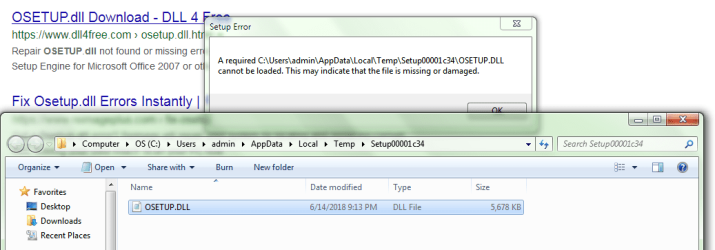
When attempting to uninstall or change the program to run a repair, I get a message stating:
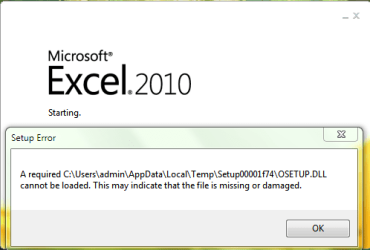
A required C:\Users\admin\AppData\Local\Temp\Setup00001c34\OSETUP.DLL cannot be loaded. This may indicate that the file is missing or damaged.
(The Setup folder number varies.)
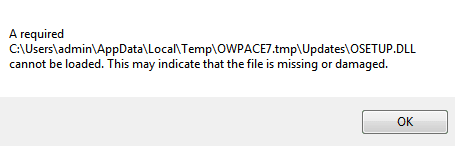
When attempting to install:
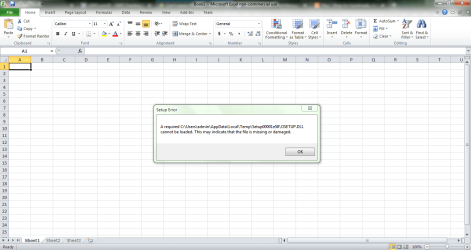
A required C:\Users\admin\AppData\Local\Temp\OWPACE7.tmp\Updates\OSETUP.DLL cannot be loaded. This may indicate that the file is missing or damaged.
This is the second time I've had this issue in the past month. The first time I had let a friend of mine clean up a program from off my computer and he deleted the registry keys in association with it. I then proceeded to install a program called Dayon!. I tend to keep my User Account Control messages turned off since I have a game that always prompts me. Installing Dayon! triggered an Action Center message stating that in order to turn on my User Account Control I would have to restart the computer. I thought it odd but just manually turned it back off again.
It wasn't until a few days later I discovered that Word wouldn't launch. After trying multiple things that failed, I did a system restore. Word didn't work right away but I was able to run a repair finally and all was well. I assumed something had gone wrong during the registry cleanup.
About a week ago I went to use Dayon! and realized it was no longer on my system. Duh to me, as I had forgotten that the system restore took me back before I installed it. So I installed it again (same User Account Control nonsense). I also installed Jitsi (which I have installed 2 or 3 other times in the past and have had no known issues from it). I had Word open earlier that day and the next day when I went to use it, same problem; it no longer launches. Unfortunately I don't have a system restore early enough to undo it this time.
(Note: My friend also keeps User Account Control off and installed Dayon! on his Win10 but he has not had any issues and did not get the same User Account Control thing I did. I also installed Dayon! on my Win8.1 which has User Account Control on. I did not have the same problem on that laptop either and all Microsoft Office 2013 programs launch fine on it including Word.)
Things I tried to do to fix Word:
Thanks again!
I'm having an issue where Microsoft Word won't launch. For a split second I see the loading circle and then nothing. This happens both when clicking on the program itself and when double clicking documents. I get no error messages. All other Microsoft Office Home and Student (32bit) programs launch without a hitch.
When attempting to uninstall or change the program to run a repair, I get a message stating:
A required C:\Users\admin\AppData\Local\Temp\Setup00001c34\OSETUP.DLL cannot be loaded. This may indicate that the file is missing or damaged.
(The Setup folder number varies.)
When attempting to install:
A required C:\Users\admin\AppData\Local\Temp\OWPACE7.tmp\Updates\OSETUP.DLL cannot be loaded. This may indicate that the file is missing or damaged.
This is the second time I've had this issue in the past month. The first time I had let a friend of mine clean up a program from off my computer and he deleted the registry keys in association with it. I then proceeded to install a program called Dayon!. I tend to keep my User Account Control messages turned off since I have a game that always prompts me. Installing Dayon! triggered an Action Center message stating that in order to turn on my User Account Control I would have to restart the computer. I thought it odd but just manually turned it back off again.
It wasn't until a few days later I discovered that Word wouldn't launch. After trying multiple things that failed, I did a system restore. Word didn't work right away but I was able to run a repair finally and all was well. I assumed something had gone wrong during the registry cleanup.
About a week ago I went to use Dayon! and realized it was no longer on my system. Duh to me, as I had forgotten that the system restore took me back before I installed it. So I installed it again (same User Account Control nonsense). I also installed Jitsi (which I have installed 2 or 3 other times in the past and have had no known issues from it). I had Word open earlier that day and the next day when I went to use it, same problem; it no longer launches. Unfortunately I don't have a system restore early enough to undo it this time.
(Note: My friend also keeps User Account Control off and installed Dayon! on his Win10 but he has not had any issues and did not get the same User Account Control thing I did. I also installed Dayon! on my Win8.1 which has User Account Control on. I did not have the same problem on that laptop either and all Microsoft Office 2013 programs launch fine on it including Word.)
Things I tried to do to fix Word:
- Uninstall Dayon! (just in case)
- Uninstall/Change Microsoft Office - Error message noted above.
- Download and Install Microsoft Office - Error message noted above.
- Download and replace file version 14.0.4755.1000 of osetup.dll that goes in the All Users file path.
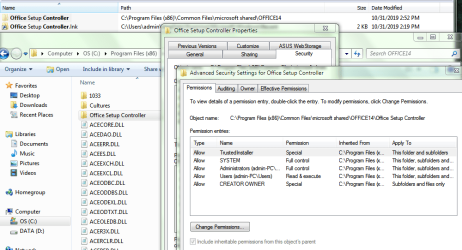
- Download and replace file version 14.0.7211.5000 of osetup.dll that goes in Office Setup Controller.
- Run Windows Update (which included some updates for Microsoft Office).
- Download kb4022208 but: "The update is already installed on this system." Was worth a shot.
- Run sfc scannow (last ditch effort).
- Various other odd & ends and ritualistic combinations of things.
Thanks again!
Attachments
My Computer
At a glance
Windows 7 Home Premium 64bitIntel Core i3-2310M @2.10GHz6GB RamIntel Graphics HD 3000
- Computer type
- Laptop
- Computer Manufacturer/Model Number
- Asus
- OS
- Windows 7 Home Premium 64bit
- CPU
- Intel Core i3-2310M @2.10GHz
- Motherboard
- U56E
- Memory
- 6GB Ram
- Graphics Card(s)
- Intel Graphics HD 3000
- Antivirus
- Kaspersky Total Security
- Browser
- Firefox