SWI2's tutorials on generating a bootable ISO on a USB stick are invaluable. The most recent version of Rufus (3.8) is extremely easy to use and does the job admirably.
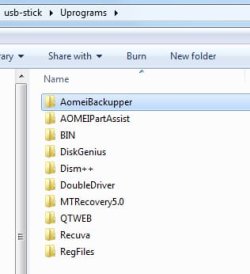
I've figured out how to have my Win7 HP250 machines boot off a USB stick, so both Macrium and Aoemi BackUpper image files can be restored in times of disaster off USB boot.
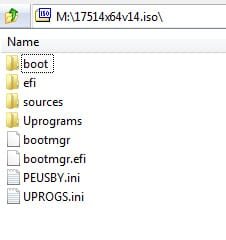
For Aomei, I'm using an ISO from SWI2. I cannot tell his reference number for this now as I relabelled it "aomei all boot" some time ago - but bootmgr and bootmgr.efi are dated May 19, 2018, as is the boot.wim file.
Why is this of interest ? Because this particular ISO from SWI2 turns on the USB3 ports on boot load, in USB3 mode. I have been unable to achieve this with the Macrium ISO, only USB2 mode off USB3 ports. [Backup images are on external USB-connected discs, of course]
I have no real idea how the SWI2 ISO achieves this. I do have USB3 drivers (inf and cat) that turn on the USB3 capacity after normal boot. Adding these to the Macrium ISO means, I think, recompiling the ISO after adding them to the boot.wim in the sources folder of the initial Macrium ISO. I'll have to learn how to use DISM for this, I think.
Q: is there an ISO generator available for this ? 7-Zip, for example, will split out the files and folders from an ISO, but not as far as I can see, do the opposite.
I've figured out how to have my Win7 HP250 machines boot off a USB stick, so both Macrium and Aoemi BackUpper image files can be restored in times of disaster off USB boot.
For Aomei, I'm using an ISO from SWI2. I cannot tell his reference number for this now as I relabelled it "aomei all boot" some time ago - but bootmgr and bootmgr.efi are dated May 19, 2018, as is the boot.wim file.
Why is this of interest ? Because this particular ISO from SWI2 turns on the USB3 ports on boot load, in USB3 mode. I have been unable to achieve this with the Macrium ISO, only USB2 mode off USB3 ports. [Backup images are on external USB-connected discs, of course]
I have no real idea how the SWI2 ISO achieves this. I do have USB3 drivers (inf and cat) that turn on the USB3 capacity after normal boot. Adding these to the Macrium ISO means, I think, recompiling the ISO after adding them to the boot.wim in the sources folder of the initial Macrium ISO. I'll have to learn how to use DISM for this, I think.
Q: is there an ISO generator available for this ? 7-Zip, for example, will split out the files and folders from an ISO, but not as far as I can see, do the opposite.
My Computer
- Computer type
- Laptop
- Computer Manufacturer/Model Number
- HP 250 G7
- OS
- Windows 7 Pro x64
- CPU
- Intel i5-8265U
- Motherboard
- Intel Coffee Lake
- Memory
- 8gb
- Graphics Card(s)
- Intel Iris Plus 655
- Sound Card
- Realtek HDA
- Monitor(s) Displays
- Generic
- Screen Resolution
- 1366 x 768
- Hard Drives
- Crucial P5 NVMe 1Tb internal
WD's 4Tb, 3Tb, 2 x 2Tb external
- Mouse
- Logi wireless
- Internet Speed
- 45 Mbps
- Antivirus
- AVG
- Browser
- Firefox 88, Pale Moon 29, Brave 129
- Other Info
- Combination of i5-8265U with Crucial P5 achieves Crystal Bench scores > 5000
Iris Plus GPU (Whiskey Lake) driver from BioStar
HP 250 G7 is a budget machine