
Solved How to generate an ISO ?

ian50

New member
Guru
VIP
Local time
7:29 PM
Messages
206
SWI2's tutorials on generating a bootable ISO on a USB stick are invaluable. The most recent version of Rufus (3.8) is extremely easy to use and does the job admirably.

I've figured out how to have my Win7 HP250 machines boot off a USB stick, so both Macrium and Aoemi BackUpper image files can be restored in times of disaster off USB boot.

For Aomei, I'm using an ISO from SWI2. I cannot tell his reference number for this now as I relabelled it "aomei all boot" some time ago - but bootmgr and bootmgr.efi are dated May 19, 2018, as is the boot.wim file.

Why is this of interest ? Because this particular ISO from SWI2 turns on the USB3 ports on boot load, in USB3 mode. I have been unable to achieve this with the Macrium ISO, only USB2 mode off USB3 ports. [Backup images are on external USB-connected discs, of course]

I have no real idea how the SWI2 ISO achieves this. I do have USB3 drivers (inf and cat) that turn on the USB3 capacity after normal boot. Adding these to the Macrium ISO means, I think, recompiling the ISO after adding them to the boot.wim in the sources folder of the initial Macrium ISO. I'll have to learn how to use DISM for this, I think.

Q: is there an ISO generator available for this ? 7-Zip, for example, will split out the files and folders from an ISO, but not as far as I can see, do the opposite.
 

My Computer My Computer

Computer type
Laptop
Computer Manufacturer/Model Number
HP 250 G7
OS
Windows 7 Pro x64
CPU
Intel i5-8265U
Motherboard
Intel Coffee Lake
Memory
8gb
Graphics Card(s)
Intel Iris Plus 655
Sound Card
Realtek HDA
Monitor(s) Displays
Generic
Screen Resolution
1366 x 768
Hard Drives
Crucial P5 NVMe 1Tb internal
WD's 4Tb, 3Tb, 2 x 2Tb external
Mouse
Logi wireless
Internet Speed
45 Mbps
Antivirus
AVG
Browser
Firefox 88, Pale Moon 29, Brave 129
Other Info
Combination of i5-8265U with Crucial P5 achieves Crystal Bench scores > 5000

Iris Plus GPU (Whiskey Lake) driver from BioStar

HP 250 G7 is a budget machine
Hi ian50,

Q: is there an ISO generator available for this ? 7-Zip, for example, will split out the files and folders from an ISO, but not as far as I can see, do the opposite.

[1] If I understand you correctly, DISM++ can generate a new installation ISO.
[2] Also have a look here Update your Win 7 installation media.. His utility also creates an ISO.

I hope this helps!
 

My Computer My Computer

Computer type
Laptop
Computer Manufacturer/Model Number
Fujitsu LIFEBOOK
OS
Win 7 HP SP1 64-bit Vista HB SP2 32-bit Linux Mint 18.3
CPU
Intel(R) Pentium(R) CPU P6200 @ 2.13GHz
Motherboard
FUJITSU FJNBB06
Memory
4.00 GB
Graphics Card(s)
Intel(R) Graphics Media Accelerator HD
Sound Card
[1] Realtek High Definition Audio [2] Intel(R) Display Audio
Screen Resolution
1366 x 768 x 32 bits (4294967296 colors) @ 59 Hz
Hard Drives
TOSHIBA MK5076GSX
Antivirus
AVG FREE
Thanks Paul.
The issue really isn't a USB boot for an installation, but rather a USB boot for backup image recovery with Macrium. This program certainly generates an ISO for boot recovery and Rufus puts it on a bootable USB stick in less than 5 minutes.
Rather, the Macrium ISO restricts the USB3 ports to USB2 mode (so a really slow recovery process) but SWI2's Aomei ISO magically turns on the USB3 ports in USB3 mode - recovery so much faster.


I'm trying to figure out how to get the Macrium ISO to do this too.
 

My Computer My Computer

Computer type
Laptop
Computer Manufacturer/Model Number
HP 250 G7
OS
Windows 7 Pro x64
CPU
Intel i5-8265U
Motherboard
Intel Coffee Lake
Memory
8gb
Graphics Card(s)
Intel Iris Plus 655
Sound Card
Realtek HDA
Monitor(s) Displays
Generic
Screen Resolution
1366 x 768
Hard Drives
Crucial P5 NVMe 1Tb internal
WD's 4Tb, 3Tb, 2 x 2Tb external
Mouse
Logi wireless
Internet Speed
45 Mbps
Antivirus
AVG
Browser
Firefox 88, Pale Moon 29, Brave 129
Other Info
Combination of i5-8265U with Crucial P5 achieves Crystal Bench scores > 5000

Iris Plus GPU (Whiskey Lake) driver from BioStar

HP 250 G7 is a budget machine
Thanks Paul.

Rather, the Macrium ISO restricts the USB3 ports to USB2 mode (so a really slow recovery process) but SWI2's Aomei ISO magically turns on the USB3 ports in USB3 mode - recovery so much faster.


I'm trying to figure out how to get the Macrium ISO to do this too.

Nope. USB mode is a HARDWARE characteristic. It doesn't depend on what you have on the drive or even the format type.
To work as USB 3.x you must have a USB 3.x port AND a USB 3.x drive. If you attach USB 2.0 drive on a USB 3.x port or vice versa it will work as USB 2.0
 

My Computers My Computers

System One System Two

  • Computer type
    PC/Desktop
    Computer Manufacturer/Model Number
    custom build
    OS
    Windows 7 HP 64
    CPU
    i5 6600K - 800MHz to 4200MHz
    Motherboard
    GA-Z170-HD3P
    Memory
    4+4G GSkill DDR4 3000
    Graphics Card(s)
    IG - Intel 530
    Monitor(s) Displays
    Samsung 226BW
    Screen Resolution
    1680x1050
    Hard Drives
    (1) -1 SM951 – 128GB M.2 AHCI PCIe SSD drive for Windows 7 and Lubuntu
    (2) -1 WD SATA 3 - 1T for Data
    (3) -1 WD SATA 3 - 1T for backup
    PSU
    Thermaltake 450W TR2 gold
    Keyboard
    Old and good Chicony mechanical keyboard
    Mouse
    Logitech mX performance - 9 buttons (had to disable some)
    Internet Speed
    500Mb/s
    Browser
    Firefox 64
    Other Info
    TinyWall firewall
  • Computer type
    Laptop
    System Manufacturer/Model Number
    Asus Q550LF
    OS
    Windows 7 Pro
    CPU
    i7-4500U 800MHz to 3.0GHz
    Motherboard
    Asus Q550LF
    Memory
    (4+4)G DDR3 1600
    Graphics Card(s)
    IG intel 4400 + NVIDIA GeForce GT 745M
    Sound Card
    Realtek
    Monitor(s) Displays
    LG Display LP156WF4-SPH1
    Screen Resolution
    1920 x 1080
    Hard Drives
    BX500 120G SSD for Windows and programs +
    1T HDD for data
    Internet Speed
    500 Mb/s
    Browser
    Firefox
    Other Info
    TinyWall firewall
>"to work as USB 3.x you must have a USB 3.x port AND a USB 3.x drive"


Obvious. Already there, some years now.


My point is here: the SWI2 ISO boot for Aoemi turns on the USB3 port in USB3 mode. The Macrium ISO boot, on exactly the same hardware, uses the USB3 port only in USB2 mode.


I appreciate the replies but it would be nice if that point was addressed.
 

My Computer My Computer

Computer type
Laptop
Computer Manufacturer/Model Number
HP 250 G7
OS
Windows 7 Pro x64
CPU
Intel i5-8265U
Motherboard
Intel Coffee Lake
Memory
8gb
Graphics Card(s)
Intel Iris Plus 655
Sound Card
Realtek HDA
Monitor(s) Displays
Generic
Screen Resolution
1366 x 768
Hard Drives
Crucial P5 NVMe 1Tb internal
WD's 4Tb, 3Tb, 2 x 2Tb external
Mouse
Logi wireless
Internet Speed
45 Mbps
Antivirus
AVG
Browser
Firefox 88, Pale Moon 29, Brave 129
Other Info
Combination of i5-8265U with Crucial P5 achieves Crystal Bench scores > 5000

Iris Plus GPU (Whiskey Lake) driver from BioStar

HP 250 G7 is a budget machine
If you are booting from USB, your creation is most likely missing correct drivers.
SIW2's ISO contains an app that detects and installs drivers. Your best bet is to contact @SIW2
for details.

Bill
 

My Computer My Computer

Computer type
PC/Desktop
Computer Manufacturer/Model Number
HP Desktop & Compaq Laptop
OS
Win 10 x64, Linux Lite, Win 7 x64, BlackArch, & Kali
Hard Drives
Samsung 850 Pro 256Gb,
Hitachi HDD 1Tb,
Crucial MX SSD 250Gb
Segate 3Tb USB 3.0 Ext. Backup HDD
Internet Speed
150Mbps dn, 20Mbps up
Antivirus
Avast Free, Malwarebytes Anti-Exploit & Anti-Ransomware
Browser
Firefox, Chrome, Opera, & VPN
Thanks for the replies. I have resolved the issue now.
It was as I outlined: SWI2's Aomei boot recovery ISO turned on my USB3 external drives, while my Macrium boot recovery W7 ISO did not, it rather just used the USB2 mode. This made me think that SWI2's ISO contained USB3 drivers while my Macrium ISO did not - for some reason.
Adding these drivers to Macrium's boot.wim with DISM would probably fix that, but the learning curve was steep and long, I feared. Especially since DISM++ is now owned by a Chinese group and all the help files are in Mandarin. One could just use the command lines on DISM ...

So I experimented with Macrium's choice of basic WIM files when it formed the rescue media.
Using Win10 PE worked just fine. USB3 mode came on almost at once. The speed of exploring and recovering Macrium images is absolutely stunning.
So SWI2 used Win10 PE in generating his Aomei ISO, it seems.
 

My Computer My Computer

Computer type
Laptop
Computer Manufacturer/Model Number
HP 250 G7
OS
Windows 7 Pro x64
CPU
Intel i5-8265U
Motherboard
Intel Coffee Lake
Memory
8gb
Graphics Card(s)
Intel Iris Plus 655
Sound Card
Realtek HDA
Monitor(s) Displays
Generic
Screen Resolution
1366 x 768
Hard Drives
Crucial P5 NVMe 1Tb internal
WD's 4Tb, 3Tb, 2 x 2Tb external
Mouse
Logi wireless
Internet Speed
45 Mbps
Antivirus
AVG
Browser
Firefox 88, Pale Moon 29, Brave 129
Other Info
Combination of i5-8265U with Crucial P5 achieves Crystal Bench scores > 5000

Iris Plus GPU (Whiskey Lake) driver from BioStar

HP 250 G7 is a budget machine
ian50

I think you have been using one of my win7 iso.
The only win10 I made back then was called 16299_x64.iso boot.wim date 30-03-18.

Most recent win7 iso is 17514x64v15.iso

It should be extracted to usb using rufus, or easier - usb7ice View attachment Usb7ice.zip

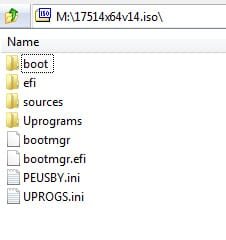
the usb then looks like this:
17514x64v14.jpg

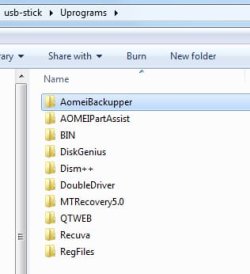
The idea is you can add programs inside the Uprograms folder. Some are already in there:

usb-stick-uprograms.jpg


So you could create a folder in Uprograms called macrium and copy the macrium files into it. You can then run it directly from there after booting the usb stick.

You could also export your license ( if you have one) from the registry and put the .reg file in the folder called RegFiles

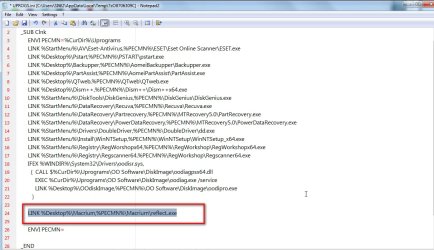
If you want to add a shortcut to the winpe desktop, edit the Uprogs.ini file ( use notepad - it is just a textfile) and add this line

LINK %Desktop%\Macrium,%PECMN%\Macrium\reflect.exe

add-to-uprogs.jpg
 

My Computers My Computers

System One System Two

  • Computer type
    PC/Desktop
    OS
    7 X64
    CPU
    i5 8400
    Motherboard
    gigabyte b365m ds3h
    Memory
    2x8gb 3200mhz
    Hard Drives
    various
    PSU
    pure power 11 400w cm
    Case
    Coolermaster
    Cooling
    cryorig m9i
  • Computer type
    PC/Desktop
    OS
    7x64
    CPU
    g5400
    Motherboard
    ga b365m ds3h
    Memory
    8gb ddr4 2400
    PSU
    xfx pro 450w
Thanks for the reply.
The Aomei ISO I'm using (which does indeed turn USB3 mode on when booted from a USB stick) has a size of 434,110,464 bytes. This doesn't match the file sizes of your 16299_x64 ISO's (all 3 versions) so I don't know now where I found it (I renamed it aomei all boot.iso so I've lost the original nomenclature).

I tried your most recent 17514x64v15.iso but had no luck with either the usb ports (not even the mouse) or even the Aomei program. I use Rufus v3.8 at this time. Nonetheless, your excellent tutorials have been extremely helpful as I've worked my way through the issues over the last 18 months.
However, are you saying that after extracting the ISO to usb via Rufus, one can then add drivers to the sub-folder Drivers in UPrograms ? And then boot off the usb ?
At this stage I have bootable usb's for both Aomei and Macrium, and both of these light up USB3 mode. UPrograms adds considerably more firepower to recovery, of course.
 

My Computer My Computer

Computer type
Laptop
Computer Manufacturer/Model Number
HP 250 G7
OS
Windows 7 Pro x64
CPU
Intel i5-8265U
Motherboard
Intel Coffee Lake
Memory
8gb
Graphics Card(s)
Intel Iris Plus 655
Sound Card
Realtek HDA
Monitor(s) Displays
Generic
Screen Resolution
1366 x 768
Hard Drives
Crucial P5 NVMe 1Tb internal
WD's 4Tb, 3Tb, 2 x 2Tb external
Mouse
Logi wireless
Internet Speed
45 Mbps
Antivirus
AVG
Browser
Firefox 88, Pale Moon 29, Brave 129
Other Info
Combination of i5-8265U with Crucial P5 achieves Crystal Bench scores > 5000

Iris Plus GPU (Whiskey Lake) driver from BioStar

HP 250 G7 is a budget machine
ian50

The Aomei ISO I'm using (which does indeed turn USB3 mode on when booted from a USB stick) has a size of 434,110,464 bytes.

Would you be good enough to upload that for me? Can't remember which that was, or what I did. Onedrive or anywhere you prefer would be fine to upload.

one can then add drivers to the sub-folder Drivers in UPrograms ?

Yes, you could create a folder Uprograms\Drivers copy any drivers into that ( not exe files - they need to be inf cat and sys ). It would need a line added to uprogs.ini to install them.

I made a win10 version with similar folders on the usb stick - Uprograms etc
183x64.iso
 
Last edited:

My Computers My Computers

System One System Two

  • Computer type
    PC/Desktop
    OS
    7 X64
    CPU
    i5 8400
    Motherboard
    gigabyte b365m ds3h
    Memory
    2x8gb 3200mhz
    Hard Drives
    various
    PSU
    pure power 11 400w cm
    Case
    Coolermaster
    Cooling
    cryorig m9i
  • Computer type
    PC/Desktop
    OS
    7x64
    CPU
    g5400
    Motherboard
    ga b365m ds3h
    Memory
    8gb ddr4 2400
    PSU
    xfx pro 450w
>"Would you be good enough to upload that for me?"


Love to but I have no MS account for OneDrive and (eg) MailBigFile needs an email address for the recipient.


The ISO is too large just to attach here, of course. I've looked at its' boot.wim - it's based on WindowsRE, not WindowsPE, and dated May 19, 2018


If you have an upload venue to suggest, please do
 

My Computer My Computer

Computer type
Laptop
Computer Manufacturer/Model Number
HP 250 G7
OS
Windows 7 Pro x64
CPU
Intel i5-8265U
Motherboard
Intel Coffee Lake
Memory
8gb
Graphics Card(s)
Intel Iris Plus 655
Sound Card
Realtek HDA
Monitor(s) Displays
Generic
Screen Resolution
1366 x 768
Hard Drives
Crucial P5 NVMe 1Tb internal
WD's 4Tb, 3Tb, 2 x 2Tb external
Mouse
Logi wireless
Internet Speed
45 Mbps
Antivirus
AVG
Browser
Firefox 88, Pale Moon 29, Brave 129
Other Info
Combination of i5-8265U with Crucial P5 achieves Crystal Bench scores > 5000

Iris Plus GPU (Whiskey Lake) driver from BioStar

HP 250 G7 is a budget machine
I may have realised the answer to the question on why some recovery ISO's light up the USB3 port on boot while others simply default to USB2 mode.


I generated a recovery ISO in Aomei Backupper Pro 5.3 (my current version) and saw that the generating process used Win10PE by default. Win10PE has USB3 drivers already. I found the same bootmgr and bootmgr.efi files in this new ISO as in the SWI2 ISO from May 2018, so perhaps that is the reason the older ISO boots in USB3 mode.


Macrium offers choice of WinPE versions when generating its' recovery ISO. Choose Win10PE and the USB3 mode will light up on boot.


There is no necessity for the boot media recovery kernel to be the same as the disc image to be recovered. So using a Win10PE-based ISO to recover a Win7 disc works just fine and includes the drivers that make life easier.


Thank you for the help and interest.
 

My Computer My Computer

Computer type
Laptop
Computer Manufacturer/Model Number
HP 250 G7
OS
Windows 7 Pro x64
CPU
Intel i5-8265U
Motherboard
Intel Coffee Lake
Memory
8gb
Graphics Card(s)
Intel Iris Plus 655
Sound Card
Realtek HDA
Monitor(s) Displays
Generic
Screen Resolution
1366 x 768
Hard Drives
Crucial P5 NVMe 1Tb internal
WD's 4Tb, 3Tb, 2 x 2Tb external
Mouse
Logi wireless
Internet Speed
45 Mbps
Antivirus
AVG
Browser
Firefox 88, Pale Moon 29, Brave 129
Other Info
Combination of i5-8265U with Crucial P5 achieves Crystal Bench scores > 5000

Iris Plus GPU (Whiskey Lake) driver from BioStar

HP 250 G7 is a budget machine
Yes, we know. The thing that doesn't work across different OS are the MS system recovery options.
 

My Computers My Computers

System One System Two

  • Computer type
    PC/Desktop
    OS
    7 X64
    CPU
    i5 8400
    Motherboard
    gigabyte b365m ds3h
    Memory
    2x8gb 3200mhz
    Hard Drives
    various
    PSU
    pure power 11 400w cm
    Case
    Coolermaster
    Cooling
    cryorig m9i
  • Computer type
    PC/Desktop
    OS
    7x64
    CPU
    g5400
    Motherboard
    ga b365m ds3h
    Memory
    8gb ddr4 2400
    PSU
    xfx pro 450w
@ian50

I think you have been using one of my win7 iso.

It should be extracted to usb using rufus, or easier - usb7ice

The idea is you can add programs inside the Uprograms folder.
I'm coming into this late in the game, but I have been following your excellent posts for quite a while on this general topic across a number of threads. So let me know if your Win7.ISO is suitable for what I would like to acquire.

Here are my objectives:

(1) I would like to have a latest and greatest ISO, i.e. with all final service pack and all final Windows Updates slipstreamed in so that the disappearance of MS Win7 support and Windows Updates for Win7 is of no concern. This ISO should be suitable for burning to optical DVD, and thus for use installing Win7 from scratch on a brand new physical machine of Skylake CPU or older which contains an optical drive.

It should reflect at least the "retail" version of Win7 x64 Pro, and thus it assumes I have available unused Win7 retail license keys in order to activate that installed Win7 once it is installed, should this ever be needed.

Actually I'm unsure as to whether MS will in fact ever be supporting such Win7 installs from scratch after January 2020, in order to "activate" them? If no Windows Updates are going to be issued is it really necessary to have a "genuine" (i.e. "activated" by their license server) copy of Win7? How will this actually work after January 2020, if you did do a from-scratch install of Win7?

Anyway, I want an up-to-date ISO that can be a genuine DVD image, burnable to real physical DVD and usable for a "retail install" with my provided valid license key. I want to end up with a physical Win7 machine with all the latest Windows Updates already applied and installed in the operating Windows.

(2) This same ISO for optical DVD can thus be used directly into VMWare running on Win10, "mounted" into a brand new Win7 VM so that it could be used to do a from-scratch Win7 retail install for that Win7 VM, exactly as if it were a physical machine capable of running Win7 (which is exactly what VMWare provides). Again, my provided valid license key.

So again, I want end up with a fully functioning and "genuine" and "activated" Win7 VM that has all of the latest Windows Updates already applied and installed in the operating Windows.

(3) For convenience, speed, etc., I would also like to be able to create a bootable USB drive that contains the identical ISO contents. So once again, I could do a from-scratch install but booting from USB, of the latest fully updated version of Win7 to a physical machine Skylake or older.

And once again I want to end up with a newly installed from scratch fully operating Win7 with all latest Windows Updates pre-installed, that is "genuine" and "activated" on that hardware.

Though I'm not familiar with it, I can use USB7ICE to create this bootable USB from your very same one-and-only primary optical DVD ISO that could be burned to actual DVD or used directly as an ISO into VMWare. And it would be usable on physical machines with legacy BIOS or UEFI. Or use RUFUS.


I understand your Uprograms folder concept. Certainly useful to have the personal collection of 3rd-party product installers (plus license key TXT files, etc.) available directly as a folder located on the very same Win7 installer media itself.

I have my own collection of 3rd-party product installers, which could be placed here. Normally I use my own USB drive containing this (in a parent folder named "\BBS Starter", with dozens of sub-folders in for all the products, customization instructions, etc. which I either run the installers from directly, or simply copy fully onto the hard drive of the newly created Win7 machine so that I can later get around to executing the product installers from hard drive as I complete the new Win7 build-out.

So what I'm really anxious to obtain and which I believe your ISO solves, is to get a latest-and-greatest fully slipstreamed final Win7 "retail installation" ISO, usable either for burning to DVD, creating a bootable USB, or reading directly as ISO into VMWare to create a usable Win7 VM.

Is that what you've provided?

Many thanks for your efforts.


P.S. - I am not discussing Macrium Reflect or similar image backups of production operating Win7 environments on existing machines. I already do that. I am concerned about the possiblity of one day in the future wanting to do a brand new from-scratch retail license key Win7 install on a brand new Skylake or older machine, and being able to do that.
 

My Computer My Computer

Computer type
PC/Desktop
Computer Manufacturer/Model Number
Home-built, two systems (1) and (2)
OS
Windows 7 Pro x64 (1), Win7 Pro X64 (2)
CPU
i5-3350p 3.1Ghz/6MB-cache (1); E8400 3.0Ghz/6MB-cache (2)
Motherboard
ASUS P8Z77-V Pro (1); ASUS P5Q3 (2)
Memory
8GB PC3-12800 DDR3 (1); 4GB PC3-10600 DDR3 (2)
Graphics Card(s)
ATI HD7750 (1), (see TV cards); ATI R7 250 (2)
Sound Card
Realtek ALC892 HD Audio (1); Realtek ALC1200 HD Audio (2)
Monitor(s) Displays
Eizo HD2441W LCD, Eizo S2433W (1); Eizo 24" S2433W (2)
Screen Resolution
1920x1200, 1920x1200 (1); 1920x1200 (2)
Hard Drives
(1) 1TB SATA-II (7200RPM), 2x2TB SATA-III (7200RPM), 250GB SATA-III (10000RPM) for OS; 2x2TB external USB 3.0

(2) 320GB SATA-II (7200RPM), 750GB SATA-II (7200RPM), 150GB SATA-II (10000RPM) for OS; 2TB external USB 3.0
PSU
Nesteq ECS-6001 600W (1); Nesteq ECS-5001 500W (2)
Case
Acousti-Case 360 (1) and (2)
Cooling
Noctua NH-U12P SE2 for CPU, 2x120mm case fans (1) and (2)
Keyboard
IBM PS/2 (1) and (2)
Mouse
Logitech MX Revolution wireless (1); Microsoft wired (2)
Internet Speed
100mbps down / 10mbps up
Antivirus
Microsoft Security Essentials; Malwarebyte Anti-Malware Pro
Browser
Firefox
Other Info
Ceton InfiniTV 4-tuner cablecard-enabled TV card as well as Hauppauge HVR-2250 OTA/ATSC 2-tuner TV card in (1), running under Win7 WMC
I would like to have a latest and greatest ISO, i.e. with all final service pack and all final Windows Updates slipstreamed in

Is that what you've provided?

As close as possible, yes.

1. Updated installation media

Updates are integrated using Simplix pack, which is updated every month - presumably the final one will be Jan2020. Net Framework 4.8 and vc runtimes can also be integrated by placing the .wa packs next to the 7updater.cmd

The wim comes out at over 4gb so to fit on fat32 usb stick can be split. It will be a bit too big for single layer dvd.

Win7 will need activating after installation by using product key in the exactly the same way as you do now.

Or you could back up the activation and restore ( same edition same machine) using dism++

Update your Win 7 installation media.


2. The winpe bootable "repair media" is a separate project. It can of course be included on the same usb stick as the updated installation media. A bcd entry can be created so there is amenu to boot either windows setup, or the winpe bootable wim with all the extra programs in the Uprograms folder from the same usb stick. That is straightforward.
 

My Computers My Computers

System One System Two

  • Computer type
    PC/Desktop
    OS
    7 X64
    CPU
    i5 8400
    Motherboard
    gigabyte b365m ds3h
    Memory
    2x8gb 3200mhz
    Hard Drives
    various
    PSU
    pure power 11 400w cm
    Case
    Coolermaster
    Cooling
    cryorig m9i
  • Computer type
    PC/Desktop
    OS
    7x64
    CPU
    g5400
    Motherboard
    ga b365m ds3h
    Memory
    8gb ddr4 2400
    PSU
    xfx pro 450w
As close as possible, yes.

Updates are integrated using Simplix pack, which is updated every month - presumably the final one will be Jan2020. Net Framework 4.8 and vc runtimes can also be integrated by placing the .wa packs next to the 7updater.cmd
But I want to be sure I understand. I don't want to have to do anything else myself. I want your ISO to reflect all of the complex recipe steps needed to slipstream anything into the resulting installer folders and thus into the ISO which is the packaging.

I just want to be able to download your final ISO in January and that's it. Ideally I could then use it for any of my three intents... (1) burn to physical DVD (may be an issue if it exceeds single-layer, but if I can still burn to double-layer DVD and it will be usable for install then that's ok, (2) create bootable USB, and (3) read ISO directly into VMWare.

I'm hoping your final posted ISO will have everything already slipstreamed for my potential eventual use, in one of these three situations.


The wim comes out at over 4gb so to fit on fat32 usb stick can be split. It will be a bit too big for single layer dvd.
So can it be burned to double-layer DVD, and still be usable to install from?


Win7 will need activating after installation by using product key in the exactly the same way as you do now.
So MS is planning on keeping their Win7 license server still running in support of post-January new installs? I didn't know that but it's good. And my supply of unused Win7 license keys should then work.


The winpe is a separate project, though it can of course be included on the same usb stick and a bcd entry can be created to boot either windows setup ( the regular boot.wim that is used for installation), or the winpe bootable wim with all the extra programs in the Uprograms folder from the same usb stick. That is straightforward.
I don't understand what this topic refers to. WinPE for what use? What would I then do with the running WinPE environment?

I'm really not concerned about build-out steps. I'm only concerned about being able to INSTALL Win7 from scratch on a new Skylake-or-older physical machine (via DVD or USB) sometime in the future, and have the resulting Win7 be "genuine" and "activated" with my valid retail license key. And I also want to be able to create a 100% usable Win7 VM under VMWare operating on Win10. And all of these should have latest-and-greatest Windows Updates already pre-installed in the resulting Win7, from scratch, via the ISO contents and all its slipstreamed components.

Sounds selfish I know, but I don't want to do anythingl I want to simply capitalize on what you've built, which I'm sure will be 100% complete and usable for my objectives (which really are everybody's).
 

My Computer My Computer

Computer type
PC/Desktop
Computer Manufacturer/Model Number
Home-built, two systems (1) and (2)
OS
Windows 7 Pro x64 (1), Win7 Pro X64 (2)
CPU
i5-3350p 3.1Ghz/6MB-cache (1); E8400 3.0Ghz/6MB-cache (2)
Motherboard
ASUS P8Z77-V Pro (1); ASUS P5Q3 (2)
Memory
8GB PC3-12800 DDR3 (1); 4GB PC3-10600 DDR3 (2)
Graphics Card(s)
ATI HD7750 (1), (see TV cards); ATI R7 250 (2)
Sound Card
Realtek ALC892 HD Audio (1); Realtek ALC1200 HD Audio (2)
Monitor(s) Displays
Eizo HD2441W LCD, Eizo S2433W (1); Eizo 24" S2433W (2)
Screen Resolution
1920x1200, 1920x1200 (1); 1920x1200 (2)
Hard Drives
(1) 1TB SATA-II (7200RPM), 2x2TB SATA-III (7200RPM), 250GB SATA-III (10000RPM) for OS; 2x2TB external USB 3.0

(2) 320GB SATA-II (7200RPM), 750GB SATA-II (7200RPM), 150GB SATA-II (10000RPM) for OS; 2TB external USB 3.0
PSU
Nesteq ECS-6001 600W (1); Nesteq ECS-5001 500W (2)
Case
Acousti-Case 360 (1) and (2)
Cooling
Noctua NH-U12P SE2 for CPU, 2x120mm case fans (1) and (2)
Keyboard
IBM PS/2 (1) and (2)
Mouse
Logitech MX Revolution wireless (1); Microsoft wired (2)
Internet Speed
100mbps down / 10mbps up
Antivirus
Microsoft Security Essentials; Malwarebyte Anti-Malware Pro
Browser
Firefox
Other Info
Ceton InfiniTV 4-tuner cablecard-enabled TV card as well as Hauppauge HVR-2250 OTA/ATSC 2-tuner TV card in (1), running under Win7 WMC
The updater I linked to is intended so you can use it to create the updated installation media on your own hard drive - then copy to usb.


Wkeller has a project with the same aim Integrate7 script – automatically download and slipstream all updates!


For obvious reasons, I am not disposed to create updated installation media for 4 x64 editions, 5x86 editions multiplied by about 30 languages and then upload hundreds of gbs of iso files.
 

My Computers My Computers

System One System Two

  • Computer type
    PC/Desktop
    OS
    7 X64
    CPU
    i5 8400
    Motherboard
    gigabyte b365m ds3h
    Memory
    2x8gb 3200mhz
    Hard Drives
    various
    PSU
    pure power 11 400w cm
    Case
    Coolermaster
    Cooling
    cryorig m9i
  • Computer type
    PC/Desktop
    OS
    7x64
    CPU
    g5400
    Motherboard
    ga b365m ds3h
    Memory
    8gb ddr4 2400
    PSU
    xfx pro 450w
Aw come on. You can do it! :D
 

My Computer My Computer

Computer type
Laptop
Computer Manufacturer/Model Number
Dell M6500 Precision Work Station
OS
Windows 7 Pro SP1 64 bit
Memory
8 GB
Screen Resolution
1920x
Internet Speed
30 Mbps
Antivirus
Norton Security
Browser
IE 11
For obvious reasons, I am not disposed to create updated installation media for 4 x64 editions, 5x86 editions multiplied by about 30 languages and then upload hundreds of gbs of iso files.
That's understandable. Of course my own needs only require Win7 Pro x64.

But, then what is contained in your own "latest ISO": Most recent win7 iso is 17514x64v15.iso

Is that not one already fully complete and updated particular x64 or x86 edition?
 

My Computer My Computer

Computer type
PC/Desktop
Computer Manufacturer/Model Number
Home-built, two systems (1) and (2)
OS
Windows 7 Pro x64 (1), Win7 Pro X64 (2)
CPU
i5-3350p 3.1Ghz/6MB-cache (1); E8400 3.0Ghz/6MB-cache (2)
Motherboard
ASUS P8Z77-V Pro (1); ASUS P5Q3 (2)
Memory
8GB PC3-12800 DDR3 (1); 4GB PC3-10600 DDR3 (2)
Graphics Card(s)
ATI HD7750 (1), (see TV cards); ATI R7 250 (2)
Sound Card
Realtek ALC892 HD Audio (1); Realtek ALC1200 HD Audio (2)
Monitor(s) Displays
Eizo HD2441W LCD, Eizo S2433W (1); Eizo 24" S2433W (2)
Screen Resolution
1920x1200, 1920x1200 (1); 1920x1200 (2)
Hard Drives
(1) 1TB SATA-II (7200RPM), 2x2TB SATA-III (7200RPM), 250GB SATA-III (10000RPM) for OS; 2x2TB external USB 3.0

(2) 320GB SATA-II (7200RPM), 750GB SATA-II (7200RPM), 150GB SATA-II (10000RPM) for OS; 2TB external USB 3.0
PSU
Nesteq ECS-6001 600W (1); Nesteq ECS-5001 500W (2)
Case
Acousti-Case 360 (1) and (2)
Cooling
Noctua NH-U12P SE2 for CPU, 2x120mm case fans (1) and (2)
Keyboard
IBM PS/2 (1) and (2)
Mouse
Logitech MX Revolution wireless (1); Microsoft wired (2)
Internet Speed
100mbps down / 10mbps up
Antivirus
Microsoft Security Essentials; Malwarebyte Anti-Malware Pro
Browser
Firefox
Other Info
Ceton InfiniTV 4-tuner cablecard-enabled TV card as well as Hauppauge HVR-2250 OTA/ATSC 2-tuner TV card in (1), running under Win7 WMC
Back
Top