sfcfix found 28 corrupt files

Nickk

New member
Local time
9:47 AM
Messages
9
Hi,

I'm new to this forum. I've read quite a bit here relating to my problem (and thank you to everyone esp to Brink and Bare Foot Kid). I took the courage to try and replace some of the corrupt system files myself (locations included system32, syswow64, IE in Program Files (plain) and IE in x86.), but it was even worse, it resulted in a hash mismatch. Luckily I did a system restore and think I've got the old versions back. I ran sfc again in in cmd at boot - it showed that if found corrupt and fixed. I then ran it again in normal mode and it showed it was unable to fix some files. Below is attached my log with the bits that I thought relevant.


So my question is, besides the difference between 32bit and 64bit what other factor makes a certain version of a system file not be suitable for my machine and how to find out which one I need from looking at my CBS/sfcdetails log? If this is mentioned already somewhere else I'd appreciate just a link to that alone.

It all started when my supportAssist with Dell didn't work, which made me realise IE11 doesn't work which introduced me to the sfc /scannow command.

Now, I know I ought to anyway upgrade to micresoft 10 soon so is it better to first have my 7 fixed and then upgrade or can I upgrade with a slightly corrupt windows 7 too?

Whilst I'm at it, I did think of going for a Repair Install, though the problem is, I bought my windows 7 home premium from Dell and so micresoft's website wouldn't accept my key for downloading an ISO image and Dell says I'm out of warrant. Now I do have a windows 7 somewhere on an external HD but don't know if that matches mine or is legit and fear that after using that, I may not be able to upgrade to 10 anymore?

Sorry for my verbose message but I'm a newbee to all that cmd stuff, eager to learn though an would massively appreciate any help.

Thank you,
Nickk
 

Attachments

My Computer My Computer

Computer type
PC/Desktop
OS
Windows 7 64
Hi Nickk,

Welcome to SevenForums!

Whilst I'm at it, I did think of going for a Repair Install, though the problem is, I bought my windows 7 home premium from Dell and so micresoft's website wouldn't accept my key for downloading an ISO image and Dell says I'm out of warranty. Now I do have a windows 7 somewhere on an external HD but don't know if that matches mine or is legit and fear that after using that, I may not be able to upgrade to 10 anymore?

As it is a Dell, there are two options available . . .

[1] There could be a recovery partition [reset to factory] on the HDD.

[2] If you have got a Service Tag number then enter it here => Dell Service Tag Number. You should then be able to download the recovery image [or at least the drivers that you need]!

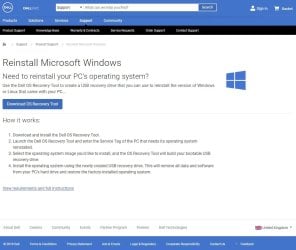
Click here => Reinstall Microsoft Windows and follow the instructions.

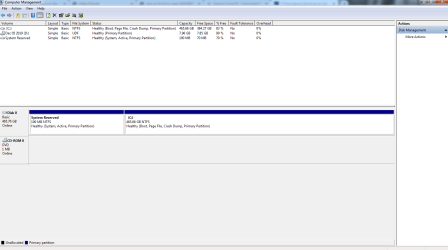
To check if you have [1] above, please post a screenshot of the Disk Management => Disk Management - Post a Screen Capture Image.
Pay special attention to Step 5.

I hope this helps!
 

My Computer My Computer

Computer type
Laptop
Computer Manufacturer/Model Number
Fujitsu LIFEBOOK
OS
Win 7 HP SP1 64-bit Vista HB SP2 32-bit Linux Mint 18.3
CPU
Intel(R) Pentium(R) CPU P6200 @ 2.13GHz
Motherboard
FUJITSU FJNBB06
Memory
4.00 GB
Graphics Card(s)
Intel(R) Graphics Media Accelerator HD
Sound Card
[1] Realtek High Definition Audio [2] Intel(R) Display Audio
Screen Resolution
1366 x 768 x 32 bits (4294967296 colors) @ 59 Hz
Hard Drives
TOSHIBA MK5076GSX
Antivirus
AVG FREE
...I did think of going for a Repair Install...

Nick note that this will "remove all data and software" from your PC.
 

My Computer My Computer

Computer type
Laptop
Computer Manufacturer/Model Number
Dell Latitude E6540 Laptop
OS
Windows 7 Professional 64bit
CPU
Intel Core i7 4600M @ 2.90GHz
Motherboard
Dell Inc. 0CYT5F (SOCKET 0)
Memory
16.0GB Dual-Channel DDR3 @ 797MHz (11-11-11-28)
Graphics Card(s)
Intel HD Graphics 4600 (Dell) 2048MB ATI AMD Radeon HD 8790M
Sound Card
Realtek High Definition Audio
Monitor(s) Displays
HP ZR30w (2560x1600@60Hz)
Hard Drives
256GB LITEONIT LMT-256M6M-41 mm SATA (SSD)
1TB Samsung SSD 860 EVO mSATA SATA (SSD)
2TB USB 3.0 USB Device
115GB SanDisk Ultra Fit USB
Other Info
Multiple Dell E-Port Plus II Port Replicator/Docking Stations 0Y72NH USB 3.0 + 130W AC Adapters
Hello Nickk,
Hi,
I ran sfc again in in cmd at boot - it showed that if found corrupt and fixed. I then ran it again in normal mode and it showed it was unable to fix some files.

I don't entirely understand. Your posted SFCdetails report shows that all listed files and registry keys were successfully repaired. What can be the problem?
 

My Computer My Computer

Computer type
PC/Desktop
OS
Windows 7 x64, Vista x64, 8.1 smartphone
CPU
Intel E8400 65W 64-bit
Motherboard
Gigabyte EP45-UD3LR
Memory
DDR2 2 x 2GB, 1GB x 2
Graphics Card(s)
XFX Radeon HD5750
Sound Card
AMD High Definition Audio; Realtek High Definition Audio
Monitor(s) Displays
iiyama prolite X2377HDS
Screen Resolution
1920 x 1080
Hard Drives
500GB 7200 rpm Seagate ST3500413AS 16MB, 500GB 5400 rpm Toshiba MQ02ABF050H 32MB, 200GB 7200 rpm Seagate ST3200820AS 8MB, 2TB 7200 rpm Western Digital WD20EZRX 64MB
PSU
Enermax Liberty Modular
Case
Antec P193 Midi Tower
Keyboard
Mionix ZIBAL 60
Mouse
Razer USB 2.0 Diamondback Mouse or Huion Graphics Tablet
Browser
Internet Explorer, Lunascape, Firefox, Opera, Avast Safezone
Do a Repair Install.
It will fix your currently installed Windows 7 and preserve your user accounts, data, programs, and system drivers.
For the Updates, use Simplix
 

My Computers My Computers

System One System Two

  • Computer type
    PC/Desktop
    Computer Manufacturer/Model Number
    custom build
    OS
    Windows 7 HP 64
    CPU
    i5 6600K - 800MHz to 4200MHz
    Motherboard
    GA-Z170-HD3P
    Memory
    4+4G GSkill DDR4 3000
    Graphics Card(s)
    IG - Intel 530
    Monitor(s) Displays
    Samsung 226BW
    Screen Resolution
    1680x1050
    Hard Drives
    (1) -1 SM951 – 128GB M.2 AHCI PCIe SSD drive for Windows 7 and Lubuntu
    (2) -1 WD SATA 3 - 1T for Data
    (3) -1 WD SATA 3 - 1T for backup
    PSU
    Thermaltake 450W TR2 gold
    Keyboard
    Old and good Chicony mechanical keyboard
    Mouse
    Logitech mX performance - 9 buttons (had to disable some)
    Internet Speed
    500Mb/s
    Browser
    Firefox 64
    Other Info
    TinyWall firewall
  • Computer type
    Laptop
    System Manufacturer/Model Number
    Asus Q550LF
    OS
    Windows 7 Pro
    CPU
    i7-4500U 800MHz to 3.0GHz
    Motherboard
    Asus Q550LF
    Memory
    (4+4)G DDR3 1600
    Graphics Card(s)
    IG intel 4400 + NVIDIA GeForce GT 745M
    Sound Card
    Realtek
    Monitor(s) Displays
    LG Display LP156WF4-SPH1
    Screen Resolution
    1920 x 1080
    Hard Drives
    BX500 120G SSD for Windows and programs +
    1T HDD for data
    Internet Speed
    500 Mb/s
    Browser
    Firefox
    Other Info
    TinyWall firewall
Nick note that this will "remove all data and software" from your PC.

maxseven
Sorry Sir, you are totally WRONG!
Repair Install is an In Place Upgrade, it replaces the OS from within windows, i.e. you run setup.exe from your computer, either by DVD, extracted ISO files, or from a Win7 Install Folder.
I've done hundreds of them.
It will remove your Microsoft keys, I.e. Windows 7 25-character key, M$ Office, other purchased M$ products.
You can copy the key with Magical Jelly Bean, or Belarc Advisor. I use MJ and copy paste to text file.
Bill
 

My Computer My Computer

Computer type
PC/Desktop
Computer Manufacturer/Model Number
HP Desktop & Compaq Laptop
OS
Win 10 x64, Linux Lite, Win 7 x64, BlackArch, & Kali
Hard Drives
Samsung 850 Pro 256Gb,
Hitachi HDD 1Tb,
Crucial MX SSD 250Gb
Segate 3Tb USB 3.0 Ext. Backup HDD
Internet Speed
150Mbps dn, 20Mbps up
Antivirus
Avast Free, Malwarebytes Anti-Exploit & Anti-Ransomware
Browser
Firefox, Chrome, Opera, & VPN

My Computer My Computer

Computer type
PC/Desktop
Computer Manufacturer/Model Number
HP Desktop & Compaq Laptop
OS
Win 10 x64, Linux Lite, Win 7 x64, BlackArch, & Kali
Hard Drives
Samsung 850 Pro 256Gb,
Hitachi HDD 1Tb,
Crucial MX SSD 250Gb
Segate 3Tb USB 3.0 Ext. Backup HDD
Internet Speed
150Mbps dn, 20Mbps up
Antivirus
Avast Free, Malwarebytes Anti-Exploit & Anti-Ransomware
Browser
Firefox, Chrome, Opera, & VPN
Hi Nickk,

Was my post [post #2] useful?

If not . . .

Repair Install

A Repair Install is actually called an In-Place-Upgrade [it replaces the corrupted OS with a new fresh copy] and is performed from within Windows itself. You will either need a Win 7 installation DVD or an ISO file [extract the ISO files with something like 7-zip]. ALL your User Accounts, Folders, Files, Documents, Pictures, Music, Videos, Data Files, Icons, and any installed programs are left INTACT. It does however, remove your activation key [Product Key, so make sure that you have it handy] and DELETES ALL the WU's [Window updates] installed. During the Repair Install a FULL OS backup copy [Windows.old] gets created. To get the OS up to date [Windows Updates], you can either use DISM++ or SIMPLIX.

NOTE: To retrieve your Product Key, you can either use Belarc Advisor or Magic Jelly Bean. If you use Magic Jelly Bean, it is the CD Key that you want, NOT the Product ID.

To perform the Repair Install, you just need to double-click the setup.exe file and follow the prompts. When you get to the installation screen, select In-Place-Upgrade.

IMPORTANT: You CANNOT do a repair install at boot, in Safe Mode, using a system repair disk, or using an integrated Windows update disk. Basically, this process can ONLY be performed from within the LIVE OS. You will also need to have MORE than the present USED HDD space available because of the FULL OS backup copy [Windows.old] that gets created during the Repair Install.

I hope this helps!
 

My Computer My Computer

Computer type
Laptop
Computer Manufacturer/Model Number
Fujitsu LIFEBOOK
OS
Win 7 HP SP1 64-bit Vista HB SP2 32-bit Linux Mint 18.3
CPU
Intel(R) Pentium(R) CPU P6200 @ 2.13GHz
Motherboard
FUJITSU FJNBB06
Memory
4.00 GB
Graphics Card(s)
Intel(R) Graphics Media Accelerator HD
Sound Card
[1] Realtek High Definition Audio [2] Intel(R) Display Audio
Screen Resolution
1366 x 768 x 32 bits (4294967296 colors) @ 59 Hz
Hard Drives
TOSHIBA MK5076GSX
Antivirus
AVG FREE
maxseven
Sorry Sir, you are totally WRONG!
Repair Install is an In Place Upgrade, it replaces the OS from within windows, i.e. you run setup.exe from your computer, either by DVD, extracted ISO files, or from a Win7 Install Folder.
I've done hundreds of them.
It will remove your Microsoft keys, I.e. Windows 7 25-character key, M$ Office, other purchased M$ products.
You can copy the key with Magical Jelly Bean, or Belarc Advisor. I use MJ and copy paste to text file.
Bill

Never apologize for being right! :D

I had merely clicked on PB's link and noted: "This will remove all data and software from your PC's hard drive and restore the factory-installed operating system". This for the Dell OS Recovery Tool.

Am I still wrong?

:confused:
 

Attachments

  • Reinstall.jpg
    Reinstall.jpg
    82.5 KB · Views: 0

My Computer My Computer

Computer type
Laptop
Computer Manufacturer/Model Number
Dell Latitude E6540 Laptop
OS
Windows 7 Professional 64bit
CPU
Intel Core i7 4600M @ 2.90GHz
Motherboard
Dell Inc. 0CYT5F (SOCKET 0)
Memory
16.0GB Dual-Channel DDR3 @ 797MHz (11-11-11-28)
Graphics Card(s)
Intel HD Graphics 4600 (Dell) 2048MB ATI AMD Radeon HD 8790M
Sound Card
Realtek High Definition Audio
Monitor(s) Displays
HP ZR30w (2560x1600@60Hz)
Hard Drives
256GB LITEONIT LMT-256M6M-41 mm SATA (SSD)
1TB Samsung SSD 860 EVO mSATA SATA (SSD)
2TB USB 3.0 USB Device
115GB SanDisk Ultra Fit USB
Other Info
Multiple Dell E-Port Plus II Port Replicator/Docking Stations 0Y72NH USB 3.0 + 130W AC Adapters
Hi maxseven,

I had merely clicked on PB's link and noted:

"This will remove all data and software from your PC's hard drive and restore the factory-installed operating system". This for the Dell OS Recovery Tool.

That is ONLY correct if you a re-setting to Factory from a recovery partition!
 

My Computer My Computer

Computer type
Laptop
Computer Manufacturer/Model Number
Fujitsu LIFEBOOK
OS
Win 7 HP SP1 64-bit Vista HB SP2 32-bit Linux Mint 18.3
CPU
Intel(R) Pentium(R) CPU P6200 @ 2.13GHz
Motherboard
FUJITSU FJNBB06
Memory
4.00 GB
Graphics Card(s)
Intel(R) Graphics Media Accelerator HD
Sound Card
[1] Realtek High Definition Audio [2] Intel(R) Display Audio
Screen Resolution
1366 x 768 x 32 bits (4294967296 colors) @ 59 Hz
Hard Drives
TOSHIBA MK5076GSX
Antivirus
AVG FREE
Hi maxseven,


That is ONLY correct if you a re-setting to Factory from a recovery partition!

But, you said only "Click here => Reinstall Microsoft Windows and follow the instructions." with no warnings about possible consequences.

The OP expressed newbie-ness so it seems to me my comment was appropriate.
 

My Computer My Computer

Computer type
Laptop
Computer Manufacturer/Model Number
Dell Latitude E6540 Laptop
OS
Windows 7 Professional 64bit
CPU
Intel Core i7 4600M @ 2.90GHz
Motherboard
Dell Inc. 0CYT5F (SOCKET 0)
Memory
16.0GB Dual-Channel DDR3 @ 797MHz (11-11-11-28)
Graphics Card(s)
Intel HD Graphics 4600 (Dell) 2048MB ATI AMD Radeon HD 8790M
Sound Card
Realtek High Definition Audio
Monitor(s) Displays
HP ZR30w (2560x1600@60Hz)
Hard Drives
256GB LITEONIT LMT-256M6M-41 mm SATA (SSD)
1TB Samsung SSD 860 EVO mSATA SATA (SSD)
2TB USB 3.0 USB Device
115GB SanDisk Ultra Fit USB
Other Info
Multiple Dell E-Port Plus II Port Replicator/Docking Stations 0Y72NH USB 3.0 + 130W AC Adapters
Hi maxseven,

But, you said only "Click here => Reinstall Microsoft Windows and follow the instructions." with no warnings about possible consequences.

The OP expressed newbie-ness so it seems to me my comment was appropriate.

Does being a newbie stop the OP from reading instructions which details the method, implications, and solution then?
 

My Computer My Computer

Computer type
Laptop
Computer Manufacturer/Model Number
Fujitsu LIFEBOOK
OS
Win 7 HP SP1 64-bit Vista HB SP2 32-bit Linux Mint 18.3
CPU
Intel(R) Pentium(R) CPU P6200 @ 2.13GHz
Motherboard
FUJITSU FJNBB06
Memory
4.00 GB
Graphics Card(s)
Intel(R) Graphics Media Accelerator HD
Sound Card
[1] Realtek High Definition Audio [2] Intel(R) Display Audio
Screen Resolution
1366 x 768 x 32 bits (4294967296 colors) @ 59 Hz
Hard Drives
TOSHIBA MK5076GSX
Antivirus
AVG FREE
maxseven,
I don't know if you have been following the posts on WU or elsewhere. I don't recognize your username, therefore, I assume you haven't been posting, or posting on WU for quite some time.
You seem to have a problem with everything we are trying to help with.
You incorrectly addressed me in my post.
Do you have any training with Windows Update? NO!

Paul, as usual, is right on/correct.
Additionally, FR Disks are mostly used to access a computer that won't work, i.e. boot to the OS or other problem that factorr reset won't work from within Windows, by that I mean while you are using the computer and the Recovery Partition remain unaccesable.
Win7 Repair Install, work similarly, you run setup.exe from within Windows, choose upgrade and it In Place Upgrades windows 7 to Windows 7 without all the problems you had!

What I try to do here on the Forum is get OPs Win7 machine running correctly, not just forcing an update to install.
Why, it will fail again because underlying issues were not addressed and corrected, and usually there are. Especially so when the OPs lack of maintenance or waiting until everything comes to a screeching halt. Corrupt/missing files in the hundreds or considerably more.
I have a repository of well over 1/2 million Windows files, Win7, 8, 8.1, 10. See my tools in Footer.

Never did like Band-Aide repairs, other than to get to to where you can repair it correctly.

Bill
 

My Computer My Computer

Computer type
PC/Desktop
Computer Manufacturer/Model Number
HP Desktop & Compaq Laptop
OS
Win 10 x64, Linux Lite, Win 7 x64, BlackArch, & Kali
Hard Drives
Samsung 850 Pro 256Gb,
Hitachi HDD 1Tb,
Crucial MX SSD 250Gb
Segate 3Tb USB 3.0 Ext. Backup HDD
Internet Speed
150Mbps dn, 20Mbps up
Antivirus
Avast Free, Malwarebytes Anti-Exploit & Anti-Ransomware
Browser
Firefox, Chrome, Opera, & VPN
Hi maxseven,


Does being a newbie stop the OP from reading instructions which details the method, implications, and solution then?

Obviously it does, because it is a constant issue!
 

My Computer My Computer

Computer type
PC/Desktop
Computer Manufacturer/Model Number
HP Desktop & Compaq Laptop
OS
Win 10 x64, Linux Lite, Win 7 x64, BlackArch, & Kali
Hard Drives
Samsung 850 Pro 256Gb,
Hitachi HDD 1Tb,
Crucial MX SSD 250Gb
Segate 3Tb USB 3.0 Ext. Backup HDD
Internet Speed
150Mbps dn, 20Mbps up
Antivirus
Avast Free, Malwarebytes Anti-Exploit & Anti-Ransomware
Browser
Firefox, Chrome, Opera, & VPN
Thank you all for your reply, especially Paul Black. It took me a while to come back because, following your suggestions, I was busy back upping my computer. It's now fully backed up, including a system image. Also, I'm writing this before reading your follow up comment because I don't want to postpone my reply any longer and after a quick glance at your follow up, I think I can consider the stage where I am now, to be after that too (except Megahertz07 and Snick may have given me further leads). Nonetheless, after posting this I will go back and follow your second comment, as well as the others, in detail so don't rush to reply.

Re option [2], I tried getting it from the link above but it wasn't available either. I contacted Dell but again they said even if I did renew my warrant, the recovery image would not be recoverable..

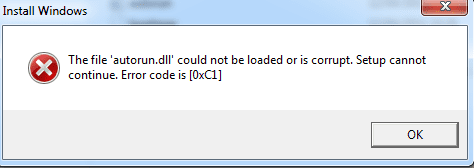
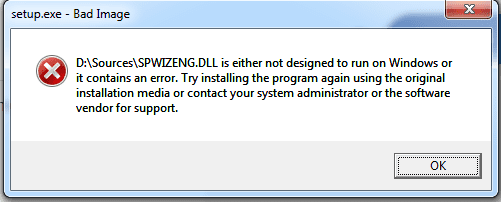
Meanwhile, I found another copy of win 7 64 on an external HD and remembered that I had given my pc into a clinic a few years ago and the guy had changed my pc's HD (hence Dell didn't have mine anymore?) and he'd given me this external HD as a restoration of all my files before my computer had gone bust so perhaps he'd also left me a copy of the windows 7 he reinstalled (or the previous win 7 I had on my pc?), and this is it. But, when I tried using for my repair install by following the instructions here, Repair Install, specifically number 4, and hit the setup.exe it gave me the errors as shown in the first two attachments below. (Maybe it's to do with me not having created a partition first and attempting to install it on the same drive that my current windows is installed - something which I do not know yet how to do)

As an aside, maybe worth mentioning that when I realised that my current Windows may not be the original win 7 that I bought together with my computer, I went to check my product key in control panel>system and security >system and it was indeed different than the one on the label stuck on the back of my machine. My current one is of, 20 characters long, instead of 25 and contains OEM in the middle of it. Still, after installing Magical Jelly bean, the cd key WAS the same as on the label.

Regardless, please see my third attachment, which shows a screenshot of my Disk Management.

Many thanks for your help,
Nickk
 

Attachments

  • 1.png
    1.png
    5.2 KB · Views: 7
  • 2.png
    2.png
    6.8 KB · Views: 7
  • 3.png
    3.png
    22.4 KB · Views: 2
Last edited:

My Computer My Computer

Computer type
PC/Desktop
OS
Windows 7 64
Megahertz07 :thumbsup:

Repair Install Instrucions from my OneDrive
I have ISO if you need it.
Link to Win7 not me Get Into PC
Windows 7 SP1 AIO ISO x64 Sep 2016 Free Download

Bill
Thank you for your post. I have a question, do I need to execute that setup.exe only on a separate partition that the one I have my current windows installed on? That is, if I have a C:\ drive only, do I need to first do this -> Partition or Volume - Create New Number 4. here, shows that I need to -> Repair Install
 

My Computer My Computer

Computer type
PC/Desktop
OS
Windows 7 64
Hi Nickk,

I have a question, do I need to execute that setup.exe only on a separate partition that the one I have my current windows installed on?

You have two options . . .

Option 1

[1] Insert the DVD/USB and boot the computer. When AutoPlay appears, double-click Run setup.exe.
[2] When you get to the installation screen, select In Place Upgrade [Repair Install].

Option 2

[1] Create a folder on the Desktop, something like Clean_Inst.
[2] Copy the ISO [DVD or USB] files into it.
[3] Unzip the ISO using something like 7-Zip => 7-Zip.
[4] Find and double-click the Setup.exe file [follow the prompts].
[5] When you get to the installation screen, select In Place Upgrade [Repair Install].

I hope this helps!
 

My Computer My Computer

Computer type
Laptop
Computer Manufacturer/Model Number
Fujitsu LIFEBOOK
OS
Win 7 HP SP1 64-bit Vista HB SP2 32-bit Linux Mint 18.3
CPU
Intel(R) Pentium(R) CPU P6200 @ 2.13GHz
Motherboard
FUJITSU FJNBB06
Memory
4.00 GB
Graphics Card(s)
Intel(R) Graphics Media Accelerator HD
Sound Card
[1] Realtek High Definition Audio [2] Intel(R) Display Audio
Screen Resolution
1366 x 768 x 32 bits (4294967296 colors) @ 59 Hz
Hard Drives
TOSHIBA MK5076GSX
Antivirus
AVG FREE
That's very helpful! Thank you and I'll let you know how it went!
 

My Computer My Computer

Computer type
PC/Desktop
OS
Windows 7 64

My Computer My Computer

Computer type
Laptop
Computer Manufacturer/Model Number
Fujitsu LIFEBOOK
OS
Win 7 HP SP1 64-bit Vista HB SP2 32-bit Linux Mint 18.3
CPU
Intel(R) Pentium(R) CPU P6200 @ 2.13GHz
Motherboard
FUJITSU FJNBB06
Memory
4.00 GB
Graphics Card(s)
Intel(R) Graphics Media Accelerator HD
Sound Card
[1] Realtek High Definition Audio [2] Intel(R) Display Audio
Screen Resolution
1366 x 768 x 32 bits (4294967296 colors) @ 59 Hz
Hard Drives
TOSHIBA MK5076GSX
Antivirus
AVG FREE
Nope, I'm getting the following error. Btw, I got a similar error when I tried upgrading straight to Windows 10 with the Media Creation Tool. I assume the next step is to attempt a clean install? If I could only know why I'm getting this error?

You guys are super helpful!
 

Attachments

  • repairInstallError.png
    repairInstallError.png
    22.6 KB · Views: 4

My Computer My Computer

Computer type
PC/Desktop
OS
Windows 7 64
Back
Top