Overheating: Power Options, supply voltage, powercfg -energy errors?

treehouse

New member
Member
Local time
4:21 PM
Messages
42
Hi, this is all a bit complicated.


The short version: I discovered an over-heating issue on my laptop, a Toshiba Satellite C660, switching itself off twice (while I was attending) - once during the Windows Experience Index CPU stress test, the other while Kaspersky did its default virus scan. It might also have shut off while unattended, maybe during a Kaspersky scan, as I vaguely remember once or twice finding the machine off after I got called away, rather than sleeping as it should. I also have an over-voltage power supply, which I swapped for a defunct one. I'm not sure how to tweak the power settings for best cooling effect under high load, and a powercfg -energy report was incomplete, scrambled and showed various errors (USB suspend and CPU timing).


Longer version: The crash during WEI testing led me to start digging into the power settings a bit more (which I tweaked from default earlier), and I installed Open Hardware Monitor to keep an eye on the temperature. On the Kaspersky scan, OHM was running and I saw the CPU reach 90C.


Then I did a powercfg -energy report, which exposed a general USB-not-entering-suspend-state issue, for which no solution seems to exist online! Whether that's related is another point entirely.

Years ago, after a fresh install of Windows 7, I tweaked the Advanced Power Settings because the fan was a bit obtrusive, kind of dithering on-off, most of the time. I changed the "Toshiba Power Saver" setting (installed app from Toshiba), which has Cooling Methods: 'Maximum performance' and 'Battery optimized'.


I've just checked now to see which one I'd changed, and it's immediately obvious - if I put it on Maximum performance, the fan usually kicks in (lowish) and dithers on and off fairly often; if I put it to Battery optimized, it goes off (or so low I can't hear it) unless there's a more obvious load.

It seems unlikely to be the cause of the overheating, since it's not a problem in general use, just these high-stress occasions (and WEI presumably overrules such things to see what the system can do).

The other Advanced Power Settings are the Wireless Adaptor Settings > Power Saver Mode (Low power saving, Medium and High Power saving, and Maximum performance), the Intel Graphics Settings > Intel Power Plan (Maximum performance, Balanced, and Battery saver), and the PCI Express > Link State Power Management (Off, Moderate, and Maximum power savings). I'm not sure how any of these affect heat production, as opposed to battery power (which I'm not so bothered about, as I'm almost always on mains). Perhaps I should put the whole (Balanced) plan back to defaults or tweak some more. (The ones currently set are in italics.)

Now, the other thing I notice (thanks to Open Hardware Monitor) is that the system seems to have ignored the option (in the same list of Advanced Power Settings) to put a limit on the Processor Power Management. It has max and min settings for the CPU for each power plan, which were at 100% and 5%. I decided to put it to 90% max to throttle the CPU and hopefully at least get through the rest of the Kaspersky scan (which went fine, hardly breaking into a sweat). But OHM reports it's been up to 100% anyway since then, so I'm not sure what's the point.

I found a suggestion to run a system energy report, which was weird - first off, it didn't save a valid html file (which I've also seen other mention of in this USB issue). I read through it in a text editor and fixed the html, and it shows that various USB devices aren't entering Suspend. Nobody seems to know how to fix that. There are also Timer Resolution warnings and "CPU Utilization:Analysis Error". (I've pasted the output below. I messed up some of the formatting copying it off the page, but hopefully it's readable.)

I've heard that Toshiba bloatware is generally a damn nuisance, and I might try uninstalling that additional app for power management in case it's confusing the Windows one (or possibly I have the wrong version - it was a long hard trek to reinstall Windows and get the drivers after my hdd broke, and it's an old, second-hand machine on its third OS and second drive).

Or is the whole issue from sticking an over-voltage power supply into it? I'd been having battery problems and got a new one, then discovered it was mainly/also the power supply. I discovered I had another one from a completely different machine with the same plug, read the spec and researched online, and decided it was worth a shot. It's been showing no obvious problem (unless that's causing this problem!). The spec on the old one is 19V, 3.4A, but when I tested it with a meter, it was cycling up and down all the time, so I don't know what it was actually putting out. I think they usually give out more volts than they say. The 'new' one is rated at 20V, 3A, but it's putting out a steady 21V according to my meter (same polarity, of course, and with a capacitor or whatever they are just short of the business end). I haven't tried any apps reporting voltages yet, as I've no idea what I'd be looking for. I'll get a correct power supply, but I suspect it's something else. If the other was putting out 20V rather than 19V, then 21V is only 5% over, which most sites say should be fine. If it was actually 19V, then 21 is 10% over, which is a bit much.


Sorry for the long complicated story! Maybe something jumps out as definitely wrong and fixable if you're au fait with these things. It would be nice if I could tweak and then run some full-on CPU test, but I'm concerned that overheating it repeatedly might do it irreparable damage. All this may be a bit early and I should see how things go, but if you spot anything at all that I should do something about, be my guest. It's happily tootling at around 42C at the moment.


Power Efficiency Diagnostics Report

Computer NameJF-TOSHScan Time2020-01-07T21:15:08ZScan Duration60 seconds System ManufacturerTOSHIBASystem Product NameSatellite C660BIOS Date05/09/12BIOS Version2.00OS Build7601Platform RolePlatformRoleMobilePlugged IntrueProcess Count69Thread Count1105Report GUID {d192fd5d-6d59-4163-82b6-413ded7e353b} Analysis Results

Errors

USB Suspend:USB Device not Entering Suspend
The USB device did not enter the Suspend state. Processor power management may be prevented if a USB device does not enter the Suspend state when not in use.
Device NameUSB Mass Storage DeviceHost Controller IDPCI\VEN_8086&DEV_3B3CHost Controller LocationPCI bus 0, device 26, function 0Device IDUSB\VID_0BDA&PID_0138Port Path1,3

USB Suspend:USB Device not Entering Suspend
The USB device did not enter the Suspend state. Processor power management may be prevented if a USB device does not enter the Suspend state when not in use.
Device NameUSB Root HubHost Controller IDPCI\VEN_8086&DEV_3B3CHost Controller LocationPCI bus 0, device 26, function 0Device IDUSB\VID_8086&PID_3B3CPort Path

USB Suspend:USB Device not Entering Suspend
The USB device did not enter the Suspend state. Processor power management may be prevented if a USB device does not enter the Suspend state when not in use.
Device NameGeneric USB HubHost Controller IDPCI\VEN_8086&DEV_3B3CHost Controller LocationPCI bus 0, device 26, function 0Device IDUSB\VID_8087&PID_0020Port Path1

Warnings

Platform Timer Resolution:Platform Timer Resolution
The default platform timer resolution is 15.6ms (15625000ns) and should be used whenever the system is idle. If the timer resolution is increased, processor power management technologies may not be effective. The timer resolution may be increased due to multimedia playback or graphical animations.
Current Timer Resolution (100ns units)10000Maximum Timer Period (100ns units)156001

Platform Timer Resolution:Outstanding Timer Request
A program or service has requested a timer resolution smaller than the platform maximum timer resolution.
Requested Period10000Requesting Process ID4000Requesting Process Path\Device\HarddiskVolume2\Program Files (x86)\Kaspersky Lab\Kaspersky Free 20.0\avpui.exe

Power Policy:Sleep timeout is long (Plugged In)
The computer is configured to automatically sleep after longer than 30 minutes.
Timeout (seconds)2700

CPU Utilization:Analysis Error
Analysis was partially unsuccessful. Some results are available, but they may be incomplete.

Information

Platform Timer Resolution:Timer Request Stack
The stack of modules responsible for the lowest platform timer setting in this process.
Requested Period10000Requesting Process ID4000Requesting Process Path\Device\HarddiskVolume2\Program Files (x86)\Kaspersky Lab\Kaspersky Free 20.0\avpui.exe Calling Module Stack\Device\HarddiskVolume2\Windows\SysWOW64\ntdll.dll
\Device\HarddiskVolume2\Windows\SysWOW64\winmm.dll
\Device\HarddiskVolume2\Windows\Microsoft.NET\Framework\v4.0.30319\WPF\wpfgfx_v0400.dll
\Device\HarddiskVolume2\Windows\SysWOW64\kernel32.dll
\Device\HarddiskVolume2\Windows\SysWOW64\ntdll.dll

Power Policy:Active Power Plan
The current power plan in use
Plan Name OEM BalancedPlan GUID{381b4222-f694-41f0-9685-ff5bb260df2e}

Power Policy:Power Plan Personality (On Battery)
The personality of the current power plan when the system is on battery power.
Personality Balanced

Power Policy:Video Quality (On Battery)
Enables Windows Media Player to optimize for quality or power savings when playing video.
Quality Mode Balance Video Quality and Power Savings

Power Policy:Power Plan Personality (Plugged In)
The personality of the current power plan when the system is plugged in.
Personality Balanced

Power Policy:Video quality (Plugged In)
Enables Windows Media Player to optimize for quality or power savings when playing video.
Quality Mode Optimize for Video Quality

System Availability Requests:Analysis Success
Analysis was successful. No energy efficiency problems were found. No information was returned.

Battery:Battery Information
Battery ID41167COMPAL PA3817U-1BRSManufacturerCOMPAL Serial Number41167ChemistryLi-ILong Term1Design Capacity48840Last Full Charge41792

Platform Power Management Capabilities:Supported Sleep States
Sleep states allow the computer to enter low-power modes after a period of inactivity. The S3 sleep state is the default sleep state for Windows platforms. The S3 sleep state consumes only enough power to preserve memory contents and allow the computer to resume working quickly. Very few platforms support the S1 or S2 Sleep states.
S1 Sleep SupportedfalseS2 Sleep SupportedfalseS3 Sleep SupportedtrueS4 Sleep Supportedtrue

Platform Power Management Capabilities:Adaptive Display Brightness is supported.
This computer enables Windows to automatically control the brightness of the integrated display.

Platform Power Management Capabilities:Processor Power Management Capabilities
Effective processor power management enables the computer to automatically balance performance and energy consumption.
Group0Index0Idle (C) State Count2Performance (P) State Count13Throttle (T) State Count0


Platform Power Management Capabilities:Processor Power Management Capabilities
Effective processor power management enables the computer to automatically balance performance and energy consumption.
Group0Index1Idle (C) State Count2Performance (P) State Count13Throttle (T) State Count0

Platform Power Management Capabilities:Processor Power Management Capabilities
Effective processor power management enables the computer to automatically balance performance and energy consumption.
Group0Index2Idle (C) State Count2Performance (P) State Count13Throttle (T) State Count0

Platform Power Management Capabilities:Processor Power Management Capabilities
Effective processor power management enables the computer to automatically balance performance and energy consumption.
Group0Index3Idle (C) State Count2Performance (P) State Count13Throttle (T) State Count0
 

My Computer My Computer

At a glance

Win 7 Home Premium x64 SP1Intel(R) Core(TM) i3 CPU M 380 @ 2.53GHz2.00 GB (1.86 GB useable)None/Integrated
Computer type
Laptop
Computer Manufacturer/Model Number
Toshiba
OS
Win 7 Home Premium x64 SP1
CPU
Intel(R) Core(TM) i3 CPU M 380 @ 2.53GHz
Motherboard
TOSHIBA PWWAA
Memory
2.00 GB (1.86 GB useable)
Graphics Card(s)
None/Integrated
Sound Card
Realtek High Definition Audio
Screen Resolution
1366 x 768 x 32 bits (4294967296 colors) @ 40 Hz
Hard Drives
(1) DREVO X1 SSD ATA Device
(2) Generic- Multi-Card USB Device
Antivirus
Kaspersky Free
Browser
Firefox
Other Info
Originally Vista, daughter's laptop. Not sure if already upgraded to 7 or if I did that. Saved it from going to bin, kicked out rats from nest in fan housing (joke), cleaned cr*p, used for some time before fatal HDD failure. Installed SSD and scraped old drive for data via ribbon cable.
Correction: the thing nobody seems to be able to fix is to do with USB hubs not going into Selective Suspend - whatever that is - mine is reported as just not going into Suspend. People with that (as per mine) usually say the computer won't sleep, which mine does fine.
 

My Computer My Computer

At a glance

Win 7 Home Premium x64 SP1Intel(R) Core(TM) i3 CPU M 380 @ 2.53GHz2.00 GB (1.86 GB useable)None/Integrated
Computer type
Laptop
Computer Manufacturer/Model Number
Toshiba
OS
Win 7 Home Premium x64 SP1
CPU
Intel(R) Core(TM) i3 CPU M 380 @ 2.53GHz
Motherboard
TOSHIBA PWWAA
Memory
2.00 GB (1.86 GB useable)
Graphics Card(s)
None/Integrated
Sound Card
Realtek High Definition Audio
Screen Resolution
1366 x 768 x 32 bits (4294967296 colors) @ 40 Hz
Hard Drives
(1) DREVO X1 SSD ATA Device
(2) Generic- Multi-Card USB Device
Antivirus
Kaspersky Free
Browser
Firefox
Other Info
Originally Vista, daughter's laptop. Not sure if already upgraded to 7 or if I did that. Saved it from going to bin, kicked out rats from nest in fan housing (joke), cleaned cr*p, used for some time before fatal HDD failure. Installed SSD and scraped old drive for data via ribbon cable.
Short story: You have a overheating problem.
How old is your laptop? Is the heat sink fan running?

The external power supply voltage isn't critical. It's only used to supply the internal power supply with energy. The 19VDC is converted internally into 12, 5 and maybe in -5V.

I would say that the main problem is dust on the heat sink.
 

My Computers My Computers

  • At a glance

    Windows 7 HP 64i5 6600K - 800MHz to 4200MHz4+4G GSkill DDR4 3000IG - Intel 530
    Computer type
    PC/Desktop
    Computer Manufacturer/Model Number
    custom build
    OS
    Windows 7 HP 64
    CPU
    i5 6600K - 800MHz to 4200MHz
    Motherboard
    GA-Z170-HD3P
    Memory
    4+4G GSkill DDR4 3000
    Graphics Card(s)
    IG - Intel 530
    Monitor(s) Displays
    Samsung 226BW
    Screen Resolution
    1680x1050
    Hard Drives
    (1) -1 SM951 – 128GB M.2 AHCI PCIe SSD drive for Windows 7 and Lubuntu
    (2) -1 WD SATA 3 - 1T for Data
    (3) -1 WD SATA 3 - 1T for backup
    PSU
    Thermaltake 450W TR2 gold
    Keyboard
    Old and good Chicony mechanical keyboard
    Mouse
    Logitech mX performance - 9 buttons (had to disable some)
    Internet Speed
    500Mb/s
    Browser
    Firefox 64
    Other Info
    TinyWall firewall
  • At a glance

    Windows 7 Proi7-4500U 800MHz to 3.0GHz(4+4)G DDR3 1600IG intel 4400 + NVIDIA GeForce GT 745M
    Computer type
    Laptop
    System Manufacturer/Model Number
    Asus Q550LF
    OS
    Windows 7 Pro
    CPU
    i7-4500U 800MHz to 3.0GHz
    Motherboard
    Asus Q550LF
    Memory
    (4+4)G DDR3 1600
    Graphics Card(s)
    IG intel 4400 + NVIDIA GeForce GT 745M
    Sound Card
    Realtek
    Monitor(s) Displays
    LG Display LP156WF4-SPH1
    Screen Resolution
    1920 x 1080
    Hard Drives
    BX500 120G SSD for Windows and programs +
    1T HDD for data
    Internet Speed
    500 Mb/s
    Browser
    Firefox
    Other Info
    TinyWall firewall
If you have checked the fan and cleaned out dirt, have you considered replacing the thermal paste?

YouTube
YouTube
YouTube
 

My Computers My Computers

  • At a glance

    7 X64i5 84002x8gb 3200mhz
    Computer type
    PC/Desktop
    OS
    7 X64
    CPU
    i5 8400
    Motherboard
    gigabyte b365m ds3h
    Memory
    2x8gb 3200mhz
    Hard Drives
    various
    PSU
    pure power 11 400w cm
    Case
    Coolermaster
    Cooling
    cryorig m9i
  • At a glance

    7x64g54008gb ddr4 2400
    Computer type
    PC/Desktop
    OS
    7x64
    CPU
    g5400
    Motherboard
    ga b365m ds3h
    Memory
    8gb ddr4 2400
    PSU
    xfx pro 450w
Short story: You have a overheating problem.
LOL.

How old is your laptop? Is the heat sink fan running?
Not sure how old it is - daughter gave me it 3 years ago, and she probably used it for 3-5 years; had Vista originally on it. The fan is working at various speeds under different loads, and blowing a gale during WEI. First thing I'll do is check it for dust...

The external power supply voltage isn't critical. It's only used to supply the internal power supply with energy. The 19VDC is converted internally into 12, 5 and maybe in -5V.
Good to have that hunch confirmed, thanks.


I would say that the main problem is dust on the heat sink.
I guess it might be good to get the fan off the heatsink connection to clean the fins properly, or if I dare...

If you have checked the fan and cleaned out dirt, have you considered replacing the thermal paste?

YouTube
YouTube
YouTube
<Swallows hard> Thanks for those vids (Mmmm, 'termal pasta'). You'll have realised by the delay just swapping the RAM that I'm a bit chicken! (And you're right, I should swap those to check they work first.) I've never replaced thermal paste, but maybe it's time to do that.
 

My Computer My Computer

At a glance

Win 7 Home Premium x64 SP1Intel(R) Core(TM) i3 CPU M 380 @ 2.53GHz2.00 GB (1.86 GB useable)None/Integrated
Computer type
Laptop
Computer Manufacturer/Model Number
Toshiba
OS
Win 7 Home Premium x64 SP1
CPU
Intel(R) Core(TM) i3 CPU M 380 @ 2.53GHz
Motherboard
TOSHIBA PWWAA
Memory
2.00 GB (1.86 GB useable)
Graphics Card(s)
None/Integrated
Sound Card
Realtek High Definition Audio
Screen Resolution
1366 x 768 x 32 bits (4294967296 colors) @ 40 Hz
Hard Drives
(1) DREVO X1 SSD ATA Device
(2) Generic- Multi-Card USB Device
Antivirus
Kaspersky Free
Browser
Firefox
Other Info
Originally Vista, daughter's laptop. Not sure if already upgraded to 7 or if I did that. Saved it from going to bin, kicked out rats from nest in fan housing (joke), cleaned cr*p, used for some time before fatal HDD failure. Installed SSD and scraped old drive for data via ribbon cable.
Hi Treehouse,

I would upgrade your Ram, supports up to 8Gb, 2 is the bare minimum, will certainly help.

Its a noisy ol beast, my mrs workhorse:-)

The USB3 hub (this model is only usb2 compatible) driver unfortunately does not have a power option to suspend so its allways on, and as far as i know its a global not port specific setting.

As a matter of interest what was plugged into it when you performed the WEI, External drive???

As for its age IF it came with Vista its over 10 years old, i dont think it did, any COA sticker on the underside it will tell you what was installed, or IF you want to run this tool copy/paste the ouput
https://go.microsoft.com/fwlink/?LinkID=52012


Have you ever reduced the bloatware, and not just the Toshiba stuff theres a lot of unneccessary services/programs running, even KIS adds a VPN service.
check out Black Vipers website

UP the Saints


Roy
 

My Computer My Computer

At a glance

W7 home premium 32bit/W7HP 64bit/w10 tp insid...E5300 dual core3gbNvidia Geforce 7100 Nforce 630i
Computer type
PC/Desktop
Computer Manufacturer/Model Number
medionl/Aspire 6930G/acer x55a
OS
W7 home premium 32bit/W7HP 64bit/w10 tp insider ring
CPU
E5300 dual core
Motherboard
medion MS7366
Memory
3gb
Graphics Card(s)
Nvidia Geforce 7100 Nforce 630i
Monitor(s) Displays
avixc
Internet Speed
n (isp resticted to 72)
Antivirus
mse/pands
Browser
palemoon
Other Info
Belkin Fd7050 n USB using Railink RT2870 drivers, more upto date
Hi Roy - so helpful, you guys - getting all these answers is amazing!
I would upgrade your Ram, supports up to 8Gb, 2 is the bare minimum, will certainly help.
Funny you should say that - I was just about to put 8GB in. That's why I did the WEI, to get a "before and after". I have just now installed the 8GB, and all seems well on the memory front. Sitting fairly steady at 30% when it would normally be 90+.

Its a noisy ol beast, my mrs workhorse:-)
Well, I think I've got to get used to it making a bit more noise, but it doesn't seem terrible compared to some I've had. In fact my mrs has just bought a new one that I swear would make a decent enough hairdrier when it's working hard.

The USB3 hub (this model is only usb2 compatible) driver unfortunately does not have a power option to suspend so its allways on, and as far as i know its a global not port specific setting.
I see - good to know. Solved that issue.

As a matter of interest what was plugged into it when you performed the WEI, External drive???
AFAIK, nothing. I'd be unlikely to run that with flash or external hdd in. One weird thing I've noticed that I don't think it used to do is it shows the E: drive in Explorer constantly, even though nothing is in it. I thought it only used to show the D: (DVD), which I've got used to being shown always on Windows. The E: drive is the card reader. I could be wrong and that's always been there in the directories. It's no biggie, just thought I'd mention it.

As for its age IF it came with Vista its over 10 years old, i dont think it did, any COA sticker on the underside it will tell you what was installed, or IF you want to run this tool copy/paste the ouput

https://go.microsoft.com/fwlink/?LinkID=52012
The sticker is too worn (probably consistent with +10 years!). I had a heck of a job getting a fresh install activated when my HDD failed. MS helped sort it eventually. It was 7 Home Premium prior to that, as it is now, but I think I was told it was originally Vista (with a free upgrade or something). I ran the diag tool, but I'm cautious about posting all the info - is there something in particular that would tell me, or is it safe to post publicly? (Doesn't matter, but might be interesting to know when it was manufactured, and it could indicate the thermal paste has had a long time drying out!)

Have you ever reduced the bloatware, and not just the Toshiba stuff theres a lot of unneccessary services/programs running, even KIS adds a VPN service.
check out Black Vipers website
When I reinstalled drivers, it was a bit hit-and-miss trying to work out what was necessary and what was bloat (the Toshiba stuff, that is). I've not really looked into other kinds. I'll have a read of that site, cheers.
 

My Computer My Computer

At a glance

Win 7 Home Premium x64 SP1Intel(R) Core(TM) i3 CPU M 380 @ 2.53GHz2.00 GB (1.86 GB useable)None/Integrated
Computer type
Laptop
Computer Manufacturer/Model Number
Toshiba
OS
Win 7 Home Premium x64 SP1
CPU
Intel(R) Core(TM) i3 CPU M 380 @ 2.53GHz
Motherboard
TOSHIBA PWWAA
Memory
2.00 GB (1.86 GB useable)
Graphics Card(s)
None/Integrated
Sound Card
Realtek High Definition Audio
Screen Resolution
1366 x 768 x 32 bits (4294967296 colors) @ 40 Hz
Hard Drives
(1) DREVO X1 SSD ATA Device
(2) Generic- Multi-Card USB Device
Antivirus
Kaspersky Free
Browser
Firefox
Other Info
Originally Vista, daughter's laptop. Not sure if already upgraded to 7 or if I did that. Saved it from going to bin, kicked out rats from nest in fan housing (joke), cleaned cr*p, used for some time before fatal HDD failure. Installed SSD and scraped old drive for data via ribbon cable.
If you don't take the heat sink from the CPU you don't need to change the thermal paste.
Just take the Fan out (if possible) and clean the heat sink fins. If you blow air or use a vacuum cleaner, block the fan so it doesn't rotate (to avoid over spinning)
 

My Computers My Computers

  • At a glance

    Windows 7 HP 64i5 6600K - 800MHz to 4200MHz4+4G GSkill DDR4 3000IG - Intel 530
    Computer type
    PC/Desktop
    Computer Manufacturer/Model Number
    custom build
    OS
    Windows 7 HP 64
    CPU
    i5 6600K - 800MHz to 4200MHz
    Motherboard
    GA-Z170-HD3P
    Memory
    4+4G GSkill DDR4 3000
    Graphics Card(s)
    IG - Intel 530
    Monitor(s) Displays
    Samsung 226BW
    Screen Resolution
    1680x1050
    Hard Drives
    (1) -1 SM951 – 128GB M.2 AHCI PCIe SSD drive for Windows 7 and Lubuntu
    (2) -1 WD SATA 3 - 1T for Data
    (3) -1 WD SATA 3 - 1T for backup
    PSU
    Thermaltake 450W TR2 gold
    Keyboard
    Old and good Chicony mechanical keyboard
    Mouse
    Logitech mX performance - 9 buttons (had to disable some)
    Internet Speed
    500Mb/s
    Browser
    Firefox 64
    Other Info
    TinyWall firewall
  • At a glance

    Windows 7 Proi7-4500U 800MHz to 3.0GHz(4+4)G DDR3 1600IG intel 4400 + NVIDIA GeForce GT 745M
    Computer type
    Laptop
    System Manufacturer/Model Number
    Asus Q550LF
    OS
    Windows 7 Pro
    CPU
    i7-4500U 800MHz to 3.0GHz
    Motherboard
    Asus Q550LF
    Memory
    (4+4)G DDR3 1600
    Graphics Card(s)
    IG intel 4400 + NVIDIA GeForce GT 745M
    Sound Card
    Realtek
    Monitor(s) Displays
    LG Display LP156WF4-SPH1
    Screen Resolution
    1920 x 1080
    Hard Drives
    BX500 120G SSD for Windows and programs +
    1T HDD for data
    Internet Speed
    500 Mb/s
    Browser
    Firefox
    Other Info
    TinyWall firewall
Hi Treehouse,

Dont worry if you post it - NO personal details on it, thousands of them on web.
there is an upgrade indicator, might not be present as you called MS
as for its age the Bios date will likely be the earliest in the report, as you've re-installed

try a UV light on the sticker, might show up.

There's no real reason to keep any of the Toshiba stuff, W7 has all the same programs/options built-in
(they wont be updating anything anyway - back-up support now provided by Dynabook)

general
Install Intel's driver checker, only once check/update as required then remove
https://downloadmirror.intel.com/28425/a08/Intel-Driver-and-Support-Assistant-Installer.exe

if you dont use sleep/hibernate
Hibernate - Enable or Disable
PCIe Link State Power Management - Turn On or Off in Windows
note you will need to change certain power options
Run MS Disk clean-up tool if you've NEVER used it then it acts like a update install with a before and after operation hence could take a while
turn off disk defragment service, you have an SSD
Use Macrium free as a back-up, and on the Wife's if you need Brownie points;)


There is tutorials sub forum here, just punch in what you want to know about


Roy
 

My Computer My Computer

At a glance

W7 home premium 32bit/W7HP 64bit/w10 tp insid...E5300 dual core3gbNvidia Geforce 7100 Nforce 630i
Computer type
PC/Desktop
Computer Manufacturer/Model Number
medionl/Aspire 6930G/acer x55a
OS
W7 home premium 32bit/W7HP 64bit/w10 tp insider ring
CPU
E5300 dual core
Motherboard
medion MS7366
Memory
3gb
Graphics Card(s)
Nvidia Geforce 7100 Nforce 630i
Monitor(s) Displays
avixc
Internet Speed
n (isp resticted to 72)
Antivirus
mse/pands
Browser
palemoon
Other Info
Belkin Fd7050 n USB using Railink RT2870 drivers, more upto date
powercfg -energy errors

Do clean the fan to help clear overheating.

Correction: the thing nobody seems to be able to fix is to do with USB hubs not going into Selective Suspend - whatever that is - mine is reported as just not going into Suspend. People with that (as per mine) usually say the computer won't sleep, which mine does fine.

Power Efficiency Diagnostics Report

Computer NameJF-TOSHScan Time2020-01-07T21:15:08ZScan Duration60 seconds System ManufacturerTOSHIBASystem Product NameSatellite C660BIOS Date05/09/12BIOS Version2.00OS Build7601Platform RolePlatformRoleMobilePlugged IntrueProcess Count69Thread Count1105Report GUID {d192fd5d-6d59-4163-82b6-413ded7e353b} Analysis Results

Errors

USB Suspend:USB Device not Entering Suspend
The USB device did not enter the Suspend state. Processor power management may be prevented if a USB device does not enter the Suspend state when not in use.
Device NameUSB Mass Storage DeviceHost Controller IDPCI\VEN_8086&DEV_3B3CHost Controller LocationPCI bus 0, device 26, function 0Device IDUSB\VID_0BDA&PID_0138Port Path1,3

This is a card reader device? Does it have any memory cards plugged in? Can you plug in memory card and remove it with safely remove USB device, without any trouble? Can you disable the card reader in device manager?
 

My Computer My Computer

At a glance

Windows 7 x64, Vista x64, 8.1 smartphoneIntel E8400 65W 64-bitDDR2 2 x 2GB, 1GB x 2XFX Radeon HD5750
Computer type
PC/Desktop
OS
Windows 7 x64, Vista x64, 8.1 smartphone
CPU
Intel E8400 65W 64-bit
Motherboard
Gigabyte EP45-UD3LR
Memory
DDR2 2 x 2GB, 1GB x 2
Graphics Card(s)
XFX Radeon HD5750
Sound Card
AMD High Definition Audio; Realtek High Definition Audio
Monitor(s) Displays
iiyama prolite X2377HDS
Screen Resolution
1920 x 1080
Hard Drives
500GB 7200 rpm Seagate ST3500413AS 16MB, 500GB 5400 rpm Toshiba MQ02ABF050H 32MB, 200GB 7200 rpm Seagate ST3200820AS 8MB, 2TB 7200 rpm Western Digital WD20EZRX 64MB
PSU
Enermax Liberty Modular
Case
Antec P193 Midi Tower
Keyboard
Mionix ZIBAL 60
Mouse
Razer USB 2.0 Diamondback Mouse or Huion Graphics Tablet
Browser
Internet Explorer, Lunascape, Firefox, Opera, Avast Safezone
If you don't take the heat sink from the CPU you don't need to change the thermal paste.
Just take the Fan out (if possible) and clean the heat sink fins. If you blow air or use a vacuum cleaner, block the fan so it doesn't rotate (to avoid over spinning)
OK cheers. It's a fairly old machine, so if the fan and fins are clean and I don't find other reasons for overheating (and it continues) I guess it'll be worth refitting the heat sink.

Hi Treehouse,

Dont worry if you post it - NO personal details on it, thousands of them on web.
there is an upgrade indicator, might not be present as you called MS
as for its age the Bios date will likely be the earliest in the report, as you've re-installed
OK, this is it:
Code:
Diagnostic Report (1.9.0027.0):
-----------------------------------------
Windows Validation Data-->

Validation Code: 0
Cached Online Validation Code: 0x0
Windows Product Key: *****-*****-Q69TJ-G3YBJ-KW8XW
Windows Product Key Hash: cQJO3zIxtDOCeiJ5+AhFZ+JYlRM=
Windows Product ID: 00359-114-4402047-85599
Windows Product ID Type: 5
Windows License Type: Retail
Windows OS version: 6.1.7601.2.00010300.1.0.003
ID: {60B857E6-E192-4AB7-B579-3049235DA3A7}(3)
Is Admin: Yes
TestCab: 0x0
LegitcheckControl ActiveX: N/A, hr = 0x80070002
Signed By: N/A, hr = 0x80070002
Product Name: Windows 7 Home Premium
Architecture: 0x00000009
Build lab: 7601.win7sp1_ldr_escrow.191127-1706
TTS Error: 
Validation Diagnostic: 
Resolution Status: N/A

Vista WgaER Data-->
ThreatID(s): N/A, hr = 0x80070002
Version: N/A, hr = 0x80070002

Windows XP Notifications Data-->
Cached Result: N/A, hr = 0x80070002
File Exists: No
Version: N/A, hr = 0x80070002
WgaTray.exe Signed By: N/A, hr = 0x80070002
WgaLogon.dll Signed By: N/A, hr = 0x80070002

OGA Notifications Data-->
Cached Result: N/A, hr = 0x80070002
Version: N/A, hr = 0x80070002
OGAExec.exe Signed By: N/A, hr = 0x80070002
OGAAddin.dll Signed By: N/A, hr = 0x80070002

OGA Data-->
Office Status: 109 N/A
OGA Version: N/A, 0x80070002
Signed By: N/A, hr = 0x80070002
Office Diagnostics: 025D1FF3-364-80041010_025D1FF3-229-80041010_025D1FF3-230-1_025D1FF3-517-

80040154_025D1FF3-237-80040154_025D1FF3-238-2_025D1FF3-244-80070002_025D1FF3-258-3

Browser Data-->
Proxy settings: N/A
User Agent: Mozilla/4.0 (compatible; MSIE 8.0; Win32)
Default Browser: C:\Program Files (x86)\Mozilla Firefox\firefox.exe
Download signed ActiveX controls: Prompt
Download unsigned ActiveX controls: Disabled
Run ActiveX controls and plug-ins: Allowed
Initialize and script ActiveX controls not marked as safe: Disabled
Allow scripting of Internet Explorer Webbrowser control: Disabled
Active scripting: Allowed
Script ActiveX controls marked as safe for scripting: Allowed

File Scan Data-->

Other data-->
Office Details: <GenuineResults><MachineData><UGUID>{60B857E6-E192-4AB7-B579-3049235DA3A7}

</UGUID><Version>1.9.0027.0</Version><OS>6.1.7601.2.00010300.1.0.003</OS><Architecture>x64</Archit

ecture><PKey>*****-*****-*****-*****-KW8XW</PKey><PID>00359-114-4402047-

85599</PID><PIDType>5</PIDType><SID>S-1-5-21-2785788139-3172466215-

127188836</SID><SYSTEM><Manufacturer>TOSHIBA</Manufacturer><Model>Satellite 

C660</Model></SYSTEM><BIOS><Manufacturer>TOSHIBA</Manufacturer><Version>2.00</Version><SMBIOSVersi

on major="2" 

minor="6"/><Date>20120509000000.000000+000</Date></BIOS><HWID>C9333107018400FC</HWID><UserLCID>080

9</UserLCID><SystemLCID>0409</SystemLCID><TimeZone>GMT Standard Time(GMT+00:00)

</TimeZone><iJoin>0</iJoin><SBID><stat>3</stat><msppid></msppid><name></name><model></model></SBID

><OEM><OEMID>TOSCPL</OEMID><OEMTableID>TOSCPL00</OEMTableID></OEM><GANotification/></MachineData><

Software><Office><Result>109</Result><Products/><Applications/></Office></Software></GenuineResult

s>  

Spsys.log Content: 0x80070002

Licensing Data-->
Software licensing service version: 6.1.7601.17514

Name: Windows(R) 7, HomePremium edition
Description: Windows Operating System - Windows(R) 7, RETAIL channel
Activation ID: 2e7d060d-4714-40f2-9896-1e4f15b612ad
Application ID: 55c92734-d682-4d71-983e-d6ec3f16059f
Extended PID: 00359-00170-114-440204-00-2057-7601.0000-1042017
Installation ID: 014386144706755884486491910613241191577684835571405943
Processor Certificate URL: http://go.microsoft.com/fwlink/?LinkID=88338
Machine Certificate URL: http://go.microsoft.com/fwlink/?LinkID=88339
Use License URL: http://go.microsoft.com/fwlink/?LinkID=88341
Product Key Certificate URL: http://go.microsoft.com/fwlink/?LinkID=88340
Partial Product Key: KW8XW
License Status: Licensed
Remaining Windows rearm count: 3
Trusted time: 09/01/2020 15:07:41

Windows Activation Technologies-->
HrOffline: 0x00000000
HrOnline: 0x00000000
HealthStatus: 0x0000000000000000
Event Time Stamp: 11:26:2019 13:32
ActiveX: Registered, Version: 7.1.7600.16395
Admin Service: Registered, Version: 7.1.7600.16395
HealthStatus Bitmask Output:


HWID Data-->
HWID Hash Current: MAAAAAEAAgABAAEAAAABAAAAAwABAAEAln2AHxKJpF+aUcgvemICWxivWESypVxd

OEM Activation 1.0 Data-->
N/A

OEM Activation 2.0 Data-->
BIOS valid for OA 2.0: yes
Windows marker version: 0x20001
OEMID and OEMTableID Consistent: yes
BIOS Information: 
  ACPI Table Name    OEMID Value    OEMTableID Value
  APIC            TOSCPL        TOSCPL00
  FACP            TOSCPL        TOSCPL00
  HPET            TOSCPL        TOSCPL00
  MCFG            TOSCPL        TOSCPL00
  ASF!            TOSCPL        TOSCPL00
  SLIC            TOSCPL        TOSCPL00
  SSDT            PmRef        CpuPm
  UEFI            PTL           PTLBUFýç
  UEFI            PTL           PTLBUFýç
  UEFI            PTL           PTLBUFýç
There's no real reason to keep any of the Toshiba stuff, W7 has all the same programs/options built-in
(they wont be updating anything anyway - back-up support now provided by Dynabook)
Thanks, I'll have a Toshiba purge! Good point about them not updating, which may be a security concern - and I didn't know that about Dynabook. I'll check it out.


general
Install Intel's driver checker, only once check/update as required then remove
https://downloadmirror.intel.com/28425/a08/Intel-Driver-and-Support-Assistant-Installer.exe
It says something went wrong. Tried a couple of times. Since it doesn't say what, it's hard to know what to look for in the forums, etc. Possibly legacy hardware or something. I could maybe contact them.

if you dont use sleep/hibernate
Hibernate - Enable or Disable
PCIe Link State Power Management - Turn On or Off in Windows
note you will need to change certain power options
I use Sleep every day, and Hibernate is useful as a setting for low battery power. I don't really understand the latter. What are you thinking I should do with that setting?

Run MS Disk clean-up tool if you've NEVER used it then it acts like a update install with a before and after operation hence could take a while
Could you say more? Why do this (on SSD)? What does the 'before and after' give me?

turn off disk defragment service, you have an SSD
Drat, I just did that recently - I forgot you shouldn't defrag them. Good to have the reminder. Thanks.

Use Macrium free as a back-up, and on the Wife's if you need Brownie points;)
I'll look into that. Brownie points always useful.

There is tutorials sub forum here, just punch in what you want to know about
Cheers.

This is a card reader device? Does it have any memory cards plugged in? Can you plug in memory card and remove it with safely remove USB device, without any trouble? Can you disable the card reader in device manager?
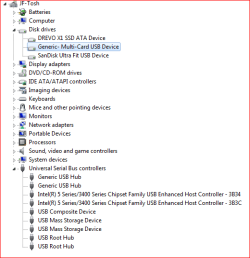
It has a card reader device, yes. I'm not sure if there's anything at all wrong with it, but I thought it was odd that the drive appears in file browsers (I've a few) even when there's no card in it (removed safely). However, it didn't require safe removal, I noticed - the Safely Remove... icon doesn't show up with it and - if it's the "Generic - Multi-card USB Device" listed under Disk drives in the device manager (selected in pic below), that requirement is set as <false> in the relevant Properties dialogue. Are you advising I disable it? Temporarily? What for? It its apparance in directory lists wrong, do you think? Thanks.
 

Attachments

  • devices.PNG
    devices.PNG
    11.6 KB · Views: 8

My Computer My Computer

At a glance

Win 7 Home Premium x64 SP1Intel(R) Core(TM) i3 CPU M 380 @ 2.53GHz2.00 GB (1.86 GB useable)None/Integrated
Computer type
Laptop
Computer Manufacturer/Model Number
Toshiba
OS
Win 7 Home Premium x64 SP1
CPU
Intel(R) Core(TM) i3 CPU M 380 @ 2.53GHz
Motherboard
TOSHIBA PWWAA
Memory
2.00 GB (1.86 GB useable)
Graphics Card(s)
None/Integrated
Sound Card
Realtek High Definition Audio
Screen Resolution
1366 x 768 x 32 bits (4294967296 colors) @ 40 Hz
Hard Drives
(1) DREVO X1 SSD ATA Device
(2) Generic- Multi-Card USB Device
Antivirus
Kaspersky Free
Browser
Firefox
Other Info
Originally Vista, daughter's laptop. Not sure if already upgraded to 7 or if I did that. Saved it from going to bin, kicked out rats from nest in fan housing (joke), cleaned cr*p, used for some time before fatal HDD failure. Installed SSD and scraped old drive for data via ribbon cable.
Hi Treehouse,

Earliest date may 2012,

Isn't it amazing we've got Dopplegangers;)


Won't restore system after driver updates broke cherrytree & ccleaner


Disk cleanup
Disk Cleanup - Open and Use

it does as it says removes old redundant data - HDD/SSD doesnt matter

When you install updates and requests a reboot the system shows
Installing updates 30% do not shutdown, then on reboot again
If youve not run it then the same proceedure applies

Defrag moves fragments together, like editing a film, doesnt actually delete anything
ssd's read so fast it doesnt matter


PCI
You can ignore this as you use sleep/hibernate

i run an SSD and system boots from cold to a full desktop in about 15/20 seconds,
in my case both are useless


Not sure why the intel tool failed, you could use Snappy Driver, its not got a user friendly gui

Toshiba sold on the support rights to Dynabook


Roy
 
Last edited:

My Computer My Computer

At a glance

W7 home premium 32bit/W7HP 64bit/w10 tp insid...E5300 dual core3gbNvidia Geforce 7100 Nforce 630i
Computer type
PC/Desktop
Computer Manufacturer/Model Number
medionl/Aspire 6930G/acer x55a
OS
W7 home premium 32bit/W7HP 64bit/w10 tp insider ring
CPU
E5300 dual core
Motherboard
medion MS7366
Memory
3gb
Graphics Card(s)
Nvidia Geforce 7100 Nforce 630i
Monitor(s) Displays
avixc
Internet Speed
n (isp resticted to 72)
Antivirus
mse/pands
Browser
palemoon
Other Info
Belkin Fd7050 n USB using Railink RT2870 drivers, more upto date
Once you get the heat sink clean, my suggestion is to replace your RAM with (4+4)G and do a Clean install.
With a Win 7 Clean install you get rid of all the trash it has accumulated over the years.
If you don't have the activation key you can retrieve it from the current installation.
If you don't have a Win 7 HP installation disk we can provide you a M$ link to download it.
 

My Computers My Computers

  • At a glance

    Windows 7 HP 64i5 6600K - 800MHz to 4200MHz4+4G GSkill DDR4 3000IG - Intel 530
    Computer type
    PC/Desktop
    Computer Manufacturer/Model Number
    custom build
    OS
    Windows 7 HP 64
    CPU
    i5 6600K - 800MHz to 4200MHz
    Motherboard
    GA-Z170-HD3P
    Memory
    4+4G GSkill DDR4 3000
    Graphics Card(s)
    IG - Intel 530
    Monitor(s) Displays
    Samsung 226BW
    Screen Resolution
    1680x1050
    Hard Drives
    (1) -1 SM951 – 128GB M.2 AHCI PCIe SSD drive for Windows 7 and Lubuntu
    (2) -1 WD SATA 3 - 1T for Data
    (3) -1 WD SATA 3 - 1T for backup
    PSU
    Thermaltake 450W TR2 gold
    Keyboard
    Old and good Chicony mechanical keyboard
    Mouse
    Logitech mX performance - 9 buttons (had to disable some)
    Internet Speed
    500Mb/s
    Browser
    Firefox 64
    Other Info
    TinyWall firewall
  • At a glance

    Windows 7 Proi7-4500U 800MHz to 3.0GHz(4+4)G DDR3 1600IG intel 4400 + NVIDIA GeForce GT 745M
    Computer type
    Laptop
    System Manufacturer/Model Number
    Asus Q550LF
    OS
    Windows 7 Pro
    CPU
    i7-4500U 800MHz to 3.0GHz
    Motherboard
    Asus Q550LF
    Memory
    (4+4)G DDR3 1600
    Graphics Card(s)
    IG intel 4400 + NVIDIA GeForce GT 745M
    Sound Card
    Realtek
    Monitor(s) Displays
    LG Display LP156WF4-SPH1
    Screen Resolution
    1920 x 1080
    Hard Drives
    BX500 120G SSD for Windows and programs +
    1T HDD for data
    Internet Speed
    500 Mb/s
    Browser
    Firefox
    Other Info
    TinyWall firewall
It has a card reader device, yes. I'm not sure if there's anything at all wrong with it, but I thought it was odd that the drive appears in file browsers (I've a few) even when there's no card in it (removed safely). However, it didn't require safe removal, I noticed - the Safely Remove... icon doesn't show up with it and - if it's the "Generic - Multi-card USB Device" listed under Disk drives in the device manager (selected in pic below), that requirement is set as <false> in the relevant Properties dialogue. Are you advising I disable it? Temporarily? What for? It its apparance in directory lists wrong, do you think? Thanks.

The Safe Remove icon should only appear when there is a memory card plugged into the card reader. Is that what happens, on your machine?

that requirement is set as <false> in the relevant Properties dialogue
I dont quite understand.

Are you advising I disable it? Temporarily? What for?
Yes, although I admit I was not too clear in my earlier post. I meant disable the card reader temporarily, and then re-run the powercfg test. See if the test passes with the card reader disabled.

What I was working towards, was to see if your machine exhibited these symptoms, which in turn could explain the powercfg error report: USB Port Remains Active for Disabled or Safely Removed USB Device | Microsoft Support.
 

My Computer My Computer

At a glance

Windows 7 x64, Vista x64, 8.1 smartphoneIntel E8400 65W 64-bitDDR2 2 x 2GB, 1GB x 2XFX Radeon HD5750
Computer type
PC/Desktop
OS
Windows 7 x64, Vista x64, 8.1 smartphone
CPU
Intel E8400 65W 64-bit
Motherboard
Gigabyte EP45-UD3LR
Memory
DDR2 2 x 2GB, 1GB x 2
Graphics Card(s)
XFX Radeon HD5750
Sound Card
AMD High Definition Audio; Realtek High Definition Audio
Monitor(s) Displays
iiyama prolite X2377HDS
Screen Resolution
1920 x 1080
Hard Drives
500GB 7200 rpm Seagate ST3500413AS 16MB, 500GB 5400 rpm Toshiba MQ02ABF050H 32MB, 200GB 7200 rpm Seagate ST3200820AS 8MB, 2TB 7200 rpm Western Digital WD20EZRX 64MB
PSU
Enermax Liberty Modular
Case
Antec P193 Midi Tower
Keyboard
Mionix ZIBAL 60
Mouse
Razer USB 2.0 Diamondback Mouse or Huion Graphics Tablet
Browser
Internet Explorer, Lunascape, Firefox, Opera, Avast Safezone
Hi Treehouse,

Earliest date may 2012,

Isn't it amazing we've got Dopplegangers;)


Won't restore system after driver updates broke cherrytree & ccleaner
Ah yes, I knew we had "previous"! It's embarrassing how many things I put on hold until later and then never got round to. Like using Macrium. Anyway, you tried to be a great help back then too! :thumbsup:

Disk cleanup
Disk Cleanup - Open and Use

it does as it says removes old redundant data - HDD/SSD doesnt matter

When you install updates and requests a reboot the system shows
Installing updates 30% do not shutdown, then on reboot again
If youve not run it then the same proceedure applies
Uh? Are these related?
1. I use Ccleaner. Does it miss anything important Disk Cleanup (DC) would sort?
2. What, it says it's installing updates on rebooting when you run DC for the first time on a disk? Why would it do that?

Defrag moves fragments together, like editing a film, doesnt actually delete anything
ssd's read so fast it doesnt matter
Yes. Now I remember. Can you defrag you brain?

i run an SSD and system boots from cold to a full desktop in about 15/20 seconds,
in my case both are useless
Mine's fairly fast, but I thought it was better for the system not to keep shutting it down and rebooting every time. Besides, I like to come back and have everything I was working on still as it was.

Not sure why the intel tool failed, you could use Snappy Driver, its not got a user friendly gui
I've used one or two driver update apps before (Driver Easy, DriverMax and Driver Genius) but ended up heeding the advice only to DL from the manufacturer's website (which I did after the fresh install). However, if I find a driver problem, I might try seeing what "Snappy Driver Installer Origin" suggests - good write-ups at AlternativeTo - and better than the fork, "Snappy Driver Installer", which now has bundleware.
 

My Computer My Computer

At a glance

Win 7 Home Premium x64 SP1Intel(R) Core(TM) i3 CPU M 380 @ 2.53GHz2.00 GB (1.86 GB useable)None/Integrated
Computer type
Laptop
Computer Manufacturer/Model Number
Toshiba
OS
Win 7 Home Premium x64 SP1
CPU
Intel(R) Core(TM) i3 CPU M 380 @ 2.53GHz
Motherboard
TOSHIBA PWWAA
Memory
2.00 GB (1.86 GB useable)
Graphics Card(s)
None/Integrated
Sound Card
Realtek High Definition Audio
Screen Resolution
1366 x 768 x 32 bits (4294967296 colors) @ 40 Hz
Hard Drives
(1) DREVO X1 SSD ATA Device
(2) Generic- Multi-Card USB Device
Antivirus
Kaspersky Free
Browser
Firefox
Other Info
Originally Vista, daughter's laptop. Not sure if already upgraded to 7 or if I did that. Saved it from going to bin, kicked out rats from nest in fan housing (joke), cleaned cr*p, used for some time before fatal HDD failure. Installed SSD and scraped old drive for data via ribbon cable.
Once you get the heat sink clean, my suggestion is to replace your RAM with (4+4)G
Done. You helped me on a recent thread with that - many thanks! System hardly breaks into a sweat on the memory side of things - now just slightly concerned that the CPU overheated a couple of times lately under high stress.


:what: I did one about two years ago when my HDD died. I've spent ages installing all the programs I use and getting settings how I want them. I realise doing that again could be streamlined a bit with a good amount of backing up of data and settings, but a lot of it can't, and it will still be quite a big job.


With a Win 7 Clean install you get rid of all the trash it has accumulated over the years.
How dare you talk about my record collection like that! ;)


If you don't have the activation key you can retrieve it from the current installation.
Yes, although I found that failed last time (not sure why), then I spent some considerable time talking to M$ agents trying to get it sorted out (M$ agents who seemed to be hoping if it took long enough and they grumbled enough I'd "upgrade" to Windows 10, and possibly pay for it too). They did sort it out eventually though and gave me what they called a "one-time activation key" (like he was doing me a really nice favour and if it went wrong again I could pee off).


If you don't have a Win 7 HP installation disk we can provide you a M$ link to download it.
Thanks, I've still got the disc.
 

My Computer My Computer

At a glance

Win 7 Home Premium x64 SP1Intel(R) Core(TM) i3 CPU M 380 @ 2.53GHz2.00 GB (1.86 GB useable)None/Integrated
Computer type
Laptop
Computer Manufacturer/Model Number
Toshiba
OS
Win 7 Home Premium x64 SP1
CPU
Intel(R) Core(TM) i3 CPU M 380 @ 2.53GHz
Motherboard
TOSHIBA PWWAA
Memory
2.00 GB (1.86 GB useable)
Graphics Card(s)
None/Integrated
Sound Card
Realtek High Definition Audio
Screen Resolution
1366 x 768 x 32 bits (4294967296 colors) @ 40 Hz
Hard Drives
(1) DREVO X1 SSD ATA Device
(2) Generic- Multi-Card USB Device
Antivirus
Kaspersky Free
Browser
Firefox
Other Info
Originally Vista, daughter's laptop. Not sure if already upgraded to 7 or if I did that. Saved it from going to bin, kicked out rats from nest in fan housing (joke), cleaned cr*p, used for some time before fatal HDD failure. Installed SSD and scraped old drive for data via ribbon cable.
Hi

never used Ccleaner, (apparently its rep has gone down a bit) not sure if it does the following

Disk cleaner goes in and ALSO removes superceeded updates, and thats why it "replicates" the reboot install update proceedure screenshots

Belarc- free will pull all your licence keys, MS and others.
Products: Belarc Advisor

note the free update to W10 is still available, as of yesterday

Roy
 

My Computer My Computer

At a glance

W7 home premium 32bit/W7HP 64bit/w10 tp insid...E5300 dual core3gbNvidia Geforce 7100 Nforce 630i
Computer type
PC/Desktop
Computer Manufacturer/Model Number
medionl/Aspire 6930G/acer x55a
OS
W7 home premium 32bit/W7HP 64bit/w10 tp insider ring
CPU
E5300 dual core
Motherboard
medion MS7366
Memory
3gb
Graphics Card(s)
Nvidia Geforce 7100 Nforce 630i
Monitor(s) Displays
avixc
Internet Speed
n (isp resticted to 72)
Antivirus
mse/pands
Browser
palemoon
Other Info
Belkin Fd7050 n USB using Railink RT2870 drivers, more upto date
The Safe Remove icon should only appear when there is a memory card plugged into the card reader. Is that what happens, on your machine?
No, it doesn't. Other USBs, it does as expected, and when removed those directories also disappear from the file explorers. However, if I right-click on the card reader when it's got a card in and select "Eject", the icon appears along with the "Safe to Remove..." pop-up, and goes again when I take it out. But the icon hasn't appeared for so long I thought it didn't apply to cards and I just hoick them out.

I dont quite understand.
My mistake, it seems. What I thought was this: From the Device Manager, selecting the item in the list, and opening Properties, there's a tab "Details". Here you can select properties from the drop-down list. I noticed "Safe Removal Required", and the value is <false>. I assumed that was why it didn't require safe removal or put the icon there. Now I look again, all my USBs have the false setting, so this may not be what I thought it was.

Yes, although I admit I was not too clear in my earlier post. I meant disable the card reader temporarily, and then re-run the powercfg test. See if the test passes with the card reader disabled.

What I was working towards, was to see if your machine exhibited these symptoms, which in turn could explain the powercfg error report: USB Port Remains Active for Disabled or Safely Removed USB Device | Microsoft Support.
OK, I've done that and the powercfg -energy report has lost a couple of Warnings (errors for the USBs are the same). Photo below.

I don't know enough to interpret the results of the energy test, especially as it didn't run properly and created a scrambled html file that wouldn't even load without doctoring the html (pretty weird). I might be chasing non-problems. Learning though - the card reader E: drive does disappear from Explorer when I disable it! Comes back without a card inserted again when enabled. This could be the correct behaviour - I just vaguely remember it not being shown unless you put a card in, and (as you suggest) that it responded like the USB sockets, with the Safe Removal icon. Maybe have to put all this down to gremlins. Data reads and writes fine to them.


Sorry - should have said - the photo is of the two warnings that didn't show up this time.
 

Attachments

  • carddisabled.PNG
    carddisabled.PNG
    7.5 KB · Views: 1

My Computer My Computer

At a glance

Win 7 Home Premium x64 SP1Intel(R) Core(TM) i3 CPU M 380 @ 2.53GHz2.00 GB (1.86 GB useable)None/Integrated
Computer type
Laptop
Computer Manufacturer/Model Number
Toshiba
OS
Win 7 Home Premium x64 SP1
CPU
Intel(R) Core(TM) i3 CPU M 380 @ 2.53GHz
Motherboard
TOSHIBA PWWAA
Memory
2.00 GB (1.86 GB useable)
Graphics Card(s)
None/Integrated
Sound Card
Realtek High Definition Audio
Screen Resolution
1366 x 768 x 32 bits (4294967296 colors) @ 40 Hz
Hard Drives
(1) DREVO X1 SSD ATA Device
(2) Generic- Multi-Card USB Device
Antivirus
Kaspersky Free
Browser
Firefox
Other Info
Originally Vista, daughter's laptop. Not sure if already upgraded to 7 or if I did that. Saved it from going to bin, kicked out rats from nest in fan housing (joke), cleaned cr*p, used for some time before fatal HDD failure. Installed SSD and scraped old drive for data via ribbon cable.
Disk cleaner goes in and ALSO removes superceeded updates, and thats why it "replicates" the reboot install update proceedure screenshots
I see. So can it be run again later to remove further superceded updates?...but then it doesn't replicate the reboot screenshots?


note the free update to W10 is still available, as of yesterday
Arrrg, I hate the damned thing from what little I've seen of it (trying to tweak one or two things on the Mrs' and recently reinstalling it on her new laptop), and even more after reading some of the complaints about privacy. I'll stick with 7 unless it becomes too insecure. Would go over to Linux but for my addiction to AutoHotkey, a BASIC dialect or two, and various other programs like CintaNotes. I mess with Linux on another machine, and XP offline on another.
 

My Computer My Computer

At a glance

Win 7 Home Premium x64 SP1Intel(R) Core(TM) i3 CPU M 380 @ 2.53GHz2.00 GB (1.86 GB useable)None/Integrated
Computer type
Laptop
Computer Manufacturer/Model Number
Toshiba
OS
Win 7 Home Premium x64 SP1
CPU
Intel(R) Core(TM) i3 CPU M 380 @ 2.53GHz
Motherboard
TOSHIBA PWWAA
Memory
2.00 GB (1.86 GB useable)
Graphics Card(s)
None/Integrated
Sound Card
Realtek High Definition Audio
Screen Resolution
1366 x 768 x 32 bits (4294967296 colors) @ 40 Hz
Hard Drives
(1) DREVO X1 SSD ATA Device
(2) Generic- Multi-Card USB Device
Antivirus
Kaspersky Free
Browser
Firefox
Other Info
Originally Vista, daughter's laptop. Not sure if already upgraded to 7 or if I did that. Saved it from going to bin, kicked out rats from nest in fan housing (joke), cleaned cr*p, used for some time before fatal HDD failure. Installed SSD and scraped old drive for data via ribbon cable.

My Computer My Computer

At a glance

Windows 7 x64, Vista x64, 8.1 smartphoneIntel E8400 65W 64-bitDDR2 2 x 2GB, 1GB x 2XFX Radeon HD5750
Computer type
PC/Desktop
OS
Windows 7 x64, Vista x64, 8.1 smartphone
CPU
Intel E8400 65W 64-bit
Motherboard
Gigabyte EP45-UD3LR
Memory
DDR2 2 x 2GB, 1GB x 2
Graphics Card(s)
XFX Radeon HD5750
Sound Card
AMD High Definition Audio; Realtek High Definition Audio
Monitor(s) Displays
iiyama prolite X2377HDS
Screen Resolution
1920 x 1080
Hard Drives
500GB 7200 rpm Seagate ST3500413AS 16MB, 500GB 5400 rpm Toshiba MQ02ABF050H 32MB, 200GB 7200 rpm Seagate ST3200820AS 8MB, 2TB 7200 rpm Western Digital WD20EZRX 64MB
PSU
Enermax Liberty Modular
Case
Antec P193 Midi Tower
Keyboard
Mionix ZIBAL 60
Mouse
Razer USB 2.0 Diamondback Mouse or Huion Graphics Tablet
Browser
Internet Explorer, Lunascape, Firefox, Opera, Avast Safezone
Back
Top