Slow boot and other issues on modern hardware

c00ki3m0nst3r

New member
Local time
3:48 PM
Messages
15
I am running Windows 7 on a Z390 motherboard, an i9 9900K CPU and an M.2 Samsung SSD and I'm experiencing very slow boot times.


The system seems to perform very poorly before it has loaded into the OS itself, it sits on the Windows loading screen way longer than it should. Booting into safe mode also takes a really long time since the drivers load extremely slowly for some reason. Also, the Windows loading screen is displayed in the wrong language, it used to say "Windows is starting" in my language but now it's instead in English which is just weird since the OS is not installed in English in the first place.


I have tried installing Windows on a regular SATA SSD instead but the same thing happens. Am I installing Windows the wrong way? Or could it be BIOS settings that cause this? Any ideas?
 

My Computer My Computer

At a glance

Windows 7 Professional x64i9 9900K16 GB 3000mzNVIDIA Geforce GTX 970
Computer type
PC/Desktop
OS
Windows 7 Professional x64
CPU
i9 9900K
Motherboard
MSI MPG Z390 Gaming Pro Carbon
Memory
16 GB 3000mz
Graphics Card(s)
NVIDIA Geforce GTX 970
PSU
EVGA Supernova 750W G3
Welcome to the forum. In the bios what is the disk set to ie legacey or other and what are sata ports set to sata 3 or 2 should be 3
 

My Computer My Computer

At a glance

win 8 32 bit
Computer type
PC/Desktop
OS
win 8 32 bit
Welcome to the forum. In the bios what is the disk set to ie legacey or other and what are sata ports set to sata 3 or 2 should be 3
Thanks. The BIOS is currently set to legacy+UEFI but I have tried setting it to UEFI as well and it didn't do anything. I'm not sure what you mean with sata 2 or 3, I couldn't find anything about it in BIOS. What makes the situation even more strange is that I currently dual boot Windows 7 and 10 and 10 manages to boot up just fine but 7 takes a ridicolous amount of time for some reason, and like I said I even tried installing it on 2 seperate drives. This whole thing doesn't make sense.
 

My Computer My Computer

At a glance

Windows 7 Professional x64i9 9900K16 GB 3000mzNVIDIA Geforce GTX 970
Computer type
PC/Desktop
OS
Windows 7 Professional x64
CPU
i9 9900K
Motherboard
MSI MPG Z390 Gaming Pro Carbon
Memory
16 GB 3000mz
Graphics Card(s)
NVIDIA Geforce GTX 970
PSU
EVGA Supernova 750W G3
Given the specs it's likely 7 won't have drivers anything with yellow triangle in device manager
 

My Computer My Computer

At a glance

win 8 32 bit
Computer type
PC/Desktop
OS
win 8 32 bit
Given the specs it's likely 7 won't have drivers anything with yellow triangle in device manager
No yellow triangles, I managed to find workarounds for every single unknown driver. USB ports work perfectly and chipset, LAN drivers are all installed as well.
 

My Computer My Computer

At a glance

Windows 7 Professional x64i9 9900K16 GB 3000mzNVIDIA Geforce GTX 970
Computer type
PC/Desktop
OS
Windows 7 Professional x64
CPU
i9 9900K
Motherboard
MSI MPG Z390 Gaming Pro Carbon
Memory
16 GB 3000mz
Graphics Card(s)
NVIDIA Geforce GTX 970
PSU
EVGA Supernova 750W G3
Thanks. The BIOS is currently set to legacy+UEFI but I have tried setting it to UEFI as well and it didn't do anything. I'm not sure what you mean with sata 2 or 3, I couldn't find anything about it in BIOS. What makes the situation even more strange is that I currently dual boot Windows 7 and 10 and 10 manages to boot up just fine but 7 takes a ridicolous amount of time for some reason, and like I said I even tried installing it on 2 seperate drives. This whole thing doesn't make sense.


Looks You're not in full UEFI but legacy mode.
Are the all others tabs set to "legacy mode first" in Bios? Modern hardware have it on Sata 3 so nothing to worry about.

PS: try also a Startup Repair - Run 3 Separate Times you might need the Windows 7 DVD to boot with (but Optional)

and see if it helps for your Log On screen (Option One): User Profile Service failed the logon. User profile cannot be loaded.
 

My Computer My Computer

At a glance

Windows 7 Professional SP1 - x64 [Non-UEFI Boot]Ivy Bridge Core i5 3570K (Delidded)G.Skill "Ares" DDR3 PC3-12800 - 1600MHz (16Gb)Asus Dual-RX480-O4G
Computer type
PC/Desktop
Computer Manufacturer/Model Number
Custom Build
OS
Windows 7 Professional SP1 - x64 [Non-UEFI Boot]
CPU
Ivy Bridge Core i5 3570K (Delidded)
Motherboard
Asus P8Z77-V LE PLUS
Memory
G.Skill "Ares" DDR3 PC3-12800 - 1600MHz (16Gb)
Graphics Card(s)
Asus Dual-RX480-O4G
Sound Card
Creative Sound Blaster Z w/5.1 sound system
Monitor(s) Displays
Asus IPS 23"
Screen Resolution
16/9
Hard Drives
Internal:
500Go Sata 6Gb/s (x2)
500Go Sata 3Gb/s (x2)
SSD 60Go Sata 6Gb/s
PSU
In Win C 900W Series 80+ Platinum
Case
Thermaltake Chaser A71
Cooling
Custom Water Cooling Loop
Keyboard
Cooler Master QuickFire XTi
Mouse
Razer Imperator 2012 (4G)
Antivirus
MSE
Browser
IE 11.0.xxx Rtm
Other Info
"Raid0" with Intel Smart Response Technology (HDD/SSD)
Looks You're not in full UEFI but legacy mode.
Are the all others tabs set to "legacy mode first" in Bios?


What do you mean by tabs? In the boot menu there is just an option to switch between UEFI and UEFI+Legacy, I tried both but neither worked.
 

My Computer My Computer

At a glance

Windows 7 Professional x64i9 9900K16 GB 3000mzNVIDIA Geforce GTX 970
Computer type
PC/Desktop
OS
Windows 7 Professional x64
CPU
i9 9900K
Motherboard
MSI MPG Z390 Gaming Pro Carbon
Memory
16 GB 3000mz
Graphics Card(s)
NVIDIA Geforce GTX 970
PSU
EVGA Supernova 750W G3
it used to say "Windows is starting" in my language but now it's instead in English

Try changing the bcd entry to your lingo.

bcdedit /set {current} locale (your locale)

eg. bcdedit /set {current} locale en-US

or
bcdedit /set {current} locale fr-FR

or whatever yours is.

You could also do

bcdboot %WinDir% /l en-US

or whatever yours is.
 

My Computers My Computers

  • At a glance

    7 X64i5 84002x8gb 3200mhz
    Computer type
    PC/Desktop
    OS
    7 X64
    CPU
    i5 8400
    Motherboard
    gigabyte b365m ds3h
    Memory
    2x8gb 3200mhz
    Hard Drives
    various
    PSU
    pure power 11 400w cm
    Case
    Coolermaster
    Cooling
    cryorig m9i
  • At a glance

    7x64g54008gb ddr4 2400
    Computer type
    PC/Desktop
    OS
    7x64
    CPU
    g5400
    Motherboard
    ga b365m ds3h
    Memory
    8gb ddr4 2400
    PSU
    xfx pro 450w
Looks You're not in full UEFI but legacy mode.
Are the all others tabs set to "legacy mode first" in Bios?


What do you mean by tabs? In the boot menu there is just an option to switch between UEFI and UEFI+Legacy, I tried both but neither worked.


In modern UEFI Bios there's not only One tab for Uefi, Uefi + Legacy, there's others tabs as how start peripherals at boot time. At the moment looks you have to stay Uefi + legacy.
 

My Computer My Computer

At a glance

Windows 7 Professional SP1 - x64 [Non-UEFI Boot]Ivy Bridge Core i5 3570K (Delidded)G.Skill "Ares" DDR3 PC3-12800 - 1600MHz (16Gb)Asus Dual-RX480-O4G
Computer type
PC/Desktop
Computer Manufacturer/Model Number
Custom Build
OS
Windows 7 Professional SP1 - x64 [Non-UEFI Boot]
CPU
Ivy Bridge Core i5 3570K (Delidded)
Motherboard
Asus P8Z77-V LE PLUS
Memory
G.Skill "Ares" DDR3 PC3-12800 - 1600MHz (16Gb)
Graphics Card(s)
Asus Dual-RX480-O4G
Sound Card
Creative Sound Blaster Z w/5.1 sound system
Monitor(s) Displays
Asus IPS 23"
Screen Resolution
16/9
Hard Drives
Internal:
500Go Sata 6Gb/s (x2)
500Go Sata 3Gb/s (x2)
SSD 60Go Sata 6Gb/s
PSU
In Win C 900W Series 80+ Platinum
Case
Thermaltake Chaser A71
Cooling
Custom Water Cooling Loop
Keyboard
Cooler Master QuickFire XTi
Mouse
Razer Imperator 2012 (4G)
Antivirus
MSE
Browser
IE 11.0.xxx Rtm
Other Info
"Raid0" with Intel Smart Response Technology (HDD/SSD)
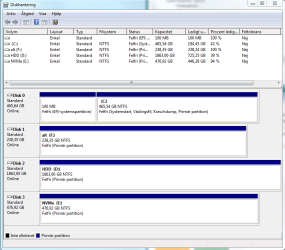
Please post a Disk Manger image as an attachment.
Open Disk Manger, expand the window and the columns so we can read them. With the Snipping tool, take a snapshot of the whole image, save to your disk.
Use the paper clip on the Quick Reply window. Browse to the image - upload

Where did you get the Win 7 installation iso with all the needed drivers to install on a M.2 MVMe drive?
 

My Computers My Computers

  • At a glance

    Windows 7 HP 64i5 6600K - 800MHz to 4200MHz4+4G GSkill DDR4 3000IG - Intel 530
    Computer type
    PC/Desktop
    Computer Manufacturer/Model Number
    custom build
    OS
    Windows 7 HP 64
    CPU
    i5 6600K - 800MHz to 4200MHz
    Motherboard
    GA-Z170-HD3P
    Memory
    4+4G GSkill DDR4 3000
    Graphics Card(s)
    IG - Intel 530
    Monitor(s) Displays
    Samsung 226BW
    Screen Resolution
    1680x1050
    Hard Drives
    (1) -1 SM951 – 128GB M.2 AHCI PCIe SSD drive for Windows 7 and Lubuntu
    (2) -1 WD SATA 3 - 1T for Data
    (3) -1 WD SATA 3 - 1T for backup
    PSU
    Thermaltake 450W TR2 gold
    Keyboard
    Old and good Chicony mechanical keyboard
    Mouse
    Logitech mX performance - 9 buttons (had to disable some)
    Internet Speed
    500Mb/s
    Browser
    Firefox 64
    Other Info
    TinyWall firewall
  • At a glance

    Windows 7 Proi7-4500U 800MHz to 3.0GHz(4+4)G DDR3 1600IG intel 4400 + NVIDIA GeForce GT 745M
    Computer type
    Laptop
    System Manufacturer/Model Number
    Asus Q550LF
    OS
    Windows 7 Pro
    CPU
    i7-4500U 800MHz to 3.0GHz
    Motherboard
    Asus Q550LF
    Memory
    (4+4)G DDR3 1600
    Graphics Card(s)
    IG intel 4400 + NVIDIA GeForce GT 745M
    Sound Card
    Realtek
    Monitor(s) Displays
    LG Display LP156WF4-SPH1
    Screen Resolution
    1920 x 1080
    Hard Drives
    BX500 120G SSD for Windows and programs +
    1T HDD for data
    Internet Speed
    500 Mb/s
    Browser
    Firefox
    Other Info
    TinyWall firewall
Please post a Disk Manger image as an attachment.
Open Disk Manger, expand the window and the columns so we can read them. With the Snipping tool, take a snapshot of the whole image, save to your disk.
Use the paper clip on the Quick Reply window. Browse to the image - upload

Where did you get the Win 7 installation iso with all the needed drivers to install on a M.2 MVMe drive?
I just downloaded a clean iso straight from Microsoft and installed the required USB and NVMe drivers through the Windows 7 installer when it asked me to, the operating system then installed successfully with no problems.
 

Attachments

  • diskmanager.png
    diskmanager.png
    25.3 KB · Views: 0

My Computer My Computer

At a glance

Windows 7 Professional x64i9 9900K16 GB 3000mzNVIDIA Geforce GTX 970
Computer type
PC/Desktop
OS
Windows 7 Professional x64
CPU
i9 9900K
Motherboard
MSI MPG Z390 Gaming Pro Carbon
Memory
16 GB 3000mz
Graphics Card(s)
NVIDIA Geforce GTX 970
PSU
EVGA Supernova 750W G3
Are you still experiencing slow boot time? You hasn't told if you just did a clean install right now
 

My Computer My Computer

At a glance

Windows 7 Professional SP1 - x64 [Non-UEFI Boot]Ivy Bridge Core i5 3570K (Delidded)G.Skill "Ares" DDR3 PC3-12800 - 1600MHz (16Gb)Asus Dual-RX480-O4G
Computer type
PC/Desktop
Computer Manufacturer/Model Number
Custom Build
OS
Windows 7 Professional SP1 - x64 [Non-UEFI Boot]
CPU
Ivy Bridge Core i5 3570K (Delidded)
Motherboard
Asus P8Z77-V LE PLUS
Memory
G.Skill "Ares" DDR3 PC3-12800 - 1600MHz (16Gb)
Graphics Card(s)
Asus Dual-RX480-O4G
Sound Card
Creative Sound Blaster Z w/5.1 sound system
Monitor(s) Displays
Asus IPS 23"
Screen Resolution
16/9
Hard Drives
Internal:
500Go Sata 6Gb/s (x2)
500Go Sata 3Gb/s (x2)
SSD 60Go Sata 6Gb/s
PSU
In Win C 900W Series 80+ Platinum
Case
Thermaltake Chaser A71
Cooling
Custom Water Cooling Loop
Keyboard
Cooler Master QuickFire XTi
Mouse
Razer Imperator 2012 (4G)
Antivirus
MSE
Browser
IE 11.0.xxx Rtm
Other Info
"Raid0" with Intel Smart Response Technology (HDD/SSD)
Are you still experiencing slow boot time? You hasn't told if you just did a clean install right now
Yes, normal boot and safe mode boot are both very slow. I have clean installed Windows 7 like 3 times on different hard drives and the same thing happens every time.
 

My Computer My Computer

At a glance

Windows 7 Professional x64i9 9900K16 GB 3000mzNVIDIA Geforce GTX 970
Computer type
PC/Desktop
OS
Windows 7 Professional x64
CPU
i9 9900K
Motherboard
MSI MPG Z390 Gaming Pro Carbon
Memory
16 GB 3000mz
Graphics Card(s)
NVIDIA Geforce GTX 970
PSU
EVGA Supernova 750W G3
Your Windows isn't installed on the fast MVMe drive, it is installed on drive 0. Why?
Is drive 0 a SSD?
 

My Computers My Computers

  • At a glance

    Windows 7 HP 64i5 6600K - 800MHz to 4200MHz4+4G GSkill DDR4 3000IG - Intel 530
    Computer type
    PC/Desktop
    Computer Manufacturer/Model Number
    custom build
    OS
    Windows 7 HP 64
    CPU
    i5 6600K - 800MHz to 4200MHz
    Motherboard
    GA-Z170-HD3P
    Memory
    4+4G GSkill DDR4 3000
    Graphics Card(s)
    IG - Intel 530
    Monitor(s) Displays
    Samsung 226BW
    Screen Resolution
    1680x1050
    Hard Drives
    (1) -1 SM951 – 128GB M.2 AHCI PCIe SSD drive for Windows 7 and Lubuntu
    (2) -1 WD SATA 3 - 1T for Data
    (3) -1 WD SATA 3 - 1T for backup
    PSU
    Thermaltake 450W TR2 gold
    Keyboard
    Old and good Chicony mechanical keyboard
    Mouse
    Logitech mX performance - 9 buttons (had to disable some)
    Internet Speed
    500Mb/s
    Browser
    Firefox 64
    Other Info
    TinyWall firewall
  • At a glance

    Windows 7 Proi7-4500U 800MHz to 3.0GHz(4+4)G DDR3 1600IG intel 4400 + NVIDIA GeForce GT 745M
    Computer type
    Laptop
    System Manufacturer/Model Number
    Asus Q550LF
    OS
    Windows 7 Pro
    CPU
    i7-4500U 800MHz to 3.0GHz
    Motherboard
    Asus Q550LF
    Memory
    (4+4)G DDR3 1600
    Graphics Card(s)
    IG intel 4400 + NVIDIA GeForce GT 745M
    Sound Card
    Realtek
    Monitor(s) Displays
    LG Display LP156WF4-SPH1
    Screen Resolution
    1920 x 1080
    Hard Drives
    BX500 120G SSD for Windows and programs +
    1T HDD for data
    Internet Speed
    500 Mb/s
    Browser
    Firefox
    Other Info
    TinyWall firewall
Your Windows isn't installed on the fast MVMe drive, it is installed on drive 0. Why?
Is drive 0 a SSD?
Yes, drive 0 is an SSD, and I previously had the OS installed on both disk 3 and disk 1, the OS boots slowly on all of them.
 
Last edited:

My Computer My Computer

At a glance

Windows 7 Professional x64i9 9900K16 GB 3000mzNVIDIA Geforce GTX 970
Computer type
PC/Desktop
OS
Windows 7 Professional x64
CPU
i9 9900K
Motherboard
MSI MPG Z390 Gaming Pro Carbon
Memory
16 GB 3000mz
Graphics Card(s)
NVIDIA Geforce GTX 970
PSU
EVGA Supernova 750W G3

My Computers My Computers

  • At a glance

    Windows 7 HP 64i5 6600K - 800MHz to 4200MHz4+4G GSkill DDR4 3000IG - Intel 530
    Computer type
    PC/Desktop
    Computer Manufacturer/Model Number
    custom build
    OS
    Windows 7 HP 64
    CPU
    i5 6600K - 800MHz to 4200MHz
    Motherboard
    GA-Z170-HD3P
    Memory
    4+4G GSkill DDR4 3000
    Graphics Card(s)
    IG - Intel 530
    Monitor(s) Displays
    Samsung 226BW
    Screen Resolution
    1680x1050
    Hard Drives
    (1) -1 SM951 – 128GB M.2 AHCI PCIe SSD drive for Windows 7 and Lubuntu
    (2) -1 WD SATA 3 - 1T for Data
    (3) -1 WD SATA 3 - 1T for backup
    PSU
    Thermaltake 450W TR2 gold
    Keyboard
    Old and good Chicony mechanical keyboard
    Mouse
    Logitech mX performance - 9 buttons (had to disable some)
    Internet Speed
    500Mb/s
    Browser
    Firefox 64
    Other Info
    TinyWall firewall
  • At a glance

    Windows 7 Proi7-4500U 800MHz to 3.0GHz(4+4)G DDR3 1600IG intel 4400 + NVIDIA GeForce GT 745M
    Computer type
    Laptop
    System Manufacturer/Model Number
    Asus Q550LF
    OS
    Windows 7 Pro
    CPU
    i7-4500U 800MHz to 3.0GHz
    Motherboard
    Asus Q550LF
    Memory
    (4+4)G DDR3 1600
    Graphics Card(s)
    IG intel 4400 + NVIDIA GeForce GT 745M
    Sound Card
    Realtek
    Monitor(s) Displays
    LG Display LP156WF4-SPH1
    Screen Resolution
    1920 x 1080
    Hard Drives
    BX500 120G SSD for Windows and programs +
    1T HDD for data
    Internet Speed
    500 Mb/s
    Browser
    Firefox
    Other Info
    TinyWall firewall

My Computer My Computer

At a glance

Windows 7 Professional x64i9 9900K16 GB 3000mzNVIDIA Geforce GTX 970
Computer type
PC/Desktop
OS
Windows 7 Professional x64
CPU
i9 9900K
Motherboard
MSI MPG Z390 Gaming Pro Carbon
Memory
16 GB 3000mz
Graphics Card(s)
NVIDIA Geforce GTX 970
PSU
EVGA Supernova 750W G3
30 sec is average. I have a M.2 drive. It takes longer to boot than a 2.5 SSD. The answer is ALL other software to load, specially antivirus.
Open MSconfig and set to a clean boot (disable all non MS services and all startup programs)
 

My Computers My Computers

  • At a glance

    Windows 7 HP 64i5 6600K - 800MHz to 4200MHz4+4G GSkill DDR4 3000IG - Intel 530
    Computer type
    PC/Desktop
    Computer Manufacturer/Model Number
    custom build
    OS
    Windows 7 HP 64
    CPU
    i5 6600K - 800MHz to 4200MHz
    Motherboard
    GA-Z170-HD3P
    Memory
    4+4G GSkill DDR4 3000
    Graphics Card(s)
    IG - Intel 530
    Monitor(s) Displays
    Samsung 226BW
    Screen Resolution
    1680x1050
    Hard Drives
    (1) -1 SM951 – 128GB M.2 AHCI PCIe SSD drive for Windows 7 and Lubuntu
    (2) -1 WD SATA 3 - 1T for Data
    (3) -1 WD SATA 3 - 1T for backup
    PSU
    Thermaltake 450W TR2 gold
    Keyboard
    Old and good Chicony mechanical keyboard
    Mouse
    Logitech mX performance - 9 buttons (had to disable some)
    Internet Speed
    500Mb/s
    Browser
    Firefox 64
    Other Info
    TinyWall firewall
  • At a glance

    Windows 7 Proi7-4500U 800MHz to 3.0GHz(4+4)G DDR3 1600IG intel 4400 + NVIDIA GeForce GT 745M
    Computer type
    Laptop
    System Manufacturer/Model Number
    Asus Q550LF
    OS
    Windows 7 Pro
    CPU
    i7-4500U 800MHz to 3.0GHz
    Motherboard
    Asus Q550LF
    Memory
    (4+4)G DDR3 1600
    Graphics Card(s)
    IG intel 4400 + NVIDIA GeForce GT 745M
    Sound Card
    Realtek
    Monitor(s) Displays
    LG Display LP156WF4-SPH1
    Screen Resolution
    1920 x 1080
    Hard Drives
    BX500 120G SSD for Windows and programs +
    1T HDD for data
    Internet Speed
    500 Mb/s
    Browser
    Firefox
    Other Info
    TinyWall firewall
30 sec is average. I have a M.2 drive. It takes longer to boot than a 2.5 SSD. The answer is ALL other software to load, specially antivirus.
Open MSconfig and set to a clean boot (disable all non MS services and all startup programs)
I know that it has nothing to do with any third party programs, because the PC started slow even when the OS was just installed with 0 programs. Also, booting into safe mode takes extremely long time since it loads about 1 driver a second instead of like 10 drivers a second like it usually does, I know something is wrong here. It can't be the M.2 drive either because I have Windows installed on literally 3 different brand new drives and it boots slowly on all of them. This is not normal, especially since this PC takes about 5 times longer to boot than my older PC that has way worse specs, it makes no sense. It has to be something with my motherboard or something, I don't know.
 

My Computer My Computer

At a glance

Windows 7 Professional x64i9 9900K16 GB 3000mzNVIDIA Geforce GTX 970
Computer type
PC/Desktop
OS
Windows 7 Professional x64
CPU
i9 9900K
Motherboard
MSI MPG Z390 Gaming Pro Carbon
Memory
16 GB 3000mz
Graphics Card(s)
NVIDIA Geforce GTX 970
PSU
EVGA Supernova 750W G3
Did you try a Clean boot?
Clean boot is not the same as safe mode.
Open MSconfig and disable all non MS services and all startup programs.


You can trace startup and shutdown.
Have a look at Why it takes so long to shut down?
 

My Computers My Computers

  • At a glance

    Windows 7 HP 64i5 6600K - 800MHz to 4200MHz4+4G GSkill DDR4 3000IG - Intel 530
    Computer type
    PC/Desktop
    Computer Manufacturer/Model Number
    custom build
    OS
    Windows 7 HP 64
    CPU
    i5 6600K - 800MHz to 4200MHz
    Motherboard
    GA-Z170-HD3P
    Memory
    4+4G GSkill DDR4 3000
    Graphics Card(s)
    IG - Intel 530
    Monitor(s) Displays
    Samsung 226BW
    Screen Resolution
    1680x1050
    Hard Drives
    (1) -1 SM951 – 128GB M.2 AHCI PCIe SSD drive for Windows 7 and Lubuntu
    (2) -1 WD SATA 3 - 1T for Data
    (3) -1 WD SATA 3 - 1T for backup
    PSU
    Thermaltake 450W TR2 gold
    Keyboard
    Old and good Chicony mechanical keyboard
    Mouse
    Logitech mX performance - 9 buttons (had to disable some)
    Internet Speed
    500Mb/s
    Browser
    Firefox 64
    Other Info
    TinyWall firewall
  • At a glance

    Windows 7 Proi7-4500U 800MHz to 3.0GHz(4+4)G DDR3 1600IG intel 4400 + NVIDIA GeForce GT 745M
    Computer type
    Laptop
    System Manufacturer/Model Number
    Asus Q550LF
    OS
    Windows 7 Pro
    CPU
    i7-4500U 800MHz to 3.0GHz
    Motherboard
    Asus Q550LF
    Memory
    (4+4)G DDR3 1600
    Graphics Card(s)
    IG intel 4400 + NVIDIA GeForce GT 745M
    Sound Card
    Realtek
    Monitor(s) Displays
    LG Display LP156WF4-SPH1
    Screen Resolution
    1920 x 1080
    Hard Drives
    BX500 120G SSD for Windows and programs +
    1T HDD for data
    Internet Speed
    500 Mb/s
    Browser
    Firefox
    Other Info
    TinyWall firewall
Back
Top