Windows 7 on Modern Hardware

Csabi

New member
Local time
6:16 PM
Messages
1
Good Morning! (Sorry for my bad english, im hungarian)

I Have a PC what i i use everyday with Windows 10. I Want to Switch to Windows 7 (Windows 10 is terrible).

My Specs:
CPU:I5 9400F
Motherboard:Aorus B365 M Elite
Video Card: Gigabyte GTX 1050 Ti
OS:Windows 10 Pro
Storage: 256GB SSD
Toshiba 1TB
RAM:8GB HyperX

i did not found anything on Google, YouTube to this config. Please Help.


Update: i forgot to write i have used Gigabyte USB Tool.
My question is only if i install Win7 and drivers. It will work normally?
 

My Computers

System One System Two

  • Computer type
    PC/Desktop
    Computer Manufacturer/Model Number
    Aorus
    OS
    Windows 10 Pro 64bit
    CPU
    Intel Core I5 9400F
    Motherboard
    Aorus B365m Elite
    Memory
    8GB HyperX
    Graphics Card(s)
    Gigabyte Geforce GTX 1050 Ti
    Hard Drives
    EmmC 2.0 SSD 256GB
    Toshiba 1TB
    Antivirus
    Eset Internet Security
    Browser
    Firefox
  • Computer type
    PC/Desktop
Welcome Csabi

Yes, you can do that.

http://www.biostar.com.tw/utility/WindowsTool.zip

OR you could use Update your Win 7 installation media

created an iso with the biostar tool(w7 pro 64bit, no updates etc) and installed onto a Gigabyte B365M DS3H(G5400, 4gb Ballistix Sport, BX500 120gb ssd), keyboard and rodent connected to usb2 ports on IO panel, usb2 key in a usb3 port, no problems, tool and drivers work.

Install Windows 7 and 8.1 onto Intel 8th, 9th, 10th(inc refresh) and 11th generation | Page 5 | NTLite Forums

What is the id of network card in your Aorus B365 M Elite ?

There are also drivers from canonkong for 9th gen graphics HERE, but you wont need them because you have separate graphics card.
Update your Win 7 installation media


NOTE:
Can also install win7 on 10th/11th gen Gigabyte B560M, there are no win7 graphics drivers for the 9th and 10th gen cpu so a separate graphics card is needed. Most desktop users have a separate graphics card anyway, so it is not an issue.
 
Last edited:

My Computers

System One System Two

  • Computer type
    PC/Desktop
    OS
    7 X64
    CPU
    i5 8400
    Motherboard
    gigabyte b365m ds3h
    Memory
    2x8gb 3200mhz
    Hard Drives
    various
    PSU
    pure power 11 400w cm
    Case
    Coolermaster
    Cooling
    cryorig m9i
  • Computer type
    PC/Desktop
    OS
    7x64
    CPU
    g5400
    Motherboard
    ga b365m ds3h
    Memory
    8gb ddr4 2400
    PSU
    xfx pro 450w
My Specs:
CPU: I5 9400F
Motherboard: Aorus B365 M Elite
Video Card: Gigabyte GTX 1050 Ti
OS: Windows 10 Pro
Storage: 256GB SSD
Toshiba 1TB
RAM: 8GB HyperX
Csabi:
The motherboard in your computer supports up to 64 GB(16 GB x 4) of DDR4 RAM.
It has an impressive performing processor and graphics card.
You are handicapping it by having only 8 GB of RAM in it.
You should increase the amount to at least 16 GB.
If you use it primarily for gaming, you should increase it to 32 GB.
 

My Computer

Computer type
PC/Desktop
Computer Manufacturer/Model Number
Dell OptiPlex 9020
OS
Windows 7 Professional SP1 64-bit
CPU
Intel Core i7-4790 3.60 GHz
Memory
32 GB DDR3-1600 MHz
Graphics Card(s)
Integrated Intel HD Graphics 4600
Monitor(s) Displays
Viewsonic 32" LCD
Hard Drives
Kingston SATA 3 240 GB SSD
Internet Speed
Spectrum Internet 1000 Mbps
(im logged in from another account)
Thanks For Everyone who helped. Succesfully installed Windows 7 Professional 64bit.
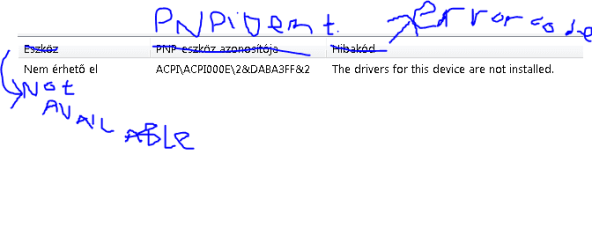
But i have 1 issue. In Device Manager i have an unknown device: ACPI000E. If i search for it nothing found, and Hard Disk Sentinel Says No NvmE SSD Driver Installed. So i think its my SSD Driver. But I Cant Find It. I Downloaded Gigabyte Dashboard and its says the same.

So, Please Help Me. I Dont want back to Windows 10.
 

My Computers

System One System Two

  • OS
    Windows 7 Professional 64bit
  • Computer type
    PC/Desktop
    Antivirus
    ESET NOD32 Antivirus, Avira, AVG
In Device Manager i have an unknown device: ACPI000E..
Hard Disk Sentinel Says No NvmE SSD Driver Installed. So i think its my SSD Driver

1. What is the exact make and model of your nvme ssd ?

2. can you post the pnp device id msinfo32>components>problem devices
 

My Computers

System One System Two

  • Computer type
    PC/Desktop
    OS
    7 X64
    CPU
    i5 8400
    Motherboard
    gigabyte b365m ds3h
    Memory
    2x8gb 3200mhz
    Hard Drives
    various
    PSU
    pure power 11 400w cm
    Case
    Coolermaster
    Cooling
    cryorig m9i
  • Computer type
    PC/Desktop
    OS
    7x64
    CPU
    g5400
    Motherboard
    ga b365m ds3h
    Memory
    8gb ddr4 2400
    PSU
    xfx pro 450w
1.And my answes:i have a TP-Link WN722N WiFi adapter.
2.I Cant incerase memory, beacuse i have guarantee.
 

My Computers

System One System Two

  • OS
    Windows 7 Professional 64bit
  • Computer type
    PC/Desktop
    Antivirus
    ESET NOD32 Antivirus, Avira, AVG
Is the wifi OK ?

what is the exact make and model of your ssd?
 

My Computers

System One System Two

  • Computer type
    PC/Desktop
    OS
    7 X64
    CPU
    i5 8400
    Motherboard
    gigabyte b365m ds3h
    Memory
    2x8gb 3200mhz
    Hard Drives
    various
    PSU
    pure power 11 400w cm
    Case
    Coolermaster
    Cooling
    cryorig m9i
  • Computer type
    PC/Desktop
    OS
    7x64
    CPU
    g5400
    Motherboard
    ga b365m ds3h
    Memory
    8gb ddr4 2400
    PSU
    xfx pro 450w
what is the make and model of the ssd?
 

My Computers

System One System Two

  • Computer type
    PC/Desktop
    OS
    7 X64
    CPU
    i5 8400
    Motherboard
    gigabyte b365m ds3h
    Memory
    2x8gb 3200mhz
    Hard Drives
    various
    PSU
    pure power 11 400w cm
    Case
    Coolermaster
    Cooling
    cryorig m9i
  • Computer type
    PC/Desktop
    OS
    7x64
    CPU
    g5400
    Motherboard
    ga b365m ds3h
    Memory
    8gb ddr4 2400
    PSU
    xfx pro 450w
WiFi:Ok
SSD:WDC PC SN520 SDA
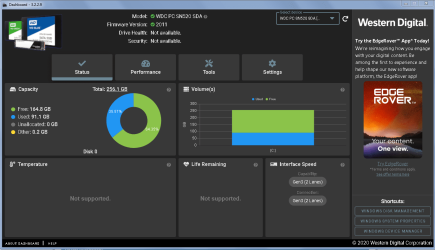
And when im checkd:
ssd.PNG

- - - Updated - - -

ssd1.PNG
i see this in every utility.

- - - Updated - - -

The SSD Started Get So Hot. 50 celsius.
 

My Computers

System One System Two

  • OS
    Windows 7 Professional 64bit
  • Computer type
    PC/Desktop
    Antivirus
    ESET NOD32 Antivirus, Avira, AVG
Thanks, im trying it now.

- - - Updated - - -

Not Work.

- - - Updated - - -

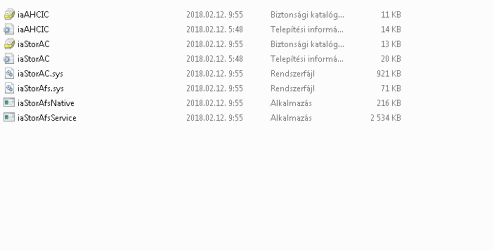
i found this driver but i dont know how to install it.files.PNG

- - - Updated - - -

the exes cant run, this is from the official aorus website.
 

My Computers

System One System Two

  • OS
    Windows 7 Professional 64bit
  • Computer type
    PC/Desktop
    Antivirus
    ESET NOD32 Antivirus, Avira, AVG
the exes cant run, this is from the official aorus website.

Is it for windows 7 ?
 

My Computers

System One System Two

  • Computer type
    PC/Desktop
    OS
    7 X64
    CPU
    i5 8400
    Motherboard
    gigabyte b365m ds3h
    Memory
    2x8gb 3200mhz
    Hard Drives
    various
    PSU
    pure power 11 400w cm
    Case
    Coolermaster
    Cooling
    cryorig m9i
  • Computer type
    PC/Desktop
    OS
    7x64
    CPU
    g5400
    Motherboard
    ga b365m ds3h
    Memory
    8gb ddr4 2400
    PSU
    xfx pro 450w
You have an unusual nvme disk.

You can try the specially ported ms nvme driver View attachment msnvme_Win7_Server2008R2.zip

You can install drivers ( sys,cat,inf) with dism++. Attached at the bottom of all my posts.

Nvme disks always run hot. They made some improvements on the wd sn550. Many people buy separate heat sinks and make sure there is airflow - many people also add extra fans, you probably have fan headers for extra case fans on the motherboard

Ther are many nvme heat sinks available , for example:

Pure Copper Graphene Heatsink M.2 NGFF 2280 PCI E NVME SSD Thermal Pad Cooler| | - AliExpress

ICY BOX M.2 Cooler with Fan and Heatpipe Heatsink for M.2 NVMe & SATA SSD up to 2280, 30 mm Fan Active, Thermal Pad Included : Amazon.co.uk: Computers & Accessories
 
Last edited:

My Computers

System One System Two

  • Computer type
    PC/Desktop
    OS
    7 X64
    CPU
    i5 8400
    Motherboard
    gigabyte b365m ds3h
    Memory
    2x8gb 3200mhz
    Hard Drives
    various
    PSU
    pure power 11 400w cm
    Case
    Coolermaster
    Cooling
    cryorig m9i
  • Computer type
    PC/Desktop
    OS
    7x64
    CPU
    g5400
    Motherboard
    ga b365m ds3h
    Memory
    8gb ddr4 2400
    PSU
    xfx pro 450w
Thanks for the help. I try it :)

- - - Updated - - -

where i can add the drivers?
in dism+++
 

My Computers

System One System Two

  • OS
    Windows 7 Professional 64bit
  • Computer type
    PC/Desktop
    Antivirus
    ESET NOD32 Antivirus, Avira, AVG
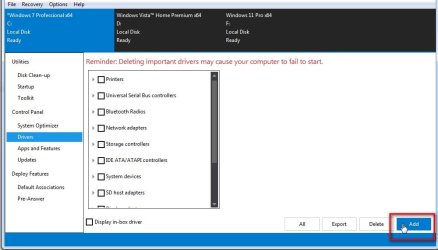
It say Drivers in the left pane. click it.

dism++drivers.jpg


Then click ADD and browse to the FOLDER containing the sys cat and inf files

dism++driversADD.jpg
 

My Computers

System One System Two

  • Computer type
    PC/Desktop
    OS
    7 X64
    CPU
    i5 8400
    Motherboard
    gigabyte b365m ds3h
    Memory
    2x8gb 3200mhz
    Hard Drives
    various
    PSU
    pure power 11 400w cm
    Case
    Coolermaster
    Cooling
    cryorig m9i
  • Computer type
    PC/Desktop
    OS
    7x64
    CPU
    g5400
    Motherboard
    ga b365m ds3h
    Memory
    8gb ddr4 2400
    PSU
    xfx pro 450w
Oh, Thanks.

- - - Updated - - -

This isnt Worked.

- - - Updated - - -

i installed the driver but nothing happen.

- - - Updated - - -

but the ssd are incredibly smoother than in Windows 10.

- - - Updated - - -

Only i cannot see the health, everything works good.
 

My Computers

System One System Two

  • OS
    Windows 7 Professional 64bit
  • Computer type
    PC/Desktop
    Antivirus
    ESET NOD32 Antivirus, Avira, AVG
I am not familiar with that wd nvme, maybe it is an oem version which dashboard doesnt work for ?

The wd we buy in the uk is a different model.

WD Blue SN550 1TB High-Performance M.2 PCIe NVME SSD : Amazon.co.uk: Computers & Accessories

- - - Updated - - -

I just found this which is an old one. so maybe it was for sale. I dont know why dashboard does not recognize it.
WD Western Digital PC SN520 NVMe 128GB M.2 PCI Express 3.0 - Western Digital PC SN520 NVMe 128GB, 128 GB, M.2, 1500 MB/s : Amazon.co.uk: Computers & Accessories

- - - Updated - - -

Here it says it should be compatible with dashboard. I have no idea why it isnt showing in yours

Western Digital PC SN520 NVMe SSD Support Information Page
 

My Computers

System One System Two

  • Computer type
    PC/Desktop
    OS
    7 X64
    CPU
    i5 8400
    Motherboard
    gigabyte b365m ds3h
    Memory
    2x8gb 3200mhz
    Hard Drives
    various
    PSU
    pure power 11 400w cm
    Case
    Coolermaster
    Cooling
    cryorig m9i
  • Computer type
    PC/Desktop
    OS
    7x64
    CPU
    g5400
    Motherboard
    ga b365m ds3h
    Memory
    8gb ddr4 2400
    PSU
    xfx pro 450w
Thanks for your help. The SSD Only not showing the health, but everything good.
 

My Computers

System One System Two

  • OS
    Windows 7 Professional 64bit
  • Computer type
    PC/Desktop
    Antivirus
    ESET NOD32 Antivirus, Avira, AVG
Back
Top