
HDD not booting Toshiba l770

OverEight

New member
Member
Local time
9:27 PM
Messages
63
Streamable - free video publishing

Pretty sure the orange light on the laptop is for the HDD, and it's not turning on, as seen in the vid. Screen is still dark but the PSU seems to work.

Laptop has also been randomly turning on at midnight, possibly because of an update, not sure if relavant but worth noting.

Using Windows 10.
 

My Computers My Computers

  • At a glance

    Windows 7 Professional x64Intel Mobile Core i5-2450M 2.50GHz? (8GB)?
    Computer type
    PC/Desktop
    Computer Manufacturer/Model Number
    Toshiba
    OS
    Windows 7 Professional x64
    CPU
    Intel Mobile Core i5-2450M 2.50GHz
    Motherboard
    ?
    Memory
    ? (8GB)
    Graphics Card(s)
    ?
    Hard Drives
    ?
    Antivirus
    Avast Free
    Browser
    Chrome
  • Antivirus
    Avast Free and MBAM Pro (latest) w/ additional on demand scanners on usb
You need to go to tenforums.com as this is the Windows 7 forums.
 

My Computer My Computer

At a glance

Windows 7 Ultimate x64
Computer type
PC/Desktop
OS
Windows 7 Ultimate x64
Does the bios see the hd?
 

My Computer My Computer

At a glance

win 8 32 bit
Computer type
PC/Desktop
OS
win 8 32 bit
Pretty sure the orange light on the laptop is for the HDD, and it's not turning on...


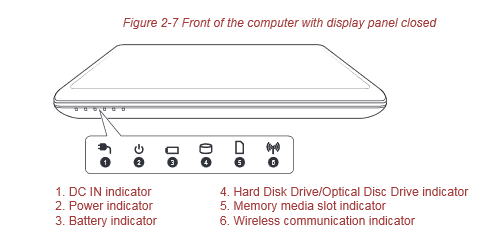
I have an L750 with the same lights as your L770. No, the HDD light is white, and then only when there's disk activity. The only amber LEDs are for the battery (when charging, white when fully charged) and the WiFi (when turned on). See Chapter 2, page 9 in the User manual available here: Satellite L770 (PSK3SC-00R004) Support | Dynabook


Toshiba Manual said:
The Hard Disk Drive/Optical Disc Drive indicator blinks white whenever the computer is accessing the built-in hard disk drive or optical disc drive.
 

Attachments

  • Toshiba L770 front edge LEDs.PNG
    Toshiba L770 front edge LEDs.PNG
    5.4 KB · Views: 11

My Computers My Computers

  • At a glance

    Windows 7 Home Premium x64AMD V1204GB
    Computer type
    Laptop
    Computer Manufacturer/Model Number
    Toshiba satellite C650D
    OS
    Windows 7 Home Premium x64
    CPU
    AMD V120
    Memory
    4GB
    Internet Speed
    150 Mbps
    Antivirus
    MSE
    Browser
    IE11, Edge, Firefox
    Other Info
    I also have W7 Pro on my System Two, and several W7 Hyper-V VMs. My other machines run Windows 10/11. Their specs are in my Ten Forums & Eleven Forum profiles.
  • At a glance

    Windows 7 Pro x64Intel i5-3320M8 GB
    Computer type
    Laptop
    System Manufacturer/Model Number
    Lenovo Thinkpad T430
    OS
    Windows 7 Pro x64
    CPU
    Intel i5-3320M
    Memory
    8 GB
    Hard Drives
    250GB Samsung SSD 860 EVO
    Antivirus
    MSE
^It's the fourth light that's off, so actually I think it is the HDD. Should I just repost to tenforums?
 

My Computers My Computers

  • At a glance

    Windows 7 Professional x64Intel Mobile Core i5-2450M 2.50GHz? (8GB)?
    Computer type
    PC/Desktop
    Computer Manufacturer/Model Number
    Toshiba
    OS
    Windows 7 Professional x64
    CPU
    Intel Mobile Core i5-2450M 2.50GHz
    Motherboard
    ?
    Memory
    ? (8GB)
    Graphics Card(s)
    ?
    Hard Drives
    ?
    Antivirus
    Avast Free
    Browser
    Chrome
  • Antivirus
    Avast Free and MBAM Pro (latest) w/ additional on demand scanners on usb
Myself and other tenforum users are on here you didnt reply does the BIOS see the HD
 

My Computer My Computer

At a glance

win 8 32 bit
Computer type
PC/Desktop
OS
win 8 32 bit
^It's the fourth light that's off, so actually I think it is the HDD. Should I just repost to tenforums?

You're not actually getting as far as Windows of any sort. This is a hardware issue, not a Windows one, so it hardly matters which forum you post on.

From your video, I see no sign of the Toshiba splash screen at start up. It look like the bios isn't even getting as far as completing its POST tests.

As it happens, my L750 had exactly that problem 6 months ago. The HDD (its original TOSHIBA MK5065GSXN 500GB) had developed a fault that prevented the bios from starting up. Not only that, but the HDD would prevent ANY machine it was connected to from booting, even when in a usb external enclosure.

Bree said:
The only way to get the PC to boot from anything, USB, CD/DVD or HDD was to remove the original HDD. Controller failure? Not on the motherboard at least, I replace the HDD with one containing an installed Windows 10 and that booted correctly. The machine could also boot from USB while any HDD (apart from the original one) was present.

OK, so it must be the internal controller of the HDD that was at fault. But here comes the really strange bit - put it in an external USB housing and it is fully functional (read and write) and Chkdsk says it's healthy, BUT....

....if this disk is left connected, even in the USB enclosure, no PC it is connected to can boot from anything, its own HDD or a USB.
Unusual HDD fault Solved - Windows 10 Forums

But, strangely, after testing it for a while it spontaneously cured itself. In fact, I'm posting this from the L750 with that same HDD back in place.


If you cannot even get as far as the BIOS, then remove the HDD and see if the BIOS then works normally. Try the HDD in a usb enclosure if you have one. See if it can be recognised by another PC. If you are (very) lucky it may just be a temporary glitch (as mine was).

If not, you may have to replace the HDD. If so, I hope you have a system image you can restore to the new drive.
 

My Computers My Computers

  • At a glance

    Windows 7 Home Premium x64AMD V1204GB
    Computer type
    Laptop
    Computer Manufacturer/Model Number
    Toshiba satellite C650D
    OS
    Windows 7 Home Premium x64
    CPU
    AMD V120
    Memory
    4GB
    Internet Speed
    150 Mbps
    Antivirus
    MSE
    Browser
    IE11, Edge, Firefox
    Other Info
    I also have W7 Pro on my System Two, and several W7 Hyper-V VMs. My other machines run Windows 10/11. Their specs are in my Ten Forums & Eleven Forum profiles.
  • At a glance

    Windows 7 Pro x64Intel i5-3320M8 GB
    Computer type
    Laptop
    System Manufacturer/Model Number
    Lenovo Thinkpad T430
    OS
    Windows 7 Pro x64
    CPU
    Intel i5-3320M
    Memory
    8 GB
    Hard Drives
    250GB Samsung SSD 860 EVO
    Antivirus
    MSE
Do you have a healthy battery? Bad battery can make the laptop un boot able.

As Bree suggested, take the disk out and see if you have a POST.
 

My Computers My Computers

  • At a glance

    Windows 7 HP 64i5 6600K - 800MHz to 4200MHz4+4G GSkill DDR4 3000IG - Intel 530
    Computer type
    PC/Desktop
    Computer Manufacturer/Model Number
    custom build
    OS
    Windows 7 HP 64
    CPU
    i5 6600K - 800MHz to 4200MHz
    Motherboard
    GA-Z170-HD3P
    Memory
    4+4G GSkill DDR4 3000
    Graphics Card(s)
    IG - Intel 530
    Monitor(s) Displays
    Samsung 226BW
    Screen Resolution
    1680x1050
    Hard Drives
    (1) -1 SM951 – 128GB M.2 AHCI PCIe SSD drive for Windows 7 and Lubuntu
    (2) -1 WD SATA 3 - 1T for Data
    (3) -1 WD SATA 3 - 1T for backup
    PSU
    Thermaltake 450W TR2 gold
    Keyboard
    Old and good Chicony mechanical keyboard
    Mouse
    Logitech mX performance - 9 buttons (had to disable some)
    Internet Speed
    500Mb/s
    Browser
    Firefox 64
    Other Info
    TinyWall firewall
  • At a glance

    Windows 7 Proi7-4500U 800MHz to 3.0GHz(4+4)G DDR3 1600IG intel 4400 + NVIDIA GeForce GT 745M
    Computer type
    Laptop
    System Manufacturer/Model Number
    Asus Q550LF
    OS
    Windows 7 Pro
    CPU
    i7-4500U 800MHz to 3.0GHz
    Motherboard
    Asus Q550LF
    Memory
    (4+4)G DDR3 1600
    Graphics Card(s)
    IG intel 4400 + NVIDIA GeForce GT 745M
    Sound Card
    Realtek
    Monitor(s) Displays
    LG Display LP156WF4-SPH1
    Screen Resolution
    1920 x 1080
    Hard Drives
    BX500 120G SSD for Windows and programs +
    1T HDD for data
    Internet Speed
    500 Mb/s
    Browser
    Firefox
    Other Info
    TinyWall firewall
Bree said:
If you cannot even get as far as the BIOS, then remove the HDD and see if the BIOS then works normally. Try the HDD in a usb enclosure if you have one. See if it can be recognised by another PC. If you are (very) lucky it may just be a temporary glitch (as mine was).

It can be registered/read on my other PC so it's not the drive, tried putting it back into my laptop but it still wouldn't start. I can't/am not going to put it in a seperate PC because if all the effort plus not having an easy way to do that so... Now what? It can still be read. Doubt it's the battery, the power cable works fine and it still starts with the fans without the battery but never reaches BIOS.
 

My Computers My Computers

  • At a glance

    Windows 7 Professional x64Intel Mobile Core i5-2450M 2.50GHz? (8GB)?
    Computer type
    PC/Desktop
    Computer Manufacturer/Model Number
    Toshiba
    OS
    Windows 7 Professional x64
    CPU
    Intel Mobile Core i5-2450M 2.50GHz
    Motherboard
    ?
    Memory
    ? (8GB)
    Graphics Card(s)
    ?
    Hard Drives
    ?
    Antivirus
    Avast Free
    Browser
    Chrome
  • Antivirus
    Avast Free and MBAM Pro (latest) w/ additional on demand scanners on usb
... it still starts with the fans without the battery but never reaches BIOS.

Did you try starting it with the HDD removed? If so, could you enter the BIOS with F2? Or get to the boot selection menu with F12? If that works, can it boot from any bootable usb (such as a Windows install usb) without the HDD present?

If that will boot, then you have isolated the HDD as being the problem. As you can read from it on the other PC, backup your user files while you still can.

If you can't boot or get into the bios with the HDD removed then the problem seems to be in the PC's hardware. It may just need a reset, try removing the battery then press and hold the power button for at least a minute.

If that doesn't revive it, then try removing the cmos battery for a couple of minutes to reset the bios to defaults. If you still have the problem, try a new cmos battery.
 

My Computers My Computers

  • At a glance

    Windows 7 Home Premium x64AMD V1204GB
    Computer type
    Laptop
    Computer Manufacturer/Model Number
    Toshiba satellite C650D
    OS
    Windows 7 Home Premium x64
    CPU
    AMD V120
    Memory
    4GB
    Internet Speed
    150 Mbps
    Antivirus
    MSE
    Browser
    IE11, Edge, Firefox
    Other Info
    I also have W7 Pro on my System Two, and several W7 Hyper-V VMs. My other machines run Windows 10/11. Their specs are in my Ten Forums & Eleven Forum profiles.
  • At a glance

    Windows 7 Pro x64Intel i5-3320M8 GB
    Computer type
    Laptop
    System Manufacturer/Model Number
    Lenovo Thinkpad T430
    OS
    Windows 7 Pro x64
    CPU
    Intel i5-3320M
    Memory
    8 GB
    Hard Drives
    250GB Samsung SSD 860 EVO
    Antivirus
    MSE
Yep, tried removing the HDD, can't get to the bios without it, so I guess it's the hardware, even tried duster, but no luck. Maybe there's a loose connection between the Mobo and the HDD reader, might have to take it apart, which I hate doing because Toshibas are a pain in the butt to disassemble.
 

My Computers My Computers

  • At a glance

    Windows 7 Professional x64Intel Mobile Core i5-2450M 2.50GHz? (8GB)?
    Computer type
    PC/Desktop
    Computer Manufacturer/Model Number
    Toshiba
    OS
    Windows 7 Professional x64
    CPU
    Intel Mobile Core i5-2450M 2.50GHz
    Motherboard
    ?
    Memory
    ? (8GB)
    Graphics Card(s)
    ?
    Hard Drives
    ?
    Antivirus
    Avast Free
    Browser
    Chrome
  • Antivirus
    Avast Free and MBAM Pro (latest) w/ additional on demand scanners on usb

My Computers My Computers

  • At a glance

    Windows 7 Home Premium x64AMD V1204GB
    Computer type
    Laptop
    Computer Manufacturer/Model Number
    Toshiba satellite C650D
    OS
    Windows 7 Home Premium x64
    CPU
    AMD V120
    Memory
    4GB
    Internet Speed
    150 Mbps
    Antivirus
    MSE
    Browser
    IE11, Edge, Firefox
    Other Info
    I also have W7 Pro on my System Two, and several W7 Hyper-V VMs. My other machines run Windows 10/11. Their specs are in my Ten Forums & Eleven Forum profiles.
  • At a glance

    Windows 7 Pro x64Intel i5-3320M8 GB
    Computer type
    Laptop
    System Manufacturer/Model Number
    Lenovo Thinkpad T430
    OS
    Windows 7 Pro x64
    CPU
    Intel i5-3320M
    Memory
    8 GB
    Hard Drives
    250GB Samsung SSD 860 EVO
    Antivirus
    MSE

My Computers My Computers

  • At a glance

    Windows 7 Home Premium x64AMD V1204GB
    Computer type
    Laptop
    Computer Manufacturer/Model Number
    Toshiba satellite C650D
    OS
    Windows 7 Home Premium x64
    CPU
    AMD V120
    Memory
    4GB
    Internet Speed
    150 Mbps
    Antivirus
    MSE
    Browser
    IE11, Edge, Firefox
    Other Info
    I also have W7 Pro on my System Two, and several W7 Hyper-V VMs. My other machines run Windows 10/11. Their specs are in my Ten Forums & Eleven Forum profiles.
  • At a glance

    Windows 7 Pro x64Intel i5-3320M8 GB
    Computer type
    Laptop
    System Manufacturer/Model Number
    Lenovo Thinkpad T430
    OS
    Windows 7 Pro x64
    CPU
    Intel i5-3320M
    Memory
    8 GB
    Hard Drives
    250GB Samsung SSD 860 EVO
    Antivirus
    MSE
Tried all of my above, no luck, HDD won't boot. I can only disassemble it or ask someone at my local computer shop for free advice.
 

My Computers My Computers

  • At a glance

    Windows 7 Professional x64Intel Mobile Core i5-2450M 2.50GHz? (8GB)?
    Computer type
    PC/Desktop
    Computer Manufacturer/Model Number
    Toshiba
    OS
    Windows 7 Professional x64
    CPU
    Intel Mobile Core i5-2450M 2.50GHz
    Motherboard
    ?
    Memory
    ? (8GB)
    Graphics Card(s)
    ?
    Hard Drives
    ?
    Antivirus
    Avast Free
    Browser
    Chrome
  • Antivirus
    Avast Free and MBAM Pro (latest) w/ additional on demand scanners on usb
Tried all of my above, no luck, HDD won't boot. I can only disassemble it or ask someone at my local computer shop for free advice.

Have you checked so there is power in the cmos battery?
There are many laptops, desktops and servers that don't start if there is too low power in the cmos battery... common problem on Acer, Asus and HP
According to the picture in the link posted by Bree, your cmos battery sits next to the RAM memory.
 
Last edited:

My Computer My Computer

At a glance

Linux:Debian, Kali.. 2xWin8.1,2x,1x7Pro, Retr...cpu's intel 8088 up to intel i7 gen9.. dual x...oldest 1024KB newest 64GBmostly internals i don't game
Computer type
PC/Desktop
Computer Manufacturer/Model Number
AsusX53, Aspire E1-572. AsusUX32A, HP Pro3130mt+3010mt, HP Proliant ML150G3, 3xCustom, i3, i5, i7
OS
Linux:Debian, Kali.. 2xWin8.1,2x,1x7Pro, Retro:1x2003server.1xXPpro, 1xW2k,1x98SE,1x95,1x3.11
CPU
cpu's intel 8088 up to intel i7 gen9.. dual xenon on server
Motherboard
a lot of them :-)
Memory
oldest 1024KB newest 64GB
Graphics Card(s)
mostly internals i don't game
Sound Card
old retro=soundblaster.. newer ones internal
Monitor(s) Displays
smalest 12" largest 26"
Internet Speed
100/100
Antivirus
NortonInternetSecurity, MS, Avast, (not on the same computer
Browser
IE8, IE9. IE11, Firefox
Other Info
I can't fit all info on all my computers in these fields :-D
Okay, they said if it can't get to bios it may not even be the HDD, as the bios is not related to the hdd
 

My Computers My Computers

  • At a glance

    Windows 7 Professional x64Intel Mobile Core i5-2450M 2.50GHz? (8GB)?
    Computer type
    PC/Desktop
    Computer Manufacturer/Model Number
    Toshiba
    OS
    Windows 7 Professional x64
    CPU
    Intel Mobile Core i5-2450M 2.50GHz
    Motherboard
    ?
    Memory
    ? (8GB)
    Graphics Card(s)
    ?
    Hard Drives
    ?
    Antivirus
    Avast Free
    Browser
    Chrome
  • Antivirus
    Avast Free and MBAM Pro (latest) w/ additional on demand scanners on usb
Okay, they said if it can't get to bios it may not even be the HDD, as the bios is not related to the hdd

Not 100% true. In fact some defective devices, as HDD, can prevent the computer to boot into BIOS.

It can also be Memory. Remove the main battery, the HDD and the memory stick(s) and clean the contacts with a contact cleaner. Also spray the contact cleaner on the memory slot.
Put the memory back and try to boot into BIOS without the HDD.
 

My Computers My Computers

  • At a glance

    Windows 7 HP 64i5 6600K - 800MHz to 4200MHz4+4G GSkill DDR4 3000IG - Intel 530
    Computer type
    PC/Desktop
    Computer Manufacturer/Model Number
    custom build
    OS
    Windows 7 HP 64
    CPU
    i5 6600K - 800MHz to 4200MHz
    Motherboard
    GA-Z170-HD3P
    Memory
    4+4G GSkill DDR4 3000
    Graphics Card(s)
    IG - Intel 530
    Monitor(s) Displays
    Samsung 226BW
    Screen Resolution
    1680x1050
    Hard Drives
    (1) -1 SM951 – 128GB M.2 AHCI PCIe SSD drive for Windows 7 and Lubuntu
    (2) -1 WD SATA 3 - 1T for Data
    (3) -1 WD SATA 3 - 1T for backup
    PSU
    Thermaltake 450W TR2 gold
    Keyboard
    Old and good Chicony mechanical keyboard
    Mouse
    Logitech mX performance - 9 buttons (had to disable some)
    Internet Speed
    500Mb/s
    Browser
    Firefox 64
    Other Info
    TinyWall firewall
  • At a glance

    Windows 7 Proi7-4500U 800MHz to 3.0GHz(4+4)G DDR3 1600IG intel 4400 + NVIDIA GeForce GT 745M
    Computer type
    Laptop
    System Manufacturer/Model Number
    Asus Q550LF
    OS
    Windows 7 Pro
    CPU
    i7-4500U 800MHz to 3.0GHz
    Motherboard
    Asus Q550LF
    Memory
    (4+4)G DDR3 1600
    Graphics Card(s)
    IG intel 4400 + NVIDIA GeForce GT 745M
    Sound Card
    Realtek
    Monitor(s) Displays
    LG Display LP156WF4-SPH1
    Screen Resolution
    1920 x 1080
    Hard Drives
    BX500 120G SSD for Windows and programs +
    1T HDD for data
    Internet Speed
    500 Mb/s
    Browser
    Firefox
    Other Info
    TinyWall firewall
Okay back, need a bit of other advice. Just got a new laptop, a Lenovo with slightly better specs. My old one is probably defective, but now I need to move the old files over with MiniTool Partion Wizard. Trying to clone the old HDD, but it's taking forever and I see no progress bar. It just says cloning 15 items so what is up? blob:https://imgur.com/f38a18f8-efff-4f5b-bef9-a061b9584f52

edit: nevermind, I needed to click the apply changes button,:party:
 
Last edited:

My Computers My Computers

  • At a glance

    Windows 7 Professional x64Intel Mobile Core i5-2450M 2.50GHz? (8GB)?
    Computer type
    PC/Desktop
    Computer Manufacturer/Model Number
    Toshiba
    OS
    Windows 7 Professional x64
    CPU
    Intel Mobile Core i5-2450M 2.50GHz
    Motherboard
    ?
    Memory
    ? (8GB)
    Graphics Card(s)
    ?
    Hard Drives
    ?
    Antivirus
    Avast Free
    Browser
    Chrome
  • Antivirus
    Avast Free and MBAM Pro (latest) w/ additional on demand scanners on usb
edit: nevermind, I needed to click the apply changes button,:party:


:roflmao:That trips up everyone the first time they use Partition Wizard....
 

My Computers My Computers

  • At a glance

    Windows 7 Home Premium x64AMD V1204GB
    Computer type
    Laptop
    Computer Manufacturer/Model Number
    Toshiba satellite C650D
    OS
    Windows 7 Home Premium x64
    CPU
    AMD V120
    Memory
    4GB
    Internet Speed
    150 Mbps
    Antivirus
    MSE
    Browser
    IE11, Edge, Firefox
    Other Info
    I also have W7 Pro on my System Two, and several W7 Hyper-V VMs. My other machines run Windows 10/11. Their specs are in my Ten Forums & Eleven Forum profiles.
  • At a glance

    Windows 7 Pro x64Intel i5-3320M8 GB
    Computer type
    Laptop
    System Manufacturer/Model Number
    Lenovo Thinkpad T430
    OS
    Windows 7 Pro x64
    CPU
    Intel i5-3320M
    Memory
    8 GB
    Hard Drives
    250GB Samsung SSD 860 EVO
    Antivirus
    MSE
Most partition managers need the user to Apply changes.

In Aomei the apply tick is at top left. In diskgenius there is a save button at top left.


Okay back, need a bit of other advice. Just got a new laptop, a Lenovo with slightly better specs. My old one is probably defective, but now I need to move the old files over with MiniTool Partion Wizard. Trying to clone the old HDD, but it's taking forever and I see no progress bar. It just says cloning 15 items so what is up? blob:https://imgur.com/f38a18f8-efff-4f5b-bef9-a061b9584f52

edit: nevermind, I needed to click the apply changes button,:party:
 

My Computers My Computers

  • At a glance

    7 X64i5 84002x8gb 3200mhz
    Computer type
    PC/Desktop
    OS
    7 X64
    CPU
    i5 8400
    Motherboard
    gigabyte b365m ds3h
    Memory
    2x8gb 3200mhz
    Hard Drives
    various
    PSU
    pure power 11 400w cm
    Case
    Coolermaster
    Cooling
    cryorig m9i
  • At a glance

    7x64g54008gb ddr4 2400
    Computer type
    PC/Desktop
    OS
    7x64
    CPU
    g5400
    Motherboard
    ga b365m ds3h
    Memory
    8gb ddr4 2400
    PSU
    xfx pro 450w
Back
Top