
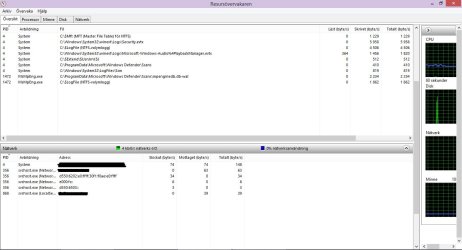
svchost trying to connect to IPv6 even that IPv6 is disabled

Marie SWE

New member
Power User
VIP
Local time
1:04 AM
Messages
286
Location
In Sweden
Hi

I have encountered a phenomenon where svchost.exe is trying to connect to an ipv6 address even that IPv6 is disabled both in registry and via the network card settings with unchecked "internet protocol version (TCP/IPv6)"

I know this is a win7 forum, but the win8 forum doesn't have as many knowledgeable members
That's why I post in here. I hope it's okay? :-)
The computer in question is an Asus UX32A with win8.1

I thank you all for answers in advance
Regards Marie

EDIT1:
Registry
Location: HKEY_LOCAL_MACHINE\SYSTEM\CurrentControlSet\Services\Tcpip6\Parameters\

Name: DisabledComponents

Type: REG_DWORD

Value: 0xFF (IPv6 disabled)

And in Services: "IP Helper"(ipv6 to ipv4): Disabled
And my local network is a IPv4 1GBit network. My firewall dhcp-server is ipv4 only

EDIT2:

Installation history
ISO from microsoft download
Installed drivers from ASUS website
Disabled all telemetry
Changed windows unwanted scheduled activities
Disabled wifi network card (I don't use wifi)
Uninstalled internet explorer
Uninstalled windows bloatware software included with win8.1 installation
Installed Firefox 68 ESR (edit in about:config for increased privacy)
Configured the registry to disable ipv6, onedrive, windows store (I only install a few standalone programs)
Disabled TCP/IPv6 protocol in the network adapter
Configured windows services from unwanted things
Configured windows firewall to block unwanted ip clusters
Edited host file to block some domains
Activated the Windows license (the computers first time online)
Installed security updates only. up to Dec 2017 (my be aware of list i have in this forum)
Installed a couple of updates to fix some things


The computer has not been online anymore than for the windows updates and activate the license.
Now I will try to solve why the resource monitor detects IPv6 addresses even that IPv6 is disabled

When all is done, I will create system recovery disks or a recovery partition on the final configuration
After the recovery configuration is done, I'm going to install the security updates from Jan 2018 up to now
 

Attachments
  • printscreen.jpg
    printscreen.jpg
    80.6 KB · Views: 4
Last edited:

My Computer My Computer

At a glance

Linux:Debian, Kali.. 2xWin8.1,2x,1x7Pro, Retr...cpu's intel 8088 up to intel i7 gen9.. dual x...oldest 1024KB newest 64GBmostly internals i don't game
Computer type
PC/Desktop
Computer Manufacturer/Model Number
AsusX53, Aspire E1-572. AsusUX32A, HP Pro3130mt+3010mt, HP Proliant ML150G3, 3xCustom, i3, i5, i7
OS
Linux:Debian, Kali.. 2xWin8.1,2x,1x7Pro, Retro:1x2003server.1xXPpro, 1xW2k,1x98SE,1x95,1x3.11
CPU
cpu's intel 8088 up to intel i7 gen9.. dual xenon on server
Motherboard
a lot of them :-)
Memory
oldest 1024KB newest 64GB
Graphics Card(s)
mostly internals i don't game
Sound Card
old retro=soundblaster.. newer ones internal
Monitor(s) Displays
smalest 12" largest 26"
Internet Speed
100/100
Antivirus
NortonInternetSecurity, MS, Avast, (not on the same computer
Browser
IE8, IE9. IE11, Firefox
Other Info
I can't fit all info on all my computers in these fields :-D
Not sure why you want to disable IPv6, I guess you have listened to some misguided fool who thinks it fixes something well it doesn't it's actually an itrigale part of local networking.


With that said try this Microsoft page.
https://support.microsoft.com/en-us...onfiguring-ipv6-in-windows-for-advanced-users


You might want to set " Prefer IPv4 over IPv6 " and as far as your Home (127.0.0.1/8 - ::1/128 ) I'm not sure --

Good luck
 
Last edited:

My Computer My Computer

At a glance

Microsoft Windows 7 Ultimate 32-bit 7601Intel(R) Pentium(R) Dual CPU E2160 @ 1.80GHz4.00 GB(1) VNC Mirror Driver (2) Intel(R) G33/G31 Ex...
Computer type
PC/Desktop
Computer Manufacturer/Model Number
Compac
OS
Microsoft Windows 7 Ultimate 32-bit 7601
CPU
Intel(R) Pentium(R) Dual CPU E2160 @ 1.80GHz
Motherboard
MSI Boston
Memory
4.00 GB
Graphics Card(s)
(1) VNC Mirror Driver (2) Intel(R) G33/G31 Express Chipset
Sound Card
Disabled
Monitor(s) Displays
Headless
Screen Resolution
1280 x 960 x 32 bits (4294967296 colors) @ 60 Hz
Hard Drives
ST3320820AS ATA Device
Keyboard
Headless
Mouse
Headless
Antivirus
Malwarebytes pro
Other Info
Also
Windows 8.1 Laptop and Desktop both Acer
Microsoft claim that Windows is designed with Ipv6 present, and they say that Windows has not been tested with the feature disabled.
 

My Computer My Computer

At a glance

Windows 7 x64, Vista x64, 8.1 smartphoneIntel E8400 65W 64-bitDDR2 2 x 2GB, 1GB x 2XFX Radeon HD5750
Computer type
PC/Desktop
OS
Windows 7 x64, Vista x64, 8.1 smartphone
CPU
Intel E8400 65W 64-bit
Motherboard
Gigabyte EP45-UD3LR
Memory
DDR2 2 x 2GB, 1GB x 2
Graphics Card(s)
XFX Radeon HD5750
Sound Card
AMD High Definition Audio; Realtek High Definition Audio
Monitor(s) Displays
iiyama prolite X2377HDS
Screen Resolution
1920 x 1080
Hard Drives
500GB 7200 rpm Seagate ST3500413AS 16MB, 500GB 5400 rpm Toshiba MQ02ABF050H 32MB, 200GB 7200 rpm Seagate ST3200820AS 8MB, 2TB 7200 rpm Western Digital WD20EZRX 64MB
PSU
Enermax Liberty Modular
Case
Antec P193 Midi Tower
Keyboard
Mionix ZIBAL 60
Mouse
Razer USB 2.0 Diamondback Mouse or Huion Graphics Tablet
Browser
Internet Explorer, Lunascape, Firefox, Opera, Avast Safezone
Not sure why you want to disable IPv6, I guess you have listened to some misguided fool who thinks it fixes something well it doesn't it's actually an itrigale part of local networking.


With that said try this Microsoft page.
https://support.microsoft.com/en-us...onfiguring-ipv6-in-windows-for-advanced-users


You might want to set " Prefer IPv4 over IPv6 " and as far as your Home (127.0.0.1/8 - ::1/128 ) I'm not sure --

Good luck

Why should I have it enabled for?
My ISP has ipv4 network, my hardware firewall and dhcp server have ipv4, my local network is ipv4 my old retro computers have ipv4.
So why should i have ipv6 enabled for?

if you look at your link you posted and then look at my EDIT1: you see that is exactly what I did to disabled ipv6 and it doesn't work obviously
 

My Computer My Computer

At a glance

Linux:Debian, Kali.. 2xWin8.1,2x,1x7Pro, Retr...cpu's intel 8088 up to intel i7 gen9.. dual x...oldest 1024KB newest 64GBmostly internals i don't game
Computer type
PC/Desktop
Computer Manufacturer/Model Number
AsusX53, Aspire E1-572. AsusUX32A, HP Pro3130mt+3010mt, HP Proliant ML150G3, 3xCustom, i3, i5, i7
OS
Linux:Debian, Kali.. 2xWin8.1,2x,1x7Pro, Retro:1x2003server.1xXPpro, 1xW2k,1x98SE,1x95,1x3.11
CPU
cpu's intel 8088 up to intel i7 gen9.. dual xenon on server
Motherboard
a lot of them :-)
Memory
oldest 1024KB newest 64GB
Graphics Card(s)
mostly internals i don't game
Sound Card
old retro=soundblaster.. newer ones internal
Monitor(s) Displays
smalest 12" largest 26"
Internet Speed
100/100
Antivirus
NortonInternetSecurity, MS, Avast, (not on the same computer
Browser
IE8, IE9. IE11, Firefox
Other Info
I can't fit all info on all my computers in these fields :-D
Microsoft claim that Windows is designed with Ipv6 present, and they say that Windows has not been tested with the feature disabled.

Okay, so if Microsoft hasn't tested it, then I'm the guinea pig in other words. *HaHaHa*:picnic: :D
 

My Computer My Computer

At a glance

Linux:Debian, Kali.. 2xWin8.1,2x,1x7Pro, Retr...cpu's intel 8088 up to intel i7 gen9.. dual x...oldest 1024KB newest 64GBmostly internals i don't game
Computer type
PC/Desktop
Computer Manufacturer/Model Number
AsusX53, Aspire E1-572. AsusUX32A, HP Pro3130mt+3010mt, HP Proliant ML150G3, 3xCustom, i3, i5, i7
OS
Linux:Debian, Kali.. 2xWin8.1,2x,1x7Pro, Retro:1x2003server.1xXPpro, 1xW2k,1x98SE,1x95,1x3.11
CPU
cpu's intel 8088 up to intel i7 gen9.. dual xenon on server
Motherboard
a lot of them :-)
Memory
oldest 1024KB newest 64GB
Graphics Card(s)
mostly internals i don't game
Sound Card
old retro=soundblaster.. newer ones internal
Monitor(s) Displays
smalest 12" largest 26"
Internet Speed
100/100
Antivirus
NortonInternetSecurity, MS, Avast, (not on the same computer
Browser
IE8, IE9. IE11, Firefox
Other Info
I can't fit all info on all my computers in these fields :-D
Hello, the 3x addresses shown in Resource Monitor - have you used netsh to find the origin of the address?
Open CMD prompt, type
Code:
[FONT="Courier New"]netsh interface ipv6 show route
netsh interface ipv6 show address[/FONT]

what is the output?
 

My Computer My Computer

At a glance

Windows 7 x64, Vista x64, 8.1 smartphoneIntel E8400 65W 64-bitDDR2 2 x 2GB, 1GB x 2XFX Radeon HD5750
Computer type
PC/Desktop
OS
Windows 7 x64, Vista x64, 8.1 smartphone
CPU
Intel E8400 65W 64-bit
Motherboard
Gigabyte EP45-UD3LR
Memory
DDR2 2 x 2GB, 1GB x 2
Graphics Card(s)
XFX Radeon HD5750
Sound Card
AMD High Definition Audio; Realtek High Definition Audio
Monitor(s) Displays
iiyama prolite X2377HDS
Screen Resolution
1920 x 1080
Hard Drives
500GB 7200 rpm Seagate ST3500413AS 16MB, 500GB 5400 rpm Toshiba MQ02ABF050H 32MB, 200GB 7200 rpm Seagate ST3200820AS 8MB, 2TB 7200 rpm Western Digital WD20EZRX 64MB
PSU
Enermax Liberty Modular
Case
Antec P193 Midi Tower
Keyboard
Mionix ZIBAL 60
Mouse
Razer USB 2.0 Diamondback Mouse or Huion Graphics Tablet
Browser
Internet Explorer, Lunascape, Firefox, Opera, Avast Safezone
Hello, the 3x addresses shown in Resource Monitor - have you used netsh to find the origin of the address?
Open CMD prompt, type
Code:
[FONT=Courier New]netsh interface ipv6 show route
netsh interface ipv6 show address[/FONT]
what is the output?

The result while i saw active ipv6 addresses.
Code:
C:\Windows\system32>netsh interface ipv6 show route 
 
Publish  Type      Met  Prefix                    Idx  Gateway/Interface Name 
-------  --------  ---  ------------------------  ---  ------------------------ 
No       System    256  ::1/128                     1  Loopback Pseudo-Interface 
 1 
No       System    256  ff00::/8                    1  Loopback Pseudo-Interface 
 1 
 
C:\Windows\system32>netsh interface ipv6 show address 
 
Interface 1: Loopback Pseudo-Interface 1 
 
Addr Type  DAD State   Valid Life Pref. Life Address 
---------  ----------- ---------- ---------- ------------------------ 
Other      Preferred     infinite   infinite ::1 
 
C:\Windows\system32>
 

My Computer My Computer

At a glance

Linux:Debian, Kali.. 2xWin8.1,2x,1x7Pro, Retr...cpu's intel 8088 up to intel i7 gen9.. dual x...oldest 1024KB newest 64GBmostly internals i don't game
Computer type
PC/Desktop
Computer Manufacturer/Model Number
AsusX53, Aspire E1-572. AsusUX32A, HP Pro3130mt+3010mt, HP Proliant ML150G3, 3xCustom, i3, i5, i7
OS
Linux:Debian, Kali.. 2xWin8.1,2x,1x7Pro, Retro:1x2003server.1xXPpro, 1xW2k,1x98SE,1x95,1x3.11
CPU
cpu's intel 8088 up to intel i7 gen9.. dual xenon on server
Motherboard
a lot of them :-)
Memory
oldest 1024KB newest 64GB
Graphics Card(s)
mostly internals i don't game
Sound Card
old retro=soundblaster.. newer ones internal
Monitor(s) Displays
smalest 12" largest 26"
Internet Speed
100/100
Antivirus
NortonInternetSecurity, MS, Avast, (not on the same computer
Browser
IE8, IE9. IE11, Firefox
Other Info
I can't fit all info on all my computers in these fields :-D
It's the loopback adaptor that gets resolved by localhost. I have an idea that editing the hosts file may resolve the issue, on the basis that your registry change has not caused a corresponding change in the host file. Entries in the Hosts file are automatically loaded into the DNS client resolver cache. You could check and customize the hosts file in C:\Windows\System32\Drivers\etc directory. Open it with NotePad:

If this IPv6 line exists in hostfile
Code:
::1	localhost
then comment out, like so:
Code:
[FONT="Courier New"]# ::1	localhost[/FONT]
AND, if the IPv4 localhost is missing then add to the file:
Code:
127.0.0.1 localhost

You can also delete/disable/customise the loopback adaptor, as it is not installed by default. In Device Manager > View, then tick show hidden devices.
Expand the Network Adapters node, and you should see Microsoft Loopback Adapter.
It is Okay to delete or disable or Customise (via Device Properties) this driver to remove it or change it to IPv4 protocol only
 

My Computer My Computer

At a glance

Windows 7 x64, Vista x64, 8.1 smartphoneIntel E8400 65W 64-bitDDR2 2 x 2GB, 1GB x 2XFX Radeon HD5750
Computer type
PC/Desktop
OS
Windows 7 x64, Vista x64, 8.1 smartphone
CPU
Intel E8400 65W 64-bit
Motherboard
Gigabyte EP45-UD3LR
Memory
DDR2 2 x 2GB, 1GB x 2
Graphics Card(s)
XFX Radeon HD5750
Sound Card
AMD High Definition Audio; Realtek High Definition Audio
Monitor(s) Displays
iiyama prolite X2377HDS
Screen Resolution
1920 x 1080
Hard Drives
500GB 7200 rpm Seagate ST3500413AS 16MB, 500GB 5400 rpm Toshiba MQ02ABF050H 32MB, 200GB 7200 rpm Seagate ST3200820AS 8MB, 2TB 7200 rpm Western Digital WD20EZRX 64MB
PSU
Enermax Liberty Modular
Case
Antec P193 Midi Tower
Keyboard
Mionix ZIBAL 60
Mouse
Razer USB 2.0 Diamondback Mouse or Huion Graphics Tablet
Browser
Internet Explorer, Lunascape, Firefox, Opera, Avast Safezone
It's the loopback adaptor that gets resolved by localhost. I have an idea that editing the hosts file may resolve the issue, on the basis that your registry change has not caused a corresponding change in the host file. Entries in the Hosts file are automatically loaded into the DNS client resolver cache. You could check and customize the hosts file in C:\Windows\System32\Drivers\etc directory. Open it with NotePad:

If this IPv6 line exists in hostfile
Code:
::1    localhost
then comment out, like so:
Code:
[FONT=Courier New]# ::1    localhost[/FONT]
AND, if the IPv4 localhost is missing then add to the file:
Code:
127.0.0.1 localhost

You can also delete/disable/customise the loopback adaptor, as it is not installed by default. In Device Manager > View, then tick show hidden devices.
Expand the Network Adapters node, and you should see Microsoft Loopback Adapter.
It is Okay to delete or disable or Customise (via Device Properties) this driver to remove it or change it to IPv4 protocol only
Thank you for helping me.:-):-)
I tried to put # in front of :: 1 then I restarted the computer.
I deleted all my other domain blocks in the host file while I was testing, just to make sure none of it affected the result.
I have no device called Microsoft Loopback Adapter.
But I found a Microsoft 4to6 so I uninstalled it.
The only ones a have left is, Microsoft ISATAP adapter
Unfortunately, ipv6 addresses still appear in the resource monitor


I even did a really unorthodox test.. i did a backup on the registry and then ripped out everything with the name IPv6 or ip6 guts and all... believe it or not, but the damned ipv6 addresses appeared anyway in the system monitor.. I did expect the system to crach or the network not working... but noooo eweryting worked even the ipv6 addresses.
:doh::roflmao:
 

My Computer My Computer

At a glance

Linux:Debian, Kali.. 2xWin8.1,2x,1x7Pro, Retr...cpu's intel 8088 up to intel i7 gen9.. dual x...oldest 1024KB newest 64GBmostly internals i don't game
Computer type
PC/Desktop
Computer Manufacturer/Model Number
AsusX53, Aspire E1-572. AsusUX32A, HP Pro3130mt+3010mt, HP Proliant ML150G3, 3xCustom, i3, i5, i7
OS
Linux:Debian, Kali.. 2xWin8.1,2x,1x7Pro, Retro:1x2003server.1xXPpro, 1xW2k,1x98SE,1x95,1x3.11
CPU
cpu's intel 8088 up to intel i7 gen9.. dual xenon on server
Motherboard
a lot of them :-)
Memory
oldest 1024KB newest 64GB
Graphics Card(s)
mostly internals i don't game
Sound Card
old retro=soundblaster.. newer ones internal
Monitor(s) Displays
smalest 12" largest 26"
Internet Speed
100/100
Antivirus
NortonInternetSecurity, MS, Avast, (not on the same computer
Browser
IE8, IE9. IE11, Firefox
Other Info
I can't fit all info on all my computers in these fields :-D
If it's any consolation for you " ::1 localhost " will not pass through your computer to your network, Every computer has that same IP.
 

My Computer My Computer

At a glance

Microsoft Windows 7 Ultimate 32-bit 7601Intel(R) Pentium(R) Dual CPU E2160 @ 1.80GHz4.00 GB(1) VNC Mirror Driver (2) Intel(R) G33/G31 Ex...
Computer type
PC/Desktop
Computer Manufacturer/Model Number
Compac
OS
Microsoft Windows 7 Ultimate 32-bit 7601
CPU
Intel(R) Pentium(R) Dual CPU E2160 @ 1.80GHz
Motherboard
MSI Boston
Memory
4.00 GB
Graphics Card(s)
(1) VNC Mirror Driver (2) Intel(R) G33/G31 Express Chipset
Sound Card
Disabled
Monitor(s) Displays
Headless
Screen Resolution
1280 x 960 x 32 bits (4294967296 colors) @ 60 Hz
Hard Drives
ST3320820AS ATA Device
Keyboard
Headless
Mouse
Headless
Antivirus
Malwarebytes pro
Other Info
Also
Windows 8.1 Laptop and Desktop both Acer
If it's any consolation for you " ::1 localhost " will not pass through your computer to your network, Every computer has that same IP.

Yes i know, it's the same with 127.0.0.1 and those addresses shouldn't be visible in the system monitor, and it isn't. But it was worth to try it anyway.
I don't understand why ipv6 addresses appear. I must have missed something somewhere.
I have disabled ipv6 on all my win7 computers years ago and i have no ipv6 addresses on them. So i know it is possible to disable ipv6. but it just don't work on this win8.1 machine, so i must have missed something.. but what..
 

My Computer My Computer

At a glance

Linux:Debian, Kali.. 2xWin8.1,2x,1x7Pro, Retr...cpu's intel 8088 up to intel i7 gen9.. dual x...oldest 1024KB newest 64GBmostly internals i don't game
Computer type
PC/Desktop
Computer Manufacturer/Model Number
AsusX53, Aspire E1-572. AsusUX32A, HP Pro3130mt+3010mt, HP Proliant ML150G3, 3xCustom, i3, i5, i7
OS
Linux:Debian, Kali.. 2xWin8.1,2x,1x7Pro, Retro:1x2003server.1xXPpro, 1xW2k,1x98SE,1x95,1x3.11
CPU
cpu's intel 8088 up to intel i7 gen9.. dual xenon on server
Motherboard
a lot of them :-)
Memory
oldest 1024KB newest 64GB
Graphics Card(s)
mostly internals i don't game
Sound Card
old retro=soundblaster.. newer ones internal
Monitor(s) Displays
smalest 12" largest 26"
Internet Speed
100/100
Antivirus
NortonInternetSecurity, MS, Avast, (not on the same computer
Browser
IE8, IE9. IE11, Firefox
Other Info
I can't fit all info on all my computers in these fields :-D
I even did a really unorthodox test.. i did a backup on the registry and then ripped out everything with the name IPv6 or ip6 guts and all... believe it or not, but the damned ipv6 addresses appeared anyway in the system monitor.. I did expect the system to crach or the network not working... but noooo eweryting worked even the ipv6 addresses.

Then with certainty it is not a registry issue. It could be a device driver configuration, or a startup service.

BTW, you don't need multiple copies of ISATAP driver. Delete them all, and one would probably re-generate on new boot. (The ISATAP driver allows IPv6 traffic to use an IPv4 network.)
 

My Computer My Computer

At a glance

Windows 7 x64, Vista x64, 8.1 smartphoneIntel E8400 65W 64-bitDDR2 2 x 2GB, 1GB x 2XFX Radeon HD5750
Computer type
PC/Desktop
OS
Windows 7 x64, Vista x64, 8.1 smartphone
CPU
Intel E8400 65W 64-bit
Motherboard
Gigabyte EP45-UD3LR
Memory
DDR2 2 x 2GB, 1GB x 2
Graphics Card(s)
XFX Radeon HD5750
Sound Card
AMD High Definition Audio; Realtek High Definition Audio
Monitor(s) Displays
iiyama prolite X2377HDS
Screen Resolution
1920 x 1080
Hard Drives
500GB 7200 rpm Seagate ST3500413AS 16MB, 500GB 5400 rpm Toshiba MQ02ABF050H 32MB, 200GB 7200 rpm Seagate ST3200820AS 8MB, 2TB 7200 rpm Western Digital WD20EZRX 64MB
PSU
Enermax Liberty Modular
Case
Antec P193 Midi Tower
Keyboard
Mionix ZIBAL 60
Mouse
Razer USB 2.0 Diamondback Mouse or Huion Graphics Tablet
Browser
Internet Explorer, Lunascape, Firefox, Opera, Avast Safezone
Then with certainty it is not a registry issue. It could be a device driver configuration, or a startup service.

BTW, you don't need multiple copies of ISATAP driver. Delete them all, and one would probably re-generate on new boot. (The ISATAP driver allows IPv6 traffic to use an IPv4 network.)

I have deleted them too and still i get ipv6 addresses
The next step I am doing now is to look up system files that contain settings for ipv6 and also ipv6 dll files.
Fortunately, I have the system recovery discs if I tear apart the system too much. *HaHaHa* :picnic:

But this dissection of the system's IPv6 may be of use to someone else in the future. :D :D

My temporary solution until I find the solution, is that i have blocked all ipv6 protocols and addresses in the firewall.

What I do find interesting is that the ipv6 addresses are still visible in the system monitor... While blocked ipv4 addresses are never visible there if they are blocked.
 

My Computer My Computer

At a glance

Linux:Debian, Kali.. 2xWin8.1,2x,1x7Pro, Retr...cpu's intel 8088 up to intel i7 gen9.. dual x...oldest 1024KB newest 64GBmostly internals i don't game
Computer type
PC/Desktop
Computer Manufacturer/Model Number
AsusX53, Aspire E1-572. AsusUX32A, HP Pro3130mt+3010mt, HP Proliant ML150G3, 3xCustom, i3, i5, i7
OS
Linux:Debian, Kali.. 2xWin8.1,2x,1x7Pro, Retro:1x2003server.1xXPpro, 1xW2k,1x98SE,1x95,1x3.11
CPU
cpu's intel 8088 up to intel i7 gen9.. dual xenon on server
Motherboard
a lot of them :-)
Memory
oldest 1024KB newest 64GB
Graphics Card(s)
mostly internals i don't game
Sound Card
old retro=soundblaster.. newer ones internal
Monitor(s) Displays
smalest 12" largest 26"
Internet Speed
100/100
Antivirus
NortonInternetSecurity, MS, Avast, (not on the same computer
Browser
IE8, IE9. IE11, Firefox
Other Info
I can't fit all info on all my computers in these fields :-D
Back
Top