Error: the service cannot be started either because it is disabled or

Rowbie

New member
Local time
7:12 AM
Messages
23
There are limited amounts of applications that I am able to access. Like Browsers, "Service," and other applications. My wifi adapter also does not work. So it was working fine before, however I wanted to upgrade to windows 10. I searched up windows 10 download, I downloaded it and did things normally, I then came across "What do you want to do" I clicked on "Upgrade Now" the default option, then it said it was downloading. After the installation was done, it started to run windows 7 updates that I hadn't installed before. The reason I wanted to upgrade it to Windows 10 is because it wasn't being used for a long time and I wanted to upgrade the version, so I wasn't surprised when they were running the updates I had missed out on, but I did think after they ran the windows 7 updates it would start downloading windows 10. After it was finished, everything looked the same as it was before, however there were 12 updates left that had failed to update, I then tried running them several times, however it did not work. I originally have come from this thread Error: the service cannot be started either because it is disabled - Microsoft Community They linked this website to me, that's how I got here, he asked me a few questions that may help you.
 

My Computer

Computer type
PC/Desktop
OS
64
Browser
Chrome
Hi
Welcome to Sevenforums!
I read your posts on the link you provided. I'll see if I can help you.
If you can do this:
From my OneDrive, would you please download and run SFCFix.exe
When it completes SFCFix.log will open in notepad & be saved on your desktop
Please post the log.

Snick
 

My Computer

Computer type
PC/Desktop
Computer Manufacturer/Model Number
HP Desktop & Compaq Laptop
OS
Win 10 x64, Linux Lite, Win 7 x64, BlackArch, & Kali
Hard Drives
Samsung 850 Pro 256Gb,
Hitachi HDD 1Tb,
Crucial MX SSD 250Gb
Segate 3Tb USB 3.0 Ext. Backup HDD
Internet Speed
150Mbps dn, 20Mbps up
Antivirus
Avast Free, Malwarebytes Anti-Exploit & Anti-Ransomware
Browser
Firefox, Chrome, Opera, & VPN
Most likely you have a OS Windows dependent service that isn't starting. Now that you tried to add Windows 10 you may have mucked up the whole lot. May want to try the SFCfix thing mentioned above.
 

My Computer

Computer type
PC/Desktop
OS
Windows 7 Ultimate x64
Hi
Welcome to Sevenforums!
I read your posts on the link you provided. I'll see if I can help you.
If you can do this:
From my OneDrive, would you please download and run SFCFix.exe
When it completes SFCFix.log will open in notepad & be saved on your desktop
Please post the log.

Snick

I can't download SFCFix because I can't access chrome on my computer, I'm currently on my iPad, is there any other way I can do it?
 

My Computer

Computer type
PC/Desktop
OS
64
Browser
Chrome
I considered this to be an issue with your problem description

  1. Do you have access to another computer you could download and place sfcfix.exe on USB, CD or DVD?
  2. Have you run sfc /scannow from Administrative CMD? This will attempt to repair system files. Depending on the level of your corruptions (I assume this) it may repair enough system files to let you access Chrome. To do so, click :orb: type cmd when it appears right-click and choose Run as Administrator. In the CMD window at the > type sfc /scannow yes there is a space between c and / It may take a while to complete. Note if there are any integrity violations. If so you may wish to run sfc /scannow another couple times. Then try to open Chrome or Internet Explorer.
Snick
 

My Computer

Computer type
PC/Desktop
Computer Manufacturer/Model Number
HP Desktop & Compaq Laptop
OS
Win 10 x64, Linux Lite, Win 7 x64, BlackArch, & Kali
Hard Drives
Samsung 850 Pro 256Gb,
Hitachi HDD 1Tb,
Crucial MX SSD 250Gb
Segate 3Tb USB 3.0 Ext. Backup HDD
Internet Speed
150Mbps dn, 20Mbps up
Antivirus
Avast Free, Malwarebytes Anti-Exploit & Anti-Ransomware
Browser
Firefox, Chrome, Opera, & VPN
I cannot run cmd because the same error message appears. At the top it says C:\Windows\System32\cmd.exe
But ir does let me left click it, should I do that instead?
 

My Computer

Computer type
PC/Desktop
OS
64
Browser
Chrome
Never mind it says I have to be an admin, but even if I did run the command, my wifi adapter wont work, so I can't use chrome anyways
 

My Computer

Computer type
PC/Desktop
OS
64
Browser
Chrome
  1. Do you have access to your computer as Administrator?
  2. Do you have access to another computer you could download with and then transfer to your ailing computer?
 

My Computer

Computer type
PC/Desktop
Computer Manufacturer/Model Number
HP Desktop & Compaq Laptop
OS
Win 10 x64, Linux Lite, Win 7 x64, BlackArch, & Kali
Hard Drives
Samsung 850 Pro 256Gb,
Hitachi HDD 1Tb,
Crucial MX SSD 250Gb
Segate 3Tb USB 3.0 Ext. Backup HDD
Internet Speed
150Mbps dn, 20Mbps up
Antivirus
Avast Free, Malwarebytes Anti-Exploit & Anti-Ransomware
Browser
Firefox, Chrome, Opera, & VPN
1. Yes I do, I am the only user that uses this computer

2. I have a school chromebook, but not another computer
 

My Computer

Computer type
PC/Desktop
OS
64
Browser
Chrome

My Computer

Computer type
PC/Desktop
Computer Manufacturer/Model Number
HP Desktop & Compaq Laptop
OS
Win 10 x64, Linux Lite, Win 7 x64, BlackArch, & Kali
Hard Drives
Samsung 850 Pro 256Gb,
Hitachi HDD 1Tb,
Crucial MX SSD 250Gb
Segate 3Tb USB 3.0 Ext. Backup HDD
Internet Speed
150Mbps dn, 20Mbps up
Antivirus
Avast Free, Malwarebytes Anti-Exploit & Anti-Ransomware
Browser
Firefox, Chrome, Opera, & VPN
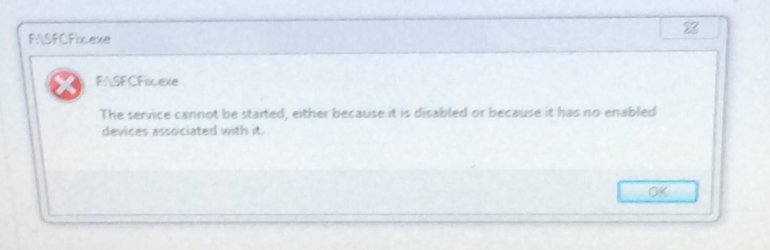
IMG_1738.jpg This is what happens when I use the file...
 

My Computer

Computer type
PC/Desktop
OS
64
Browser
Chrome
I was able to open up the MGADiag application, however I couldn´t copy the information
 

My Computer

Computer type
PC/Desktop
OS
64
Browser
Chrome

My Computer

Computer type
PC/Desktop
Computer Manufacturer/Model Number
HP Desktop & Compaq Laptop
OS
Win 10 x64, Linux Lite, Win 7 x64, BlackArch, & Kali
Hard Drives
Samsung 850 Pro 256Gb,
Hitachi HDD 1Tb,
Crucial MX SSD 250Gb
Segate 3Tb USB 3.0 Ext. Backup HDD
Internet Speed
150Mbps dn, 20Mbps up
Antivirus
Avast Free, Malwarebytes Anti-Exploit & Anti-Ransomware
Browser
Firefox, Chrome, Opera, & VPN
Yes I have service pack 1, however I do not have Windows 7 SP1 DVD
 

My Computer

Computer type
PC/Desktop
OS
64
Browser
Chrome
And can I borrow this Os folder please
 

My Computer

Computer type
PC/Desktop
OS
64
Browser
Chrome
Rowbie, of course you can!

From my OneDrive
Windows7x64_Folder.zip

Make sure you have your 25 character activation key. You will need it.
During Repair Install, when you get to the screen you want to choose UPGRADE

You can use Simplix Update Pack to install updates. Does not include Microsoft products such as Office. You will still have to use Windows Update for that.
Simplix Update Pack 7 MajorGeeks Download

Snick
 

My Computer

Computer type
PC/Desktop
Computer Manufacturer/Model Number
HP Desktop & Compaq Laptop
OS
Win 10 x64, Linux Lite, Win 7 x64, BlackArch, & Kali
Hard Drives
Samsung 850 Pro 256Gb,
Hitachi HDD 1Tb,
Crucial MX SSD 250Gb
Segate 3Tb USB 3.0 Ext. Backup HDD
Internet Speed
150Mbps dn, 20Mbps up
Antivirus
Avast Free, Malwarebytes Anti-Exploit & Anti-Ransomware
Browser
Firefox, Chrome, Opera, & VPN
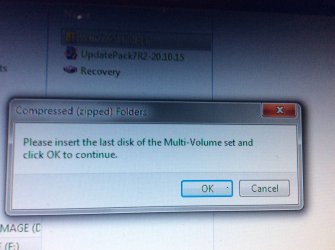
This is the error i received when try to open up the os file you let me use IMG_1748.jpg
 

My Computer

Computer type
PC/Desktop
OS
64
Browser
Chrome
Weird
Downloaded and opened it with WinRAR works perfectly.
How are you trying to open it?
Double-left click?
With what compression/decompression program?

You can try 7-zip to open zip/compressed folder.
Download - 7-Zip

Here's a link to the Win7x64 ISO.zip
You can extract the ISO contents to a folder with 7-zip
I create a folder and extract to there so that you don't end up with multiple folders in the location you choose.

Snick
 

My Computer

Computer type
PC/Desktop
Computer Manufacturer/Model Number
HP Desktop & Compaq Laptop
OS
Win 10 x64, Linux Lite, Win 7 x64, BlackArch, & Kali
Hard Drives
Samsung 850 Pro 256Gb,
Hitachi HDD 1Tb,
Crucial MX SSD 250Gb
Segate 3Tb USB 3.0 Ext. Backup HDD
Internet Speed
150Mbps dn, 20Mbps up
Antivirus
Avast Free, Malwarebytes Anti-Exploit & Anti-Ransomware
Browser
Firefox, Chrome, Opera, & VPN
My email notification indicated you have a question about obtaining your 25 character product key.
If your Win7 is factory installed it should be on the case of a desktop, or on the bottom or in the battery compartment of a laptop.
You can use Magic Jellybean to find it from within your Win7 installation.
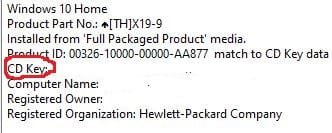
Magic Jellybean. You want CD key, not product ID. I usually copy and paste to notepad, place the file on my desktop & also print it. If you don't have the key you will not be able to enter it and activate windows.
The video I provided by Brian at Britec Computers UK had that info as well.
KeyFinder | Magical Jelly Bean

Capture.JPG

Snick


My Computer

Computer type
PC/Desktop
Computer Manufacturer/Model Number
HP Desktop & Compaq Laptop
OS
Win 10 x64, Linux Lite, Win 7 x64, BlackArch, & Kali
Hard Drives
Samsung 850 Pro 256Gb,
Hitachi HDD 1Tb,
Crucial MX SSD 250Gb
Segate 3Tb USB 3.0 Ext. Backup HDD
Internet Speed
150Mbps dn, 20Mbps up
Antivirus
Avast Free, Malwarebytes Anti-Exploit & Anti-Ransomware
Browser
Firefox, Chrome, Opera, & VPN
Back
Top