Getting your Nikon Coolscan to work on W7 x64

Windows XP and Windows 10 are two different entities where the scanner is concerned as the scanner was fully supported under XP, and not at all after Vista - i.e. Windows 7 and beyond.

Good luck.
 

My Computer My Computer

At a glance

Windows 10 ProIntel Core i7-4770K (3.5Ghz)32 gig Corsair Dominator Platinum (4x8Gig)Sapphire Tri-X R9 Fury
Computer type
PC/Desktop
Computer Manufacturer/Model Number
Custom built by me.
OS
Windows 10 Pro
CPU
Intel Core i7-4770K (3.5Ghz)
Motherboard
Gigabyte G1 Sniper 5 (F10 Bios)
Memory
32 gig Corsair Dominator Platinum (4x8Gig)
Graphics Card(s)
Sapphire Tri-X R9 Fury
Sound Card
Soundblaster ZXR
Monitor(s) Displays
NEC PA242W 24" LCD Monitor
Screen Resolution
1920 x 1200
Hard Drives
Primary - Samsung 850 Pro (512gig), Samsung 840 Pro (256gig), 2TB WD Caviar Black.
PSU
EVGA Supernova 1000 G2
Case
Cooler Master HAF X
Cooling
Corsair H100i with Corsair Air Series SP120 Quiet Fans
Keyboard
Logitech Wireless Wave
Mouse
Logitech Performance MX
Internet Speed
High Speed Cable
Antivirus
Norton Security
Browser
IE11
Other Info
Memory Timings - 1866MHz @ 9-9-9-27-1T @ 1.5 volts
I finally got a Nikon Coolscan 4000 ED working with Windows 10 - 64 bits via a FireWire connection
My FireWire adapter is a StarTech.com 2 port PCI Express 1394a Firewire card (Part # PEX 1394A2V)
1) It seems the card is not recognized on some PCI ports of the motherboard and I almost gave up- But I found a white paper recommending to try with another port - I did it and the card was recognized without problem by Windows 10 - No need to download a "legacy" driver


2) I rebooted in "advanced" mode (Option 7 : disable driver signature verification) - This is necessary or you would get an error message


3) I followed the procedure but did a small mistake : NKS1394.inf and NKScnUSD.dll we re not in the same folder - I got a message telling that a file is missing


Once my errors were fixed, installation went fine and now the scanner is recognized and working


Thanks to everyone for your help Have a good day
 

My Computer My Computer

At a glance

Windows 7 -64 BitsIntel Quadcore4 GbATI Raceon
OS
Windows 7 -64 Bits
CPU
Intel Quadcore
Motherboard
Gigabyte
Memory
4 Gb
Graphics Card(s)
ATI Raceon
Sound Card
None
I finally got a Nikon Coolscan 4000 ED working with Windows 10 - 64 bits via a FireWire connection
My FireWire adapter is a StarTech.com 2 port PCI Express 1394a Firewire card (Part # PEX 1394A2V)
1) It seems the card is not recognized on some PCI ports of the motherboard and I almost gave up- But I found a white paper recommending to try with another port - I did it and the card was recognized without problem by Windows 10 - No need to download a "legacy" driver.

I didn't have to install any "legacy" drivers (or drivers at all) with the this ShineStar card I posted about in post #599. Its simply plug and play under Windows 10.

The one suggestion I would make is make sure the card you get has a VIA chip on it as the ShineStar does. Makes it more compatible with the scanners needing FireWire connections; also no weird issues.

Anyway glad I was able to help. Happy scanning :-)
 

My Computer My Computer

At a glance

Windows 10 ProIntel Core i7-4770K (3.5Ghz)32 gig Corsair Dominator Platinum (4x8Gig)Sapphire Tri-X R9 Fury
Computer type
PC/Desktop
Computer Manufacturer/Model Number
Custom built by me.
OS
Windows 10 Pro
CPU
Intel Core i7-4770K (3.5Ghz)
Motherboard
Gigabyte G1 Sniper 5 (F10 Bios)
Memory
32 gig Corsair Dominator Platinum (4x8Gig)
Graphics Card(s)
Sapphire Tri-X R9 Fury
Sound Card
Soundblaster ZXR
Monitor(s) Displays
NEC PA242W 24" LCD Monitor
Screen Resolution
1920 x 1200
Hard Drives
Primary - Samsung 850 Pro (512gig), Samsung 840 Pro (256gig), 2TB WD Caviar Black.
PSU
EVGA Supernova 1000 G2
Case
Cooler Master HAF X
Cooling
Corsair H100i with Corsair Air Series SP120 Quiet Fans
Keyboard
Logitech Wireless Wave
Mouse
Logitech Performance MX
Internet Speed
High Speed Cable
Antivirus
Norton Security
Browser
IE11
Other Info
Memory Timings - 1866MHz @ 9-9-9-27-1T @ 1.5 volts

Windows XP and Windows 10 are two different entities where the scanner is concerned as the scanner was fully supported under XP, and not at all after Vista - i.e. Windows 7 and beyond.

Good luck.

sygnus21, this might interest you. After deciding to ditch the Coolscan 4000ED and going another route, something in me said try this again. So, I reconnected the scanner, and it was recognized by the system which reported it as an Imaging device "Nikon SUPER COOLSCAN 4000 ED". I'd seen this before, of course.

For grins, I decided to push the preview button without a slide in the scanner. The software came back immediately with there being no slide in the scanner! Huh. So, I put in a slide, and surprise, it all works correctly.

I was able to get a slide scanned (just as on XP a few years ago). Bottom line: your instructions are spot on, and other than giving this move project a break for a couple of weeks, and meanwhile having upgraded memory on the Win 10 host (undergoing untold number of reboots), there has been no other changes. Now, I'm starting to think perhaps the IEEE1394 cable was not properly seated, but all the clues don't line up.

Cheers
Mukesh
 

My Computer My Computer

At a glance

Windows 10
Computer type
PC/Desktop
OS
Windows 10

My Computer My Computer

At a glance

Windows 10 ProIntel Core i7-4770K (3.5Ghz)32 gig Corsair Dominator Platinum (4x8Gig)Sapphire Tri-X R9 Fury
Computer type
PC/Desktop
Computer Manufacturer/Model Number
Custom built by me.
OS
Windows 10 Pro
CPU
Intel Core i7-4770K (3.5Ghz)
Motherboard
Gigabyte G1 Sniper 5 (F10 Bios)
Memory
32 gig Corsair Dominator Platinum (4x8Gig)
Graphics Card(s)
Sapphire Tri-X R9 Fury
Sound Card
Soundblaster ZXR
Monitor(s) Displays
NEC PA242W 24" LCD Monitor
Screen Resolution
1920 x 1200
Hard Drives
Primary - Samsung 850 Pro (512gig), Samsung 840 Pro (256gig), 2TB WD Caviar Black.
PSU
EVGA Supernova 1000 G2
Case
Cooler Master HAF X
Cooling
Corsair H100i with Corsair Air Series SP120 Quiet Fans
Keyboard
Logitech Wireless Wave
Mouse
Logitech Performance MX
Internet Speed
High Speed Cable
Antivirus
Norton Security
Browser
IE11
Other Info
Memory Timings - 1866MHz @ 9-9-9-27-1T @ 1.5 volts

Still works in February 2021!! I'm impressed...thank you! (If anyone is even still reading this:)
 

My Computer My Computer

At a glance

VIC
Computer type
PC/Desktop
OS
VIC
Thanks
That some negatives from .... 1978, directly produced with the scanner under Windows 10 ... and waiting to be processed with Photoshop

Hope it would be the same for you !
Have a good day
 

Attachments

  • FB SC_Yosemite_01_09.jpg
    FB SC_Yosemite_01_09.jpg
    121 KB · Views: 0
  • FB SC_Yosemite_01_33.jpg
    FB SC_Yosemite_01_33.jpg
    113.4 KB · Views: 0

My Computer My Computer

At a glance

Windows 7 -64 BitsIntel Quadcore4 GbATI Raceon
OS
Windows 7 -64 Bits
CPU
Intel Quadcore
Motherboard
Gigabyte
Memory
4 Gb
Graphics Card(s)
ATI Raceon
Sound Card
None
Still works in February 2021!! I'm impressed...thank you! (If anyone is even still reading this:)

Thanks. And yes, this thread is still active.

Happy scanning :)
 

My Computer My Computer

At a glance

Windows 10 ProIntel Core i7-4770K (3.5Ghz)32 gig Corsair Dominator Platinum (4x8Gig)Sapphire Tri-X R9 Fury
Computer type
PC/Desktop
Computer Manufacturer/Model Number
Custom built by me.
OS
Windows 10 Pro
CPU
Intel Core i7-4770K (3.5Ghz)
Motherboard
Gigabyte G1 Sniper 5 (F10 Bios)
Memory
32 gig Corsair Dominator Platinum (4x8Gig)
Graphics Card(s)
Sapphire Tri-X R9 Fury
Sound Card
Soundblaster ZXR
Monitor(s) Displays
NEC PA242W 24" LCD Monitor
Screen Resolution
1920 x 1200
Hard Drives
Primary - Samsung 850 Pro (512gig), Samsung 840 Pro (256gig), 2TB WD Caviar Black.
PSU
EVGA Supernova 1000 G2
Case
Cooler Master HAF X
Cooling
Corsair H100i with Corsair Air Series SP120 Quiet Fans
Keyboard
Logitech Wireless Wave
Mouse
Logitech Performance MX
Internet Speed
High Speed Cable
Antivirus
Norton Security
Browser
IE11
Other Info
Memory Timings - 1866MHz @ 9-9-9-27-1T @ 1.5 volts
This post saves the day

Hi

I recently updated my machine to use an SSD device and after re build my Nikon 9000 refused to communicate with the computer.

I followed the Disable Driver Signature Enforcement procedure and much joy and happiness, I now have my scanner back working on Windows 10.

Best wishes to all and stay safe.

Philip L Jackson
 

My Computer My Computer

At a glance

Windows 10 pro
Computer type
PC/Desktop
Computer Manufacturer/Model Number
HP 700-060ea
OS
Windows 10 pro
A new life for your scanner !!!!!!
 

My Computer My Computer

At a glance

Windows 7 -64 BitsIntel Quadcore4 GbATI Raceon
OS
Windows 7 -64 Bits
CPU
Intel Quadcore
Motherboard
Gigabyte
Memory
4 Gb
Graphics Card(s)
ATI Raceon
Sound Card
None
Hi

I recently updated my machine to use an SSD device and after re build my Nikon 9000 refused to communicate with the computer.

I followed the Disable Driver Signature Enforcement procedure and much joy and happiness, I now have my scanner back working on Windows 10.

Best wishes to all and stay safe.

Philip L Jackson

I don't know why an SSD would change things. Anyway, glad to hear its working again.

Peace :cool:
 

My Computer My Computer

At a glance

Windows 10 ProIntel Core i7-4770K (3.5Ghz)32 gig Corsair Dominator Platinum (4x8Gig)Sapphire Tri-X R9 Fury
Computer type
PC/Desktop
Computer Manufacturer/Model Number
Custom built by me.
OS
Windows 10 Pro
CPU
Intel Core i7-4770K (3.5Ghz)
Motherboard
Gigabyte G1 Sniper 5 (F10 Bios)
Memory
32 gig Corsair Dominator Platinum (4x8Gig)
Graphics Card(s)
Sapphire Tri-X R9 Fury
Sound Card
Soundblaster ZXR
Monitor(s) Displays
NEC PA242W 24" LCD Monitor
Screen Resolution
1920 x 1200
Hard Drives
Primary - Samsung 850 Pro (512gig), Samsung 840 Pro (256gig), 2TB WD Caviar Black.
PSU
EVGA Supernova 1000 G2
Case
Cooler Master HAF X
Cooling
Corsair H100i with Corsair Air Series SP120 Quiet Fans
Keyboard
Logitech Wireless Wave
Mouse
Logitech Performance MX
Internet Speed
High Speed Cable
Antivirus
Norton Security
Browser
IE11
Other Info
Memory Timings - 1866MHz @ 9-9-9-27-1T @ 1.5 volts
Sygnus21, You're tutorial helped me to get my Nikon Coolscan 4000 to work on my Window's 7 machine some time back and just the other day I put that machine to rest and committed to Windows 10 on all our Windows computers now. I apologize for taking the easy way, but wondering if you or anyone else has adapted the Coolscan 4000 to work on the Windows 10 platform?
 

My Computer My Computer

At a glance

Windows 7 Professional 64 bit
Computer Manufacturer/Model Number
Dell XPS-720
OS
Windows 7 Professional 64 bit
I apologize for taking the easy way, but wondering if you or anyone else has adapted the Coolscan 4000 to work on the Windows 10 platform?

Please read the first post again. Also take note of the "Note" :)
 
Last edited:

My Computer My Computer

At a glance

Windows 10 ProIntel Core i7-4770K (3.5Ghz)32 gig Corsair Dominator Platinum (4x8Gig)Sapphire Tri-X R9 Fury
Computer type
PC/Desktop
Computer Manufacturer/Model Number
Custom built by me.
OS
Windows 10 Pro
CPU
Intel Core i7-4770K (3.5Ghz)
Motherboard
Gigabyte G1 Sniper 5 (F10 Bios)
Memory
32 gig Corsair Dominator Platinum (4x8Gig)
Graphics Card(s)
Sapphire Tri-X R9 Fury
Sound Card
Soundblaster ZXR
Monitor(s) Displays
NEC PA242W 24" LCD Monitor
Screen Resolution
1920 x 1200
Hard Drives
Primary - Samsung 850 Pro (512gig), Samsung 840 Pro (256gig), 2TB WD Caviar Black.
PSU
EVGA Supernova 1000 G2
Case
Cooler Master HAF X
Cooling
Corsair H100i with Corsair Air Series SP120 Quiet Fans
Keyboard
Logitech Wireless Wave
Mouse
Logitech Performance MX
Internet Speed
High Speed Cable
Antivirus
Norton Security
Browser
IE11
Other Info
Memory Timings - 1866MHz @ 9-9-9-27-1T @ 1.5 volts
Thanks sygnus21, got it and will set up to try soon!
 

My Computer My Computer

At a glance

Windows 7 Professional 64 bit
Computer Manufacturer/Model Number
Dell XPS-720
OS
Windows 7 Professional 64 bit
Related question regarding CoolsCan IV

I was given an old but seemingly working-well Nikon LS-40 (IV) film-scanner. I downloaded and installed the drivers from the Nikon archive and also Nikon Scan v4.03 and without any glitches was able to scan a strip of colour-negative film. Which is rather remarkable since its 20-years old and I am on 64-Bit Windows 10. Anyhow the question I have to this community is why would I want to buy "VueScan" I see mentioned on many forums when the original software seems to work pretty well? I am embarking on the lengthy of job of scanning my younger-years and figured it's best to do it right the first time. Does VueScan really do any better? Does it save time? Better images? Would appreciate any feedback and apologies for hijacking aan installtion-thread.
 

My Computer My Computer

At a glance

Windows 7 Pro 64-BitCore i7-7600U16GBIntel HD Graphics 620
Computer type
Laptop
Computer Manufacturer/Model Number
Lenovo T560
OS
Windows 7 Pro 64-Bit
CPU
Core i7-7600U
Memory
16GB
Graphics Card(s)
Intel HD Graphics 620
Hard Drives
512GB NVMe
Antivirus
Emsisoft
Browser
Various
Vuescan is just a paid alternate to Nikon Scan with different features. It also includes working drivers for the scanners.

That said, you can run (use to be able to) both apps side by side to see which solution you like better. Again, though be mindful Vuescan is a paid app.

And yes, I've used both (some years ago), but in the end "I" preferred Nikon Scan over Vuescan.

Hope this helps.
 

My Computer My Computer

At a glance

Windows 10 ProIntel Core i7-4770K (3.5Ghz)32 gig Corsair Dominator Platinum (4x8Gig)Sapphire Tri-X R9 Fury
Computer type
PC/Desktop
Computer Manufacturer/Model Number
Custom built by me.
OS
Windows 10 Pro
CPU
Intel Core i7-4770K (3.5Ghz)
Motherboard
Gigabyte G1 Sniper 5 (F10 Bios)
Memory
32 gig Corsair Dominator Platinum (4x8Gig)
Graphics Card(s)
Sapphire Tri-X R9 Fury
Sound Card
Soundblaster ZXR
Monitor(s) Displays
NEC PA242W 24" LCD Monitor
Screen Resolution
1920 x 1200
Hard Drives
Primary - Samsung 850 Pro (512gig), Samsung 840 Pro (256gig), 2TB WD Caviar Black.
PSU
EVGA Supernova 1000 G2
Case
Cooler Master HAF X
Cooling
Corsair H100i with Corsair Air Series SP120 Quiet Fans
Keyboard
Logitech Wireless Wave
Mouse
Logitech Performance MX
Internet Speed
High Speed Cable
Antivirus
Norton Security
Browser
IE11
Other Info
Memory Timings - 1866MHz @ 9-9-9-27-1T @ 1.5 volts
And yes, I've used both (some years ago), but in the end "I" preferred Nikon Scan over Vuescan.
Hope this helps.
Gratitude for the reply. Yes the fact that I need to pay foe VueScan is why I raised the question. But I spent a few hours now playing with Nikon Scan and it seems to do the job very well. It helps very much, thank you!
 

My Computer My Computer

At a glance

Windows 7 Pro 64-BitCore i7-7600U16GBIntel HD Graphics 620
Computer type
Laptop
Computer Manufacturer/Model Number
Lenovo T560
OS
Windows 7 Pro 64-Bit
CPU
Core i7-7600U
Memory
16GB
Graphics Card(s)
Intel HD Graphics 620
Hard Drives
512GB NVMe
Antivirus
Emsisoft
Browser
Various
I have learned a lot form this thread - thank you!

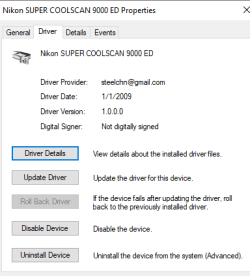
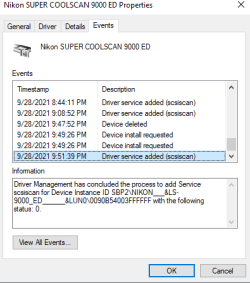
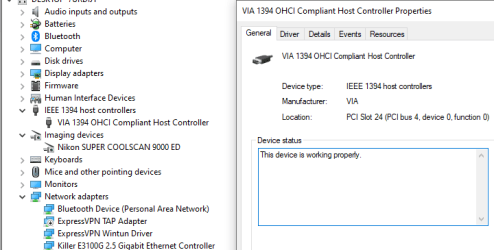
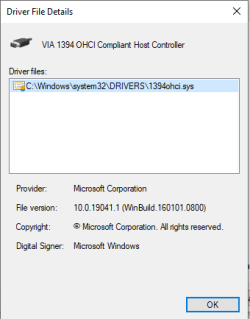
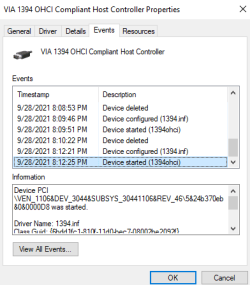
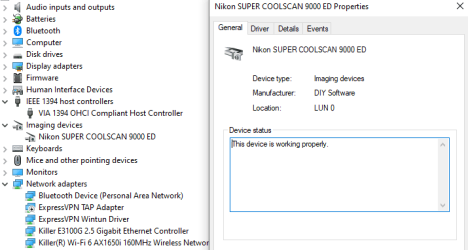
But I am still stuck. I have had a problem updating the Nikon driver with the unsigned version. I can start the install from Device Mgr- but I find that I am in an endless loop with the driver update never completing, Upon ending the task (after leaving it overnight) I see that the drive appears to have installed and Device Mgr reports is working properly. However neither Nikon Scan or VueScan recognize the Device. Following are a few screens shots that may help to illustrate my situation.

Thanks!

Firewire Card info -

image.png

image.png
image.png


Scanner Info-

image.png
image.png
image.png
 

My Computers My Computers

  • At a glance

    Windows 10
    OS
    Windows 10
  • Computer type
    PC/Desktop
I have learned a lot form this thread - thank you!

But I am still stuck. I have had a problem updating the Nikon driver with the unsigned version. I can start the install from Device Mgr- but I find that I am in an endless loop with the driver update never completing, Upon ending the task (after leaving it overnight) I see that the drive appears to have installed and Device Mgr reports is working properly. However neither Nikon Scan or VueScan recognize the Device. Following are a few screens shots that may help to illustrate my situation.
When I dabbled with the Coolscan 8000 and Firewire cards on Windows 7 and more modern PC hardware, I seem to recall that only Firewire cards with a Firewire chip from a certain manufacturer - can't recall the brand now - would work for me. Other Firewire cards didn't work. I don't recall enough to say whether your experience fits that pattern, but perhaps it's worth considering.

One way to troubleshoot would be if you have or can set up a Windows XP machine, so the original NikonScan drivers can be used to confirm that your Coolscan and card can work together.
 

My Computer My Computer

At a glance

Windows 7 Pro x64Intel i7 6th Gen16GB
Computer type
PC/Desktop
Computer Manufacturer/Model Number
custom
OS
Windows 7 Pro x64
CPU
Intel i7 6th Gen
Motherboard
Asus Z170e
Memory
16GB
Antivirus
Eset NOD32
Browser
Firefox
But I am still stuck. I have had a problem updating the Nikon driver with the unsigned version. I can start the install from Device Mgr- but I find that I am in an endless loop with the driver update never completing, Upon ending the task (after leaving it overnight) I see that the drive appears to have installed and Device Mgr reports is working properly. However neither Nikon Scan or VueScan recognize the Device. Following are a few screens shots that may help to illustrate my situation.
@GDI, I'm not sure what's going on with your machine. The images you posted certainly says everything is installed correctly, so I'm at a loss as to what the issue is.

What OS version of Windows are you running - Win 7, 8, 10, or 11? Build number?

Are you sure there's no issue with the scanner? You saying it isn't recognized even with Vuescan is concerning.

That said, please be reminded I did say to remove Vuescan prior to trying these procedures, so perhaps remove Vuescan first and try again?

@spoolin01, the Firewire chipset you're trying to remember is VIA, which is what the card GDI, is using appears to have; so on the surface that isn't the issue. Everything looks good there.
 

My Computer My Computer

At a glance

Windows 10 ProIntel Core i7-4770K (3.5Ghz)32 gig Corsair Dominator Platinum (4x8Gig)Sapphire Tri-X R9 Fury
Computer type
PC/Desktop
Computer Manufacturer/Model Number
Custom built by me.
OS
Windows 10 Pro
CPU
Intel Core i7-4770K (3.5Ghz)
Motherboard
Gigabyte G1 Sniper 5 (F10 Bios)
Memory
32 gig Corsair Dominator Platinum (4x8Gig)
Graphics Card(s)
Sapphire Tri-X R9 Fury
Sound Card
Soundblaster ZXR
Monitor(s) Displays
NEC PA242W 24" LCD Monitor
Screen Resolution
1920 x 1200
Hard Drives
Primary - Samsung 850 Pro (512gig), Samsung 840 Pro (256gig), 2TB WD Caviar Black.
PSU
EVGA Supernova 1000 G2
Case
Cooler Master HAF X
Cooling
Corsair H100i with Corsair Air Series SP120 Quiet Fans
Keyboard
Logitech Wireless Wave
Mouse
Logitech Performance MX
Internet Speed
High Speed Cable
Antivirus
Norton Security
Browser
IE11
Other Info
Memory Timings - 1866MHz @ 9-9-9-27-1T @ 1.5 volts
Back
Top