BootMgr help please

vix2000

New member
Local time
6:10 PM
Messages
24
Basically I partitioned my hard drive when I installed windows 7, and had 3 partitions, one primary active with vista, one logical with win 7 and another logical for data. As the win 7 and data partitions were filling up, I decided to remove the vista drive, so I used partition manager to make the windows 7 partition a primary drive then made it active. I then decided too restart to check that everything was ok before I deleted the vista partition. I got the dreaded bootmgr missng error. I have tried to repair via win 7 console but says this drive cannot be repaired. Cannot use my pc vista restore disc as this will remove all partitions. Am going to try and reinstall vista on the vista partition. What I need help with is when I have done ths how doo I get bootmgr and any other vital files onto my windows 7 partition to enabe me to delete my vista partition? Thank you
 

My Computer My Computer

At a glance

vista
OS
vista
Hi,
Windows 7 comes with the software ,i.e to boot your pc.
Can you post a screen shot of your partitions and im sure we can help.

Dan
 

My Computer My Computer

At a glance

Windows 7 Ultimate 64bitAMD Phenom II 555 Black Edition Quad Core OC'...G Skill RipJaw 1333MHz 4GBATI raideon 4250 HD/XFX ATI Radeon 1GB HD4650
Computer Manufacturer/Model Number
Blue Shards 1.0
OS
Windows 7 Ultimate 64bit
CPU
AMD Phenom II 555 Black Edition Quad Core OC'd to 4.0GHz
Motherboard
ASUS M4A88T-M
Memory
G Skill RipJaw 1333MHz 4GB
Graphics Card(s)
ATI raideon 4250 HD/XFX ATI Radeon 1GB HD4650
Sound Card
Realteck HD Audio
Monitor(s) Displays
2x 22" Widescreen HD Monitors
Hard Drives
500GB Sata 7500RPM
80GB IDE
PSU
850W OCUK Modular
Case
Antec Dark Fleet DF-30
Cooling
Titan Fenrir Pro (CPU)
Keyboard
Logitech Wireless
Mouse
Logitech Wireless
Internet Speed
24Meg
Other Info
Getting soon-
2TB 7200RPM HDD
+8GB RAM
30GB SSD
HD6950/70
Excuse the dumbness but if you can tell me how to post it I'm sure I could. Sorry never done it before :confused:

I tried the repair console but it says the drive cannot be repaired, the problem being the bootmgr, so I tried repairing from the command prompt and it said completed but when I reboot I'm back to square one!!!!!
 

My Computer My Computer

At a glance

vista
OS
vista
OK Im even more dumb as I cant get into my laptop to do a screen shot anyway? I'll try and write what it says.
 

My Computer My Computer

At a glance

vista
OS
vista

My Computer My Computer

At a glance

Vista Ult64, Win7600Intel Core 2 Quad Q6600 @ 2400 MHz 64bit OS4096 MB DDR3-SDRAMATI Radeon HD 3870 Series x2 Crossfired
Computer Manufacturer/Model Number
Self Build 64bit
OS
Vista Ult64, Win7600
CPU
Intel Core 2 Quad Q6600 @ 2400 MHz 64bit OS
Motherboard
Asus P5E3 Deluxe WiFi @p 64 bit OS
Memory
4096 MB DDR3-SDRAM
Graphics Card(s)
ATI Radeon HD 3870 Series x2 Crossfired
Sound Card
Realtek on board
Monitor(s) Displays
Samsung SyncMaster - 23 inches
Screen Resolution
1680x1050 pixels at 60 Hz in True Colors
Hard Drives
Hitachi (250 GB)/Samsung 750 GB. /Barracuda 160 GB.
My Book 1 TB external..
PSU
Cooler Master 1000w
Case
Cooler Master Cosmos 1000.
Cooling
Fans and fresh air,
Keyboard
Wireless
Mouse
Wireless
Internet Speed
Never fast enough
Other Info
I use a Magnum.
OK Im even more dumb as I cant get into my laptop to do a screen shot anyway? I'll try and write what it says.
Sorry lol,my fault. Yes if you could type it out so we can get an idea.

Try open command promt in the repair console and type sfc /scannow ,this should highlight and fix corrupted data.

In the repair console for 7>system restore to an earlier date


After many threads and my own trials i would do the below if the above does not work.
Actually,start windows with the partition wizard boot disc,delete both Win7 partition and Vista partition,format unallocated space as NTFS,make primary,mark as active (move it to the left so data partition is on the right).Click apply at bottom left of screen in PW after EACH step.

Run a clean install on the new partition,Windows 7 will install new bootmanager.

Dan
 

My Computer My Computer

At a glance

Windows 7 Ultimate 64bitAMD Phenom II 555 Black Edition Quad Core OC'...G Skill RipJaw 1333MHz 4GBATI raideon 4250 HD/XFX ATI Radeon 1GB HD4650
Computer Manufacturer/Model Number
Blue Shards 1.0
OS
Windows 7 Ultimate 64bit
CPU
AMD Phenom II 555 Black Edition Quad Core OC'd to 4.0GHz
Motherboard
ASUS M4A88T-M
Memory
G Skill RipJaw 1333MHz 4GB
Graphics Card(s)
ATI raideon 4250 HD/XFX ATI Radeon 1GB HD4650
Sound Card
Realteck HD Audio
Monitor(s) Displays
2x 22" Widescreen HD Monitors
Hard Drives
500GB Sata 7500RPM
80GB IDE
PSU
850W OCUK Modular
Case
Antec Dark Fleet DF-30
Cooling
Titan Fenrir Pro (CPU)
Keyboard
Logitech Wireless
Mouse
Logitech Wireless
Internet Speed
24Meg
Other Info
Getting soon-
2TB 7200RPM HDD
+8GB RAM
30GB SSD
HD6950/70
system recovery options
operating system windows 7 ultimate (recovered)
partition size 52789 mb location c:win 7

next

this version of system rec options not comp wiyh version you're trying to repair

eventually get to system recovery options
choose start up repair
searching for problems-attempting repair-startup repair cannot repair this computer automatically
problem details
problem event name startuprepairoffline
prob sig 1 6.1.7100.0
prob sig 2 ditto
3 unknown
4 -1
5 ext media
6 1
7 missingbootmanager
os version 6.1.7100.2.0.0.256.1

restarting to get partition info then will try the suggestions above. Thanks all.


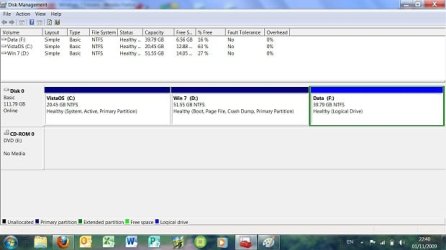
disk 0 partition 1: vista os 20.5gb 12.9 gb primary
disk 0 partition 2: win 7 51.6gb 16.5gb system
disk 0 partition 3: data 39.8 gb 6.6 gb logical

I changed the win 7 partition to primary active before the problem? was hoping not to delete the win 7 partition but not bothered about the vista as all programs on win 7.

just done the sfc/scannow it says there is a system repair pending which requires reboot. just restarted and one it 3 times, but obviously not rebooting. its after 2am so giving up for tonight. thanks for all the help, and any further suggestions gratefully received.
 
Last edited:

My Computer My Computer

At a glance

vista
OS
vista
Can you install 7 on the first (Vista) partition?

Mark it Active first.

Diskpart

sel disk 0

sel par 1

act

exi
 

My Computers My Computers

  • At a glance

    7 X64i5 84002x8gb 3200mhz
    Computer type
    PC/Desktop
    OS
    7 X64
    CPU
    i5 8400
    Motherboard
    gigabyte b365m ds3h
    Memory
    2x8gb 3200mhz
    Hard Drives
    various
    PSU
    pure power 11 400w cm
    Case
    Coolermaster
    Cooling
    cryorig m9i
  • At a glance

    7x64g54008gb ddr4 2400
    Computer type
    PC/Desktop
    OS
    7x64
    CPU
    g5400
    Motherboard
    ga b365m ds3h
    Memory
    8gb ddr4 2400
    PSU
    xfx pro 450w
I thought about that earlier. I installed mine from exe, so my sil burned me the iso to the disk I'm using and it doesn't complete the installation. Tomorrow I'll try getting a vista or win 7 bootable disk that works.

Just a thought, If I can mark the vista partition active again won't it boot from there anyway? Do I run the diskpart from the recovery console prompt?
 

My Computer My Computer

At a glance

vista
OS
vista
SIW2 WHAT A STAR!!!! I've been trying to sort this for nearly 2 days.:thumbsup:
Thanks to everyone for their help, too.

Now my vista partition is bu@@ered but I can access my win 7 partition.

Now for my main problem. How and where do I properly put (and what are) all the necessary bootmgr and associated files into windows 7 so that I can delete the vista partition and make windows 7 boot properly, please?
 

My Computer My Computer

At a glance

vista
OS
vista
SIW2 WHAT A STAR!!!! I've been trying to sort this for nearly 2 days.:thumbsup:
Thanks to everyone for their help, too.

Now my vista partition is bu@@ered but I can access my win 7 partition.

Now for my main problem. How and where do I properly put (and what are) all the necessary bootmgr and associated files into windows 7 so that I can delete the vista partition and make windows 7 boot properly, please?
SIW2 is thee person when it comes to partitions and installs,he has an excellent knowledge on this subject (and alot others id bet)

Your Win7 partition isnt booting properly?

Seeing as you copied over it you should have the boot files in the old vista/new win7 partition

You simply delete the old Win 7 partition,format it and thats your second (for whatever) partition.

1 Win7 install,1 empty partition,im pretty sure thats accurate,SIW2 could confirm this?
 

My Computer My Computer

At a glance

Windows 7 Ultimate 64bitAMD Phenom II 555 Black Edition Quad Core OC'...G Skill RipJaw 1333MHz 4GBATI raideon 4250 HD/XFX ATI Radeon 1GB HD4650
Computer Manufacturer/Model Number
Blue Shards 1.0
OS
Windows 7 Ultimate 64bit
CPU
AMD Phenom II 555 Black Edition Quad Core OC'd to 4.0GHz
Motherboard
ASUS M4A88T-M
Memory
G Skill RipJaw 1333MHz 4GB
Graphics Card(s)
ATI raideon 4250 HD/XFX ATI Radeon 1GB HD4650
Sound Card
Realteck HD Audio
Monitor(s) Displays
2x 22" Widescreen HD Monitors
Hard Drives
500GB Sata 7500RPM
80GB IDE
PSU
850W OCUK Modular
Case
Antec Dark Fleet DF-30
Cooling
Titan Fenrir Pro (CPU)
Keyboard
Logitech Wireless
Mouse
Logitech Wireless
Internet Speed
24Meg
Other Info
Getting soon-
2TB 7200RPM HDD
+8GB RAM
30GB SSD
HD6950/70

My Computers My Computers

  • At a glance

    7 X64i5 84002x8gb 3200mhz
    Computer type
    PC/Desktop
    OS
    7 X64
    CPU
    i5 8400
    Motherboard
    gigabyte b365m ds3h
    Memory
    2x8gb 3200mhz
    Hard Drives
    various
    PSU
    pure power 11 400w cm
    Case
    Coolermaster
    Cooling
    cryorig m9i
  • At a glance

    7x64g54008gb ddr4 2400
    Computer type
    PC/Desktop
    OS
    7x64
    CPU
    g5400
    Motherboard
    ga b365m ds3h
    Memory
    8gb ddr4 2400
    PSU
    xfx pro 450w
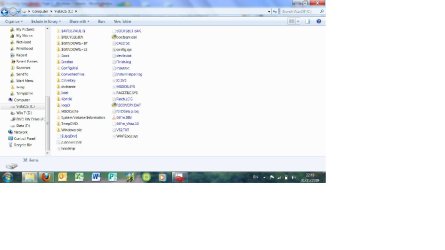
Sorry, I didn't need to do a new install, as soon as I was able to make the original vista partition active again with diskpart, my original dual boot screen appeared and I could access my original win 7 installation as normal. My vista partition won't boot properly anymore but I'm not bothered as I want rid anyway, but obviously the bootmgr files and any others originally loaded on there when I installed win 7 from the vista partition need to be moved/copied to the win 7 partition before I delete it otherwise I'll be back to square one, and I'm not sure which files they are. Hope the screen shot is right? I'll try and do another of my c (vista) drive as it looks pretty messed up)
 

Attachments

  • screen diskmgmt.jpg
    screen diskmgmt.jpg
    25.7 KB · Views: 18

My Computer My Computer

At a glance

vista
OS
vista
screen print c drive (sorry they seem so small?)
 

Attachments

  • screen c drive.jpg
    screen c drive.jpg
    57.7 KB · Views: 16

My Computer My Computer

At a glance

vista
OS
vista
In win 7 ( which I assume is D when you are booted into it? ) - open an elevated cmd prompt, and type:

bcdboot d:\windows /s d:

then press enter.

It should say completed successfully.

Mark 7 partition Active.

Restart.
 

My Computers My Computers

  • At a glance

    7 X64i5 84002x8gb 3200mhz
    Computer type
    PC/Desktop
    OS
    7 X64
    CPU
    i5 8400
    Motherboard
    gigabyte b365m ds3h
    Memory
    2x8gb 3200mhz
    Hard Drives
    various
    PSU
    pure power 11 400w cm
    Case
    Coolermaster
    Cooling
    cryorig m9i
  • At a glance

    7x64g54008gb ddr4 2400
    Computer type
    PC/Desktop
    OS
    7x64
    CPU
    g5400
    Motherboard
    ga b365m ds3h
    Memory
    8gb ddr4 2400
    PSU
    xfx pro 450w
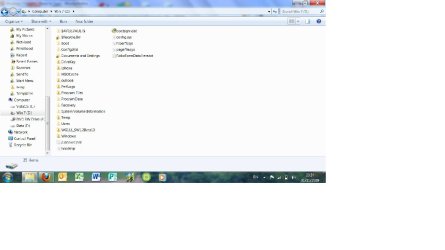
Followed all your perfectly clear instructions and on restart it booted straight into windows 7 without the pick operating system menu first, which I hope what was meant to happen? My d drive is now as below with what I believe to be all the boot files. I can't thank you enough for your help, and am I now ok to delete the vista/c drive?
 

Attachments

  • screen d drive.jpg
    screen d drive.jpg
    50.3 KB · Views: 10

My Computer My Computer

At a glance

vista
OS
vista
Yes, that was the intention.

Check in Disk Management - you should see the 7 partition showing as "system".

You can then delete the Vista partition if you like.
 

My Computers My Computers

  • At a glance

    7 X64i5 84002x8gb 3200mhz
    Computer type
    PC/Desktop
    OS
    7 X64
    CPU
    i5 8400
    Motherboard
    gigabyte b365m ds3h
    Memory
    2x8gb 3200mhz
    Hard Drives
    various
    PSU
    pure power 11 400w cm
    Case
    Coolermaster
    Cooling
    cryorig m9i
  • At a glance

    7x64g54008gb ddr4 2400
    Computer type
    PC/Desktop
    OS
    7x64
    CPU
    g5400
    Motherboard
    ga b365m ds3h
    Memory
    8gb ddr4 2400
    PSU
    xfx pro 450w
Yes its showing as system. Thanks again for all your help. I'll delete it now.
 

My Computer My Computer

At a glance

vista
OS
vista
You're welcome.
 

My Computers My Computers

  • At a glance

    7 X64i5 84002x8gb 3200mhz
    Computer type
    PC/Desktop
    OS
    7 X64
    CPU
    i5 8400
    Motherboard
    gigabyte b365m ds3h
    Memory
    2x8gb 3200mhz
    Hard Drives
    various
    PSU
    pure power 11 400w cm
    Case
    Coolermaster
    Cooling
    cryorig m9i
  • At a glance

    7x64g54008gb ddr4 2400
    Computer type
    PC/Desktop
    OS
    7x64
    CPU
    g5400
    Motherboard
    ga b365m ds3h
    Memory
    8gb ddr4 2400
    PSU
    xfx pro 450w
Back
Top