A Few Macrium Reflect Questions

BuckSkin

Member
Power User
VIP
Local time
9:45 AM
Messages
523
Okay, brand-new SSD, straight out of the box and installed just as it came out of the box into a laptop.

All Macrium System Images are stored in a Network Drive, EXACTLY where Macrium put them.

New clean SSD installed, I booted the Macrium Win-PE disc and got the Macrium console up on the screen.

I tried every alternative and every method that I could see and never was able to make it find the Network Drive where the images are stored.

I finally gave up and copied the chosen image onto an Ext-HDD, plugged it in, and Macrium then found it and went to work installing it.

1. Should Macrium have been able to navigate to the Network Drive ? and, if so, how should I have went about it ? Remember, this is a clean SSD.


2. I can't remember what it is called, but I read of an option to have Macrium install something such that it will show in the boot menu; does this mean that whatever is on the Macrium Win-PE Rescue disc will instead be loaded in the machine such that I will not have to put the disc in the DVD tray and boot to that ? Advantages and disadvantages ?

Thanks for reading and all help is appreciated.
 

My Computer My Computer

Computer type
PC/Desktop
Computer Manufacturer/Model Number
Dell Optiplex 780m "mini-tower"
OS
Windows 7 Pro x64
CPU
Intel Core Two Duo E8600 3.33 ghz
Motherboard
Whatever DELL put in it
Memory
8GB
Graphics Card(s)
Gigabyte Radeon R7 240
Monitor(s) Displays
HP 2159m
PSU
750 Watt Corsair CX750
Keyboard
Logitech Wireless
Mouse
Logitech Wireless
Browser
Chrome, Firefox, IE

My Computer My Computer

Computer type
PC/Desktop
Computer Manufacturer/Model Number
HP Desktop & Compaq Laptop
OS
Win 10 x64, Linux Lite, Win 7 x64, BlackArch, & Kali
Hard Drives
Samsung 850 Pro 256Gb,
Hitachi HDD 1Tb,
Crucial MX SSD 250Gb
Segate 3Tb USB 3.0 Ext. Backup HDD
Internet Speed
150Mbps dn, 20Mbps up
Antivirus
Avast Free, Malwarebytes Anti-Exploit & Anti-Ransomware
Browser
Firefox, Chrome, Opera, & VPN

Thanks.
After reading that, if I understood correctly, when a Macrium Win-PE disc is created and then later the path to the saved images is changed, then another new disc needs be made to account for that, as the path to the saved images is actually recorded in the rescue disc, right ? ? ?

Can anyone shed some light on question #2 ? I hope I worded it to where it makes sense.
 

My Computer My Computer

Computer type
PC/Desktop
Computer Manufacturer/Model Number
Dell Optiplex 780m "mini-tower"
OS
Windows 7 Pro x64
CPU
Intel Core Two Duo E8600 3.33 ghz
Motherboard
Whatever DELL put in it
Memory
8GB
Graphics Card(s)
Gigabyte Radeon R7 240
Monitor(s) Displays
HP 2159m
PSU
750 Watt Corsair CX750
Keyboard
Logitech Wireless
Mouse
Logitech Wireless
Browser
Chrome, Firefox, IE
I can't remember what it is called, but I read of an option to have Macrium install something such that it will show in the boot menu; does this mean that whatever is on the Macrium Win-PE Rescue disc will instead be loaded in the machine such that I will not have to put the disc in the DVD tray and boot to that ? Advantages and disadvantages ?

What you're describing is covered on page 315 of the Macrium Reflect User Guide.

When you normally create rescue media, Macrium builds a bootable .iso file, which you then use to burn a CD or turn into a bootable USB stick. In contrast, the "Boot Menu option" leaves that .iso somewhere on your hard drive and modifies the Windows BCD boot menu to add Macrium Reflect Recovery as a boot option. Thereafter, every time you boot you'll have the option of booting into Windows or booting into the Macrium Recovery environment, where the latter option simply mounts the .iso in ram as a virtual "partition" and boots into the recovery environment from ram.

The advantage is it's convenient to get to, since you don't have to hunt around for your Macrium rescue CD or USB stick. When you need to use it you'll still have to reboot to get into it, but it's arguably quicker loading the recovery environment from the .iso on a hard disk rather than the slower CD or USB boot.

The disadvantage is it's on the hard drive, so you won't have access to it if the hard drive dies or if your BCD/System partition gets corrupted.

For that reason, you don't want to rely solely on this method and it would be wise to create a CD or USB stick anyway. You don't have to use the CD/USB all the time, but at least make it and stash it away as a backup in case the Boot Menu option becomes inaccessible for some reason.
 

My Computer My Computer

Computer type
PC/Desktop
Computer Manufacturer/Model Number
Dell Optiplex 7050
OS
Windows 7/8.1/10 multiboot
CPU
Intel Core i7-7700
Motherboard
Dell, Intel Q270 chipset
Memory
48GB (2x16GB Crucial DDR4-3200 + 2x8GB Hynix DDR4-2400)
Graphics Card(s)
Intel HD630 + AMD Radeon R7 450 PCIe
Monitor(s) Displays
Asus VC279 (27")
Screen Resolution
1920x1080
Hard Drives
Toshiba M.2 NVMe (256GB),
Samsung 960 Evo (500GB),
WD Red Plus 80EFBX (8TB)
The disadvantage is it's on the hard drive, so you won't have access to it if the hard drive dies or if your BCD/System partition gets corrupted.

Thanks for that wonderful explanation that I could fully comprehend.

Now, for question number three.


3. If one is limited to a single hard-drive, such as a

laptop, and has meticulously created partitions with the O/S on

one partition and tons of data and maybe even a Linux

installation on the other partitions, to keep image size

manageable, can Macrium be set to backup only the O/S AND the

partition configuration without also having to image all of the

data that is in those partitions ?


3a. And, if such as I describe is not possible with Macrium, is there a program that can back up the partition structure (no data) and recreate it on a new HDD when the old one has failed ?

3b. Along the same line of thinking, if I prepare the new HDD/SSD and create my partitions in a separate working machine, can I point Macrium restore to a particular partition without wiping everything away ?
 

My Computer My Computer

Computer type
PC/Desktop
Computer Manufacturer/Model Number
Dell Optiplex 780m "mini-tower"
OS
Windows 7 Pro x64
CPU
Intel Core Two Duo E8600 3.33 ghz
Motherboard
Whatever DELL put in it
Memory
8GB
Graphics Card(s)
Gigabyte Radeon R7 240
Monitor(s) Displays
HP 2159m
PSU
750 Watt Corsair CX750
Keyboard
Logitech Wireless
Mouse
Logitech Wireless
Browser
Chrome, Firefox, IE
3. If one is limited to a single hard-drive, such as a laptop, and has meticulously created partitions with the O/S on one partition and tons of data and maybe even a Linux installation on the other partitions, to keep image size manageable, can Macrium be set to backup only the O/S AND the partition configuration without also having to image all of the data that is in those partitions ?

Yes, Macrium saves a disk map with every image. You can image one or more partitions (a disk image is really nothing more than a collection of partition images), and regardless of how many partitions you include in your image set, Macrium will always include a disk map, even for partitions it doesn't image.

If it helps, see the screenshot in Step 3 from one of my webpages for an illustration of what I'm talking about. Note the "Source" image shows where the original disk's four partitions were, even though partition 3 was the only one imaged.

However, you should be aware that in my example, if you're restoring to a blank destination disk you cannot leave unallocated space in front and restore only partition 3. A partition restore will always try to go as far forward as it can go. If you don't want partition 3 to end up at the front of the disk, you'd need to first restore partitions 1 and 2 (or create partition placeholders with a partition manager), so that there's no preceding unallocated space when you go to restore the third partition.
 

My Computer My Computer

Computer type
PC/Desktop
Computer Manufacturer/Model Number
Dell Optiplex 7050
OS
Windows 7/8.1/10 multiboot
CPU
Intel Core i7-7700
Motherboard
Dell, Intel Q270 chipset
Memory
48GB (2x16GB Crucial DDR4-3200 + 2x8GB Hynix DDR4-2400)
Graphics Card(s)
Intel HD630 + AMD Radeon R7 450 PCIe
Monitor(s) Displays
Asus VC279 (27")
Screen Resolution
1920x1080
Hard Drives
Toshiba M.2 NVMe (256GB),
Samsung 960 Evo (500GB),
WD Red Plus 80EFBX (8TB)
All of the third party imaging programs I am aware of allow selection of which partitions to include in an image.

Only a few allow exclusions of specified files/folders.
 

My Computers My Computers

System One System Two

  • Computer type
    PC/Desktop
    OS
    7 X64
    CPU
    i5 8400
    Motherboard
    gigabyte b365m ds3h
    Memory
    2x8gb 3200mhz
    Hard Drives
    various
    PSU
    pure power 11 400w cm
    Case
    Coolermaster
    Cooling
    cryorig m9i
  • Computer type
    PC/Desktop
    OS
    7x64
    CPU
    g5400
    Motherboard
    ga b365m ds3h
    Memory
    8gb ddr4 2400
    PSU
    xfx pro 450w
All of the third party imaging programs I am aware of allow selection of which partitions to include in an image.

Only a few allow exclusions of specified files/folders.

I agree

:thumbsup:
 

My Computer My Computer

Computer type
PC/Desktop
Computer Manufacturer/Model Number
HP Desktop & Compaq Laptop
OS
Win 10 x64, Linux Lite, Win 7 x64, BlackArch, & Kali
Hard Drives
Samsung 850 Pro 256Gb,
Hitachi HDD 1Tb,
Crucial MX SSD 250Gb
Segate 3Tb USB 3.0 Ext. Backup HDD
Internet Speed
150Mbps dn, 20Mbps up
Antivirus
Avast Free, Malwarebytes Anti-Exploit & Anti-Ransomware
Browser
Firefox, Chrome, Opera, & VPN
dg1261

Excellent dissertations!

:thumbsup:
 

My Computer My Computer

Computer type
PC/Desktop
Computer Manufacturer/Model Number
HP Desktop & Compaq Laptop
OS
Win 10 x64, Linux Lite, Win 7 x64, BlackArch, & Kali
Hard Drives
Samsung 850 Pro 256Gb,
Hitachi HDD 1Tb,
Crucial MX SSD 250Gb
Segate 3Tb USB 3.0 Ext. Backup HDD
Internet Speed
150Mbps dn, 20Mbps up
Antivirus
Avast Free, Malwarebytes Anti-Exploit & Anti-Ransomware
Browser
Firefox, Chrome, Opera, & VPN
Question Number 4:

4. Lets say I have a Brand X desktop/tower with Windows 7

Pro and a rock-solid O/S loaded with all my favorite programs

and all the little annoyances and fixes that often go along with

getting those programs to work with the O/S already taken care of.

Now, lets say that I have another machine, maybe a

laptop,Brand E, also Windows 7 Pro, with none of my preferred

programs and a possible virus infection.

Now, lets say the HDD fails in machine Brand E and I install

a new HDD/SSD; AND; I use Macrium Win-PE to load an image of

machine Brand X in machine Brand E; other than a few possible

driver issues, what are the pitfalls and unsurmountable problems

with this scenario ?

4a. Lets say that I have managed to successfully load the

Brand X image in machine brand E and everything is clicking

right along, when I attempt to change the license key to the one

that matches the machine, am I going to then run into a snag ?

4b. Lets say that the Brand X image in Brand E, still

thinking it is Brand X and licensed as such, both machines

working flawlessly, with the same credentials, would I best

leave alone as is, rather than risk the aggravation of trying to

set the license to rights ? --- It isn't as if there isn't a

bought and paid for license sticker right on the machine.
 

My Computer My Computer

Computer type
PC/Desktop
Computer Manufacturer/Model Number
Dell Optiplex 780m "mini-tower"
OS
Windows 7 Pro x64
CPU
Intel Core Two Duo E8600 3.33 ghz
Motherboard
Whatever DELL put in it
Memory
8GB
Graphics Card(s)
Gigabyte Radeon R7 240
Monitor(s) Displays
HP 2159m
PSU
750 Watt Corsair CX750
Keyboard
Logitech Wireless
Mouse
Logitech Wireless
Browser
Chrome, Firefox, IE
You've correctly identified the two major roadblocks to cloning or restoring images to dissimilar hardware: drivers and Windows authentication.

Restoring to dissimilar hardware is discussed on page 391 of the aforementioned User Guide. (Note that "Macrium ReDeploy" is not available in the free version.) I've never tried it myself because such tactics offend my sensibilities; I always insist on starting with a clean install if it's a different machine.

People who have tried it report mixed results -- it seems to sort of work if the two machines are mostly similar, but fails miserably if the machines are too different. If you want a recounting of one guy's trip down the rabbit hole, read this blog post. (tldr: he ultimately gave up.)

I can't speak to the license issue because, as I said, I never clone or restore to dissimilar hardware, but there are numerous threads elsewhere in this and other forums that discuss the problems you can run into.
 

My Computer My Computer

Computer type
PC/Desktop
Computer Manufacturer/Model Number
Dell Optiplex 7050
OS
Windows 7/8.1/10 multiboot
CPU
Intel Core i7-7700
Motherboard
Dell, Intel Q270 chipset
Memory
48GB (2x16GB Crucial DDR4-3200 + 2x8GB Hynix DDR4-2400)
Graphics Card(s)
Intel HD630 + AMD Radeon R7 450 PCIe
Monitor(s) Displays
Asus VC279 (27")
Screen Resolution
1920x1080
Hard Drives
Toshiba M.2 NVMe (256GB),
Samsung 960 Evo (500GB),
WD Red Plus 80EFBX (8TB)
You've correctly identified the two major roadblocks to cloning or restoring images to dissimilar hardware: drivers and Windows authentication.

Thanks.

I have just ran into another question.

Question Number 5. I have just an hour or so ago started Macrium to creating their rescue media for another Windows 7 machine.

I cannot recall just exactly how it was named/worded; but, it said that it needed to download some sort of file to proceed with building the Win-PE disc; it also gave me the option of browsing for said file if I already had it somewhere.

I just clicked Okay for the download and it has now been downloading forever.

As I have already created several rescue discs for each of our other Win7 machines, I most likely already have this file on hand.

My question is, is this file that is being downloaded the same for all versions of Win7, regardless of make and model of machine ?

And, if so, where in my machine would I find this file ?

I don't remember it taking forever to download when I did this on the other machines.

Thanks for reading and all help is appreciated.


>>>EDIT: I think I may have found the download's location on another machine = Program Data > Macrium > Reflect > Windows AIK > Tools

In that folder are three subfolders, amd64, PETools, and x86.

I do not see any zip file as described.

Am I in the right place; and, if so, which and how of all this do I use the next time I need it ?
 

My Computer My Computer

Computer type
PC/Desktop
Computer Manufacturer/Model Number
Dell Optiplex 780m "mini-tower"
OS
Windows 7 Pro x64
CPU
Intel Core Two Duo E8600 3.33 ghz
Motherboard
Whatever DELL put in it
Memory
8GB
Graphics Card(s)
Gigabyte Radeon R7 240
Monitor(s) Displays
HP 2159m
PSU
750 Watt Corsair CX750
Keyboard
Logitech Wireless
Mouse
Logitech Wireless
Browser
Chrome, Firefox, IE
You ought to spend some time reading the User Guide.

On page 301 of the User Guide, it shows a screenshot of the "Rescue Media Builder" dialog box. At the top of that window it shows which Windows RE version it will build. Clicking the [Advanced] button allows you to change that -- see page 304. If you select the version natively installed with your Windows, Macrium will use what's already installed to build its own, custom RE. No download required.

If you select one of the other versions*, Macrium will need to first download that version of the Windows Assessment and Development Kit (WADK), extract the RE files out of that, and use those to build the Macrium custom RE. That download is hundreds of MBs, and can take some time to download.

If you've already downloaded it before, I don't know what format it needs to be in to feed it back into the Macrium builder. The described zip file contains the Windows AIK folders and files, and what you've located on your other machine are the contents already extracted from the zip file. I don't know if you can just copy that folder or if you have to zip them back up. The best place to get an answer to that might be at the Macrium forum.


* BTW, FWIW I use the PE10 version because it's backward compatible with 8 and 7, but can also boot from USB3 ports and both MBR and UEFI. That means I can use the same rescue media for lots of different machines.

Disclaimer: I don't try to image/restore across a network, so I don't bother with trying to add network drivers to my rescue media. That's just my preference. My opinion is that adding drivers or wifi configurations to the rescue media just makes it less universal, though it can provide more options if you're going to be using the rescue media on only that one specific machine.
 

My Computer My Computer

Computer type
PC/Desktop
Computer Manufacturer/Model Number
Dell Optiplex 7050
OS
Windows 7/8.1/10 multiboot
CPU
Intel Core i7-7700
Motherboard
Dell, Intel Q270 chipset
Memory
48GB (2x16GB Crucial DDR4-3200 + 2x8GB Hynix DDR4-2400)
Graphics Card(s)
Intel HD630 + AMD Radeon R7 450 PCIe
Monitor(s) Displays
Asus VC279 (27")
Screen Resolution
1920x1080
Hard Drives
Toshiba M.2 NVMe (256GB),
Samsung 960 Evo (500GB),
WD Red Plus 80EFBX (8TB)
You ought to spend some time reading the User Guide.

On page 301 of the User Guide, it shows a screenshot of the "Rescue Media Builder" dialog box. At the top of that window it shows which Windows RE version it will build. Clicking the [Advanced] button allows you to change that -- see page 304. If you select the version natively installed with your Windows, Macrium will use what's already installed to build its own, custom RE. No download required.

If you select one of the other versions*, Macrium will need to first download that version of the Windows Assessment and Development Kit (WADK), extract the RE files out of that, and use those to build the Macrium custom RE. That download is hundreds of MBs, and can take some time to download.

If you've already downloaded it before, I don't know what format it needs to be in to feed it back into the Macrium builder. The described zip file contains the Windows AIK folders and files, and what you've located on your other machine are the contents already extracted from the zip file. I don't know if you can just copy that folder or if you have to zip them back up. The best place to get an answer to that might be at the Macrium forum.


* BTW, FWIW I use the PE10 version because it's backward compatible with 8 and 7, but can also boot from USB3 ports and both MBR and UEFI. That means I can use the same rescue media for lots of different machines.

Disclaimer: I don't try to image/restore across a network, so I don't bother with trying to add network drivers to my rescue media. That's just my preference. My opinion is that adding drivers or wifi configurations to the rescue media just makes it less universal, though it can provide more options if you're going to be using the rescue media on only that one specific machine.

It finally did finish downloading and the completed disc works.

I agree; I do need to read the manual.

As I have thus far barely knew what I was doing, I always use the default recommended PE version (PE3 I think it said); but, I am definitely going to start using the PE10 version.

One bit I am not clear on, are these rescue discs I have been creating machine specific or just O/S specific; as in, do I need to create a separate disc for each and every one of my Windows 7 machines, or will one Windows 7 disc work across the board?

Thanks and I really do appreciate everyone's patience in answering my many questions.
 

My Computer My Computer

Computer type
PC/Desktop
Computer Manufacturer/Model Number
Dell Optiplex 780m "mini-tower"
OS
Windows 7 Pro x64
CPU
Intel Core Two Duo E8600 3.33 ghz
Motherboard
Whatever DELL put in it
Memory
8GB
Graphics Card(s)
Gigabyte Radeon R7 240
Monitor(s) Displays
HP 2159m
PSU
750 Watt Corsair CX750
Keyboard
Logitech Wireless
Mouse
Logitech Wireless
Browser
Chrome, Firefox, IE
And, if so, where in my machine would I find this file ?

Last time I looked at it,the downloads macrium does are stored in ProgramData/macrium.


I have made fancy windows 7 boot media. It is better extracted usb stick ( which most people do nowadays, rather than using cd/dvd )

17514x64v22.iso


Iso files can be extracted to bootable usb using something like usb7ice View attachment Usb7ice.zip


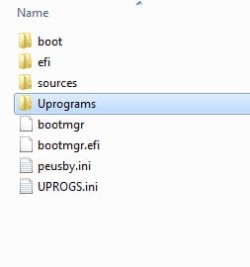
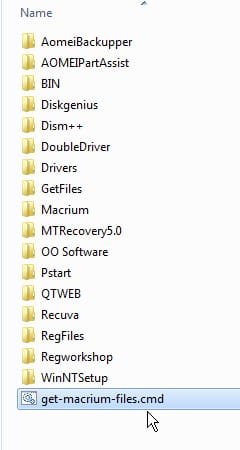
If you want to include macrium, just run the get-macrium-files.cmd file and it will copied from your current system to the boot media:

It is in the Uprograms folder

uprograms.jpg

uprograms-macrium.jpg
 

My Computers My Computers

System One System Two

  • Computer type
    PC/Desktop
    OS
    7 X64
    CPU
    i5 8400
    Motherboard
    gigabyte b365m ds3h
    Memory
    2x8gb 3200mhz
    Hard Drives
    various
    PSU
    pure power 11 400w cm
    Case
    Coolermaster
    Cooling
    cryorig m9i
  • Computer type
    PC/Desktop
    OS
    7x64
    CPU
    g5400
    Motherboard
    ga b365m ds3h
    Memory
    8gb ddr4 2400
    PSU
    xfx pro 450w
I downloaded the manual and read through the section on differential and incremental backups, and have started a differential backup on one of our machines = sort of a practice run.

Please follow along and see if I understand what a differential backup is as opposed to an incremental backup.

Lets say the stored data is like a number board and at the time I make the Full Backup the data is up to "4"

I make some changes and add some data and it is now up to "7" --- at which point I run a differential backup.

This differential will back up the new data between "4" and "7"

Then, I add more data, bringing the total up to "9"

I then run another differential. --- If I understand, this new differential, instead of starting at "7", will go all the way back to "4" and make an image of everything between "4" and "9", thus making the 1st differential of "4" to "7" redundant; in which scenario, all that is required to make a complete restore are two files = the initial full backup plus the most recent differential, regardless of however many differentials may be in between.

Whereas, an incremental backup would have made an image of "4" to "7" and another of "7" to "9" and each subsequent incremental backup would only include data added since the most recent incremental; and, therefore, to make a complete restore would require the initial full backup plus all individual incremental backups.

Do I have this right ?
 

My Computer My Computer

Computer type
PC/Desktop
Computer Manufacturer/Model Number
Dell Optiplex 780m "mini-tower"
OS
Windows 7 Pro x64
CPU
Intel Core Two Duo E8600 3.33 ghz
Motherboard
Whatever DELL put in it
Memory
8GB
Graphics Card(s)
Gigabyte Radeon R7 240
Monitor(s) Displays
HP 2159m
PSU
750 Watt Corsair CX750
Keyboard
Logitech Wireless
Mouse
Logitech Wireless
Browser
Chrome, Firefox, IE
If you replace Uprogs.ini with this one, it will create a shortcut on the desktop.

View attachment UPROGS.zip

One of the macrium annoyances is that it changes the mounted devices in winpe. It is the only program I have come across with that that particular "feature".

It means that if you want to run any of the other programs on the usb stick after you have run macrium, you might need to run fixusby ( which is under the start menu )
 
Last edited:

My Computers My Computers

System One System Two

  • Computer type
    PC/Desktop
    OS
    7 X64
    CPU
    i5 8400
    Motherboard
    gigabyte b365m ds3h
    Memory
    2x8gb 3200mhz
    Hard Drives
    various
    PSU
    pure power 11 400w cm
    Case
    Coolermaster
    Cooling
    cryorig m9i
  • Computer type
    PC/Desktop
    OS
    7x64
    CPU
    g5400
    Motherboard
    ga b365m ds3h
    Memory
    8gb ddr4 2400
    PSU
    xfx pro 450w
initial full backup plus the most recent differential


initial full backup plus all individual incrementals.

That is the general idea. All imaging programs use that description.
 

My Computers My Computers

System One System Two

  • Computer type
    PC/Desktop
    OS
    7 X64
    CPU
    i5 8400
    Motherboard
    gigabyte b365m ds3h
    Memory
    2x8gb 3200mhz
    Hard Drives
    various
    PSU
    pure power 11 400w cm
    Case
    Coolermaster
    Cooling
    cryorig m9i
  • Computer type
    PC/Desktop
    OS
    7x64
    CPU
    g5400
    Motherboard
    ga b365m ds3h
    Memory
    8gb ddr4 2400
    PSU
    xfx pro 450w
That is the general idea. All imaging programs use that description.


Thanks. I am beginning to get a handle on this. (that's the same thing Lt. Col. Custer thought just before he went over the top of that hill)
 

My Computer My Computer

Computer type
PC/Desktop
Computer Manufacturer/Model Number
Dell Optiplex 780m "mini-tower"
OS
Windows 7 Pro x64
CPU
Intel Core Two Duo E8600 3.33 ghz
Motherboard
Whatever DELL put in it
Memory
8GB
Graphics Card(s)
Gigabyte Radeon R7 240
Monitor(s) Displays
HP 2159m
PSU
750 Watt Corsair CX750
Keyboard
Logitech Wireless
Mouse
Logitech Wireless
Browser
Chrome, Firefox, IE
BuckSkin

had to chuckle on that one!
 

My Computer My Computer

Computer type
PC/Desktop
Computer Manufacturer/Model Number
HP Desktop & Compaq Laptop
OS
Win 10 x64, Linux Lite, Win 7 x64, BlackArch, & Kali
Hard Drives
Samsung 850 Pro 256Gb,
Hitachi HDD 1Tb,
Crucial MX SSD 250Gb
Segate 3Tb USB 3.0 Ext. Backup HDD
Internet Speed
150Mbps dn, 20Mbps up
Antivirus
Avast Free, Malwarebytes Anti-Exploit & Anti-Ransomware
Browser
Firefox, Chrome, Opera, & VPN
Back
Top