Solved Saved web page links on desktop displaying wrong icons

Melita

New member
Power User
VIP
Local time
1:51 PM
Messages
293
Location
Canada
I have saved about a dozen web pages on to my W7 desktop, using drag and drop method. I still continue this practice when I find a web page I like to save. My browser is Firefox. Earlier when I did this, the web page link took up the Firefox icon automatically. Lately, much to my annoyance, these web pages when saved to the desktop are taking up the Notepad icon. How can I persuade Windows to go back to the Firefox icon?

Thank you
 

My Computer My Computer

At a glance

Windows 7 Home Premium 64bitAMD Dual Core C-502GB DDR3/320GB HDDAMD Radeon HD 6250
Computer Manufacturer/Model Number
Laptop - Acer Aspire 5250-BZ479
OS
Windows 7 Home Premium 64bit
CPU
AMD Dual Core C-50
Memory
2GB DDR3/320GB HDD
Graphics Card(s)
AMD Radeon HD 6250
Monitor(s) Displays
15.6" HD LED LCD
Internet Speed
ADSL
Hi Melita,

When did your icons change?

Capture 1 .PNG Capture 2 .PNG

My default browser is Firefox & I use it pretty much exclusively.
If I drag and drop the lock in the URL, I get a shortcut link with the icon that appears on the corresponding Firefox tab & the arrow in the lower-left indicating shortcut. (left snippet)

If I press ctrl + s or click the three bars (upper right corner below the red X), and choose Save Page As > Desktop > & save the Firefox Icon is on the saved page. The extension is htm. (right snippet)

Snick
 

My Computer My Computer

At a glance

Win 10 x64, Linux Lite, Win 7 x64, BlackArch,...
Computer type
PC/Desktop
Computer Manufacturer/Model Number
HP Desktop & Compaq Laptop
OS
Win 10 x64, Linux Lite, Win 7 x64, BlackArch, & Kali
Hard Drives
Samsung 850 Pro 256Gb,
Hitachi HDD 1Tb,
Crucial MX SSD 250Gb
Segate 3Tb USB 3.0 Ext. Backup HDD
Internet Speed
150Mbps dn, 20Mbps up
Antivirus
Avast Free, Malwarebytes Anti-Exploit & Anti-Ransomware
Browser
Firefox, Chrome, Opera, & VPN
This might be a file association issue. Firefox or some other program like Notepad took over the file extension. Do the following.

In the start orb under search begin by typing default programs.

Now in the window go to Associate a file type or program with a specific program.

Scroll down the alphabetical list and find HTM and HTML. Double click on each one and make sure it's associated to Firefox.
 

My Computer My Computer

At a glance

Windows 7 Ultimate x64
Computer type
PC/Desktop
OS
Windows 7 Ultimate x64
.......Scroll down the alphabetical list and find HTM and HTML. Double click on each one and make sure it's associated to Firefox.
I did all this and found that Firefox is already associated with HTM and HTML, among other things. For good measure, I changed to associate these with Epic Privacy Browser (which also I use), and changed them back again to Firefox but this did not solve the problem.

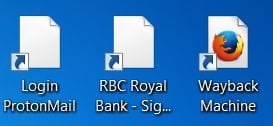
Another curious thing; if I drag and drop a web page from Epic browser it immediately takes up the Firefox icon where as the Firefox browser refuse to do it :cry: Please see attachments. In the last picture "Wayback Machine" has the icon I used to get earlier, and the other two are the Notepad like icons I am getting now. All three were dragged and dropped from Firefox.
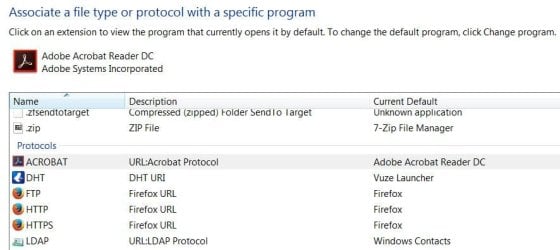
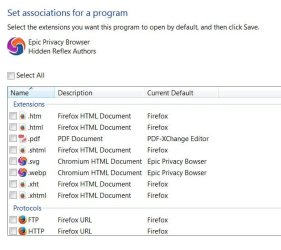
FF  3 associated file types.JPG

FF All programs.JPG

Epic default programs.JPG

FF wrong icons.JPG
 

My Computer My Computer

At a glance

Windows 7 Home Premium 64bitAMD Dual Core C-502GB DDR3/320GB HDDAMD Radeon HD 6250
Computer Manufacturer/Model Number
Laptop - Acer Aspire 5250-BZ479
OS
Windows 7 Home Premium 64bit
CPU
AMD Dual Core C-50
Memory
2GB DDR3/320GB HDD
Graphics Card(s)
AMD Radeon HD 6250
Monitor(s) Displays
15.6" HD LED LCD
Internet Speed
ADSL
In the default programs settings, go to the setting as I said it called, Associate a file type or program with a specific program. And look to make sure that in fact in this setting, not the one you're using for programs, is set to have HTM and HTML open in Firefox.


Instead of dragging and dropping. What happens if you go to File in Firefox and save web page as?

Also, in this Associate a file type or program with a specific program setting, what is the program associated to txt files?
 

My Computer My Computer

At a glance

Windows 7 Ultimate x64
Computer type
PC/Desktop
OS
Windows 7 Ultimate x64
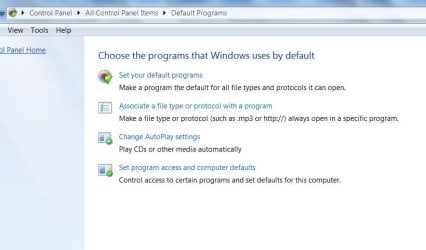
Sorry I am not able to find this. I don't have a page that says "Associate a file type or program with a specific program". The attachment shows the only 4 items that I have under Default Programs. The attachments in my previous post are from the first 2 items in this list.

Thank you
 

Attachments

  • Default Programs.JPG
    Default Programs.JPG
    46.2 KB · Views: 0

My Computer My Computer

At a glance

Windows 7 Home Premium 64bitAMD Dual Core C-502GB DDR3/320GB HDDAMD Radeon HD 6250
Computer Manufacturer/Model Number
Laptop - Acer Aspire 5250-BZ479
OS
Windows 7 Home Premium 64bit
CPU
AMD Dual Core C-50
Memory
2GB DDR3/320GB HDD
Graphics Card(s)
AMD Radeon HD 6250
Monitor(s) Displays
15.6" HD LED LCD
Internet Speed
ADSL
Update to my earlier post:

Instead of dragging and dropping. What happens if you go to File in Firefox and save web page as?
The icon comes right. Some web pages are OK but most don't display properly (incomplete). Also it creates a folder in addition to the icon, with dozens of small files inside. The URL does not show the web address. It comes out as something like this:

file:///C:/Users/Melita/Desktop/Windows%207%20Help%20Forums.htm
 
Last edited:

My Computer My Computer

At a glance

Windows 7 Home Premium 64bitAMD Dual Core C-502GB DDR3/320GB HDDAMD Radeon HD 6250
Computer Manufacturer/Model Number
Laptop - Acer Aspire 5250-BZ479
OS
Windows 7 Home Premium 64bit
CPU
AMD Dual Core C-50
Memory
2GB DDR3/320GB HDD
Graphics Card(s)
AMD Radeon HD 6250
Monitor(s) Displays
15.6" HD LED LCD
Internet Speed
ADSL
That's exactly what's suppose to happen in regards to an additional folder. That folder has all of the java scrip, CSS, images, etc associated to the HTML document you saved. If that folder is not there then elements withen the saved webpage won't render since the folder for those elements are gone. And yes, that path is also correct. In your path posted it means the HTML document is on your desktop.

If the icon is showing right, then we know that Firefox is indeed the default handler of HTML files. Missing elements may mean the folder that accompanies the HTML document doesn't have that. This may mean that the elements came from a third-party CDN (Content Delivery Network) like Amazon Cloudfront. Websites do this to segregate the content spread in an effort to speed up page load times and keep resources to a minimum on their host.

In Firefox go to File and save this webpage right here. Now zip both the HTML document and its folder and upload the zip here. I'll check to see if perhaps you're missing anything.

By the way, why are you saving HTML documents when you can just bookmark the page? There are times where you'd want the HTML document, but in most cases a simple bookmark is all that is needed.
 

My Computer My Computer

At a glance

Windows 7 Ultimate x64
Computer type
PC/Desktop
OS
Windows 7 Ultimate x64
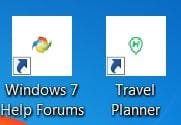
This folder with the java script etc will take up extra space on my desk top. That is one more reason to reject this method of saving a web page. However, after deselecting and selecting the items shown on my post#4 and a computer restart, I am getting a different type of icon which is very satisfactory because it has an image in the center that shows the identity of the individual web page, as shown in the attachment. So, I consider my problem as solved.

Thank you
 

Attachments

  • Icons.JPG
    Icons.JPG
    11.8 KB · Views: 4

My Computer My Computer

At a glance

Windows 7 Home Premium 64bitAMD Dual Core C-502GB DDR3/320GB HDDAMD Radeon HD 6250
Computer Manufacturer/Model Number
Laptop - Acer Aspire 5250-BZ479
OS
Windows 7 Home Premium 64bit
CPU
AMD Dual Core C-50
Memory
2GB DDR3/320GB HDD
Graphics Card(s)
AMD Radeon HD 6250
Monitor(s) Displays
15.6" HD LED LCD
Internet Speed
ADSL
Melita

That is a shortcut to the webpage you dragged & dropped with the icon that was on the tab.
That's exactly as mine works, & save as or ctrl + s displays the FF icon and associated info in additional folders.

Snick
 

My Computer My Computer

At a glance

Win 10 x64, Linux Lite, Win 7 x64, BlackArch,...
Computer type
PC/Desktop
Computer Manufacturer/Model Number
HP Desktop & Compaq Laptop
OS
Win 10 x64, Linux Lite, Win 7 x64, BlackArch, & Kali
Hard Drives
Samsung 850 Pro 256Gb,
Hitachi HDD 1Tb,
Crucial MX SSD 250Gb
Segate 3Tb USB 3.0 Ext. Backup HDD
Internet Speed
150Mbps dn, 20Mbps up
Antivirus
Avast Free, Malwarebytes Anti-Exploit & Anti-Ransomware
Browser
Firefox, Chrome, Opera, & VPN
Melita

That is a shortcut to the webpage you dragged & dropped with the icon that was on the tab.
That's exactly as mine works, & save as or ctrl + s displays the FF icon and associated info in additional folders.

Snick
I always do drag and drop. That way I can put the icon where I want :-) Also, with drag and drop, fortunately, I don't get any additional folders landed on my desktop. Only the icon appears on the desktop.
 

My Computer My Computer

At a glance

Windows 7 Home Premium 64bitAMD Dual Core C-502GB DDR3/320GB HDDAMD Radeon HD 6250
Computer Manufacturer/Model Number
Laptop - Acer Aspire 5250-BZ479
OS
Windows 7 Home Premium 64bit
CPU
AMD Dual Core C-50
Memory
2GB DDR3/320GB HDD
Graphics Card(s)
AMD Radeon HD 6250
Monitor(s) Displays
15.6" HD LED LCD
Internet Speed
ADSL
Melita

Yes that is it exactly. Drag & Drop places a shortcut on your desktop!

The save page as & (CTRL + s shortcut) works for offline viewing, that is why the extra data folders appear.

Happy Computing!

Snick
 

My Computer My Computer

At a glance

Win 10 x64, Linux Lite, Win 7 x64, BlackArch,...
Computer type
PC/Desktop
Computer Manufacturer/Model Number
HP Desktop & Compaq Laptop
OS
Win 10 x64, Linux Lite, Win 7 x64, BlackArch, & Kali
Hard Drives
Samsung 850 Pro 256Gb,
Hitachi HDD 1Tb,
Crucial MX SSD 250Gb
Segate 3Tb USB 3.0 Ext. Backup HDD
Internet Speed
150Mbps dn, 20Mbps up
Antivirus
Avast Free, Malwarebytes Anti-Exploit & Anti-Ransomware
Browser
Firefox, Chrome, Opera, & VPN
Thank you :-)
 

My Computer My Computer

At a glance

Windows 7 Home Premium 64bitAMD Dual Core C-502GB DDR3/320GB HDDAMD Radeon HD 6250
Computer Manufacturer/Model Number
Laptop - Acer Aspire 5250-BZ479
OS
Windows 7 Home Premium 64bit
CPU
AMD Dual Core C-50
Memory
2GB DDR3/320GB HDD
Graphics Card(s)
AMD Radeon HD 6250
Monitor(s) Displays
15.6" HD LED LCD
Internet Speed
ADSL
Back
Top