Make Windows 7 bootable after motherboard swap

Make Windows 7 bootable after motherboard swap, or bootable after swapping hard drive to new machine. Software described Paragon P2P Adjust OS.


This procedure describes how to do it. Procedure can be used in case of:
  1. Download "Paragon Adaptive Restore 2010" from Paragon Adaptive Restore 2010 on my DROPBOX.
  2. Burn the ISO to CD/DVD using Windows Disc Image Burner or ImgBurn.
  3. Set CD/DVD as first boot device in BIOS.
Do the following:
  1. Boot the computer from Paragon Windows PE 3.0 based CD/DVD.
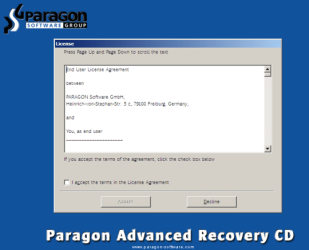
  2. Accept the end user license agreement, otherwise you are not able to use the tool.
    1.png
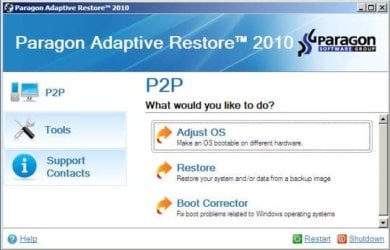
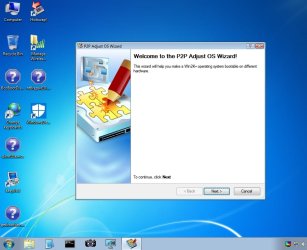
  3. Launch P2P Adjust OS.
    2.jpg
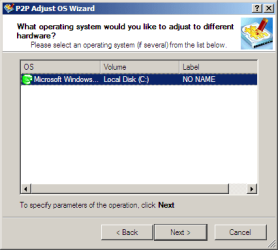
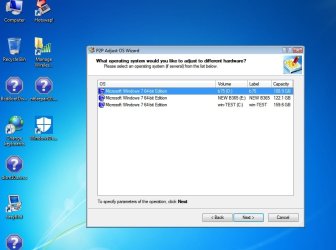
  4. Select the operating system you need to adjust to your new hardware.
    3.png
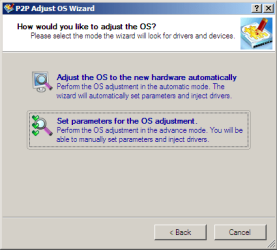
  5. Choose whether you want to add third-party drivers or not, and the way to do it.
    4.png
  6. If you chose "Adjust the OS to the new hardware automatically", the P2P Adjust OS Wizard will automatically accomplish all the necessary actions.
    5.png
  7. The only thing that might need your interaction is to specify additional driver repository.
    6.png
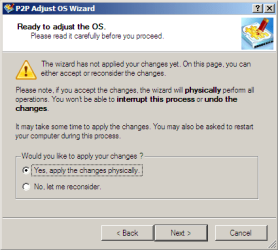
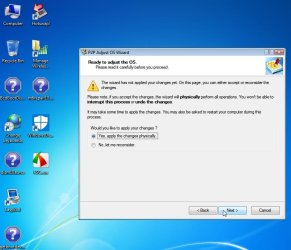
  8. At last, choose "Yes, apply the changes physically" and then restart your computer after operations are done. Do remember, you cannot interrupt the process or undo the changes.
    7.png
Compelete pdf manual: Paragon Adaptive Restore 2010 on my DROPBOX.

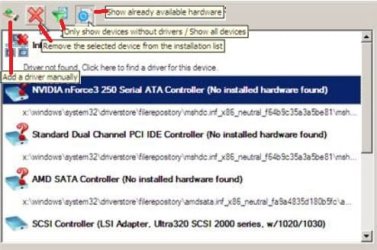
Just before the OS adjustment, you can additionally:
extra.JPG


   Warning
Sometimes the internal hard drive is not recognized in Paragon P2P Adjust OS due to missing SATA or RAID driver. In that case add specific drivers to Windows PE based Paragon Recovery Environment.
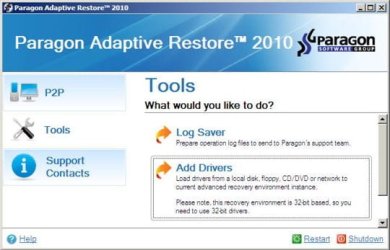
  1. Click to open Add Drivers dialog.
    a.jpg
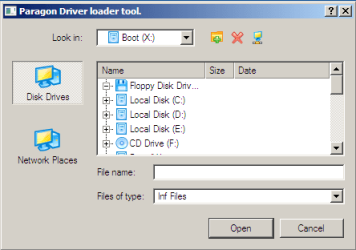
  2. Browse for an .INF file of the required driver, then click the Open button to initiate the process.
    b.png
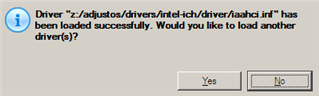
  3. Click Yes to confirm the operation.
    c.png
   Information
You can only add third-party drivers in INF file. If they are zipped, you need to unpack them before processing the steps. The Windows PE environment is 32bit-based, so you need to use 32-bit drivers for injection.
After procedure has finished succesfully and system boots fine, first check if Enable hardware auto-updating via Windows Update (Set to Automatic) is on so it will query Windows Update. After that:

  1. Uninstall Device and Device Driver for devices no longer attached to system. Uninstall associated software as well.
  2. Install all of your device drivers, then Windows Updates.
  3. Refresh your Windows Experience Index (WEI) score.
  4. When done, all you will need to do is to activate Windows 7.
After rebooting from disk, drivers should start swapping out in a cascade you can monitor by clicking on the system tray animation. Wait until all are finished before doing the requested restart. After reboot, go immediately to Check for Updates and install all Important and Optional Updates which may include critical drivers and patches for the OS to run on that hardware.

You must reactivate at the Change Product Key link on System page. If it's not present you can insert Product Key and then Activate using SLMgr Commands

On some systems you see "setup is preparing your computer for first use" on every reboot. Read this to fix that issue: Fix "Setup is Preparing Your Computer for First Use" on Every Reboot


Last edited:
I made it work 2 weeks ago, didn't have time to report.

I integrated drivers into Win 7 from within the OS using Dism++, then booted from Paragon Adaptive Restore and did automatic adjustment. On new hardware USB drivers worked right away, I installed x470 chipset drivers on my x570 motherboard, network driver manually, the rest via "search online" from Device Manager. Several times got BSOD and Checkdisk forced itself and fixed many issues. I've transferred two systems this way from same hardware to same new hardware. Systems seem stable for now.

Thank you for support! The only driver missing is for Intel WiFi 6.

Can you point me to a tutorial on how to integrate drivers into an ISO using DISM++?
 

My Computer My Computer

At a glance

Windows 7 Ultimate 64 bit
Computer type
PC/Desktop
OS
Windows 7 Ultimate 64 bit

My Computer My Computer

At a glance

Win 7 HP SP1 64-bit Vista HB SP2 32-bit Linux...Intel(R) Pentium(R) CPU P6200 @ 2.13GHz4.00 GBIntel(R) Graphics Media Accelerator HD
Computer type
Laptop
Computer Manufacturer/Model Number
Fujitsu LIFEBOOK
OS
Win 7 HP SP1 64-bit Vista HB SP2 32-bit Linux Mint 18.3
CPU
Intel(R) Pentium(R) CPU P6200 @ 2.13GHz
Motherboard
FUJITSU FJNBB06
Memory
4.00 GB
Graphics Card(s)
Intel(R) Graphics Media Accelerator HD
Sound Card
[1] Realtek High Definition Audio [2] Intel(R) Display Audio
Screen Resolution
1366 x 768 x 32 bits (4294967296 colors) @ 59 Hz
Hard Drives
TOSHIBA MK5076GSX
Antivirus
AVG FREE
Hi Stason99,


Does this answer your question => Update your Win 7 installation media.

I hope this helps!

I guess it does, although I've beard that dism++ can do it as well.

I got my USB and other drivers for x570 motherboards from this forum:

Forum - [Solution] Win7 drivers for USB 3.0/3.1 Controllers of new AMD X570 mainboard.

But they are slow responding and non-native English speaking...

Does anyone know if drivers they provided can be updated with newer versions? I'm not that much tek savvy... I don't understand exactly how they made those drivers.
 

My Computer My Computer

At a glance

Windows 7 Ultimate 64 bit
Computer type
PC/Desktop
OS
Windows 7 Ultimate 64 bit
Hi, I'm trying to update my system, but I'm facing problems with Win 7.
I have a question about the Paragon application. When I have to run the software: before or after I change my hardware?
Also, it works with 64 bit version of Win 7?

Best Regards
 

My Computer My Computer

At a glance

Windows 7 Home Premium 64 Bit
Computer type
PC/Desktop
OS
Windows 7 Home Premium 64 Bit
When I have to run the software: before or after I change my hardware?


When the adjusted os is booted it will install the drivers relevant to the machine from windows\system32\driverstore\filerepository.


1. attach the hard disk to the new machine

2. Boot paragon cd and do the adjustment

2. Boot into the Hard disk on the new hardware
 

My Computers My Computers

  • At a glance

    7 X64i5 84002x8gb 3200mhz
    Computer type
    PC/Desktop
    OS
    7 X64
    CPU
    i5 8400
    Motherboard
    gigabyte b365m ds3h
    Memory
    2x8gb 3200mhz
    Hard Drives
    various
    PSU
    pure power 11 400w cm
    Case
    Coolermaster
    Cooling
    cryorig m9i
  • At a glance

    7x64g54008gb ddr4 2400
    Computer type
    PC/Desktop
    OS
    7x64
    CPU
    g5400
    Motherboard
    ga b365m ds3h
    Memory
    8gb ddr4 2400
    PSU
    xfx pro 450w
Thanks.
I'll try to do that.
Regards
 

My Computer My Computer

At a glance

Windows 7 Home Premium 64 Bit
Computer type
PC/Desktop
OS
Windows 7 Home Premium 64 Bit
i noticed the CD BSODs at boot with AMD X570 chipset, i assume i need some drivers, probably storage controller drivers. as far as i know they aren't available on AMD's site.
 

My Computer My Computer

At a glance

64 bit Windows 7 Ultimate
Computer type
PC/Desktop
Computer Manufacturer/Model Number
more than you can count
OS
64 bit Windows 7 Ultimate
Antivirus
Avast + Mbam

My Computers My Computers

  • At a glance

    7 X64i5 84002x8gb 3200mhz
    Computer type
    PC/Desktop
    OS
    7 X64
    CPU
    i5 8400
    Motherboard
    gigabyte b365m ds3h
    Memory
    2x8gb 3200mhz
    Hard Drives
    various
    PSU
    pure power 11 400w cm
    Case
    Coolermaster
    Cooling
    cryorig m9i
  • At a glance

    7x64g54008gb ddr4 2400
    Computer type
    PC/Desktop
    OS
    7x64
    CPU
    g5400
    Motherboard
    ga b365m ds3h
    Memory
    8gb ddr4 2400
    PSU
    xfx pro 450w
Hi there,

I used this software once which totally saved my life and my mind and sanity.

Sadly after porting my HDD data back to my HDD and hardware upgrade 4 months later my HDD died on me.

I still had the same back up image as used initially prior to using the paragon software, my problem is this time after booting paragon up and clicking on the option to adjust the OS. It was saying no OS detected which makes no sense since the hardware was the exact same as when I originally had success making my OS bootable.

Can anyone help/advise me what might be the cause?

I am 100% certain the BIOS settings are the same as when I was last able to successfully use the paragon software.

Cheers,

Bandit.
 

My Computer My Computer

At a glance

New ZealandRyzen 3200GKingston 16GBGTX 1660 Super
Computer type
PC/Desktop
Computer Manufacturer/Model Number
Custom Build
OS
New Zealand
CPU
Ryzen 3200G
Motherboard
B450M Steel Legend
Memory
Kingston 16GB
Graphics Card(s)
GTX 1660 Super
Hard Drives
WD Blue x 2 - 1 x 4TB 1 x 6TB
WD Green 1 x 1TB
Antivirus
Malware Bytes, Avast, Spybot search and delete
Browser
Chrome/Firefox
Sounds like it is not the same. Not clear from your post.

Sadly after porting my HDD data back to my HDD and hardware upgrade

I don't know what this means:
porting my HDD data back to my HDD


Plus sounds like you have changed something:
and hardware upgrade


How do you know the image restored correctly?

What is the hardware? the paragon 2010 is quite old and maybe doesn't work on your "hardware change"
 
Last edited:

My Computers My Computers

  • At a glance

    7 X64i5 84002x8gb 3200mhz
    Computer type
    PC/Desktop
    OS
    7 X64
    CPU
    i5 8400
    Motherboard
    gigabyte b365m ds3h
    Memory
    2x8gb 3200mhz
    Hard Drives
    various
    PSU
    pure power 11 400w cm
    Case
    Coolermaster
    Cooling
    cryorig m9i
  • At a glance

    7x64g54008gb ddr4 2400
    Computer type
    PC/Desktop
    OS
    7x64
    CPU
    g5400
    Motherboard
    ga b365m ds3h
    Memory
    8gb ddr4 2400
    PSU
    xfx pro 450w

My Computers My Computers

  • At a glance

    7 X64i5 84002x8gb 3200mhz
    Computer type
    PC/Desktop
    OS
    7 X64
    CPU
    i5 8400
    Motherboard
    gigabyte b365m ds3h
    Memory
    2x8gb 3200mhz
    Hard Drives
    various
    PSU
    pure power 11 400w cm
    Case
    Coolermaster
    Cooling
    cryorig m9i
  • At a glance

    7x64g54008gb ddr4 2400
    Computer type
    PC/Desktop
    OS
    7x64
    CPU
    g5400
    Motherboard
    ga b365m ds3h
    Memory
    8gb ddr4 2400
    PSU
    xfx pro 450w
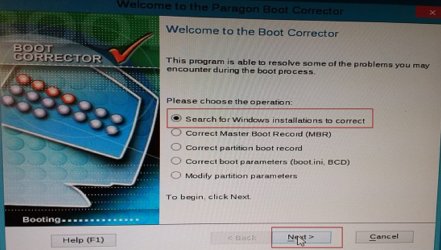
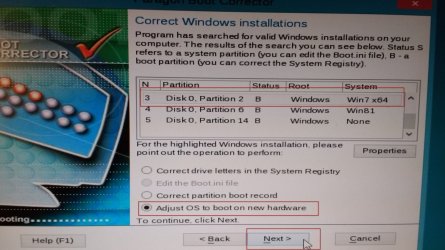
RK14 LINUX boot media

RKI4-bootcorrector.jpg

RK14-search.jpg

RK14-tickadj.jpg
 

My Computers My Computers

  • At a glance

    7 X64i5 84002x8gb 3200mhz
    Computer type
    PC/Desktop
    OS
    7 X64
    CPU
    i5 8400
    Motherboard
    gigabyte b365m ds3h
    Memory
    2x8gb 3200mhz
    Hard Drives
    various
    PSU
    pure power 11 400w cm
    Case
    Coolermaster
    Cooling
    cryorig m9i
  • At a glance

    7x64g54008gb ddr4 2400
    Computer type
    PC/Desktop
    OS
    7x64
    CPU
    g5400
    Motherboard
    ga b365m ds3h
    Memory
    8gb ddr4 2400
    PSU
    xfx pro 450w
Hi there,

Thank you for the quick reply.

Basically I made a HDD back up prior to upgrading my whole system with acronis.

I reflashed my HDD image once back to the original HDD after injecting the required drives via acronis then used paragon to make the system bootable since it was blue screening from the get go, which paragon stopped long enough for me to get in and resolve any driver issues.

I had my system working for sometime then the HDD died so I have now had to port that image (the one prior to hardware upgrades) to the new HDD and start over again fixing up driver issues etc.

The old hardware was a gigabyte board with an fx8350 and an rx560 upgraded to a b450m steel legend motherboard with a gtx 1660 ventus and a ryzen 3200g.

HDD's and other preps keyboard mouse dvd drive all the same.

Yes I was using the software provided at the start of this thread due to it showing how to use the software and wasn't sure how to do it in the new one.

Now my system seems stable after running chkdsk on my drives there was a few files that were corrupted but fixed/moved now all drives coming up clean with chkdsk /f /r.

The only issue I have had BSOD wise is a 'memory_management' BSOD. I forgot to mention above I am now using DDR4 sticks. One is a 16gb kingston stick and another is klisre 16gb stick (chinese branded stuff not showing in mobo compatability list).

I have checked both RAM sticks with memtest86 which comes up clean.

I initially had just the chinese ram stick which the motherboard would not boot, since this was purchased from aliexpress it took sometime to get this stick so I need ram fast and went and got some from the shop as my machine already has had alot of down time hence why I have 2 mixed sticks.

After adding the kingston stick to the machine it booted fine and also picked up the chinese branded stick and confirms both sticks are working in the machine.

Can a system have issues with ram even if its cleared by memtest86 such as BSOD's due to the ram being mixed?

Its basically the only error I have concerns about in my machine and would like some advice/insight from anyone who can confirm.

There is also a cheap chinese branded SSD in the system however there were never any BSOD's on my old machine when using this goldenfir SSD. My OS is just on a normal HDD due to OS/other files taking up a ton of space greater than the SSD.
 

My Computer My Computer

At a glance

New ZealandRyzen 3200GKingston 16GBGTX 1660 Super
Computer type
PC/Desktop
Computer Manufacturer/Model Number
Custom Build
OS
New Zealand
CPU
Ryzen 3200G
Motherboard
B450M Steel Legend
Memory
Kingston 16GB
Graphics Card(s)
GTX 1660 Super
Hard Drives
WD Blue x 2 - 1 x 4TB 1 x 6TB
WD Green 1 x 1TB
Antivirus
Malware Bytes, Avast, Spybot search and delete
Browser
Chrome/Firefox

My Computer My Computer

At a glance

Windows 7 Ultimate X64I3-2120 Sandy Bridge8GB DDR3 (2 Sticks of 4GB each)PCI Express 2.0 x16: Sapphire Radeon HD 5450
Computer type
PC/Desktop
Computer Manufacturer/Model Number
Custom build
OS
Windows 7 Ultimate X64
CPU
I3-2120 Sandy Bridge
Motherboard
Gigabyte GA-Z68P-DS3 v1
Memory
8GB DDR3 (2 Sticks of 4GB each)
Graphics Card(s)
PCI Express 2.0 x16: Sapphire Radeon HD 5450
Sound Card
Onboard
Monitor(s) Displays
Dell 2311H
Screen Resolution
1080P natural resolution
Hard Drives
System hard disk is Samsung EVO 850 250GB
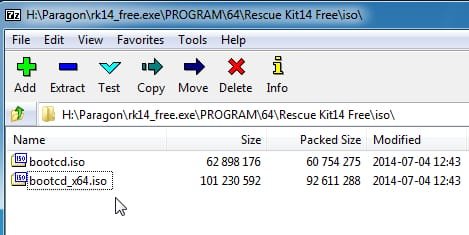
Copy the linux iso out of rescue kit free 14 with 7-zip

rk14-isofiles.jpg
 
Last edited:

My Computers My Computers

  • At a glance

    7 X64i5 84002x8gb 3200mhz
    Computer type
    PC/Desktop
    OS
    7 X64
    CPU
    i5 8400
    Motherboard
    gigabyte b365m ds3h
    Memory
    2x8gb 3200mhz
    Hard Drives
    various
    PSU
    pure power 11 400w cm
    Case
    Coolermaster
    Cooling
    cryorig m9i
  • At a glance

    7x64g54008gb ddr4 2400
    Computer type
    PC/Desktop
    OS
    7x64
    CPU
    g5400
    Motherboard
    ga b365m ds3h
    Memory
    8gb ddr4 2400
    PSU
    xfx pro 450w
I just had a look after all these years and the free paragon 2010 runs in 64 bit win7 pe if it supports 32 bit programs:

paragon-p2p-1.jpg

paragon-p2p-2.jpg

paragon-p2p-3.jpg

paragon-p2p-4.jpg

paragon-p2p-5.jpg
 

My Computers My Computers

  • At a glance

    7 X64i5 84002x8gb 3200mhz
    Computer type
    PC/Desktop
    OS
    7 X64
    CPU
    i5 8400
    Motherboard
    gigabyte b365m ds3h
    Memory
    2x8gb 3200mhz
    Hard Drives
    various
    PSU
    pure power 11 400w cm
    Case
    Coolermaster
    Cooling
    cryorig m9i
  • At a glance

    7x64g54008gb ddr4 2400
    Computer type
    PC/Desktop
    OS
    7x64
    CPU
    g5400
    Motherboard
    ga b365m ds3h
    Memory
    8gb ddr4 2400
    PSU
    xfx pro 450w
Interesting, two topics. Very helpful.

Make Windows 7 bootable after motherboard swap
by Kaktussoft

Windows 7 Installation - Transfer to a New Computer
by Kari

- - - Updated - - -

@SIW2
My test is hitting ceiling, needs help,

my test using Paragon Adaptive Restore 2010 (post#1), on Windows 7 64x GPT, was transferring from HP Elite 8300 to HP 800 G1.

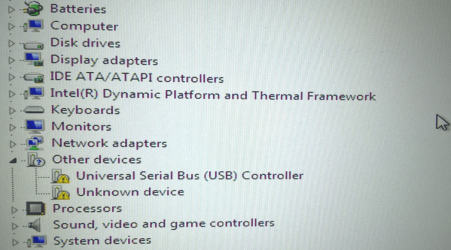
boot-->restart, everything looked fine. Windows 7 music sounded, , ,installed various drivers, , , then popped up "Restart". At this time, it's noticed, either USB HP keyboard or mouse not working, no way to click the button of "Restart". had to power down manually to "Restart".

my both HP kb/mouse worked fine while navigating the BIOS until Windows logo starts, then they both are dead, red LED light gone. I tried Logitech wireless mouse on USB port, not working too. this confirmed it's USB port issue.
I don't have any PS/2 devices to try at this time.

I tried several times in last days, trying to add USB drivers. but all failed.
Within the whole thread (pg1 to pg26), there was an ID mentioned a similar problem. his fix was using wireless devices (below link)

https://www.sevenforums.com/tutoria...le-after-motherboard-swap-10.html#post3000135

image.png
obviously paragon adjusted USB drivers and disabled/cleaned out USB driver. my question is why my USB/USB3 re-install failed/not recognized (cannot be detected).
 
Last edited:

My Computers My Computers

  • At a glance

    Windows 7 Pro 64-bitI7-970032 GB
    Computer type
    PC/Desktop
    Computer Manufacturer/Model Number
    HP Elite 800 G5
    OS
    Windows 7 Pro 64-bit
    CPU
    I7-9700
    Memory
    32 GB
  • At a glance

    Windows 7 Pro 64-bit
    Computer type
    Laptop
    System Manufacturer/Model Number
    ASUS UX305C
    OS
    Windows 7 Pro 64-bit
It works on win7 x64 gpt. I tested it 2 days ago.

you could try uninstalling the usb3 drivers using dism++ in case they are causing an issue.
 

My Computers My Computers

  • At a glance

    7 X64i5 84002x8gb 3200mhz
    Computer type
    PC/Desktop
    OS
    7 X64
    CPU
    i5 8400
    Motherboard
    gigabyte b365m ds3h
    Memory
    2x8gb 3200mhz
    Hard Drives
    various
    PSU
    pure power 11 400w cm
    Case
    Coolermaster
    Cooling
    cryorig m9i
  • At a glance

    7x64g54008gb ddr4 2400
    Computer type
    PC/Desktop
    OS
    7x64
    CPU
    g5400
    Motherboard
    ga b365m ds3h
    Memory
    8gb ddr4 2400
    PSU
    xfx pro 450w

My Computers My Computers

  • At a glance

    Windows 7 Pro 64-bitI7-970032 GB
    Computer type
    PC/Desktop
    Computer Manufacturer/Model Number
    HP Elite 800 G5
    OS
    Windows 7 Pro 64-bit
    CPU
    I7-9700
    Memory
    32 GB
  • At a glance

    Windows 7 Pro 64-bit
    Computer type
    Laptop
    System Manufacturer/Model Number
    ASUS UX305C
    OS
    Windows 7 Pro 64-bit
As far as I know, paragon p2p doesn't do anything to usb.

That is why it is possible your usb3 drivers from hp8300 might be causing some problem on the switch to the G1.
 

My Computers My Computers

  • At a glance

    7 X64i5 84002x8gb 3200mhz
    Computer type
    PC/Desktop
    OS
    7 X64
    CPU
    i5 8400
    Motherboard
    gigabyte b365m ds3h
    Memory
    2x8gb 3200mhz
    Hard Drives
    various
    PSU
    pure power 11 400w cm
    Case
    Coolermaster
    Cooling
    cryorig m9i
  • At a glance

    7x64g54008gb ddr4 2400
    Computer type
    PC/Desktop
    OS
    7x64
    CPU
    g5400
    Motherboard
    ga b365m ds3h
    Memory
    8gb ddr4 2400
    PSU
    xfx pro 450w
Back
Top