
Solved Ethernet connection needed after installation of windows 7

Sans Vans

New member
Member
Local time
11:13 AM
Messages
64
Location
(Hint): The timezone is wrong
Ok, so recently I just finished installing (and finally getting) windows 7 to work. One of the many things I have that don't work right now are ethernet connection. I cannot use wireless wifi, since I do not have an adapter, so I have to use ethernet. However, it says I have no connections, and it says I do not have driver installed for my connection. I think I need drivers or something for my router, because it does not get recognized and won't let me connect to the internet. Any help?
 

My Computer My Computer

At a glance

Windows 10 Home 20H2 64x, Windows 7 Ultimate ...AMD Ryzen 3 1200 Quad-Core Processor (3.10 GHz)NVIDIA GeForce GT 730
Computer type
PC/Desktop
Computer Manufacturer/Model Number
It says "to be filled by O.E.M", same with model number.
OS
Windows 10 Home 20H2 64x, Windows 7 Ultimate x64 (dual booting)
CPU
AMD Ryzen 3 1200 Quad-Core Processor (3.10 GHz)
Motherboard
ASRock A320M-HDV atleast.. I think that's it.
Graphics Card(s)
NVIDIA GeForce GT 730
Monitor(s) Displays
2
Screen Resolution
1920x1080 (although I swear its 1920x1024), 1280x1024
Hard Drives
I don't know how to check, all I know is that I don't have an SSD.
Mouse
G502 Hero (Wired)
Antivirus
AVG Antivirus, Malwarebytes
Browser
Chromium based Microsoft Edge, Google Chrome
Is there a yellow triangle in device manager? from a cmd prompt type


ipconfig /all


post results
 

My Computer My Computer

At a glance

win 8 32 bit
Computer type
PC/Desktop
OS
win 8 32 bit
No, there is a red X on it.

Edit: Oh wait, in device manager? The ethernet thing DOES indeed have a yellow triangle, sorry. There is a red X on the taskbar.
 
Last edited:

My Computer My Computer

At a glance

Windows 10 Home 20H2 64x, Windows 7 Ultimate ...AMD Ryzen 3 1200 Quad-Core Processor (3.10 GHz)NVIDIA GeForce GT 730
Computer type
PC/Desktop
Computer Manufacturer/Model Number
It says "to be filled by O.E.M", same with model number.
OS
Windows 10 Home 20H2 64x, Windows 7 Ultimate x64 (dual booting)
CPU
AMD Ryzen 3 1200 Quad-Core Processor (3.10 GHz)
Motherboard
ASRock A320M-HDV atleast.. I think that's it.
Graphics Card(s)
NVIDIA GeForce GT 730
Monitor(s) Displays
2
Screen Resolution
1920x1080 (although I swear its 1920x1024), 1280x1024
Hard Drives
I don't know how to check, all I know is that I don't have an SSD.
Mouse
G502 Hero (Wired)
Antivirus
AVG Antivirus, Malwarebytes
Browser
Chromium based Microsoft Edge, Google Chrome
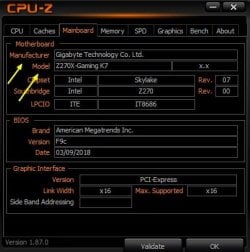
You need the network interface (NIC) card driver. Please run CPUz and under the Mainboard tab what does it say for Manufacture and Model? CPU-Z | Softwares | CPUID

Routers don't use drivers. In fact, the only computer code that a router uses is its firmware much like a computer's BIOS/UEFI.

While you have CPUz, fill in the pertinent Info. for your Specs here at the site. YOU can also pull up computer Info. by going to the start orb and in search begin by typing system information. Click that. Come to think of it, I see system information lists the motherboard manufacture and type. No CPUz needed I guess, but it is a great little utility.
 

My Computer My Computer

At a glance

Windows 7 Ultimate x64
Computer type
PC/Desktop
OS
Windows 7 Ultimate x64
You need the network interface (NIC) card driver. Please run CPUz and under the Mainboard tab what does it say for Manufacture and Model? CPU-Z | Softwares | CPUID

Routers don't use drivers. In fact, the only computer code that a router uses is its firmware much like a computer's BIOS/UEFI.

While you have CPUz, fill in the pertinent Info. for your Specs here at the site. YOU can also pull up computer Info. by going to the start orb and in search begin by typing system information. Click that. Come to think of it, I see system information lists the motherboard manufacture and type. No CPUz needed I guess, but it is a great little utility.

Well, on system information, it says that both system manufacturer and model are "To be filled by O.E.M"
 

My Computer My Computer

At a glance

Windows 10 Home 20H2 64x, Windows 7 Ultimate ...AMD Ryzen 3 1200 Quad-Core Processor (3.10 GHz)NVIDIA GeForce GT 730
Computer type
PC/Desktop
Computer Manufacturer/Model Number
It says "to be filled by O.E.M", same with model number.
OS
Windows 10 Home 20H2 64x, Windows 7 Ultimate x64 (dual booting)
CPU
AMD Ryzen 3 1200 Quad-Core Processor (3.10 GHz)
Motherboard
ASRock A320M-HDV atleast.. I think that's it.
Graphics Card(s)
NVIDIA GeForce GT 730
Monitor(s) Displays
2
Screen Resolution
1920x1080 (although I swear its 1920x1024), 1280x1024
Hard Drives
I don't know how to check, all I know is that I don't have an SSD.
Mouse
G502 Hero (Wired)
Antivirus
AVG Antivirus, Malwarebytes
Browser
Chromium based Microsoft Edge, Google Chrome
And I have no idea whatsoever about how to find the correct network interface card driver.. so I might need help with that. You DID read my signature, right?
 

My Computer My Computer

At a glance

Windows 10 Home 20H2 64x, Windows 7 Ultimate ...AMD Ryzen 3 1200 Quad-Core Processor (3.10 GHz)NVIDIA GeForce GT 730
Computer type
PC/Desktop
Computer Manufacturer/Model Number
It says "to be filled by O.E.M", same with model number.
OS
Windows 10 Home 20H2 64x, Windows 7 Ultimate x64 (dual booting)
CPU
AMD Ryzen 3 1200 Quad-Core Processor (3.10 GHz)
Motherboard
ASRock A320M-HDV atleast.. I think that's it.
Graphics Card(s)
NVIDIA GeForce GT 730
Monitor(s) Displays
2
Screen Resolution
1920x1080 (although I swear its 1920x1024), 1280x1024
Hard Drives
I don't know how to check, all I know is that I don't have an SSD.
Mouse
G502 Hero (Wired)
Antivirus
AVG Antivirus, Malwarebytes
Browser
Chromium based Microsoft Edge, Google Chrome
No, there is a red X on it.

Edit: Oh wait, in device manager? The ethernet thing DOES indeed have a yellow triangle, sorry. There is a red X on the taskbar.

In Device Manager, double-click on the Ethernet device (the problem device) and in the General Tab, what is the message under Device status?
 

My Computer My Computer

At a glance

Windows 7 x64, Vista x64, 8.1 smartphoneIntel E8400 65W 64-bitDDR2 2 x 2GB, 1GB x 2XFX Radeon HD5750
Computer type
PC/Desktop
OS
Windows 7 x64, Vista x64, 8.1 smartphone
CPU
Intel E8400 65W 64-bit
Motherboard
Gigabyte EP45-UD3LR
Memory
DDR2 2 x 2GB, 1GB x 2
Graphics Card(s)
XFX Radeon HD5750
Sound Card
AMD High Definition Audio; Realtek High Definition Audio
Monitor(s) Displays
iiyama prolite X2377HDS
Screen Resolution
1920 x 1080
Hard Drives
500GB 7200 rpm Seagate ST3500413AS 16MB, 500GB 5400 rpm Toshiba MQ02ABF050H 32MB, 200GB 7200 rpm Seagate ST3200820AS 8MB, 2TB 7200 rpm Western Digital WD20EZRX 64MB
PSU
Enermax Liberty Modular
Case
Antec P193 Midi Tower
Keyboard
Mionix ZIBAL 60
Mouse
Razer USB 2.0 Diamondback Mouse or Huion Graphics Tablet
Browser
Internet Explorer, Lunascape, Firefox, Opera, Avast Safezone
And I have no idea whatsoever about how to find the correct network interface card driver.. so I might need help with that. You DID read my signature, right?

And I mentioned CPUz... Please use and follow my specific instructions. I can't give you a driver download without know the type of computer.


There's another way with the device ID, but I'd rather know the computer first.

Edit- Now I see your specs state an ASRock A320M-HDV which may not be the case due to that OEM verbiage there. Also, there are more than one types of the ASRock A320M-HDV which is a real pain. If it's just the A320M-HDV, then I can give you the driver link, providing the absence of a NIC driver is the issue.
 

My Computer My Computer

At a glance

Windows 7 Ultimate x64
Computer type
PC/Desktop
OS
Windows 7 Ultimate x64
And I mentioned CPUz... Please use and follow my specific instructions. I can't give you a driver download without know the type of computer.


There's another way with the device ID, but I'd rather know the computer first.

Edit- Now I see your specs state an ASRock A320M-HDV which may not be the case due to that OEM verbiage there. Also, there are more than one types of the ASRock A320M-HDV which is a real pain. If it's just the A320M-HDV, then I can give you the driver link, providing the absence of a NIC driver is the issue.

Ok, I have CPUz, but I don't see a single thing saying manufacturer anywhere, except for in "Mainboard" where it says manufacturer for motherboard is ASRock, and the model number is nowhere to be seen, atleast, until somebody points it out to me and then I feel dumb.
 

My Computer My Computer

At a glance

Windows 10 Home 20H2 64x, Windows 7 Ultimate ...AMD Ryzen 3 1200 Quad-Core Processor (3.10 GHz)NVIDIA GeForce GT 730
Computer type
PC/Desktop
Computer Manufacturer/Model Number
It says "to be filled by O.E.M", same with model number.
OS
Windows 10 Home 20H2 64x, Windows 7 Ultimate x64 (dual booting)
CPU
AMD Ryzen 3 1200 Quad-Core Processor (3.10 GHz)
Motherboard
ASRock A320M-HDV atleast.. I think that's it.
Graphics Card(s)
NVIDIA GeForce GT 730
Monitor(s) Displays
2
Screen Resolution
1920x1080 (although I swear its 1920x1024), 1280x1024
Hard Drives
I don't know how to check, all I know is that I don't have an SSD.
Mouse
G502 Hero (Wired)
Antivirus
AVG Antivirus, Malwarebytes
Browser
Chromium based Microsoft Edge, Google Chrome
In Device Manager, double-click on the Ethernet device (the problem device) and in the General Tab, what is the message under Device status?

I'll have to get back to that in like 5 hours (max time 7, minimum is like 2) , uhh sorry, but I'll just probably edit this comment after the period of time.

Edit: It says: "The drivers for this device are not installed (Code 28)

To find a driver for this device. click update driver."
 
Last edited:

My Computer My Computer

At a glance

Windows 10 Home 20H2 64x, Windows 7 Ultimate ...AMD Ryzen 3 1200 Quad-Core Processor (3.10 GHz)NVIDIA GeForce GT 730
Computer type
PC/Desktop
Computer Manufacturer/Model Number
It says "to be filled by O.E.M", same with model number.
OS
Windows 10 Home 20H2 64x, Windows 7 Ultimate x64 (dual booting)
CPU
AMD Ryzen 3 1200 Quad-Core Processor (3.10 GHz)
Motherboard
ASRock A320M-HDV atleast.. I think that's it.
Graphics Card(s)
NVIDIA GeForce GT 730
Monitor(s) Displays
2
Screen Resolution
1920x1080 (although I swear its 1920x1024), 1280x1024
Hard Drives
I don't know how to check, all I know is that I don't have an SSD.
Mouse
G502 Hero (Wired)
Antivirus
AVG Antivirus, Malwarebytes
Browser
Chromium based Microsoft Edge, Google Chrome
Is there a yellow triangle in device manager? from a cmd prompt type


ipconfig /all


post results

It says:

"Windows IP Configuration

Host Name....................:Win7
Primary DNS Suffix.........:
Node Type.....................:Hybrid
IP Routing Enabled.........:No
WINS Proxy Enabled.......:No"
 

My Computer My Computer

At a glance

Windows 10 Home 20H2 64x, Windows 7 Ultimate ...AMD Ryzen 3 1200 Quad-Core Processor (3.10 GHz)NVIDIA GeForce GT 730
Computer type
PC/Desktop
Computer Manufacturer/Model Number
It says "to be filled by O.E.M", same with model number.
OS
Windows 10 Home 20H2 64x, Windows 7 Ultimate x64 (dual booting)
CPU
AMD Ryzen 3 1200 Quad-Core Processor (3.10 GHz)
Motherboard
ASRock A320M-HDV atleast.. I think that's it.
Graphics Card(s)
NVIDIA GeForce GT 730
Monitor(s) Displays
2
Screen Resolution
1920x1080 (although I swear its 1920x1024), 1280x1024
Hard Drives
I don't know how to check, all I know is that I don't have an SSD.
Mouse
G502 Hero (Wired)
Antivirus
AVG Antivirus, Malwarebytes
Browser
Chromium based Microsoft Edge, Google Chrome
In Device Manager, right-mouse click on the Ethernet driver, choose Properties, then the Driver tab, followed by the Update Drive button.
 

My Computer My Computer

At a glance

Windows 7 x64, Vista x64, 8.1 smartphoneIntel E8400 65W 64-bitDDR2 2 x 2GB, 1GB x 2XFX Radeon HD5750
Computer type
PC/Desktop
OS
Windows 7 x64, Vista x64, 8.1 smartphone
CPU
Intel E8400 65W 64-bit
Motherboard
Gigabyte EP45-UD3LR
Memory
DDR2 2 x 2GB, 1GB x 2
Graphics Card(s)
XFX Radeon HD5750
Sound Card
AMD High Definition Audio; Realtek High Definition Audio
Monitor(s) Displays
iiyama prolite X2377HDS
Screen Resolution
1920 x 1080
Hard Drives
500GB 7200 rpm Seagate ST3500413AS 16MB, 500GB 5400 rpm Toshiba MQ02ABF050H 32MB, 200GB 7200 rpm Seagate ST3200820AS 8MB, 2TB 7200 rpm Western Digital WD20EZRX 64MB
PSU
Enermax Liberty Modular
Case
Antec P193 Midi Tower
Keyboard
Mionix ZIBAL 60
Mouse
Razer USB 2.0 Diamondback Mouse or Huion Graphics Tablet
Browser
Internet Explorer, Lunascape, Firefox, Opera, Avast Safezone
Ok, I have CPUz, but I don't see a single thing saying manufacturer anywhere, except for in "Mainboard" where it says manufacturer for motherboard is ASRock, and the model number is nowhere to be seen, atleast, until somebody points it out to me and then I feel dumb.

Under Mainboard.
 

Attachments

  • gbhnf.jpg
    gbhnf.jpg
    25.6 KB · Views: 17

My Computer My Computer

At a glance

Windows 7 Ultimate x64
Computer type
PC/Desktop
OS
Windows 7 Ultimate x64
Under Mainboard.

It says...

unknown.png
 

My Computer My Computer

At a glance

Windows 10 Home 20H2 64x, Windows 7 Ultimate ...AMD Ryzen 3 1200 Quad-Core Processor (3.10 GHz)NVIDIA GeForce GT 730
Computer type
PC/Desktop
Computer Manufacturer/Model Number
It says "to be filled by O.E.M", same with model number.
OS
Windows 10 Home 20H2 64x, Windows 7 Ultimate x64 (dual booting)
CPU
AMD Ryzen 3 1200 Quad-Core Processor (3.10 GHz)
Motherboard
ASRock A320M-HDV atleast.. I think that's it.
Graphics Card(s)
NVIDIA GeForce GT 730
Monitor(s) Displays
2
Screen Resolution
1920x1080 (although I swear its 1920x1024), 1280x1024
Hard Drives
I don't know how to check, all I know is that I don't have an SSD.
Mouse
G502 Hero (Wired)
Antivirus
AVG Antivirus, Malwarebytes
Browser
Chromium based Microsoft Edge, Google Chrome
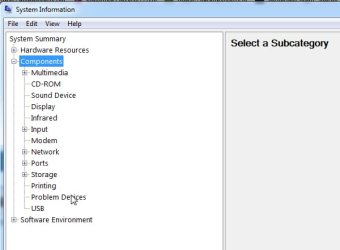
Type msinfo32 in start search box

msinf-1.jpg


click it when it pops up

click Components

msinf-2.jpg

then click Problem Devices

msinf-3.jpg
 

My Computers My Computers

  • At a glance

    7 X64i5 84002x8gb 3200mhz
    Computer type
    PC/Desktop
    OS
    7 X64
    CPU
    i5 8400
    Motherboard
    gigabyte b365m ds3h
    Memory
    2x8gb 3200mhz
    Hard Drives
    various
    PSU
    pure power 11 400w cm
    Case
    Coolermaster
    Cooling
    cryorig m9i
  • At a glance

    7x64g54008gb ddr4 2400
    Computer type
    PC/Desktop
    OS
    7x64
    CPU
    g5400
    Motherboard
    ga b365m ds3h
    Memory
    8gb ddr4 2400
    PSU
    xfx pro 450w

My Computer My Computer

At a glance

Windows 10 Home 20H2 64x, Windows 7 Ultimate ...AMD Ryzen 3 1200 Quad-Core Processor (3.10 GHz)NVIDIA GeForce GT 730
Computer type
PC/Desktop
Computer Manufacturer/Model Number
It says "to be filled by O.E.M", same with model number.
OS
Windows 10 Home 20H2 64x, Windows 7 Ultimate x64 (dual booting)
CPU
AMD Ryzen 3 1200 Quad-Core Processor (3.10 GHz)
Motherboard
ASRock A320M-HDV atleast.. I think that's it.
Graphics Card(s)
NVIDIA GeForce GT 730
Monitor(s) Displays
2
Screen Resolution
1920x1080 (although I swear its 1920x1024), 1280x1024
Hard Drives
I don't know how to check, all I know is that I don't have an SSD.
Mouse
G502 Hero (Wired)
Antivirus
AVG Antivirus, Malwarebytes
Browser
Chromium based Microsoft Edge, Google Chrome
In Device Manager, right-mouse click on the Ethernet driver, choose Properties, then the Driver tab, followed by the Update Drive button.

It says if you want to do it online or search your PC, I did both options and both drives and nothing worked.
 

My Computer My Computer

At a glance

Windows 10 Home 20H2 64x, Windows 7 Ultimate ...AMD Ryzen 3 1200 Quad-Core Processor (3.10 GHz)NVIDIA GeForce GT 730
Computer type
PC/Desktop
Computer Manufacturer/Model Number
It says "to be filled by O.E.M", same with model number.
OS
Windows 10 Home 20H2 64x, Windows 7 Ultimate x64 (dual booting)
CPU
AMD Ryzen 3 1200 Quad-Core Processor (3.10 GHz)
Motherboard
ASRock A320M-HDV atleast.. I think that's it.
Graphics Card(s)
NVIDIA GeForce GT 730
Monitor(s) Displays
2
Screen Resolution
1920x1080 (although I swear its 1920x1024), 1280x1024
Hard Drives
I don't know how to check, all I know is that I don't have an SSD.
Mouse
G502 Hero (Wired)
Antivirus
AVG Antivirus, Malwarebytes
Browser
Chromium based Microsoft Edge, Google Chrome
It says the ethernet controller or something like that, and on the error code it says "this driver is not installed." Windows probably doesn't recognize the one I have currently.


It should show the PNP device ID. You can search the internet for the PNP Device ID to find the driver.
 

My Computers My Computers

  • At a glance

    7 X64i5 84002x8gb 3200mhz
    Computer type
    PC/Desktop
    OS
    7 X64
    CPU
    i5 8400
    Motherboard
    gigabyte b365m ds3h
    Memory
    2x8gb 3200mhz
    Hard Drives
    various
    PSU
    pure power 11 400w cm
    Case
    Coolermaster
    Cooling
    cryorig m9i
  • At a glance

    7x64g54008gb ddr4 2400
    Computer type
    PC/Desktop
    OS
    7x64
    CPU
    g5400
    Motherboard
    ga b365m ds3h
    Memory
    8gb ddr4 2400
    PSU
    xfx pro 450w
Ok, I have found the PNP ID, what do I search? I searched up the ID, and almost downloaded malware :confused:
Should I just send the ID here, or is the ID something you should keep private?
 

My Computer My Computer

At a glance

Windows 10 Home 20H2 64x, Windows 7 Ultimate ...AMD Ryzen 3 1200 Quad-Core Processor (3.10 GHz)NVIDIA GeForce GT 730
Computer type
PC/Desktop
Computer Manufacturer/Model Number
It says "to be filled by O.E.M", same with model number.
OS
Windows 10 Home 20H2 64x, Windows 7 Ultimate x64 (dual booting)
CPU
AMD Ryzen 3 1200 Quad-Core Processor (3.10 GHz)
Motherboard
ASRock A320M-HDV atleast.. I think that's it.
Graphics Card(s)
NVIDIA GeForce GT 730
Monitor(s) Displays
2
Screen Resolution
1920x1080 (although I swear its 1920x1024), 1280x1024
Hard Drives
I don't know how to check, all I know is that I don't have an SSD.
Mouse
G502 Hero (Wired)
Antivirus
AVG Antivirus, Malwarebytes
Browser
Chromium based Microsoft Edge, Google Chrome
You can post the device id. It is not private.
 

My Computers My Computers

  • At a glance

    7 X64i5 84002x8gb 3200mhz
    Computer type
    PC/Desktop
    OS
    7 X64
    CPU
    i5 8400
    Motherboard
    gigabyte b365m ds3h
    Memory
    2x8gb 3200mhz
    Hard Drives
    various
    PSU
    pure power 11 400w cm
    Case
    Coolermaster
    Cooling
    cryorig m9i
  • At a glance

    7x64g54008gb ddr4 2400
    Computer type
    PC/Desktop
    OS
    7x64
    CPU
    g5400
    Motherboard
    ga b365m ds3h
    Memory
    8gb ddr4 2400
    PSU
    xfx pro 450w
Back
Top