
Solved New Samsung 860 Pro running extremely slow

Xp4me

New member
Member
Local time
10:05 PM
Messages
65
Build info:
Motherboard Gigabyte GA-990FXA-UD5 Rev 3.0
Processor FX 8350 AMD 8 - Core
Power Supply Seasonic M12 II Bronze 650 W
SSD Samsung SSD 840 EVO 120GB
HDD Seagate Barracuda ST3000DM001 3TB
Memory Mushkin Silverline 8GB x4 32GB
Graphics Card MSI Twin Frozr Geforce GTX 660


I tried to upgrade my SSD to a Samsung 860 Pro 512GB, but it made my computer run extremely slow and hung up all the time. I ran a bench test using AS SSD Benchmark and the 4k-64 THRD was very low, see attached. I just assumed there was something wrong with it and returned it, I got another, exactly the same and having the same issues. The SSD that it's replacing (Samsung Evo 840) works just fine.
Is this because AMD AHCI Sata Controllers don't always play well with Samsung? If so, why don't I have any problems with the older Samsung SSD (2013 model)? I always do the preinstall from flash drive during OS install. Not sure I can do the OS install without it and really don't want to have to use a standard windows AHCI driver, could cut down some performance.
Any help would be appreciated, thanks guys.
 

Attachments
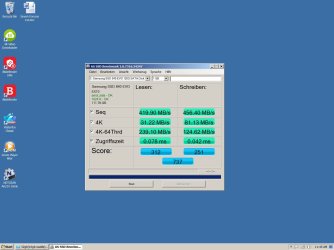
  • Evo 840 AS SSD Benchmark.jpg
    Evo 840 AS SSD Benchmark.jpg
    88.2 KB · Views: 0
  • Samsung 860.jpg
    Samsung 860.jpg
    59.8 KB · Views: 1

My Computer My Computer

At a glance

XP 32 Bit & Win 7 64 BitFX 8350 AMD 8 - CoreMushkin Silverline 8GB x2 16GBMSI Twin Frozr Geforce GTX 660
Computer type
PC/Desktop
Computer Manufacturer/Model Number
Custom build
OS
XP 32 Bit & Win 7 64 Bit
CPU
FX 8350 AMD 8 - Core
Motherboard
Gigabyte 990FXA-UD5
Memory
Mushkin Silverline 8GB x2 16GB
Graphics Card(s)
MSI Twin Frozr Geforce GTX 660
Hard Drives
SSD Samsung SSD 840 EVO
HDD Seagate Barracuda ST3000DM001 3TB
Antivirus
Bitdefender Internet Security
Browser
Firefox

My Computers My Computers

  • At a glance

    7 X64i5 84002x8gb 3200mhz
    Computer type
    PC/Desktop
    OS
    7 X64
    CPU
    i5 8400
    Motherboard
    gigabyte b365m ds3h
    Memory
    2x8gb 3200mhz
    Hard Drives
    various
    PSU
    pure power 11 400w cm
    Case
    Coolermaster
    Cooling
    cryorig m9i
  • At a glance

    7x64g54008gb ddr4 2400
    Computer type
    PC/Desktop
    OS
    7x64
    CPU
    g5400
    Motherboard
    ga b365m ds3h
    Memory
    8gb ddr4 2400
    PSU
    xfx pro 450w

My Computer My Computer

At a glance

XP 32 Bit & Win 7 64 BitFX 8350 AMD 8 - CoreMushkin Silverline 8GB x2 16GBMSI Twin Frozr Geforce GTX 660
Computer type
PC/Desktop
Computer Manufacturer/Model Number
Custom build
OS
XP 32 Bit & Win 7 64 Bit
CPU
FX 8350 AMD 8 - Core
Motherboard
Gigabyte 990FXA-UD5
Memory
Mushkin Silverline 8GB x2 16GB
Graphics Card(s)
MSI Twin Frozr Geforce GTX 660
Hard Drives
SSD Samsung SSD 840 EVO
HDD Seagate Barracuda ST3000DM001 3TB
Antivirus
Bitdefender Internet Security
Browser
Firefox
I figured it out myself, in order to use a Samsung SSD you have to just let it use all the standard windows drivers, you can't install any controller or chipset drivers for your motherboard. Which is not right because you should be able to use your motherboard drivers for optimal performance instead of being limited by the standard windows drivers.
 

My Computer My Computer

At a glance

XP 32 Bit & Win 7 64 BitFX 8350 AMD 8 - CoreMushkin Silverline 8GB x2 16GBMSI Twin Frozr Geforce GTX 660
Computer type
PC/Desktop
Computer Manufacturer/Model Number
Custom build
OS
XP 32 Bit & Win 7 64 Bit
CPU
FX 8350 AMD 8 - Core
Motherboard
Gigabyte 990FXA-UD5
Memory
Mushkin Silverline 8GB x2 16GB
Graphics Card(s)
MSI Twin Frozr Geforce GTX 660
Hard Drives
SSD Samsung SSD 840 EVO
HDD Seagate Barracuda ST3000DM001 3TB
Antivirus
Bitdefender Internet Security
Browser
Firefox
That's odd! While running Win-7, and an SSD, I always used the drivers for the motherboard, that came with the motherboard, on CD.

Why that would or could interfere with the operation of an SSD is beyond my understanding and experience.


Good Luck!
TM :cool:
 

My Computer My Computer

At a glance

Win 7 Pro, SP1, x86, Win-11/Pro/64AMD8GB CrucialVarious
Computer type
PC/Desktop
Computer Manufacturer/Model Number
Various
OS
Win 7 Pro, SP1, x86, Win-11/Pro/64
CPU
AMD
Motherboard
Various
Memory
8GB Crucial
Graphics Card(s)
Various
Sound Card
OnBoard
Monitor(s) Displays
Acer 21.5"
Hard Drives
Crucial SSD, 500 GB
PSU
OEM
Case
SFF Slim Line Case
Cooling
OEM
Keyboard
eMachines
Mouse
Logitech Wireless
Internet Speed
varies
Antivirus
Windows Defender/Super Anti-Spyware
Browser
Firefox
That's odd! While running Win-7, and an SSD, I always used the drivers for the motherboard, that came with the motherboard, on CD.

Why that would or could interfere with the operation of an SSD is beyond my understanding and experience.


Good Luck!
TM :cool:
For some reason AMD AHCI drivers don't play well with Samsung SSD's. Do a search for it and you will see all the problems that people are having.
 

My Computer My Computer

At a glance

XP 32 Bit & Win 7 64 BitFX 8350 AMD 8 - CoreMushkin Silverline 8GB x2 16GBMSI Twin Frozr Geforce GTX 660
Computer type
PC/Desktop
Computer Manufacturer/Model Number
Custom build
OS
XP 32 Bit & Win 7 64 Bit
CPU
FX 8350 AMD 8 - Core
Motherboard
Gigabyte 990FXA-UD5
Memory
Mushkin Silverline 8GB x2 16GB
Graphics Card(s)
MSI Twin Frozr Geforce GTX 660
Hard Drives
SSD Samsung SSD 840 EVO
HDD Seagate Barracuda ST3000DM001 3TB
Antivirus
Bitdefender Internet Security
Browser
Firefox
Back
Top