Hi people, I have a doubt

SomeoneWonders

New member
Local time
1:01 PM
Messages
21
Hi people!

I have a doubt!

First of all let me tell you that I am at home, not at work where it would not be strange if I would detect the presence of any other network users. At home I am sure I don't share anything with anybody.

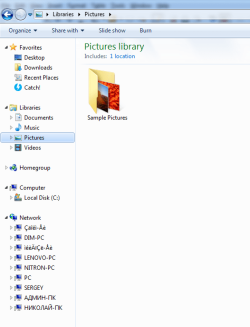
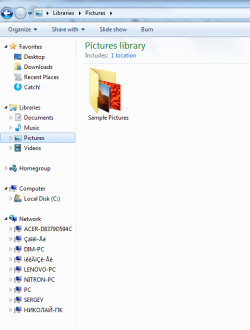
Well, some time ago, while at home, I noticed that my network was filled with lots of users, and that some of those users where composed by gibberish letters.

I formatted the disk and the problem didn't show up anymore.

However, I started thinking: maybe I was being spied during the time I could see all those users on my network? Maybe it was a trojan or something similar? But a trojan wouldn't be so easy to detect, so it's even more strange!

If anyone is interested, I can post shoots of the situation I am describing, as I made printscreens at the time.

Thank you in advance.
 

My Computer My Computer

At a glance

Windows 7 64 bit
Computer type
PC/Desktop
OS
Windows 7 64 bit
Welcome to the forum. We do need to see how the others were showing and in what ie filemanger. Are you using wireless or cable? One of the problems with staying on 7 is its less secure and out of support so more of a risk
 

My Computer My Computer

At a glance

win 8 32 bit
Computer type
PC/Desktop
OS
win 8 32 bit
I am using cable. I am sending two photos now (the only available I have).
 

My Computer My Computer

At a glance

Windows 7 64 bit
Computer type
PC/Desktop
OS
Windows 7 64 bit
Not sure whether the photos I attached were published.
 

My Computer My Computer

At a glance

Windows 7 64 bit
Computer type
PC/Desktop
OS
Windows 7 64 bit
Well, it seems it worked now!
 

Attachments

  • example 1.png
    example 1.png
    24.8 KB · Views: 20
  • example 2.png
    example 2.png
    22.1 KB · Views: 20

My Computer My Computer

At a glance

Windows 7 64 bit
Computer type
PC/Desktop
OS
Windows 7 64 bit
I missed it, who/what is your ISP? I heard rumors that a few ISPs have a "feature" which allows piggy-backing onto your WIFI, which doesn't benefit you, rather such benefits others.
 

My Computer My Computer

At a glance

Windows 7 Professional 64-bitDesktop i5; Acers i5 & i7desktop 16GB; 1 Acer 8GB & 1 Acer 16GB
Computer type
PC/Desktop
Computer Manufacturer/Model Number
Antec desktop; Acer Aspire laptops
OS
Windows 7 Professional 64-bit
CPU
Desktop i5; Acers i5 & i7
Memory
desktop 16GB; 1 Acer 8GB & 1 Acer 16GB
Hard Drives
1TB split into 2 equal partitions [OS and data] usable by RJS
Internet Speed
AT&T DSL
Browser
FF, GChrome, msIE
Other Info
Windows 7 Firewall, Emsisoft AM/AV, MSE [scan-only], SpywareBlaster, Ruiware/BillP combine
Those networks are using Unicode characters which seems to suggest to me a Samba NetBIOS mess up or computer mess up of some sort.

I don't use NetBIOS anything and have been turning it off since my XP days in the network adapter. It can be a security issue. Not saying that's what you had, but it's a possibility if you manged to get something on your computer.

For me personally, if I want to share files I use something a hell of a lot more secure, robust and sane without all the complication and overheard. It's called FTP and I have a local FTP server at home. Actually two. It's just a program that runs on a computer. Then I use WinSCP on my other computer's to transfer files back and fourth. With my phone I use the AndFTP App to transfer data to and from the phone and computers. I used to use the Filezilla FTP server program, but now I use something very simple and small called Serva. If you use Serva free edition, just right click the top bar to get the option to minimize.

Keep in mind this is all local FTP, there are no external port forwarded ports. If I need in to my FTP remotely I have a built in VPN in my router which is flashed with the third-party firmware Asus Merlin and I use the OpenVPN App on my phone, make a connection to my home's router and from there I can make local connections. Which means I can gain access to my local FTP server for file transfers. I can also access my local Team Speak server as well with the Team Speak App on my phone to hear my police scanner anywhere in the world where there is an Internet connection. I also have Team Viewer installed and the Team Viewer App to see and use my laptop here that's on 24/7 as the FTP and Team Speak server running my scanner program and what not. It sits here recording audio from the scanner 24/7.


Beyond that many routers now-a-days come with a USB port to use such things like a USB stick for your own little private cloud storage. This is alright, but it still has some things there I don't particularly care for in terms of security. It would be of course easier to use over a local FTP server, but that easy setup comes with a cost in terms of security.

The big disadvantage of turning off NetBIOS would be lack of network printing ability. It's fine for me because if I need something printed I transfer it to the FTP and then access the FTP on the computer with printing ability with a portable version of WinSCP, grab the Doc and print it.

Now back in the day with the Comcast ISP (and I don't know if this is still current with other ISPs), but you were able to browse other people's network shares due to how the Internet connection worked. I think newer versions of DOCSIS fixes that. Again, this was many years ago. Maybe around 2005 or so.

If you want to secure your network as best as you can absent of something like running Pfsense, have a read at my post here.
 

My Computer My Computer

At a glance

Windows 7 Ultimate x64
Computer type
PC/Desktop
OS
Windows 7 Ultimate x64
I missed it, who/what is your ISP? I heard rumors that a few ISPs have a "feature" which allows piggy-backing onto your WIFI, which doesn't benefit you, rather such benefits others.


For Comcast modems this is a "feature" built into the modem that advertises a "free" WiFi connection using the SSID Xfinity or something like that. If you connect to it you are presented a captive portal web page asking you to enter your Comcast email and password for Internet access. So if you currently are a Comcast customer and are mobile you can access this network, enter your credentials and get Internet.

Is it a security vulnerability? Not that I know of now. This WiFi network is in its own DMZ outside of your network. Also, if you have a new modem this WiFi network can be turned on or off using the Comcast App.


Now another thing here about "free" WiFi networks is with Amazon Alexa and their Echo line of products. They're rolling out something called Sidewalk that can create a type of mesh network with your Echo devices and your neighbor's. Being the security person I am and know one day a hacker may find a flaw to it or an eventual CVE, I turned it off. For anyone interested in how to turn this off, read my post here.
 

My Computer My Computer

At a glance

Windows 7 Ultimate x64
Computer type
PC/Desktop
OS
Windows 7 Ultimate x64
I missed it, who/what is your ISP? I heard rumors that a few ISPs have a "feature" which allows piggy-backing onto your WIFI, which doesn't benefit you, rather such benefits others.

I don't know how to explain who/what is my ISP. I never listened about such kind of "feature". What I think they are able to, and please correct me if I am wrong, is to get a list of the sites you visit (if you don't use a VPN), but they still don't get the full information. Example: for this site where we are now, I think they would be able to see solely: https://www.sevenforums.com (and not other ramifications where you have been). In any case, after formatting the disk I don't have the problem I have described anymore, so I doubt this has something to do with ISP.
 

My Computer My Computer

At a glance

Windows 7 64 bit
Computer type
PC/Desktop
OS
Windows 7 64 bit
Those networks are using Unicode characters which seems to suggest to me a Samba NetBIOS mess up or computer mess up of some sort.

I don't use NetBIOS anything and have been turning it off since my XP days in the network adapter. It can be a security issue. Not saying that's what you had, but it's a possibility if you manged to get something on your computer.

For me personally, if I want to share files I use something a hell of a lot more secure, robust and sane without all the complication and overheard. It's called FTP and I have a local FTP server at home. Actually two. It's just a program that runs on a computer. Then I use WinSCP on my other computer's to transfer files back and fourth. With my phone I use the AndFTP App to transfer data to and from the phone and computers. I used to use the Filezilla FTP server program, but now I use something very simple and small called Serva. If you use Serva free edition, just right click the top bar to get the option to minimize.

Keep in mind this is all local FTP, there are no external port forwarded ports. If I need in to my FTP remotely I have a built in VPN in my router which is flashed with the third-party firmware Asus Merlin and I use the OpenVPN App on my phone, make a connection to my home's router and from there I can make local connections. Which means I can gain access to my local FTP server for file transfers. I can also access my local Team Speak server as well with the Team Speak App on my phone to hear my police scanner anywhere in the world where there is an Internet connection. I also have Team Viewer installed and the Team Viewer App to see and use my laptop here that's on 24/7 as the FTP and Team Speak server running my scanner program and what not. It sits here recording audio from the scanner 24/7.


Beyond that many routers now-a-days come with a USB port to use such things like a USB stick for your own little private cloud storage. This is alright, but it still has some things there I don't particularly care for in terms of security. It would be of course easier to use over a local FTP server, but that easy setup comes with a cost in terms of security.

The big disadvantage of turning off NetBIOS would be lack of network printing ability. It's fine for me because if I need something printed I transfer it to the FTP and then access the FTP on the computer with printing ability with a portable version of WinSCP, grab the Doc and print it.

Now back in the day with the Comcast ISP (and I don't know if this is still current with other ISPs), but you were able to browse other people's network shares due to how the Internet connection worked. I think newer versions of DOCSIS fixes that. Again, this was many years ago. Maybe around 2005 or so.

Thanks for all your information. I heard a lot about FTP before, but never tried it.

If you want to secure your network as best as you can absent of something like running Pfsense, have a read at my post here.

This link doesn't open (it shows: "Error 1005 Ray ID: 62d33461fc4853f8 Access denied"), so I can't read anything.
 

My Computer My Computer

At a glance

Windows 7 64 bit
Computer type
PC/Desktop
OS
Windows 7 64 bit
I think you have to join cyberpcforum.com free before you can see it.
 

My Computer My Computer

At a glance

Windows 7 Professional 64-bitDesktop i5; Acers i5 & i7desktop 16GB; 1 Acer 8GB & 1 Acer 16GB
Computer type
PC/Desktop
Computer Manufacturer/Model Number
Antec desktop; Acer Aspire laptops
OS
Windows 7 Professional 64-bit
CPU
Desktop i5; Acers i5 & i7
Memory
desktop 16GB; 1 Acer 8GB & 1 Acer 16GB
Hard Drives
1TB split into 2 equal partitions [OS and data] usable by RJS
Internet Speed
AT&T DSL
Browser
FF, GChrome, msIE
Other Info
Windows 7 Firewall, Emsisoft AM/AV, MSE [scan-only], SpywareBlaster, Ruiware/BillP combine

My Computers My Computers

  • At a glance

    Windows 7 Home Premium x64AMD V1204GB
    Computer type
    Laptop
    Computer Manufacturer/Model Number
    Toshiba satellite C650D
    OS
    Windows 7 Home Premium x64
    CPU
    AMD V120
    Memory
    4GB
    Internet Speed
    150 Mbps
    Antivirus
    MSE
    Browser
    IE11, Edge, Firefox
    Other Info
    I also have W7 Pro on my System Two, and several W7 Hyper-V VMs. My other machines run Windows 10/11. Their specs are in my Ten Forums & Eleven Forum profiles.
  • At a glance

    Windows 7 Pro x64Intel i5-3320M8 GB
    Computer type
    Laptop
    System Manufacturer/Model Number
    Lenovo Thinkpad T430
    OS
    Windows 7 Pro x64
    CPU
    Intel i5-3320M
    Memory
    8 GB
    Hard Drives
    250GB Samsung SSD 860 EVO
    Antivirus
    MSE
@F22 Simpilot could answer that. I certainly have no problems reading the site as an unregistered guest, but then I'm not using VPN.

Would you mind being more specific? Are you insinuating that it is a reprehensible act to use VPN? Why should someone not use VPN while surfing on the net, would you mind explaining? Please be direct.
 

My Computer My Computer

At a glance

Windows 7 64 bit
Computer type
PC/Desktop
OS
Windows 7 64 bit
We block loads of VPNs at this site due to them coming from low rent data centers that are the source of all sorts of attacks on us and I think F22 does the same.

I'm actually surprised you can view this site as you are coming in on a LeaseWeb IP and most of their data centers are on my shit list.
 

My Computer My Computer

At a glance

Windows 11
Computer type
PC/Desktop
OS
Windows 11
If one uses any VPN, F22SimPilot's website refuses entrance. Same with sevenforums, z3 explained why quite elegently. I have never used tunneling/VPN, I'm going to learn a lot from this thread.
 
Last edited:

My Computer My Computer

At a glance

Windows 7 Professional 64-bitDesktop i5; Acers i5 & i7desktop 16GB; 1 Acer 8GB & 1 Acer 16GB
Computer type
PC/Desktop
Computer Manufacturer/Model Number
Antec desktop; Acer Aspire laptops
OS
Windows 7 Professional 64-bit
CPU
Desktop i5; Acers i5 & i7
Memory
desktop 16GB; 1 Acer 8GB & 1 Acer 16GB
Hard Drives
1TB split into 2 equal partitions [OS and data] usable by RJS
Internet Speed
AT&T DSL
Browser
FF, GChrome, msIE
Other Info
Windows 7 Firewall, Emsisoft AM/AV, MSE [scan-only], SpywareBlaster, Ruiware/BillP combine
We block loads of VPNs at this site due to them coming from low rent data centers that are the source of all sorts of attacks on us and I think F22 does the same.

I'm actually surprised you can view this site as you are coming in on a LeaseWeb IP and most of their data centers are on my shit list.

Well, I don't even know what is a "LeaseWeb IP" (not acquainted with such term), but of course I use VPN. I am not here to performance attacks, so you can't conclude that everyone that uses a VPN is "evil". In my opinion it doesn't make sense to block someone just for using VPN. But I am not going to discuss this topic, it's not my forum, nor my rules.
 

My Computer My Computer

At a glance

Windows 7 64 bit
Computer type
PC/Desktop
OS
Windows 7 64 bit
LeaseWeb owns the datacenter that your VPN endpoint is currently come out of.

I appreciate not all VPN users are bad, IMO most of them are stupid as they are contracting out their privacy to some random company on the internet because they read on a website it makes their browsing safer, and they went along with that without a shred of evidence to prove their data isn't being harvested and sold which was the reason they wanted it in the first place.
 

My Computer My Computer

At a glance

Windows 11
Computer type
PC/Desktop
OS
Windows 11
Well, I don't even know what is a "LeaseWeb IP" (not acquainted with such term), but of course I use VPN...
LeaswWeb is a hosting company and is they who are providing your VPN. The IP address that sites you visit see as your IP address is one that belongs to LeaseWeb.

While LeaseWeb is completely above board, some of their customers may be less so. When a spammer uses their services maliciously it can result in the whole or part of LeaseWeb's IP address range being blacklisted.

As Leaseweb offers unfiltered access to the internet, like any other large unmanaged hosting provider, it cannot always prevent the negative effects on network reputation by intentional and unintentional unsolicited – or even malicious – network activity.
What you need to know about IP address blacklisting - Leaseweb Blog
 

My Computers My Computers

  • At a glance

    Windows 7 Home Premium x64AMD V1204GB
    Computer type
    Laptop
    Computer Manufacturer/Model Number
    Toshiba satellite C650D
    OS
    Windows 7 Home Premium x64
    CPU
    AMD V120
    Memory
    4GB
    Internet Speed
    150 Mbps
    Antivirus
    MSE
    Browser
    IE11, Edge, Firefox
    Other Info
    I also have W7 Pro on my System Two, and several W7 Hyper-V VMs. My other machines run Windows 10/11. Their specs are in my Ten Forums & Eleven Forum profiles.
  • At a glance

    Windows 7 Pro x64Intel i5-3320M8 GB
    Computer type
    Laptop
    System Manufacturer/Model Number
    Lenovo Thinkpad T430
    OS
    Windows 7 Pro x64
    CPU
    Intel i5-3320M
    Memory
    8 GB
    Hard Drives
    250GB Samsung SSD 860 EVO
    Antivirus
    MSE
LeaseWeb owns the datacenter that your VPN endpoint is currently come out of.

I appreciate not all VPN users are bad, IMO most of them are stupid as they are contracting out their privacy to some random company on the internet because they read on a website it makes their browsing safer, and they went along with that without a shred of evidence to prove their data isn't being harvested and sold which was the reason they wanted it in the first place.

Well, I use VPN not because I worry about my data being harvested and sold, but for self-defense, i.e. I do it for the same reason you block VPN, which is for self-defense too. With that being said, I think I don't belong to the "stupid" category you mentioned. At least I hope so.
 

My Computer My Computer

At a glance

Windows 7 64 bit
Computer type
PC/Desktop
OS
Windows 7 64 bit
Back
Top