Tried to move Folders from C Drive to F drive - Error re. File Name

CHRISX

New member
Member
VIP
Local time
3:15 AM
Messages
117
Location
LONDON UK
Hello All,

Please excuse my lack of Computer terminology - I have very little knowledge in Computing as I only use my Computer for browsing the Internet, Emailing and online Shopping so I would need `Idiot Proof` Step by Step Instructions to carry out any suggestions to help me with this problem Please:

Because I have very little Free Space on my Computer`s C Drive and the Free space keeps dropping down inexplicably by approximately 10 - 12 GB`s every couple of days causing the Computer to be completely unusable I wanted to move some Library Folders from the C Drive to the F Drive which has loads of Free space and I tried doing that following Instructions that I found on the Forum here:

User Folders - Change Default Location


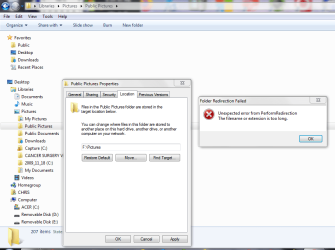
Unfortunately when I tried to move the Folder - Pictures [also happened with Videos] - I received an onscreen Error message which stated:

`Unexpected error from PerformRedirection The file name or extension is too long`

I am attaching a Screenshot of that Error message.


I did find a reference to that Error message on a Google search from another Computer Forum type website but the details were so Technical that they impossible for me to understand and there was no `Fix` described.

Having read some of the information on the other website I am guessing that the Error message is referring to a `hidden file name` because my Computers / Library `Pictures` is obviously not a file name or extension that is too long and my attempted new Location which was F:\Pictures is also obviously not a file name or extension that is too long ?

I think that I remember a comment referring to `Finding the File name / Extension and making it shorter` - something to that effect - but as I mentioned the details were FAR too complicated for me to even try to understand.

Unless I can get the process explained in very simple `Step by Step instructions`I would not be comfortable trying to Rename Folders / File names / shorten File names / Extensions in case that meant that they just disappeared because I had made a mistake.


I really do need to be able to move a large amount of Data / large Folders from my Computer`s C Drive to the F Drive because the C Drive keeps dropping the Free Space down to approximately 10 or 11 GB`s and at that point the Computer`s Mouse and Keyboard freeze up and I have to turn off the Computer using the power button.

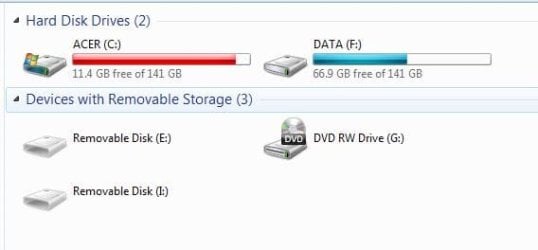
I am attaching a Screenshot example of the C Drive having dropped down from approximately 20 GB`s to about 11 GB`s.

Most of the 66.9 GB`s that are showing on the F Drive are Pictures & Videos Folders contents that I previously Copied & Pasted to the F Drive before I found the Forum thread Instructions - that was an Error on my part because I found out afterwards that doing that would not have caused Windows to put future Files to those locations as the Default location.


I have not deleted those Folders yet in case something goes wrong and I accidentally lose Data / Folders / Files while trying to move them correctly.

Before I Copied & Pasted those Folders into the Computer`s F Drive there was approximately 135 GB`s of Free space there out of the original 141 GB`s.


I am desperate to get help with gaining a large amount of Free space on the C Drive by moving the Library Pictures and Videos Folders to the F Drive by somehow overcoming the cause of the Error message.


When I read the Instructions from the Forum thread [link above] I was very pleased that the Steps were simply explained and looked easy to follow - unfortunately the resulting Error message now seems to be indicating an insurmountable problem for Me because of my lack of experience / knowledge in Computing ?


Thank You for reading this - I would really appreciate any Help.

My Regards, Chris
 

Attachments
  • image_2021-03-19_191537.png
    image_2021-03-19_191537.png
    43.6 KB · Views: 1
  • ACER COMPUTER C DRIVE FREE SPACE DROPPED TO 11.4 GB - TUESDAY 16th  MARCH 2021 - SCREENSHOT.JPG
    ACER COMPUTER C DRIVE FREE SPACE DROPPED TO 11.4 GB - TUESDAY 16th MARCH 2021 - SCREENSHOT.JPG
    21.3 KB · Views: 23

My Computer My Computer

At a glance

WINDOWS 7 HOME PREMIUM
Computer type
PC/Desktop
Computer Manufacturer/Model Number
ACER 3800
OS
WINDOWS 7 HOME PREMIUM
Keyboard
LOGITECH WIRELESS
Mouse
LOGITECH WIRELESS
Internet Speed
2.5Mbps
Antivirus
AVAST 2025 FREE VERSION
Browser
FIREFOX OR GOOGLE CHROME
"File name or extension is too long"

Open the Public Picture folder.
Is there any name that a big name (many characters)?
Is there any name that a big extension (more than 4 characters)?


To free some GigaBytes you can move the virtual memory to D: and disable hibernation.
Also move the system and user temporary folder to D:
Did on my computer and can guide you.
 

My Computers My Computers

  • At a glance

    Windows 7 HP 64i5 6600K - 800MHz to 4200MHz4+4G GSkill DDR4 3000IG - Intel 530
    Computer type
    PC/Desktop
    Computer Manufacturer/Model Number
    custom build
    OS
    Windows 7 HP 64
    CPU
    i5 6600K - 800MHz to 4200MHz
    Motherboard
    GA-Z170-HD3P
    Memory
    4+4G GSkill DDR4 3000
    Graphics Card(s)
    IG - Intel 530
    Monitor(s) Displays
    Samsung 226BW
    Screen Resolution
    1680x1050
    Hard Drives
    (1) -1 SM951 – 128GB M.2 AHCI PCIe SSD drive for Windows 7 and Lubuntu
    (2) -1 WD SATA 3 - 1T for Data
    (3) -1 WD SATA 3 - 1T for backup
    PSU
    Thermaltake 450W TR2 gold
    Keyboard
    Old and good Chicony mechanical keyboard
    Mouse
    Logitech mX performance - 9 buttons (had to disable some)
    Internet Speed
    500Mb/s
    Browser
    Firefox 64
    Other Info
    TinyWall firewall
  • At a glance

    Windows 7 Proi7-4500U 800MHz to 3.0GHz(4+4)G DDR3 1600IG intel 4400 + NVIDIA GeForce GT 745M
    Computer type
    Laptop
    System Manufacturer/Model Number
    Asus Q550LF
    OS
    Windows 7 Pro
    CPU
    i7-4500U 800MHz to 3.0GHz
    Motherboard
    Asus Q550LF
    Memory
    (4+4)G DDR3 1600
    Graphics Card(s)
    IG intel 4400 + NVIDIA GeForce GT 745M
    Sound Card
    Realtek
    Monitor(s) Displays
    LG Display LP156WF4-SPH1
    Screen Resolution
    1920 x 1080
    Hard Drives
    BX500 120G SSD for Windows and programs +
    1T HDD for data
    Internet Speed
    500 Mb/s
    Browser
    Firefox
    Other Info
    TinyWall firewall
"File name or extension is too long"

Open the Public Picture folder.
Is there any name that a big name (many characters)?
Is there any name that a big extension (more than 4 characters)?


To free some GigaBytes you can move the virtual memory to D: and disable hibernation.
Also move the system and user temporary folder to D:
Did on my computer and can guide you.

Hello Megahertz07,

Thank You very much for your message.

In my Computer`s Public Pictures Folder there are more than 28 GB`s of Pictures - almost 30,000 Pictures / Files which is why I want to move it out of the C Drive.

A lot of the Pictures / Files I would have given long descriptive Names as I had no idea that would ever cause any problems.

I am guessing that it would be an almost impossible task to go through that amount of individual Pictures / Files [30,000] to find and rename the one`s that would have quite long names or check the individual Extensions.

Is it the case that perhaps just ONE Picture in my Computer`s C Drive Public Pictures Folder which has either a long `Name` or Extension is preventing me from moving the 28 GB plus Folder to the F Drive ?


I am not a person who tries to make excuses or is too lazy to spend time carrying out tasks but if the only way to resolve the cause of the Error that is preventing me from moving the Folders from the C Drive to the F Drive is to rename every Picture that has a long name I am wondering if it is even possible because when I have previously renamed Files the file then moves to a different location withing the Folder [Alphabetically ?] so I would not be able to just work down a list of Pictures / Files because they would all move withing the Folder when I renamed them ?

Also with regard to that - it occurs to me that finding and renaming Pictures / Files with long names in a Folder with approximately 28 GB contents / 30,000 Pictures / Files would not be possible during even many long sessions and because when the Pictures / Files were renamed they would move within the Public Pictures Folder I would never know where I was when I returned to the Folder to rename the individual Pictures.

I would have to start again looking at ALL of the Pictures / File names [30,000] and as soon as I had renamed some more they would also have moved and IF only ONE Picture / File with a long name can cause the problem that We are corresponding about it would be almost impossible to make sure not to miss one.


As I mentioned in my original message starting this thread I would need Step by Step Instructions to move what You suggested into my Computer`s F Drive [there is no D Drive] as I have no experience at all in `Computing`.

Thanks again for your interest - I would welcome your further comments on what I wrote above.

Regards, Chris


P.S: My Computer is massively important to me at present because We are Shielding from the Corona Virus and are unable to go out of my Home so I need the Computer for online Grocery Shopping - without it I would have no way to get Food / other Groceries etc. so if it was not working I would have real problems.
 
Last edited:

My Computer My Computer

At a glance

WINDOWS 7 HOME PREMIUM
Computer type
PC/Desktop
Computer Manufacturer/Model Number
ACER 3800
OS
WINDOWS 7 HOME PREMIUM
Keyboard
LOGITECH WIRELESS
Mouse
LOGITECH WIRELESS
Internet Speed
2.5Mbps
Antivirus
AVAST 2025 FREE VERSION
Browser
FIREFOX OR GOOGLE CHROME
Is it the case that perhaps just ONE Picture in my Computer`s C Drive Public Pictures Folder which has either a long `Name` or Extension is preventing me from moving the 28 GB plus Folder to the F Drive ?
Yes

It doesn't matter if is drive D: or F:
Windows has a 260 path character size limit.
Before Windows 95, Windows only allowed file names that were eight characters long, with a three character file extension–commonly known as an 8.3 filename. Windows 95 abandoned that to allow long file names, but still limited the maximum path length (which includes the full folder path and the file name) to 260 characters. That limit has been in place ever since. If you’ve ever run into this limit, most likely it was when you were trying to copy deep folder structures into other folders, such as when copying the contents of a hard drive to a folder on another drive.

If you have a file name that has 220 characters (space included) and you try to move to a F:\My pictures\Summer 1998 trip\Scotland and Ireland\Whisky distillers\ the folder path is 72 Characters will fail (220+72=292 > 260)

You have to find a file that has a huge name and make it shorter
 

My Computers My Computers

  • At a glance

    Windows 7 HP 64i5 6600K - 800MHz to 4200MHz4+4G GSkill DDR4 3000IG - Intel 530
    Computer type
    PC/Desktop
    Computer Manufacturer/Model Number
    custom build
    OS
    Windows 7 HP 64
    CPU
    i5 6600K - 800MHz to 4200MHz
    Motherboard
    GA-Z170-HD3P
    Memory
    4+4G GSkill DDR4 3000
    Graphics Card(s)
    IG - Intel 530
    Monitor(s) Displays
    Samsung 226BW
    Screen Resolution
    1680x1050
    Hard Drives
    (1) -1 SM951 – 128GB M.2 AHCI PCIe SSD drive for Windows 7 and Lubuntu
    (2) -1 WD SATA 3 - 1T for Data
    (3) -1 WD SATA 3 - 1T for backup
    PSU
    Thermaltake 450W TR2 gold
    Keyboard
    Old and good Chicony mechanical keyboard
    Mouse
    Logitech mX performance - 9 buttons (had to disable some)
    Internet Speed
    500Mb/s
    Browser
    Firefox 64
    Other Info
    TinyWall firewall
  • At a glance

    Windows 7 Proi7-4500U 800MHz to 3.0GHz(4+4)G DDR3 1600IG intel 4400 + NVIDIA GeForce GT 745M
    Computer type
    Laptop
    System Manufacturer/Model Number
    Asus Q550LF
    OS
    Windows 7 Pro
    CPU
    i7-4500U 800MHz to 3.0GHz
    Motherboard
    Asus Q550LF
    Memory
    (4+4)G DDR3 1600
    Graphics Card(s)
    IG intel 4400 + NVIDIA GeForce GT 745M
    Sound Card
    Realtek
    Monitor(s) Displays
    LG Display LP156WF4-SPH1
    Screen Resolution
    1920 x 1080
    Hard Drives
    BX500 120G SSD for Windows and programs +
    1T HDD for data
    Internet Speed
    500 Mb/s
    Browser
    Firefox
    Other Info
    TinyWall firewall
Windows has a 260 path character size limit.
Before Windows 95, Windows only allowed file names that were eight characters long, with a three character file extension–commonly known as an 8.3 filename. Windows 95 abandoned that to allow long file names, but still limited the maximum path length (which includes the full folder path and the file name) to 260 characters. That limit has been in place ever since. If you’ve ever run into this limit, most likely it was when you were trying to copy deep folder structures into other folders, such as when copying the contents of a hard drive to a folder on another drive.

If you have a file name that has 220 characters (space included) and you try to move to a D:\My pictures\Summer 1998 trip\Scotland and Ireland\Whisky distillers\ the folder path is 72 Characters will fail (220+72=292 > 260)

You have to find a file that has a huge name and make it shorter


Hello again,

Thank You very much for your explanation - however now I am further confused about what Picture / File name could have caused the Error because although I stated that I would have named a lot of the Pictures / Files with a long descriptive name I would not have used anywhere near the amount of characters that You described for any individual Picture or Folder re. the 260 character limits.

Something that has now occurred to me is that within the Computer`s Public Pictures Folder are many Sub Folders that I have created which have many Pictures / Files within them - every one of those Pictures / Files have long descriptive names.

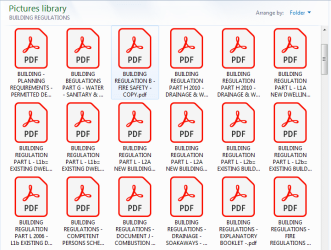
So for example there is a Folder within the Public Pictures Folder which is Named `BUILDING REGULATIONS` and within that Folder there are 121 PDF`s which all have long descriptive names.

I am attaching a Screenshot of just a small section of the `BUILDING REGULATIONS` Folder contents - the individual Pictures / Files names are much longer than what you can see on the Screenshot - probably at least twice as many characters as you can see for each file name.

I am now fairly sure that the majority of the Pictures / Files in my Computer`s Public Pictures Folder are in Sub Folders and have long names.

Does that mean that the characters in the name `Public Pictures` Folder plus the characters in the names of the Sub Folders and ALL of the names of the Pictures / Files within that sub folder are adding up to many hundreds of characters in `File Names` and that is the cause of the Error / Error message that I got when I tried to move the Pictures Folder from the Computer`s C Drive to the F Drive ?

If that is the case I might as well give up now on trying to move the Pictures Folder to my Computer`s F Drive because there is no way that I could ever rectify the situation by having to Rename nearly EVERY Folder and EVERY Picture / File - 30,000 Pictures / Files.

I could easily be misunderstanding the situation through lack of Computing knowledge [ I hope that I am] so could You please correct me if that is the case.

Thanks again for your help.

Chris
 

Attachments

  • image_2021-03-19_235756.png
    image_2021-03-19_235756.png
    22 KB · Views: 19

My Computer My Computer

At a glance

WINDOWS 7 HOME PREMIUM
Computer type
PC/Desktop
Computer Manufacturer/Model Number
ACER 3800
OS
WINDOWS 7 HOME PREMIUM
Keyboard
LOGITECH WIRELESS
Mouse
LOGITECH WIRELESS
Internet Speed
2.5Mbps
Antivirus
AVAST 2025 FREE VERSION
Browser
FIREFOX OR GOOGLE CHROME
Bulk Rename Utility or Advanced Renamer, free versions, can help you "see" files in list form, with some careful choices, one can greatly abbreviate whole words and eliminate spaces within file names, shorten file names. Usually much safer than DOS commands in DOS boxes. Shortening folder names to shorten paths - I don't know what utilities to recommend. I know of no shortcuts to this huge labor project.
 
Last edited:

My Computer My Computer

At a glance

Windows 7 Professional 64-bitDesktop i5; Acers i5 & i7desktop 16GB; 1 Acer 8GB & 1 Acer 16GB
Computer type
PC/Desktop
Computer Manufacturer/Model Number
Antec desktop; Acer Aspire laptops
OS
Windows 7 Professional 64-bit
CPU
Desktop i5; Acers i5 & i7
Memory
desktop 16GB; 1 Acer 8GB & 1 Acer 16GB
Hard Drives
1TB split into 2 equal partitions [OS and data] usable by RJS
Internet Speed
AT&T DSL
Browser
FF, GChrome, msIE
Other Info
Windows 7 Firewall, Emsisoft AM/AV, MSE [scan-only], SpywareBlaster, Ruiware/BillP combine
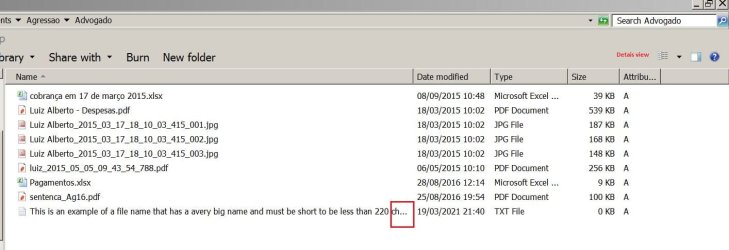
It isn't very difficult.
Open Explorer, select to view Details and set the column width to medium. Any file bigger will have dots at the end.
 

Attachments

  • Filename.JPG
    Filename.JPG
    72.8 KB · Views: 0

My Computers My Computers

  • At a glance

    Windows 7 HP 64i5 6600K - 800MHz to 4200MHz4+4G GSkill DDR4 3000IG - Intel 530
    Computer type
    PC/Desktop
    Computer Manufacturer/Model Number
    custom build
    OS
    Windows 7 HP 64
    CPU
    i5 6600K - 800MHz to 4200MHz
    Motherboard
    GA-Z170-HD3P
    Memory
    4+4G GSkill DDR4 3000
    Graphics Card(s)
    IG - Intel 530
    Monitor(s) Displays
    Samsung 226BW
    Screen Resolution
    1680x1050
    Hard Drives
    (1) -1 SM951 – 128GB M.2 AHCI PCIe SSD drive for Windows 7 and Lubuntu
    (2) -1 WD SATA 3 - 1T for Data
    (3) -1 WD SATA 3 - 1T for backup
    PSU
    Thermaltake 450W TR2 gold
    Keyboard
    Old and good Chicony mechanical keyboard
    Mouse
    Logitech mX performance - 9 buttons (had to disable some)
    Internet Speed
    500Mb/s
    Browser
    Firefox 64
    Other Info
    TinyWall firewall
  • At a glance

    Windows 7 Proi7-4500U 800MHz to 3.0GHz(4+4)G DDR3 1600IG intel 4400 + NVIDIA GeForce GT 745M
    Computer type
    Laptop
    System Manufacturer/Model Number
    Asus Q550LF
    OS
    Windows 7 Pro
    CPU
    i7-4500U 800MHz to 3.0GHz
    Motherboard
    Asus Q550LF
    Memory
    (4+4)G DDR3 1600
    Graphics Card(s)
    IG intel 4400 + NVIDIA GeForce GT 745M
    Sound Card
    Realtek
    Monitor(s) Displays
    LG Display LP156WF4-SPH1
    Screen Resolution
    1920 x 1080
    Hard Drives
    BX500 120G SSD for Windows and programs +
    1T HDD for data
    Internet Speed
    500 Mb/s
    Browser
    Firefox
    Other Info
    TinyWall firewall
kind of strange you got some really long name txt file. i think you can delete those files by one folder to next folder.
or you can download some file explorer software to let you view earlier. good luck
 

My Computer My Computer

At a glance

-
Computer type
PC/Desktop
OS
-
It isn't very difficult.
Open Explorer, select to view Details and set the column width to medium. Any file bigger will have dots at the end.

Hello Megahertz07,

Thanks for your reply - however on my Computer the steps that you described produce a different display:

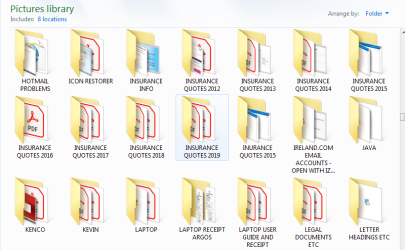
When I open Explorer and select View details for `Pictures` that does not open a list of Pictures / Files on my Computer it opens a display of the Sub Folders - see attached Screenshot.

Even if there was a method of displaying a List of all the Pictures / Files because there are almost 30,000 of them I could not go through that renaming probably many thousands and if there were `Names` that I had not created I would not know whether I could change the name / what could be removed without causing the Pictures / Files to be damaged / no longer able to be opened / lost.


Could You please give me instructions on how to gain Free space on my Computer`s C Drive by carrying out the other processes that you mentioned in your first reply to me - I would really appreciate it:

Here is what You mentioned:

To free some GigaBytes you can move the virtual memory to D: and disable hibernation.
Also move the system and user temporary folder to D:


Would carrying out those processes usually move quite a few GB`s from the C Drive to the F Drive ?

I ask that to make sure that it would be worth carrying them out because every `Technical` process that I have to attempt is risky because of my almost total lack of knowledge in `Computing`.


I would need Step by Step instructions please so that I do not make a mistake and cause further problems on my Computer.


I am now resigned to the fact that because there are almost 30,000 Files in my Computer`s `Public Pictures` Folder any one of which [or more probably thousands] could be causing the problem / Error message that I received when I tried to move the Pictures Folder from the C Drive to the F Drive I will have to forget about moving large amounts of Data / Pictures / Files from the C Drive to the F Drive.

Finding and changing the `Names` of thousands of Files / Pictures would be an impossible task for Me and missing even ONE that had a very long name would still prevent the transfer from the C Drive to the F Drive.

Thank You very much also to Members RolandJS and peterwwilo for reading this thread and your replies.

Chris
 

Attachments

  • image_2021-03-20_141641.png
    image_2021-03-20_141641.png
    38.8 KB · Views: 2
Last edited:

My Computer My Computer

At a glance

WINDOWS 7 HOME PREMIUM
Computer type
PC/Desktop
Computer Manufacturer/Model Number
ACER 3800
OS
WINDOWS 7 HOME PREMIUM
Keyboard
LOGITECH WIRELESS
Mouse
LOGITECH WIRELESS
Internet Speed
2.5Mbps
Antivirus
AVAST 2025 FREE VERSION
Browser
FIREFOX OR GOOGLE CHROME
It seems you did not select to view details.
 

My Computers My Computers

  • At a glance

    Windows 7 HP 64i5 6600K - 800MHz to 4200MHz4+4G GSkill DDR4 3000IG - Intel 530
    Computer type
    PC/Desktop
    Computer Manufacturer/Model Number
    custom build
    OS
    Windows 7 HP 64
    CPU
    i5 6600K - 800MHz to 4200MHz
    Motherboard
    GA-Z170-HD3P
    Memory
    4+4G GSkill DDR4 3000
    Graphics Card(s)
    IG - Intel 530
    Monitor(s) Displays
    Samsung 226BW
    Screen Resolution
    1680x1050
    Hard Drives
    (1) -1 SM951 – 128GB M.2 AHCI PCIe SSD drive for Windows 7 and Lubuntu
    (2) -1 WD SATA 3 - 1T for Data
    (3) -1 WD SATA 3 - 1T for backup
    PSU
    Thermaltake 450W TR2 gold
    Keyboard
    Old and good Chicony mechanical keyboard
    Mouse
    Logitech mX performance - 9 buttons (had to disable some)
    Internet Speed
    500Mb/s
    Browser
    Firefox 64
    Other Info
    TinyWall firewall
  • At a glance

    Windows 7 Proi7-4500U 800MHz to 3.0GHz(4+4)G DDR3 1600IG intel 4400 + NVIDIA GeForce GT 745M
    Computer type
    Laptop
    System Manufacturer/Model Number
    Asus Q550LF
    OS
    Windows 7 Pro
    CPU
    i7-4500U 800MHz to 3.0GHz
    Motherboard
    Asus Q550LF
    Memory
    (4+4)G DDR3 1600
    Graphics Card(s)
    IG intel 4400 + NVIDIA GeForce GT 745M
    Sound Card
    Realtek
    Monitor(s) Displays
    LG Display LP156WF4-SPH1
    Screen Resolution
    1920 x 1080
    Hard Drives
    BX500 120G SSD for Windows and programs +
    1T HDD for data
    Internet Speed
    500 Mb/s
    Browser
    Firefox
    Other Info
    TinyWall firewall
It seems you did not select to view details.

Hello again Megahertz07,

Sorry - my mistake but when I corrected it a List of the Public Pictures Sub Folders was displayed - see attached Screenshot.

The only way to see any details about those Sub Folders [not the contents] was to hover the Mouse curser over them to view hidden information - there seemed to be some information but it did not look like a `File names` and I could not get a Screenshot of any of that because moving the curser closed the information box.

The `PrintScreen` facility does not work on my Computer I have to use `Snipping Tool`.

Opening any of the Sub Folders would obviously display the contents / Pictures / Files.


Chris
 

Attachments

  • COMPUTER - OPEN EXPLORER - PICTURES - VIEW DETAILS - DISPLAYS LIST OF SUB FOLDERS .JPG
    COMPUTER - OPEN EXPLORER - PICTURES - VIEW DETAILS - DISPLAYS LIST OF SUB FOLDERS .JPG
    58.5 KB · Views: 0

My Computer My Computer

At a glance

WINDOWS 7 HOME PREMIUM
Computer type
PC/Desktop
Computer Manufacturer/Model Number
ACER 3800
OS
WINDOWS 7 HOME PREMIUM
Keyboard
LOGITECH WIRELESS
Mouse
LOGITECH WIRELESS
Internet Speed
2.5Mbps
Antivirus
AVAST 2025 FREE VERSION
Browser
FIREFOX OR GOOGLE CHROME
Double click on each folder to see their files names. On the details view, adjust the column do see how big the files name are.
 
Last edited:

My Computers My Computers

  • At a glance

    Windows 7 HP 64i5 6600K - 800MHz to 4200MHz4+4G GSkill DDR4 3000IG - Intel 530
    Computer type
    PC/Desktop
    Computer Manufacturer/Model Number
    custom build
    OS
    Windows 7 HP 64
    CPU
    i5 6600K - 800MHz to 4200MHz
    Motherboard
    GA-Z170-HD3P
    Memory
    4+4G GSkill DDR4 3000
    Graphics Card(s)
    IG - Intel 530
    Monitor(s) Displays
    Samsung 226BW
    Screen Resolution
    1680x1050
    Hard Drives
    (1) -1 SM951 – 128GB M.2 AHCI PCIe SSD drive for Windows 7 and Lubuntu
    (2) -1 WD SATA 3 - 1T for Data
    (3) -1 WD SATA 3 - 1T for backup
    PSU
    Thermaltake 450W TR2 gold
    Keyboard
    Old and good Chicony mechanical keyboard
    Mouse
    Logitech mX performance - 9 buttons (had to disable some)
    Internet Speed
    500Mb/s
    Browser
    Firefox 64
    Other Info
    TinyWall firewall
  • At a glance

    Windows 7 Proi7-4500U 800MHz to 3.0GHz(4+4)G DDR3 1600IG intel 4400 + NVIDIA GeForce GT 745M
    Computer type
    Laptop
    System Manufacturer/Model Number
    Asus Q550LF
    OS
    Windows 7 Pro
    CPU
    i7-4500U 800MHz to 3.0GHz
    Motherboard
    Asus Q550LF
    Memory
    (4+4)G DDR3 1600
    Graphics Card(s)
    IG intel 4400 + NVIDIA GeForce GT 745M
    Sound Card
    Realtek
    Monitor(s) Displays
    LG Display LP156WF4-SPH1
    Screen Resolution
    1920 x 1080
    Hard Drives
    BX500 120G SSD for Windows and programs +
    1T HDD for data
    Internet Speed
    500 Mb/s
    Browser
    Firefox
    Other Info
    TinyWall firewall
There might be another way? Cloning, sector by sector if intelligent cloning balks, the entire HDD onto another equal size external HDD. After making sure the clone is aok, then delete from the cline all folders and files of the OS, 3rd party stuff. Do not touch the 30000. If the target HDD has the 30000, delete from the source HDD those 30000.
 

My Computer My Computer

At a glance

Windows 7 Professional 64-bitDesktop i5; Acers i5 & i7desktop 16GB; 1 Acer 8GB & 1 Acer 16GB
Computer type
PC/Desktop
Computer Manufacturer/Model Number
Antec desktop; Acer Aspire laptops
OS
Windows 7 Professional 64-bit
CPU
Desktop i5; Acers i5 & i7
Memory
desktop 16GB; 1 Acer 8GB & 1 Acer 16GB
Hard Drives
1TB split into 2 equal partitions [OS and data] usable by RJS
Internet Speed
AT&T DSL
Browser
FF, GChrome, msIE
Other Info
Windows 7 Firewall, Emsisoft AM/AV, MSE [scan-only], SpywareBlaster, Ruiware/BillP combine
Double click on each folder to see their files names. On the details view, adjust the column do see how bib the files name are.

Hello again,

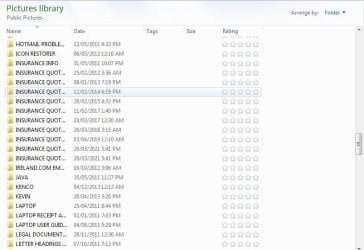
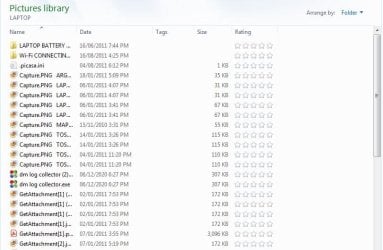
Double clicking onto a Sub Folder from the previous list display opens the Sub Folder and displays the contents / Pictures / Files - Screenshot attached.

Clicking onto some of those Files / Pictures would perhaps display further information but I cannot be doing this for all of the 30,000 Pictures / Files contained in the `Public Pictures` Folder.


Because of what I previously wrote about it being impossible for Me to ever be able to go through the approximately 30,000 Pictures / Files I will have to abandon trying to move the Computer`s Public Pictures Folder from the C Drive to the F Drive.

Finding and renaming probably thousands of Files / Pictures without missing even ONE I feel is completely beyond realistic and too daunting a task for Me and perhaps the same for any Domestic Computer user ?

Would carrying out the other processes that You described in your first reply to me create a few GB`s of Free space in my Computer`s C Drive ?

Perhaps even just a few more GB`s would make my Computer more stable and less likely to `Freeze Up` when the unexplained 10 -12 GB drops in Free space occur ?

I would really appreciate your help with Step by Step Instructions on how to carry out those processes please.

Thanks again for your help.

Chris
 

Attachments

  • COMPUTER - OPEN EXPLORER - PICTURES - VIEW DETAILS - DISPLAYS LIST OF SUB FOLDERS - DOUBLE CLICK.JPG
    COMPUTER - OPEN EXPLORER - PICTURES - VIEW DETAILS - DISPLAYS LIST OF SUB FOLDERS - DOUBLE CLICK.JPG
    60.6 KB · Views: 0

My Computer My Computer

At a glance

WINDOWS 7 HOME PREMIUM
Computer type
PC/Desktop
Computer Manufacturer/Model Number
ACER 3800
OS
WINDOWS 7 HOME PREMIUM
Keyboard
LOGITECH WIRELESS
Mouse
LOGITECH WIRELESS
Internet Speed
2.5Mbps
Antivirus
AVAST 2025 FREE VERSION
Browser
FIREFOX OR GOOGLE CHROME
You almost did what I asked.
Why didn't you expand the Name column to see how big the files name are?
 

My Computers My Computers

  • At a glance

    Windows 7 HP 64i5 6600K - 800MHz to 4200MHz4+4G GSkill DDR4 3000IG - Intel 530
    Computer type
    PC/Desktop
    Computer Manufacturer/Model Number
    custom build
    OS
    Windows 7 HP 64
    CPU
    i5 6600K - 800MHz to 4200MHz
    Motherboard
    GA-Z170-HD3P
    Memory
    4+4G GSkill DDR4 3000
    Graphics Card(s)
    IG - Intel 530
    Monitor(s) Displays
    Samsung 226BW
    Screen Resolution
    1680x1050
    Hard Drives
    (1) -1 SM951 – 128GB M.2 AHCI PCIe SSD drive for Windows 7 and Lubuntu
    (2) -1 WD SATA 3 - 1T for Data
    (3) -1 WD SATA 3 - 1T for backup
    PSU
    Thermaltake 450W TR2 gold
    Keyboard
    Old and good Chicony mechanical keyboard
    Mouse
    Logitech mX performance - 9 buttons (had to disable some)
    Internet Speed
    500Mb/s
    Browser
    Firefox 64
    Other Info
    TinyWall firewall
  • At a glance

    Windows 7 Proi7-4500U 800MHz to 3.0GHz(4+4)G DDR3 1600IG intel 4400 + NVIDIA GeForce GT 745M
    Computer type
    Laptop
    System Manufacturer/Model Number
    Asus Q550LF
    OS
    Windows 7 Pro
    CPU
    i7-4500U 800MHz to 3.0GHz
    Motherboard
    Asus Q550LF
    Memory
    (4+4)G DDR3 1600
    Graphics Card(s)
    IG intel 4400 + NVIDIA GeForce GT 745M
    Sound Card
    Realtek
    Monitor(s) Displays
    LG Display LP156WF4-SPH1
    Screen Resolution
    1920 x 1080
    Hard Drives
    BX500 120G SSD for Windows and programs +
    1T HDD for data
    Internet Speed
    500 Mb/s
    Browser
    Firefox
    Other Info
    TinyWall firewall
Maybe cloning...?
Cloning, sector by sector, the entire HDD onto another equal size external HDD. After making sure the clone is aok, then delete from the cline all folders and files of the OS, 3rd party stuff. Do not touch the 30000. If the target HDD has the 30000, delete from the source HDD those 30000.
Later, you can adjust en-mass paths and filenames on the ext usb target HDD.
 

My Computer My Computer

At a glance

Windows 7 Professional 64-bitDesktop i5; Acers i5 & i7desktop 16GB; 1 Acer 8GB & 1 Acer 16GB
Computer type
PC/Desktop
Computer Manufacturer/Model Number
Antec desktop; Acer Aspire laptops
OS
Windows 7 Professional 64-bit
CPU
Desktop i5; Acers i5 & i7
Memory
desktop 16GB; 1 Acer 8GB & 1 Acer 16GB
Hard Drives
1TB split into 2 equal partitions [OS and data] usable by RJS
Internet Speed
AT&T DSL
Browser
FF, GChrome, msIE
Other Info
Windows 7 Firewall, Emsisoft AM/AV, MSE [scan-only], SpywareBlaster, Ruiware/BillP combine
You almost did what I asked.
Why didn't you expand the Name column to see how big the files name are?

Hello, Could You please explain how to do that.

When I right click onto the `Names` heading at the top of the list of the Sub Folder`s contents list [the one that I attached the Screenshot for] it just displays a drop down Menu where `Size` - Dates - Ratings and Tags are already selected - there is an option to open a further `Choose details` Menu where there are many options to select but again within that Menu the items that I mentioned are already selected.

If I left click onto the small downward facing`arrow head` on the `Names` heading it produces small box with 4 alphabetically ranged options that have boxes to select for example: A-H or I-P or Q-Z or Other.


I look forward to reading your instructions on what to do to achieve what you previously asked for but even if I can then view the example File sizes I cannot do that going through 30,000 Files / Pictures.

With that in mind could You please instruct me on what to do to achieve the other Tasks that you mentioned in your first reply to me - I would really appreciate it.


I apologise if my lack of even very basic `Computing` knowledge is frustrating You but I did mention in some of my messages that I have almost no knowledge or experience in carrying out technical processes etc. and that every instruction would need to be `Step by Step` please.

The 30,000 Files / Pictures were a shock to me when I found that out from my Computer`s Public Pictures `Properties` which showed over 28 GB`s and 29,923 plus Files in 1580 Folders - they would almost all be either PDF`s or Photos but also a lot of Files containing various stuff of interest to me over the years.

Although I have had my Computer for about 11 Years and it is Vital for my lifestyle [I am Housebound] regarding especially online Food Shopping etc. I have only used it for very basic `Computing` including online Grocery / Food Shopping, Emailing and browsing the Internet.

Without a Computer I would not be able to get Food etc. and as I am way past my retirement age I would never be able to afford to buy another one so trying to get my Computer `Stable` by regaining some more Free space on the C Drive is vitally important to me.

Thanks again for your help.

Chris
 
Last edited:

My Computer My Computer

At a glance

WINDOWS 7 HOME PREMIUM
Computer type
PC/Desktop
Computer Manufacturer/Model Number
ACER 3800
OS
WINDOWS 7 HOME PREMIUM
Keyboard
LOGITECH WIRELESS
Mouse
LOGITECH WIRELESS
Internet Speed
2.5Mbps
Antivirus
AVAST 2025 FREE VERSION
Browser
FIREFOX OR GOOGLE CHROME
Maybe cloning...?
Cloning, sector by sector, the entire HDD onto another equal size external HDD. After making sure the clone is aok, then delete from the cline all folders and files of the OS, 3rd party stuff. Do not touch the 30000. If the target HDD has the 30000, delete from the source HDD those 30000.
Later, you can adjust en-mass paths and filenames on the ext usb target HDD.


Hello RolandJS,

Thanks for your message I really appreciate your interest and your suggestions.

However You must have seen in some of my messages that I have almost Zero knowledge of `Computing` and just reading your suggestions seems far too technical for me to even think about attempting.

Although I have had my Computer for about 11 Years and it is Vital for my lifestyle [I am Housebound] regarding especially online Food Shopping etc. I have only used it for very basic `Computing` including online Grocery / Food Shopping, Emailing and browsing the Internet.

The 30,000 Files / Pictures was a shock to me when I found that out from my Computer`s Public Pictures `Properties` which showed over 28 GB`s and 29,923 plus Files in 1580 Folders - they would almost all be either PDF`s or Photos but also a lot of Files containing various stuff of interest to me over the 11 years.

Thanks again for your replies.

Chris
 

My Computer My Computer

At a glance

WINDOWS 7 HOME PREMIUM
Computer type
PC/Desktop
Computer Manufacturer/Model Number
ACER 3800
OS
WINDOWS 7 HOME PREMIUM
Keyboard
LOGITECH WIRELESS
Mouse
LOGITECH WIRELESS
Internet Speed
2.5Mbps
Antivirus
AVAST 2025 FREE VERSION
Browser
FIREFOX OR GOOGLE CHROME
Guys, Gals, is there any way, any literature, for beginners and newbies that could walk them through making a clone? I think one of these three -- Macrium Reflect or EaseUS or AOMEI -- might be best for our new-found friend. I am gone way too much of the time to be able to walk our friend through making a clone. Or, maybe return to attempting to rename 30000 files & their respective folders? :)
 

My Computer My Computer

At a glance

Windows 7 Professional 64-bitDesktop i5; Acers i5 & i7desktop 16GB; 1 Acer 8GB & 1 Acer 16GB
Computer type
PC/Desktop
Computer Manufacturer/Model Number
Antec desktop; Acer Aspire laptops
OS
Windows 7 Professional 64-bit
CPU
Desktop i5; Acers i5 & i7
Memory
desktop 16GB; 1 Acer 8GB & 1 Acer 16GB
Hard Drives
1TB split into 2 equal partitions [OS and data] usable by RJS
Internet Speed
AT&T DSL
Browser
FF, GChrome, msIE
Other Info
Windows 7 Firewall, Emsisoft AM/AV, MSE [scan-only], SpywareBlaster, Ruiware/BillP combine
Guys, Gals, is there any way, any literature, for beginners and newbies that could walk them through making a clone? I think one of these three -- Macrium Reflect or EaseUS or AOMEI -- might be best for our new-found friend. I am gone way too much of the time to be able to walk our friend through making a clone. Or, maybe return to attempting to rename 30000 files & their respective folders? :)


Hello again RolandJS,

Thank You very much for trying to recruit Members to explain / instruct me on the suggestions that You mentioned but I do not have sufficient knowledge or confidence to attempt anything that is / sounds as `Technical` as Cloning etc.

I looked at and downloaded Macrim Reflect onto my Computer some time ago because I was told that it could be useful if my Computer / Windows ever malfunctioned but when I booted from it / opened it I could not understand how to operate the program even after I thought that I had found the Instructions online.

I need Step by Step Instructions on how to carry out the processes that Member Megahertz suggested in his first reply to this thread.

Quote from Member Megahertz:

To free some GigaBytes you can move the virtual memory to D: and disable hibernation.

Also move the system and user temporary folder to D:


End Quote


Thanks again RolandJS for your interest and suggestions and Thanks also to any future Members that might read this thread and be able to help with `Idiot Proof Instructions` the above processes.

Chris
 

My Computer My Computer

At a glance

WINDOWS 7 HOME PREMIUM
Computer type
PC/Desktop
Computer Manufacturer/Model Number
ACER 3800
OS
WINDOWS 7 HOME PREMIUM
Keyboard
LOGITECH WIRELESS
Mouse
LOGITECH WIRELESS
Internet Speed
2.5Mbps
Antivirus
AVAST 2025 FREE VERSION
Browser
FIREFOX OR GOOGLE CHROME
Back
Top