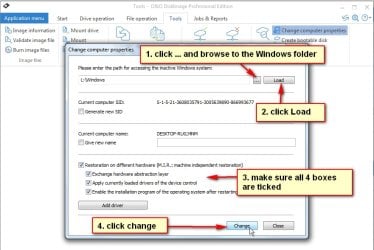
I think you did it wrong.
You need to highloght the target OS in blue in the top pane.
Then click drivers in the left pane.
The click ADD and browse to the driver folder.
Wait for it to tell it has completed.
Yes i did it correctly . It says : Operation succeeded , Success 2 , not applicable 0.
then i hit "ok" .
But what i miss maybe , is a save button or something after that. I shouldnt close it like that .
Maybe after that operation , i should do :
File > Apply Image or Save Image or Mount image >> Unmount image ?
i don't really know about the correct order .
If i dont have to do this for the progam to apply the drivers , so yes it failed . I keep rebooting and i'm not able to use keyboard , nor mouse with this Crucial SSD .
My Computer
At a glance
Windows 7 Ultimate x64
- Computer type
- PC/Desktop
- OS
- Windows 7 Ultimate x64