Is My HDD Completely Dead? I/O Device Error

It is quite possible that sector 0 of your drive is just about readable sometimes and unreadable sometimes. If data is important for me, I wouldn't tax the drive any further. The only time I would run the drive is for cloning with ddrescue and that if I don't want to turn the job to professional data recovery..

If you do not mind taking a risk and wouldn't mind running the drive once or twice, I would suggest that you download the trial version of Getdataback Simple https://www.runtime.org/data-recovery-software.htm and scan your drive with it. If it finds your partition and shows the files in it, you can preview the files and check the integrity. If happy you have to buy a licence for, I think $70, to copy the files to another drive. All risks are borne by you.
 
Last edited:

My Computer My Computer

At a glance

Windows 7 Home Premium 32 bit
OS
Windows 7 Home Premium 32 bit
Just a side note.
Your "C" partition on disk "0" is to full. Not enough free space for Windows 7 to work properly.
 

My Computer My Computer

At a glance

Windows 10 Pro. 64/ version 1709 Windows 7 Pr...Intel i7-6800K @ 4.3Corsair Platinum 16 gig @2400EVGA GTX 1070 OC
Computer type
PC/Desktop
Computer Manufacturer/Model Number
Home made Desktop
OS
Windows 10 Pro. 64/ version 1709 Windows 7 Pro/64
CPU
Intel i7-6800K @ 4.3
Motherboard
ASUS X-99 Deluxe II
Memory
Corsair Platinum 16 gig @2400
Graphics Card(s)
EVGA GTX 1070 OC
Monitor(s) Displays
Asus 27" LED LCD/VE278Q
Screen Resolution
1920-1080 or 1280-720 HDMI
Hard Drives
INTEL SSD 730-240 Gb Sata 3.0/
PSU
EVGA Platium 1200W
Case
Phanteks Luxe Tempered Glass 8 fans/ one radiator
Cooling
XSPC/ Water Cooled CPU
Keyboard
Das 4 Professional
Mouse
Logitech M705/MX Anywhere 2-S
Internet Speed
100 mbits
Antivirus
Microsoft Security Essentials/ Malwarebytes Premium 3.0/ SAS
Browser
I.E. 11 default/Firefox/ ISP Time Warner Cable/Spectrum
Other Info
LG BluRay Burner/
Sound system-KLipsch-THX/
Icy Dock ssd Hot Swap bays.
I'm Facing Same Issue

Good Morning,
I know this thread is very old, but still I'm posting on this just to seek all you expert's attention....

I'm using an assembled desktop containing 2 HDD's, 250 GB & 320 GB(collected from a laptop).
320 GB was my primary HDD containing OS(Win 7) & 3 other partition to store data, where 250 GB HDD was my secondary HDD with 3 partition just to store data.
This was the scenario for last 6years(never formatted during 6 years)

One day while working on VMWare I had to reboot my system but, strangely system was stuck on "logging off"....so I decided to force restart.
But when I did system never came up...got the message"Select proper boot media". HDD were getting detected in BIOS.
Then I decided to install OS on my secondary HDD(250 GB). Shockingly what I found, My 320 GB HDD has no partition & asking for "initialize" in disk management.
After Initialize I used "testdisk-7.2" to scan & getting the following error...."file_pread(5,2,buffer,119(0/1/57)) ReadFile The request could not be performed because of an I/O device error.

"

What should I do...plz help
 

My Computer My Computer

At a glance

win 7 32 bit
Computer type
PC/Desktop
OS
win 7 32 bit
Doesn't sound good.

If there is data on there that you need, you could try making a clone/image using something like clonezilla, or whatever bootable imaging program you have - many allow you to skip damaged sectors. If that is successful, you might be able to try data recovery - first from the hd , and if that dies, then you can try data recovery from the clone.
 

My Computers My Computers

  • At a glance

    7 X64i5 84002x8gb 3200mhz
    Computer type
    PC/Desktop
    OS
    7 X64
    CPU
    i5 8400
    Motherboard
    gigabyte b365m ds3h
    Memory
    2x8gb 3200mhz
    Hard Drives
    various
    PSU
    pure power 11 400w cm
    Case
    Coolermaster
    Cooling
    cryorig m9i
  • At a glance

    7x64g54008gb ddr4 2400
    Computer type
    PC/Desktop
    OS
    7x64
    CPU
    g5400
    Motherboard
    ga b365m ds3h
    Memory
    8gb ddr4 2400
    PSU
    xfx pro 450w
Okay...thank you for the reply

Currently another scan is going on with Active@ partition recovery.....& It is showing bad sectors....
(All sectors.. whichever scanned till now)
 

My Computer My Computer

At a glance

win 7 32 bit
Computer type
PC/Desktop
OS
win 7 32 bit
^ I presume that your HDD had a catastrophic failure - sudden death. While I don't have any high hopes of recovering it, that does not preclude trying various avenues hoping something may click.

SIW2 suggested cloning. On my part i have a suggestion.

You said you initialised it and thereafter analysed it with TestDisk 7.2 which I think is the beta version.( I always recommend using the stable version 7.1)

That you were asked to initialise the drive is an indication of Sector 0 failure. Sector 0 holds the MBR code, Unique ID given by Windows in recognition of the HDD and the partition tables. If it is a mere corruption, we should definitely be able to make it good. If on the other hand it had become a bad sector and cannot be read or written into it, then there is absolutely no possibility of DIY recovery. Did the initialisation go through or did you get a " cannot initialise. I/O error" message?

Now try initialising it with TestDisk7.1. When you get into the [Analyse] screen instead of [Analyse], highlight [MBR Code] to write the MBR Code. If it succeeds in writing the MBR code then go to [Analyse] to recover the partitions.

[Once when I was experimenting with my Trial HDD, instead of zeroing its sector 0, I accidentally zeroed sector 0 of my System drive. The syatem wouldn't boot. I didn't panic. I had Testdisk for DOS on a pendrive, booted into TestDisk with it, wrote TestDisk MBR Code and then recovered the partitions]
 

My Computer My Computer

At a glance

Windows 7 Home Premium 32 bit
OS
Windows 7 Home Premium 32 bit
Thank you Mr. Jumanji & very good morning

"Did the initialisation go through or did you get a " cannot initialise. I/O error" message? ".........There was no error. After installing os in second HDD when I didn't find any drive from 320 GB HDD, went to "Computer Management" console & found HDD was there but completely blank & showing disk needs to be initialized, when I right click only one option was there"Initialize"....so I Initialized. Current status is unallocated

The scan I ran yesterday, is still going on (completed 3% till now).....till now 184 blocks(50 MB each) have been scanned....& All are showing bad sectors.
Shall I cancel the scan & proceed with test disk 7.1 as per your recommendation?
 

My Computer My Computer

At a glance

win 7 32 bit
Computer type
PC/Desktop
OS
win 7 32 bit
You may stop the scan. At this rate I don't think it is going to take you anywhere. Go ahead with TestDisk 7.1, write the [MBR Code] and then [Analyse] [Quick Search].and if quick search fails to find any partition then[Deeper Search]. This is the normal procedure we adopt. If it runs through successfully, well and good. If you get the same error you got earlier with TestDisk 7.2, then abort and try disk cloning as suggested by SIW2.
 

My Computer My Computer

At a glance

Windows 7 Home Premium 32 bit
OS
Windows 7 Home Premium 32 bit
Write error: can't write new MBR code.

Getting this error....tried 3 times
 

My Computer My Computer

At a glance

win 7 32 bit
Computer type
PC/Desktop
OS
win 7 32 bit
That leaves you to try your luck cloning the drive as suggested by SIW2.
 

My Computer My Computer

At a glance

Windows 7 Home Premium 32 bit
OS
Windows 7 Home Premium 32 bit
If the data on there is very important, you should stop trying to recover it yourself and use professional data recovery company. They are very expensive.

Up to you to decide if it is worth it.

If you want to try and recover the data yourself:
you can try to make a clone/image so if the disk dies completely there is still the image/clone for attempting recovery.
 

My Computers My Computers

  • At a glance

    7 X64i5 84002x8gb 3200mhz
    Computer type
    PC/Desktop
    OS
    7 X64
    CPU
    i5 8400
    Motherboard
    gigabyte b365m ds3h
    Memory
    2x8gb 3200mhz
    Hard Drives
    various
    PSU
    pure power 11 400w cm
    Case
    Coolermaster
    Cooling
    cryorig m9i
  • At a glance

    7x64g54008gb ddr4 2400
    Computer type
    PC/Desktop
    OS
    7x64
    CPU
    g5400
    Motherboard
    ga b365m ds3h
    Memory
    8gb ddr4 2400
    PSU
    xfx pro 450w
Going forward, after replacing the bad drive, please begin and maintain a routine backup, full images, folder/file, whatever works for later restores, from source drive partitions to affordable external media of your choosing.
 

My Computer My Computer

At a glance

Windows 7 Professional 64-bitDesktop i5; Acers i5 & i7desktop 16GB; 1 Acer 8GB & 1 Acer 16GB
Computer type
PC/Desktop
Computer Manufacturer/Model Number
Antec desktop; Acer Aspire laptops
OS
Windows 7 Professional 64-bit
CPU
Desktop i5; Acers i5 & i7
Memory
desktop 16GB; 1 Acer 8GB & 1 Acer 16GB
Hard Drives
1TB split into 2 equal partitions [OS and data] usable by RJS
Internet Speed
AT&T DSL
Browser
FF, GChrome, msIE
Other Info
Windows 7 Firewall, Emsisoft AM/AV, MSE [scan-only], SpywareBlaster, Ruiware/BillP combine
HDD I/O Device Error with Error code 0x80070057

I am having the same problem.

My system specs have changed

I do have access to another laptop that has Windows 7 Home Premium SP1.

I don't have any tower or desktop.

I'm having to boot using the "Try Ubuntu" option on a usb thumb stick.

I have the files on the crashed internal HDD saved to another thumb stick.

When I try to install Windows to the internal HDD it returns with the error code 0x80070057

when I entered the cmd prompt "X:\Sources" and entered "cd c:" it returned the "I/O device error".

I tried the diskpart clean and diskpart seems to work.

When I tried to install Ubuntu it returns a message that the request has failed.

Somewhere I seen that the internal HDD is marked as "Raw" volume.

I prefer windows 7 but I may have to settle with Ubuntu.

When I connect the HDD to the other laptop as an external, it shows up as an unidentified device in Devices and Printers.

I need to install to the internal HDD.

Please help
 
Last edited:

My Computer My Computer

At a glance

Microsoft Windows 7 Home Premium 64-bit 7601 ...Intel(R) Celeron(R) 2957U @ 1.40GHz8.00 GBIntel(R) HD Graphics
Computer type
Laptop
Computer Manufacturer/Model Number
Acer Aspire E1-532
OS
Microsoft Windows 7 Home Premium 64-bit 7601 Multiprocessor Free Service Pack 1
CPU
Intel(R) Celeron(R) 2957U @ 1.40GHz
Motherboard
Acer EA50_HW
Memory
8.00 GB
Graphics Card(s)
Intel(R) HD Graphics
Sound Card
High Definition Audio Device
Screen Resolution
1366 x 768 x 32 bits (4294967296 colors) @ 59 Hz
Hard Drives
TOSHIBA MQ01ABD100 ATA Device
Is it the Acer Aspire 5733Z that has the problem?
 

My Computers My Computers

  • At a glance

    7 X64i5 84002x8gb 3200mhz
    Computer type
    PC/Desktop
    OS
    7 X64
    CPU
    i5 8400
    Motherboard
    gigabyte b365m ds3h
    Memory
    2x8gb 3200mhz
    Hard Drives
    various
    PSU
    pure power 11 400w cm
    Case
    Coolermaster
    Cooling
    cryorig m9i
  • At a glance

    7x64g54008gb ddr4 2400
    Computer type
    PC/Desktop
    OS
    7x64
    CPU
    g5400
    Motherboard
    ga b365m ds3h
    Memory
    8gb ddr4 2400
    PSU
    xfx pro 450w
Is it the Acer Aspire 5733Z that has the problem?


No, it is an Acer Aspire E1-532. Four months ago I upgraded the HDD to a 1TB internal.

The SNID is 42220915034

The current HDD...

Model: TOSHIBA MQ01ABD100 (AX1R4C)
Serial #: 57TKPNZHT

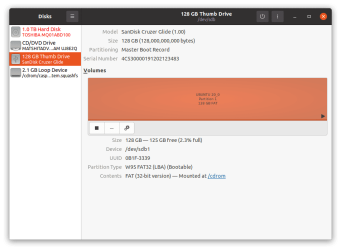
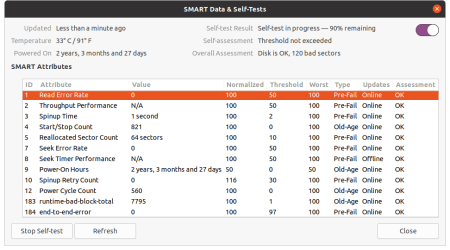
Notice in attachment 1 that under Disks the HDD in question is in red

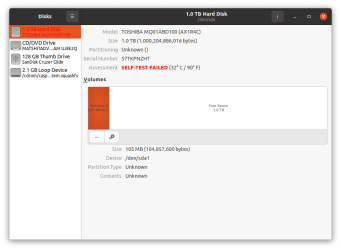
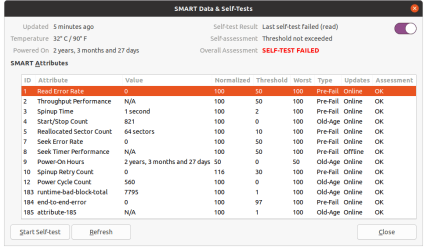
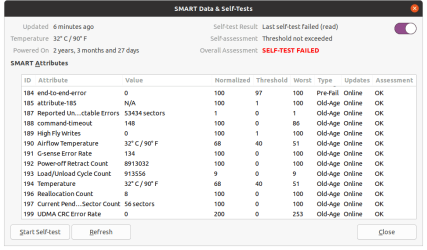
Attachments 2-4 shows at the Overall Assessment as Self-Test Failed, while attachment 5 says the disk is ok with 120 bad clusters.

Attachments 3-4 shows all area as either pre-fail or old-age. They also show the assessment of the individual area's assessments are "OK".

I'm not sure how to get the output of the cmd (Admin) prompt in Windows unless I connect the HDD to the good laptop as an external, even though it shows up as an "unidentified device". Even then, I wouldn't know how to go about getting the info needed, I would need guidance on that.
 

Attachments

  • Screenshot from 2021-08-11 04-44-02.png
    Screenshot from 2021-08-11 04-44-02.png
    22.1 KB · Views: 0
  • Screenshot from 2021-08-11 04-47-06.png
    Screenshot from 2021-08-11 04-47-06.png
    19.5 KB · Views: 0
  • Screenshot from 2021-08-11 04-48-31.png
    Screenshot from 2021-08-11 04-48-31.png
    24.5 KB · Views: 0
  • Screenshot from 2021-08-11 04-48-49.png
    Screenshot from 2021-08-11 04-48-49.png
    23.5 KB · Views: 0
  • Screenshot from 2021-08-11 05-06-54.png
    Screenshot from 2021-08-11 05-06-54.png
    23.9 KB · Views: 0
Last edited:

My Computer My Computer

At a glance

Microsoft Windows 7 Home Premium 64-bit 7601 ...Intel(R) Celeron(R) 2957U @ 1.40GHz8.00 GBIntel(R) HD Graphics
Computer type
Laptop
Computer Manufacturer/Model Number
Acer Aspire E1-532
OS
Microsoft Windows 7 Home Premium 64-bit 7601 Multiprocessor Free Service Pack 1
CPU
Intel(R) Celeron(R) 2957U @ 1.40GHz
Motherboard
Acer EA50_HW
Memory
8.00 GB
Graphics Card(s)
Intel(R) HD Graphics
Sound Card
High Definition Audio Device
Screen Resolution
1366 x 768 x 32 bits (4294967296 colors) @ 59 Hz
Hard Drives
TOSHIBA MQ01ABD100 ATA Device
Bad clusters means that your disk is dying or already dead.
 

My Computers My Computers

  • At a glance

    Windows 7 HP 64i5 6600K - 800MHz to 4200MHz4+4G GSkill DDR4 3000IG - Intel 530
    Computer type
    PC/Desktop
    Computer Manufacturer/Model Number
    custom build
    OS
    Windows 7 HP 64
    CPU
    i5 6600K - 800MHz to 4200MHz
    Motherboard
    GA-Z170-HD3P
    Memory
    4+4G GSkill DDR4 3000
    Graphics Card(s)
    IG - Intel 530
    Monitor(s) Displays
    Samsung 226BW
    Screen Resolution
    1680x1050
    Hard Drives
    (1) -1 SM951 – 128GB M.2 AHCI PCIe SSD drive for Windows 7 and Lubuntu
    (2) -1 WD SATA 3 - 1T for Data
    (3) -1 WD SATA 3 - 1T for backup
    PSU
    Thermaltake 450W TR2 gold
    Keyboard
    Old and good Chicony mechanical keyboard
    Mouse
    Logitech mX performance - 9 buttons (had to disable some)
    Internet Speed
    500Mb/s
    Browser
    Firefox 64
    Other Info
    TinyWall firewall
  • At a glance

    Windows 7 Proi7-4500U 800MHz to 3.0GHz(4+4)G DDR3 1600IG intel 4400 + NVIDIA GeForce GT 745M
    Computer type
    Laptop
    System Manufacturer/Model Number
    Asus Q550LF
    OS
    Windows 7 Pro
    CPU
    i7-4500U 800MHz to 3.0GHz
    Motherboard
    Asus Q550LF
    Memory
    (4+4)G DDR3 1600
    Graphics Card(s)
    IG intel 4400 + NVIDIA GeForce GT 745M
    Sound Card
    Realtek
    Monitor(s) Displays
    LG Display LP156WF4-SPH1
    Screen Resolution
    1920 x 1080
    Hard Drives
    BX500 120G SSD for Windows and programs +
    1T HDD for data
    Internet Speed
    500 Mb/s
    Browser
    Firefox
    Other Info
    TinyWall firewall
I tried one more time before going to sleep.

I used the Windows install thumb stick to delete the partitions and create a new one then formatted the largest one that appeared.

Then I chose the "Try Ubuntu" mode on the Ubuntu thumb stick and learned that Ubuntu is able to use the internal 1.0TB HDD as "free" and "available" storage space as though it is an external hard drive.

Maybe there's hope for this HDD after all. (At least for a little while longer)
 

My Computer My Computer

At a glance

Microsoft Windows 7 Home Premium 64-bit 7601 ...Intel(R) Celeron(R) 2957U @ 1.40GHz8.00 GBIntel(R) HD Graphics
Computer type
Laptop
Computer Manufacturer/Model Number
Acer Aspire E1-532
OS
Microsoft Windows 7 Home Premium 64-bit 7601 Multiprocessor Free Service Pack 1
CPU
Intel(R) Celeron(R) 2957U @ 1.40GHz
Motherboard
Acer EA50_HW
Memory
8.00 GB
Graphics Card(s)
Intel(R) HD Graphics
Sound Card
High Definition Audio Device
Screen Resolution
1366 x 768 x 32 bits (4294967296 colors) @ 59 Hz
Hard Drives
TOSHIBA MQ01ABD100 ATA Device
Your priority should be to save your data to an external drive.
 

My Computers My Computers

  • At a glance

    Windows 7 HP 64i5 6600K - 800MHz to 4200MHz4+4G GSkill DDR4 3000IG - Intel 530
    Computer type
    PC/Desktop
    Computer Manufacturer/Model Number
    custom build
    OS
    Windows 7 HP 64
    CPU
    i5 6600K - 800MHz to 4200MHz
    Motherboard
    GA-Z170-HD3P
    Memory
    4+4G GSkill DDR4 3000
    Graphics Card(s)
    IG - Intel 530
    Monitor(s) Displays
    Samsung 226BW
    Screen Resolution
    1680x1050
    Hard Drives
    (1) -1 SM951 – 128GB M.2 AHCI PCIe SSD drive for Windows 7 and Lubuntu
    (2) -1 WD SATA 3 - 1T for Data
    (3) -1 WD SATA 3 - 1T for backup
    PSU
    Thermaltake 450W TR2 gold
    Keyboard
    Old and good Chicony mechanical keyboard
    Mouse
    Logitech mX performance - 9 buttons (had to disable some)
    Internet Speed
    500Mb/s
    Browser
    Firefox 64
    Other Info
    TinyWall firewall
  • At a glance

    Windows 7 Proi7-4500U 800MHz to 3.0GHz(4+4)G DDR3 1600IG intel 4400 + NVIDIA GeForce GT 745M
    Computer type
    Laptop
    System Manufacturer/Model Number
    Asus Q550LF
    OS
    Windows 7 Pro
    CPU
    i7-4500U 800MHz to 3.0GHz
    Motherboard
    Asus Q550LF
    Memory
    (4+4)G DDR3 1600
    Graphics Card(s)
    IG intel 4400 + NVIDIA GeForce GT 745M
    Sound Card
    Realtek
    Monitor(s) Displays
    LG Display LP156WF4-SPH1
    Screen Resolution
    1920 x 1080
    Hard Drives
    BX500 120G SSD for Windows and programs +
    1T HDD for data
    Internet Speed
    500 Mb/s
    Browser
    Firefox
    Other Info
    TinyWall firewall
Your priority should be to save your data to an external drive.


If you are meaning something like a System Image Backup or a System Recovery Disk, that is no longer an option for me. I had already deleted, cleaned, created new partitions and formatted the whole HDD.

Now that I have my data (personal files, images, etc) backed up on another usb thumb stick, my next priority is to try and revive or recreate a MBR with a working operating system.

Will chkdsk /r /x render the specified drive completely and permanently unusable?
 
Last edited:

My Computer My Computer

At a glance

Microsoft Windows 7 Home Premium 64-bit 7601 ...Intel(R) Celeron(R) 2957U @ 1.40GHz8.00 GBIntel(R) HD Graphics
Computer type
Laptop
Computer Manufacturer/Model Number
Acer Aspire E1-532
OS
Microsoft Windows 7 Home Premium 64-bit 7601 Multiprocessor Free Service Pack 1
CPU
Intel(R) Celeron(R) 2957U @ 1.40GHz
Motherboard
Acer EA50_HW
Memory
8.00 GB
Graphics Card(s)
Intel(R) HD Graphics
Sound Card
High Definition Audio Device
Screen Resolution
1366 x 768 x 32 bits (4294967296 colors) @ 59 Hz
Hard Drives
TOSHIBA MQ01ABD100 ATA Device

My Computers My Computers

  • At a glance

    Windows 7 HP 64i5 6600K - 800MHz to 4200MHz4+4G GSkill DDR4 3000IG - Intel 530
    Computer type
    PC/Desktop
    Computer Manufacturer/Model Number
    custom build
    OS
    Windows 7 HP 64
    CPU
    i5 6600K - 800MHz to 4200MHz
    Motherboard
    GA-Z170-HD3P
    Memory
    4+4G GSkill DDR4 3000
    Graphics Card(s)
    IG - Intel 530
    Monitor(s) Displays
    Samsung 226BW
    Screen Resolution
    1680x1050
    Hard Drives
    (1) -1 SM951 – 128GB M.2 AHCI PCIe SSD drive for Windows 7 and Lubuntu
    (2) -1 WD SATA 3 - 1T for Data
    (3) -1 WD SATA 3 - 1T for backup
    PSU
    Thermaltake 450W TR2 gold
    Keyboard
    Old and good Chicony mechanical keyboard
    Mouse
    Logitech mX performance - 9 buttons (had to disable some)
    Internet Speed
    500Mb/s
    Browser
    Firefox 64
    Other Info
    TinyWall firewall
  • At a glance

    Windows 7 Proi7-4500U 800MHz to 3.0GHz(4+4)G DDR3 1600IG intel 4400 + NVIDIA GeForce GT 745M
    Computer type
    Laptop
    System Manufacturer/Model Number
    Asus Q550LF
    OS
    Windows 7 Pro
    CPU
    i7-4500U 800MHz to 3.0GHz
    Motherboard
    Asus Q550LF
    Memory
    (4+4)G DDR3 1600
    Graphics Card(s)
    IG intel 4400 + NVIDIA GeForce GT 745M
    Sound Card
    Realtek
    Monitor(s) Displays
    LG Display LP156WF4-SPH1
    Screen Resolution
    1920 x 1080
    Hard Drives
    BX500 120G SSD for Windows and programs +
    1T HDD for data
    Internet Speed
    500 Mb/s
    Browser
    Firefox
    Other Info
    TinyWall firewall
Back
Top