Show - Hide Hidden Files - Add to Context Menu

How to Add "Show/Hide Hidden Files" to Context Menu in Vista, Windows 7, and Windows 8

   Information
This will show you how to add or remove Show/Hide Hidden Files to the desktop, library, and folder window context menu for all users to be able to toggle "Show" or "Don't show" hidden files, folders, drives, and protected operating system files in Vista, Windows 7, and Windows 8.

While you must be logged in as an administrator to be able to add or remove the context menu, all users will be able to use the context menu.

   Note
When you right click on the Desktop and click on Show/Hide Hidden Files, the hidden files (faded files) will instantly show or hide. You will need to refresh (F5) any other opened inactive window to see the hidden files show or hide in them.

When you right click on a blank area in the main window of a library or folder and click on Show/Hide Hidden Files, the hidden files (faded files) will instantly show or hide in that window. You may need to refresh (F5) with any other opened inactive window to see the hidden files show or hide in them.


EXAMPLE: "Show/Hide Hidden Files" and/or "Show/Hide All Hidden Files" Added to Context Menu
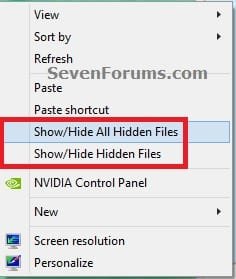
Desktop_Context_Menu.jpg


OPTION ONE

To Add "Show/Hide Hidden Files" to Context Menu


1. Do either step 2 or 3, and/or step 4 or 5 for what you would like.


2. To Toggle Show or Hide ALL Hidden Files with Notify Sound Played
NOTE: When you click/tap on the Show/Hide Hidden Files context menu item using this option, you will hear the notify.wav file play only if Window Media Player is set as the default program for .wav files. If you do not have Window Media Player turned on in Windows Features, then you will get an error instead of the sound playing.
A) Click/tap on the Download button below to download the file below, and go to step 6 below.
NOTE: This includes all "hidden files, folders, or drives" and "hidden protected operating system files".
Add_Show_Hide_ALL_Hidden_Files_to_Context_Menu_with_SOUND.zip


Download


3. To Toggle Show or Hide ALL Hidden Files without any Sound
NOTE: This option is if you did not want to have the Notify.wav play when you use the Show/Hide Hidden Files context menu item, or if you get an error from using step 2 since you have Windows Media Player turned off in Windows Features.
A) Click/tap on the Download button below to download the file below, and go to step 6 below.
NOTE: This includes all "hidden files, folders, or drives" and "hidden protected operating system files".
Add_Show_Hide_ALL_Hidden_Files_to_Context_Menu.zip


Download


AND/OR


4. To Toggle Show or Hide Hidden Files with Notify Sound Played
NOTE: When you click/tap on the Show/Hide Hidden Files context menu item using this option, you will hear the notify.wav file play only if Window Media Player is set as the default program for .wav files. If you do not have Window Media Player turned on in Windows Features, then you will get an error instead of the sound playing.
A) Click/tap on the Download button below to download the file below, and go to step 6 below.
NOTE: This includes only all "hidden files, folders, or drives" and not "hidden protected operating system files".
Add_Show_Hide_Hidden_Files_to_Context_Menu_with_SOUND.zip


Download


5. To Toggle Show or Hide Hidden Files without any Sound
NOTE: This option is if you did not want to have the Notify.wav play when you use the Show/Hide Hidden Files context menu item, or if you get an error from using step 4 since you have Windows Media Player turned off in Windows Features.
A) Click/tap on the Download button below to download the file below, and go to step 6 below.
NOTE: This includes only all "hidden files, folders, or drives" and not "hidden protected operating system files".
Add_Show_Hide_Hidden_Files_to_Context_Menu.zip


Download


6. Save the .zip file to your desktop.

7. Open the downloaded ZIP file, and extract (drag and drop) both the .reg and .vbs files to your desktop.

8. Unblock the extracted .vbs file, click/tap on Properties.

9. Right click or press and hold on the extracted and unblocked .vbs file, and click/tap on Copy.

10. In Windows Explorer, navigate to and open the C:\Windows folder. Right click or press and hold on an empty area in the C:\Window folder, click/tap on Paste, then click/tap on Continue and Yes (UAC) if prompted. Close the Windows Explorer window.

11. Double click/tap on the extracted .reg file to merge it.

12. If prompter, click/tap on Run, Yes (UAC-Windows 7/8) or Continue (UAC-Vista), Yes, and OK to approve the merge.

13. You can now delete the downloaded files left on your desktop if you like.


OPTION TWO

To Remove "Show/Hide Hidden Files" from Context Menu


NOTE: This is the default setting.
1. Do step 2 and/or 3 below for what you would like to do.

2. To Remove "Show/Hide Hidden Files" from Context Menu
A) Click/tap on the Download button below to download the file below, and go to step 4 below.
Remove_Show_Hide_Hidden_Files_from_Context_Menu.reg


Download


3. To Remove "Show/Hide All Hidden Files" from Context Menu
A) Click/tap on the Download button below to download the file below, and go to step 4 below.
Remove_Show_Hide_All_Hidden_Files_from_Context_Menu.reg


Download


4. Save the .zip file to your desktop.

5. Double click/tap on the downloaded .reg file to merge it.

6. If prompted, click/tap on Run, Yes (UAC-Windows 7/8) or Continue (UAC-Vista), Yes, and OK to approve the merge.

7. In Windows Explorer, navigate to and open the C:\Windows folder, right click or press and hold on the file below, click/tap on Delete, and Yes (if prompted).
Toggle_Show_Hidden_Files_On_Off.vbs

OR

Toggle_Show_Hidden_Files_On_Off_with_SOUND.vbs
AND/OR

Toggle_Show_All_Hidden_Files_On_Off.vbs

OR

Toggle_Show_All_Hidden_Files_On_Off_with_SOUND.vbs
8. You can now delete the download reg file if you would like to.
That's it,
Shawn


Attachments

Last edited:
"Show" or "Don't show" hidden files, folders, drives, and protected operating system files
thats the ability of the added context menu. however is it possible to have some of these functions on a separate menu? If possible I'd like to see show hidden files separate from show protected operating system files.. wondering if thats possible


Ok M18XR2. The tutorial has been updated to be able to have one or both options available now.

To update, remove the current context menu, and use the new downloads in the tutorial. :)
 

My Computer My Computer

At a glance

64-bit Windows 11 Pro for WorkstationsIntel i7-8700K OC'd to 5 GHz64 GB (4x16GB) G.SKILL TridentZ RGB DDR4 3600...ASUS ROG-STRIX-GTX1080TI-O11G-GAMING
Computer type
PC/Desktop
Computer Manufacturer/Model Number
Self built custom
OS
64-bit Windows 11 Pro for Workstations
CPU
Intel i7-8700K OC'd to 5 GHz
Motherboard
ASUS ROG Maximus XI Formula Z390
Memory
64 GB (4x16GB) G.SKILL TridentZ RGB DDR4 3600 MHz
Graphics Card(s)
ASUS ROG-STRIX-GTX1080TI-O11G-GAMING
Sound Card
Integrated
Monitor(s) Displays
2 x Samsung Odyssey G7 27"
Screen Resolution
2560x1440
Hard Drives
1TB Samsung 990 PRO M.2,
4TB Samsung 990 PRO PRO M.2,
TerraMaster F8 SSD Plus NAS
PSU
Seasonic Prime Titanium 850W
Case
Thermaltake Core P3
Cooling
Corsair Hydro H115i
Keyboard
Logitech wireless K800
Mouse
Logitech MX Master 4
Internet Speed
2 Gb/s Download and 100 Mb/s Upload
Antivirus
Malwarebyte Anti-Malware Premium
Browser
Google Chrome
Other Info
Logitech Z625 speaker system,
Logitech BRIO 4K Pro webcam,
HP Color LaserJet Pro MFP M477fdn,
APC SMART-UPS RT 1000 XL - SURT1000XLI,
Galaxy S23 Plus phone
hey Brink, I tried it but it only has show all hidden files, just like the old one

where cfan i get the new downloads?

Edit: nevermind I see what you mean. it is working very nicely this is what I wanted. thank you once again man
 

My Computer My Computer

At a glance

window 7 64 bit
OS
window 7 64 bit
You're most welcome. :)
 

My Computer My Computer

At a glance

64-bit Windows 11 Pro for WorkstationsIntel i7-8700K OC'd to 5 GHz64 GB (4x16GB) G.SKILL TridentZ RGB DDR4 3600...ASUS ROG-STRIX-GTX1080TI-O11G-GAMING
Computer type
PC/Desktop
Computer Manufacturer/Model Number
Self built custom
OS
64-bit Windows 11 Pro for Workstations
CPU
Intel i7-8700K OC'd to 5 GHz
Motherboard
ASUS ROG Maximus XI Formula Z390
Memory
64 GB (4x16GB) G.SKILL TridentZ RGB DDR4 3600 MHz
Graphics Card(s)
ASUS ROG-STRIX-GTX1080TI-O11G-GAMING
Sound Card
Integrated
Monitor(s) Displays
2 x Samsung Odyssey G7 27"
Screen Resolution
2560x1440
Hard Drives
1TB Samsung 990 PRO M.2,
4TB Samsung 990 PRO PRO M.2,
TerraMaster F8 SSD Plus NAS
PSU
Seasonic Prime Titanium 850W
Case
Thermaltake Core P3
Cooling
Corsair Hydro H115i
Keyboard
Logitech wireless K800
Mouse
Logitech MX Master 4
Internet Speed
2 Gb/s Download and 100 Mb/s Upload
Antivirus
Malwarebyte Anti-Malware Premium
Browser
Google Chrome
Other Info
Logitech Z625 speaker system,
Logitech BRIO 4K Pro webcam,
HP Color LaserJet Pro MFP M477fdn,
APC SMART-UPS RT 1000 XL - SURT1000XLI,
Galaxy S23 Plus phone
I hope this isn't asking too much :D, but would you be a dear and add the final combination: context menu to toggle only "protected operating system files"? Please? :o
 

My Computer My Computer

At a glance

Windows 7 Home Premium 64-bit SP1Intel Core i3-350M @ 2.27GHz8GB DDR3Intel HD Graphics
Computer type
Laptop
Computer Manufacturer/Model Number
ASUS K52F-A1
OS
Windows 7 Home Premium 64-bit SP1
CPU
Intel Core i3-350M @ 2.27GHz
Motherboard
ASUS K52F
Memory
8GB DDR3
Graphics Card(s)
Intel HD Graphics
Sound Card
Conexant SmartAudio HD
Monitor(s) Displays
Notebook display (disabled) and BenQ EW2420 24" (active)
Screen Resolution
1920 x 1080
Hard Drives
Samsung 840 EVO SSD 120GB
Keyboard
Logitech K120
Mouse
Dell Laser MOCZUL
Antivirus
none
Browser
Opera portable
Other Info
not yet revealed
Hello Soyabeaner,

I wish I could, but in order for protected OS files to show, the Show hidden files, folders, and drives option must be turned on (checked) as well. :(
 

My Computer My Computer

At a glance

64-bit Windows 11 Pro for WorkstationsIntel i7-8700K OC'd to 5 GHz64 GB (4x16GB) G.SKILL TridentZ RGB DDR4 3600...ASUS ROG-STRIX-GTX1080TI-O11G-GAMING
Computer type
PC/Desktop
Computer Manufacturer/Model Number
Self built custom
OS
64-bit Windows 11 Pro for Workstations
CPU
Intel i7-8700K OC'd to 5 GHz
Motherboard
ASUS ROG Maximus XI Formula Z390
Memory
64 GB (4x16GB) G.SKILL TridentZ RGB DDR4 3600 MHz
Graphics Card(s)
ASUS ROG-STRIX-GTX1080TI-O11G-GAMING
Sound Card
Integrated
Monitor(s) Displays
2 x Samsung Odyssey G7 27"
Screen Resolution
2560x1440
Hard Drives
1TB Samsung 990 PRO M.2,
4TB Samsung 990 PRO PRO M.2,
TerraMaster F8 SSD Plus NAS
PSU
Seasonic Prime Titanium 850W
Case
Thermaltake Core P3
Cooling
Corsair Hydro H115i
Keyboard
Logitech wireless K800
Mouse
Logitech MX Master 4
Internet Speed
2 Gb/s Download and 100 Mb/s Upload
Antivirus
Malwarebyte Anti-Malware Premium
Browser
Google Chrome
Other Info
Logitech Z625 speaker system,
Logitech BRIO 4K Pro webcam,
HP Color LaserJet Pro MFP M477fdn,
APC SMART-UPS RT 1000 XL - SURT1000XLI,
Galaxy S23 Plus phone
Fair play.
 

My Computer My Computer

At a glance

Windows 7 Home Premium 64-bit SP1Intel Core i3-350M @ 2.27GHz8GB DDR3Intel HD Graphics
Computer type
Laptop
Computer Manufacturer/Model Number
ASUS K52F-A1
OS
Windows 7 Home Premium 64-bit SP1
CPU
Intel Core i3-350M @ 2.27GHz
Motherboard
ASUS K52F
Memory
8GB DDR3
Graphics Card(s)
Intel HD Graphics
Sound Card
Conexant SmartAudio HD
Monitor(s) Displays
Notebook display (disabled) and BenQ EW2420 24" (active)
Screen Resolution
1920 x 1080
Hard Drives
Samsung 840 EVO SSD 120GB
Keyboard
Logitech K120
Mouse
Dell Laser MOCZUL
Antivirus
none
Browser
Opera portable
Other Info
not yet revealed
Thank you very much! That's what I've been looking for! SevenForums and you rockz!
 

My Computer My Computer

At a glance

None
OS
None
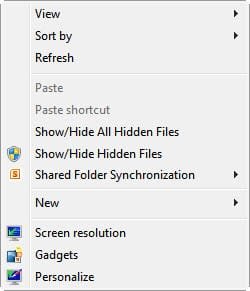
For some reason, I keep getting the shield icon on the Show/Hide Hidden Files but not on the Show/Hide All Hidden Files. Attached is a picture of my context menu.
 

Attachments

  • Untitled.jpg
    Untitled.jpg
    10.4 KB · Views: 217

My Computer My Computer

At a glance

Microsoft Windows 7 64-bit Service Pack 1Intel Core i7-4790K Devil's Canyon Quad-Core ...16.00 GBNVIDIA GeForce GTX 950
Computer type
PC/Desktop
Computer Manufacturer/Model Number
Custom Build
OS
Microsoft Windows 7 64-bit Service Pack 1
CPU
Intel Core i7-4790K Devil's Canyon Quad-Core 4.0 GHz
Motherboard
GIGABYTE GA-Z97X-SLI LGA 1150
Memory
16.00 GB
Graphics Card(s)
NVIDIA GeForce GTX 950
Monitor(s) Displays
AOC 2050W
Screen Resolution
1920 x 1080
Hard Drives
ST1000DL002-9TT153 ATA Device
Seagate 2TB FireCuda Gaming SSHD (Solid State Hybrid Drive) - 7200 RPM SATA 6Gb/s 64MB Cache 3.5-Inch Hard Drive
Samsung 850 EVO - 250GB - 2.5-Inch SATA III Internal SSD
PSU
CORSAIR CX-M Series CX750M 750W ATX12V & EPS12V Semi-modular
Case
Lian Li PC-7H
Browser
Firefox
Hello TON, :)

The .reg file below will remove the UAC shield for you.
 

Attachments

My Computer My Computer

At a glance

64-bit Windows 11 Pro for WorkstationsIntel i7-8700K OC'd to 5 GHz64 GB (4x16GB) G.SKILL TridentZ RGB DDR4 3600...ASUS ROG-STRIX-GTX1080TI-O11G-GAMING
Computer type
PC/Desktop
Computer Manufacturer/Model Number
Self built custom
OS
64-bit Windows 11 Pro for Workstations
CPU
Intel i7-8700K OC'd to 5 GHz
Motherboard
ASUS ROG Maximus XI Formula Z390
Memory
64 GB (4x16GB) G.SKILL TridentZ RGB DDR4 3600 MHz
Graphics Card(s)
ASUS ROG-STRIX-GTX1080TI-O11G-GAMING
Sound Card
Integrated
Monitor(s) Displays
2 x Samsung Odyssey G7 27"
Screen Resolution
2560x1440
Hard Drives
1TB Samsung 990 PRO M.2,
4TB Samsung 990 PRO PRO M.2,
TerraMaster F8 SSD Plus NAS
PSU
Seasonic Prime Titanium 850W
Case
Thermaltake Core P3
Cooling
Corsair Hydro H115i
Keyboard
Logitech wireless K800
Mouse
Logitech MX Master 4
Internet Speed
2 Gb/s Download and 100 Mb/s Upload
Antivirus
Malwarebyte Anti-Malware Premium
Browser
Google Chrome
Other Info
Logitech Z625 speaker system,
Logitech BRIO 4K Pro webcam,
HP Color LaserJet Pro MFP M477fdn,
APC SMART-UPS RT 1000 XL - SURT1000XLI,
Galaxy S23 Plus phone

My Computer My Computer

At a glance

Microsoft Windows 7 64-bit Service Pack 1Intel Core i7-4790K Devil's Canyon Quad-Core ...16.00 GBNVIDIA GeForce GTX 950
Computer type
PC/Desktop
Computer Manufacturer/Model Number
Custom Build
OS
Microsoft Windows 7 64-bit Service Pack 1
CPU
Intel Core i7-4790K Devil's Canyon Quad-Core 4.0 GHz
Motherboard
GIGABYTE GA-Z97X-SLI LGA 1150
Memory
16.00 GB
Graphics Card(s)
NVIDIA GeForce GTX 950
Monitor(s) Displays
AOC 2050W
Screen Resolution
1920 x 1080
Hard Drives
ST1000DL002-9TT153 ATA Device
Seagate 2TB FireCuda Gaming SSHD (Solid State Hybrid Drive) - 7200 RPM SATA 6Gb/s 64MB Cache 3.5-Inch Hard Drive
Samsung 850 EVO - 250GB - 2.5-Inch SATA III Internal SSD
PSU
CORSAIR CX-M Series CX750M 750W ATX12V & EPS12V Semi-modular
Case
Lian Li PC-7H
Browser
Firefox
You're most welcome TON. I hope have a Happy New Year as well. :)
 

My Computer My Computer

At a glance

64-bit Windows 11 Pro for WorkstationsIntel i7-8700K OC'd to 5 GHz64 GB (4x16GB) G.SKILL TridentZ RGB DDR4 3600...ASUS ROG-STRIX-GTX1080TI-O11G-GAMING
Computer type
PC/Desktop
Computer Manufacturer/Model Number
Self built custom
OS
64-bit Windows 11 Pro for Workstations
CPU
Intel i7-8700K OC'd to 5 GHz
Motherboard
ASUS ROG Maximus XI Formula Z390
Memory
64 GB (4x16GB) G.SKILL TridentZ RGB DDR4 3600 MHz
Graphics Card(s)
ASUS ROG-STRIX-GTX1080TI-O11G-GAMING
Sound Card
Integrated
Monitor(s) Displays
2 x Samsung Odyssey G7 27"
Screen Resolution
2560x1440
Hard Drives
1TB Samsung 990 PRO M.2,
4TB Samsung 990 PRO PRO M.2,
TerraMaster F8 SSD Plus NAS
PSU
Seasonic Prime Titanium 850W
Case
Thermaltake Core P3
Cooling
Corsair Hydro H115i
Keyboard
Logitech wireless K800
Mouse
Logitech MX Master 4
Internet Speed
2 Gb/s Download and 100 Mb/s Upload
Antivirus
Malwarebyte Anti-Malware Premium
Browser
Google Chrome
Other Info
Logitech Z625 speaker system,
Logitech BRIO 4K Pro webcam,
HP Color LaserJet Pro MFP M477fdn,
APC SMART-UPS RT 1000 XL - SURT1000XLI,
Galaxy S23 Plus phone
Num lock msg tirggered

Hi Shawn,

This works great but everytime it shows/hides the files and folders the "numlock on" msg is triggered, im not sure why, i have logitech setpoint installed for my wireless keyboard and mouse...the script somehow interferes with them and displaying the numlock on msg, is there any way i can disable that?
 

My Computer My Computer

At a glance

windows 10 32bit
Computer type
PC/Desktop
OS
windows 10 32bit
Hello Joseph, :)

As a test, do you see the "numlock on" message if you press F5 (refresh) the desktop?

That's the only thing in the .vbs file I see that may possibly be causing this with the Logitech software. The rest of the commands are only changing registry values for hide/show.
 

My Computer My Computer

At a glance

64-bit Windows 11 Pro for WorkstationsIntel i7-8700K OC'd to 5 GHz64 GB (4x16GB) G.SKILL TridentZ RGB DDR4 3600...ASUS ROG-STRIX-GTX1080TI-O11G-GAMING
Computer type
PC/Desktop
Computer Manufacturer/Model Number
Self built custom
OS
64-bit Windows 11 Pro for Workstations
CPU
Intel i7-8700K OC'd to 5 GHz
Motherboard
ASUS ROG Maximus XI Formula Z390
Memory
64 GB (4x16GB) G.SKILL TridentZ RGB DDR4 3600 MHz
Graphics Card(s)
ASUS ROG-STRIX-GTX1080TI-O11G-GAMING
Sound Card
Integrated
Monitor(s) Displays
2 x Samsung Odyssey G7 27"
Screen Resolution
2560x1440
Hard Drives
1TB Samsung 990 PRO M.2,
4TB Samsung 990 PRO PRO M.2,
TerraMaster F8 SSD Plus NAS
PSU
Seasonic Prime Titanium 850W
Case
Thermaltake Core P3
Cooling
Corsair Hydro H115i
Keyboard
Logitech wireless K800
Mouse
Logitech MX Master 4
Internet Speed
2 Gb/s Download and 100 Mb/s Upload
Antivirus
Malwarebyte Anti-Malware Premium
Browser
Google Chrome
Other Info
Logitech Z625 speaker system,
Logitech BRIO 4K Pro webcam,
HP Color LaserJet Pro MFP M477fdn,
APC SMART-UPS RT 1000 XL - SURT1000XLI,
Galaxy S23 Plus phone
Hello Joseph, :)

As a test, do you see the "numlock on" message if you press F5 (refresh) the desktop?

That's the only thing in the .vbs file I see that may possibly be causing this with the Logitech software. The rest of the commands are only changing registry values for hide/show.

Thanks for the reply,

No I dont see the Num lock message shown when i press F5 normally..only when i click the show files right click menu it happens...

Its not a big deal anyway..:)
 

My Computer My Computer

At a glance

windows 10 32bit
Computer type
PC/Desktop
OS
windows 10 32bit
Odd little issue. :huh:
 

My Computer My Computer

At a glance

64-bit Windows 11 Pro for WorkstationsIntel i7-8700K OC'd to 5 GHz64 GB (4x16GB) G.SKILL TridentZ RGB DDR4 3600...ASUS ROG-STRIX-GTX1080TI-O11G-GAMING
Computer type
PC/Desktop
Computer Manufacturer/Model Number
Self built custom
OS
64-bit Windows 11 Pro for Workstations
CPU
Intel i7-8700K OC'd to 5 GHz
Motherboard
ASUS ROG Maximus XI Formula Z390
Memory
64 GB (4x16GB) G.SKILL TridentZ RGB DDR4 3600 MHz
Graphics Card(s)
ASUS ROG-STRIX-GTX1080TI-O11G-GAMING
Sound Card
Integrated
Monitor(s) Displays
2 x Samsung Odyssey G7 27"
Screen Resolution
2560x1440
Hard Drives
1TB Samsung 990 PRO M.2,
4TB Samsung 990 PRO PRO M.2,
TerraMaster F8 SSD Plus NAS
PSU
Seasonic Prime Titanium 850W
Case
Thermaltake Core P3
Cooling
Corsair Hydro H115i
Keyboard
Logitech wireless K800
Mouse
Logitech MX Master 4
Internet Speed
2 Gb/s Download and 100 Mb/s Upload
Antivirus
Malwarebyte Anti-Malware Premium
Browser
Google Chrome
Other Info
Logitech Z625 speaker system,
Logitech BRIO 4K Pro webcam,
HP Color LaserJet Pro MFP M477fdn,
APC SMART-UPS RT 1000 XL - SURT1000XLI,
Galaxy S23 Plus phone
Odd little issue. :huh:

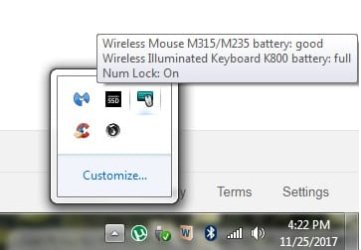
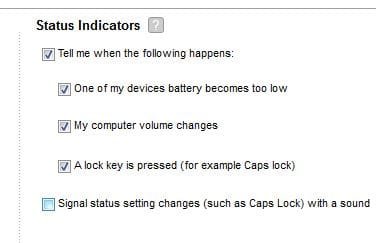
Yes, If you see the attachments the logitech software is showing the tooltip as "Num lock On" and if we turn off the settings inside the software(attch 2) then the message is not shown....but I would like to have this message shown..
 

Attachments

  • 1.jpg
    1.jpg
    12.1 KB · Views: 197
  • 2.JPG
    2.JPG
    17.4 KB · Views: 186

My Computer My Computer

At a glance

windows 10 32bit
Computer type
PC/Desktop
OS
windows 10 32bit
Possible to add Keyboard shortcut for this?

Hi Shawn,

As days goes by this is the only script I use it daily...Is there a way to add a keyboard shortcut instead of right click and click "show all hidden files" ?
 

My Computer My Computer

At a glance

windows 10 32bit
Computer type
PC/Desktop
OS
windows 10 32bit
Hi Shawn,

As days goes by this is the only script I use it daily...Is there a way to add a keyboard shortcut instead of right click and click "show all hidden files" ?

Hello Joseph, :-)

You could create a shortcut of the VBS file on the desktop, in the Start menu, or pinned to the taskbar or Start menu.

Afterwards, assign a keyboard shortcut like below to this VBS shortcut to use.

Keyboard Shortcut | Vista Forums
 

My Computer My Computer

At a glance

64-bit Windows 11 Pro for WorkstationsIntel i7-8700K OC'd to 5 GHz64 GB (4x16GB) G.SKILL TridentZ RGB DDR4 3600...ASUS ROG-STRIX-GTX1080TI-O11G-GAMING
Computer type
PC/Desktop
Computer Manufacturer/Model Number
Self built custom
OS
64-bit Windows 11 Pro for Workstations
CPU
Intel i7-8700K OC'd to 5 GHz
Motherboard
ASUS ROG Maximus XI Formula Z390
Memory
64 GB (4x16GB) G.SKILL TridentZ RGB DDR4 3600 MHz
Graphics Card(s)
ASUS ROG-STRIX-GTX1080TI-O11G-GAMING
Sound Card
Integrated
Monitor(s) Displays
2 x Samsung Odyssey G7 27"
Screen Resolution
2560x1440
Hard Drives
1TB Samsung 990 PRO M.2,
4TB Samsung 990 PRO PRO M.2,
TerraMaster F8 SSD Plus NAS
PSU
Seasonic Prime Titanium 850W
Case
Thermaltake Core P3
Cooling
Corsair Hydro H115i
Keyboard
Logitech wireless K800
Mouse
Logitech MX Master 4
Internet Speed
2 Gb/s Download and 100 Mb/s Upload
Antivirus
Malwarebyte Anti-Malware Premium
Browser
Google Chrome
Other Info
Logitech Z625 speaker system,
Logitech BRIO 4K Pro webcam,
HP Color LaserJet Pro MFP M477fdn,
APC SMART-UPS RT 1000 XL - SURT1000XLI,
Galaxy S23 Plus phone
Hello Joseph, :-)

You could create a shortcut of the VBS file on the desktop, in the Start menu, or pinned to the taskbar or Start menu.

Afterwards, assign a keyboard shortcut like below to this VBS shortcut to use.

Keyboard Shortcut | Vista Forums

Wow..You are a Genius :cool: ..Thankyou..
 

My Computer My Computer

At a glance

windows 10 32bit
Computer type
PC/Desktop
OS
windows 10 32bit

My Computer My Computer

At a glance

64-bit Windows 11 Pro for WorkstationsIntel i7-8700K OC'd to 5 GHz64 GB (4x16GB) G.SKILL TridentZ RGB DDR4 3600...ASUS ROG-STRIX-GTX1080TI-O11G-GAMING
Computer type
PC/Desktop
Computer Manufacturer/Model Number
Self built custom
OS
64-bit Windows 11 Pro for Workstations
CPU
Intel i7-8700K OC'd to 5 GHz
Motherboard
ASUS ROG Maximus XI Formula Z390
Memory
64 GB (4x16GB) G.SKILL TridentZ RGB DDR4 3600 MHz
Graphics Card(s)
ASUS ROG-STRIX-GTX1080TI-O11G-GAMING
Sound Card
Integrated
Monitor(s) Displays
2 x Samsung Odyssey G7 27"
Screen Resolution
2560x1440
Hard Drives
1TB Samsung 990 PRO M.2,
4TB Samsung 990 PRO PRO M.2,
TerraMaster F8 SSD Plus NAS
PSU
Seasonic Prime Titanium 850W
Case
Thermaltake Core P3
Cooling
Corsair Hydro H115i
Keyboard
Logitech wireless K800
Mouse
Logitech MX Master 4
Internet Speed
2 Gb/s Download and 100 Mb/s Upload
Antivirus
Malwarebyte Anti-Malware Premium
Browser
Google Chrome
Other Info
Logitech Z625 speaker system,
Logitech BRIO 4K Pro webcam,
HP Color LaserJet Pro MFP M477fdn,
APC SMART-UPS RT 1000 XL - SURT1000XLI,
Galaxy S23 Plus phone
Back
Top