Solved Having issues with a Bluetooth speaker that will not show "Connect"

Kadence

New member
Local time
6:16 AM
Messages
3
Having issues with a Bluetooth speaker that will not show "Connect"

I'm having trouble with a Bluetooth speaker (ION Pathfinder 4): https://www.amazon.com/gp/product/B08J46KG83/ref=ppx_yo_dt_b_asin_title_o01_s00

Windows 7 can detect it, but I can't connect for some reason. I can connect to other Bluetooth speakers, but not this one. My cell phone can both detect and connect to the speaker and it works fine. Also I tried turning off all my other Bluetooth speakers and restarting my PC, as well as removing the device and re-installing it, but I get the same problem.

I'm hitting the Bluetooth pairing button, and it does detect the device, but I don't get the "Connect" button I usually get for Bluetooth speakers. Here's an image of when I open the device, no "Connect" button: Ion-Pathfinder-4-Bluetooth — ImgBB

And here's some of my other devices in Control Panel>Hardware and Sound>Devices and Printers: Devices — ImgBB

I tried contacting ION support, but haven't received any response. I think maybe the problem is that the device isn't detecting as a speaker. As you can see in the second image, my other audio devices show icons of headphones or a speaker, whereas the Pathfinder 4 seems to use another icon.

Any suggestions of what else I can try?
 

My Computers My Computers

  • At a glance

    Windows 7 Professional 64 Bit 6.1Intel Core i7-670016GBAMD Radeon R9 360
    Computer type
    PC/Desktop
    Computer Manufacturer/Model Number
    Dell Inspiron
    OS
    Windows 7 Professional 64 Bit 6.1
    CPU
    Intel Core i7-6700
    Memory
    16GB
    Graphics Card(s)
    AMD Radeon R9 360
    Browser
    Chrome
  • Computer type
    PC/Desktop

My Computer My Computer

At a glance

W7 home premium 32bit/W7HP 64bit/w10 tp insid...E5300 dual core3gbNvidia Geforce 7100 Nforce 630i
Computer type
PC/Desktop
Computer Manufacturer/Model Number
medionl/Aspire 6930G/acer x55a
OS
W7 home premium 32bit/W7HP 64bit/w10 tp insider ring
CPU
E5300 dual core
Motherboard
medion MS7366
Memory
3gb
Graphics Card(s)
Nvidia Geforce 7100 Nforce 630i
Monitor(s) Displays
avixc
Internet Speed
n (isp resticted to 72)
Antivirus
mse/pands
Browser
palemoon
Other Info
Belkin Fd7050 n USB using Railink RT2870 drivers, more upto date
hi,
as this piece of kit is v5, according to this its not Natively supported on w7
https://www.google.com/url?sa=t&rct...ows-versions&usg=AOvVaw3KhMnoLMRNOuHlDUTNHdre

easy to check if its correct -- what versions are your others running


did find this official video re drivers for windows
ION Audio
Hey thanks! Wasn't expecting a reply back so fast. You've been very helpful, it's appreciated.

I've never had an issue with Bluetooth speakers before, it didn't occur to me that they wouldn't be compatible with Windows 7. Out of curiosity, how did you find out what "kit" it was? I would like to google the kit version of speakers so I don't make this mistake again. I don't see anything about a kit version on the Amazon page for the speaker though, and couldn't find anything when I searched "ion pathfinder 4 kit bluetooth", or "ion pathfinder 4 kit bluetooth version v5".

Edit: That video link redirects me to ION Audio , I don't see the video. Maybe it's a geographic location thing, I'm in the US (New Jersey).
 

My Computers My Computers

  • At a glance

    Windows 7 Professional 64 Bit 6.1Intel Core i7-670016GBAMD Radeon R9 360
    Computer type
    PC/Desktop
    Computer Manufacturer/Model Number
    Dell Inspiron
    OS
    Windows 7 Professional 64 Bit 6.1
    CPU
    Intel Core i7-6700
    Memory
    16GB
    Graphics Card(s)
    AMD Radeon R9 360
    Browser
    Chrome
  • Computer type
    PC/Desktop
hi

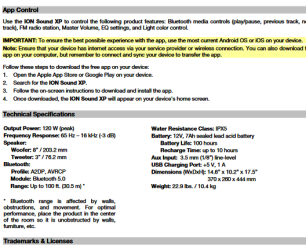
i blew up the install device setup page to find the version
it also quotes andrios/ios requirements
i can only find references to w11 drivers

note check the dell page MIGHT have driver
 

Attachments

  • ion.PNG
    ion.PNG
    33.8 KB · Views: 6

My Computer My Computer

At a glance

W7 home premium 32bit/W7HP 64bit/w10 tp insid...E5300 dual core3gbNvidia Geforce 7100 Nforce 630i
Computer type
PC/Desktop
Computer Manufacturer/Model Number
medionl/Aspire 6930G/acer x55a
OS
W7 home premium 32bit/W7HP 64bit/w10 tp insider ring
CPU
E5300 dual core
Motherboard
medion MS7366
Memory
3gb
Graphics Card(s)
Nvidia Geforce 7100 Nforce 630i
Monitor(s) Displays
avixc
Internet Speed
n (isp resticted to 72)
Antivirus
mse/pands
Browser
palemoon
Other Info
Belkin Fd7050 n USB using Railink RT2870 drivers, more upto date
hi

i blew up the install device setup page to find the version
it also quotes andrios/ios requirements
i can only find references to w11 drivers

note check the dell page MIGHT have driver
Thank you very much for your assistance.

- - - Updated - - -

hi

i blew up the install device setup page to find the version
it also quotes andrios/ios requirements
i can only find references to w11 drivers

note check the dell page MIGHT have driver
I used your suggestion found downloaded the driver from this page:
https://www.dell.com/support/home/e...6430u-ultrabook&languageCode=en&categoryId=NI

I had a bunch of problems after installing the driver, had to restart my computer a number of times because Windows kept crashing, but eventually it did work and Windows stopped crashing. Just wanted to post, in case anyone else found this thread when googling for a similar problem. So now the speaker works with the updated driver.

Thanks again for the help.
 

My Computers My Computers

  • At a glance

    Windows 7 Professional 64 Bit 6.1Intel Core i7-670016GBAMD Radeon R9 360
    Computer type
    PC/Desktop
    Computer Manufacturer/Model Number
    Dell Inspiron
    OS
    Windows 7 Professional 64 Bit 6.1
    CPU
    Intel Core i7-6700
    Memory
    16GB
    Graphics Card(s)
    AMD Radeon R9 360
    Browser
    Chrome
  • Computer type
    PC/Desktop
Back
Top