
Take Ownership - Allow or Prevent Users and Groups To

How to Allow or Prevent Users and Groups to be able to Take Ownership

   Information
This will show you how to allow or prevent specific users and groups from being able to Take Ownership of items such as a file, folder, registry key, drive, or other objects in Vista, Windows 7, and Windows 8.

You will need to be logged in as administrator to be able to do this tutorial.

   Note
Default Users and Groups Allowed to Take Ownership
NOTE: This security setting determines which users can take ownership of any securable object in the system, including Active Directory objects, files and folders, printers, registry keys, processes, and threads.

On All Computers: Administrators


OPTION ONE

Through Local Security Policy


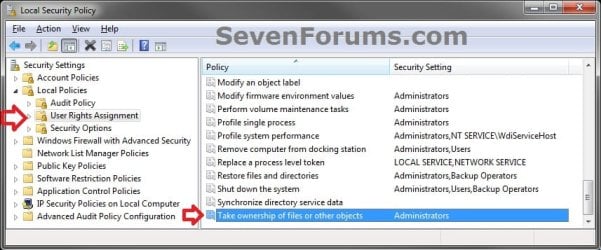
1. Open the Local Security Policy window, expand Local Policies in the left pane, and select User Rights Assignment. (see screenshot below)
Step1.jpg
2. In the right pane of User Rights Assignment, double click on Take ownership of files or other objects. (see screenshot above)

3. Prevent Listed Users or Groups to be able to Take Ownership
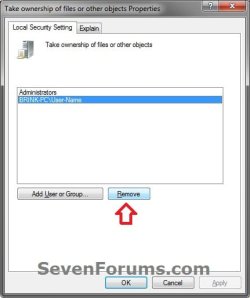
A) Select (highlight) listed user(s) and/or group(s) that you do not want to be allowed to shut down the computer anymore, then click on the Remove button. (see screenshot below)
NOTE: You can press and hold the CTRL key to select more than one listed user and group.
Step2.jpg


   Tip
To Only Prevent Specific Administrators
  • You will also need to remove the Administrators group in addition to step 3A first, then only add each administrator user account name in step 4A that you want to be able to take ownership.
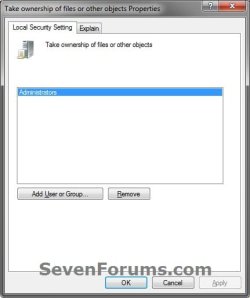
B) Click on Apply. (see screenshot below)
Step3.jpg
4. Allow Users or Groups to be able to Take Ownership
A) Click on the Add User or Group button. (see screenshot above)

B) To Change the Location to Search for "Object Types"


NOTE: This is only if you wanted to search for object types to allow from a location other than your local computer. If you only want to search from your computer, then skip this step and go to step 4C.
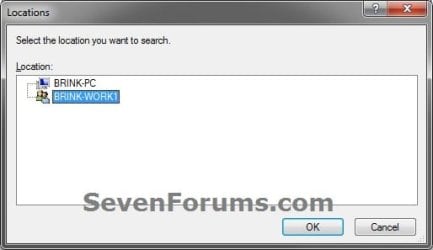
  • Click on the Locations button. (see screenshot below step 4C)
  • Select a location, and click on OK. (see screenshot below)
Location-1.jpg
C) Click on the Advanced button. (see screenshot below)
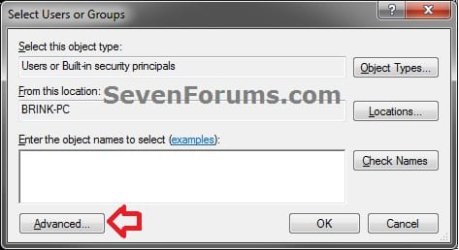
Add-1.jpg
D) Click on the Object Types button. (see screenshot below)
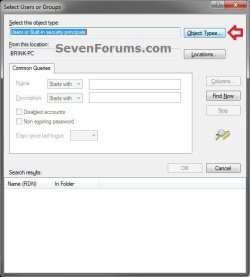
Add-2.jpg
E) Check all boxes or the "object types" (ex: Users or Groups) that you want to find and select from in step 4G, and click on OK. (see screenshot below)
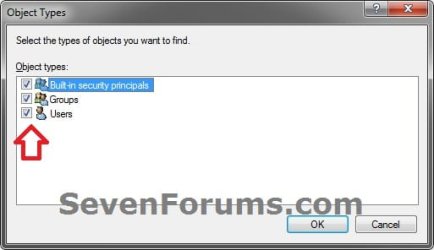
Add-3.jpg
F) Click on the Find Now button. (see screenshot below)
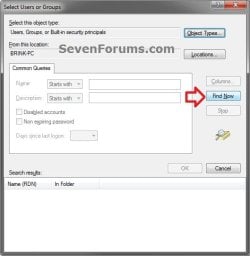
Add-4.jpg
G) In the bottom pane under Search results, select the user account name(s) and/or groups that you want to be allowed to shut down the computer, then click on OK. (see screenshot below)
NOTE: You can press and hold the CTRL key to select more than one listed users (user account names) or group.
Add-5.jpg


   Tip
To Only Allow Specific Administrators
  • You will need to remove the Administrators group in step 3A first, then add each administrator user account name that you want to be able to take ownership.
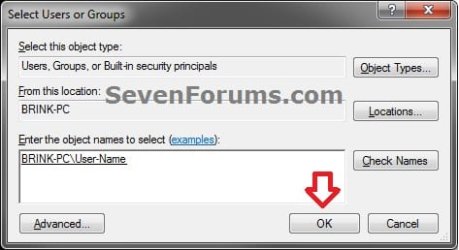
H) Click on OK. (see screenshot below)
Add-6.jpg
I) Click on Apply. (see screenshot below)
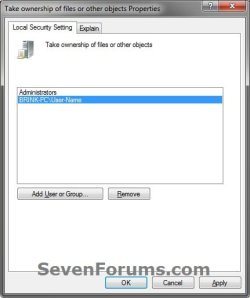
Add-7.jpg
5. When finished, click on OK. (see screenshots below steps 3B and 4I)

6. Close the Local Security Policy window. (see screenshot below step 1)


OPTION TWO

Using an Elevated Command Prompt


NOTE: Be sure to write down changes you make to the user rights assignment so that you will know what you changed later. Please see the NOTE box at the top of the tutorial for the default user rights assignments.
1. If you have not already, click on the Download button below to download the ntrights.bat file originally from within the Windows Server 2003 Resource Kit Tools.

Download


A) Save the ntrights.zip file to your desktop.

B) Unblock the ntrights.zip file.

C) Open the .zip file, and extract (drag and drop) the ntrights.exe fileto your desktop.

D) Right click on the ntrights.exe file and click on Move.

E) Open Windows Explorer and navigate to and open the C:\Windows\System32 folder, then Paste the ntrights.exe file to move it here.

F) If prompted, click on Continue and Yes to approve moving the ntrights.exe file into the System32 folder, then close the Windows Explorer window.
2. Open an elevated command prompt (Run as administrator).

3. Prevent Users or Groups to be able to Take Ownership
A) In the elevated command prompt type in the command below and press enter. (see screenshot below)
NOTE: Substitute User or Group in the command below with the actual user account name (ex: Users) or group name within quotes that you want to prevent.
ntrights -U "User or Group" -R SeTakeOwnershipPrivilege
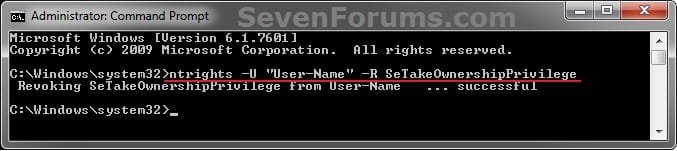
CMD-Remove.jpg


   Tip
To Only Prevent Specific Administrators
  • You will also need to remove the Administrators group in addition to step 3A first, then only add each administrator user account name in step 4A that you want to be able to take ownership.
4. Allow Users or Groups to be able to Take Ownership
A) In the elevated command prompt type in the command below and press enter. (see screenshot below)
NOTE: Substitute User or Group in the command below with the actual user account name (ex: Users) or group name within quotes that you want to allow.
ntrights -U "User or Group" +R SeTakeOwnershipPrivilege
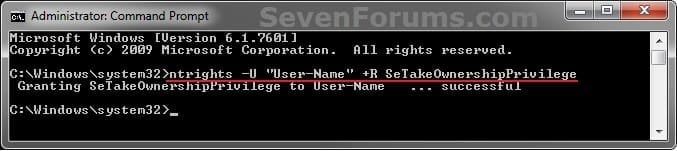
CMD-Add.jpg


   Tip
To Only Allow Specific Administrators
  • You will need to remove the Administrators group in step 3A first, then add each administrator user account name that you want to be able to take ownership.
5. When finished, close the elevated command prompt.
That's it,
Shawn


Attachments

Last edited:
But if the admin affected by this action go through the Local Security Policy and allow himself to Take Ownership of files or other objects????
 

My Computer My Computer

Computer Manufacturer/Model Number
HP Pavilon Slimline
OS
Windows 7 Ultimate 64 bits
CPU
Dual Core Intel Core 2 Duo E7500
Motherboard
MSI MS-7525 (Boston)
Memory
2x[2048 MB DDR2-SDRAM (PC2-6400 / 800 MHz), 2 Gb]; Total:4Gb
Graphics Card(s)
Intel(R) G33/G31 Express Chipset Family (256 MB)
Sound Card
Realtek ALC662 @ Intel 82801GB ICH7 - HD Audio Controller
Monitor(s) Displays
HP 2009m 20'' LCD
Screen Resolution
1600x900
Hard Drives
SAMSUNG HD642JJ (596 GB)
Hello Agustín,

Yes, an admin could do so, but only trusted people should be made admins.

This is mostly to be able to allow other groups or users other than admins to be able to Take Ownership though.
 

My Computer My Computer

Computer type
PC/Desktop
Computer Manufacturer/Model Number
Self built custom
OS
64-bit Windows 11 Pro for Workstations
CPU
Intel i7-8700K OC'd to 5 GHz
Motherboard
ASUS ROG Maximus XI Formula Z390
Memory
64 GB (4x16GB) G.SKILL TridentZ RGB DDR4 3600 MHz
Graphics Card(s)
ASUS ROG-STRIX-GTX1080TI-O11G-GAMING
Sound Card
Integrated
Monitor(s) Displays
2 x Samsung Odyssey G7 27"
Screen Resolution
2560x1440
Hard Drives
1TB Samsung 990 PRO M.2,
4TB Samsung 990 PRO PRO M.2,
TerraMaster F8 SSD Plus NAS
PSU
Seasonic Prime Titanium 850W
Case
Thermaltake Core P3
Cooling
Corsair Hydro H115i
Keyboard
Logitech wireless K800
Mouse
Logitech MX Master 4
Internet Speed
2 Gb/s Download and 100 Mb/s Upload
Antivirus
Malwarebyte Anti-Malware Premium
Browser
Google Chrome
Other Info
Logitech Z625 speaker system,
Logitech BRIO 4K Pro webcam,
HP Color LaserJet Pro MFP M477fdn,
APC SMART-UPS RT 1000 XL - SURT1000XLI,
Galaxy S23 Plus phone
And there is a way to prevent other admins to take ownership? I mean the posibility of having a folder totally private that the permissions could not be modified after the taken ownership of that folder by another admin. Is that possible? I don't think so... by maybe there's a way, that is what I were looking into this tutorial.

By the way, the tutorial is really good. ;)
 

My Computer My Computer

Computer Manufacturer/Model Number
HP Pavilon Slimline
OS
Windows 7 Ultimate 64 bits
CPU
Dual Core Intel Core 2 Duo E7500
Motherboard
MSI MS-7525 (Boston)
Memory
2x[2048 MB DDR2-SDRAM (PC2-6400 / 800 MHz), 2 Gb]; Total:4Gb
Graphics Card(s)
Intel(R) G33/G31 Express Chipset Family (256 MB)
Sound Card
Realtek ALC662 @ Intel 82801GB ICH7 - HD Audio Controller
Monitor(s) Displays
HP 2009m 20'' LCD
Screen Resolution
1600x900
Hard Drives
SAMSUNG HD642JJ (596 GB)

My Computer My Computer

Computer type
PC/Desktop
Computer Manufacturer/Model Number
Self built custom
OS
64-bit Windows 11 Pro for Workstations
CPU
Intel i7-8700K OC'd to 5 GHz
Motherboard
ASUS ROG Maximus XI Formula Z390
Memory
64 GB (4x16GB) G.SKILL TridentZ RGB DDR4 3600 MHz
Graphics Card(s)
ASUS ROG-STRIX-GTX1080TI-O11G-GAMING
Sound Card
Integrated
Monitor(s) Displays
2 x Samsung Odyssey G7 27"
Screen Resolution
2560x1440
Hard Drives
1TB Samsung 990 PRO M.2,
4TB Samsung 990 PRO PRO M.2,
TerraMaster F8 SSD Plus NAS
PSU
Seasonic Prime Titanium 850W
Case
Thermaltake Core P3
Cooling
Corsair Hydro H115i
Keyboard
Logitech wireless K800
Mouse
Logitech MX Master 4
Internet Speed
2 Gb/s Download and 100 Mb/s Upload
Antivirus
Malwarebyte Anti-Malware Premium
Browser
Google Chrome
Other Info
Logitech Z625 speaker system,
Logitech BRIO 4K Pro webcam,
HP Color LaserJet Pro MFP M477fdn,
APC SMART-UPS RT 1000 XL - SURT1000XLI,
Galaxy S23 Plus phone

My Computer My Computer

Computer Manufacturer/Model Number
HP Pavilon Slimline
OS
Windows 7 Ultimate 64 bits
CPU
Dual Core Intel Core 2 Duo E7500
Motherboard
MSI MS-7525 (Boston)
Memory
2x[2048 MB DDR2-SDRAM (PC2-6400 / 800 MHz), 2 Gb]; Total:4Gb
Graphics Card(s)
Intel(R) G33/G31 Express Chipset Family (256 MB)
Sound Card
Realtek ALC662 @ Intel 82801GB ICH7 - HD Audio Controller
Monitor(s) Displays
HP 2009m 20'' LCD
Screen Resolution
1600x900
Hard Drives
SAMSUNG HD642JJ (596 GB)
Thanks, again! I always have to come back to get this when installing a new hard drive! :thumbsup:
 

My Computer My Computer

Computer type
Laptop
OS
Windows 7 Pro x64 (Upgrade, Clean Install)
:thumbsup:
 

My Computer My Computer

Computer type
PC/Desktop
Computer Manufacturer/Model Number
Self built custom
OS
64-bit Windows 11 Pro for Workstations
CPU
Intel i7-8700K OC'd to 5 GHz
Motherboard
ASUS ROG Maximus XI Formula Z390
Memory
64 GB (4x16GB) G.SKILL TridentZ RGB DDR4 3600 MHz
Graphics Card(s)
ASUS ROG-STRIX-GTX1080TI-O11G-GAMING
Sound Card
Integrated
Monitor(s) Displays
2 x Samsung Odyssey G7 27"
Screen Resolution
2560x1440
Hard Drives
1TB Samsung 990 PRO M.2,
4TB Samsung 990 PRO PRO M.2,
TerraMaster F8 SSD Plus NAS
PSU
Seasonic Prime Titanium 850W
Case
Thermaltake Core P3
Cooling
Corsair Hydro H115i
Keyboard
Logitech wireless K800
Mouse
Logitech MX Master 4
Internet Speed
2 Gb/s Download and 100 Mb/s Upload
Antivirus
Malwarebyte Anti-Malware Premium
Browser
Google Chrome
Other Info
Logitech Z625 speaker system,
Logitech BRIO 4K Pro webcam,
HP Color LaserJet Pro MFP M477fdn,
APC SMART-UPS RT 1000 XL - SURT1000XLI,
Galaxy S23 Plus phone
I keep getting this error:

Code:
C:\WINDOWS\system32>ntrights -U "User or Group" +R SeTakeOwnershipPrivilege
 Granting SeTakeOwnershipPrivilege to User or Group   ... failed (GetAccountSid(User or Group)=1332
 

My Computer My Computer

OS
Micro$oft 64-bit
Memory
16Gb
Monitor(s) Displays
LCD
Screen Resolution
1080p
Hard Drives
120Gb + 2Tb + 750Gb
PSU
800W
Cooling
Liquid
Other Info
( . Y . )
I keep getting this error:

Code:
C:\WINDOWS\system32>ntrights -U "User or Group" +R SeTakeOwnershipPrivilege
 Granting SeTakeOwnershipPrivilege to User or Group   ... failed (GetAccountSid(User or Group)=1332

Hello, :-)

You will need to substitute "User or Group" in the command with an actual user account name or group name instead.
 

My Computer My Computer

Computer type
PC/Desktop
Computer Manufacturer/Model Number
Self built custom
OS
64-bit Windows 11 Pro for Workstations
CPU
Intel i7-8700K OC'd to 5 GHz
Motherboard
ASUS ROG Maximus XI Formula Z390
Memory
64 GB (4x16GB) G.SKILL TridentZ RGB DDR4 3600 MHz
Graphics Card(s)
ASUS ROG-STRIX-GTX1080TI-O11G-GAMING
Sound Card
Integrated
Monitor(s) Displays
2 x Samsung Odyssey G7 27"
Screen Resolution
2560x1440
Hard Drives
1TB Samsung 990 PRO M.2,
4TB Samsung 990 PRO PRO M.2,
TerraMaster F8 SSD Plus NAS
PSU
Seasonic Prime Titanium 850W
Case
Thermaltake Core P3
Cooling
Corsair Hydro H115i
Keyboard
Logitech wireless K800
Mouse
Logitech MX Master 4
Internet Speed
2 Gb/s Download and 100 Mb/s Upload
Antivirus
Malwarebyte Anti-Malware Premium
Browser
Google Chrome
Other Info
Logitech Z625 speaker system,
Logitech BRIO 4K Pro webcam,
HP Color LaserJet Pro MFP M477fdn,
APC SMART-UPS RT 1000 XL - SURT1000XLI,
Galaxy S23 Plus phone
Back
Top