Solved Factory reset new Win7 comp. using old Win7 comp's Rcvry Partition?

ArlisT

New member
Local time
9:46 AM
Messages
33
Location
Indiana
Hey everybody. Noob question, I suppose, but anyway... A couple years ago I bought a Win7 Pro i5 refurb with a Recovery Partition for Factory Reset if needed, and I recently acquired a Win7 Pro i7 refurb from the same vendor who this time neglected to include a Recovery Partition. Of course, I have no installation disks. Would it be possible to connect the two computers with a CAT6 cable and factory reset the new computer from the old one's Recovery Partition (using the i7's Product Key, of course)?

Thanks.
 
Last edited:

My Computer My Computer

At a glance

Windows 7 Pro x64Intel i5 - 347016 GBIntel(R) HD Graphics
Computer type
PC/Desktop
Computer Manufacturer/Model Number
Dell Optiplex 7010
OS
Windows 7 Pro x64
CPU
Intel i5 - 3470
Motherboard
Dell Inc. 0WR7PY
Memory
16 GB
Graphics Card(s)
Intel(R) HD Graphics
Sound Card
Realtek High Definition Audio
Monitor(s) Displays
Insignia 50" Flat Screen TV
Screen Resolution
1080p
Hard Drives
1863 GB HITACHI HUA723020ALA640 ATA Device (SATA)
Keyboard
Logitech K800
Mouse
Logitech M325
Internet Speed
25 Mbps down 5 Mbps up
Antivirus
MalwareBytes Premium
Browser
Firefox
Other Info
I am the rightful King of France
There is another way:

download the official ms .iso file and install using that, skip entering the key. It is always useful to have the ms media anyway.

Windows 7 Professional x64 English search for :

X17-59186.iso

or

en_windows_7_professional_with_sp1_x64_dvd_u_676939.iso

They are both exactly the same. SHA1: 0BCFC54019EA175B1EE51F6D2B207A3D14DD2B58


If you like, you can d/l the drivers for the i7 machine first from the manufacturer website, and preinstall them into the media.

It is easier than it appears
Update your Win 7 installation media

What is the make and model of the i7 machine? Is it also a dell optiplex 7010 ?

--------------------------------------------------------------------------------------------------------------------------------------

Or you might be able to use the recovery partion from the other machine , it is simpler to advise if you tell us exactly what is on it.

You should be able to view all the contents using the free version of diskgenuis

Free Download DiskGenius Online

just select the recovery partition and click the Files tab

then take a screenshot and post it up
 

My Computers My Computers

  • At a glance

    7 X64i5 84002x8gb 3200mhz
    Computer type
    PC/Desktop
    OS
    7 X64
    CPU
    i5 8400
    Motherboard
    gigabyte b365m ds3h
    Memory
    2x8gb 3200mhz
    Hard Drives
    various
    PSU
    pure power 11 400w cm
    Case
    Coolermaster
    Cooling
    cryorig m9i
  • At a glance

    7x64g54008gb ddr4 2400
    Computer type
    PC/Desktop
    OS
    7x64
    CPU
    g5400
    Motherboard
    ga b365m ds3h
    Memory
    8gb ddr4 2400
    PSU
    xfx pro 450w
Thanks for the quick reply. :thumbsup:

The computer I just bought is an HP Z220 with i7-3770. I've been in touch with the vendor about the missing recovery partition. It took them a few days to get back to me (long weekend, I guess), but they've just replied that the failure to include a recovery partition was a mistake on their part; it was definitely supposed to be a part of the deal, and it's in the works to exchange the machine for a Dell 790 with an i7-3770 (which is what I had intended to order in the first place, but between the time I saw it and had a couple inquiries answered it sold out, and the only i7 on offer was the HP). They assure me this one will have the recovery partition. I think the advice to get the .iso is good though.

Second computer I've bought from this vendor. They customize the machine as you like it, and even though they now sell just Win10 and 11 machines, they agreed to make me one with Win7 Pro, like the Dell 7010 I got from them a couple years ago. For this order I got a 500 GB SSD and a 2 TB HDD, 16 GB RAM, and a 1 year warranty.

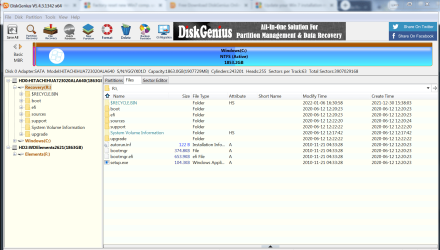
Anyway, here is the DiskGenius screenshot of my Dell 7010 i5 (that's a handy tool!):

disk genius.PNG

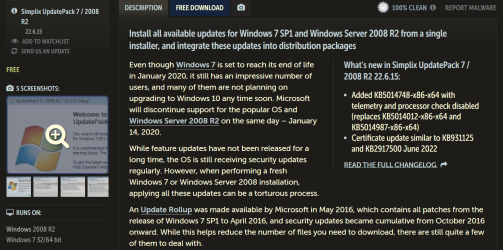
Also, I do have Simplix. I found it after I ran Windows Update on the new computer and some of the updates would download but not install. Searched for a solution to this, and it seems the updates that were not installing had a deadline to have been installed by 2019. Anyhow, that's how I understand it. It was during this search I ran across Simplix. It was most recently updated June 15th this year, and it not only installs all security updates to present, but also disables the updates that snuck Win10's telemetry into Win7 and 8.

What I got is a stand-alone program, though. You don't have to be online to run it, or include it as part of the .iso. You just set up the computer offline, and run Simplix instead of Windows Updates.

Simplix.PNG
 

My Computer My Computer

At a glance

Windows 7 Pro x64Intel i5 - 347016 GBIntel(R) HD Graphics
Computer type
PC/Desktop
Computer Manufacturer/Model Number
Dell Optiplex 7010
OS
Windows 7 Pro x64
CPU
Intel i5 - 3470
Motherboard
Dell Inc. 0WR7PY
Memory
16 GB
Graphics Card(s)
Intel(R) HD Graphics
Sound Card
Realtek High Definition Audio
Monitor(s) Displays
Insignia 50" Flat Screen TV
Screen Resolution
1080p
Hard Drives
1863 GB HITACHI HUA723020ALA640 ATA Device (SATA)
Keyboard
Logitech K800
Mouse
Logitech M325
Internet Speed
25 Mbps down 5 Mbps up
Antivirus
MalwareBytes Premium
Browser
Firefox
Other Info
I am the rightful King of France
1. At first glance it looks like the installation media has simply been extracted to the recovery partition.

How to acess that type of recovery partition:

Method1
There could be a bcd entry pointing at R:\sources\boot.wim. If so, then it could be set to show as a visble boot menu option or it could be hidden from display on the boot menu and accessed via a key press.

Method 2
For a primary partition on an mbr disk, a second way to start up the recovery is to mark it active.

Method 3
Running setup.exe from booted media ( boot.wim or winre.wim ) should find installation sources folder on the root of any partition.

Method 4
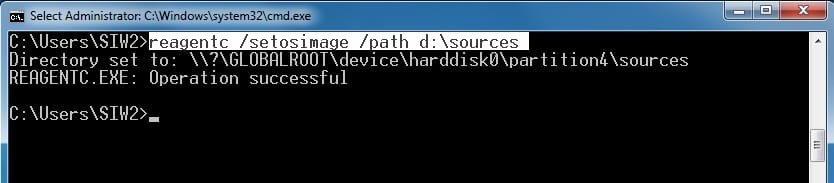
If reagentc /setosimage has been set up to point at R:\sources then running system recovery options from boot.wim/winre.wim should find it like this:

here is an example - in the pic below reagentc has been pointed at D:\sources

reagentc-setosimage.jpg

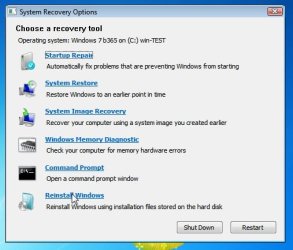
then when running system recovery options from booted media ( boot.wim or winre.wim ) it will be offerred

sysrecoptions-3.jpg


It is very easy to make a recovery partition that way.

The drawback is that if the disk fails, a recovery partition wont be any use. Which is another reason to have a copy of .iso file stored somewhere else.

-----------------------------------------------------------------------

2. One advantage of the dell 7010 and 9010 over the hp 8300/hp z220 is that the dell bios are much easier to mod if you want to add boot from nvme disk support.

----------------------------------------------------------------------

3. You seem to be buying another machine that is essentially the same as the one you already have.

As an alternative, it should be cheap and easy to replace the i5 cpu with the i7 and add more ram and an ssd if wanted.

i7-3770 £38 with 24 month warranty
https://uk.webuy.com/product-detail/?id=scpuinti73770&sku=scpuinti73770

8gb 1600mhz ram £15 per stick
https://uk.webuy.com/product-detail...1600mhz-240-pin-memory&referredFrom=boxsearch

Is there something similar in your region?

- - - Updated - - -

and it's in the works to exchange the machine for a Dell 790 with an i7-3770

dell 790? 790 is an older machine , intel 2nd gen.
 
Last edited:

My Computers My Computers

  • At a glance

    7 X64i5 84002x8gb 3200mhz
    Computer type
    PC/Desktop
    OS
    7 X64
    CPU
    i5 8400
    Motherboard
    gigabyte b365m ds3h
    Memory
    2x8gb 3200mhz
    Hard Drives
    various
    PSU
    pure power 11 400w cm
    Case
    Coolermaster
    Cooling
    cryorig m9i
  • At a glance

    7x64g54008gb ddr4 2400
    Computer type
    PC/Desktop
    OS
    7x64
    CPU
    g5400
    Motherboard
    ga b365m ds3h
    Memory
    8gb ddr4 2400
    PSU
    xfx pro 450w
dell 790? 790 is an older machine , intel 2nd gen.

The case is basically an edifice, and then they use (mostly) all new parts to construct a computer to your order. The OptiPlex 7010 I bought from them in 2019 has an i5-3470 CPU; this OptiPlex 790 comes with an i7, but yes it apparently is 2nd gen i7 according to the specs, so I was wrong there. They switch out 6 of the 10 original USB 2.0 ports for USB 3.0, no extra charge there. I specify the storage options, so I'm getting a 500 GB SSD and a 2TB HDD. Comes with a one year warranty, all for around $320, with free shipping. Not the latest tech, obvs, but definitely an upgrade from the machine I've been using, which was itself an upgrade from the i3 I'd been using for a couple years before that. Good enough for me. I will check into getting the 3770 CPU installed instead. Thanks for the heads up on that.
 

My Computer My Computer

At a glance

Windows 7 Pro x64Intel i5 - 347016 GBIntel(R) HD Graphics
Computer type
PC/Desktop
Computer Manufacturer/Model Number
Dell Optiplex 7010
OS
Windows 7 Pro x64
CPU
Intel i5 - 3470
Motherboard
Dell Inc. 0WR7PY
Memory
16 GB
Graphics Card(s)
Intel(R) HD Graphics
Sound Card
Realtek High Definition Audio
Monitor(s) Displays
Insignia 50" Flat Screen TV
Screen Resolution
1080p
Hard Drives
1863 GB HITACHI HUA723020ALA640 ATA Device (SATA)
Keyboard
Logitech K800
Mouse
Logitech M325
Internet Speed
25 Mbps down 5 Mbps up
Antivirus
MalwareBytes Premium
Browser
Firefox
Other Info
I am the rightful King of France
I will check into getting the 3770 CPU installed instead.

That is the point. The 790 motherboard doesn't support 3rd gen, you can't have a 3770 on that machine. You would be going backwards with 2nd gen.
 

My Computers My Computers

  • At a glance

    7 X64i5 84002x8gb 3200mhz
    Computer type
    PC/Desktop
    OS
    7 X64
    CPU
    i5 8400
    Motherboard
    gigabyte b365m ds3h
    Memory
    2x8gb 3200mhz
    Hard Drives
    various
    PSU
    pure power 11 400w cm
    Case
    Coolermaster
    Cooling
    cryorig m9i
  • At a glance

    7x64g54008gb ddr4 2400
    Computer type
    PC/Desktop
    OS
    7x64
    CPU
    g5400
    Motherboard
    ga b365m ds3h
    Memory
    8gb ddr4 2400
    PSU
    xfx pro 450w
That is the point. The 790 motherboard doesn't support 3rd gen, you can't have a 3770 on that machine. You would be going backwards with 2nd gen.

Ah. I did not know that. Thanks for all your help on this.
 

My Computer My Computer

At a glance

Windows 7 Pro x64Intel i5 - 347016 GBIntel(R) HD Graphics
Computer type
PC/Desktop
Computer Manufacturer/Model Number
Dell Optiplex 7010
OS
Windows 7 Pro x64
CPU
Intel i5 - 3470
Motherboard
Dell Inc. 0WR7PY
Memory
16 GB
Graphics Card(s)
Intel(R) HD Graphics
Sound Card
Realtek High Definition Audio
Monitor(s) Displays
Insignia 50" Flat Screen TV
Screen Resolution
1080p
Hard Drives
1863 GB HITACHI HUA723020ALA640 ATA Device (SATA)
Keyboard
Logitech K800
Mouse
Logitech M325
Internet Speed
25 Mbps down 5 Mbps up
Antivirus
MalwareBytes Premium
Browser
Firefox
Other Info
I am the rightful King of France
Is the lack of recovery partition on the hard disk your only concern about the Z220?

It is a workstation which are a level above the regular business machines (hp9300 or the dell equivalent 7010)

they are a bit better built with usually more powerful psu and fans, also a bit more sturdy all round and the higher C216 chipset. And a more sensible internal layout which doesn't have a drive cage blocking the bottom of the pc

The only drawback of an hp is for geeks who want to modify the bios, for example to support booting fom nvme disks, which is much more difficult on an hp. Real geeks might prefer the dell 7010 or 9010 but definitely not the older dell 790.

QuickSpecs HP Z220 CMT Workstation
 

My Computers My Computers

  • At a glance

    7 X64i5 84002x8gb 3200mhz
    Computer type
    PC/Desktop
    OS
    7 X64
    CPU
    i5 8400
    Motherboard
    gigabyte b365m ds3h
    Memory
    2x8gb 3200mhz
    Hard Drives
    various
    PSU
    pure power 11 400w cm
    Case
    Coolermaster
    Cooling
    cryorig m9i
  • At a glance

    7x64g54008gb ddr4 2400
    Computer type
    PC/Desktop
    OS
    7x64
    CPU
    g5400
    Motherboard
    ga b365m ds3h
    Memory
    8gb ddr4 2400
    PSU
    xfx pro 450w
Is the lack of recovery partition on the hard disk your only concern about the Z220?

That's good info about the HP. I didn't know any of that. Due to a couple bad HPs I owned, I haven't bought HP in a long time, and much preferred Dell for my most recent computer purchases. I've decided to keep this HP with its i7-3770. I contacted the vendor and they are sending me the Win 7 Pro Recovery disk, since they neglected to install a recovery partition.

Thanks again.
 

My Computer My Computer

At a glance

Windows 7 Pro x64Intel i5 - 347016 GBIntel(R) HD Graphics
Computer type
PC/Desktop
Computer Manufacturer/Model Number
Dell Optiplex 7010
OS
Windows 7 Pro x64
CPU
Intel i5 - 3470
Motherboard
Dell Inc. 0WR7PY
Memory
16 GB
Graphics Card(s)
Intel(R) HD Graphics
Sound Card
Realtek High Definition Audio
Monitor(s) Displays
Insignia 50" Flat Screen TV
Screen Resolution
1080p
Hard Drives
1863 GB HITACHI HUA723020ALA640 ATA Device (SATA)
Keyboard
Logitech K800
Mouse
Logitech M325
Internet Speed
25 Mbps down 5 Mbps up
Antivirus
MalwareBytes Premium
Browser
Firefox
Other Info
I am the rightful King of France
You are welcome.

If you really want a recovery partition it is very simple to create one. I don't have them on desktops, but they might be some use on laptops.

The simple method:


create a small partition at the end of the hd. 10gb is usually plenty. Give it a letter e.g. R

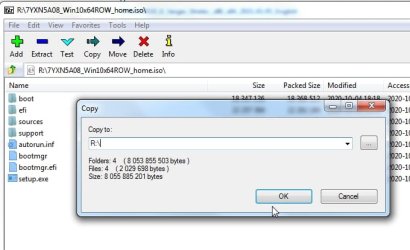
Extract the contents of the installation media onto that partition. Easy with 7-zip.

All the stuff highlighted in blue gets copied to R:\

7-zip-copy-iso-contents.jpg

That is a basic recovery partition done.

the basic way to recover from that is :

boot up winre.wim ( f8) by default to get to system recovery options. open cmd prompt and type:
x:\setup

That is all you need.

Optionally:

It is quite neat to replace R:\sources\install.wim with your own custom install.wim

For example, set up your system the way you like with your settings, programs, drivers, updates and so on.

clean it up using cleanmgr, clear your browser cache and so on.

Then capture it as install.wim which you put in R:\sources\

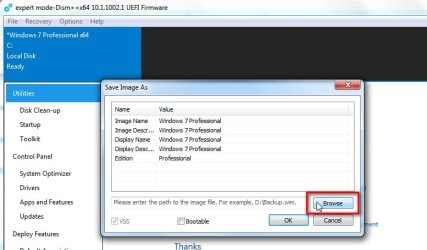
Simple to use dism++ for this:

File>Save Image

dism++-capture-1.jpg

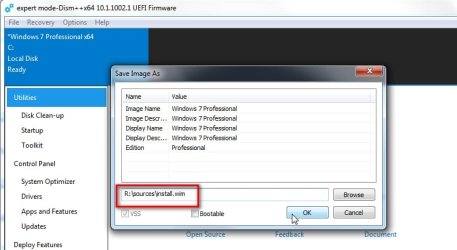
browse to the destination, or type in R:\sources\install.wim

dism++-capture-2.jpg

click ok and it will make an install.wim of your system

dism++-capture-3.jpg

If you want it is possible to add boot menu options to your recovery ( either on display or hidden with a scan code) .
 
Last edited:

My Computers My Computers

  • At a glance

    7 X64i5 84002x8gb 3200mhz
    Computer type
    PC/Desktop
    OS
    7 X64
    CPU
    i5 8400
    Motherboard
    gigabyte b365m ds3h
    Memory
    2x8gb 3200mhz
    Hard Drives
    various
    PSU
    pure power 11 400w cm
    Case
    Coolermaster
    Cooling
    cryorig m9i
  • At a glance

    7x64g54008gb ddr4 2400
    Computer type
    PC/Desktop
    OS
    7x64
    CPU
    g5400
    Motherboard
    ga b365m ds3h
    Memory
    8gb ddr4 2400
    PSU
    xfx pro 450w
Back
Top