Recovery manager "factory reset" greyed out after a f11 bootup

LIGHTTY1

New member
Local time
1:53 PM
Messages
6
Location
TUCSON
Recovery manager "factory reset" greyed out after a f11 bootup

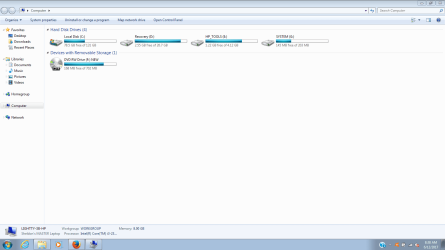
I have an intact dedicated hp recovery partition ( "D:" drive ) on my laptop..Originally I used the HP factory restored discs to install everything for this computer onto a larger 320 GB WD BLUE SCORPION HDD SATA Drive. Then, i wanted to upgrade to a SSD so I used Acronis True Image Home edition to CLONE that HDD over to the NEW Toshiba 240 GB SSD..I'm suspecting that due to "cloning" that the HP recovery partition will now have limited functionality due to how HP links the recovery configuration data to the motherboard BIOS at production time ?? When I tap on F11 at startup, it loads the recovery partition environment to the point where I see the Recovery manager, but the "factory restore/reset" option is greyed out & unclickable...

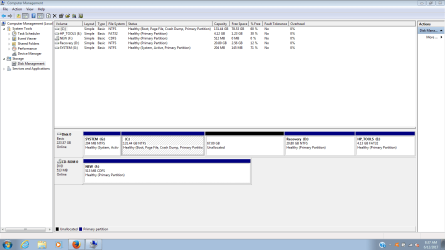
I also resized the C Drive to allow "over-provisioning" to make the new Toshiba SSD happy because their SSD UTILITY Recommends that..This resulted in an extra 67 GB "unallocated" partition.. The other 4 partitions are PRIMARY NTFS except for the HP_TOOLS ( E: ) Drive Partition being FAT32 of course...The "BOOT" Drive is the C Drive..The SYSTEM (G:) Drive is the "Active" Drive....

Even if I set the RECOVERY PARTITION to "active", that doesn't rectify my issue either...

I've also read on a post somewhere online that HP creates 4 "basic" partitions when they create these computers & any attempt to resize, delete, reallocate, etc. the basic partitions turns all the partitions into "DYNAMIC" Partitions whatever this means ??
 

My Computer My Computer

At a glance

windows 7 home premium 64-bitINTEL CORE I3 2350M SANDY BRIDGE 2.3 GHZ8 GB DDR3INTEL INTEGRATED HD 3000
Computer type
Laptop
Computer Manufacturer/Model Number
HP PAVILION G7 1310 US NOTEBOOK
OS
windows 7 home premium 64-bit
CPU
INTEL CORE I3 2350M SANDY BRIDGE 2.3 GHZ
Motherboard
HP 1671
Memory
8 GB DDR3
Graphics Card(s)
INTEL INTEGRATED HD 3000
Sound Card
INTEL COUGAR POINT PCH - HD AUDIO CONTROLLER
Monitor(s) Displays
LG PHILLIPS LP173WD1-TLC3
Hard Drives
TOSHIBA TL100 SSD 240 GB WEI=7.9
Antivirus
AVAST FREE ANTIVIRUS
Browser
FIREFOX
Hi LIGHTTY1, welcome to the Forum.

Could you supply a screen shot of Disc Management please. Also include all drives including any USB ones. Your post mentions other partitions & other drives, so have all included if you can. This Forum tutorial explains how to take a screen shot & Item 7 explains how to post it to the Forum.

Disk Management - Post a Screen Capture Image - Windows 7 Help Forums
 

My Computer My Computer

At a glance

Windows 7 Home Premium 64 bit sp1Intel i5 3570 3.4Ghz Ivy Bridge SKT 1155 quad...G-Skill Rip Jaws 16Gb (8x2) DDR3 -1600 PC3 12...Gigabyte NVIDIA GT610 1Gb DDR3 810/1200 PCI-E...
Computer type
PC/Desktop
Computer Manufacturer/Model Number
Self built using existing case
OS
Windows 7 Home Premium 64 bit sp1
CPU
Intel i5 3570 3.4Ghz Ivy Bridge SKT 1155 quad core
Motherboard
Gigabyte Z77-HD3 SKT 1155 2xSata 3, 4x USB 3.0
Memory
G-Skill Rip Jaws 16Gb (8x2) DDR3 -1600 PC3 12800 CL 10 red
Graphics Card(s)
Gigabyte NVIDIA GT610 1Gb DDR3 810/1200 PCI-E 2.0 Silent
Sound Card
NVIDIA High Definition & Realtech High Definition Audio
Monitor(s) Displays
2 x Philips 226V4L 16:9 aspect ratio
Screen Resolution
1920 x 1080 HD
Hard Drives
Samsung 840 Pro 256gb SSD, SATA 3.
Hitachi Touro Portable 1tb, USB 3.0 HDD used for image b/ups.
PSU
Corsair VS450
Case
Codeng
Cooling
PSU fan & CPU fan
Keyboard
Logitech
Mouse
Logitech Wireless trackball M570
Internet Speed
Wireless 3G. 3mg down & 550kb up.
Antivirus
Bitdefender Internet Security 2020
Browser
Opera (Current Version) & Firefox
Other Info
MS Office 2013 Pro. Davis weather station software. MGE Nova 600 avr UPS.
Recovery manager "factory reset" greyed out after a f11 bootup

Capture.PNG

Capture-2.PNG
 

My Computer My Computer

At a glance

windows 7 home premium 64-bitINTEL CORE I3 2350M SANDY BRIDGE 2.3 GHZ8 GB DDR3INTEL INTEGRATED HD 3000
Computer type
Laptop
Computer Manufacturer/Model Number
HP PAVILION G7 1310 US NOTEBOOK
OS
windows 7 home premium 64-bit
CPU
INTEL CORE I3 2350M SANDY BRIDGE 2.3 GHZ
Motherboard
HP 1671
Memory
8 GB DDR3
Graphics Card(s)
INTEL INTEGRATED HD 3000
Sound Card
INTEL COUGAR POINT PCH - HD AUDIO CONTROLLER
Monitor(s) Displays
LG PHILLIPS LP173WD1-TLC3
Hard Drives
TOSHIBA TL100 SSD 240 GB WEI=7.9
Antivirus
AVAST FREE ANTIVIRUS
Browser
FIREFOX
Look on the recovery partition for several BASE#.WIM files.

You can apply those to your target partition by browsing to the first one, using e.g. dism++.

You will have to do that from boot media

64 bit:

17514x64-v3.iso

32 bit:

A23x86.iso
 

My Computers My Computers

  • At a glance

    7 X64i5 84002x8gb 3200mhz
    Computer type
    PC/Desktop
    OS
    7 X64
    CPU
    i5 8400
    Motherboard
    gigabyte b365m ds3h
    Memory
    2x8gb 3200mhz
    Hard Drives
    various
    PSU
    pure power 11 400w cm
    Case
    Coolermaster
    Cooling
    cryorig m9i
  • At a glance

    7x64g54008gb ddr4 2400
    Computer type
    PC/Desktop
    OS
    7x64
    CPU
    g5400
    Motherboard
    ga b365m ds3h
    Memory
    8gb ddr4 2400
    PSU
    xfx pro 450w
Alternatively:

1. use dism++ to export the 3rd party drivers from your current installation..

2. clean install win 7 from regular installation media.

3. install your previously exported drivers.
 

My Computers My Computers

  • At a glance

    7 X64i5 84002x8gb 3200mhz
    Computer type
    PC/Desktop
    OS
    7 X64
    CPU
    i5 8400
    Motherboard
    gigabyte b365m ds3h
    Memory
    2x8gb 3200mhz
    Hard Drives
    various
    PSU
    pure power 11 400w cm
    Case
    Coolermaster
    Cooling
    cryorig m9i
  • At a glance

    7x64g54008gb ddr4 2400
    Computer type
    PC/Desktop
    OS
    7x64
    CPU
    g5400
    Motherboard
    ga b365m ds3h
    Memory
    8gb ddr4 2400
    PSU
    xfx pro 450w
Recovery manager "factory reset" greyed out after a f11 bootup

I don't know how to use the "DISM++ tool" and thought that only works on Windows 8 & newer anyways? Can't there be a "batch file" for idiots like me to run to do this stuff or a "fix-it" tool to "rebuild" the recovery partition from another Hard Drive which is WHERE the "good working copy" of this recovery partition is located now ??

Remember, I have A Toshiba SSD Drive installed right now & HPs Installation Discs ( 5 of them ) will NOT install to a SSD, which is WHY I ran into all these issues..I get a "reducer error" when trying that route..
 

My Computer My Computer

At a glance

windows 7 home premium 64-bitINTEL CORE I3 2350M SANDY BRIDGE 2.3 GHZ8 GB DDR3INTEL INTEGRATED HD 3000
Computer type
Laptop
Computer Manufacturer/Model Number
HP PAVILION G7 1310 US NOTEBOOK
OS
windows 7 home premium 64-bit
CPU
INTEL CORE I3 2350M SANDY BRIDGE 2.3 GHZ
Motherboard
HP 1671
Memory
8 GB DDR3
Graphics Card(s)
INTEL INTEGRATED HD 3000
Sound Card
INTEL COUGAR POINT PCH - HD AUDIO CONTROLLER
Monitor(s) Displays
LG PHILLIPS LP173WD1-TLC3
Hard Drives
TOSHIBA TL100 SSD 240 GB WEI=7.9
Antivirus
AVAST FREE ANTIVIRUS
Browser
FIREFOX
Dism++ is in the media I already linked to. Anybody can use it, that is why it was created as a simple gui.
It works for vista/7/8/8.1/10.

WinNtsetup is also included, which you could use instead, either will do the job.
That also works for vista/7/8/8.1/10.

If you prefer, you could get clean install media, though it requires a key ( probaly on sticker on your machine- often under the battery on laptops)

Installation media:
Microsoft Windows and Office ISO Download Tool
 

My Computers My Computers

  • At a glance

    7 X64i5 84002x8gb 3200mhz
    Computer type
    PC/Desktop
    OS
    7 X64
    CPU
    i5 8400
    Motherboard
    gigabyte b365m ds3h
    Memory
    2x8gb 3200mhz
    Hard Drives
    various
    PSU
    pure power 11 400w cm
    Case
    Coolermaster
    Cooling
    cryorig m9i
  • At a glance

    7x64g54008gb ddr4 2400
    Computer type
    PC/Desktop
    OS
    7x64
    CPU
    g5400
    Motherboard
    ga b365m ds3h
    Memory
    8gb ddr4 2400
    PSU
    xfx pro 450w
My hp recovery partition not launching proprly at f11 keystroke startu

OK, THX FOR THAT BOOT-UP CD INFO WITH THE DISM TOOL..Have you actually "tried" this yourself when a HP Recovery partition does not launch properly on F11 Startup ? Recovery Manager has the "factory reset option" greyed out also when in the "DOS/BIOS" Mode, so "what" do you think is going on personally ?? I want to be able to figure this out, then help many others who suffer with these issues.. I did use that BCD tool also to rebuild the BCD & I reset my MBR & used the FIX BOOT Command also..Will the DISM++ Reset all of this for that recovery partition & "CLONE" the image perfectly when I "image" it from the HDD over to my Laptops SSD ??
 

My Computer My Computer

At a glance

windows 7 home premium 64-bitINTEL CORE I3 2350M SANDY BRIDGE 2.3 GHZ8 GB DDR3INTEL INTEGRATED HD 3000
Computer type
Laptop
Computer Manufacturer/Model Number
HP PAVILION G7 1310 US NOTEBOOK
OS
windows 7 home premium 64-bit
CPU
INTEL CORE I3 2350M SANDY BRIDGE 2.3 GHZ
Motherboard
HP 1671
Memory
8 GB DDR3
Graphics Card(s)
INTEL INTEGRATED HD 3000
Sound Card
INTEL COUGAR POINT PCH - HD AUDIO CONTROLLER
Monitor(s) Displays
LG PHILLIPS LP173WD1-TLC3
Hard Drives
TOSHIBA TL100 SSD 240 GB WEI=7.9
Antivirus
AVAST FREE ANTIVIRUS
Browser
FIREFOX
1.The recovery manager is expecting the original partition layout. It should be possible to apply the wim file, just like any other wim, using any number of tools, dism, dism++, winntsetup, gimagex, wimlib, etc.

You will get a lot of bloat, pointless oem programs, outdated updates ( if the oem included them, etc).

2. Instead of the above, enthusiasts will just do clean install with regular MS install media and add any extra drivers.

If you prefer, you could get clean install media, though it requires a key to activate ( probaly on sticker on your machine- often under the battery on laptops)

Installation media:
Microsoft Windows and Office ISO Download Tool
 

My Computers My Computers

  • At a glance

    7 X64i5 84002x8gb 3200mhz
    Computer type
    PC/Desktop
    OS
    7 X64
    CPU
    i5 8400
    Motherboard
    gigabyte b365m ds3h
    Memory
    2x8gb 3200mhz
    Hard Drives
    various
    PSU
    pure power 11 400w cm
    Case
    Coolermaster
    Cooling
    cryorig m9i
  • At a glance

    7x64g54008gb ddr4 2400
    Computer type
    PC/Desktop
    OS
    7x64
    CPU
    g5400
    Motherboard
    ga b365m ds3h
    Memory
    8gb ddr4 2400
    PSU
    xfx pro 450w
ecovery manager "factory reset" greyed out after a f11 bootup

OK, I burndt your ISO image onto a CD & will monkey around with this when I have more spare time.. I'm fairly "computer savy" & hopefully can figure out how to use the "dism++ Tool" !!!!! I just wantta be able to figure out something that seems impossible to figure out, that's why I'm trying this.. I have the OEM Installation Discs from "Computer Surgeons" as well...I also have Generic Windows 7 Installers FYI. Thanks for the help
 

My Computer My Computer

At a glance

windows 7 home premium 64-bitINTEL CORE I3 2350M SANDY BRIDGE 2.3 GHZ8 GB DDR3INTEL INTEGRATED HD 3000
Computer type
Laptop
Computer Manufacturer/Model Number
HP PAVILION G7 1310 US NOTEBOOK
OS
windows 7 home premium 64-bit
CPU
INTEL CORE I3 2350M SANDY BRIDGE 2.3 GHZ
Motherboard
HP 1671
Memory
8 GB DDR3
Graphics Card(s)
INTEL INTEGRATED HD 3000
Sound Card
INTEL COUGAR POINT PCH - HD AUDIO CONTROLLER
Monitor(s) Displays
LG PHILLIPS LP173WD1-TLC3
Hard Drives
TOSHIBA TL100 SSD 240 GB WEI=7.9
Antivirus
AVAST FREE ANTIVIRUS
Browser
FIREFOX
Recovery manager "factory reset" greyed out after a f11 bootup

UPDATE: I CREATED "AOMEI ONE KEY RECOVERY PARTITION" ALSO NOW JUST IN CASE I CAN'T FIGURE OUT HOW TO "CLONE" THE HP RECOVERY PARTITION OVER TO MY LAPTOP.. I RAN THE DISM++ BOOTUP CD & NEED TO KNOW WHICH FILE(S) ARE THE CORRECT "BASE.WIM" TO SELECT WITH THIS BOOTUP CD PLEASE ???

Recovery(J:)>recovery> Windows RE> winRE.wim, WinUCRD.wim

Recovery(J:)>preload>base.wim

Recovery(J:)>Factory update>boot.wim

With that AOEMI Recovery partition I also created on my "TARGET/LOCAL DISC" ( I also created a NEW Partition so I can clone it over ), I'll end up having 5 Partitions if that BOOT-UP CD can successfully CLONE that HP_Recovery Partition over to my TARGET/LOCAL Drive..
 

My Computer My Computer

At a glance

windows 7 home premium 64-bitINTEL CORE I3 2350M SANDY BRIDGE 2.3 GHZ8 GB DDR3INTEL INTEGRATED HD 3000
Computer type
Laptop
Computer Manufacturer/Model Number
HP PAVILION G7 1310 US NOTEBOOK
OS
windows 7 home premium 64-bit
CPU
INTEL CORE I3 2350M SANDY BRIDGE 2.3 GHZ
Motherboard
HP 1671
Memory
8 GB DDR3
Graphics Card(s)
INTEL INTEGRATED HD 3000
Sound Card
INTEL COUGAR POINT PCH - HD AUDIO CONTROLLER
Monitor(s) Displays
LG PHILLIPS LP173WD1-TLC3
Hard Drives
TOSHIBA TL100 SSD 240 GB WEI=7.9
Antivirus
AVAST FREE ANTIVIRUS
Browser
FIREFOX
WHICH FILE(S) ARE THE CORRECT "BASE.WIM" TO SELECT

Only one of the below is called base.wim.

Recovery(J>recovery> Windows RE> winRE.wim, WinUCRD.wim

Recovery(J>preload>base.wim

Recovery(J>Factory update>boot.wim
 

My Computers My Computers

  • At a glance

    7 X64i5 84002x8gb 3200mhz
    Computer type
    PC/Desktop
    OS
    7 X64
    CPU
    i5 8400
    Motherboard
    gigabyte b365m ds3h
    Memory
    2x8gb 3200mhz
    Hard Drives
    various
    PSU
    pure power 11 400w cm
    Case
    Coolermaster
    Cooling
    cryorig m9i
  • At a glance

    7x64g54008gb ddr4 2400
    Computer type
    PC/Desktop
    OS
    7x64
    CPU
    g5400
    Motherboard
    ga b365m ds3h
    Memory
    8gb ddr4 2400
    PSU
    xfx pro 450w
Back
Top