Solved Keyboard and Mouse don't work after installing Windows 7 with SIW2

Resprune

New member
Local time
12:55 AM
Messages
10
Location
Grand Est
Greetings Forumers, I have an issue that has been ongoing for some time now. Let me elaborate.

Whenever I tried installing windows 7, the keyboard and mouse didn't work at the language screen. I have however come accross SIW2's PEMENU 2020 tool, which I used. After installation, however, at the screen for setting up a username and password, the Keyboard and mouse don't work.

This is odd considering that on the USB Drive, it works perfectly when I boot from it.

I tried many things; Disabling Legacy USB, reinstalling, changing keyboard... Nothing works!

One idea I had was to put the drivers from the USB drive into the OS via 7zip (that and Admin CMD are accessible through the USB Drive).

Is anyone able to help me ASAP please? I am just completely lost...
 

My Computers My Computers

  • At a glance

    Windows 7 Professional x64AMD Ryzen 5 1500X Quad-Core Processor8gbGeForce GTX 750 Ti
    Computer type
    PC/Desktop
    Computer Manufacturer/Model Number
    custom build
    OS
    Windows 7 Professional x64
    CPU
    AMD Ryzen 5 1500X Quad-Core Processor
    Motherboard
    ASUS PRIME A320M-K
    Memory
    8gb
    Graphics Card(s)
    GeForce GTX 750 Ti
    Hard Drives
    SSD - 500Gb
    HDD - 2Tb
    Antivirus
    N/A
    Browser
    Google Chrome
  • Computer type
    PC/Desktop
what do you mean by pemenu tool?

You could first integrate windows6.1-kb2864202-x64.msu using dism++. That is required for the xhci drivers to work.

Then add the xhci drivers using dism++

Both are included at the bottom of all my posts.

:ar: Dism++ add updates and drivers
 

My Computers My Computers

  • At a glance

    7 X64i5 84002x8gb 3200mhz
    Computer type
    PC/Desktop
    OS
    7 X64
    CPU
    i5 8400
    Motherboard
    gigabyte b365m ds3h
    Memory
    2x8gb 3200mhz
    Hard Drives
    various
    PSU
    pure power 11 400w cm
    Case
    Coolermaster
    Cooling
    cryorig m9i
  • At a glance

    7x64g54008gb ddr4 2400
    Computer type
    PC/Desktop
    OS
    7x64
    CPU
    g5400
    Motherboard
    ga b365m ds3h
    Memory
    8gb ddr4 2400
    PSU
    xfx pro 450w
what do you mean by pemenu tool?

You could first integrate windows6.1-kb2864202-x64.msu using dism++

Then add the xhci drivers using dism++

Both are included at the bottom of all my posts.
When I boot from the USB drive, this is the menu I get.
(check image)
EDIT: Forgot to put the image here it is
image.png
 

My Computers My Computers

  • At a glance

    Windows 7 Professional x64AMD Ryzen 5 1500X Quad-Core Processor8gbGeForce GTX 750 Ti
    Computer type
    PC/Desktop
    Computer Manufacturer/Model Number
    custom build
    OS
    Windows 7 Professional x64
    CPU
    AMD Ryzen 5 1500X Quad-Core Processor
    Motherboard
    ASUS PRIME A320M-K
    Memory
    8gb
    Graphics Card(s)
    GeForce GTX 750 Ti
    Hard Drives
    SSD - 500Gb
    HDD - 2Tb
    Antivirus
    N/A
    Browser
    Google Chrome
  • Computer type
    PC/Desktop

My Computers My Computers

  • At a glance

    7 X64i5 84002x8gb 3200mhz
    Computer type
    PC/Desktop
    OS
    7 X64
    CPU
    i5 8400
    Motherboard
    gigabyte b365m ds3h
    Memory
    2x8gb 3200mhz
    Hard Drives
    various
    PSU
    pure power 11 400w cm
    Case
    Coolermaster
    Cooling
    cryorig m9i
  • At a glance

    7x64g54008gb ddr4 2400
    Computer type
    PC/Desktop
    OS
    7x64
    CPU
    g5400
    Motherboard
    ga b365m ds3h
    Memory
    8gb ddr4 2400
    PSU
    xfx pro 450w

My Computers My Computers

  • At a glance

    Windows 7 Professional x64AMD Ryzen 5 1500X Quad-Core Processor8gbGeForce GTX 750 Ti
    Computer type
    PC/Desktop
    Computer Manufacturer/Model Number
    custom build
    OS
    Windows 7 Professional x64
    CPU
    AMD Ryzen 5 1500X Quad-Core Processor
    Motherboard
    ASUS PRIME A320M-K
    Memory
    8gb
    Graphics Card(s)
    GeForce GTX 750 Ti
    Hard Drives
    SSD - 500Gb
    HDD - 2Tb
    Antivirus
    N/A
    Browser
    Google Chrome
  • Computer type
    PC/Desktop
If you want to add usb3 support boot.wim then mount boot.wim image 2. and follow the screenshots.
Don't forget to Unmount the image when done.

After that, mount Install.wim ( whatever your edition ) and do exactly the same.


OR you could do this:

Update your Win 7 installation media
 

My Computers My Computers

  • At a glance

    7 X64i5 84002x8gb 3200mhz
    Computer type
    PC/Desktop
    OS
    7 X64
    CPU
    i5 8400
    Motherboard
    gigabyte b365m ds3h
    Memory
    2x8gb 3200mhz
    Hard Drives
    various
    PSU
    pure power 11 400w cm
    Case
    Coolermaster
    Cooling
    cryorig m9i
  • At a glance

    7x64g54008gb ddr4 2400
    Computer type
    PC/Desktop
    OS
    7x64
    CPU
    g5400
    Motherboard
    ga b365m ds3h
    Memory
    8gb ddr4 2400
    PSU
    xfx pro 450w
If you want to add usb3 support boot.wim then mount boot.wim image 2. and follow the screenshots.
Don't forget to Unmount the image when done.

After that, mount Install.wim ( whatever your edition ) and do exactly the same.


OR you could do this:

Update your Win 7 installation media
Alright I mounted them. Though, did it update the install.wim and boot.wim, or do I need to go through the mount folder and put them in the wim files??
(sorry I can be a bit of an idiot at understanding sometimes lol)

EDIT: Nvm it deletes thjem. I'll give an update if it works or not though.

- - - Updated - - -

If you want to add usb3 support boot.wim then mount boot.wim image 2. and follow the screenshots.
Don't forget to Unmount the image when done.

After that, mount Install.wim ( whatever your edition ) and do exactly the same.


OR you could do this:

Update your Win 7 installation media

SIW2 YOU ARE A LIFE SAVER THANK YOU IT FINALLY WORKS
 

My Computers My Computers

  • At a glance

    Windows 7 Professional x64AMD Ryzen 5 1500X Quad-Core Processor8gbGeForce GTX 750 Ti
    Computer type
    PC/Desktop
    Computer Manufacturer/Model Number
    custom build
    OS
    Windows 7 Professional x64
    CPU
    AMD Ryzen 5 1500X Quad-Core Processor
    Motherboard
    ASUS PRIME A320M-K
    Memory
    8gb
    Graphics Card(s)
    GeForce GTX 750 Ti
    Hard Drives
    SSD - 500Gb
    HDD - 2Tb
    Antivirus
    N/A
    Browser
    Google Chrome
  • Computer type
    PC/Desktop
Which did you do?

Did you follow the screenshots and add the upadte and drivers to boot.wim and install.wim ?

OR did you use the 7UPv64 method ?
 

My Computers My Computers

  • At a glance

    7 X64i5 84002x8gb 3200mhz
    Computer type
    PC/Desktop
    OS
    7 X64
    CPU
    i5 8400
    Motherboard
    gigabyte b365m ds3h
    Memory
    2x8gb 3200mhz
    Hard Drives
    various
    PSU
    pure power 11 400w cm
    Case
    Coolermaster
    Cooling
    cryorig m9i
  • At a glance

    7x64g54008gb ddr4 2400
    Computer type
    PC/Desktop
    OS
    7x64
    CPU
    g5400
    Motherboard
    ga b365m ds3h
    Memory
    8gb ddr4 2400
    PSU
    xfx pro 450w
Which did you do?

Did you follow the screenshots and add the upadte and drivers to boot.wim and install.wim ?

OR did you use the 7UPv64 method ?

Both
But Thank you so much man, I'm so happy right now
 

My Computers My Computers

  • At a glance

    Windows 7 Professional x64AMD Ryzen 5 1500X Quad-Core Processor8gbGeForce GTX 750 Ti
    Computer type
    PC/Desktop
    Computer Manufacturer/Model Number
    custom build
    OS
    Windows 7 Professional x64
    CPU
    AMD Ryzen 5 1500X Quad-Core Processor
    Motherboard
    ASUS PRIME A320M-K
    Memory
    8gb
    Graphics Card(s)
    GeForce GTX 750 Ti
    Hard Drives
    SSD - 500Gb
    HDD - 2Tb
    Antivirus
    N/A
    Browser
    Google Chrome
  • Computer type
    PC/Desktop
:D:D
 

My Computers My Computers

  • At a glance

    7 X64i5 84002x8gb 3200mhz
    Computer type
    PC/Desktop
    OS
    7 X64
    CPU
    i5 8400
    Motherboard
    gigabyte b365m ds3h
    Memory
    2x8gb 3200mhz
    Hard Drives
    various
    PSU
    pure power 11 400w cm
    Case
    Coolermaster
    Cooling
    cryorig m9i
  • At a glance

    7x64g54008gb ddr4 2400
    Computer type
    PC/Desktop
    OS
    7x64
    CPU
    g5400
    Motherboard
    ga b365m ds3h
    Memory
    8gb ddr4 2400
    PSU
    xfx pro 450w
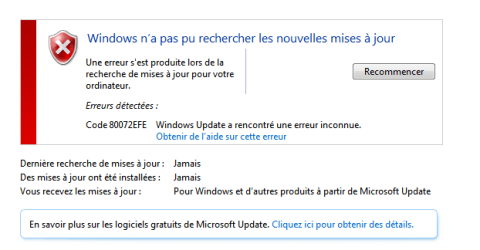
One last thing (if that's okay), it says here I can't install updates, same goes for MSE, any way to fix this?
image.png

- - - Updated - - -

One last thing (if that's okay), it says here I can't install updates, same goes for MSE, any way to fix this?
image.png

Along with that, I tried installing the NVIDIA driver, it says "an unknown error has occured"
 

My Computers My Computers

  • At a glance

    Windows 7 Professional x64AMD Ryzen 5 1500X Quad-Core Processor8gbGeForce GTX 750 Ti
    Computer type
    PC/Desktop
    Computer Manufacturer/Model Number
    custom build
    OS
    Windows 7 Professional x64
    CPU
    AMD Ryzen 5 1500X Quad-Core Processor
    Motherboard
    ASUS PRIME A320M-K
    Memory
    8gb
    Graphics Card(s)
    GeForce GTX 750 Ti
    Hard Drives
    SSD - 500Gb
    HDD - 2Tb
    Antivirus
    N/A
    Browser
    Google Chrome
  • Computer type
    PC/Desktop
A lot of people use simplix for the updates
 

My Computers My Computers

  • At a glance

    7 X64i5 84002x8gb 3200mhz
    Computer type
    PC/Desktop
    OS
    7 X64
    CPU
    i5 8400
    Motherboard
    gigabyte b365m ds3h
    Memory
    2x8gb 3200mhz
    Hard Drives
    various
    PSU
    pure power 11 400w cm
    Case
    Coolermaster
    Cooling
    cryorig m9i
  • At a glance

    7x64g54008gb ddr4 2400
    Computer type
    PC/Desktop
    OS
    7x64
    CPU
    g5400
    Motherboard
    ga b365m ds3h
    Memory
    8gb ddr4 2400
    PSU
    xfx pro 450w
A lot of people use simplix for the updates

I see, where can I find it? What about NVIDIA? I hope i'm not asking too much lol
 

My Computers My Computers

  • At a glance

    Windows 7 Professional x64AMD Ryzen 5 1500X Quad-Core Processor8gbGeForce GTX 750 Ti
    Computer type
    PC/Desktop
    Computer Manufacturer/Model Number
    custom build
    OS
    Windows 7 Professional x64
    CPU
    AMD Ryzen 5 1500X Quad-Core Processor
    Motherboard
    ASUS PRIME A320M-K
    Memory
    8gb
    Graphics Card(s)
    GeForce GTX 750 Ti
    Hard Drives
    SSD - 500Gb
    HDD - 2Tb
    Antivirus
    N/A
    Browser
    Google Chrome
  • Computer type
    PC/Desktop
Back
Top