
Stroppy
New member
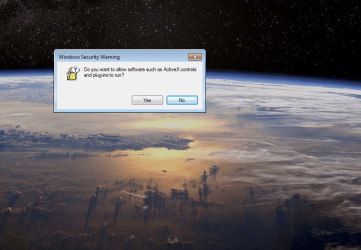
Hello, I am new here and I will thank all assistance in advance. I have moderate computer skills. I am running a Windows 7 PC in my living room attached to my Panasonic Viera tv. I continue to run 7 on the machine because I like Windows Media Centre and have a digital tv card installed in the HTPC case so I can view and record live to air tv (although a lot of it is crappy these days). Recently I noticed that the calendar widget on the desktop would not start whenever I booted the PC. I searched online for answers and found a Youtube tutorial which suggested changing a value in the registry. I did this and the ability to keep the calendar on the desktop was restored. I then hand to install another weather widget because the one I had would not allow position settings changes. After this everything started up fine BUT after the machine started up and went into Windows I saw a pop up (which repeated numerous times and clicking "yes" or "no" made no difference). This is the pop-up message:"Do you want to allow software such as Active X controls and plugins to run?" ... with the yes/no button.Now I can't get rid of the message which appears about four times before things settle down. I have Googled various answers and tried changing Active X permissions to no avail. Can anyone here help me before my brain goes (more) batty???Here is the Youtube video I watched and followed: https://www.youtube.com/watch?v=bG9Ep_hUbbY
- - - Updated - - -
For those interested the fix required a change to the registry accomplished through Regedit.
Windows(R) 7 Gadgets not working or displaying properly - (Method 1) - YouTube
- - - Updated - - -
For those interested the fix required a change to the registry accomplished through Regedit.
Windows(R) 7 Gadgets not working or displaying properly - (Method 1) - YouTube
Attachments
My Computers
-
At a glance
Windows 7i5-467016 gbNvidia- Computer type
- PC/Desktop
- Computer Manufacturer/Model Number
- Custom build
- OS
- Windows 7
- CPU
- i5-4670
- Motherboard
- Gigabyte durabuilt
- Memory
- 16 gb
- Graphics Card(s)
- Nvidia
- Hard Drives
- SSD Boot (480 gb)
Data: standard WD 1 trerrabyte
- Antivirus
- Avast
- Browser
- Opera
-
- Computer type
- PC/Desktop
- Antivirus
- Avast/Malwarebytes

