Delete Win7 orphaned system image restore points ("backup" type)
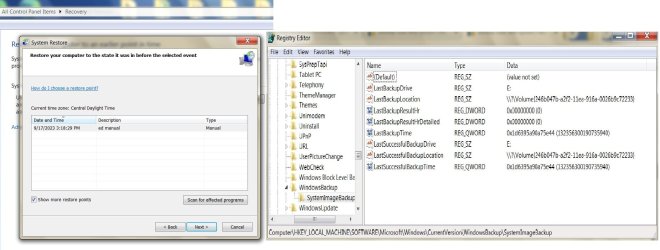
I was brousing forums/tutorial/632 that gave me some clues of how to delete two backup image pointers found in REGEDIT that were left on my Windows 7 laptop from previous owners/installers. I have never done a backup since the computer purchase, and I always assumed that these were a couple of restore backups on my single OS hardrive to restore to if needed in an emergency. I had located one tutorial for deleting orphans using CMD in Windows 10 - but only here with Win7 and REGEDIT - did it look more of a promising venture to complete this task. Here is the REGEDIT screenshot with the two orphaned images of data code in the right-hand pane :
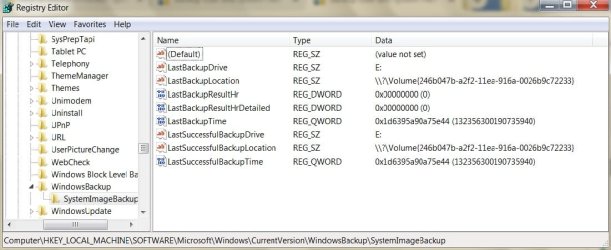
An E: drive was/is the next logical drive after my CD/DVD that was likely used as an external image backup in the past.
Can I delete all these data entries within the right pane to clear those entries that are redundant and remain visible in the restore window - and/or should I leave the "default" entry intact within the REGEDIT screen ?
I was brousing forums/tutorial/632 that gave me some clues of how to delete two backup image pointers found in REGEDIT that were left on my Windows 7 laptop from previous owners/installers. I have never done a backup since the computer purchase, and I always assumed that these were a couple of restore backups on my single OS hardrive to restore to if needed in an emergency. I had located one tutorial for deleting orphans using CMD in Windows 10 - but only here with Win7 and REGEDIT - did it look more of a promising venture to complete this task. Here is the REGEDIT screenshot with the two orphaned images of data code in the right-hand pane :
An E: drive was/is the next logical drive after my CD/DVD that was likely used as an external image backup in the past.
Can I delete all these data entries within the right pane to clear those entries that are redundant and remain visible in the restore window - and/or should I leave the "default" entry intact within the REGEDIT screen ?
My Computers
System One System Two
-
- Computer type
- Laptop
- Computer Manufacturer/Model Number
- Dell Latitude E6400
- OS
- Windows 7 professional x64 bit
- CPU
- Dual core
- Memory
- 4 Gb
- Hard Drives
- WD Scopio black 320 Gb
- Antivirus
- none
- Browser
- Chrome; Edge; Fox
-
- Computer type
- PC/Desktop