Solved W7 unable to confirm Driver Signing for video card

videobruce

New member
Member
VIP
Local time
7:59 AM
Messages
182
Running Win7 Pro x64, I do have those two SHA-2' KB patches installed, but when I try to install nVidia drivers using DM (no need for that bloated Ctl Panel and all the fluff), the installation goes fine, but on re-boot, DM has a yellow flag with a Driver signing error.

I did some research with 3 methods to disable driver signing, but 2 of the three didn't work (Command Prompt & Group Policy). The 3rd has to do with using WinRE which I've never done before (or had to). This involves forcing power off re-boots 3 times.
I also have read that holding F8 during booting does the same thing (I believe).

Anyone have any input of this??
 

My Computers My Computers

System One System Two

  • Computer type
    Laptop
    Computer Manufacturer/Model Number
    Toshiba
    OS
    Win7 x64
    CPU
    AMD
  • Computer type
    PC/Desktop
    System Manufacturer/Model Number
    AMD based MB
    OS
    Win 7 Pro x64
    CPU
    AMD FX-8350
    Motherboard
    Gigabyte GA-970A-D3P
    Memory
    16GB
    Graphics Card(s)
    nVidia GeForce 1060
    Monitor(s) Displays
    25"
    Screen Resolution
    1920x1200
    Hard Drives
    two SSD;
    two 4TB HDD
    PSU
    700watt Seasonic
    Internet Speed
    300MB up & down
    Browser
    Firefox
    Other Info
    BD Recorder

My Computer My Computer

Computer type
PC/Desktop
Computer Manufacturer/Model Number
Dell OptiPlex 9020
OS
Windows 7 Professional SP1 64-bit
CPU
Intel Core i7-4790 3.60 GHz
Memory
32 GB DDR3-1600 MHz
Graphics Card(s)
Integrated Intel HD Graphics 4600
Monitor(s) Displays
Viewsonic 32" LCD
Hard Drives
Kingston SATA 3 240 GB SSD
Internet Speed
Spectrum Internet 1000 Mbps
The oldest driver I have a copy of is 457.51
The current version is 475.14.

The error message in Device Mgr I get is;
" Windows cannot verify the digital signature"
 

My Computers My Computers

System One System Two

  • Computer type
    Laptop
    Computer Manufacturer/Model Number
    Toshiba
    OS
    Win7 x64
    CPU
    AMD
  • Computer type
    PC/Desktop
    System Manufacturer/Model Number
    AMD based MB
    OS
    Win 7 Pro x64
    CPU
    AMD FX-8350
    Motherboard
    Gigabyte GA-970A-D3P
    Memory
    16GB
    Graphics Card(s)
    nVidia GeForce 1060
    Monitor(s) Displays
    25"
    Screen Resolution
    1920x1200
    Hard Drives
    two SSD;
    two 4TB HDD
    PSU
    700watt Seasonic
    Internet Speed
    300MB up & down
    Browser
    Firefox
    Other Info
    BD Recorder

My Computer My Computer

Computer type
PC/Desktop
Computer Manufacturer/Model Number
Dell OptiPlex 9020
OS
Windows 7 Professional SP1 64-bit
CPU
Intel Core i7-4790 3.60 GHz
Memory
32 GB DDR3-1600 MHz
Graphics Card(s)
Integrated Intel HD Graphics 4600
Monitor(s) Displays
Viewsonic 32" LCD
Hard Drives
Kingston SATA 3 240 GB SSD
Internet Speed
Spectrum Internet 1000 Mbps
I mis-read your previous post. I missed the "not newer" part. I read it as something newer than that version which I already have..

Ok, it worked. What's with this older version, why does that work???

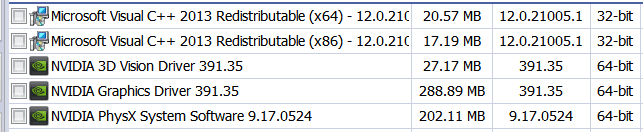
I used DM as I almost always do so all of that other crap doesn't get installed. BUT, it did anyway which has never happened before.
The following I don't want, can I remove them?;
3D Vision Driver,
Physx System Software (nVidia Settings)
Visual C++ x86
Visual C++ x64, do I also need x86, or for that matter do I need either?

Basically, I want to know if they are needed for the actual drivers. I do not game or overclock !!
 

Attachments

  • nVidea 391 files.png
    nVidea 391 files.png
    5.4 KB · Views: 19
Last edited:

My Computers My Computers

System One System Two

  • Computer type
    Laptop
    Computer Manufacturer/Model Number
    Toshiba
    OS
    Win7 x64
    CPU
    AMD
  • Computer type
    PC/Desktop
    System Manufacturer/Model Number
    AMD based MB
    OS
    Win 7 Pro x64
    CPU
    AMD FX-8350
    Motherboard
    Gigabyte GA-970A-D3P
    Memory
    16GB
    Graphics Card(s)
    nVidia GeForce 1060
    Monitor(s) Displays
    25"
    Screen Resolution
    1920x1200
    Hard Drives
    two SSD;
    two 4TB HDD
    PSU
    700watt Seasonic
    Internet Speed
    300MB up & down
    Browser
    Firefox
    Other Info
    BD Recorder
Select the custom option instead of the default option.
Uncheck all boxes, except for the display driver.
Select the clean install option.
Doing this will install only the display driver without the unneeded features.

Since you have already installed the driver, and it is working fine, just uninstall the 2 unneeded NVIDIA features.
All you need to keep is the display driver and C++ 2013.

391.35 is the last version released for Windows 7 before driver signing went into effect.
Driver versions newer than that are effected by driver signing.
 

My Computer My Computer

Computer type
PC/Desktop
Computer Manufacturer/Model Number
Dell OptiPlex 9020
OS
Windows 7 Professional SP1 64-bit
CPU
Intel Core i7-4790 3.60 GHz
Memory
32 GB DDR3-1600 MHz
Graphics Card(s)
Integrated Intel HD Graphics 4600
Monitor(s) Displays
Viewsonic 32" LCD
Hard Drives
Kingston SATA 3 240 GB SSD
Internet Speed
Spectrum Internet 1000 Mbps
Nice secret, no thanks to nVidia and M$. :devil::mad:
I don't understand why they couldn't be verified?? I got them straight from nVidias site.

That 3d driver uninstalled fine,
That system software didn't! It left globs of files that I initially couldn't delete. The DisplayContainer that ran 3 processes couldn't be terminated using Resource Hacker, they kept on re-starting just like a virus would.
I had to delete the .exe to stop them from loading at startup.
Twenty years of loading drivers using Device Manager, I NEVER had any of this happen, how the hell the entire package loaded thu DM even when I pointed it to the 'Display' folder is beyond me!

Next card will be AMD.
 

My Computers My Computers

System One System Two

  • Computer type
    Laptop
    Computer Manufacturer/Model Number
    Toshiba
    OS
    Win7 x64
    CPU
    AMD
  • Computer type
    PC/Desktop
    System Manufacturer/Model Number
    AMD based MB
    OS
    Win 7 Pro x64
    CPU
    AMD FX-8350
    Motherboard
    Gigabyte GA-970A-D3P
    Memory
    16GB
    Graphics Card(s)
    nVidia GeForce 1060
    Monitor(s) Displays
    25"
    Screen Resolution
    1920x1200
    Hard Drives
    two SSD;
    two 4TB HDD
    PSU
    700watt Seasonic
    Internet Speed
    300MB up & down
    Browser
    Firefox
    Other Info
    BD Recorder
The oldest driver I have a copy of is 457.51
The current version is 475.14.

The error message in Device Mgr I get is;
" Windows cannot verify the digital signature"
The latest Windows 7 drivers are not WHQL-certified, thus Windows cannot verify the digital signature. The last WHQL-certified one is v474.11. All later versions are basically the same, just include some "security updates" that don't affect performance, etc.

Visual C++ x86/x64 is not mandatory for the drivers to work, but you can keep it for something else.
 

My Computers My Computers

System One System Two

  • OS
    Windows 7 Home Premium 64bit
  • Computer type
    PC/Desktop
Then why are they released if one can't install them? Am I missing something here??
 

My Computers My Computers

System One System Two

  • Computer type
    Laptop
    Computer Manufacturer/Model Number
    Toshiba
    OS
    Win7 x64
    CPU
    AMD
  • Computer type
    PC/Desktop
    System Manufacturer/Model Number
    AMD based MB
    OS
    Win 7 Pro x64
    CPU
    AMD FX-8350
    Motherboard
    Gigabyte GA-970A-D3P
    Memory
    16GB
    Graphics Card(s)
    nVidia GeForce 1060
    Monitor(s) Displays
    25"
    Screen Resolution
    1920x1200
    Hard Drives
    two SSD;
    two 4TB HDD
    PSU
    700watt Seasonic
    Internet Speed
    300MB up & down
    Browser
    Firefox
    Other Info
    BD Recorder
I have no interest in installing them.
The driver that is in the main drive is 430.39 which is later that this 391.35 driver and I didn't have any issue that I remember installing that years ago.

BTW; I did try that 'Test Mode", but that didn't work, driver signing still failed. When I researched this, 4 methods were suppose to work; Group Policy didn't have the entry to change listed, WinRE I didn't try, nor did I with pressing F8 during boot and those 2 bcdedit.exe command lines. Here is the instructions I found;

Disable Code Signing for Device Drivers using Group Policy
If you find the aforementioned method difficult, you can also disable driver signature enforcement using Group Policy. Follow the steps below to get rid of error code 52:
1. Open the Group Policy editor by typing in “gpedit.msc” in the Run Command box.
2. Go to the following from the left pane:
Local Computer Policy >> User Configuration >> Administrative Templates >> System >> Driver Installation
Double-click the policy “Code signing for driver packages.”
4. Disable the policy.
Select the “Disabled” radio button, then click Apply and Ok.
Please note that this method may or may not work with Windows 10 or Windows 11. If this doesn’t work, you should follow the method given above earlier which surely works.

Disable Driver Signature Enforcement using Command Prompt
Microsoft gives users the option to disable driver signature enforcement. If you disable this option, Windows will accept all drivers installed in the system, whether they are signed by Microsoft or not verified.
To disable driver signature enforcement, follow the steps below:
Launch an elevated Command Prompt. Run the following commands one after the other:
bcdedit.exe -set loadoptions DISABLE_INTEGRITY_CHECKS
bcdedit.exe -set TESTSIGNING ON
You will need to restart your system after successfully running the commands.
If you see the following error when running the cmdlets above, then you must try disabling the driver signature enforcement using the Windows Recovery Environment (WinRE) for which the method is shared in the next section.
“An error has occurred setting the element data. The value is protected by Secure Boot policy and cannot be modified or deleted.”

Disable Driver Signature Enforcement using WinRE
Follow these steps to disable the driver signature enforcement using WinRE:
1. Hold down the power button for 10 seconds to switch the machine off forcefully.
2. Turn it back on again, and then repeat the process 3 times.
This will reboot Windows into the Windows Recovery Environment (WinRE).
3. Navigate to the following:
Troubleshoot >> Advanced Options >> Startup Settings >> Restart
The device will now restart again. This time, you will be presented with a list of options you can choose from by using the function keys on the keyboard (F1-F9).
4. Press the key that says “Disable drive signature enforcement” (F7).
This procedure to disable driver signature enforcement is the same for all versions of Windows, including Windows 7, Windows 8/8.1, Windows 10, and Windows 11.

Press F8 during boot[

- - - Updated - - -

Well, I found what/where the problem is as to DM installing unwanted programs. I looked thru the 'Display.Driver' folder and found a number of exe files that were not driver related including NvContainerSetup, NvCplSetupInt and VulkanRT-Installer which I have no idea what that last one is for.
Real stupid idea placing programs in a Driver folder.

 
Last edited:

My Computers My Computers

System One System Two

  • Computer type
    Laptop
    Computer Manufacturer/Model Number
    Toshiba
    OS
    Win7 x64
    CPU
    AMD
  • Computer type
    PC/Desktop
    System Manufacturer/Model Number
    AMD based MB
    OS
    Win 7 Pro x64
    CPU
    AMD FX-8350
    Motherboard
    Gigabyte GA-970A-D3P
    Memory
    16GB
    Graphics Card(s)
    nVidia GeForce 1060
    Monitor(s) Displays
    25"
    Screen Resolution
    1920x1200
    Hard Drives
    two SSD;
    two 4TB HDD
    PSU
    700watt Seasonic
    Internet Speed
    300MB up & down
    Browser
    Firefox
    Other Info
    BD Recorder
If you install a NVIDIA driver for Windows 7 64-bit that's not newer than version 391.35
GeForce Game Ready Driver | 391.35 | Windows 7 64-bit, Windows 8.1 64-bit, Windows 8 64-bit | NVIDIA
you shouldn't have that driver signing issue.

It's the driver version that I use now for the NVIDIA graphics cards in my Windows 7 64-bit systems.

Im not sure if I can still post here or not and couldnt find a way to direct message you. But thank you so much. Ive been struggling with my computer not recognizing my graphics card for days. Ive tried so many options and this is finally the solution. Turns out I was trying to install newer drivers then what my windows 7 could handle. So thank you, this was really helpful and what was able to finally solve my issue.
 

My Computers My Computers

System One System Two

  • OS
    Windows 7 Home Premium 64 bit.
  • Computer type
    PC/Desktop
Of course you can post here. Why not?
Newer isn't always better especially when it come to M$ and NVidea.
 

My Computers My Computers

System One System Two

  • Computer type
    Laptop
    Computer Manufacturer/Model Number
    Toshiba
    OS
    Win7 x64
    CPU
    AMD
  • Computer type
    PC/Desktop
    System Manufacturer/Model Number
    AMD based MB
    OS
    Win 7 Pro x64
    CPU
    AMD FX-8350
    Motherboard
    Gigabyte GA-970A-D3P
    Memory
    16GB
    Graphics Card(s)
    nVidia GeForce 1060
    Monitor(s) Displays
    25"
    Screen Resolution
    1920x1200
    Hard Drives
    two SSD;
    two 4TB HDD
    PSU
    700watt Seasonic
    Internet Speed
    300MB up & down
    Browser
    Firefox
    Other Info
    BD Recorder
Back
Top