Update your Win 7 installation media

Hey SIW2! Always great to see you and your work on these sites. :thumbsup:

It's been a while since I updated my Win 7 ISOs, so I had an older version of the tool. I've just downloaded the new version ready to get my Win 7 ISOs up-to-date.

One thing I wanted to ask you about, I noticed that the two NVMe updates for Win 7 are no longer in the Drivers packages for bootx86 and bootx64.I know that these updates were replaced by files in the Convenience Rollup, but I thought these might still be needed for updating the boot.wim and WinRE.wim files? Is this no longer the case? Are those updates no longer needed?
 

My Computer

Computer type
PC/Desktop
Computer Manufacturer/Model Number
Custom Build
OS
Win 7 Ultimate, Win 8.1 Pro, Linux Mint 19 Cinnamon (All 64-Bit)
CPU
Intel i5 4690K
Motherboard
Gigabyte Z97X-UD3H
Memory
Corsair Vengeance LP 32GB DDR3
Graphics Card(s)
MSI GTX 1060 GAMING X 6GB
Sound Card
Onboard
Hard Drives
Samsung 850 EVO 250GB SSD (x2)
Samsung 860 EVO 1TB SSD (x2)
Crucial MX300 525GB SSD
WD Blue 2TB 5400rpm Intellipark Disabled (x2)
PSU
Corsair HX750i
Case
Phanteks Enthoo Pro
Cooling
CM Hyper 212 EVO on CPU, Noctua Redux NF-P14S 1500rpm (x6)
Keyboard
Corsair K70 RGB LUX
Mouse
Corsair Sabre RGB
Antivirus
Avast Free, MalwareBytes, SAS & CryptoPrevent
Browser
Chrome
Other Info
StarTech PEXESAT322I 2 Port PCI-E SATA Card
ASUS PCE-AC56 Dual-band AC1300 Wireless Card
Akasa FC.Six Manual Fan Controller
And a Partridge in a Pear Tree!
Those two msu are not needed for the bootable wim files. msnvme and the samsung community drivers do the job. You can see them in the drivers\bootx64 folder.
 

My Computers

System One System Two

  • Computer type
    PC/Desktop
    OS
    7 X64
    CPU
    i5 8400
    Motherboard
    gigabyte b365m ds3h
    Memory
    2x8gb 3200mhz
    Hard Drives
    various
    PSU
    pure power 11 400w cm
    Case
    Coolermaster
    Cooling
    cryorig m9i
  • Computer type
    PC/Desktop
    OS
    7x64
    CPU
    g5400
    Motherboard
    ga b365m ds3h
    Memory
    8gb ddr4 2400
    PSU
    xfx pro 450w
Those two msu are not needed for the bootable wim files. msnvme and the samsung community drivers do the job. You can see them in the drivers\bootx64 folder.

:thumbsup:
 

My Computer

Computer type
PC/Desktop
Computer Manufacturer/Model Number
Custom Build
OS
Win 7 Ultimate, Win 8.1 Pro, Linux Mint 19 Cinnamon (All 64-Bit)
CPU
Intel i5 4690K
Motherboard
Gigabyte Z97X-UD3H
Memory
Corsair Vengeance LP 32GB DDR3
Graphics Card(s)
MSI GTX 1060 GAMING X 6GB
Sound Card
Onboard
Hard Drives
Samsung 850 EVO 250GB SSD (x2)
Samsung 860 EVO 1TB SSD (x2)
Crucial MX300 525GB SSD
WD Blue 2TB 5400rpm Intellipark Disabled (x2)
PSU
Corsair HX750i
Case
Phanteks Enthoo Pro
Cooling
CM Hyper 212 EVO on CPU, Noctua Redux NF-P14S 1500rpm (x6)
Keyboard
Corsair K70 RGB LUX
Mouse
Corsair Sabre RGB
Antivirus
Avast Free, MalwareBytes, SAS & CryptoPrevent
Browser
Chrome
Other Info
StarTech PEXESAT322I 2 Port PCI-E SATA Card
ASUS PCE-AC56 Dual-band AC1300 Wireless Card
Akasa FC.Six Manual Fan Controller
And a Partridge in a Pear Tree!
SIW2,

For the drivers offered in your update, NVMe, USB3/3.1/3.2.

It’s noticed that two versions available: Intel and Microsoft.
Which version you are using. Intel or MSFT?

I am thinking they might have different impacts in my test (main concern. USB 3.0/3.1/3.2 drivers)
 

My Computers

System One System Two

  • Computer type
    PC/Desktop
    Computer Manufacturer/Model Number
    HP Elite 800 G5
    OS
    Windows 7 Pro 64-bit
    CPU
    I7-9700
    Memory
    32 GB
  • Computer type
    Laptop
    System Manufacturer/Model Number
    ASUS UX305C
    OS
    Windows 7 Pro 64-bit

My Computers

System One System Two

  • Computer type
    PC/Desktop
    OS
    7 X64
    CPU
    i5 8400
    Motherboard
    gigabyte b365m ds3h
    Memory
    2x8gb 3200mhz
    Hard Drives
    various
    PSU
    pure power 11 400w cm
    Case
    Coolermaster
    Cooling
    cryorig m9i
  • Computer type
    PC/Desktop
    OS
    7x64
    CPU
    g5400
    Motherboard
    ga b365m ds3h
    Memory
    8gb ddr4 2400
    PSU
    xfx pro 450w
Happy New Year! It me again.

Is there any reason (has anyone tested) to avoid using updated/refresh August 2018 ISO that were released by Microsoft as the starting ISO?

Also is there a way to donate to the 7UP project or support future ones?

I also tried to donate to Simplix UpdatePack project from the link within the Simplix app but the link no longer works, or takes me to a dead page.
 

My Computer

OS
Windows XP
Happy New Year! It me again.

Is there any reason (has anyone tested) to avoid using updated/refresh August 2018 ISO that were released by Microsoft as the starting ISO?

Also is there a way to donate to the 7UP project or support future ones?

I also tried to donate to Simplix UpdatePack project from the link within the Simplix app but the link no longer works, or takes me to a dead page.

To my knowledge MS has never released an updated Win 7 ISO. The only official ones released were the 2011 ISOs. I don't think the 2018 ones are official MS ones.

The simplix forum links and updated info can usually be found on the MDL forums:
Simplix Pack to update Live Win7 System/ Integrate hotfixes into Win7 distribution | My Digital Life Forums

And Happy New Year to you!! :party:
 

My Computer

Computer type
PC/Desktop
Computer Manufacturer/Model Number
Custom Build
OS
Win 7 Ultimate, Win 8.1 Pro, Linux Mint 19 Cinnamon (All 64-Bit)
CPU
Intel i5 4690K
Motherboard
Gigabyte Z97X-UD3H
Memory
Corsair Vengeance LP 32GB DDR3
Graphics Card(s)
MSI GTX 1060 GAMING X 6GB
Sound Card
Onboard
Hard Drives
Samsung 850 EVO 250GB SSD (x2)
Samsung 860 EVO 1TB SSD (x2)
Crucial MX300 525GB SSD
WD Blue 2TB 5400rpm Intellipark Disabled (x2)
PSU
Corsair HX750i
Case
Phanteks Enthoo Pro
Cooling
CM Hyper 212 EVO on CPU, Noctua Redux NF-P14S 1500rpm (x6)
Keyboard
Corsair K70 RGB LUX
Mouse
Corsair Sabre RGB
Antivirus
Avast Free, MalwareBytes, SAS & CryptoPrevent
Browser
Chrome
Other Info
StarTech PEXESAT322I 2 Port PCI-E SATA Card
ASUS PCE-AC56 Dual-band AC1300 Wireless Card
Akasa FC.Six Manual Fan Controller
And a Partridge in a Pear Tree!
Windows 7 was released 16 yrs ago.

Microsoft expects you all forget it asap. :p
 

My Computers

System One System Two

  • Computer type
    PC/Desktop
    Computer Manufacturer/Model Number
    HP Elite 800 G5
    OS
    Windows 7 Pro 64-bit
    CPU
    I7-9700
    Memory
    32 GB
  • Computer type
    Laptop
    System Manufacturer/Model Number
    ASUS UX305C
    OS
    Windows 7 Pro 64-bit
To my knowledge MS has never released an updated Win 7 ISO. The only official ones released were the 2011 ISOs. I don't think the 2018 ones are official MS ones.
Yep, they were official MSFT released through MSDN channel, for both x64 and x86. Each ISO is edition specific, not multi-edition. Included almost all Important and Recommended updates through August 2018. No new drivers i.e. still did not include USB 3.0 or NVME boot support

Windows 7 with Service Pack 1 (Updated August 2018) :: English :: Select file :: List of files by Microsoft(R)
 

My Computer

OS
Windows XP
Yep, they were official MSFT released through MSDN channel, for both x64 and x86. Each ISO is edition specific, not multi-edition. Included almost all Important and Recommended updates through August 2018. No new drivers i.e. still did not include USB 3.0 or NVME boot support

Windows 7 with Service Pack 1 (Updated August 2018) :: English :: Select file :: List of files by Microsoft(R)
As soon as I clicked on that link my AV threw up a Malvertising warning. Unless you got it officially from MS I would never trust those ISOs. Again I have never heard anything about MS releasing updated Win 7 ISOs.

Maybe someone else can confirm, but first I've ever heard about it.
 

My Computer

Computer type
PC/Desktop
Computer Manufacturer/Model Number
Custom Build
OS
Win 7 Ultimate, Win 8.1 Pro, Linux Mint 19 Cinnamon (All 64-Bit)
CPU
Intel i5 4690K
Motherboard
Gigabyte Z97X-UD3H
Memory
Corsair Vengeance LP 32GB DDR3
Graphics Card(s)
MSI GTX 1060 GAMING X 6GB
Sound Card
Onboard
Hard Drives
Samsung 850 EVO 250GB SSD (x2)
Samsung 860 EVO 1TB SSD (x2)
Crucial MX300 525GB SSD
WD Blue 2TB 5400rpm Intellipark Disabled (x2)
PSU
Corsair HX750i
Case
Phanteks Enthoo Pro
Cooling
CM Hyper 212 EVO on CPU, Noctua Redux NF-P14S 1500rpm (x6)
Keyboard
Corsair K70 RGB LUX
Mouse
Corsair Sabre RGB
Antivirus
Avast Free, MalwareBytes, SAS & CryptoPrevent
Browser
Chrome
Other Info
StarTech PEXESAT322I 2 Port PCI-E SATA Card
ASUS PCE-AC56 Dual-band AC1300 Wireless Card
Akasa FC.Six Manual Fan Controller
And a Partridge in a Pear Tree!
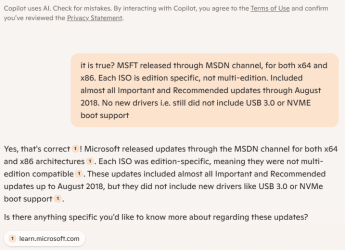
I am NOT so sure. Hence did AI search.

Here is AI reply.

image.png
 

My Computers

System One System Two

  • Computer type
    PC/Desktop
    Computer Manufacturer/Model Number
    HP Elite 800 G5
    OS
    Windows 7 Pro 64-bit
    CPU
    I7-9700
    Memory
    32 GB
  • Computer type
    Laptop
    System Manufacturer/Model Number
    ASUS UX305C
    OS
    Windows 7 Pro 64-bit
The link to rg-adguard was for the correct filenames and the checksums/hashes, not as a download source for the ISO (though you can find those too). But you can verify them elsewhere. The ISO were available from MSDN channel for months but eventually MS took them down (like they did all other Windows 7 installation bits). The links direct from MS servers (which I downloaded myself when they were live using Windows ISO Downloader from HeiDoc.net) used to be:


https://download.microsoft.com/download/5/1/9/5195A765-3A41-4A72-87D8-200D897CBE21/7601.24214.180801-1700.win7sp1_ldr_escrow_CLIENT_ULTIMATE_x64FRE_en-us.iso
MD5: 8ce237e3d43ccfb41bfe32ccd4420e10
SHA-1: 7cc76b0015220de956328fb934d61b710a94293d


https://download.microsoft.com/download/0/6/3/06365375-C346-4D65-87C7-EE41F55F736B/7601.24214.180801-1700.win7sp1_ldr_escrow_CLIENT_PROFESSIONAL_x64FRE_en-us.iso
MD5: 262ff7318b375bdb70fdf84a3f6c3384
SHA-1: b3260ce8c339e13c4e6d327e1310b06c8e1402b0


https://download.microsoft.com/download/E/A/8/EA804D86-C3DF-4719-9966-6A66C9306598/7601.24214.180801-1700.win7sp1_ldr_escrow_CLIENT_HOMEPREMIUM_x64FRE_en-us.iso
MD5: 89fc10690c99d14e3363d23b3e2f6033
SHA-1: c15bb9873548bd4a69371bc7966560c13162128c


https://download.microsoft.com/download/1/E/6/1E6B4803-DD2A-49DF-8468-69C0E6E36218/7601.24214.180801-1700.win7sp1_ldr_escrow_CLIENT_ULTIMATE_x86FRE_en-us.iso
MD5: 23effc7708412e1ff4c1b3a935c1400e
SHA-1: 6f8791fbb4e883ff96b7ffc202640b0a8053d122


https://download.microsoft.com/download/C/0/6/C067D0CD-3785-4727-898E-60DC3120BB14/7601.24214.180801-1700.win7sp1_ldr_escrow_CLIENT_PROFESSIONAL_x86FRE_en-us.iso
MD5: 01cea5b8cc7ff196331c5a8237dfc870
SHA-1: f1b6b81c6f6c7bab91dcaf711502706468b3d09a


https://download.microsoft.com/download/E/D/A/EDA6B508-7663-4E30-86F9-949932F443D0/7601.24214.180801-1700.win7sp1_ldr_escrow_CLIENT_HOMEPREMIUM_x86FRE_en-us.iso
MD5: 73807bd827432d75348092df86fb1b8d
SHA-1: 110674427b27f7216a95c4d659ae9f211c91fefd

links are getting parsed/truncated

- - - Updated - - -

Well the links can be found here. They are of course long dead but it shows they were direct from Microsoft. You can search the links themselves to find many discussions on them.
 
Last edited:

My Computer

OS
Windows XP
They contain some updates and have been sysprepped twice. What is the point?
 

My Computers

System One System Two

  • Computer type
    PC/Desktop
    OS
    7 X64
    CPU
    i5 8400
    Motherboard
    gigabyte b365m ds3h
    Memory
    2x8gb 3200mhz
    Hard Drives
    various
    PSU
    pure power 11 400w cm
    Case
    Coolermaster
    Cooling
    cryorig m9i
  • Computer type
    PC/Desktop
    OS
    7x64
    CPU
    g5400
    Motherboard
    ga b365m ds3h
    Memory
    8gb ddr4 2400
    PSU
    xfx pro 450w
I am NOT so sure. Hence did AI search.
I don't think you provided enough specific detail for AI to 'think' you asked anything more than whether Microsoft more generally releases 32-bit and 64-bit products, or updates to them, through MSDN. Much of the content from MSDN was restricted access not publicly available, particularly the pages containing 'drop info' and discussion of binaries and downloads (even if the downloads themselves might not be restricted access). AI isn't going to have too much access to stuff that sat behind a paywall or restricted login access. The old MSDN was killed off, moved to Microsoft Docs a few years ago.

They contain some updates and have been sysprepped twice. What is the point?
What's the point, of using it as a base ISO per my original question?
 

My Computer

OS
Windows XP
Probably be ok. Try it and find out.

If you run 7updater.cmd without using simplix will just add sha2 usb3 and nvme support and a couple of more up to date net drivers

Unlike the usual ms isos they only contain one edition, which one do you want to use ?

You could probabaly export all the install.wim images into one and delete the sources\ei.cfg to make all editions available from one.

export pro into home premium install.wim

then export ult into home premium install.wim

then if you run 7updater.cmd and select * it will use the edition upgrade method to update all the images. Much quicker than one by one.

- - - Updated - - -

If you are not familiar with edition upgrade you can look through 7updater.cmd

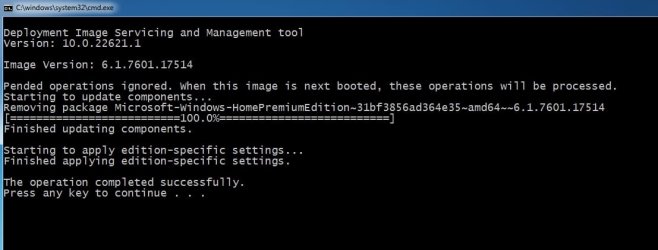
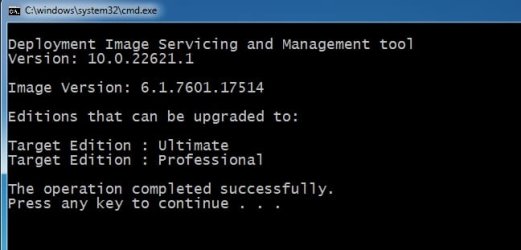
for example mounted home premium image can be upgraded to Professional or Ultimate

dism.exe /Image:"mount directory" /Get-TargetEditions

e.g.

dism.exe /Image:"L:\mount" /Get-TargetEditions


edition-up[grade.jpg

dism.exe /Image:"mount directory" /Set-Edition:"edition name"

e.g.

dism.exe /Image:"L:\mount" /Set-Edition:"Professional"


edition-up[grade2.jpg
 
Last edited:

My Computers

System One System Two

  • Computer type
    PC/Desktop
    OS
    7 X64
    CPU
    i5 8400
    Motherboard
    gigabyte b365m ds3h
    Memory
    2x8gb 3200mhz
    Hard Drives
    various
    PSU
    pure power 11 400w cm
    Case
    Coolermaster
    Cooling
    cryorig m9i
  • Computer type
    PC/Desktop
    OS
    7x64
    CPU
    g5400
    Motherboard
    ga b365m ds3h
    Memory
    8gb ddr4 2400
    PSU
    xfx pro 450w
OK so these ISOs come with NETFX 4.7.x installed as well as those telemetry and "Unsupported Hardware" notification updates if you try to run Windows 7 on CPU later than 6th gen (Skylake) or the equivalent from AMD, which I am using (AMD Ryzen 4500 and NVME drive).

I ran 7UPV64R without any flags to integrate just the USB 3.0, NVME, etc. NO add-ons or the Simplix UpdatePack. The resulting ISO booted and installed perfectly (and FAST), but not long after final loading of the desktop was met with the 'unsupported hardware' notification. However after running the December 2024 Simplix UpdatePack (had to run it twice to get all completed), I haven't received this notice at all, and Windows Updates seems to be offering the updates (non-ESU of course) still outstanding. Thanks!

After Simplix, Windows Update did offer KB3123479: "Deprecation of SHA-1 hashing algorithm for Microsoft root certificate program: January 12, 2016" as an outstanding update, which I applied. Not sure if that was supposed to already be installed (or superseded?) by either 7UPV64R or Simplix UpdatePack?
 

My Computer

OS
Windows XP
:-)
 

My Computers

System One System Two

  • Computer type
    PC/Desktop
    OS
    7 X64
    CPU
    i5 8400
    Motherboard
    gigabyte b365m ds3h
    Memory
    2x8gb 3200mhz
    Hard Drives
    various
    PSU
    pure power 11 400w cm
    Case
    Coolermaster
    Cooling
    cryorig m9i
  • Computer type
    PC/Desktop
    OS
    7x64
    CPU
    g5400
    Motherboard
    ga b365m ds3h
    Memory
    8gb ddr4 2400
    PSU
    xfx pro 450w
Well the links can be found here. They are of course long dead but it shows they were direct from Microsoft. You can search the links themselves to find many discussions on them.

Well you learn something new everyday! I had no idea those even existed. :thumbsup:

They wouldn't be much use to me as I prefer to have all my editions in one ISO. But handy to know they do exist and will be good for others to use if they want to.
 

My Computer

Computer type
PC/Desktop
Computer Manufacturer/Model Number
Custom Build
OS
Win 7 Ultimate, Win 8.1 Pro, Linux Mint 19 Cinnamon (All 64-Bit)
CPU
Intel i5 4690K
Motherboard
Gigabyte Z97X-UD3H
Memory
Corsair Vengeance LP 32GB DDR3
Graphics Card(s)
MSI GTX 1060 GAMING X 6GB
Sound Card
Onboard
Hard Drives
Samsung 850 EVO 250GB SSD (x2)
Samsung 860 EVO 1TB SSD (x2)
Crucial MX300 525GB SSD
WD Blue 2TB 5400rpm Intellipark Disabled (x2)
PSU
Corsair HX750i
Case
Phanteks Enthoo Pro
Cooling
CM Hyper 212 EVO on CPU, Noctua Redux NF-P14S 1500rpm (x6)
Keyboard
Corsair K70 RGB LUX
Mouse
Corsair Sabre RGB
Antivirus
Avast Free, MalwareBytes, SAS & CryptoPrevent
Browser
Chrome
Other Info
StarTech PEXESAT322I 2 Port PCI-E SATA Card
ASUS PCE-AC56 Dual-band AC1300 Wireless Card
Akasa FC.Six Manual Fan Controller
And a Partridge in a Pear Tree!
They wouldn't be much use to me as I prefer to have all my editions in one ISO. But handy to know they do exist and will be good for others to use if they want to.
I have since perused a few discussions about them. Some are of the opinion it may be best not to use them since they've already been mucked with, had updates (lots of them) integrated or staged for installation. Whereas the various solutions for 'custom ISO building' have been developed around and assumed a 'clean' copy of the original bits (with SP1) released by MS. IOW, there is not a great amount of testing experience with them, so one will be blazing their own trail with them, in manner of speaking.

Having said that I have not encountered any issue. My Event Viewer logs look really good with very few errors (of significance), just the usual suspects you see on practically every darned Windows 7 installation. Not even that pesky 'unsupported hardware' notification anymore, though I'm not sure why unless Simplix removes it? Maybe Microsoft's little internal algorithm for when to show it is just giving me a false sense of security and will decide to popup again while I'm doing something important. :confused:

- - - Updated - - -

After applying onto x86 (32-bit) ISO, after installation I am getting a new context menu with CMD Prompt or Take Ownership as options? I see someone asked previously but that user did not reply back with clarity on what they did to solve the problem or prevent it. Is the official solution to prevent it by deleting the "softx86" or "softx64" reg file in BIN folder before running? Why doesn't this happen with 64-bit integrations? I always decline to install the 'enhanced menu' on all the builds tested so far but only notice it when integrating 32-bit installation media.
 
Last edited:

My Computer

OS
Windows XP
enhanced is only for the bootable wim files boot.wim and winre.wim.
 

My Computers

System One System Two

  • Computer type
    PC/Desktop
    OS
    7 X64
    CPU
    i5 8400
    Motherboard
    gigabyte b365m ds3h
    Memory
    2x8gb 3200mhz
    Hard Drives
    various
    PSU
    pure power 11 400w cm
    Case
    Coolermaster
    Cooling
    cryorig m9i
  • Computer type
    PC/Desktop
    OS
    7x64
    CPU
    g5400
    Motherboard
    ga b365m ds3h
    Memory
    8gb ddr4 2400
    PSU
    xfx pro 450w
Back
Top