Browsers working on Win 7:

Uitlander

New member
Over the last three+ years I have been 'test-driving' these browsers on Win7:


Chrome 109.0.5414.120
ComodoDragon 98.0.4758.102
Epic Privacy Browser 104.0.5112.81
Iridium 2022.04
LibreWolf 111.0-3
Basilisk 2025.10.10
Firefox 115 ESR
Waterfox 2022.11


All work, though Firefox but barely…so much so, I ended up jettisoning it last month. As of two weeks ago, I replaced it with Eclipse r3dfox 147.0.1, which is far superior in every way, and is able to download extensions from Mozilla.


Last week I also downloaded a Chrome clone….Supermium 138.0.7204.300. Too early to tell, but it appears way better than Chrome. So these are the ten browsers working on Win 7 Pro (64-bit), in case anyone is curious.
 

My Computers

System One System Two

  • Computer type
    PC/Desktop
    Computer Manufacturer/Model Number
    Dell OptiPlex 7010 Tower
    OS
    Windows 7 Pro 64-bit
    CPU
    i7-3770
    Memory
    16GB
    Graphics Card(s)
    onboard
    Monitor(s) Displays
    Dell
    Hard Drives
    1TB.
    Keyboard
    Wyse ku8933
    Mouse
    Microsoft optical
    Antivirus
    none
    Browser
    ComodoDragon, Basilisk, WaterFox, Brave, Chrome, Iridium
  • Computer type
    PC/Desktop

My Computer

Computer type
Laptop
Computer Manufacturer/Model Number
Dell Precision 15 7550 Workstation
OS
Windows 10 22H2 Pro
CPU
Intel(R) Xeon W-10885M
Motherboard
Dell
Memory
2x 32 GB DDR4 ECC memory (128 GB max)
Graphics Card(s)
Intel onboard GPU 1080p - Quadro RTX 5000 Max-Q GPU 4K
Hard Drives
500 GB Corsair T500 main M2 SSD
1 TB Intel storage M2 SSD (6 TB max)
Mouse
Logitech MX-25 Bluetooth
Internet Speed
slow
Antivirus
MS
Browser
Pale Moon 33.3.x x64 AVX2 build
Brave v1.48.152 beta (Chromium 109.0.5414.119) is the latest version of Brave browser i could get working on Win 7.

Whale Browser v3.18.154.13
 

My Computer

Computer type
PC/Desktop
Computer Manufacturer/Model Number
multiple
OS
Win7Pro
Over the last three+ years I have been 'test-driving' these browsers on Win7:
Chrome 109.0.5414.120
ComodoDragon 98.0.4758.102
Epic Privacy Browser 104.0.5112.81
Iridium 2022.04
LibreWolf 111.0-3
Basilisk 2025.10.10
Firefox 115 ESR
Waterfox 2022.11


All work, though Firefox but barely…so much so, I ended up jettisoning it last month. As of two weeks ago, I replaced it with Eclipse r3dfox 147.0.1, which is far superior in every way, and is able to download extensions from Mozilla.


Last week I also downloaded a Chrome clone….Supermium 138.0.7204.300. Too early to tell, but it appears way better than Chrome. So these are the ten browsers working on Win 7 Pro (64-bit), in case anyone is curious.

I use ESR 115, its still pretty good, too bad support ends this month.
You can also use Echelon, a custom Firefox theme ( Echelon — An Old Mozilla Firefox Theme ) which accurately themes specifically ESR 115 with the old Firefox theme, and its rock solid and bug-free.
 

My Computers

System One System Two

  • Computer type
    PC/Desktop
    Computer Manufacturer/Model Number
    Custom Build
    OS
    Windows XP Media Center Edition 2002 SP3 32bit
    CPU
    Core 2 Quad Q9650 3.00GHz
    Motherboard
    GIGABYTE GA-P35-DS3 Rev 2.0 (Award BIOS version F14)
    Memory
    4GB DDR2
    Graphics Card(s)
    SAPPHRIE ATI HD 3870 GDDR4
    Sound Card
    Creative Sound Blaster Audigy SB0090
    Monitor(s) Displays
    Sony SDM-HS75 17'' 75Hz VGA LCD Monitor
    Screen Resolution
    1280x1024 72Hz
    Hard Drives
    36GB Western Digital WDC360ADFD Raptor 10k RPM Mechanical Hard Disk (OS DRIVE)
    1TB Western Digital WDC10EARS 5400RPM Mechanical Hard Disk
    PSU
    Be Quiet! 700W ATX PSU
    Case
    Extrema Unknown Model
    Cooling
    Scythe Samurai Z LGA775 Cooler
    Keyboard
    Microsoft Wireless Keyboard 3000
    Mouse
    Microsoft Wheel Mouse Optical USB-PS/2 Compatible (BLACK)
    Internet Speed
    200Mbit/s FTTH (COSMOTE Fiber Plan)
    Antivirus
    Common Sense
    Browser
    Firefox
    Other Info
    Additional Expansions:

    Sweex/MosChip MCS98xx ECP Parallel PCI Card
    Creative SoundBlaster Audigy SB0090 Sound Card
    MosChip MCS9865 2x RS-232 Serial PCI Card

    Disk Drives:

    Sony OptiArc AD-5240S DVD-RW (SATA)
    Sony MPF920 Floppy Diskette Drive (Manufactured Jun. 2007)
  • Computer type
    Laptop
    System Manufacturer/Model Number
    HP Compaq 6710b
    OS
    Windows XP Professional 32bit SP3
    CPU
    Intel Core 2 Duo T7500 2.20GHz
    Motherboard
    HP Stock
    Memory
    Hynix 4GB DDR2
    Graphics Card(s)
    Mobile Intel Express 965 Chipset Graphics
    Sound Card
    SoundMAX Intergrated Digital HD Audio
    Monitor(s) Displays
    HP LCD Panel
    Screen Resolution
    1280x800
    Hard Drives
    500GB CRUCIAL BX500 SSD SATA
    PSU
    HP ED465AA AC Adapter + Stock HP Battery
    Case
    Stock
    Cooling
    Stock
    Keyboard
    Aftermarket, Replaced
    Mouse
    Microsoft Optical Mouse USB (with PS/2 Adapter)
    Internet Speed
    5-50 Megabits/sec. (Wi-Fi FTTH)
    Browser
    Firefox
    Antivirus
    None
    Other Info
    With a Genuine Docking Station.
Sorry. I left out Brave. Most online shopping sites reject it, so I rarely use it. I have Brave 1.47.186.

Brave v1.48.152 beta (Chromium 109.0.5414.119) is the latest version of Brave browser i could get working on Win 7.

Whale Browser v3.18.154.13

- - - Updated - - -


I use ESR 115, its still pretty good, too bad support ends this month.
You can also use Echelon, a custom Firefox theme ( Echelon — An Old Mozilla Firefox Theme ) which accurately themes specifically ESR 115 with the old Firefox theme, and its rock solid and bug-free.

Firefox was decent at one time, like couple years ago, then went downhiil fast. Maybe six months ago my addons started disappearing one by one, despite my best efforts to ban Mozilla from my computer. When uBlock Origin vanished, and I was stopped from access to the addons store to replace it, Firefox became worthless (other than as a open door for advertisers). I definitely don't miss it...especially now that I discovered r3dfox.

Echelon is a zip file. I'm able to download, but never managed to install one. I have it, but it will have to wait for the computer tech to come by to install.
 

My Computers

System One System Two

  • Computer type
    PC/Desktop
    Computer Manufacturer/Model Number
    Dell OptiPlex 7010 Tower
    OS
    Windows 7 Pro 64-bit
    CPU
    i7-3770
    Memory
    16GB
    Graphics Card(s)
    onboard
    Monitor(s) Displays
    Dell
    Hard Drives
    1TB.
    Keyboard
    Wyse ku8933
    Mouse
    Microsoft optical
    Antivirus
    none
    Browser
    ComodoDragon, Basilisk, WaterFox, Brave, Chrome, Iridium
  • Computer type
    PC/Desktop
Sorry. I left out Brave. Most online shopping sites reject it, so I rarely use it. I have Brave 1.47.186.


- - - Updated - - -


Firefox was decent at one time, like couple years ago, then went downhiil fast. Maybe six months ago my addons started disappearing one by one, despite my best efforts to ban Mozilla from my computer. When uBlock Origin vanished, and I was stopped from access to the addons store to replace it, Firefox became worthless (other than as a open door for advertisers). I definitely don't miss it...especially now that I discovered r3dfox.

Echelon is a zip file. I'm able to download, but never managed to install one. I have it, but it will have to wait for the computer tech to come by to install.


Echelon is rather simple to install. Just copy some files and follow the instructions...
Im thinking about making an installer to simplify things one day..

ALSO I SHALL note Echelon does NOT work with r3dfox... because its ESR 14x-based, and Echelon only works with 115.

Dont try it, itll break the UI!!!!
 

My Computers

System One System Two

  • Computer type
    PC/Desktop
    Computer Manufacturer/Model Number
    Custom Build
    OS
    Windows XP Media Center Edition 2002 SP3 32bit
    CPU
    Core 2 Quad Q9650 3.00GHz
    Motherboard
    GIGABYTE GA-P35-DS3 Rev 2.0 (Award BIOS version F14)
    Memory
    4GB DDR2
    Graphics Card(s)
    SAPPHRIE ATI HD 3870 GDDR4
    Sound Card
    Creative Sound Blaster Audigy SB0090
    Monitor(s) Displays
    Sony SDM-HS75 17'' 75Hz VGA LCD Monitor
    Screen Resolution
    1280x1024 72Hz
    Hard Drives
    36GB Western Digital WDC360ADFD Raptor 10k RPM Mechanical Hard Disk (OS DRIVE)
    1TB Western Digital WDC10EARS 5400RPM Mechanical Hard Disk
    PSU
    Be Quiet! 700W ATX PSU
    Case
    Extrema Unknown Model
    Cooling
    Scythe Samurai Z LGA775 Cooler
    Keyboard
    Microsoft Wireless Keyboard 3000
    Mouse
    Microsoft Wheel Mouse Optical USB-PS/2 Compatible (BLACK)
    Internet Speed
    200Mbit/s FTTH (COSMOTE Fiber Plan)
    Antivirus
    Common Sense
    Browser
    Firefox
    Other Info
    Additional Expansions:

    Sweex/MosChip MCS98xx ECP Parallel PCI Card
    Creative SoundBlaster Audigy SB0090 Sound Card
    MosChip MCS9865 2x RS-232 Serial PCI Card

    Disk Drives:

    Sony OptiArc AD-5240S DVD-RW (SATA)
    Sony MPF920 Floppy Diskette Drive (Manufactured Jun. 2007)
  • Computer type
    Laptop
    System Manufacturer/Model Number
    HP Compaq 6710b
    OS
    Windows XP Professional 32bit SP3
    CPU
    Intel Core 2 Duo T7500 2.20GHz
    Motherboard
    HP Stock
    Memory
    Hynix 4GB DDR2
    Graphics Card(s)
    Mobile Intel Express 965 Chipset Graphics
    Sound Card
    SoundMAX Intergrated Digital HD Audio
    Monitor(s) Displays
    HP LCD Panel
    Screen Resolution
    1280x800
    Hard Drives
    500GB CRUCIAL BX500 SSD SATA
    PSU
    HP ED465AA AC Adapter + Stock HP Battery
    Case
    Stock
    Cooling
    Stock
    Keyboard
    Aftermarket, Replaced
    Mouse
    Microsoft Optical Mouse USB (with PS/2 Adapter)
    Internet Speed
    5-50 Megabits/sec. (Wi-Fi FTTH)
    Browser
    Firefox
    Antivirus
    None
    Other Info
    With a Genuine Docking Station.
I am using now r3dfox after having some trouble with Firefox, and there are still some sites that don't like it and I've grown weary of spending time tracking-down the possibility that it's "just a setting".

I don't even remember any more exactly why I left Firefox (though it's still on my laptop as is Brave and I might use them to check something) but there can be no doubt but that as more & more websites tweak their security procedures we all are going to suffer for it... :p
 

My Computer

Computer type
Laptop
Computer Manufacturer/Model Number
Dell Latitude E6540 Laptop
OS
Windows 7 Professional 64bit
CPU
Intel Core i7 4600M @ 2.90GHz
Motherboard
Dell Inc. 0CYT5F (SOCKET 0)
Memory
16.0GB Dual-Channel DDR3 @ 797MHz (11-11-11-28)
Graphics Card(s)
Intel HD Graphics 4600 (Dell) 2048MB ATI AMD Radeon HD 8790M
Sound Card
Realtek High Definition Audio
Monitor(s) Displays
HP ZR30w (2560x1600@60Hz)
Hard Drives
256GB LITEONIT LMT-256M6M-41 mm SATA (SSD)
1TB Samsung SSD 860 EVO mSATA SATA (SSD)
2TB USB 3.0 USB Device
115GB SanDisk Ultra Fit USB
Other Info
Multiple Dell E-Port Plus II Port Replicator/Docking Stations 0Y72NH USB 3.0 + 130W AC Adapters
I am using now r3dfox after having some trouble with Firefox, and there are still some sites that don't like it and I've grown weary of spending time tracking-down the possibility that it's "just a setting".

I don't even remember any more exactly why I left Firefox (though it's still on my laptop as is Brave and I might use them to check something) but there can be no doubt but that as more & more websites tweak their security procedures we all are going to suffer for it... :p


have you updated your operating system's root certificates? It fixed a lot of internet-based problems for me...
 

My Computers

System One System Two

  • Computer type
    PC/Desktop
    Computer Manufacturer/Model Number
    Custom Build
    OS
    Windows XP Media Center Edition 2002 SP3 32bit
    CPU
    Core 2 Quad Q9650 3.00GHz
    Motherboard
    GIGABYTE GA-P35-DS3 Rev 2.0 (Award BIOS version F14)
    Memory
    4GB DDR2
    Graphics Card(s)
    SAPPHRIE ATI HD 3870 GDDR4
    Sound Card
    Creative Sound Blaster Audigy SB0090
    Monitor(s) Displays
    Sony SDM-HS75 17'' 75Hz VGA LCD Monitor
    Screen Resolution
    1280x1024 72Hz
    Hard Drives
    36GB Western Digital WDC360ADFD Raptor 10k RPM Mechanical Hard Disk (OS DRIVE)
    1TB Western Digital WDC10EARS 5400RPM Mechanical Hard Disk
    PSU
    Be Quiet! 700W ATX PSU
    Case
    Extrema Unknown Model
    Cooling
    Scythe Samurai Z LGA775 Cooler
    Keyboard
    Microsoft Wireless Keyboard 3000
    Mouse
    Microsoft Wheel Mouse Optical USB-PS/2 Compatible (BLACK)
    Internet Speed
    200Mbit/s FTTH (COSMOTE Fiber Plan)
    Antivirus
    Common Sense
    Browser
    Firefox
    Other Info
    Additional Expansions:

    Sweex/MosChip MCS98xx ECP Parallel PCI Card
    Creative SoundBlaster Audigy SB0090 Sound Card
    MosChip MCS9865 2x RS-232 Serial PCI Card

    Disk Drives:

    Sony OptiArc AD-5240S DVD-RW (SATA)
    Sony MPF920 Floppy Diskette Drive (Manufactured Jun. 2007)
  • Computer type
    Laptop
    System Manufacturer/Model Number
    HP Compaq 6710b
    OS
    Windows XP Professional 32bit SP3
    CPU
    Intel Core 2 Duo T7500 2.20GHz
    Motherboard
    HP Stock
    Memory
    Hynix 4GB DDR2
    Graphics Card(s)
    Mobile Intel Express 965 Chipset Graphics
    Sound Card
    SoundMAX Intergrated Digital HD Audio
    Monitor(s) Displays
    HP LCD Panel
    Screen Resolution
    1280x800
    Hard Drives
    500GB CRUCIAL BX500 SSD SATA
    PSU
    HP ED465AA AC Adapter + Stock HP Battery
    Case
    Stock
    Cooling
    Stock
    Keyboard
    Aftermarket, Replaced
    Mouse
    Microsoft Optical Mouse USB (with PS/2 Adapter)
    Internet Speed
    5-50 Megabits/sec. (Wi-Fi FTTH)
    Browser
    Firefox
    Antivirus
    None
    Other Info
    With a Genuine Docking Station.
have you updated your operating system's root certificates? It fixed a lot of internet-based problems for me...
Never done that and after surfing on it don't know I'm gonna--looks non-trivial at best?
 

My Computer

Computer type
Laptop
Computer Manufacturer/Model Number
Dell Latitude E6540 Laptop
OS
Windows 7 Professional 64bit
CPU
Intel Core i7 4600M @ 2.90GHz
Motherboard
Dell Inc. 0CYT5F (SOCKET 0)
Memory
16.0GB Dual-Channel DDR3 @ 797MHz (11-11-11-28)
Graphics Card(s)
Intel HD Graphics 4600 (Dell) 2048MB ATI AMD Radeon HD 8790M
Sound Card
Realtek High Definition Audio
Monitor(s) Displays
HP ZR30w (2560x1600@60Hz)
Hard Drives
256GB LITEONIT LMT-256M6M-41 mm SATA (SSD)
1TB Samsung SSD 860 EVO mSATA SATA (SSD)
2TB USB 3.0 USB Device
115GB SanDisk Ultra Fit USB
Other Info
Multiple Dell E-Port Plus II Port Replicator/Docking Stations 0Y72NH USB 3.0 + 130W AC Adapters

My Computers

System One System Two

  • Computer type
    PC/Desktop
    Computer Manufacturer/Model Number
    Custom Build
    OS
    Windows XP Media Center Edition 2002 SP3 32bit
    CPU
    Core 2 Quad Q9650 3.00GHz
    Motherboard
    GIGABYTE GA-P35-DS3 Rev 2.0 (Award BIOS version F14)
    Memory
    4GB DDR2
    Graphics Card(s)
    SAPPHRIE ATI HD 3870 GDDR4
    Sound Card
    Creative Sound Blaster Audigy SB0090
    Monitor(s) Displays
    Sony SDM-HS75 17'' 75Hz VGA LCD Monitor
    Screen Resolution
    1280x1024 72Hz
    Hard Drives
    36GB Western Digital WDC360ADFD Raptor 10k RPM Mechanical Hard Disk (OS DRIVE)
    1TB Western Digital WDC10EARS 5400RPM Mechanical Hard Disk
    PSU
    Be Quiet! 700W ATX PSU
    Case
    Extrema Unknown Model
    Cooling
    Scythe Samurai Z LGA775 Cooler
    Keyboard
    Microsoft Wireless Keyboard 3000
    Mouse
    Microsoft Wheel Mouse Optical USB-PS/2 Compatible (BLACK)
    Internet Speed
    200Mbit/s FTTH (COSMOTE Fiber Plan)
    Antivirus
    Common Sense
    Browser
    Firefox
    Other Info
    Additional Expansions:

    Sweex/MosChip MCS98xx ECP Parallel PCI Card
    Creative SoundBlaster Audigy SB0090 Sound Card
    MosChip MCS9865 2x RS-232 Serial PCI Card

    Disk Drives:

    Sony OptiArc AD-5240S DVD-RW (SATA)
    Sony MPF920 Floppy Diskette Drive (Manufactured Jun. 2007)
  • Computer type
    Laptop
    System Manufacturer/Model Number
    HP Compaq 6710b
    OS
    Windows XP Professional 32bit SP3
    CPU
    Intel Core 2 Duo T7500 2.20GHz
    Motherboard
    HP Stock
    Memory
    Hynix 4GB DDR2
    Graphics Card(s)
    Mobile Intel Express 965 Chipset Graphics
    Sound Card
    SoundMAX Intergrated Digital HD Audio
    Monitor(s) Displays
    HP LCD Panel
    Screen Resolution
    1280x800
    Hard Drives
    500GB CRUCIAL BX500 SSD SATA
    PSU
    HP ED465AA AC Adapter + Stock HP Battery
    Case
    Stock
    Cooling
    Stock
    Keyboard
    Aftermarket, Replaced
    Mouse
    Microsoft Optical Mouse USB (with PS/2 Adapter)
    Internet Speed
    5-50 Megabits/sec. (Wi-Fi FTTH)
    Browser
    Firefox
    Antivirus
    None
    Other Info
    With a Genuine Docking Station.
its pretty easy, Legacy Update: Get back online, activate, and install updates on your legacy Windows PC does it for you, alongside many other very important updates for older windows versions.
Thanks I've never seen that before and will take a look.

BTW I learned yesterday that my problems logging-in to Discover.com with r3dfox could be solved by finding and asserting the very latest Firefox User Agent using the below extension. I forgot that I had done this once before, and now I believe that at least discover.com must routinely update their login to always look that customers are using latest/greatest/securest apps.

User Agent Switcher and Manager :: WebExtension.ORG
 

My Computer

Computer type
Laptop
Computer Manufacturer/Model Number
Dell Latitude E6540 Laptop
OS
Windows 7 Professional 64bit
CPU
Intel Core i7 4600M @ 2.90GHz
Motherboard
Dell Inc. 0CYT5F (SOCKET 0)
Memory
16.0GB Dual-Channel DDR3 @ 797MHz (11-11-11-28)
Graphics Card(s)
Intel HD Graphics 4600 (Dell) 2048MB ATI AMD Radeon HD 8790M
Sound Card
Realtek High Definition Audio
Monitor(s) Displays
HP ZR30w (2560x1600@60Hz)
Hard Drives
256GB LITEONIT LMT-256M6M-41 mm SATA (SSD)
1TB Samsung SSD 860 EVO mSATA SATA (SSD)
2TB USB 3.0 USB Device
115GB SanDisk Ultra Fit USB
Other Info
Multiple Dell E-Port Plus II Port Replicator/Docking Stations 0Y72NH USB 3.0 + 130W AC Adapters
running Opera gx on mine
 

My Computer

Computer type
PC/Desktop
Computer Manufacturer/Model Number
medionl/Aspire 6930G/acer x55a
OS
W7 home premium 32bit/W7HP 64bit/w10 tp insider ring
CPU
E5300 dual core
Motherboard
medion MS7366
Memory
3gb
Graphics Card(s)
Nvidia Geforce 7100 Nforce 630i
Monitor(s) Displays
avixc
Internet Speed
n (isp resticted to 72)
Antivirus
mse/pands
Browser
palemoon
Other Info
Belkin Fd7050 n USB using Railink RT2870 drivers, more upto date

My Computer

Computer type
PC/Desktop
Computer Manufacturer/Model Number
Dell Inspiron 620
OS
Windows 7 SP1 Home Premium 64bit [x64]
CPU
Intel(R) Core(TM) i5-2310 CPU @ 2.90GHz
Memory
6 GB
Graphics Card(s)
Intel HD Graphics 2000
Sound Card
Conexant CX20641 HD Audio
Hard Drives
Western Digital 1TB (1024GB) WD10EALX-759BA1
Internet Speed
Spectrum Cable Internet up to 100Mbps
Good old InternetExplorer 9
Blisk (chroniums like chromes)
FireFox Nightly
OperaGX

is what i use on win7-32bit...
 

My Computers

System One System Two

  • Computer type
    PC/Desktop
    OS
    Windows 7 Ultimate 32bit
    Antivirus
    What is that? 👀
    Browser
    IE 9
  • Computer type
    PC/Desktop
    System Manufacturer/Model Number
    𝐖𝐈𝐍𝐃𝐎𝐖𝐒 𝟕 x86
    OS
    AlienOS
    Motherboard
    ALIENZ
    Internet Speed
    2FAST4U
    Antivirus
    What is that? 👀
I agree that r3dfox is generally a good browser but it has a major problem: it does not reliably download PDF files. Sometimes the file is downloaded but most of the of the time when I look for the downloaded file it's not there. As I can't rely on r3dfox for this I have to switch to Avast browser [a Chrome variant] or Firefox and go back to the site and download the file. I reported this problem. I don't remember the exact response but it was something along the lines that they weren't going to bother to fix it.
 

My Computers

System One System Two

  • Computer type
    PC/Desktop
    Computer Manufacturer/Model Number
    Dell XPS 8300
    OS
    W7 Pro 64
    Memory
    8G
    Sound Card
    RealTek High Definition Audio
    Monitor(s) Displays
    Asus
    Hard Drives
    WD Elements, Samsung Story Station, Samsung EVO 860 / 870
    Mouse
    Logitech M310
    Antivirus
    Avast, Malwarebytes, SUPERAntiSpyware
    Browser
    Firefox, Avast Secure Browser
  • Computer type
    Laptop
    System Manufacturer/Model Number
    HP
    OS
    Win10
    Keyboard
    external
    Mouse
    wireless
    Browser
    Firefox, Avast
    Antivirus
    Avast / Malwarebytes / Superantispyware
I agree that r3dfox is generally a good browser but it has a major problem: it does not reliably download PDF files. Sometimes the file is downloaded but most of the of the time when I look for the downloaded file it's not there. As I can't rely on r3dfox for this I have to switch to Avast browser [a Chrome variant] or Firefox and go back to the site and download the file. I reported this problem. I don't remember the exact response but it was something along the lines that they weren't going to bother to fix it.
I have no problems with PDFs but today again r3dfox locked-up my laptop hard, requiring a hard OFF (power button) though thankfully "Resume Windows normally..." worked with no apparent residual issues.

The lockups (and it's happened maybe a half-dozen times in the last couple months) appear as first a frozen r3dfox window, with no ability to select e.g. Quit, and then CTL-ALT-DEL to Task Manager reveals all the instances of r3dfox.exe, most of which are End Process-able, but there remains one that simply won't quit, and I have to hard OFF.

This is a bad problem. Running 148.0 64-bit.
 

My Computer

Computer type
Laptop
Computer Manufacturer/Model Number
Dell Latitude E6540 Laptop
OS
Windows 7 Professional 64bit
CPU
Intel Core i7 4600M @ 2.90GHz
Motherboard
Dell Inc. 0CYT5F (SOCKET 0)
Memory
16.0GB Dual-Channel DDR3 @ 797MHz (11-11-11-28)
Graphics Card(s)
Intel HD Graphics 4600 (Dell) 2048MB ATI AMD Radeon HD 8790M
Sound Card
Realtek High Definition Audio
Monitor(s) Displays
HP ZR30w (2560x1600@60Hz)
Hard Drives
256GB LITEONIT LMT-256M6M-41 mm SATA (SSD)
1TB Samsung SSD 860 EVO mSATA SATA (SSD)
2TB USB 3.0 USB Device
115GB SanDisk Ultra Fit USB
Other Info
Multiple Dell E-Port Plus II Port Replicator/Docking Stations 0Y72NH USB 3.0 + 130W AC Adapters
Here r3dfox works without any complaints.
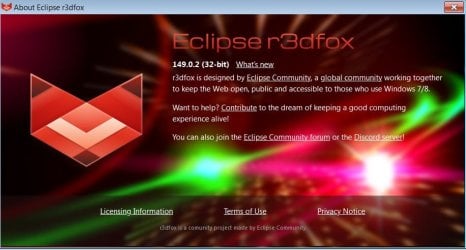
Updated to version - 149.0.2 (32bit)

RF 149.jpg
 

My Computers

System One System Two

  • Computer type
    Laptop
    Computer Manufacturer/Model Number
    Lenovo 3000 N100
    OS
    Windows 7 Ultimate 32-bit SP1 since 2010
    CPU
    Intel Mobile Core 2 Duo T5200 @ 1.60GHz
    Motherboard
    LENOVO CAPELL VALLEY(NAPA) CRB (U2E1)
    Memory
    2,00GB Dual-Channel DDR2 @ 265MHz
    Graphics Card(s)
    128MB NVIDIA GeForce Go 7300 (Lenovo) onboard
    Hard Drives
    120GB FUJITSU MHV2120BH PL ATA Device (SATA )
    Antivirus
    AVG Fee
    Browser
    SUPERMIUM Version 132.0.6834.226 (Official Build) (32-bit)
  • Computer type
    PC/Desktop
Here r3dfox works without any complaints.
Updated to version - 149.0.2 (32bit)
I'm surprised there appears to be no "automatic update" notices when a new version appears.

Thanks for posting, I'm updated now, using 64-bit.
 

My Computer

Computer type
Laptop
Computer Manufacturer/Model Number
Dell Latitude E6540 Laptop
OS
Windows 7 Professional 64bit
CPU
Intel Core i7 4600M @ 2.90GHz
Motherboard
Dell Inc. 0CYT5F (SOCKET 0)
Memory
16.0GB Dual-Channel DDR3 @ 797MHz (11-11-11-28)
Graphics Card(s)
Intel HD Graphics 4600 (Dell) 2048MB ATI AMD Radeon HD 8790M
Sound Card
Realtek High Definition Audio
Monitor(s) Displays
HP ZR30w (2560x1600@60Hz)
Hard Drives
256GB LITEONIT LMT-256M6M-41 mm SATA (SSD)
1TB Samsung SSD 860 EVO mSATA SATA (SSD)
2TB USB 3.0 USB Device
115GB SanDisk Ultra Fit USB
Other Info
Multiple Dell E-Port Plus II Port Replicator/Docking Stations 0Y72NH USB 3.0 + 130W AC Adapters
I tried using pale moon but didn't like it. First off I couldn't use the 64-bit version because it requires an instruction set not used on my processor. I find it strange that FF doesn't use that but pale moon does. The error on 7 was generic, some kind of hex code. However trying to install it on 10 (for diagnostic purposes) gave me the full story. I couldn't even install it. I installed 32 bit but I experienced performance issues. I had an extreme lag and even browsing 7 forums caused my fan to start revving up. Generally I found the interface to be archaic and the plugins outdated. One of them didn't even work.

- - - Updated - - -

I decided to take the plunge and go with R3dfox rather than FF. I copied my FF profile and set it for that and it appears to be working however it doesn't look quite right. The menu and tabs are more shrunken compared to FF. Is this normal and can I correct it? When I tried R3dfox last year I created a new profile so I don't remember this happening but I'm not for sure. I'm posting a screenshot of each. Oh I installed a new theme and I have the same issue so it's not like something is wrong with the one I had. I suppose that this cosmetic. I tried looking through the setting that they have and can't figure them out. They seemed to change nothing.

Just to test I got out the backed up copy of my F3dfox test from last year and it's doing the same thing as is a brand new profile. It's also got aero.
 

Attachments

  • FF.JPG
    FF.JPG
    38.8 KB · Views: 1
  • R3dfox.JPG
    R3dfox.JPG
    32.2 KB · Views: 1

My Computers

System One System Two

I decided to take the plunge and go with R3dfox rather than FF. I copied my FF profile and set it for that and it appears to be working however it doesn't look quite right. The menu and tabs are more shrunken compared to FF.

Don't know if any of this will help, but I'll offer a few observations.

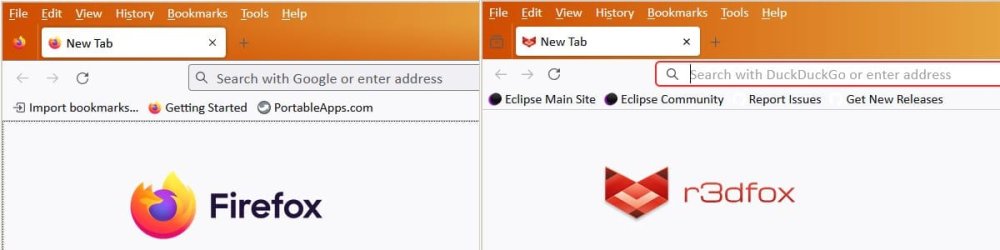
Here's a side-by-side with fresh default configs of FF 115 and R3dfox 147, with no previous profile.

ff-vs-r3dfox.jpg

(I'm illustrating portable installations of both so as to be certain they're not pulling any prior config from the registry or old profiles anywhere. The orange colors are my Win7 OS default window colors, so ignore.)

Note there's still a slight vertical compression, but not much. The conclusion I draw from this is there's not much difference in the basic source code of one browser vs. the other, and so the differences you're noticing must have more to do with how you've customized each browser.

Next, I saved/downloaded your screenshots in post #19, and noticed they appear to have different dimensions. The upper image appears to be 997 pixels wide and lower image is 1603 wide. In post #19 the forum software seems to rescale them to appear as the same width, so it stands to reason the lower image will look more compressed. When the two images are viewed side-by-side at the same resolution, they look like this:

towsbg-ff-vs-r3efox.jpg

Notice there's still some compression, but much less than the screenshots in post #19 might lead one to believe.

You might try ditching the old profile and starting from scratch. Without carefully going through the old profiles, you don't know for sure what is causing the apprearance changes and so don't know what to do about it.

Without having to preserve them from the old profile, bookmarks can easily be exported/imported, and extensions can simply be reinstalled anew.

Also, try scanning about:config and prefs.js to see if anything jumps out at you.

In addition, there are probably css options to tweak the browser window metrics. I haven't bothered to explore Firefox's userChrome.css file, but I have used it to alter Mozilla Thunderbird so it's more to my liking, so that may give you similar control over FF or the forks.
 

My Computer

Computer type
PC/Desktop
Computer Manufacturer/Model Number
Dell Optiplex 7050
OS
Windows 7/8.1/10 multiboot
CPU
Intel Core i7-7700
Motherboard
Dell, Intel Q270 chipset
Memory
48GB (2x16GB Crucial DDR4-3200 + 2x8GB Hynix DDR4-2400)
Graphics Card(s)
Intel HD630 + AMD Radeon R7 450 PCIe
Monitor(s) Displays
Asus VC279 (27")
Screen Resolution
1920x1080
Hard Drives
Toshiba M.2 NVMe (256GB),
Samsung 960 Evo (500GB),
WD Red Plus 80EFBX (8TB)
Back
Top