***HDMI + ATI + REALTEK = ISSUE*** Need Expert Advice

Have you had any HDMI Issue with Windows 7?


  • Total voters
    12

bdelariva

New member
Local time
3:33 PM
Messages
16
(((SOLVED))) ATI + REALTEK = No Sound**

Hey Guy,
This has been DRIVING me NUTS for the last 2 week so I finally decide to post my problem. Hopefully you guys can help.

Specs:
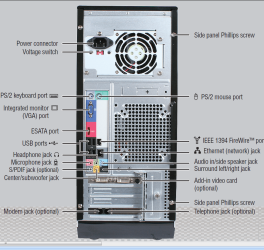
- Gateway FX6800-01e
- ATI 4850 Sapphire Video Card (with 2 DVI Ports)
- Onboard Audio via REALTEK HD
- Windows 7 Professional x64 (Retail)
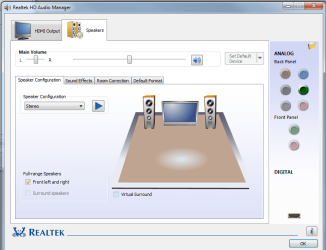
****Pics of PC, Device Manager, Realtek HD Manager Below***

Issue:
I did a fresh install of Windows 7 Professional x64 (Retail) and everything is running prefectly except ONE THING. I'm not able to get sound from my HDMI to my TV. I previously had Vista Home Premium x64 running to my TV and it was working WITH SOUND fine but ever since I upgraded it not working. So I know its not a hardware/setup issue.

FYI - I do get VIDEO on the TV

Setup:
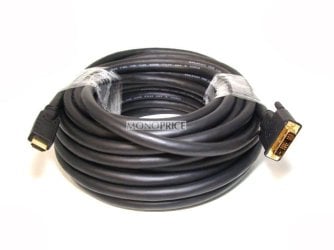
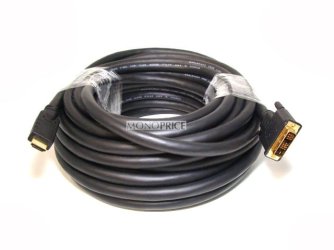
I have my Primary Display via DVI to my monitor on my desk. I have my Secondary Monitor (My TV) hooked up via a DVI to HDMI cable (not ATI but it shouldn't matter since it was working before)

Attempts to fix:
- I'm aware on how my setting are suppose to be on REALTEK manager and/or my Device Manager.
- Updated to the latest ATI Cat Driver 9.10 , Realtek Drivers R2.36, & Realtek HDMI Driver R2.35
- I tried old ATI CAT drivers

I'm thinking is a DRIVER issue but I'm not 100% sure.

I've been reading forums everywhere at it seems like some of the community has been having this issue but hasn't found a solution. I'm hoping to get this fix or myself and the community

I can really use some expert advice


***********UPDATE**************

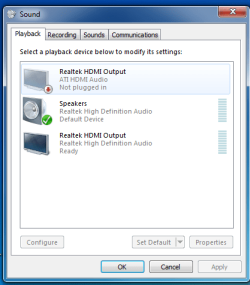
I was able to solve the issue. I purchase the original ATI DVI to HDMI adapter off ebay for like $5 dollars. Now my ATI driver is up and working. Its showing up an "READY". See below

So the ATI Adapter was the problem
 

Attachments
  • Sound.png
    Sound.png
    15.7 KB · Views: 63
  • Realtek.png
    Realtek.png
    43 KB · Views: 98
  • Gateway.png
    Gateway.png
    282.7 KB · Views: 198
  • Cable.jpg
    Cable.jpg
    52.1 KB · Views: 37
  • Untitled.png
    Untitled.png
    18 KB · Views: 25
  • 315853001_tp.jpg
    315853001_tp.jpg
    17.7 KB · Views: 22
Last edited:

My Computer My Computer

Computer Manufacturer/Model Number
Gateway FX6800-01e
OS
Windows 7 Professional x64 - Retail
CPU
Intel(R) Core(TM) i7 CPU 920 @ 2.67GHz (8 CPUs), ~2
n/m didnt see that part of post.
 

My Computer My Computer

Computer Manufacturer/Model Number
Home Built
OS
Windows 7 Ultimate x64 RTM
CPU
AMD Athlon II X2 240 @ 3.2Ghz
Motherboard
Gigabyte GA-MA785GMT-UD2H
Memory
6GB Mushkin DDR3 PC-1333
Graphics Card(s)
ATI Radeon HD 4200 IGP Hybrid CrossFireX w\ Sapphire HD3450
Sound Card
Onboard Realtek HD audio controller
Monitor(s) Displays
D-SUB: LG W2343T-PF 23" LCD HDMI: LG 32LH20 32" LCD
Screen Resolution
1920*1080
Hard Drives
WD Caviar Green 1TB SATA3
PSU
Cooler Master Elite Power 400W
Case
Cooler Master Elite 360
Cooling
AMD Stock :)
Keyboard
Crappy wirelss logitech
Mouse
crappy wireless logitech
Internet Speed
792k
set HDMI as default.

also do you have the adaptor in the same DVI port as when you had vista?
 

My Computer My Computer

Computer Manufacturer/Model Number
Home Built
OS
Windows 7 Ultimate x64 RTM
CPU
AMD Athlon II X2 240 @ 3.2Ghz
Motherboard
Gigabyte GA-MA785GMT-UD2H
Memory
6GB Mushkin DDR3 PC-1333
Graphics Card(s)
ATI Radeon HD 4200 IGP Hybrid CrossFireX w\ Sapphire HD3450
Sound Card
Onboard Realtek HD audio controller
Monitor(s) Displays
D-SUB: LG W2343T-PF 23" LCD HDMI: LG 32LH20 32" LCD
Screen Resolution
1920*1080
Hard Drives
WD Caviar Green 1TB SATA3
PSU
Cooler Master Elite Power 400W
Case
Cooler Master Elite 360
Cooling
AMD Stock :)
Keyboard
Crappy wirelss logitech
Mouse
crappy wireless logitech
Internet Speed
792k
set HDMI as default.

also do you have the adaptor in the same DVI port as when you had vista?

Yes,
I've set the REALTEK HDMI OUT as Default. Through the Device Manager and I also trying setting it through the REALTEK HD Manager with NO LUCK. :(

Yes,
Its on the same port as my Vista Setup. I didn't touch any thing on my hardware since my FRESH install
 

My Computer My Computer

Computer Manufacturer/Model Number
Gateway FX6800-01e
OS
Windows 7 Professional x64 - Retail
CPU
Intel(R) Core(TM) i7 CPU 920 @ 2.67GHz (8 CPUs), ~2
Are you trying to set it as default with the speakers connected?
 

My Computer My Computer

Computer Manufacturer/Model Number
Home Built
OS
Windows 7 Ultimate x64 RTM
CPU
AMD Athlon II X2 240 @ 3.2Ghz
Motherboard
Gigabyte GA-MA785GMT-UD2H
Memory
6GB Mushkin DDR3 PC-1333
Graphics Card(s)
ATI Radeon HD 4200 IGP Hybrid CrossFireX w\ Sapphire HD3450
Sound Card
Onboard Realtek HD audio controller
Monitor(s) Displays
D-SUB: LG W2343T-PF 23" LCD HDMI: LG 32LH20 32" LCD
Screen Resolution
1920*1080
Hard Drives
WD Caviar Green 1TB SATA3
PSU
Cooler Master Elite Power 400W
Case
Cooler Master Elite 360
Cooling
AMD Stock :)
Keyboard
Crappy wirelss logitech
Mouse
crappy wireless logitech
Internet Speed
792k
Are you trying to set it as default with the speakers connected?

Yes,
I'm keeping my speakers connected as i normally would.


Let me give you a scenario:

When i was on Vista:
- I would change my default device to REALTEK HDMI output and after that I would play a movie and the sound & video would come out of my TV.

In Windows 7:
- When I change the default device to REALTEK HDMI output and I start a movie NO sound is pass through the DVI-HDMI but Video does show up.
 

Attachments

  • Sound2.png
    Sound2.png
    19.3 KB · Views: 39

My Computer My Computer

Computer Manufacturer/Model Number
Gateway FX6800-01e
OS
Windows 7 Professional x64 - Retail
CPU
Intel(R) Core(TM) i7 CPU 920 @ 2.67GHz (8 CPUs), ~2
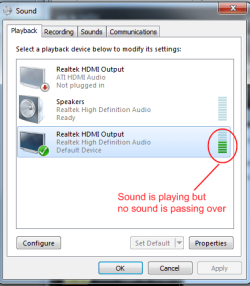
what motherbaord are you using? I am going to guess that it has onboard sound and you not only have it enabled but drivers installed so that you can use your speakers?

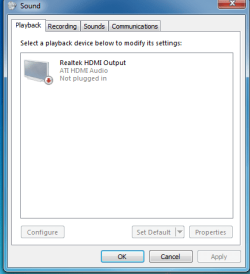
The sound controller on your ATI card is completely separate form the mobos onboard chip. you see that top option in your sound panel?
"ATI HDMI Audio"
 

My Computer My Computer

Computer Manufacturer/Model Number
Home Built
OS
Windows 7 Ultimate x64 RTM
CPU
AMD Athlon II X2 240 @ 3.2Ghz
Motherboard
Gigabyte GA-MA785GMT-UD2H
Memory
6GB Mushkin DDR3 PC-1333
Graphics Card(s)
ATI Radeon HD 4200 IGP Hybrid CrossFireX w\ Sapphire HD3450
Sound Card
Onboard Realtek HD audio controller
Monitor(s) Displays
D-SUB: LG W2343T-PF 23" LCD HDMI: LG 32LH20 32" LCD
Screen Resolution
1920*1080
Hard Drives
WD Caviar Green 1TB SATA3
PSU
Cooler Master Elite Power 400W
Case
Cooler Master Elite 360
Cooling
AMD Stock :)
Keyboard
Crappy wirelss logitech
Mouse
crappy wireless logitech
Internet Speed
792k
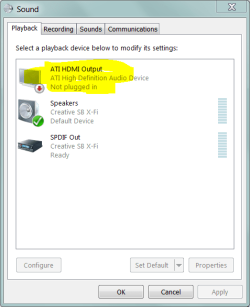
It looks like you need to add/update your ATI driver. The DVI port is on the ATI card, not the RealTek card.

Because the ATI HDMI device is not shown, this should mean Driver Issue.

.
 

Attachments

  • Capture.PNG
    Capture.PNG
    14.1 KB · Views: 64
It should have been automatically installed with the 9.10 cat suite...
 

My Computer My Computer

Computer Manufacturer/Model Number
Home Built
OS
Windows 7 Ultimate x64 RTM
CPU
AMD Athlon II X2 240 @ 3.2Ghz
Motherboard
Gigabyte GA-MA785GMT-UD2H
Memory
6GB Mushkin DDR3 PC-1333
Graphics Card(s)
ATI Radeon HD 4200 IGP Hybrid CrossFireX w\ Sapphire HD3450
Sound Card
Onboard Realtek HD audio controller
Monitor(s) Displays
D-SUB: LG W2343T-PF 23" LCD HDMI: LG 32LH20 32" LCD
Screen Resolution
1920*1080
Hard Drives
WD Caviar Green 1TB SATA3
PSU
Cooler Master Elite Power 400W
Case
Cooler Master Elite 360
Cooling
AMD Stock :)
Keyboard
Crappy wirelss logitech
Mouse
crappy wireless logitech
Internet Speed
792k
It should have been automatically installed with the 9.10 cat suite...

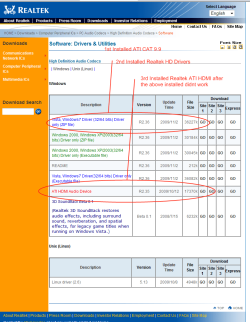
Exact Install Procedure I Took:
- Installed ATI CAT 9.10 Suite
- Installed Realtek HD Driver

**It didn't work**

So then I also installed:
- Installed Realtek ATI HDMI Drivers (on Realtek's website)

**Still didnt work


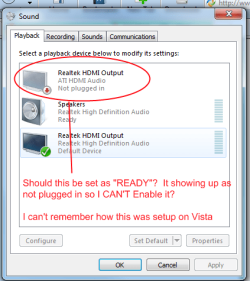
Should ATI HDMI Output show "READY"??? Can this be the problem?

I can't remember my setup on Vista
 

Attachments

  • Sound3.png
    Sound3.png
    21.9 KB · Views: 322

My Computer My Computer

Computer Manufacturer/Model Number
Gateway FX6800-01e
OS
Windows 7 Professional x64 - Retail
CPU
Intel(R) Core(TM) i7 CPU 920 @ 2.67GHz (8 CPUs), ~2
Okay some info on my setup I have onboard HD4200 w/ HDMI out crossfired with a 3450 for extra power... luckily the 3450 i have has an HDMI out as well. The reason i crossfire instead of using the discreet by itself is becase I want that little extra power, and I only have a 5.1 speaker setup and capable receiver so I use the realtek S/PDIF to receiver for audio and mobo HDMI for video

I went into bios and disabled onbard video, allowing the 3450 to take on the role of supplying HDMI audio through its onboard controller, however I left the realtek onboard for the mobo enabled as well... and I end up with the same problem as you bdelariva... the onboard does not want to play nice with the ATI controller... I can not get it to set as default for audio... even with drivers installed.... now if you will excuse me for a few minutes I have to reboot and restore...
 

My Computer My Computer

Computer Manufacturer/Model Number
Home Built
OS
Windows 7 Ultimate x64 RTM
CPU
AMD Athlon II X2 240 @ 3.2Ghz
Motherboard
Gigabyte GA-MA785GMT-UD2H
Memory
6GB Mushkin DDR3 PC-1333
Graphics Card(s)
ATI Radeon HD 4200 IGP Hybrid CrossFireX w\ Sapphire HD3450
Sound Card
Onboard Realtek HD audio controller
Monitor(s) Displays
D-SUB: LG W2343T-PF 23" LCD HDMI: LG 32LH20 32" LCD
Screen Resolution
1920*1080
Hard Drives
WD Caviar Green 1TB SATA3
PSU
Cooler Master Elite Power 400W
Case
Cooler Master Elite 360
Cooling
AMD Stock :)
Keyboard
Crappy wirelss logitech
Mouse
crappy wireless logitech
Internet Speed
792k
The difference between 'should' and 'did'.

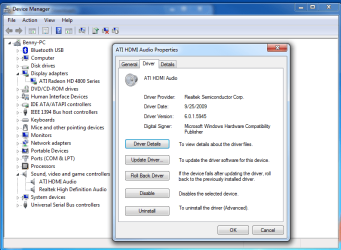
Let's try a different approach - confirm the existence of a loaded driver.

.


Currently running the REALTEK ATI HDMI Drivers
 

Attachments

  • Drvers.png
    Drvers.png
    36.5 KB · Views: 277
  • Drvers2.png
    Drvers2.png
    50.5 KB · Views: 596

My Computer My Computer

Computer Manufacturer/Model Number
Gateway FX6800-01e
OS
Windows 7 Professional x64 - Retail
CPU
Intel(R) Core(TM) i7 CPU 920 @ 2.67GHz (8 CPUs), ~2
Okay some info on my setup I have onboard HD4200 w/ HDMI out crossfired with a 3450 for extra power... luckily the 3450 i have has an HDMI out as well. The reason i crossfire instead of using the discreet by itself is becase I want that little extra power, and I only have a 5.1 speaker setup and capable receiver so I use the realtek S/PDIF to receiver for audio and mobo HDMI for video

I went into bios and disabled onbard video, allowing the 3450 to take on the role of supplying HDMI audio through its onboard controller, however I left the realtek onboard for the mobo enabled as well... and I end up with the same problem as you bdelariva... the onboard does not want to play nice with the ATI controller... I can not get it to set as default for audio... even with drivers installed.... now if you will excuse me for a few minutes I have to reboot and restore...


My video is not ONBOARD only the audio is ONBOARD. I don't want to run another S/PDIF cable because its 25ft away and my HDMI is running through the walls.

Getting this fix is my priority
 

My Computer My Computer

Computer Manufacturer/Model Number
Gateway FX6800-01e
OS
Windows 7 Professional x64 - Retail
CPU
Intel(R) Core(TM) i7 CPU 920 @ 2.67GHz (8 CPUs), ~2
Maybe you should read my post fully. I completely replicated your setup using my hardware... same issue... I don't know why it was working in vista... but I got the exact same problem as you...
 

My Computer My Computer

Computer Manufacturer/Model Number
Home Built
OS
Windows 7 Ultimate x64 RTM
CPU
AMD Athlon II X2 240 @ 3.2Ghz
Motherboard
Gigabyte GA-MA785GMT-UD2H
Memory
6GB Mushkin DDR3 PC-1333
Graphics Card(s)
ATI Radeon HD 4200 IGP Hybrid CrossFireX w\ Sapphire HD3450
Sound Card
Onboard Realtek HD audio controller
Monitor(s) Displays
D-SUB: LG W2343T-PF 23" LCD HDMI: LG 32LH20 32" LCD
Screen Resolution
1920*1080
Hard Drives
WD Caviar Green 1TB SATA3
PSU
Cooler Master Elite Power 400W
Case
Cooler Master Elite 360
Cooling
AMD Stock :)
Keyboard
Crappy wirelss logitech
Mouse
crappy wireless logitech
Internet Speed
792k
Adaptor

A)To ensure that you will get sound from hdmi with ati graphics cards...
Use the ORIGINAL adapter,the one that came with your ati graphic card.
Believe me is important.I know you can buy as many adaptors you like from ebay or… BUT the ORIGINAL adapter have something emmm....<<special?>> i dont know what exactly but is there.
B)Before installing the catalyst remove the second monitor(just unplack the wire from the adaptor)then when finishing setup/restart put back again the second monitor with the ORIGINAL adaptor this way the sound will automatically activated on it.
C)Remember to increase the HDMI volume to max,(ATI HDMI Output-properties-volume)
Because from default is set to min.
(common sence use the ORIGINAL in the monitor you want the sound)
Is NOT possible to use 2(two) ORIGINALS adaptors the same time and having sound from both monitors,just one.
 

My Computer My Computer

Computer Manufacturer/Model Number
Custom Built by me.
OS
Windows 7 Ultimate 64bit SP1
CPU
Intel Core 2 Quad Q6600
Motherboard
Gigabyte GA-X38-DS4
Memory
2X2GB DDR2 PC6400 800MHZ DUAL CHANNEL
Graphics Card(s)
XFX RADEON HD 6850 1GB GDDR5
Sound Card
2/4/5.1/7.1-channel Realtek High Definition
Monitor(s) Displays
Samsung LE40A656F1 1080p 100Hz LCD HD TV 50,000:1
Screen Resolution
1366x768 in Desktop,1920x1080p in gaming and video
Hard Drives
C:\WD VelociRaptor 150 GB,10,000 RPM
E:\WESTERN DIGITAL WD15EADS 1.5TB CAVIAR GREEN SATA2 F:\WESTERN DIGITAL WD15EADS 1.5TB CAVIAR GREEN SATA2
PSU
THERMALTAKE W0229 TOUGHPOWER XT 750W
Case
A-Case Twin Engine BB
Cooling
3 x thermaltake smart case fan II + 1 arctic cooling fan
Keyboard
Wireless Logitech LX710
Mouse
Logitech Wireless Gaming Mouse G700
Internet Speed
ADSL 12000 plus
Other Info
Mouse Logitech G700,with 13 buttons who needs keyboard in RPG?

D:\Sony high speed sata Dvd Rewriter
Logitech Cordless Rumblepad 2
A)To ensure that you will get sound from hdmi with ati graphics cards...
Use the ORIGINAL adapter,the one that came with your ati graphic card.
Believe me is important.I know you can buy as many adaptors you like from ebay or… BUT the ORIGINAL adapter have something emmm....<<special?>> i dont know what exactly but is there.
B)Before installing the catalyst remove the second monitor(just unplack the wire from the adaptor)then when finishing setup/restart put back again the second monitor with the ORIGINAL adaptor this way the sound will automatically activated on it.
C)Remember to increase the HDMI volume to max,(ATI HDMI Output-properties-volume)
Because from default is set to min.
(common sence use the ORIGINAL in the monitor you want the sound)
Is NOT possible to use 2(two) ORIGINALS adaptors the same time and having sound from both monitors,just one.

That's would really SUCK if I need the ORIGINAL ATI DVI-HDMI adapter because I have a 25foot DVI-HDMI cable running through my wall. :(

That mean i would need to run a NEW Male to Female HDMI cable. If no solution is found I'm going to buy a WD Media box which is last resort

Any other suggestion?


There has to be an ANSWER out there.
 

Attachments

  • Cable.jpg
    Cable.jpg
    52.1 KB · Views: 17

My Computer My Computer

Computer Manufacturer/Model Number
Gateway FX6800-01e
OS
Windows 7 Professional x64 - Retail
CPU
Intel(R) Core(TM) i7 CPU 920 @ 2.67GHz (8 CPUs), ~2
Well i am not... I am simply illustrating that what we need to be looking at is trying to get the mobo chip and ATI chip to play nice... I should also add that when i disabled the mobo audio , ATI HDMI worked without fail... this is most definitely a conflict between the onboard audio and the ATI audio controller
 

My Computer My Computer

Computer Manufacturer/Model Number
Home Built
OS
Windows 7 Ultimate x64 RTM
CPU
AMD Athlon II X2 240 @ 3.2Ghz
Motherboard
Gigabyte GA-MA785GMT-UD2H
Memory
6GB Mushkin DDR3 PC-1333
Graphics Card(s)
ATI Radeon HD 4200 IGP Hybrid CrossFireX w\ Sapphire HD3450
Sound Card
Onboard Realtek HD audio controller
Monitor(s) Displays
D-SUB: LG W2343T-PF 23" LCD HDMI: LG 32LH20 32" LCD
Screen Resolution
1920*1080
Hard Drives
WD Caviar Green 1TB SATA3
PSU
Cooler Master Elite Power 400W
Case
Cooler Master Elite 360
Cooling
AMD Stock :)
Keyboard
Crappy wirelss logitech
Mouse
crappy wireless logitech
Internet Speed
792k
Well i am not... I am simply illustrating that what we need to be looking at is trying to get the mobo chip and ATI chip to play nice... I should also add that when i disabled the mobo audio , ATI HDMI worked without fail... this is most definitely a conflict between the onboard audio and the ATI audio controller

Hmmmm,
When I disable my onboard sound I was still not able to get the HDMI sound.

I wonder if the ATI HDMI OUTPUT should be in a "READY" state instead of the "Not Plugged IN"

Can some post their DEVICE MANAGER with the AT HDMI OUTPUT?

See device manager below:
 

Attachments

  • Sound 4.png
    Sound 4.png
    10.7 KB · Views: 8

My Computer My Computer

Computer Manufacturer/Model Number
Gateway FX6800-01e
OS
Windows 7 Professional x64 - Retail
CPU
Intel(R) Core(TM) i7 CPU 920 @ 2.67GHz (8 CPUs), ~2
hdmi to hdmi 2

A)To ensure that you will get sound from hdmi with ati graphics cards...
Use the ORIGINAL adapter,the one that came with your ati graphic card.
Believe me is important.I know you can buy as many adaptors you like from ebay or… BUT the ORIGINAL adapter have something emmm....<<special?>> i dont know what exactly but is there.
B)Before installing the catalyst remove the second monitor(just unplack the wire from the adaptor)then when finishing setup/restart put back again the second monitor with the ORIGINAL adaptor this way the sound will automatically activated on it.
C)Remember to increase the HDMI volume to max,(ATI HDMI Output-properties-volume)
Because from default is set to min.
(common sence use the ORIGINAL in the monitor you want the sound)
Is NOT possible to use 2(two) ORIGINALS adaptors the same time and having sound from both monitors,just one.

That's would really SUCK if I need the ORIGINAL ATI DVI-HDMI adapter because I have a 25foot DVI-HDMI cable running through my wall. :(

That mean i would need to run a NEW Male to Female HDMI cable. If no solution is found I'm going to buy a WD Media box which is last resort

Any other suggestion?


There has to be an ANSWER out there.
I never disable the onboard sound.
For the best results use HDMI-HDMI cable with the original adaptor,no dvi,and prefer to use the HDMI 2 port on your T.V. I notice with some monitors/T.V. the display is better when using the HDMI 2.
I personally have the ati 4890oc 1GB GDDR5
I have connected 2(two) T.V.
For the first t.v. i use NO original ati adaptor with HDMI-HDMI 6m cable,for sound the onboard realtek with logitech speakers.
For the second t.v. i use the ORIGINAL ati adaptor with HDMI-HDMI cable 15m.
When i want to watch a movie in the second tv i just set the ATI HDMI Outpot as default,THATS IT,no conflicts no problems in vista,and no problems with windows 7.
 

My Computer My Computer

Computer Manufacturer/Model Number
Custom Built by me.
OS
Windows 7 Ultimate 64bit SP1
CPU
Intel Core 2 Quad Q6600
Motherboard
Gigabyte GA-X38-DS4
Memory
2X2GB DDR2 PC6400 800MHZ DUAL CHANNEL
Graphics Card(s)
XFX RADEON HD 6850 1GB GDDR5
Sound Card
2/4/5.1/7.1-channel Realtek High Definition
Monitor(s) Displays
Samsung LE40A656F1 1080p 100Hz LCD HD TV 50,000:1
Screen Resolution
1366x768 in Desktop,1920x1080p in gaming and video
Hard Drives
C:\WD VelociRaptor 150 GB,10,000 RPM
E:\WESTERN DIGITAL WD15EADS 1.5TB CAVIAR GREEN SATA2 F:\WESTERN DIGITAL WD15EADS 1.5TB CAVIAR GREEN SATA2
PSU
THERMALTAKE W0229 TOUGHPOWER XT 750W
Case
A-Case Twin Engine BB
Cooling
3 x thermaltake smart case fan II + 1 arctic cooling fan
Keyboard
Wireless Logitech LX710
Mouse
Logitech Wireless Gaming Mouse G700
Internet Speed
ADSL 12000 plus
Other Info
Mouse Logitech G700,with 13 buttons who needs keyboard in RPG?

D:\Sony high speed sata Dvd Rewriter
Logitech Cordless Rumblepad 2
Any other suggestions?
 

My Computer My Computer

Computer Manufacturer/Model Number
Gateway FX6800-01e
OS
Windows 7 Professional x64 - Retail
CPU
Intel(R) Core(TM) i7 CPU 920 @ 2.67GHz (8 CPUs), ~2
Back
Top