stuttering in games. (mainly valve)

Type system information into start menu search box. Hit enter. Then in screen that pops up, do ctrl+s to save. Then Winrar the saved file. Attach the .rar to a post so we could check on a few things. Something might alert us or stand out.
 

My Computer My Computer

At a glance

7600.20510 x86P4 550 3.4 GHz HT running at 3.5 GHzOCZ 2 GB(2x1GB) DDR400mHz running @ 414 mHzHIS Radeon HD 3850 IceQ 3 Turbo HDMI Dual DL-...
Computer Manufacturer/Model Number
self built
OS
7600.20510 x86
CPU
P4 550 3.4 GHz HT running at 3.5 GHz
Motherboard
MSI PM8M3-V (MS-7211 v1.x) Micro-ATX mainboard
Memory
OCZ 2 GB(2x1GB) DDR400mHz running @ 414 mHz
Graphics Card(s)
HIS Radeon HD 3850 IceQ 3 Turbo HDMI Dual DL-DVI AGP
Sound Card
MOTU Traveler firewire studio interface 192 kHz 24 bit
Monitor(s) Displays
22" widescreen Acer X223W LCD, 17" Compaq P75 CRT
Screen Resolution
1680x1050 and 1280x1024
Hard Drives
SATA I x2 WD, 400 GB and 120 GB, SATA 2 WD Caviar Black 1 TB
PSU
350W generic
Case
Cybertronpc, it glows blue
Cooling
stock cpu fan, Ice-Q 3 gpu and system, many case fans
Keyboard
Logitch Classical Keyboard 200
Mouse
Logitech Mediaplay cordless
Internet Speed
1792/448 kbits/sec
Other Info
SATA II PCI fake RAID adapter, 1 GB Readyboost, original ATI Remote Wonder (even works with WMC perfectly), Logitech Rumblepad 2 game controller x2
i struggle to figure out why some1 playing a game online would have so much stuff running behind the game......does it do it in single player and did you turn off multi-core? you have way too many things running in the background....also, what kind of internet connection do you have?
 

My Computer My Computer

At a glance

windows 7 ultimatecore 2 quad q66004GB OCZ DDR3nvidia geforce 8800 gts
Computer Manufacturer/Model Number
home built
OS
windows 7 ultimate
CPU
core 2 quad q6600
Motherboard
asus p5k3 deluxe
Memory
4GB OCZ DDR3
Graphics Card(s)
nvidia geforce 8800 gts
Sound Card
soundblaster x-fi xtreme
Monitor(s) Displays
viewsonic va2226
Case
soprano dx
Keyboard
logitech G-15
Mouse
logitech G5
Internet Speed
AT&T U-Verse 18MBS
i struggle to figure out why some1 playing a game online would have so much stuff running behind the game......does it do it in single player and did you turn off multi-core? you have way too many things running in the background....also, what kind of internet connection do you have?

I struggle to figure out why anybody would "turn off multi-core"? Can you explain that in more detail?
 

My Computer My Computer

At a glance

Win7x64
Computer Manufacturer/Model Number
Multiple machines in various stages of decomposition.
OS
Win7x64
i struggle to figure out why some1 playing a game online would have so much stuff running behind the game......does it do it in single player and did you turn off multi-core? you have way too many things running in the background....also, what kind of internet connection do you have?

I struggle to figure out why anybody would "turn off multi-core"? Can you explain that in more detail?

Because even Valve admits that it is buggy as hell. It often causes rather unstable frame rates. The multi-core rendering Valve has implemented for source engine games is still pretty much in beta.
 

My Computer My Computer

At a glance

Windows 7 Home x64
OS
Windows 7 Home x64
Because even Valve admits that it is buggy as hell. It often causes rather unstable frame rates. The multi-core rendering Valve has implemented for source engine games is still pretty much in beta.
If this is true....I can't believe we are trying to troubleshoot such pos lol.
 

My Computer My Computer

At a glance

7600.20510 x86P4 550 3.4 GHz HT running at 3.5 GHzOCZ 2 GB(2x1GB) DDR400mHz running @ 414 mHzHIS Radeon HD 3850 IceQ 3 Turbo HDMI Dual DL-...
Computer Manufacturer/Model Number
self built
OS
7600.20510 x86
CPU
P4 550 3.4 GHz HT running at 3.5 GHz
Motherboard
MSI PM8M3-V (MS-7211 v1.x) Micro-ATX mainboard
Memory
OCZ 2 GB(2x1GB) DDR400mHz running @ 414 mHz
Graphics Card(s)
HIS Radeon HD 3850 IceQ 3 Turbo HDMI Dual DL-DVI AGP
Sound Card
MOTU Traveler firewire studio interface 192 kHz 24 bit
Monitor(s) Displays
22" widescreen Acer X223W LCD, 17" Compaq P75 CRT
Screen Resolution
1680x1050 and 1280x1024
Hard Drives
SATA I x2 WD, 400 GB and 120 GB, SATA 2 WD Caviar Black 1 TB
PSU
350W generic
Case
Cybertronpc, it glows blue
Cooling
stock cpu fan, Ice-Q 3 gpu and system, many case fans
Keyboard
Logitch Classical Keyboard 200
Mouse
Logitech Mediaplay cordless
Internet Speed
1792/448 kbits/sec
Other Info
SATA II PCI fake RAID adapter, 1 GB Readyboost, original ATI Remote Wonder (even works with WMC perfectly), Logitech Rumblepad 2 game controller x2
I struggle to figure out why we are trying to find the solution for valve softoware.... ;) Don't get me wrong I use valve software, doesn't mean I like to. ;) haha
 

My Computer My Computer

At a glance

Windows 7, LinuxAMD Phemon II x2 3@37501G Crucial 16668800GT OC (custom OC)
Computer Manufacturer/Model Number
Custom
OS
Windows 7, Linux
CPU
AMD Phemon II x2 3@3750
Motherboard
ASRock M3A770DE
Memory
1G Crucial 1666
Graphics Card(s)
8800GT OC (custom OC)
Sound Card
Sound Blaster Live! (never changes!)
Monitor(s) Displays
Vivitron 22"
Screen Resolution
1600x1200
Hard Drives
Western Digital 120G/160G SATA
Maxtor 80G IDE
PSU
450w
Case
Unknown
Cooling
Custom Air cooled
Keyboard
Logitech
Mouse
Logitech M-BZ15A Laser
Internet Speed
Cable 10mbit
Well i mean ive had a few hiccups out of game watching a movie and what not. thats why i cant get it going constant, if you guys still want to give it a shot here is that file.
 

Attachments

My Computer My Computer

At a glance

windows 7 professional 64 bitintel core i7 920 (1366)Corsair Dominators (TR3X6G1600C8D)Sapphire 5970
OS
windows 7 professional 64 bit
CPU
intel core i7 920 (1366)
Motherboard
Asus P6T Deluxe V2
Memory
Corsair Dominators (TR3X6G1600C8D)
Graphics Card(s)
Sapphire 5970
Sound Card
on board / Asus Xonar D2
Monitor(s) Displays
lg flatron wide 22" 2x
Hard Drives
caviar black 1tb
caviar green 1tb

external western digital my book 1tb
external western my book digital 500gb
PSU
corsair 750w
Case
antec 1200
Cooling
sythek mugen - 2
Keyboard
flico maje
Mouse
g500
Internet Speed
comcast houstont x, 16mb down with boost. 2mb up
The system looks suprisingly well although I did notice you didn't uninstall the 3d Steroscopic NVIDIA driver.

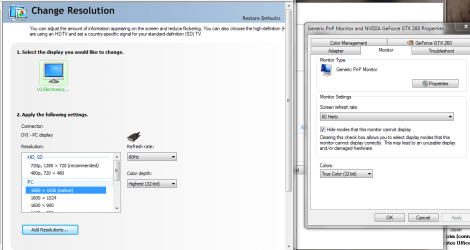
I also noticed your refesh rate is 59 Hz. Perhaps give this thread a read....Somewhere in the middle of it is a fix.

http://www.sevenforums.com/graphic-cards/1792-59hz.html
 

My Computer My Computer

At a glance

7600.20510 x86P4 550 3.4 GHz HT running at 3.5 GHzOCZ 2 GB(2x1GB) DDR400mHz running @ 414 mHzHIS Radeon HD 3850 IceQ 3 Turbo HDMI Dual DL-...
Computer Manufacturer/Model Number
self built
OS
7600.20510 x86
CPU
P4 550 3.4 GHz HT running at 3.5 GHz
Motherboard
MSI PM8M3-V (MS-7211 v1.x) Micro-ATX mainboard
Memory
OCZ 2 GB(2x1GB) DDR400mHz running @ 414 mHz
Graphics Card(s)
HIS Radeon HD 3850 IceQ 3 Turbo HDMI Dual DL-DVI AGP
Sound Card
MOTU Traveler firewire studio interface 192 kHz 24 bit
Monitor(s) Displays
22" widescreen Acer X223W LCD, 17" Compaq P75 CRT
Screen Resolution
1680x1050 and 1280x1024
Hard Drives
SATA I x2 WD, 400 GB and 120 GB, SATA 2 WD Caviar Black 1 TB
PSU
350W generic
Case
Cybertronpc, it glows blue
Cooling
stock cpu fan, Ice-Q 3 gpu and system, many case fans
Keyboard
Logitch Classical Keyboard 200
Mouse
Logitech Mediaplay cordless
Internet Speed
1792/448 kbits/sec
Other Info
SATA II PCI fake RAID adapter, 1 GB Readyboost, original ATI Remote Wonder (even works with WMC perfectly), Logitech Rumblepad 2 game controller x2
Ok hope nobody read the this cause it's an edit.

Code:
"[B]Make its initial size as big as the maximum size. [/B] Although this  will cause the Pagefile
to occupy more HD space, we do not want it to  start off small, then having to constantly
grow on the HD. Writing large  files (and the Pagefile is indeed large) to the HD will cause a
lot of  disk activity that will cause performance degradation. [B]Also, since the  Pagefile only 
grows in increments, you will probably cause Pagefile  fragmentation, adding more overhead
to the already stressed HD.[/B]"
http://www.petri.co.il/pagefile_optimization.htm

Goes back to one of my ideas of the HDD having performance issues. 5G is a lot for a paigefile, and if it was made over time the files may not be close together. Since it is one of the hardest files to defrag you usually get stuck with it "as is". This is another thing you could look at, cause as time progressed you started seeing this problem, you remove AV and it helped, but it's still their. Which makes me seem to believe the disc isn't reading files as quick as it shood somewhere else as well. All back to performance, The larger the hard drive you get the more you have to think about performance because the farther those files can fragment.
 

My Computer My Computer

At a glance

Windows 7, LinuxAMD Phemon II x2 3@37501G Crucial 16668800GT OC (custom OC)
Computer Manufacturer/Model Number
Custom
OS
Windows 7, Linux
CPU
AMD Phemon II x2 3@3750
Motherboard
ASRock M3A770DE
Memory
1G Crucial 1666
Graphics Card(s)
8800GT OC (custom OC)
Sound Card
Sound Blaster Live! (never changes!)
Monitor(s) Displays
Vivitron 22"
Screen Resolution
1600x1200
Hard Drives
Western Digital 120G/160G SATA
Maxtor 80G IDE
PSU
450w
Case
Unknown
Cooling
Custom Air cooled
Keyboard
Logitech
Mouse
Logitech M-BZ15A Laser
Internet Speed
Cable 10mbit
Hi mushroomboy,

Something I learned from an expert here, is that with enough ram (and 6gb of ram is more than enough), the pagefile just sits there.
It is not actually being used, and will only come into play in case of a crash,
to be able to create a dumpfile.
So changing it's location or shrinking it will have no effect what so ever on performance, let alone solve the OP's problem.

Greetings

Edit: FYI, I have the pagefile totally disabled, which I don't recommend for everyone.
 

My Computer My Computer

At a glance

Win7 Build 7600 x86Pentium II 300MHz32mb EDO RAMDiamond Viper
OS
Win7 Build 7600 x86
CPU
Pentium II 300MHz
Motherboard
Asus
Memory
32mb EDO RAM
Graphics Card(s)
Diamond Viper
Sound Card
Soundblaster 16
Monitor(s) Displays
14" AOC CRT 16K color
Screen Resolution
800x600
Hard Drives
300mb Quantum fireball
PSU
110 Watts
Cooling
Passive
Keyboard
Trust Ergonomic
Mouse
Generic
Internet Speed
256K u 128K d
Ok hope nobody read the this cause it's an edit.

Code:
"[B]Make its initial size as big as the maximum size. [/B] Although this  will cause the Pagefile
to occupy more HD space, we do not want it to  start off small, then having to constantly
grow on the HD. Writing large  files (and the Pagefile is indeed large) to the HD will cause a
lot of  disk activity that will cause performance degradation. [B]Also, since the  Pagefile only 
grows in increments, you will probably cause Pagefile  fragmentation, adding more overhead
to the already stressed HD.[/B]"
How can I optimize the Windows 2000/XP/2003 virtual memory (Pagefile)?

Goes back to one of my ideas of the HDD having performance issues. 5G is a lot for a paigefile, and if it was made over time the files may not be close together. Since it is one of the hardest files to defrag you usually get stuck with it "as is". This is another thing you could look at, cause as time progressed you started seeing this problem, you remove AV and it helped, but it's still their. Which makes me seem to believe the disc isn't reading files as quick as it shood somewhere else as well. All back to performance, The larger the hard drive you get the more you have to think about performance because the farther those files can fragment.

The article you referred to is from 2003 when people had systems with 256mb ram.

This article can be thrown in the dustbin, because it doesn't apply for modern computers any more.

greetings
 

My Computer My Computer

At a glance

Win7 Build 7600 x86Pentium II 300MHz32mb EDO RAMDiamond Viper
OS
Win7 Build 7600 x86
CPU
Pentium II 300MHz
Motherboard
Asus
Memory
32mb EDO RAM
Graphics Card(s)
Diamond Viper
Sound Card
Soundblaster 16
Monitor(s) Displays
14" AOC CRT 16K color
Screen Resolution
800x600
Hard Drives
300mb Quantum fireball
PSU
110 Watts
Cooling
Passive
Keyboard
Trust Ergonomic
Mouse
Generic
Internet Speed
256K u 128K d
The system looks suprisingly well although I did notice you didn't uninstall the 3d Steroscopic NVIDIA driver.

I also noticed your refesh rate is 59 Hz. Perhaps give this thread a read....Somewhere in the middle of it is a fix.

http://www.sevenforums.com/graphic-cards/1792-59hz.html


the 3d thing i was going to do it but i was going to read some into it but it slippped my mind
and that 3d stero thing is now gone.

i checked the hz it said 60 both on monitor and gfx settings, and it still says it now.

and i just now did it how they did it, i added a custom resolution and put it .01 higher just to be sure.
 

Attachments

  • hz.PNG
    hz.PNG
    36.2 KB · Views: 65
Last edited:

My Computer My Computer

At a glance

windows 7 professional 64 bitintel core i7 920 (1366)Corsair Dominators (TR3X6G1600C8D)Sapphire 5970
OS
windows 7 professional 64 bit
CPU
intel core i7 920 (1366)
Motherboard
Asus P6T Deluxe V2
Memory
Corsair Dominators (TR3X6G1600C8D)
Graphics Card(s)
Sapphire 5970
Sound Card
on board / Asus Xonar D2
Monitor(s) Displays
lg flatron wide 22" 2x
Hard Drives
caviar black 1tb
caviar green 1tb

external western digital my book 1tb
external western my book digital 500gb
PSU
corsair 750w
Case
antec 1200
Cooling
sythek mugen - 2
Keyboard
flico maje
Mouse
g500
Internet Speed
comcast houstont x, 16mb down with boost. 2mb up
...
and i just now did it how they did it, i added a custom resolution and put it .01 higher just to be sure.

Do you still get this "stuttering" symptom presently? If so, are you willing to try following some instructions to log data in order to understand it better?
 

My Computer My Computer

At a glance

Win7x64
Computer Manufacturer/Model Number
Multiple machines in various stages of decomposition.
OS
Win7x64
so far i havent got any stuttering, but i still haven't done a satisfying amount of testing i been a bit busy today, but as of tonight i will be doing more testing and report back.

yes i will be willing to cooperate whatever it takes to get rid of this mini beast

i could even start the logging now if you would like,
 

My Computer My Computer

At a glance

windows 7 professional 64 bitintel core i7 920 (1366)Corsair Dominators (TR3X6G1600C8D)Sapphire 5970
OS
windows 7 professional 64 bit
CPU
intel core i7 920 (1366)
Motherboard
Asus P6T Deluxe V2
Memory
Corsair Dominators (TR3X6G1600C8D)
Graphics Card(s)
Sapphire 5970
Sound Card
on board / Asus Xonar D2
Monitor(s) Displays
lg flatron wide 22" 2x
Hard Drives
caviar black 1tb
caviar green 1tb

external western digital my book 1tb
external western my book digital 500gb
PSU
corsair 750w
Case
antec 1200
Cooling
sythek mugen - 2
Keyboard
flico maje
Mouse
g500
Internet Speed
comcast houstont x, 16mb down with boost. 2mb up
i struggle to figure out why some1 playing a game online would have so much stuff running behind the game......does it do it in single player and did you turn off multi-core? you have way too many things running in the background....also, what kind of internet connection do you have?

I struggle to figure out why anybody would "turn off multi-core"? Can you explain that in more detail?

if you read steam forums and the stutter problem...this seems to be the only fix. just because its a setting...doesn't mean it works. i know it fixed my stutter prob. when i turned it off.
 

My Computer My Computer

At a glance

windows 7 ultimatecore 2 quad q66004GB OCZ DDR3nvidia geforce 8800 gts
Computer Manufacturer/Model Number
home built
OS
windows 7 ultimate
CPU
core 2 quad q6600
Motherboard
asus p5k3 deluxe
Memory
4GB OCZ DDR3
Graphics Card(s)
nvidia geforce 8800 gts
Sound Card
soundblaster x-fi xtreme
Monitor(s) Displays
viewsonic va2226
Case
soprano dx
Keyboard
logitech G-15
Mouse
logitech G5
Internet Speed
AT&T U-Verse 18MBS
i struggle to figure out why some1 playing a game online would have so much stuff running behind the game......does it do it in single player and did you turn off multi-core? you have way too many things running in the background....also, what kind of internet connection do you have?

I struggle to figure out why anybody would "turn off multi-core"? Can you explain that in more detail?

if you read steam forums and the stutter problem...this seems to be the only fix. just because its a setting...doesn't mean it works. i know it fixed my stutter prob. when i turned it off.

yea as of earlier i turned it off so im going to be doing some testing with it off, and if it happens again then we def know we have a problem.
 

My Computer My Computer

At a glance

windows 7 professional 64 bitintel core i7 920 (1366)Corsair Dominators (TR3X6G1600C8D)Sapphire 5970
OS
windows 7 professional 64 bit
CPU
intel core i7 920 (1366)
Motherboard
Asus P6T Deluxe V2
Memory
Corsair Dominators (TR3X6G1600C8D)
Graphics Card(s)
Sapphire 5970
Sound Card
on board / Asus Xonar D2
Monitor(s) Displays
lg flatron wide 22" 2x
Hard Drives
caviar black 1tb
caviar green 1tb

external western digital my book 1tb
external western my book digital 500gb
PSU
corsair 750w
Case
antec 1200
Cooling
sythek mugen - 2
Keyboard
flico maje
Mouse
g500
Internet Speed
comcast houstont x, 16mb down with boost. 2mb up
Uninstall your drivers, run driver sweeper in safe mode, then install the newest ones - including chipset drivers.
 

My Computer My Computer

At a glance

Windows 7 Ultimate x86-64[email protected] 1066MHz FSB6GB DDR3 1066MHz9300M GS 256MB Dedicated (Speed) + Intel4500M...
Computer Manufacturer/Model Number
Sony Vaio Z46GDU
OS
Windows 7 Ultimate x86-64
CPU
[email protected] 1066MHz FSB
Motherboard
Sony branded
Memory
6GB DDR3 1066MHz
Graphics Card(s)
9300M GS 256MB Dedicated (Speed) + Intel4500MHD (Stamina)
Sound Card
Realtek HD Audio
Monitor(s) Displays
13.1' WXGA
Screen Resolution
1600x900
Hard Drives
320GB 7200RPM w/ 16MB cache
Internet Speed
1MB/s
so far i havent got any stuttering, but i still haven't done a satisfying amount of testing i been a bit busy today, but as of tonight i will be doing more testing and report back.

yes i will be willing to cooperate whatever it takes to get rid of this mini beast

i could even start the logging now if you would like,

There's no point doing detailed logging if the problem is not happening currently. If it does come back, despite the steps which have already been suggested (by others), let us know.
 

My Computer My Computer

At a glance

Win7x64
Computer Manufacturer/Model Number
Multiple machines in various stages of decomposition.
OS
Win7x64
well 30 mins here 40 mins there and everything has been looking ok, no common stutter, but keep an eye out for this thread, i will report back as soon as it happens so we can take it a step further.... just incase it does not happen again i want to say i love you guys and thanks for all your help.
 

My Computer My Computer

At a glance

windows 7 professional 64 bitintel core i7 920 (1366)Corsair Dominators (TR3X6G1600C8D)Sapphire 5970
OS
windows 7 professional 64 bit
CPU
intel core i7 920 (1366)
Motherboard
Asus P6T Deluxe V2
Memory
Corsair Dominators (TR3X6G1600C8D)
Graphics Card(s)
Sapphire 5970
Sound Card
on board / Asus Xonar D2
Monitor(s) Displays
lg flatron wide 22" 2x
Hard Drives
caviar black 1tb
caviar green 1tb

external western digital my book 1tb
external western my book digital 500gb
PSU
corsair 750w
Case
antec 1200
Cooling
sythek mugen - 2
Keyboard
flico maje
Mouse
g500
Internet Speed
comcast houstont x, 16mb down with boost. 2mb up
ok i think i am ready for some testing that you wanted me to go threw..

let me explain why, the stuttering that i had before is gone... there is a new type. its almost like a lag type thing and i cant explain it in detail. if you guys will be kind to put me threw the instructions of doing what you wanted me to doing for further testing im READY.

for some reason now i think it might have to do something with my sound it now crackles from time to time, i have a tf2 demo if you guys want me to upload to kinda show you what its doing.

I also get these quick freezes in the new codmw2 so i dont think its only valve games anymore.


http://rapidshare.com/files/306277628/lagfreeze.rar

there is a demo you can see some parts where i kinda get stuck for a split second.
 

My Computer My Computer

At a glance

windows 7 professional 64 bitintel core i7 920 (1366)Corsair Dominators (TR3X6G1600C8D)Sapphire 5970
OS
windows 7 professional 64 bit
CPU
intel core i7 920 (1366)
Motherboard
Asus P6T Deluxe V2
Memory
Corsair Dominators (TR3X6G1600C8D)
Graphics Card(s)
Sapphire 5970
Sound Card
on board / Asus Xonar D2
Monitor(s) Displays
lg flatron wide 22" 2x
Hard Drives
caviar black 1tb
caviar green 1tb

external western digital my book 1tb
external western my book digital 500gb
PSU
corsair 750w
Case
antec 1200
Cooling
sythek mugen - 2
Keyboard
flico maje
Mouse
g500
Internet Speed
comcast houstont x, 16mb down with boost. 2mb up
Back
Top