ATI Radeon 3650 HD AGP

thank you. can you tell where to look (the devices) and possibly help me with those drivers. I think I have the latest BIOS drivers
 

My Computer My Computer

At a glance

Windows 7 x32Pentium 4 2,4GHz2GbSapphire Radeon HD3650
OS
Windows 7 x32
CPU
Pentium 4 2,4GHz
Motherboard
Asus R4R800-V Deluxe
Memory
2Gb
Graphics Card(s)
Sapphire Radeon HD3650
please help me with those drivers
 

My Computer My Computer

At a glance

Windows 7 x32Pentium 4 2,4GHz2GbSapphire Radeon HD3650
OS
Windows 7 x32
CPU
Pentium 4 2,4GHz
Motherboard
Asus R4R800-V Deluxe
Memory
2Gb
Graphics Card(s)
Sapphire Radeon HD3650
Unfortunately, no I can't tell you where to look because I don't think Asus supports the board any longer. You're probably going to have to use XP only.

Bios does not use "drivers." Rather, it uses firmware. That's what is meant by "updating the bios." I doubt you are using the latest one ever made for the board, but could be possible.

Anyhow, we can try one thing and one thing only if you are unable to locate an updated bios.

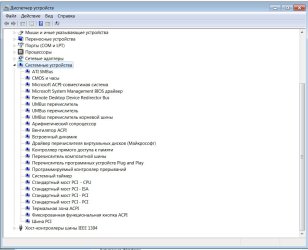
Go to device manager. Expand system devices section. Look for something with AGP in it. If found, right click it. Properties. Details tab. Change dropdown to hardware ids. Copy and paste results to here and I will see what I can do.

Don't get you hopes up too much though, please. It doesn't look good.

Edit: here is latest bios I just found: http://asus.com/product.aspx?P_ID=ZL2HInDuvKJ4Qj4J
Please let me know after you installed that or if you have latest version already, in next post.
 

My Computer My Computer

At a glance

7600.20510 x86P4 550 3.4 GHz HT running at 3.5 GHzOCZ 2 GB(2x1GB) DDR400mHz running @ 414 mHzHIS Radeon HD 3850 IceQ 3 Turbo HDMI Dual DL-...
Computer Manufacturer/Model Number
self built
OS
7600.20510 x86
CPU
P4 550 3.4 GHz HT running at 3.5 GHz
Motherboard
MSI PM8M3-V (MS-7211 v1.x) Micro-ATX mainboard
Memory
OCZ 2 GB(2x1GB) DDR400mHz running @ 414 mHz
Graphics Card(s)
HIS Radeon HD 3850 IceQ 3 Turbo HDMI Dual DL-DVI AGP
Sound Card
MOTU Traveler firewire studio interface 192 kHz 24 bit
Monitor(s) Displays
22" widescreen Acer X223W LCD, 17" Compaq P75 CRT
Screen Resolution
1680x1050 and 1280x1024
Hard Drives
SATA I x2 WD, 400 GB and 120 GB, SATA 2 WD Caviar Black 1 TB
PSU
350W generic
Case
Cybertronpc, it glows blue
Cooling
stock cpu fan, Ice-Q 3 gpu and system, many case fans
Keyboard
Logitch Classical Keyboard 200
Mouse
Logitech Mediaplay cordless
Internet Speed
1792/448 kbits/sec
Other Info
SATA II PCI fake RAID adapter, 1 GB Readyboost, original ATI Remote Wonder (even works with WMC perfectly), Logitech Rumblepad 2 game controller x2
Go to device manager. Expand system devices section. Look for something with AGP in it. If found, right click it. Properties. Details tab. Change dropdown to hardware ids. Copy and paste results to here and I will see what I can do.
Did not find anything
As for the BIOS firmware, I'm using ACPI BIOS Rev.1008 and the latest is Beta Version 1009.004
how to install it?
 

My Computer My Computer

At a glance

Windows 7 x32Pentium 4 2,4GHz2GbSapphire Radeon HD3650
OS
Windows 7 x32
CPU
Pentium 4 2,4GHz
Motherboard
Asus R4R800-V Deluxe
Memory
2Gb
Graphics Card(s)
Sapphire Radeon HD3650
Use the Awdflash.exe for ASUS V1.08 or AWDFlash utility V1.01 in the bios downloads section. They probably have clear instructions that come with them.
 

My Computer My Computer

At a glance

7600.20510 x86P4 550 3.4 GHz HT running at 3.5 GHzOCZ 2 GB(2x1GB) DDR400mHz running @ 414 mHzHIS Radeon HD 3850 IceQ 3 Turbo HDMI Dual DL-...
Computer Manufacturer/Model Number
self built
OS
7600.20510 x86
CPU
P4 550 3.4 GHz HT running at 3.5 GHz
Motherboard
MSI PM8M3-V (MS-7211 v1.x) Micro-ATX mainboard
Memory
OCZ 2 GB(2x1GB) DDR400mHz running @ 414 mHz
Graphics Card(s)
HIS Radeon HD 3850 IceQ 3 Turbo HDMI Dual DL-DVI AGP
Sound Card
MOTU Traveler firewire studio interface 192 kHz 24 bit
Monitor(s) Displays
22" widescreen Acer X223W LCD, 17" Compaq P75 CRT
Screen Resolution
1680x1050 and 1280x1024
Hard Drives
SATA I x2 WD, 400 GB and 120 GB, SATA 2 WD Caviar Black 1 TB
PSU
350W generic
Case
Cybertronpc, it glows blue
Cooling
stock cpu fan, Ice-Q 3 gpu and system, many case fans
Keyboard
Logitch Classical Keyboard 200
Mouse
Logitech Mediaplay cordless
Internet Speed
1792/448 kbits/sec
Other Info
SATA II PCI fake RAID adapter, 1 GB Readyboost, original ATI Remote Wonder (even works with WMC perfectly), Logitech Rumblepad 2 game controller x2
I updated BIOS. What to do after?
 

My Computer My Computer

At a glance

Windows 7 x32Pentium 4 2,4GHz2GbSapphire Radeon HD3650
OS
Windows 7 x32
CPU
Pentium 4 2,4GHz
Motherboard
Asus R4R800-V Deluxe
Memory
2Gb
Graphics Card(s)
Sapphire Radeon HD3650
Update your bios to latest, first. Then try to find the most up to date drivers for your 9100 IGP, specifically for AGP control (CPU to AGP control in system devices in device manager.)

That's the only chance you have to fix. If not, your motherboard is too old.

See above please. You can try installing video driver now or after above. What you're hoping to do is something almost impossible. The only reason I'm offering some advice is if there is any chance at all, I'm hoping to point you to it.

Doesn't look good. But ya never know.
 

My Computer My Computer

At a glance

7600.20510 x86P4 550 3.4 GHz HT running at 3.5 GHzOCZ 2 GB(2x1GB) DDR400mHz running @ 414 mHzHIS Radeon HD 3850 IceQ 3 Turbo HDMI Dual DL-...
Computer Manufacturer/Model Number
self built
OS
7600.20510 x86
CPU
P4 550 3.4 GHz HT running at 3.5 GHz
Motherboard
MSI PM8M3-V (MS-7211 v1.x) Micro-ATX mainboard
Memory
OCZ 2 GB(2x1GB) DDR400mHz running @ 414 mHz
Graphics Card(s)
HIS Radeon HD 3850 IceQ 3 Turbo HDMI Dual DL-DVI AGP
Sound Card
MOTU Traveler firewire studio interface 192 kHz 24 bit
Monitor(s) Displays
22" widescreen Acer X223W LCD, 17" Compaq P75 CRT
Screen Resolution
1680x1050 and 1280x1024
Hard Drives
SATA I x2 WD, 400 GB and 120 GB, SATA 2 WD Caviar Black 1 TB
PSU
350W generic
Case
Cybertronpc, it glows blue
Cooling
stock cpu fan, Ice-Q 3 gpu and system, many case fans
Keyboard
Logitch Classical Keyboard 200
Mouse
Logitech Mediaplay cordless
Internet Speed
1792/448 kbits/sec
Other Info
SATA II PCI fake RAID adapter, 1 GB Readyboost, original ATI Remote Wonder (even works with WMC perfectly), Logitech Rumblepad 2 game controller x2
Try with this: DriversCollection.com

Before you do anything at all though, do this first - Open device manager and maximize system devices. Post a screenshot for me to see. You can use the paperclip thing when you go to post after you hit "post reply."

If you need help making a screenshot, use this.

If you connect your computer directly to internet without a modem, I can control it with your permission to try to fix it. Let me know either way.
 

My Computer My Computer

At a glance

7600.20510 x86P4 550 3.4 GHz HT running at 3.5 GHzOCZ 2 GB(2x1GB) DDR400mHz running @ 414 mHzHIS Radeon HD 3850 IceQ 3 Turbo HDMI Dual DL-...
Computer Manufacturer/Model Number
self built
OS
7600.20510 x86
CPU
P4 550 3.4 GHz HT running at 3.5 GHz
Motherboard
MSI PM8M3-V (MS-7211 v1.x) Micro-ATX mainboard
Memory
OCZ 2 GB(2x1GB) DDR400mHz running @ 414 mHz
Graphics Card(s)
HIS Radeon HD 3850 IceQ 3 Turbo HDMI Dual DL-DVI AGP
Sound Card
MOTU Traveler firewire studio interface 192 kHz 24 bit
Monitor(s) Displays
22" widescreen Acer X223W LCD, 17" Compaq P75 CRT
Screen Resolution
1680x1050 and 1280x1024
Hard Drives
SATA I x2 WD, 400 GB and 120 GB, SATA 2 WD Caviar Black 1 TB
PSU
350W generic
Case
Cybertronpc, it glows blue
Cooling
stock cpu fan, Ice-Q 3 gpu and system, many case fans
Keyboard
Logitch Classical Keyboard 200
Mouse
Logitech Mediaplay cordless
Internet Speed
1792/448 kbits/sec
Other Info
SATA II PCI fake RAID adapter, 1 GB Readyboost, original ATI Remote Wonder (even works with WMC perfectly), Logitech Rumblepad 2 game controller x2
Hi, I have different problem with this type of card (asus ah3650 agp exactly). All installations goes correctly and I can run aero but after few minutes strange marks appears at title bars (I attached screenshot) after another few minutes dwm.exe crashes. It happens with all drivers from 9.3 to latest 9.10(both normal and hotfix), with previous I don't have this problem but dwm uses a lot of cpu resources making windows almost impossible to work with it. Any advice will be appreciate


aerow.jpg
 

My Computer My Computer

At a glance

Windows 7
OS
Windows 7
Hi, I have different problem with this type of card (asus ah3650 agp exactly). All installations goes correctly and I can run aero but after few minutes strange marks appears at title bars (I attached screenshot) after another few minutes dwm.exe crashes. It happens with all drivers from 9.3 to latest 9.10(both normal and hotfix), with previous I don't have this problem but dwm uses a lot of cpu resources making windows almost impossible to work with it. Any advice will be appreciate

Scan for malware with Malwarebytes' full scan. Your dwm (Desktop Window Manager) service probably was hijacked as I saw it happen to another.
 

My Computer My Computer

At a glance

7600.20510 x86P4 550 3.4 GHz HT running at 3.5 GHzOCZ 2 GB(2x1GB) DDR400mHz running @ 414 mHzHIS Radeon HD 3850 IceQ 3 Turbo HDMI Dual DL-...
Computer Manufacturer/Model Number
self built
OS
7600.20510 x86
CPU
P4 550 3.4 GHz HT running at 3.5 GHz
Motherboard
MSI PM8M3-V (MS-7211 v1.x) Micro-ATX mainboard
Memory
OCZ 2 GB(2x1GB) DDR400mHz running @ 414 mHz
Graphics Card(s)
HIS Radeon HD 3850 IceQ 3 Turbo HDMI Dual DL-DVI AGP
Sound Card
MOTU Traveler firewire studio interface 192 kHz 24 bit
Monitor(s) Displays
22" widescreen Acer X223W LCD, 17" Compaq P75 CRT
Screen Resolution
1680x1050 and 1280x1024
Hard Drives
SATA I x2 WD, 400 GB and 120 GB, SATA 2 WD Caviar Black 1 TB
PSU
350W generic
Case
Cybertronpc, it glows blue
Cooling
stock cpu fan, Ice-Q 3 gpu and system, many case fans
Keyboard
Logitch Classical Keyboard 200
Mouse
Logitech Mediaplay cordless
Internet Speed
1792/448 kbits/sec
Other Info
SATA II PCI fake RAID adapter, 1 GB Readyboost, original ATI Remote Wonder (even works with WMC perfectly), Logitech Rumblepad 2 game controller x2
No question is a stupid question.

It's cool because this gives me a chance to show my l33t Photoshop skill0rz.

Jeez you must have to fight off prospective employers with a stick :D
 

My Computer My Computer

At a glance

Windows 7 Ult x64i7 9206GB DDR3GF 9400GT
OS
Windows 7 Ult x64
CPU
i7 920
Motherboard
GA-EX58-UD5
Memory
6GB DDR3
Graphics Card(s)
GF 9400GT
Monitor(s) Displays
Syncmaster 233HD
Screen Resolution
1920 x 1080
Hard Drives
loads
Case
HAF 920
Hi, I have different problem with this type of card (asus ah3650 agp exactly). All installations goes correctly and I can run aero but after few minutes strange marks appears at title bars (I attached screenshot) after another few minutes dwm.exe crashes. It happens with all drivers from 9.3 to latest 9.10(both normal and hotfix), with previous I don't have this problem but dwm uses a lot of cpu resources making windows almost impossible to work with it. Any advice will be appreciate

Scan for malware with Malwarebytes' full scan. Your dwm (Desktop Window Manager) service probably was hijacked as I saw it happen to another.

I did scan but that nothing changed although anti-malware has found some trojans. I would think that my card is broken but i can still run other 3d aplication
 

My Computer My Computer

At a glance

Windows 7
OS
Windows 7
Your card is fine. It's your Windows install that got corrupted by the malware.

Can you perhaps fix it? Yes.
Is that wise? No.

Once a pc is infected with malware, especially of this nature that has attacked your system services, even the greatest minds can not say with authority that your system is clear of all erroneous behavior. With proper (malicious) coding, things can go on that would be nearly impossible to detect.

That's my way of telling you that you should at the very least clean install Windows 7 again and start over. Better yet, ensure a format of the drive/partition is done while installing. Copy any data you need off of it first to a backup media and proceed. Scan the backup media for malware too.
 

My Computer My Computer

At a glance

7600.20510 x86P4 550 3.4 GHz HT running at 3.5 GHzOCZ 2 GB(2x1GB) DDR400mHz running @ 414 mHzHIS Radeon HD 3850 IceQ 3 Turbo HDMI Dual DL-...
Computer Manufacturer/Model Number
self built
OS
7600.20510 x86
CPU
P4 550 3.4 GHz HT running at 3.5 GHz
Motherboard
MSI PM8M3-V (MS-7211 v1.x) Micro-ATX mainboard
Memory
OCZ 2 GB(2x1GB) DDR400mHz running @ 414 mHz
Graphics Card(s)
HIS Radeon HD 3850 IceQ 3 Turbo HDMI Dual DL-DVI AGP
Sound Card
MOTU Traveler firewire studio interface 192 kHz 24 bit
Monitor(s) Displays
22" widescreen Acer X223W LCD, 17" Compaq P75 CRT
Screen Resolution
1680x1050 and 1280x1024
Hard Drives
SATA I x2 WD, 400 GB and 120 GB, SATA 2 WD Caviar Black 1 TB
PSU
350W generic
Case
Cybertronpc, it glows blue
Cooling
stock cpu fan, Ice-Q 3 gpu and system, many case fans
Keyboard
Logitch Classical Keyboard 200
Mouse
Logitech Mediaplay cordless
Internet Speed
1792/448 kbits/sec
Other Info
SATA II PCI fake RAID adapter, 1 GB Readyboost, original ATI Remote Wonder (even works with WMC perfectly), Logitech Rumblepad 2 game controller x2
I updated BIOS , but everything was the same - the system installed the driver and after reboot there was blue screen and reboot.

Here is screenshot
 

Attachments

  • screenshot.JPG
    screenshot.JPG
    107 KB · Views: 98

My Computer My Computer

At a glance

Windows 7 x32Pentium 4 2,4GHz2GbSapphire Radeon HD3650
OS
Windows 7 x32
CPU
Pentium 4 2,4GHz
Motherboard
Asus R4R800-V Deluxe
Memory
2Gb
Graphics Card(s)
Sapphire Radeon HD3650
I updated BIOS , but everything was the same - the system installed the driver and after reboot there was blue screen and reboot.

Here is screenshot

Follow this first then.

Only if it still blue screens, try to install this. Then follow the above link again, after.

C:\Windows\Minimdump

If it still blue sceens, copy the .dmp files from the above folder to another one. Then use Winrar to compress. Attach the .rar to a post and I can have a look at it to see why.

Disable onboard vga in the bios and set AGP to primary display too. This you can do first out if it all.
 

My Computer My Computer

At a glance

7600.20510 x86P4 550 3.4 GHz HT running at 3.5 GHzOCZ 2 GB(2x1GB) DDR400mHz running @ 414 mHzHIS Radeon HD 3850 IceQ 3 Turbo HDMI Dual DL-...
Computer Manufacturer/Model Number
self built
OS
7600.20510 x86
CPU
P4 550 3.4 GHz HT running at 3.5 GHz
Motherboard
MSI PM8M3-V (MS-7211 v1.x) Micro-ATX mainboard
Memory
OCZ 2 GB(2x1GB) DDR400mHz running @ 414 mHz
Graphics Card(s)
HIS Radeon HD 3850 IceQ 3 Turbo HDMI Dual DL-DVI AGP
Sound Card
MOTU Traveler firewire studio interface 192 kHz 24 bit
Monitor(s) Displays
22" widescreen Acer X223W LCD, 17" Compaq P75 CRT
Screen Resolution
1680x1050 and 1280x1024
Hard Drives
SATA I x2 WD, 400 GB and 120 GB, SATA 2 WD Caviar Black 1 TB
PSU
350W generic
Case
Cybertronpc, it glows blue
Cooling
stock cpu fan, Ice-Q 3 gpu and system, many case fans
Keyboard
Logitch Classical Keyboard 200
Mouse
Logitech Mediaplay cordless
Internet Speed
1792/448 kbits/sec
Other Info
SATA II PCI fake RAID adapter, 1 GB Readyboost, original ATI Remote Wonder (even works with WMC perfectly), Logitech Rumblepad 2 game controller x2
Only if it still blue screens, try to install this.
Renew the URL. I did not download
 

My Computer My Computer

At a glance

Windows 7 x32Pentium 4 2,4GHz2GbSapphire Radeon HD3650
OS
Windows 7 x32
CPU
Pentium 4 2,4GHz
Motherboard
Asus R4R800-V Deluxe
Memory
2Gb
Graphics Card(s)
Sapphire Radeon HD3650
Please renew the link
 

My Computer My Computer

At a glance

Windows 7 x32Pentium 4 2,4GHz2GbSapphire Radeon HD3650
OS
Windows 7 x32
CPU
Pentium 4 2,4GHz
Motherboard
Asus R4R800-V Deluxe
Memory
2Gb
Graphics Card(s)
Sapphire Radeon HD3650
I don't control the link and I really can't locate any others. If you'd like to try yourself, search the internet for "Vista ATI IXP150" or "Vista IXP150"

Try to fnd a Vista driver package for ATI IXP150.
 

My Computer My Computer

At a glance

7600.20510 x86P4 550 3.4 GHz HT running at 3.5 GHzOCZ 2 GB(2x1GB) DDR400mHz running @ 414 mHzHIS Radeon HD 3850 IceQ 3 Turbo HDMI Dual DL-...
Computer Manufacturer/Model Number
self built
OS
7600.20510 x86
CPU
P4 550 3.4 GHz HT running at 3.5 GHz
Motherboard
MSI PM8M3-V (MS-7211 v1.x) Micro-ATX mainboard
Memory
OCZ 2 GB(2x1GB) DDR400mHz running @ 414 mHz
Graphics Card(s)
HIS Radeon HD 3850 IceQ 3 Turbo HDMI Dual DL-DVI AGP
Sound Card
MOTU Traveler firewire studio interface 192 kHz 24 bit
Monitor(s) Displays
22" widescreen Acer X223W LCD, 17" Compaq P75 CRT
Screen Resolution
1680x1050 and 1280x1024
Hard Drives
SATA I x2 WD, 400 GB and 120 GB, SATA 2 WD Caviar Black 1 TB
PSU
350W generic
Case
Cybertronpc, it glows blue
Cooling
stock cpu fan, Ice-Q 3 gpu and system, many case fans
Keyboard
Logitch Classical Keyboard 200
Mouse
Logitech Mediaplay cordless
Internet Speed
1792/448 kbits/sec
Other Info
SATA II PCI fake RAID adapter, 1 GB Readyboost, original ATI Remote Wonder (even works with WMC perfectly), Logitech Rumblepad 2 game controller x2
It still shows the blue screen. I attached files from C:Windows\Minidump
 

Attachments

My Computer My Computer

At a glance

Windows 7 x32Pentium 4 2,4GHz2GbSapphire Radeon HD3650
OS
Windows 7 x32
CPU
Pentium 4 2,4GHz
Motherboard
Asus R4R800-V Deluxe
Memory
2Gb
Graphics Card(s)
Sapphire Radeon HD3650
Yeah, I just looked at the dumps. They surely are from the video driver. And that's because it has no way to interface (talk to) the motherboard.

You need to find what I said to search for. If you can not locate that, you can not use that motherboard to accelerate graphics on Windows 7, unfortunately.
 

My Computer My Computer

At a glance

7600.20510 x86P4 550 3.4 GHz HT running at 3.5 GHzOCZ 2 GB(2x1GB) DDR400mHz running @ 414 mHzHIS Radeon HD 3850 IceQ 3 Turbo HDMI Dual DL-...
Computer Manufacturer/Model Number
self built
OS
7600.20510 x86
CPU
P4 550 3.4 GHz HT running at 3.5 GHz
Motherboard
MSI PM8M3-V (MS-7211 v1.x) Micro-ATX mainboard
Memory
OCZ 2 GB(2x1GB) DDR400mHz running @ 414 mHz
Graphics Card(s)
HIS Radeon HD 3850 IceQ 3 Turbo HDMI Dual DL-DVI AGP
Sound Card
MOTU Traveler firewire studio interface 192 kHz 24 bit
Monitor(s) Displays
22" widescreen Acer X223W LCD, 17" Compaq P75 CRT
Screen Resolution
1680x1050 and 1280x1024
Hard Drives
SATA I x2 WD, 400 GB and 120 GB, SATA 2 WD Caviar Black 1 TB
PSU
350W generic
Case
Cybertronpc, it glows blue
Cooling
stock cpu fan, Ice-Q 3 gpu and system, many case fans
Keyboard
Logitch Classical Keyboard 200
Mouse
Logitech Mediaplay cordless
Internet Speed
1792/448 kbits/sec
Other Info
SATA II PCI fake RAID adapter, 1 GB Readyboost, original ATI Remote Wonder (even works with WMC perfectly), Logitech Rumblepad 2 game controller x2
Back
Top