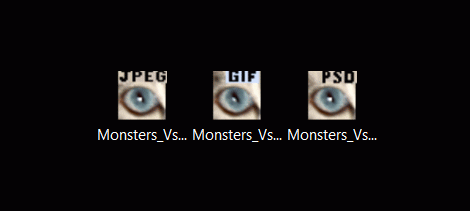
Thumbnail View of PhotoShop 6 files in Windows7

CadillacPat

New member
Local time
4:59 PM
Messages
25
Just two days ago I purchased a new Pavilion HP with an 8 G memory and 750 HardDrive.
My old HP with XP just bit the dust and rather than spend $200 fixing it,(only a 512 M with a 160 HD) I decided to buy something new.

I was seriously considering wiping any new PC clean of Vista and installing XP which I am comfortable with.
However, the timely demise of my old HP happened just as W7 was coming out, so I have kept 7 as my OS.
So far I am pleased with most of the changes but I am having a couple of small but important problems.

Everything I do is in PhotoShop.
I design and print Custom Decals for Custom DieCast Cars,i.e., HotWheels, MatchBox, etc..
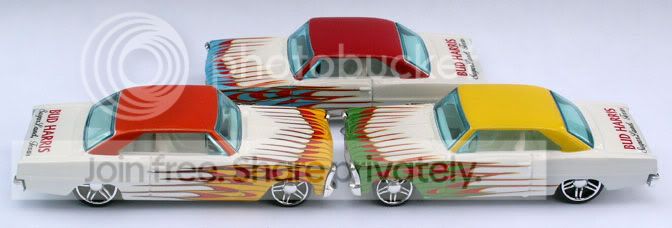
PICT0016-3.jpg


Here's my situation,
When I open up a folder from Documents, mostly of which all are image files, there is no Thumbnail option in the Windows 7 View drop down menu.
Available options include Extra Large, Large, Medium, and Small Icons, Details, and List, but no Thumbnail option.
Any image that is a jpeg displays as a Thumbnail but psd files just show up as the Icon.
If I want to "see" all the different files in a folder I can't.
Setting the View menu to Large Icons did allow the jpegs to display as thumbnails.

I have to open up the folder in PhotoShop to get the Icons to display as Thumbnails.

If I right click onto a file that is opened up in Documents, and go to "Open With" there is no option to open it with PS.

Could Windows 7 not be allowing the usual interfacing of files I am used to.

To actually view all my image files of all types, psd and jpeg, I had to put everything into Picasa 3 which readily displays everything as thumbnails.

However, right clicking onto anything in Picasa also gives no option of opening it with PhotoShop.

Is this ancient program PhotoShop 6 just too old to be completely compatible with Windows 7.
Might I have the very same inability I describe even if I purchased the latests versions of PhotoShop.

I understand Windows 7 has only been out 3 days all problems with it are just beginning to surface,
but,
This looks like a pretty active Forum and perhaps someone can give me some insight or tell me ther is simply no way to fix this.
Thanks for aking the time to read my problem,

Sincerely,
Pat Parker
 

My Computer My Computer

At a glance

Windows 7Intel(R) Core(TM)2 Quad Q83008 G
Computer Manufacturer/Model Number
HP p6240f
OS
Windows 7
CPU
Intel(R) Core(TM)2 Quad Q8300
Memory
8 G
Hard Drives
750 G
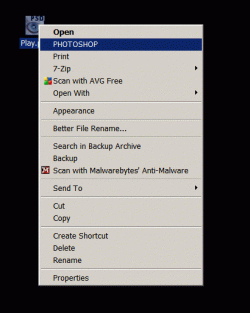
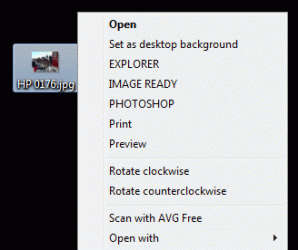
To "Open With" ..
You have to browse to find it the first time ... for it to be in the Open With list.
There's a program to show psd Thumbnails in 7 .. but I found it was Very slow and I didn't like it.

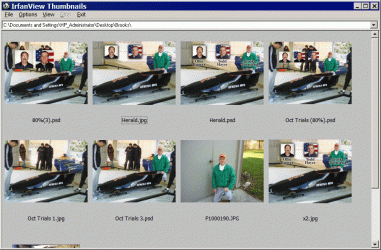
The freeware Irfanview has a nice thumbnail browser that shows psd files ..
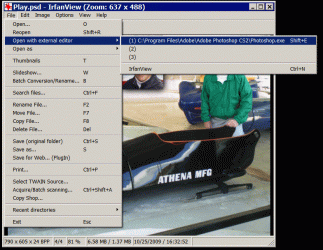
and Irfanview can be set up to send a file directly to Photoshop .. as its external editor.
I Have Irfanview installed to be my Default Viewer and basic Image editor.

There's also a way to edit the registry for Irfanview that will open a file in Photoshop ..
Without having to take the "Open With" > "Multiple Choice" test.
Or you can try the registry edits Here

If I get a new computer .. I'll put XP in it ...
Since Vista or W7 doesn't know there's difference between an Icon and a Thumbnail.
 

Attachments

  • Clip.gif
    Clip.gif
    30.6 KB · Views: 128
  • Clip2.gif
    Clip2.gif
    17.2 KB · Views: 16
  • Clip3.gif
    Clip3.gif
    137.1 KB · Views: 76
  • Clip4.gif
    Clip4.gif
    218.4 KB · Views: 63

My Computer My Computer

At a glance

XP MCE .... XP Pro 64 .... W7 U x64E6750, 2.67GHz C2D4GB, PC2 6400GeForce 9400GT
Computer Manufacturer/Model Number
HP d4996t (upgraded)
OS
XP MCE .... XP Pro 64 .... W7 U x64
CPU
E6750, 2.67GHz C2D
Memory
4GB, PC2 6400
Graphics Card(s)
GeForce 9400GT
Monitor(s) Displays
Twin Samsung 2443BWT
Screen Resolution
1920x1200
Hard Drives
Many .. 3 Installed
PSU
460W
Internet Speed
Cable
Since W7 doesn't recognize psd files as an Image ...
It's registry cannot be edited to include psd files ... as a direct click path as shown.

Too bad Vista and W7 removed this advanced customizing option from the folder options.

If you decide to install Irfanview ..
I can send you a reg file that will customize it's file type Context menus...
By performing the required registry edits ...
So you'll never have to take the "Open With" >> "Multiple Choice" test again.
 

My Computer My Computer

At a glance

XP MCE .... XP Pro 64 .... W7 U x64E6750, 2.67GHz C2D4GB, PC2 6400GeForce 9400GT
Computer Manufacturer/Model Number
HP d4996t (upgraded)
OS
XP MCE .... XP Pro 64 .... W7 U x64
CPU
E6750, 2.67GHz C2D
Memory
4GB, PC2 6400
Graphics Card(s)
GeForce 9400GT
Monitor(s) Displays
Twin Samsung 2443BWT
Screen Resolution
1920x1200
Hard Drives
Many .. 3 Installed
PSU
460W
Internet Speed
Cable
Hi Noyb,

Thank you very, very much for your excellent assistance.
Right off the bat, in your very first sentence you put me on the right path to correct things.

I write Tutorials that I post on the Internet for DieCast Customizing and I always get the same "I am amazed you take the time to help us" feedback that I now want to extend to you with thanks.

From your help I am now able to "see" small pictures (thumbnails) of my psd documents just as I did on my old PC using XP.

Your expertise may find my method a bit archaic but here is how I am correcting this problem of Document files being displayed as Icons and not Thumbnails.

From the Desktop open the Document and display the Files in Details mode in the View Menu. Leave this window open.
Open PhotoShop, open the same Document and using the Large Icons mode in the View Menu all the Icons will transform into Thumbnails.
While the PhotoShop view is open go back to the other Document and when you change your View from Details to Large Icons all the files will transform from Icons into Thumbnails with tiny PhotoShop icons in the lower right half corner.

I'm doing this for each Document that contains psd files.
It may be redundant and slow but it works.
After closing all applications and starting fresh, my files open and display as Thumbnails.
It's pretty much what I am used to with XP except Thumbnails are smaller.
Even using the Large Icons option the Thumbnails are still smaller than with XP but I'm not complaining.

The key here is to make sure, while viewing the Thumbnails in PhotoShop, is to scroll down the page so all Icons (all your files in that Document) transform into Thumbnails.
As the Icons roll up into view they will transform into Thumbnails.

Your explanations are concise and easy to follow.
Not everyone knows how to write instructions so that anyone can follow them.
You do.

Thanks for taking the time to help and moreso thanks for giving accurate answers that go straight to the root of the problem.
I'll be telling others on other sites that this "Windows 7 Forums" should be their first place to come to for assistance with their Windows 7 questions.

If I have another problem or question, like Arnold says, "I'll be back."

Pat Parker
 

My Computer My Computer

At a glance

Windows 7Intel(R) Core(TM)2 Quad Q83008 G
Computer Manufacturer/Model Number
HP p6240f
OS
Windows 7
CPU
Intel(R) Core(TM)2 Quad Q8300
Memory
8 G
Hard Drives
750 G
I figured that once you trained W7 and showed it the way .. You'd be OK
But, You did mention Picasa .. and I think there's a better/faster way.

I do all my work in Windows with Irfanview .. And only go to PS when I need an advance editor.
Otherwise, PS is too slow for me .. and I hate organizers.
 

My Computer My Computer

At a glance

XP MCE .... XP Pro 64 .... W7 U x64E6750, 2.67GHz C2D4GB, PC2 6400GeForce 9400GT
Computer Manufacturer/Model Number
HP d4996t (upgraded)
OS
XP MCE .... XP Pro 64 .... W7 U x64
CPU
E6750, 2.67GHz C2D
Memory
4GB, PC2 6400
Graphics Card(s)
GeForce 9400GT
Monitor(s) Displays
Twin Samsung 2443BWT
Screen Resolution
1920x1200
Hard Drives
Many .. 3 Installed
PSU
460W
Internet Speed
Cable

My Computer My Computer

At a glance

Windows 7Core i7 8608 GB
OS
Windows 7
CPU
Core i7 860
Motherboard
Intel DP55KG
Memory
8 GB
Hard Drives
Intel X-25M
Seagate 7200 Barracuda
Does this get a little slow with Huge psd files ???
 

My Computer My Computer

At a glance

XP MCE .... XP Pro 64 .... W7 U x64E6750, 2.67GHz C2D4GB, PC2 6400GeForce 9400GT
Computer Manufacturer/Model Number
HP d4996t (upgraded)
OS
XP MCE .... XP Pro 64 .... W7 U x64
CPU
E6750, 2.67GHz C2D
Memory
4GB, PC2 6400
Graphics Card(s)
GeForce 9400GT
Monitor(s) Displays
Twin Samsung 2443BWT
Screen Resolution
1920x1200
Hard Drives
Many .. 3 Installed
PSU
460W
Internet Speed
Cable
We are working on a commercial PSD codec for Windows XP SP3 and later.

It provides PSD thumbnails, previews, metadata in Windows Explorer, Windows Live Photo Gallery, and Windows 7 Media Center.


Ardfry,
It's obvious from my first reply I have solved my problem with tools already on my PC.

As you can see in my other Thread entitled "Fancast" I am much more reluctant to install extra programs on my new PC if they really aren't necessary.
My old PC had the Desktop full of Icons for programs that I installed but never used.
I now prefer keeping things trimmed down for a lean mean clean machine.

I now have Thumbnails insead of Icons and my Picasa files open up in PhotoShop.

Like Noyb said, "I just had to train the PC to do it."

--CadillacPat the UnCustomizer--
 
Last edited by a moderator:

My Computer My Computer

At a glance

Windows 7Intel(R) Core(TM)2 Quad Q83008 G
Computer Manufacturer/Model Number
HP p6240f
OS
Windows 7
CPU
Intel(R) Core(TM)2 Quad Q8300
Memory
8 G
Hard Drives
750 G
RE: PSD Thumbnails on Windows 7

CadillacPat,
I was just answering the question you raised in your original post, which was how to get thumbnails for PSD files in Windows Explorer on Windows 7.


noyb, how big is huge? One of our beta testers reported that he had thousands of 50 MB PSD files on his system and didn't experience any slowdowns. We are always working to improve the performance in our codecs, and usually do in our free updates.

David Blake
 

My Computer My Computer

At a glance

Windows 7Core i7 8608 GB
OS
Windows 7
CPU
Core i7 860
Motherboard
Intel DP55KG
Memory
8 GB
Hard Drives
Intel X-25M
Seagate 7200 Barracuda
noyb, how big is huge?
I'm currently working in a folder of 28 files .. 33 > 83MB
The last time I installed psd thumbnail software ..
The loss of speed wasn't worth the advantage of seeing Thumbs.

As a side note ...
If someone could figure out how to see Icons instead of Thumbs on the Desktop ...
without disabling all thumbs ... I might be able to use W7.

Does this add psd thumbs to the desktop ??
 

My Computer My Computer

At a glance

XP MCE .... XP Pro 64 .... W7 U x64E6750, 2.67GHz C2D4GB, PC2 6400GeForce 9400GT
Computer Manufacturer/Model Number
HP d4996t (upgraded)
OS
XP MCE .... XP Pro 64 .... W7 U x64
CPU
E6750, 2.67GHz C2D
Memory
4GB, PC2 6400
Graphics Card(s)
GeForce 9400GT
Monitor(s) Displays
Twin Samsung 2443BWT
Screen Resolution
1920x1200
Hard Drives
Many .. 3 Installed
PSU
460W
Internet Speed
Cable
RE: Thumbnails on Windows 7

I did a test and the shell shows a thumbnail image for PSD files on the desktop if thumbnails are enabled. The codec itself doesn't put one there, it only provides one when asked. Couldn't you create a folder on your desktop, put your image files in that folder, and set the view to small icons?

For all but the largest sizes of icon/thumbnail images in Explorer, the codec uses the embedded thumbnail. Our RAW codecs are used by professional photographers who shoot thousands of images on location and return to their PCs to review the images they have stored on external hard drives. We have worked to make our codecs load hundreds of thumbnails per second in directories with hundreds or thousands of images so that our customers aren't hindered by performance of their systems.
 

My Computer My Computer

At a glance

Windows 7Core i7 8608 GB
OS
Windows 7
CPU
Core i7 860
Motherboard
Intel DP55KG
Memory
8 GB
Hard Drives
Intel X-25M
Seagate 7200 Barracuda
Couldn't you create a folder on your desktop, put your image files in that folder, and set the view to small icons?
I have customize Image Icons that identify the file type.
Tiny Views of Icons in a folder are not identifiable .. and an not answer.
There are a couple of ways I can work around not being able to see what I have on my Desktop.
Installing XP is the easiest to use.

Since Vista or W7 replaces Icons with Thumbnails on my desktop ..
I wouldn't be able to see which image is the original jpg, the working Photoshop file or the resulting animated gif Image.
 

Attachments

  • Clipboard.gif
    Clipboard.gif
    6.5 KB · Views: 14

My Computer My Computer

At a glance

XP MCE .... XP Pro 64 .... W7 U x64E6750, 2.67GHz C2D4GB, PC2 6400GeForce 9400GT
Computer Manufacturer/Model Number
HP d4996t (upgraded)
OS
XP MCE .... XP Pro 64 .... W7 U x64
CPU
E6750, 2.67GHz C2D
Memory
4GB, PC2 6400
Graphics Card(s)
GeForce 9400GT
Monitor(s) Displays
Twin Samsung 2443BWT
Screen Resolution
1920x1200
Hard Drives
Many .. 3 Installed
PSU
460W
Internet Speed
Cable
[...]
Since Vista or W7 replaces Icons with Thumbnails on my desktop ..
I wouldn't be able to see which image is the original jpg, the working Photoshop file or the resulting animated gif Image.

I face the same issue when converting CR2/NEF to DNG. I rely on the file extension to distinguish the files, but I don't generally use the desktop as a working folder for my image files. For longer file names the extension isn't shown as in your screenshot, but you can see the extension when you select a file on the desktop.
 

My Computer My Computer

At a glance

Windows 7Core i7 8608 GB
OS
Windows 7
CPU
Core i7 860
Motherboard
Intel DP55KG
Memory
8 GB
Hard Drives
Intel X-25M
Seagate 7200 Barracuda
I don't generally use the desktop as a working folder for my image files. For longer file names the extension isn't shown as in your screenshot..

I'm spoiled by twin screens and my second desktop is usually my working space.
Many times .. I will have 2 or 3 files with the same name .. and can usually see the extension.
But I've also been spoiled by XP .. I see no reason to have to resort to several workarounds or tolerate irritations to use something newer and more handicapped.

This is what I see if I disable all Thumbnails so I can use my customized Icons ...
But this is not an acceptable workaround...
Since it is nice to be able to Browse a folder and see the contents in an appropriately sized Thumbnail .. Including psd files.

What's the price of the Ardfry addon going to be ...
And is it better than the other freebies ???
 

Attachments

  • Clip.gif
    Clip.gif
    8.6 KB · Views: 4
Last edited:

My Computer My Computer

At a glance

XP MCE .... XP Pro 64 .... W7 U x64E6750, 2.67GHz C2D4GB, PC2 6400GeForce 9400GT
Computer Manufacturer/Model Number
HP d4996t (upgraded)
OS
XP MCE .... XP Pro 64 .... W7 U x64
CPU
E6750, 2.67GHz C2D
Memory
4GB, PC2 6400
Graphics Card(s)
GeForce 9400GT
Monitor(s) Displays
Twin Samsung 2443BWT
Screen Resolution
1920x1200
Hard Drives
Many .. 3 Installed
PSU
460W
Internet Speed
Cable
RE: Ardfry PSD Codec

[...]
What's the price of the Ardfry addon going to be ...
And is it better than the other freebies ???

Photoshop covers a lot of ground. We're initially focusing on where we have customers--professional photography (due to our RAW codecs), and grapic/web design and pixel art (due to our PNGOUT products).

Our PSD codec is very fast for even large numbers of files.
Since it's a full blown codec and not just a thumbnail provider (although we do include one) you can view PSD files in Photo Gallery and Windows 7 Media center. Some people use PSD as the working format for their photography, so having the ability to view their PSD files in Media Center and Photo Gallery is an advantage.

The codec also provides metadata to Windows and therefore integrates with Windows Desktop Search. I imagine larger design departments have trouble finding files from time to time, so this should be of great value to them.

Also, since it's a commercial product, we'll be providing support. We've helped out customers on short notice who were working with hard and fast deadlines.

The price for the initial release is $19.95 US. Time is money, so the gain in efficiency will pay for the codec almost immediately.
 

My Computer My Computer

At a glance

Windows 7Core i7 8608 GB
OS
Windows 7
CPU
Core i7 860
Motherboard
Intel DP55KG
Memory
8 GB
Hard Drives
Intel X-25M
Seagate 7200 Barracuda
Thanks for the info.
Now if you can just fix M$'s stupid Desktop Manager.
I'm currently working on the Bobsled photos .. In XP
Some of them are over 100MB in PS
I think we're #1 so far
 

Attachments

  • Clip.jpg
    Clip.jpg
    56.8 KB · Views: 50

My Computer My Computer

At a glance

XP MCE .... XP Pro 64 .... W7 U x64E6750, 2.67GHz C2D4GB, PC2 6400GeForce 9400GT
Computer Manufacturer/Model Number
HP d4996t (upgraded)
OS
XP MCE .... XP Pro 64 .... W7 U x64
CPU
E6750, 2.67GHz C2D
Memory
4GB, PC2 6400
Graphics Card(s)
GeForce 9400GT
Monitor(s) Displays
Twin Samsung 2443BWT
Screen Resolution
1920x1200
Hard Drives
Many .. 3 Installed
PSU
460W
Internet Speed
Cable
Just purchased the Ardfry NEF Codec. A great add-on to my system. FINALLY I'm able to readily view all my pic files.
Not being a computer expert, I'm miffed at Microsoft for not making this type of feature a part of Win 7.
 

My Computer My Computer

At a glance

Windows 7 Home PremiumAMD Athlon 64 x 2 Dual Core Processor 5600+ 2...4 GB RAMNVIDIA GeForce 6150
Computer Manufacturer/Model Number
Dell Inspiron 531-New, Sept. 2007
OS
Windows 7 Home Premium
CPU
AMD Athlon 64 x 2 Dual Core Processor 5600+ 2.81 GHz
Motherboard
Foxconn G33M02 mATX
Memory
4 GB RAM
Graphics Card(s)
NVIDIA GeForce 6150
Sound Card
High Definition Audio
Monitor(s) Displays
Acer X192W
Screen Resolution
1440 x 900
Hard Drives
500 GB
Cooling
ACPI Fan
Keyboard
Microsoft USB Dual Receiver Wireless
Mouse
Microsoft Natural Wireless Laser Mouse 7000
Internet Speed
Comcast "Blazing Fast" (per Comcast)
I agree .. Windows 7 doesn't even see a psd as an Image file ..
This makes editing the Right Click psd context menu impossible.

Does it seem to slow anything down ???
 

My Computer My Computer

At a glance

XP MCE .... XP Pro 64 .... W7 U x64E6750, 2.67GHz C2D4GB, PC2 6400GeForce 9400GT
Computer Manufacturer/Model Number
HP d4996t (upgraded)
OS
XP MCE .... XP Pro 64 .... W7 U x64
CPU
E6750, 2.67GHz C2D
Memory
4GB, PC2 6400
Graphics Card(s)
GeForce 9400GT
Monitor(s) Displays
Twin Samsung 2443BWT
Screen Resolution
1920x1200
Hard Drives
Many .. 3 Installed
PSU
460W
Internet Speed
Cable

My Computers My Computers

  • At a glance

    Windows 11 Pro x64 [Latest Release and Releas...Ryzen 9 5950X, 3.8 - 5.2 MHz64GB [2 x 32GB] DDR4 3200MHz4GB NVIDIA GEFORCE GTX 1650 Ti
    Computer type
    PC/Desktop
    Computer Manufacturer/Model Number
    ChillBlast - Custom to my design
    OS
    Windows 11 Pro x64 [Latest Release and Release Preview]
    CPU
    Ryzen 9 5950X, 3.8 - 5.2 MHz
    Motherboard
    Asus Prime X570-Pro
    Memory
    64GB [2 x 32GB] DDR4 3200MHz
    Graphics Card(s)
    4GB NVIDIA GEFORCE GTX 1650 Ti
    Sound Card
    On-board SPDIF to 5.1 System + HDMI [5.1 system]
    Monitor(s) Displays
    32" UHD 32 Bit HDR Monitor + 43" UHD 4K 32Bit HDR TV
    Screen Resolution
    2 x 3840 x 2160 @60Hz
    Hard Drives
    1TB M2 SSD OS, 500GB Fast Access SSD, 2 x 8TB Data + Various Externals from 1TB to 4TB, 10TB NAS
    PSU
    NZXT C750 80 PLUS Gold 750W Modular PSU
    Case
    Workstation Case [Matt Black]
    Cooling
    NZXT Kraken X63 280mm CPU Cooler +2x Quiet Case fans
    Keyboard
    Logitech Wireless MX Keys & K400 + others
    Mouse
    Logitech Wireless MX Master 3S
    Internet Speed
    920 MB Down 50 MB Up
    Antivirus
    BitDefender Total Security Pro
    Browser
    Chrome (always run latest Non-Beta)
    Other Info
    Also run ...
    Laptop - Quad 8GB - Windows 10 Pro x64
    Nexus 7 Android tablet x2
    Samsung 10.2" tablet
    Blackview TAB 8 4G Android Tablet c/w Keyboard
    Wacom Intuos Pro Medium Pen Pad
    Wacom Intuos Pro Small Pen Pad
    Wacom Expresskeys Remote
    Loopdeck+ Graphics Controller
    Shuttle Pro v2 Control
  • At a glance

    Windows 11 Pro x64 Latest RPIntel I7 10750H 5.0GHz32GB [2x16GB] DDR4 2933 MHznVidia GTX1650Ti 4 GB GDDR6
    Computer type
    Laptop
    System Manufacturer/Model Number
    Dell XPS 17 10750H
    OS
    Windows 11 Pro x64 Latest RP
    CPU
    Intel I7 10750H 5.0GHz
    Motherboard
    Dell XPS
    Memory
    32GB [2x16GB] DDR4 2933 MHz
    Graphics Card(s)
    nVidia GTX1650Ti 4 GB GDDR6
    Sound Card
    Stock [Realtek] 4 Speaker
    Monitor(s) Displays
    17" IPS UHD+ Infinity Edge Touchscreen
    Screen Resolution
    3840 x 2400
    Hard Drives
    2TB M2 NVMe, 4TB External + various 500GB & 1TB External NVMe (also have access to spinner HDD from
    PSU
    Stock
    Case
    Stock XPS Aluminium & Carbon Fibre
    Cooling
    Stock - Active Fan Control
    Keyboard
    Backlit + Various Logitech
    Mouse
    Stock Track Pad + Logitech MX Trackball
    Internet Speed
    72 MB Down 18MB Up
    Browser
    Chrome
    Other Info
    Also run ...
    Laptop - Quad 8GB - Windows 10 Pro x64
    Nexus 7 Android tablet x2
    10.2" tablet
    Sony Z3 Android Smartphone
    Wacom Intuos Pro Medium Pen Pad
    Wacom Intuos Pro Small Pen Pad
    Wacom Expresskeys Remote
    Loopdeck+ Graphics Controller
    Shuttle Pro v2 Control Pad
    10TB NAS
Haven't noticed any slowdown at all. Since I've never been able to open psd files, I just don't use that format. It's not critical enough for
my uses to warrant any more time or expense. :D
 

My Computer My Computer

At a glance

Windows 7 Home PremiumAMD Athlon 64 x 2 Dual Core Processor 5600+ 2...4 GB RAMNVIDIA GeForce 6150
Computer Manufacturer/Model Number
Dell Inspiron 531-New, Sept. 2007
OS
Windows 7 Home Premium
CPU
AMD Athlon 64 x 2 Dual Core Processor 5600+ 2.81 GHz
Motherboard
Foxconn G33M02 mATX
Memory
4 GB RAM
Graphics Card(s)
NVIDIA GeForce 6150
Sound Card
High Definition Audio
Monitor(s) Displays
Acer X192W
Screen Resolution
1440 x 900
Hard Drives
500 GB
Cooling
ACPI Fan
Keyboard
Microsoft USB Dual Receiver Wireless
Mouse
Microsoft Natural Wireless Laser Mouse 7000
Internet Speed
Comcast "Blazing Fast" (per Comcast)
Back
Top