stuttering in games. (mainly valve)

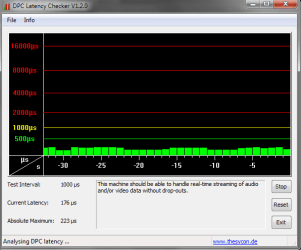
I don't know, but first lets try the DPC Latency Checker.
Do you have the results?
 

My Computer My Computer

At a glance

Windows 7 Professional x64Intel Core i7 2600k - 3.4 GHz4x4 Ripjaws X79 Series 2133 MHz (9-11-10-28)1x eVGA GTX 580 - 3GB Classified
Computer Manufacturer/Model Number
Custom Built
OS
Windows 7 Professional x64
CPU
Intel Core i7 2600k - 3.4 GHz
Motherboard
Asus Maximus IV Z68 - Extreme
Memory
4x4 Ripjaws X79 Series 2133 MHz (9-11-10-28)
Graphics Card(s)
1x eVGA GTX 580 - 3GB Classified
Sound Card
Realtek ALC 889 HD Audio
Monitor(s) Displays
Full HD Philips TV 32"
Screen Resolution
1920x1080
Hard Drives
1x Crucial m4 SSD 512 GB
PSU
800W Coolermaster Silentpro Gold
Case
Sentey - Renegade GS-6200
Cooling
Stock
Keyboard
Logitech K800 Wireless
Mouse
Logitech Performance MX Laser
Internet Speed
10MB Internet Connection

Attachments

  • Capture.PNG
    Capture.PNG
    10.9 KB · Views: 36
Last edited:

My Computer My Computer

At a glance

windows 7 professional 64 bitintel core i7 920 (1366)Corsair Dominators (TR3X6G1600C8D)Sapphire 5970
OS
windows 7 professional 64 bit
CPU
intel core i7 920 (1366)
Motherboard
Asus P6T Deluxe V2
Memory
Corsair Dominators (TR3X6G1600C8D)
Graphics Card(s)
Sapphire 5970
Sound Card
on board / Asus Xonar D2
Monitor(s) Displays
lg flatron wide 22" 2x
Hard Drives
caviar black 1tb
caviar green 1tb

external western digital my book 1tb
external western my book digital 500gb
PSU
corsair 750w
Case
antec 1200
Cooling
sythek mugen - 2
Keyboard
flico maje
Mouse
g500
Internet Speed
comcast houstont x, 16mb down with boost. 2mb up
Latency of 173ms is lame, it's causing some of the jerkyness you are experienceing. Since your computer performs so well it's updating as soon as you get the data, but with 160+ latency it gets choppy. If you've ever been on a server with 20ms latency and noticed how the 150+ms people jump around? Well for them everything is a little jerky, and right now that's you! 170ms.... That's very bad for latency.
 

My Computer My Computer

At a glance

Windows 7, LinuxAMD Phemon II x2 3@37501G Crucial 16668800GT OC (custom OC)
Computer Manufacturer/Model Number
Custom
OS
Windows 7, Linux
CPU
AMD Phemon II x2 3@3750
Motherboard
ASRock M3A770DE
Memory
1G Crucial 1666
Graphics Card(s)
8800GT OC (custom OC)
Sound Card
Sound Blaster Live! (never changes!)
Monitor(s) Displays
Vivitron 22"
Screen Resolution
1600x1200
Hard Drives
Western Digital 120G/160G SATA
Maxtor 80G IDE
PSU
450w
Case
Unknown
Cooling
Custom Air cooled
Keyboard
Logitech
Mouse
Logitech M-BZ15A Laser
Internet Speed
Cable 10mbit
Latency of 173ms is lame, it's causing some of the jerkyness you are experienceing. Since your computer performs so well it's updating as soon as you get the data, but with 160+ latency it gets choppy. If you've ever been on a server with 20ms latency and noticed how the 150+ms people jump around? Well for them everything is a little jerky, and right now that's you! 170ms.... That's very bad for latency.
I don't think the stuttering is coming from 170 Latency, i mean, if it would be abt 1000-2000 then we would have something to worry about.
 

My Computer My Computer

At a glance

Windows 7 Professional x64Intel Core i7 2600k - 3.4 GHz4x4 Ripjaws X79 Series 2133 MHz (9-11-10-28)1x eVGA GTX 580 - 3GB Classified
Computer Manufacturer/Model Number
Custom Built
OS
Windows 7 Professional x64
CPU
Intel Core i7 2600k - 3.4 GHz
Motherboard
Asus Maximus IV Z68 - Extreme
Memory
4x4 Ripjaws X79 Series 2133 MHz (9-11-10-28)
Graphics Card(s)
1x eVGA GTX 580 - 3GB Classified
Sound Card
Realtek ALC 889 HD Audio
Monitor(s) Displays
Full HD Philips TV 32"
Screen Resolution
1920x1080
Hard Drives
1x Crucial m4 SSD 512 GB
PSU
800W Coolermaster Silentpro Gold
Case
Sentey - Renegade GS-6200
Cooling
Stock
Keyboard
Logitech K800 Wireless
Mouse
Logitech Performance MX Laser
Internet Speed
10MB Internet Connection
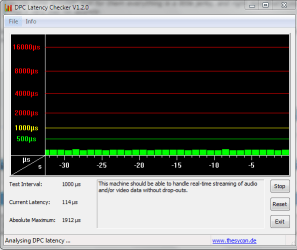
well i left it running and when i came back from work the max hit 1912

is there anyway i can go back and check?

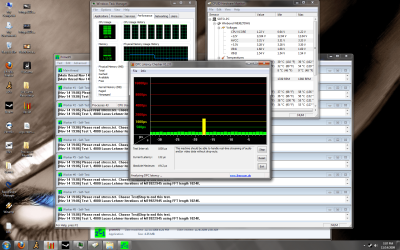
ok now i was doing some testing when i was doing a stress test 1 yellow lined popped up out of no where, also when i opened hw monitor it had spiked pretty high got it to 1964 idk if that means anything. the 2nd screen shot i posted a yellow thing popped up randomly during the testing.

and whats a normal latency it should be at??
 

Attachments

  • latency.PNG
    latency.PNG
    13 KB · Views: 8
  • test.png
    test.png
    242.1 KB · Views: 24
Last edited:

My Computer My Computer

At a glance

windows 7 professional 64 bitintel core i7 920 (1366)Corsair Dominators (TR3X6G1600C8D)Sapphire 5970
OS
windows 7 professional 64 bit
CPU
intel core i7 920 (1366)
Motherboard
Asus P6T Deluxe V2
Memory
Corsair Dominators (TR3X6G1600C8D)
Graphics Card(s)
Sapphire 5970
Sound Card
on board / Asus Xonar D2
Monitor(s) Displays
lg flatron wide 22" 2x
Hard Drives
caviar black 1tb
caviar green 1tb

external western digital my book 1tb
external western my book digital 500gb
PSU
corsair 750w
Case
antec 1200
Cooling
sythek mugen - 2
Keyboard
flico maje
Mouse
g500
Internet Speed
comcast houstont x, 16mb down with boost. 2mb up
Engineering Windows 7 : Disk Defragmentation ? Background and Engineering the Windows 7 Improvements

Code:
In short, the figures illustrate that while disk capacities are  increasing, their ability 
to transfer data or write new data is not  increasing at an equivalent rate – so disks contain 
[B][U]more[/U][/B]  data that takes [B][U]longer[/U][/B] to read or write. Consequently,  fast CPUs are relatively idle, 
waiting for data to do work on.

Hence why again I say some of it might be due to the fact it's a 1TB hard drive. We really never planned to have 1TB hard drives and have crazy good performance for them. Why? Because your trashing space for performance.

So I say again, with latency and 1TB hdd he might be experienceing lag. It's not lag as in the sense of lagging, it's because the data he needs is slower than what it takes for his computer to render it. So it's choppy because the data is choppy.

Lag - Wikipedia, the free encyclopedia
While strictly every packet experiences lag, the term lag is used to refer to delays noticeable to the user.

Yeah I know wiki isn't really what's "true" but if the data isn't their for the computer to process and display the user's next position you have to wait till it gets their, then process it and then display. So if their is a problem with server-client sync you experience "lag". I see it ALL the time on CS:S. The problem is ****ty net code and bad rates can cause whole servers to experience this.

Lionhead Community - Re: It's not LAG it's low FPS!

I like this thread!

So the reality is, It doesn't matter if the GPU/RAM/CPU can process it. Why? Because if the data can't get their fast enough then what's the freaking point? You experience LAG, can be both ping related or otherwise. If one component has to wait for another component and then you now have 2 idle components and so on and so on, it causes lag. So what do we do? Idk, get smart and start to learn the ideal lessons of lag. The shorter the data has to travel the less you notice or experience lag. How do you shorten the distance? That's the real question.
 

My Computer My Computer

At a glance

Windows 7, LinuxAMD Phemon II x2 3@37501G Crucial 16668800GT OC (custom OC)
Computer Manufacturer/Model Number
Custom
OS
Windows 7, Linux
CPU
AMD Phemon II x2 3@3750
Motherboard
ASRock M3A770DE
Memory
1G Crucial 1666
Graphics Card(s)
8800GT OC (custom OC)
Sound Card
Sound Blaster Live! (never changes!)
Monitor(s) Displays
Vivitron 22"
Screen Resolution
1600x1200
Hard Drives
Western Digital 120G/160G SATA
Maxtor 80G IDE
PSU
450w
Case
Unknown
Cooling
Custom Air cooled
Keyboard
Logitech
Mouse
Logitech M-BZ15A Laser
Internet Speed
Cable 10mbit
well thats the next step, i guess a diff hard drive, but its just strange to me... how there is so many people with 1tb hard drives and there is not more complaints like this.
 

My Computer My Computer

At a glance

windows 7 professional 64 bitintel core i7 920 (1366)Corsair Dominators (TR3X6G1600C8D)Sapphire 5970
OS
windows 7 professional 64 bit
CPU
intel core i7 920 (1366)
Motherboard
Asus P6T Deluxe V2
Memory
Corsair Dominators (TR3X6G1600C8D)
Graphics Card(s)
Sapphire 5970
Sound Card
on board / Asus Xonar D2
Monitor(s) Displays
lg flatron wide 22" 2x
Hard Drives
caviar black 1tb
caviar green 1tb

external western digital my book 1tb
external western my book digital 500gb
PSU
corsair 750w
Case
antec 1200
Cooling
sythek mugen - 2
Keyboard
flico maje
Mouse
g500
Internet Speed
comcast houstont x, 16mb down with boost. 2mb up
Or maybe they don't complain? You could just reformat and have the first 100G just for the OS. That's what you should do instead of get another TB hard drive.
 

My Computer My Computer

At a glance

Windows 7, LinuxAMD Phemon II x2 3@37501G Crucial 16668800GT OC (custom OC)
Computer Manufacturer/Model Number
Custom
OS
Windows 7, Linux
CPU
AMD Phemon II x2 3@3750
Motherboard
ASRock M3A770DE
Memory
1G Crucial 1666
Graphics Card(s)
8800GT OC (custom OC)
Sound Card
Sound Blaster Live! (never changes!)
Monitor(s) Displays
Vivitron 22"
Screen Resolution
1600x1200
Hard Drives
Western Digital 120G/160G SATA
Maxtor 80G IDE
PSU
450w
Case
Unknown
Cooling
Custom Air cooled
Keyboard
Logitech
Mouse
Logitech M-BZ15A Laser
Internet Speed
Cable 10mbit
Or maybe they don't complain? You could just reformat and have the first 100G just for the OS. That's what you should do instead of get another TB hard drive.


Id rather have a smaller one if thats the case. throw this 1 as storage, and take my other storage and put it in the computer im going to sell. because idk how to do partitions.

if you guys can find an easy guide on how to partition the drive, ill give it a shot.
 

My Computer My Computer

At a glance

windows 7 professional 64 bitintel core i7 920 (1366)Corsair Dominators (TR3X6G1600C8D)Sapphire 5970
OS
windows 7 professional 64 bit
CPU
intel core i7 920 (1366)
Motherboard
Asus P6T Deluxe V2
Memory
Corsair Dominators (TR3X6G1600C8D)
Graphics Card(s)
Sapphire 5970
Sound Card
on board / Asus Xonar D2
Monitor(s) Displays
lg flatron wide 22" 2x
Hard Drives
caviar black 1tb
caviar green 1tb

external western digital my book 1tb
external western my book digital 500gb
PSU
corsair 750w
Case
antec 1200
Cooling
sythek mugen - 2
Keyboard
flico maje
Mouse
g500
Internet Speed
comcast houstont x, 16mb down with boost. 2mb up
Start>search and type compmgmt.msc hit enter, then go to Storage/Disk Management. Take one of your 1TB Hard drives (make sure it's empty, if not backup data). Then right click and delete volume, then format it. When it formats you should be asked how much of the drive you want to format for NTFS, just enter 120G and when your done install windows on that hard drive and on that partition. Just repartition the rest of the drive however you want. Really it's not hard, the windows setup cd should give you similiar options. You can just get a smaller hard drive, and use the 1TB for space. Why not just use all the HDDs? =P 2TB with another 160G? haha I'd kill for that. I've only got 500G total space. =(
 

My Computer My Computer

At a glance

Windows 7, LinuxAMD Phemon II x2 3@37501G Crucial 16668800GT OC (custom OC)
Computer Manufacturer/Model Number
Custom
OS
Windows 7, Linux
CPU
AMD Phemon II x2 3@3750
Motherboard
ASRock M3A770DE
Memory
1G Crucial 1666
Graphics Card(s)
8800GT OC (custom OC)
Sound Card
Sound Blaster Live! (never changes!)
Monitor(s) Displays
Vivitron 22"
Screen Resolution
1600x1200
Hard Drives
Western Digital 120G/160G SATA
Maxtor 80G IDE
PSU
450w
Case
Unknown
Cooling
Custom Air cooled
Keyboard
Logitech
Mouse
Logitech M-BZ15A Laser
Internet Speed
Cable 10mbit
haha ok, well i think i will do that next weekend.

so your saying if i pop in the windows 7 cds i could make a partition from there??? cause that would be the easiest way.

ALSO just another quick question. say i do, do the 100gb partition since its gaming thats the problem wouldn't the other 800 or so gigs still be a problem??? since its still going to be writing things from everywhere???
 
Last edited:

My Computer My Computer

At a glance

windows 7 professional 64 bitintel core i7 920 (1366)Corsair Dominators (TR3X6G1600C8D)Sapphire 5970
OS
windows 7 professional 64 bit
CPU
intel core i7 920 (1366)
Motherboard
Asus P6T Deluxe V2
Memory
Corsair Dominators (TR3X6G1600C8D)
Graphics Card(s)
Sapphire 5970
Sound Card
on board / Asus Xonar D2
Monitor(s) Displays
lg flatron wide 22" 2x
Hard Drives
caviar black 1tb
caviar green 1tb

external western digital my book 1tb
external western my book digital 500gb
PSU
corsair 750w
Case
antec 1200
Cooling
sythek mugen - 2
Keyboard
flico maje
Mouse
g500
Internet Speed
comcast houstont x, 16mb down with boost. 2mb up
I wanna report in on some new intel, ive had this bug up my ass that it has been my sound so i went ahead an disabled 1 sound card at a time starting with onboard which fixed 1 minor issue, which was when i would open up cod and it would freeze when the community little tab would pop up and say press shift + tab to open community

and also on cod i would lag on this 1 level called terminal while every other map was perfect, very weird even in offline mode. then i disabled both my sound cards at the same time and was left with 0 sound. i would not lag on that map no longer. then i turned 1 individually on after a restart but would still lag on that map WHETHER 1 or the other was enabled. I also cured the tf2 stutter (that ive always had even on my old rig) when you would join a server and the sound would loop twice and lock up before you can hit ok (never mentioned it because it happen to me on my old pc)

now the funny thing is i turned both of them on at the same time and everything seems to be fine and dandy, even with both of them on now i still dont get the lag with the community thing up while open cod, and i dont get the tf2 server entry lag, allthough i still get the lag on that 1 map with either one or the other sound card enabled, the only way i wont get it is if both sound cards are disabled at the same time.

it seemed to me as if it was conflicting and since i disabled both of them they kind of repaired them selfs... its a bit late right now where im at and i cant do any further testing, so as far as the tf2 issue server playing wise, it may be resolved but havent played long enough.

i wanted to post and see what you guy's thoughts were. i also disabled services that were not related to windows (which wasnt much) so i dont think that was the case tomorrow morning im going to reenable them to see if that is what had caused it to be sure, and disabled everything at start up.
 

My Computer My Computer

At a glance

windows 7 professional 64 bitintel core i7 920 (1366)Corsair Dominators (TR3X6G1600C8D)Sapphire 5970
OS
windows 7 professional 64 bit
CPU
intel core i7 920 (1366)
Motherboard
Asus P6T Deluxe V2
Memory
Corsair Dominators (TR3X6G1600C8D)
Graphics Card(s)
Sapphire 5970
Sound Card
on board / Asus Xonar D2
Monitor(s) Displays
lg flatron wide 22" 2x
Hard Drives
caviar black 1tb
caviar green 1tb

external western digital my book 1tb
external western my book digital 500gb
PSU
corsair 750w
Case
antec 1200
Cooling
sythek mugen - 2
Keyboard
flico maje
Mouse
g500
Internet Speed
comcast houstont x, 16mb down with boost. 2mb up
I wanna report in on some new intel, ive had this bug up my ass that it has been my sound so i went ahead an disabled 1 sound card at a time starting with onboard which fixed 1 minor issue, which was when i would open up cod and it would freeze when the community little tab would pop up and say press shift + tab to open community

and also on cod i would lag on this 1 level called terminal while every other map was perfect, very weird even in offline mode. then i disabled both my sound cards at the same time and was left with 0 sound. i would not lag on that map no longer. then i turned 1 individually on after a restart but would still lag on that map WHETHER 1 or the other was enabled. I also cured the tf2 stutter (that ive always had even on my old rig) when you would join a server and the sound would loop twice and lock up before you can hit ok (never mentioned it because it happen to me on my old pc)

now the funny thing is i turned both of them on at the same time and everything seems to be fine and dandy, even with both of them on now i still dont get the lag with the community thing up while open cod, and i dont get the tf2 server entry lag, allthough i still get the lag on that 1 map with either one or the other sound card enabled, the only way i wont get it is if both sound cards are disabled at the same time.

it seemed to me as if it was conflicting and since i disabled both of them they kind of repaired them selfs... its a bit late right now where im at and i cant do any further testing, so as far as the tf2 issue server playing wise, it may be resolved but havent played long enough.

i wanted to post and see what you guy's thoughts were. i also disabled services that were not related to windows (which wasnt much) so i dont think that was the case tomorrow morning im going to reenable them to see if that is what had caused it to be sure, and disabled everything at start up.

I following this thread for while. Two weeks ago I installed Windows 7 Pro (x64) on other partition on my PC where I have already WinXP Pro installed.
I have the same problem with micro pauses in TF2 and in Overlord 1 & 2 which I recently bought at Steam Weekend Deal. Every 2-5 seconds a half-second pause but only at display output. Audio keeps running.
I after I read your last posted about the soundcards I went ahead and tested myself. I got two soundcards X-Fi Titanium PCI-E and the onboard Realteak HD Audio 889.
When I disable audio input both overlords runs smooth. Using either soundcard bring the problems back. As notice when I reboot my PC in WinXP all games runs smooth.
I Googled a bit and it seems almost everyone that had this problem was running Win7 Pro (x64) though in one case someone was using Ultimate (x64).

 

My Computer My Computer

At a glance

WinXP Pro (x86) / Win7 Pro (x64)Core 2 Quad Q9500(8192MB) 4x2GB DDR2 FSB1066Mhz (800mhz) Kings...Gigabyte GeForce GTX 670 OC 2GB
Computer Manufacturer/Model Number
Handjob ;)
OS
WinXP Pro (x86) / Win7 Pro (x64)
CPU
Core 2 Quad Q9500
Motherboard
Gigabyte GA-EP35-DS3R (rev. 2.1)
Memory
(8192MB) 4x2GB DDR2 FSB1066Mhz (800mhz) Kingston HyperX
Graphics Card(s)
Gigabyte GeForce GTX 670 OC 2GB
Sound Card
Creative SB X-Fi Titanium PCI-E, (Onboard) Realtek ALC889A
Monitor(s) Displays
24" TFT NEC EA241WM, 24" TFT LG 24EB23 IPS LED
Screen Resolution
2x TFT 1920*1200
Hard Drives
IDE/-ATA Samsung 250GB SP2514N
SATA Raid 5 Array 2xSamsung 500GB HD501LJ, 1xHitachi 500GB HDS721050CLA362, 1xSamsung 1.GB HD154UI
SATA Samsung 1.5TB HD154UI
SATA Seagate Barracuda Green Drive 2TB ST2000DL003-9VT166
4 External USB-Backup HDD's per
PSU
Thermaltake Toughpower XT 875W
Case
Antec Nine Hundred
Cooling
Arctic Freezer 7 Pro
Keyboard
Microsoft Natural MultiMedia
Mouse
Steelseries Sensei
Internet Speed
DSL 1.6 MB/s
Antivirus
Microsoft Security Essentials
Browser
Firefox / IE 10
Other Info
Microsoft XBox 360 Wireless reciever + Controller,
Teratec DVB-T Cinergy DT USB XS Diversity
I wanna report in on some new intel, ive had this bug up my ass that it has been my sound so i went ahead an disabled 1 sound card at a time starting with onboard which fixed 1 minor issue, which was when i would open up cod and it would freeze when the community little tab would pop up and say press shift + tab to open community

and also on cod i would lag on this 1 level called terminal while every other map was perfect, very weird even in offline mode. then i disabled both my sound cards at the same time and was left with 0 sound. i would not lag on that map no longer. then i turned 1 individually on after a restart but would still lag on that map WHETHER 1 or the other was enabled. I also cured the tf2 stutter (that ive always had even on my old rig) when you would join a server and the sound would loop twice and lock up before you can hit ok (never mentioned it because it happen to me on my old pc)

now the funny thing is i turned both of them on at the same time and everything seems to be fine and dandy, even with both of them on now i still dont get the lag with the community thing up while open cod, and i dont get the tf2 server entry lag, allthough i still get the lag on that 1 map with either one or the other sound card enabled, the only way i wont get it is if both sound cards are disabled at the same time.

it seemed to me as if it was conflicting and since i disabled both of them they kind of repaired them selfs... its a bit late right now where im at and i cant do any further testing, so as far as the tf2 issue server playing wise, it may be resolved but havent played long enough.

i wanted to post and see what you guy's thoughts were. i also disabled services that were not related to windows (which wasnt much) so i dont think that was the case tomorrow morning im going to reenable them to see if that is what had caused it to be sure, and disabled everything at start up.

I following this thread for while. Two weeks ago I installed Windows 7 Pro (x64) on other partition on my PC where I have already WinXP Pro installed.
I have the same problem with micro pauses in TF2 and in Overlord 1 & 2 which I recently bought at Steam Weekend Deal. Every 2-5 seconds a half-second pause but only at display output. Audio keeps running.
I after I read your last posted about the soundcards I went ahead and tested myself. I got two soundcards X-Fi Titanium PCI-E and the onboard Realteak HD Audio 889.
When I disable audio input both overlords runs smooth. Using either soundcard bring the problems back. As notice when I reboot my PC in WinXP all games runs smooth.
I Googled a bit and it seems almost everyone that had this problem was running Win7 Pro (x64) though in one case someone was using Ultimate (x64).

yea i plan do do further testing, why its causing it idk, but for the most part things really seemed to have smoothed out. As for MW2 idk what the problem is i think thats a bug on there side.

i dont know if its the 2 conflicting in 7 or what or if its the 24 bit rate processing or just bad drivers.

what im going to do is take my old soundblaster 5.1 from my old computer and try something with that maybe.
 
Last edited:

My Computer My Computer

At a glance

windows 7 professional 64 bitintel core i7 920 (1366)Corsair Dominators (TR3X6G1600C8D)Sapphire 5970
OS
windows 7 professional 64 bit
CPU
intel core i7 920 (1366)
Motherboard
Asus P6T Deluxe V2
Memory
Corsair Dominators (TR3X6G1600C8D)
Graphics Card(s)
Sapphire 5970
Sound Card
on board / Asus Xonar D2
Monitor(s) Displays
lg flatron wide 22" 2x
Hard Drives
caviar black 1tb
caviar green 1tb

external western digital my book 1tb
external western my book digital 500gb
PSU
corsair 750w
Case
antec 1200
Cooling
sythek mugen - 2
Keyboard
flico maje
Mouse
g500
Internet Speed
comcast houstont x, 16mb down with boost. 2mb up
haha ok, well i think i will do that next weekend.

so your saying if i pop in the windows 7 cds i could make a partition from there??? cause that would be the easiest way.

ALSO just another quick question. say i do, do the 100gb partition since its gaming thats the problem wouldn't the other 800 or so gigs still be a problem??? since its still going to be writing things from everywhere???

Lets say you do 200G for games/Os, all those files will be organized on the first 20% of the disc, so the needle (the head) will only have to move through 20% of the drive when your playing games (assuming your not downloading to the other 80% or copying files somehow). That way you can have 20% for OS/games/applications and 80% for storage. See how that might be more efficient? The needle travels less so you have less wait. Those 12ms seek times are for optimal performance, and are usually the outer edge of the disc, where that 20% size partition will be. All hard drive stats are based off the optimal performance for the most part. IE the data rate, is the edge of the disc, where it is fastest. it's kind of a white lie they use, that's why I say do a small partition, that way when you install files you know they will be hitting the best area for performance.

[edit] That's why I posted the defrag thread. With larger and larger hard drives the space from the inner edge to the outer edge is getting larger (that's kind of a lie, because it's also adding more platters) See if it's 1TB that means 500GB are in low performance areas. And as you don't know how many platters or where they lay. 3 platters would mean that roughly every 300G you hit a new edge, which is a better performance area. But you don't know how many platters, is it 2, 3, 4? I guess you could go online... that's too much work hahaha, Just good to keep it safe at 100-150G partitions for the OS. The people earlier would say this is BS and check your hardware, but with any system of 2G ram, lets say an 8600GT PCIE, 3Ghz cpu (even single) and an SBL shouldn't get bad frames with the game you had on that video. Which leaves little room for where your stutters are comming from, either it's software or somewhere else. Most of the time bios defaults will work fine, so you look elsewhere.... That's why when people say they have 1TB or more of HDD space I always ask how it's partitioned, it can't hurt can it? =P
 

My Computer My Computer

At a glance

Windows 7, LinuxAMD Phemon II x2 3@37501G Crucial 16668800GT OC (custom OC)
Computer Manufacturer/Model Number
Custom
OS
Windows 7, Linux
CPU
AMD Phemon II x2 3@3750
Motherboard
ASRock M3A770DE
Memory
1G Crucial 1666
Graphics Card(s)
8800GT OC (custom OC)
Sound Card
Sound Blaster Live! (never changes!)
Monitor(s) Displays
Vivitron 22"
Screen Resolution
1600x1200
Hard Drives
Western Digital 120G/160G SATA
Maxtor 80G IDE
PSU
450w
Case
Unknown
Cooling
Custom Air cooled
Keyboard
Logitech
Mouse
Logitech M-BZ15A Laser
Internet Speed
Cable 10mbit
Yea i mean it makes perfect logical sense, to why a smaller hard drive would be better...


i also have another question to all you guys, when disabling a hardware threw device manager, does this temporary shut the driver down, or is it working somewhere in the background?
 

My Computer My Computer

At a glance

windows 7 professional 64 bitintel core i7 920 (1366)Corsair Dominators (TR3X6G1600C8D)Sapphire 5970
OS
windows 7 professional 64 bit
CPU
intel core i7 920 (1366)
Motherboard
Asus P6T Deluxe V2
Memory
Corsair Dominators (TR3X6G1600C8D)
Graphics Card(s)
Sapphire 5970
Sound Card
on board / Asus Xonar D2
Monitor(s) Displays
lg flatron wide 22" 2x
Hard Drives
caviar black 1tb
caviar green 1tb

external western digital my book 1tb
external western my book digital 500gb
PSU
corsair 750w
Case
antec 1200
Cooling
sythek mugen - 2
Keyboard
flico maje
Mouse
g500
Internet Speed
comcast houstont x, 16mb down with boost. 2mb up
Yea i mean it makes perfect logical sense, to why a smaller hard drive would be better...


i also have another question to all you guys, when disabling a hardware threw device manager, does this temporary shut the driver down, or is it working somewhere in the background?

Windows still see's it, but it's not allowed to be interfaced with. So if a program tries to use it it can't (in case you have problems with X hardware and Z software) so it won't BSOD or anything.

[edit] The driver is for the most part unloaded and not running.

Ugh forgot this, smaller hard drives still have performance issues. Remember 50% of any HDD is in the low performance end, no matter what the size is.
 

My Computer My Computer

At a glance

Windows 7, LinuxAMD Phemon II x2 3@37501G Crucial 16668800GT OC (custom OC)
Computer Manufacturer/Model Number
Custom
OS
Windows 7, Linux
CPU
AMD Phemon II x2 3@3750
Motherboard
ASRock M3A770DE
Memory
1G Crucial 1666
Graphics Card(s)
8800GT OC (custom OC)
Sound Card
Sound Blaster Live! (never changes!)
Monitor(s) Displays
Vivitron 22"
Screen Resolution
1600x1200
Hard Drives
Western Digital 120G/160G SATA
Maxtor 80G IDE
PSU
450w
Case
Unknown
Cooling
Custom Air cooled
Keyboard
Logitech
Mouse
Logitech M-BZ15A Laser
Internet Speed
Cable 10mbit
Yea i mean it makes perfect logical sense, to why a smaller hard drive would be better...


i also have another question to all you guys, when disabling a hardware threw device manager, does this temporary shut the driver down, or is it working somewhere in the background?

Windows still see's it, but it's not allowed to be interfaced with. So if a program tries to use it it can't (in case you have problems with X hardware and Z software) so it won't BSOD or anything.

[edit] The driver is for the most part unloaded and not running.

Ugh forgot this, smaller hard drives still have performance issues. Remember 50% of any HDD is in the low performance end, no matter what the size is.

im sure a 300gb velociraptor would do just fine.
 

My Computer My Computer

At a glance

windows 7 professional 64 bitintel core i7 920 (1366)Corsair Dominators (TR3X6G1600C8D)Sapphire 5970
OS
windows 7 professional 64 bit
CPU
intel core i7 920 (1366)
Motherboard
Asus P6T Deluxe V2
Memory
Corsair Dominators (TR3X6G1600C8D)
Graphics Card(s)
Sapphire 5970
Sound Card
on board / Asus Xonar D2
Monitor(s) Displays
lg flatron wide 22" 2x
Hard Drives
caviar black 1tb
caviar green 1tb

external western digital my book 1tb
external western my book digital 500gb
PSU
corsair 750w
Case
antec 1200
Cooling
sythek mugen - 2
Keyboard
flico maje
Mouse
g500
Internet Speed
comcast houstont x, 16mb down with boost. 2mb up
Yea i mean it makes perfect logical sense, to why a smaller hard drive would be better...


i also have another question to all you guys, when disabling a hardware threw device manager, does this temporary shut the driver down, or is it working somewhere in the background?

Windows still see's it, but it's not allowed to be interfaced with. So if a program tries to use it it can't (in case you have problems with X hardware and Z software) so it won't BSOD or anything.

[edit] The driver is for the most part unloaded and not running.

Ugh forgot this, smaller hard drives still have performance issues. Remember 50% of any HDD is in the low performance end, no matter what the size is.

im sure a 300gb velociraptor would do just fine.

Haha, that's a WHOLE different subject. They spin at 10000rpm as upposed to the 7200rpm, which does mean higher performance. That's stat related, and a no brainer... ;) As the inside of that HDD might get the same speeds as the outside of a regular HDD. They are soooo sexy. The only thing sexier is SCSI drives, but they are uber expensive.
 

My Computer My Computer

At a glance

Windows 7, LinuxAMD Phemon II x2 3@37501G Crucial 16668800GT OC (custom OC)
Computer Manufacturer/Model Number
Custom
OS
Windows 7, Linux
CPU
AMD Phemon II x2 3@3750
Motherboard
ASRock M3A770DE
Memory
1G Crucial 1666
Graphics Card(s)
8800GT OC (custom OC)
Sound Card
Sound Blaster Live! (never changes!)
Monitor(s) Displays
Vivitron 22"
Screen Resolution
1600x1200
Hard Drives
Western Digital 120G/160G SATA
Maxtor 80G IDE
PSU
450w
Case
Unknown
Cooling
Custom Air cooled
Keyboard
Logitech
Mouse
Logitech M-BZ15A Laser
Internet Speed
Cable 10mbit
For any hard drive, you need to look as the write/read times, the density and the rotational speed. The less platters the better, as the more dense the less movement the head has to make.
 

My Computer My Computer

At a glance

Windows 7 Ultimate x86-64[email protected] 1066MHz FSB6GB DDR3 1066MHz9300M GS 256MB Dedicated (Speed) + Intel4500M...
Computer Manufacturer/Model Number
Sony Vaio Z46GDU
OS
Windows 7 Ultimate x86-64
CPU
[email protected] 1066MHz FSB
Motherboard
Sony branded
Memory
6GB DDR3 1066MHz
Graphics Card(s)
9300M GS 256MB Dedicated (Speed) + Intel4500MHD (Stamina)
Sound Card
Realtek HD Audio
Monitor(s) Displays
13.1' WXGA
Screen Resolution
1600x900
Hard Drives
320GB 7200RPM w/ 16MB cache
Internet Speed
1MB/s
Back
Top