
iTunes 64 is not working on Win 7 64

JohnnyScience

New member
Power User
Local time
3:34 PM
Messages
889
Ok I've had problems with iTunes 64 opening period for the last few weeks.

When I first got win7 64 and installed iTunes it worked fine for the first few days, then started giving me issues with constantly staying in sync with my iPhone.

Since I have an iPhone I really do need iTunes to work & I do prefer it as my media player anyways compared to others for many reasons, so this is really killing me.

Any ideas or issues that I can try?

I've uninstalled/installed it like 6 times, used CCleaner, allowed everything iTunes, Bounjour & apple to have access through the firewall both private & public.

I'm at a standstill. I hope someone here can help.
 

My Computer My Computer

At a glance

Windows 7 64 & Ubuntu 64Intel Quad Core Q6600 2.40GHz8gNvidia 9600 GT & 9800 GT
Computer Manufacturer/Model Number
Built it myself
OS
Windows 7 64 & Ubuntu 64
CPU
Intel Quad Core Q6600 2.40GHz
Motherboard
Asus
Memory
8g
Graphics Card(s)
Nvidia 9600 GT & 9800 GT
Sound Card
Turtle Beach 5.1
Monitor(s) Displays
Three 19" Dell's & one 46" Samsung 750
I believe that some people have been able to mitigate this issue by downgrading iTunes from version 9.0.2 to version 9.0.0. There may be an update soon at the Microsoft Answer site.

A few other potential fixes...
A USB port on a USB card not part of the P55
Deleting the iPodDevices.xml file from C:\Users username\AppData\Local\Apple Computer\iTunes
Disabling Bonjour
Turning on C-state capability in BIOS
 

My Computer My Computer

At a glance

Windows 7 Ult, Windows 8.1 Pro,Q9650-4.275GHz, E8600 4.5GHz, E6750-3.8GHzG.Skill PC2 9600 1200Mhz 5 5 5 15 2TGTX480
Computer type
PC/Desktop
Computer Manufacturer/Model Number
Home built
OS
Windows 7 Ult, Windows 8.1 Pro,
CPU
Q9650-4.275GHz, E8600 4.5GHz, E6750-3.8GHz
Motherboard
Evga 780i FTW
Memory
G.Skill PC2 9600 1200Mhz 5 5 5 15 2T
Graphics Card(s)
GTX480
Sound Card
Asus Xonar D2
Monitor(s) Displays
HannsG
Screen Resolution
1680X1050
Hard Drives
GSkill Phoenix Pro 120GB SSD
PSU
ThermalTake Toughpower 1000Watt modular
Case
ThermalTake XaserV
Cooling
Xigmatek S1283
Keyboard
Logitech G15
Mouse
Logitech G9
Internet Speed
T1
I believe that some people have been able to mitigate this issue by downgrading iTunes from version 9.0.2 to version 9.0.0. There may be an update soon at the Microsoft Answer site.

A few other potential fixes...
A USB port on a USB card not part of the P55
Deleting the iPodDevices.xml file from C:\Users username\AppData\Local\Apple Computer\iTunes
Disabling Bonjour
Turning on C-state capability in BIOS

Ok I did all of that except for turning on C-state capability in bios - what does that do & how do I do it?

I'm going to look for version 9.0.0 now...
 

My Computer My Computer

At a glance

Windows 7 64 & Ubuntu 64Intel Quad Core Q6600 2.40GHz8gNvidia 9600 GT & 9800 GT
Computer Manufacturer/Model Number
Built it myself
OS
Windows 7 64 & Ubuntu 64
CPU
Intel Quad Core Q6600 2.40GHz
Motherboard
Asus
Memory
8g
Graphics Card(s)
Nvidia 9600 GT & 9800 GT
Sound Card
Turtle Beach 5.1
Monitor(s) Displays
Three 19" Dell's & one 46" Samsung 750
I tried deleting everything apple, but quicktime wouldnt uninstall from control panel after like 5 times even after a couple of restarts & to try again.

I also used the registry on CCleaner.

So then I tried downloading 9.0.0 & it gave me an error about quicktime not being available or something.

But I allowed quicktime to be installed with the new download?

Any ideas? This is so frustrating.
 

My Computer My Computer

At a glance

Windows 7 64 & Ubuntu 64Intel Quad Core Q6600 2.40GHz8gNvidia 9600 GT & 9800 GT
Computer Manufacturer/Model Number
Built it myself
OS
Windows 7 64 & Ubuntu 64
CPU
Intel Quad Core Q6600 2.40GHz
Motherboard
Asus
Memory
8g
Graphics Card(s)
Nvidia 9600 GT & 9800 GT
Sound Card
Turtle Beach 5.1
Monitor(s) Displays
Three 19" Dell's & one 46" Samsung 750
This sounds to me like everything just keeps corrupting, Quicktime is defiantly corrupt, well the uninstaller is, , uhmm, need to somehow clear your PC of any apple remains, but its going to be a job and a half finding every little bit and deleting it.
 

My Computer My Computer

At a glance

W7 RTM Ultimate x64Intel Q8400 @ 2.66GHZ4GB DDR2-800Gainward GTS 450 GLH 1GB Edition
Computer Manufacturer/Model Number
Custom Build
OS
W7 RTM Ultimate x64
CPU
Intel Q8400 @ 2.66GHZ
Motherboard
Gigabyte GA-EG45M-UD2H
Memory
4GB DDR2-800
Graphics Card(s)
Gainward GTS 450 GLH 1GB Edition
Sound Card
Integrated 8 Channel
Monitor(s) Displays
AOC 23.6 Inch Widescreen LCD
Screen Resolution
1920x1080
Hard Drives
Seagate 500GB Internal
Western Digital 1TB Internal

Hitachi 1TB External
PSU
Apevia Java Power 500W
Case
Cooler Master HAF 922 Black
Cooling
Stock Intel CPU Fan
Keyboard
HP SK-2960 Multimedia Keyboard
Mouse
Logitech M350 Wireless Gaming Mouse
Internet Speed
1.5MB
This sounds to me like everything just keeps corrupting, Quicktime is defiantly corrupt, well the uninstaller is, , uhmm, need to somehow clear your PC of any apple remains, but its going to be a job and a half finding every little bit and deleting it.

I was able to find everything apple & uninstall except for quicktime.

Where else/how do I delete/uninstall other than control panel & CCleaner?
 

My Computer My Computer

At a glance

Windows 7 64 & Ubuntu 64Intel Quad Core Q6600 2.40GHz8gNvidia 9600 GT & 9800 GT
Computer Manufacturer/Model Number
Built it myself
OS
Windows 7 64 & Ubuntu 64
CPU
Intel Quad Core Q6600 2.40GHz
Motherboard
Asus
Memory
8g
Graphics Card(s)
Nvidia 9600 GT & 9800 GT
Sound Card
Turtle Beach 5.1
Monitor(s) Displays
Three 19" Dell's & one 46" Samsung 750
I have horrible problems with iTunes 9.x, my iPod Touch, and Win7 64: large file transfers to my iPod often fail, and it takes down all my USB devices until I reboot; and the volume and slider controls do not work in the video window (but standalone Quicktime is fine).

So far I have had to completely restore/reinstall my Touch 3 times, and Apple don't want to know. I think that their 64 bit USB driver is f@@@@@. :mad:
 

My Computer My Computer

At a glance

Win7 & XP
OS
Win7 & XP
I dunno if this helps, but would a Touch work with Winamp?
 

My Computer My Computer

At a glance

W7 RTM Ultimate x64Intel Q8400 @ 2.66GHZ4GB DDR2-800Gainward GTS 450 GLH 1GB Edition
Computer Manufacturer/Model Number
Custom Build
OS
W7 RTM Ultimate x64
CPU
Intel Q8400 @ 2.66GHZ
Motherboard
Gigabyte GA-EG45M-UD2H
Memory
4GB DDR2-800
Graphics Card(s)
Gainward GTS 450 GLH 1GB Edition
Sound Card
Integrated 8 Channel
Monitor(s) Displays
AOC 23.6 Inch Widescreen LCD
Screen Resolution
1920x1080
Hard Drives
Seagate 500GB Internal
Western Digital 1TB Internal

Hitachi 1TB External
PSU
Apevia Java Power 500W
Case
Cooler Master HAF 922 Black
Cooling
Stock Intel CPU Fan
Keyboard
HP SK-2960 Multimedia Keyboard
Mouse
Logitech M350 Wireless Gaming Mouse
Internet Speed
1.5MB
Ok I've had problems with iTunes 64 opening period for the last few weeks.
Johnny Welcome to Windows 7 Forums, what version of Windows are you operating?

When I first got win7 64 and installed iTunes it worked fine for the first few days, then started giving me issues with constantly staying in sync with my iPhone.
Did you chane your settings in Itunes to autosync whenever you plugged your iphone in?

Since I have an iPhone I really do need iTunes to work & I do prefer it as my media player anyways compared to others for many reasons, so this is really killing me.

Any ideas or issues that I can try?

I've uninstalled/installed it like 6 times, used CCleaner, allowed everything iTunes, Bounjour & apple to have access through the firewall both private & public.

I'm at a standstill. I hope someone here can help.
Hi Johnny I suggest you uninstall all things Apple as has been already suggested.
Follow this link to use MS removal tool and follow the prompts, here is the D/L link:
Description of the Windows Installer CleanUp Utility

After downloading and installing you will need to remove all apple software, IE:
  • quiktime
  • bonjour
  • apple media
  • apple updates software
  • itunes
  • itunes installer
AFter you finish, reboot! Download Itunes 9.02 64 bit version, here is the link:
Apple - iTunes - Download iTunes Now
Before installing Itunes to your system make sure your iphone is disconnected.
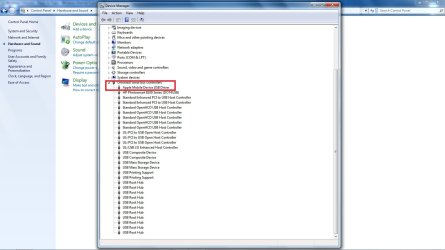
Once itunes is installed connect your iphone, listen for the 2 distinct sounds, they will be the usb drivers installing your phone, the first sound is the generic usb driver because windows 7 recognises your phone as a camera, the second sound is the itunes driver recognising your phone. See screenshot!
Open up Itunes and see if your iphone is recognised in itues, if yes perform sync.
The biggest issue thats been observed is the backup process with iphone! ITunes has been observed to hang midway point during the phone backup and sync then hangs. There is a workaround fix for this, you can either disable the backup in cmd mode or you can do this with a software fix. Follow this link and download and install the Iphone Backup switch and enable! This will shut down the backup procedure and you will have the sync function operational again. http://microseconds.com/?page_id=395
Sorry to be so long winded, report back to us how it went.

Regards,
Adrian
 

Attachments

  • apple_driver.jpg
    apple_driver.jpg
    104 KB · Views: 152
Last edited:

My Computer My Computer

At a glance

Windows 7 7600 1 X64AMD PHENOM II X 550 PROCESSOR 3.1 ghzCorsair 4 gig ddr 3ati radeon 3300
Computer Manufacturer/Model Number
Custom Build
OS
Windows 7 7600 1 X64
CPU
AMD PHENOM II X 550 PROCESSOR 3.1 ghz
Motherboard
ASUS M4A78-TE
Memory
Corsair 4 gig ddr 3
Graphics Card(s)
ati radeon 3300
Sound Card
ati hd
Monitor(s) Displays
syncmaster 2033sw
Screen Resolution
1600X900 60 hz refresh
Hard Drives
twin_seagates SATA's 1 TB & 500 Gig, hitachi_slimline 160 gig
PSU
antec_550 watt
Case
cooler master GLite
Cooling
stock_heat sink
Internet Speed
20mbs up/ 1.5mbs down
Other Info
favorite child "stewie"
favorite dog "brian"
Ok I've had problems with iTunes 64 opening period for the last few weeks.
Johnny Welcome to Windows 7 Forums, what version of Windows are you operating?

When I first got win7 64 and installed iTunes it worked fine for the first few days, then started giving me issues with constantly staying in sync with my iPhone.
Did you chane your settings in Itunes to autosync whenever you plugged your iphone in?

Since I have an iPhone I really do need iTunes to work & I do prefer it as my media player anyways compared to others for many reasons, so this is really killing me.

Any ideas or issues that I can try?

I've uninstalled/installed it like 6 times, used CCleaner, allowed everything iTunes, Bounjour & apple to have access through the firewall both private & public.

I'm at a standstill. I hope someone here can help.
Hi Johnny I suggest you uninstall all things Apple as has been already suggested.
Follow this link to use MS removal tool and follow the prompts, here is the D/L link:
Description of the Windows Installer CleanUp Utility

After downloading and installing you will need to remove all apple software, IE:
  • quiktime
  • bonjour
  • apple media
  • apple updates software
  • itunes
  • itunes installer
AFter you finish, reboot! Download Itunes 9.02 64 bit version, here is the link:
Apple - iTunes - Download iTunes Now
Before installing Itunes to your system make sure your iphone is disconnected.
Once itunes is installed connect your iphone, listen for the 2 distinct sounds, they will be the usb drivers installing your phone, the first sound is the generic usb driver because windows 7 recognises your phone as a camera, the second sound is the itunes driver recognising your phone. See screenshot!
Open up Itunes and see if your iphone is recognised in itues, if yes perform sync.
The biggest issue thats been observed is the backup process with iphone! ITunes has been observed to hang midway point during the phone backup and sync then hangs. There is a workaround fix for this, you can either disable the backup in cmd mode or you can do this with a software fix. Follow this link and download and install the Iphone Backup switch and enable! This will shut down the backup procedure and you will have the sync function operational again. iPhone/iPod Backup Switch
Sorry to be so long winded, report back to us how it went.

Regards,
Adrian

Ok I finally was able to download cleanup & remove quicktime which was giving me problems uninstalling from every where else.

Are you sure I want to download 9.0.2?

I thought I should download 9.0.0 and then upgrade from within?

That was one of the work arounds people with win7 64 have found worked?
 

My Computer My Computer

At a glance

Windows 7 64 & Ubuntu 64Intel Quad Core Q6600 2.40GHz8gNvidia 9600 GT & 9800 GT
Computer Manufacturer/Model Number
Built it myself
OS
Windows 7 64 & Ubuntu 64
CPU
Intel Quad Core Q6600 2.40GHz
Motherboard
Asus
Memory
8g
Graphics Card(s)
Nvidia 9600 GT & 9800 GT
Sound Card
Turtle Beach 5.1
Monitor(s) Displays
Three 19" Dell's & one 46" Samsung 750
Ok so after all of that it STILL isnt working.

I installed 9.0.0 and it wont open.

Itunes helper is in the task manager, but thats it.

God this is ridiculous.

Any ideas?
 

My Computer My Computer

At a glance

Windows 7 64 & Ubuntu 64Intel Quad Core Q6600 2.40GHz8gNvidia 9600 GT & 9800 GT
Computer Manufacturer/Model Number
Built it myself
OS
Windows 7 64 & Ubuntu 64
CPU
Intel Quad Core Q6600 2.40GHz
Motherboard
Asus
Memory
8g
Graphics Card(s)
Nvidia 9600 GT & 9800 GT
Sound Card
Turtle Beach 5.1
Monitor(s) Displays
Three 19" Dell's & one 46" Samsung 750
9.02


What's new in iTunes 9.0.2

iTunes 9.0.2 adds support for Apple TV software version 3.0, adds an option for a dark background for Grid View, and improves support for accessibility. iTunes Store accessibility requires Window-Eyes 7.1.1 or later.

iTunes 9 comes with many new features and improvements, including:

• An improved look and feel, including a new Column Browser for easily browsing your artists or albums, movies, TV shows, and more.

• iTunes Store has a brand new look, with improved navigation for quick and easy exploration.

• iTunes LP and iTunes Extras create unique experiences that feature exclusive interviews, videos, photos, and more — available with select album and movie purchases on the iTunes Store.

• Home Sharing helps you manage your family's iTunes collection between computers in your home. iTunes can automatically transfer new purchases, or you can choose just the items you want.

• Genius Mixes are created for you by iTunes and play songs from your library that go great together.

• iPod and iPhone syncing now allows you to organize your iPhone and iPod touch home screens directly in iTunes. Syncing is now also more flexible, allowing you to sync individual artists, genres, or TV show and Podcast episodes.

• iTunes U items are now organized into their own section in your iTunes library.

• Sync with iPod nano (5th generation), iPod classic (Fall 2009), and iPod touch (Fall 2009).

• iTunes 9 also includes many other improvements, such as HE-AAC encoding and playback, more flexibility with Smart Playlist rules, simpler organization of your media files inside an iTunes Media folder, and more.

iTunes 9.0.2 requirements

Hardware:
• A PC with a 1GHz Intel or AMD processor
• Intel Pentium D or faster processor is required to play Standard Definition video from the iTunes Store
• 2.0GHz Intel Core 2 Duo or faster processor is required to play HD video, an iTunes LP, or iTunes Extras from the iTunes Store
• 512MB of RAM; 1GB is required to play HD video, an iTunes LP, or iTunes Extras
• Screen resolution of 1024x768 or greater; 1280x800 or greater is required to play an iTunes LP or iTunes Extras
• DirectX 9.0-compatible video card with 32MB of video RAM; 64MB recommended
• QuickTime-compatible audio card
• Broadband Internet connection to use the iTunes Store
• iTunes-compatible CD or DVD recorder to create audio CDs, MP3 CDs, or back-up CDs or DVDs

Software:
• Windows XP Service Pack 2 or later, 32-bit editions of Windows Vista, or 32-bit editions of Windows 7
• 64-bit editions of Windows Vista or Windows 7 require the iTunes 9.0.2 64-bit installer; for more information, visit Apple - iTunes - Download iTunes Now
• QuickTime 7.6.4 (included)
• 200MB of available disk space
• Screen reader support requires Window-Eyes 7.1.1 or later; for information about accessibility in iTunes, visit Apple - Accessibility

iPod and iPhone:
• Syncing purchased videos requires iPod nano (3rd generation), iPod classic, iPod (5th generation) with software version 1.2 or later, iPod touch, or iPhone
• Transferring rented movies requires iPod nano (3rd generation) and iPod classic with software version 1.1 or later or iPod touch and iPhone with iPhone software version 1.1.3 or later
• Syncing ringtones requires iPhone software version 1.1 or later
• Purchasing or syncing applications require an iPhone or iPod touch with the iPhone 2.0 Software Update or later
• Purchasing from the iTunes Music Store for iPhone or iPod touch requires iPhone software version 1.1.1 or later
• Syncing iPod Games requires iPod nano (3rd generation), iPod classic, or iPod (5th generation) with software version 1.2 or later. Some iPod Games may not be
 

My Computer My Computer

At a glance

Windows 7 7600 1 X64AMD PHENOM II X 550 PROCESSOR 3.1 ghzCorsair 4 gig ddr 3ati radeon 3300
Computer Manufacturer/Model Number
Custom Build
OS
Windows 7 7600 1 X64
CPU
AMD PHENOM II X 550 PROCESSOR 3.1 ghz
Motherboard
ASUS M4A78-TE
Memory
Corsair 4 gig ddr 3
Graphics Card(s)
ati radeon 3300
Sound Card
ati hd
Monitor(s) Displays
syncmaster 2033sw
Screen Resolution
1600X900 60 hz refresh
Hard Drives
twin_seagates SATA's 1 TB & 500 Gig, hitachi_slimline 160 gig
PSU
antec_550 watt
Case
cooler master GLite
Cooling
stock_heat sink
Internet Speed
20mbs up/ 1.5mbs down
Other Info
favorite child "stewie"
favorite dog "brian"
9.0.2 was giving me all of the same problems...
 

My Computer My Computer

At a glance

Windows 7 64 & Ubuntu 64Intel Quad Core Q6600 2.40GHz8gNvidia 9600 GT & 9800 GT
Computer Manufacturer/Model Number
Built it myself
OS
Windows 7 64 & Ubuntu 64
CPU
Intel Quad Core Q6600 2.40GHz
Motherboard
Asus
Memory
8g
Graphics Card(s)
Nvidia 9600 GT & 9800 GT
Sound Card
Turtle Beach 5.1
Monitor(s) Displays
Three 19" Dell's & one 46" Samsung 750
Ok so after all of that it STILL isnt working.

I installed 9.0.0 and it wont open.

Itunes helper is in the task manager, but thats it.

God this is ridiculous.

Any ideas?
Johnny, un-install everything and start again using ver.9.02 and install as administrator.
 

My Computer My Computer

At a glance

Windows 7 7600 1 X64AMD PHENOM II X 550 PROCESSOR 3.1 ghzCorsair 4 gig ddr 3ati radeon 3300
Computer Manufacturer/Model Number
Custom Build
OS
Windows 7 7600 1 X64
CPU
AMD PHENOM II X 550 PROCESSOR 3.1 ghz
Motherboard
ASUS M4A78-TE
Memory
Corsair 4 gig ddr 3
Graphics Card(s)
ati radeon 3300
Sound Card
ati hd
Monitor(s) Displays
syncmaster 2033sw
Screen Resolution
1600X900 60 hz refresh
Hard Drives
twin_seagates SATA's 1 TB & 500 Gig, hitachi_slimline 160 gig
PSU
antec_550 watt
Case
cooler master GLite
Cooling
stock_heat sink
Internet Speed
20mbs up/ 1.5mbs down
Other Info
favorite child "stewie"
favorite dog "brian"
Dont forget I am running the 64 version of win7, so I actually have to download this version:

iTunes 9.0.2 for Windows (64 bit)

Also, after trying to install that version again I received this error message:

Printersettings.png


and its still not opening even after a restart and I received this error message... and it wouldnt restart again after that message

Ituneserror2.png


For some reason the original itunes download keeps getting an error, yet still downloads enough to install? Just not install properly?
 

My Computer My Computer

At a glance

Windows 7 64 & Ubuntu 64Intel Quad Core Q6600 2.40GHz8gNvidia 9600 GT & 9800 GT
Computer Manufacturer/Model Number
Built it myself
OS
Windows 7 64 & Ubuntu 64
CPU
Intel Quad Core Q6600 2.40GHz
Motherboard
Asus
Memory
8g
Graphics Card(s)
Nvidia 9600 GT & 9800 GT
Sound Card
Turtle Beach 5.1
Monitor(s) Displays
Three 19" Dell's & one 46" Samsung 750
Install

Hi Johnny, can you clarify for me. Is the installation failing. Or is it stopping when you launch Itunes.
Standing By!
 

My Computer My Computer

At a glance

Windows 7 7600 1 X64AMD PHENOM II X 550 PROCESSOR 3.1 ghzCorsair 4 gig ddr 3ati radeon 3300
Computer Manufacturer/Model Number
Custom Build
OS
Windows 7 7600 1 X64
CPU
AMD PHENOM II X 550 PROCESSOR 3.1 ghz
Motherboard
ASUS M4A78-TE
Memory
Corsair 4 gig ddr 3
Graphics Card(s)
ati radeon 3300
Sound Card
ati hd
Monitor(s) Displays
syncmaster 2033sw
Screen Resolution
1600X900 60 hz refresh
Hard Drives
twin_seagates SATA's 1 TB & 500 Gig, hitachi_slimline 160 gig
PSU
antec_550 watt
Case
cooler master GLite
Cooling
stock_heat sink
Internet Speed
20mbs up/ 1.5mbs down
Other Info
favorite child "stewie"
favorite dog "brian"
Control Panel

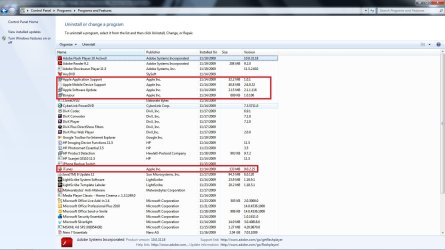
Would you look to see what, if any, Itunes programs you may have showing in your control panel.
Also, do you see Quicktime?
 

Attachments

  • programs.jpg
    programs.jpg
    148.3 KB · Views: 89
Last edited:

My Computer My Computer

At a glance

Windows 7 7600 1 X64AMD PHENOM II X 550 PROCESSOR 3.1 ghzCorsair 4 gig ddr 3ati radeon 3300
Computer Manufacturer/Model Number
Custom Build
OS
Windows 7 7600 1 X64
CPU
AMD PHENOM II X 550 PROCESSOR 3.1 ghz
Motherboard
ASUS M4A78-TE
Memory
Corsair 4 gig ddr 3
Graphics Card(s)
ati radeon 3300
Sound Card
ati hd
Monitor(s) Displays
syncmaster 2033sw
Screen Resolution
1600X900 60 hz refresh
Hard Drives
twin_seagates SATA's 1 TB & 500 Gig, hitachi_slimline 160 gig
PSU
antec_550 watt
Case
cooler master GLite
Cooling
stock_heat sink
Internet Speed
20mbs up/ 1.5mbs down
Other Info
favorite child "stewie"
favorite dog "brian"
Hi Johnny,

Just out of curiousity what version of Windows 7 are you running? Retail or the RTM? I'm running the retail version of Windows 7 Ultimate x64 and iTune and have not had any problems. That's why I ask.

I sync to an iPod classic.
 

My Computer My Computer

At a glance

Windows 10 ProIntel Core i7-4770K (3.5Ghz)32 gig Corsair Dominator Platinum (4x8Gig)Sapphire Tri-X R9 Fury
Computer type
PC/Desktop
Computer Manufacturer/Model Number
Custom built by me.
OS
Windows 10 Pro
CPU
Intel Core i7-4770K (3.5Ghz)
Motherboard
Gigabyte G1 Sniper 5 (F10 Bios)
Memory
32 gig Corsair Dominator Platinum (4x8Gig)
Graphics Card(s)
Sapphire Tri-X R9 Fury
Sound Card
Soundblaster ZXR
Monitor(s) Displays
NEC PA242W 24" LCD Monitor
Screen Resolution
1920 x 1200
Hard Drives
Primary - Samsung 850 Pro (512gig), Samsung 840 Pro (256gig), 2TB WD Caviar Black.
PSU
EVGA Supernova 1000 G2
Case
Cooler Master HAF X
Cooling
Corsair H100i with Corsair Air Series SP120 Quiet Fans
Keyboard
Logitech Wireless Wave
Mouse
Logitech Performance MX
Internet Speed
High Speed Cable
Antivirus
Norton Security
Browser
IE11
Other Info
Memory Timings - 1866MHz @ 9-9-9-27-1T @ 1.5 volts
Virus software

Johnny, what AV program are you using?
 

My Computer My Computer

At a glance

Windows 7 7600 1 X64AMD PHENOM II X 550 PROCESSOR 3.1 ghzCorsair 4 gig ddr 3ati radeon 3300
Computer Manufacturer/Model Number
Custom Build
OS
Windows 7 7600 1 X64
CPU
AMD PHENOM II X 550 PROCESSOR 3.1 ghz
Motherboard
ASUS M4A78-TE
Memory
Corsair 4 gig ddr 3
Graphics Card(s)
ati radeon 3300
Sound Card
ati hd
Monitor(s) Displays
syncmaster 2033sw
Screen Resolution
1600X900 60 hz refresh
Hard Drives
twin_seagates SATA's 1 TB & 500 Gig, hitachi_slimline 160 gig
PSU
antec_550 watt
Case
cooler master GLite
Cooling
stock_heat sink
Internet Speed
20mbs up/ 1.5mbs down
Other Info
favorite child "stewie"
favorite dog "brian"
Shoot sorry I posted one of the wrong pics.

Here's the other error message

ituneserror.png


i was getting both error message and iTunes still not opening.
 

My Computer My Computer

At a glance

Windows 7 64 & Ubuntu 64Intel Quad Core Q6600 2.40GHz8gNvidia 9600 GT & 9800 GT
Computer Manufacturer/Model Number
Built it myself
OS
Windows 7 64 & Ubuntu 64
CPU
Intel Quad Core Q6600 2.40GHz
Motherboard
Asus
Memory
8g
Graphics Card(s)
Nvidia 9600 GT & 9800 GT
Sound Card
Turtle Beach 5.1
Monitor(s) Displays
Three 19" Dell's & one 46" Samsung 750
Back
Top