Reboot Time Problem

nolephin

New member
Local time
3:30 PM
Messages
32
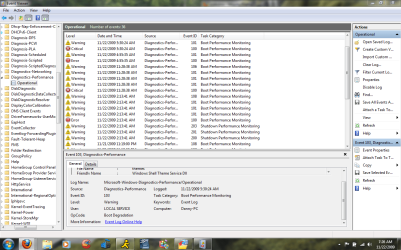
i went into Event Viewer>Applications and Services>Microsoft>Windows>Diagnostics-Performance>Operational and it listed a bunch of errors. let me show you the screen shot. I have been having slow start up times and I don't know why considering I just ran a clean install yesterday.

Any help on this is appreciated. I just want my computer to start up faster.


Attachments
  • eventviewer.PNG
    eventviewer.PNG
    316 KB · Views: 70

My Computer

OS
XP
Have you tried getting rid of some of the startup programs?
 

My Computer

Computer Manufacturer/Model Number
Custom Build
OS
W7 RTM Ultimate x64
CPU
Intel Q8400 @ 2.66GHZ
Motherboard
Gigabyte GA-EG45M-UD2H
Memory
4GB DDR2-800
Graphics Card(s)
Gainward GTS 450 GLH 1GB Edition
Sound Card
Integrated 8 Channel
Monitor(s) Displays
AOC 23.6 Inch Widescreen LCD
Screen Resolution
1920x1080
Hard Drives
Seagate 500GB Internal
Western Digital 1TB Internal

Hitachi 1TB External
PSU
Apevia Java Power 500W
Case
Cooler Master HAF 922 Black
Cooling
Stock Intel CPU Fan
Keyboard
HP SK-2960 Multimedia Keyboard
Mouse
Logitech M350 Wireless Gaming Mouse
Internet Speed
1.5MB
I am having similar problems. I have an Event ID 100 for every startup (Warning the first two weeks after custom build and install, and Error the last two days since I re-seated my HSF and installed another DVD burner). I disabled most of the unnecessary startup problems.

My Re-start time was 143 sec.; it seems to get caught up at "Starting Windows". I have a pretty fast system (WEI index of 7.5).
 

My Computer

OS
Windows 7
CPU
Intel i7 920
Motherboard
Asus P6T Deluxe V2
Memory
6GB DDR3 OCZ Platinum
Graphics Card(s)
XFX 9800GT
Monitor(s) Displays
Dual 28" Hanns G
Hard Drives
OCZ Vertex 120GB SSD
PSU
Corsair 750TX
Case
ThermalTake Element S
Cooling
Xigmatek Dark Knight
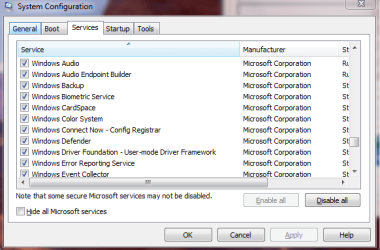
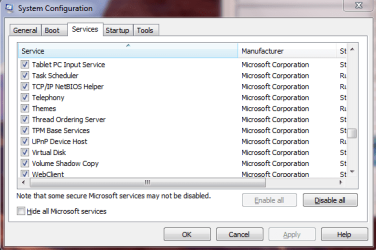
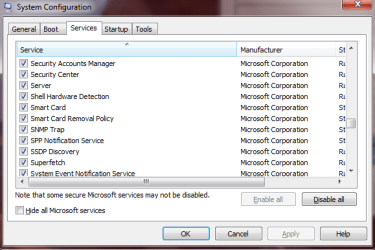
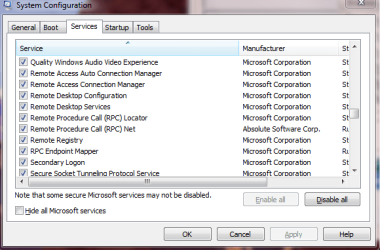
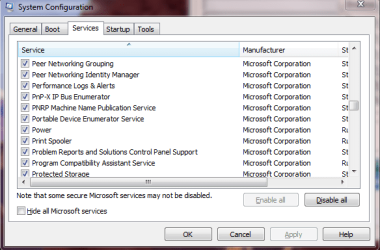
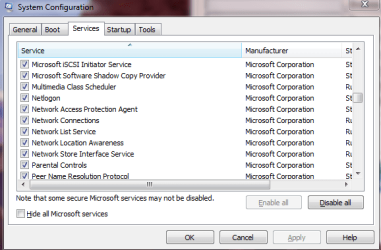
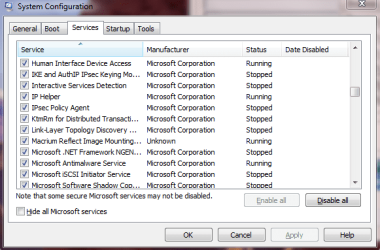
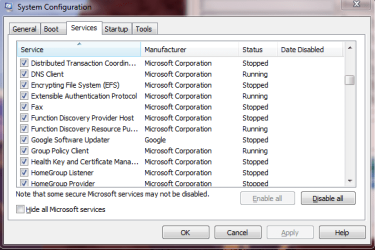
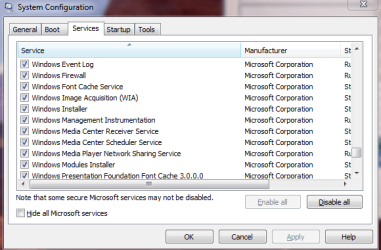
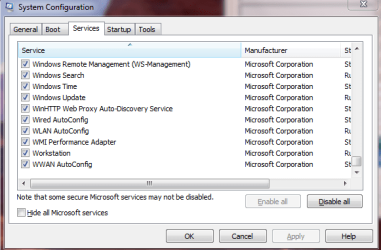
Most people go right to msconfig>start up to remove items from the start up process. Take a look at "services". It shows many applications, some not necessary that are automatically started when you boot. Some of these applications can be changed from automatic to manual.
 

My Computer

Computer type
PC/Desktop
Computer Manufacturer/Model Number
Dell XPS 420
OS
Windows 10, Home Clean Install
CPU
Intel Core2 processsor Q8200(2.33Ghz 1333FSB) Quad Core Tech
Motherboard
Dell
Memory
6 gb
Graphics Card(s)
ATI Radeon 256MB HD3650
Sound Card
Intergrated 7.1 Channel Audio
Monitor(s) Displays
Dell SP2009W 20"
Hard Drives
640 GB Serial ATA Hard drive
Cooling
Fan
Keyboard
Dell USB Keyboard
Mouse
Dell Premium Optical USB
Internet Speed
DSL 2.85
Are you OC'ing?
 

My Computer

Computer type
PC/Desktop
Computer Manufacturer/Model Number
DELL VOSTRO 3650
OS
Windows 8.1 PRO
CPU
3rd Generation Intel Core i7‐3612QM CPU @ 2.10GHZ
Memory
8GB DDR3
Graphics Card(s)
NVIDIA GeForce GT 525M (128 bit), 1GB Grpahics
Screen Resolution
1920X1080
Hard Drives
750GB 5400RPM
Most people go right to msconfig>start up to remove items from the start up process. Take a look at "services". It shows many applications, some not necessary that are automatically started when you boot. Some of these applications can be changed from automatic to manual.

Which of these applications can I remove from the services?
 

My Computer

OS
XP
Take a picture of services, post it and many people here can help.
 

My Computer

Computer type
PC/Desktop
Computer Manufacturer/Model Number
Dell XPS 420
OS
Windows 10, Home Clean Install
CPU
Intel Core2 processsor Q8200(2.33Ghz 1333FSB) Quad Core Tech
Motherboard
Dell
Memory
6 gb
Graphics Card(s)
ATI Radeon 256MB HD3650
Sound Card
Intergrated 7.1 Channel Audio
Monitor(s) Displays
Dell SP2009W 20"
Hard Drives
640 GB Serial ATA Hard drive
Cooling
Fan
Keyboard
Dell USB Keyboard
Mouse
Dell Premium Optical USB
Internet Speed
DSL 2.85

Attachments

  • msconfig10.PNG
    msconfig10.PNG
    70 KB · Views: 13
  • msconfig9.PNG
    msconfig9.PNG
    70.1 KB · Views: 16
  • msconfig8.PNG
    msconfig8.PNG
    66.5 KB · Views: 18
  • msconfig7.PNG
    msconfig7.PNG
    67 KB · Views: 14
  • msconfig6.PNG
    msconfig6.PNG
    72.4 KB · Views: 12
  • msconfig5.PNG
    msconfig5.PNG
    62.8 KB · Views: 17
  • msconfig4.PNG
    msconfig4.PNG
    70 KB · Views: 18
  • msconfig3.PNG
    msconfig3.PNG
    74.9 KB · Views: 17
  • msconfig2.PNG
    msconfig2.PNG
    68.7 KB · Views: 27
  • msconfig_services.PNG
    msconfig_services.PNG
    84.3 KB · Views: 32
  • msconfig11.PNG
    msconfig11.PNG
    66.6 KB · Views: 16
  • msconfig12.PNG
    msconfig12.PNG
    65.5 KB · Views: 16

My Computer

OS
XP
Hello Nolephin, I have to agree with richc46 I know service tweaks made a vast differrence with Vista startup, Seven seems to have made a lot of those tweaks default but there are still some you can shut down or set to manual (that way your OS can still start them if needed but wont run at start up)
Here is a link to a handy guide on service tweaking;
Windows 7 Service Configurations by Black Viper
 

My Computer

Computer Manufacturer/Model Number
Hewlett Packard Compaq Presario CQ60-305au
OS
Windows Seven Home Premium 32bit SP1
CPU
AMD Athlon QI46 2.1Ghz
Motherboard
Wistron 303c
Memory
2048 Mb DDR2 SD RAM
Graphics Card(s)
NVidea GE GoForce 8200M G/256mb dedicated graphics memory
Sound Card
MCP78S NVidea high definition
Monitor(s) Displays
15.6" High definition Brightview Widescreen
Screen Resolution
1336x768
Hard Drives
Toshiba MK2555GSX ATA
Take a look at the services that are running. Any that you do not use, take a look at what appl depends on it. If you are sure you do not want it, at start up you can turn it off. If you are not sure you can ask here. You may also want to make a system image before you make any changes, just so you can restore everytning in case there is a problem. I will look at services and give my recommendation, also.


EDIT. As I was typing the prior poster gave you a good lead the infomation about services. Take a look at it and then return if you have any questions. But dont change anything unless you are sure. One thing that I saw already is Parental Controls, unless you actually use it.
 

My Computer

Computer type
PC/Desktop
Computer Manufacturer/Model Number
Dell XPS 420
OS
Windows 10, Home Clean Install
CPU
Intel Core2 processsor Q8200(2.33Ghz 1333FSB) Quad Core Tech
Motherboard
Dell
Memory
6 gb
Graphics Card(s)
ATI Radeon 256MB HD3650
Sound Card
Intergrated 7.1 Channel Audio
Monitor(s) Displays
Dell SP2009W 20"
Hard Drives
640 GB Serial ATA Hard drive
Cooling
Fan
Keyboard
Dell USB Keyboard
Mouse
Dell Premium Optical USB
Internet Speed
DSL 2.85
Hello Nolephin, I have to agree with richc46 I know service tweaks made a vast differrence with Vista startup, Seven seems to have made a lot of those tweaks default but there are still some you can shut down or set to manual (that way your OS can still start them if needed but wont run at start up)
Here is a link to a handy guide on service tweaking;
Windows 7 Service Configurations by Black Viper

Hey Mitchell

I am at the Services box, that I arrived at by typing "services.msc" in the startup box. I don't quite understand how to put the services under manual, which (correct me if I am wrong) makes it so that the computer doesn't run the service at start up, but instead only when it needs it.

I guess my question is, if manual would be the best setting, what would I need to do to set it that way. Also, i was looking at that link you provided, but I am still unsure of how exactly to do it.

Edit:

Ok I think I figured it out somewhat, (again please correct me if I am wrong) Basically I can follow the chart at the bottom of the link and set the services according to either "Safe", "Tweaked", or "Bare-Bones".

Which do you personally recommend?
 

My Computer

OS
XP
Sorry i just realised your OS is XP the link i gave you was for Windows 7 if you go back to the site and browse on the LH side you will find Service tweaks for XP and whatever service pack is applicable
Here is a link to a tutorial for what you want to know it is the same basis for XP
http://www.sevenforums.com/tutorials/2495-services-start-disable.html
I hope this helps
 

My Computer

Computer Manufacturer/Model Number
Hewlett Packard Compaq Presario CQ60-305au
OS
Windows Seven Home Premium 32bit SP1
CPU
AMD Athlon QI46 2.1Ghz
Motherboard
Wistron 303c
Memory
2048 Mb DDR2 SD RAM
Graphics Card(s)
NVidea GE GoForce 8200M G/256mb dedicated graphics memory
Sound Card
MCP78S NVidea high definition
Monitor(s) Displays
15.6" High definition Brightview Widescreen
Screen Resolution
1336x768
Hard Drives
Toshiba MK2555GSX ATA

My Computer

OS
XP
Sorry i just realised your OS is XP the link i gave you was for Windows 7 if you go back to the site and browse on the LH side you will find Service tweaks for XP and whatever service pack is applicable
Here is a link to a tutorial for what you want to know it is the same basis for XP
http://www.sevenforums.com/tutorials/2495-services-start-disable.html
I hope this helps

No no lol my OS is Windows 7.

Lol. i thought after how is this guy doing aero screen shots on XP doh!

Yeah just use the black Viper guide and only use safe settings to start, after you get a bit more comfortable with it you might want to try a few more

I got in the habit of keeping a record of the ones you change and what thier default setting was, this is handy when you have to reinstall windows as all your service tweaks are written down.

In the early days of Vista i would just refer to BVs guide study what a particular service purpose is and maybee if i thought i didnt need it on Auto do one every few days just to see how things responded

An example of this is Tablet initially was auto by default i think now it is manual by default anyway i dont use a tablet so i disabled it but a few days latter i went to use my snipping tool and it wouldnt work
Hence because i only done one service every now & then i was able to backtrack & found that the snipping tool was dependent on Tablet to be set to at least manual

Anyway gotta go just dont rush the process & take notes, all the best ;)
 

My Computer

Computer Manufacturer/Model Number
Hewlett Packard Compaq Presario CQ60-305au
OS
Windows Seven Home Premium 32bit SP1
CPU
AMD Athlon QI46 2.1Ghz
Motherboard
Wistron 303c
Memory
2048 Mb DDR2 SD RAM
Graphics Card(s)
NVidea GE GoForce 8200M G/256mb dedicated graphics memory
Sound Card
MCP78S NVidea high definition
Monitor(s) Displays
15.6" High definition Brightview Widescreen
Screen Resolution
1336x768
Hard Drives
Toshiba MK2555GSX ATA
I was also a big Black Viper fan to tolerate early Vista, and used him like a Bible in XP, but trust me it is not at all necessary in Win7 which genius is in setting most services on quick triggers.

The startup issues you have Nolephin are best troubleshot in the Event Viewer using Google, and by enabling Boot Logging using F8 at bootup, so you can check the log over time and detect the faulty driver or software as it fails to load.

I had a multi-minute startup on Vista laptop last year which I spent several weeks learning how to troubleshoot, mostly Googling relentlessly until I became familar with the Event errors, then fixing them one by one.

And the boot logging gives you suspect drivers/software to disable for testing, reinstall, or replace.

All that said, I am still very much a novice at startup troubleshooting so hopefully keeping this bumped will attract more knowledgeable techies.
 
nolephin, when you're in Services (services.msc), you can set the items to atomatic, manual, or disabled. Select the service, right click on it, choose properties. When the window opens, click the drop down bar, then set it to your choice. Before just randomly disabling anything, it would be wiser to set it to manual... except those you know for sure you do not use.
 

My Computer

Computer type
PC/Desktop
Computer Manufacturer/Model Number
Bruce ... somewhere in his 40's
OS
Windows 7 Ultimate 32bit SP1
CPU
Intel(R) Core(TM)2 Quad CPU @ 2.40GHz, 2400 MHz
Motherboard
INTEL/D975XBX2
Memory
4 GB
Graphics Card(s)
ATI Radeon HD 2600 Pro
Monitor(s) Displays
Samsung SyncMaster 914v
Screen Resolution
1280 x 1024
Hard Drives
2/500GB each ... ST3500630AS ATA Device.
One is not connected
PSU
Rocketfish 700 W
Case
G.Skill Gigabyte Chassis
Keyboard
Standard PS/2 Keyboard
Mouse
Microsoft PS/2 Mouse
Internet Speed
DSL
Antivirus
Avira Internet Security
Browser
IE 11
Other Info
ATI HDMI Audio
nolephin, when you're in Services (services.msc), you can set the items to atomatic, manual, or disabled. Select the service, right click on it, choose properties. When the window opens, click the drop down bar, then set it to your choice. Before just randomly disabling anything, it would be wiser to set it to manual... except those you know for sure you do not use.

Thanks for the suggestion, Jacee.

I followed Black Viper's guide and set it to his "Safe" suggestion. Going to try this out for a few days and see how it works.

If all goes well I might try the next step and see how works.
 

My Computer

OS
XP
Also make sure your drivers are up to date ... they will have an effect on the performance of your computer, especially graphics.
 

My Computer

Computer type
PC/Desktop
Computer Manufacturer/Model Number
Bruce ... somewhere in his 40's
OS
Windows 7 Ultimate 32bit SP1
CPU
Intel(R) Core(TM)2 Quad CPU @ 2.40GHz, 2400 MHz
Motherboard
INTEL/D975XBX2
Memory
4 GB
Graphics Card(s)
ATI Radeon HD 2600 Pro
Monitor(s) Displays
Samsung SyncMaster 914v
Screen Resolution
1280 x 1024
Hard Drives
2/500GB each ... ST3500630AS ATA Device.
One is not connected
PSU
Rocketfish 700 W
Case
G.Skill Gigabyte Chassis
Keyboard
Standard PS/2 Keyboard
Mouse
Microsoft PS/2 Mouse
Internet Speed
DSL
Antivirus
Avira Internet Security
Browser
IE 11
Other Info
ATI HDMI Audio
I was also a big Black Viper fan to tolerate early Vista, and used him like a Bible in XP, but trust me it is not at all necessary in Win7 which genius is in setting most services on quick triggers.
You are correct gregrocker, i went through mine last night and there was only 3 i reset compared to the 12 i would do with Vista :)
 

My Computer

Computer Manufacturer/Model Number
Hewlett Packard Compaq Presario CQ60-305au
OS
Windows Seven Home Premium 32bit SP1
CPU
AMD Athlon QI46 2.1Ghz
Motherboard
Wistron 303c
Memory
2048 Mb DDR2 SD RAM
Graphics Card(s)
NVidea GE GoForce 8200M G/256mb dedicated graphics memory
Sound Card
MCP78S NVidea high definition
Monitor(s) Displays
15.6" High definition Brightview Widescreen
Screen Resolution
1336x768
Hard Drives
Toshiba MK2555GSX ATA
Back
Top