
Windows 7 uses 1gb RAM idle

iphupho

New member
Local time
2:37 PM
Messages
4
[SOLVED] Windows 7 uses 1gb RAM idle

Hi!

Two days ago it used only about 600 MB of Ram when idle.
Yesterday it suddenly started using 1 GB idle and it froze a few times.
Why the sudden change? Can you help me decrease the usage?

PS If it helps, the problem started after installing G Data AV (before I used Nod32) and now I installed nod again and the usage is still the same.

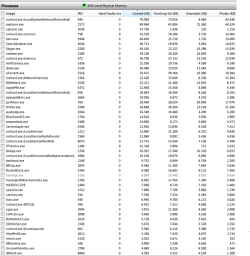
I enclosed a picture from Resource Monitor in the attachments.
Explorer.exe is using 70mb. Is that normal?
 

Attachments
  • RAMUSAGE.PNG
    RAMUSAGE.PNG
    69.6 KB · Views: 795
Last edited:

My Computer My Computer

At a glance

Windows 7AMD Athlon X2 5200+2GBGeForce 8600 GT
OS
Windows 7
CPU
AMD Athlon X2 5200+
Motherboard
Asus M2N SLI-Deluxe
Memory
2GB
Graphics Card(s)
GeForce 8600 GT
Check for Memory leaks, use Task Manager and see if over the coarse of the day does anything creep up (Memory Usage).
 
Last edited:

My Computer My Computer

At a glance

Vista (Hate Win 7)
OS
Vista (Hate Win 7)
NOD 32 is famous for eating Ram, it's been a problem for quite a while now.
 

My Computer My Computer

At a glance

Windows 7 Ult, Windows 8.1 Pro,Q9650-4.275GHz, E8600 4.5GHz, E6750-3.8GHzG.Skill PC2 9600 1200Mhz 5 5 5 15 2TGTX480
Computer type
PC/Desktop
Computer Manufacturer/Model Number
Home built
OS
Windows 7 Ult, Windows 8.1 Pro,
CPU
Q9650-4.275GHz, E8600 4.5GHz, E6750-3.8GHz
Motherboard
Evga 780i FTW
Memory
G.Skill PC2 9600 1200Mhz 5 5 5 15 2T
Graphics Card(s)
GTX480
Sound Card
Asus Xonar D2
Monitor(s) Displays
HannsG
Screen Resolution
1680X1050
Hard Drives
GSkill Phoenix Pro 120GB SSD
PSU
ThermalTake Toughpower 1000Watt modular
Case
ThermalTake XaserV
Cooling
Xigmatek S1283
Keyboard
Logitech G15
Mouse
Logitech G9
Internet Speed
T1
Try restoring to a time before you installed that AV, and see does it help.
it might be the simplest thing to do.
 

My Computer My Computer

At a glance

Vista Ult64, Win7600Intel Core 2 Quad Q6600 @ 2400 MHz 64bit OS4096 MB DDR3-SDRAMATI Radeon HD 3870 Series x2 Crossfired
Computer Manufacturer/Model Number
Self Build 64bit
OS
Vista Ult64, Win7600
CPU
Intel Core 2 Quad Q6600 @ 2400 MHz 64bit OS
Motherboard
Asus P5E3 Deluxe WiFi @p 64 bit OS
Memory
4096 MB DDR3-SDRAM
Graphics Card(s)
ATI Radeon HD 3870 Series x2 Crossfired
Sound Card
Realtek on board
Monitor(s) Displays
Samsung SyncMaster - 23 inches
Screen Resolution
1680x1050 pixels at 60 Hz in True Colors
Hard Drives
Hitachi (250 GB)/Samsung 750 GB. /Barracuda 160 GB.
My Book 1 TB external..
PSU
Cooler Master 1000w
Case
Cooler Master Cosmos 1000.
Cooling
Fans and fresh air,
Keyboard
Wireless
Mouse
Wireless
Internet Speed
Never fast enough
Other Info
I use a Magnum.
depends also if it's 32 bits or 64 bits version ...
 

My Computer My Computer

At a glance

win7
OS
win7
It's 32bit Version
 

My Computer My Computer

At a glance

Windows 7AMD Athlon X2 5200+2GBGeForce 8600 GT
OS
Windows 7
CPU
AMD Athlon X2 5200+
Motherboard
Asus M2N SLI-Deluxe
Memory
2GB
Graphics Card(s)
GeForce 8600 GT
Search Indexer seems to be taking a large share of ram, has that always been like that?
 

My Computer My Computer

At a glance

W7 RTM Ultimate x64Intel Q8400 @ 2.66GHZ4GB DDR2-800Gainward GTS 450 GLH 1GB Edition
Computer Manufacturer/Model Number
Custom Build
OS
W7 RTM Ultimate x64
CPU
Intel Q8400 @ 2.66GHZ
Motherboard
Gigabyte GA-EG45M-UD2H
Memory
4GB DDR2-800
Graphics Card(s)
Gainward GTS 450 GLH 1GB Edition
Sound Card
Integrated 8 Channel
Monitor(s) Displays
AOC 23.6 Inch Widescreen LCD
Screen Resolution
1920x1080
Hard Drives
Seagate 500GB Internal
Western Digital 1TB Internal

Hitachi 1TB External
PSU
Apevia Java Power 500W
Case
Cooler Master HAF 922 Black
Cooling
Stock Intel CPU Fan
Keyboard
HP SK-2960 Multimedia Keyboard
Mouse
Logitech M350 Wireless Gaming Mouse
Internet Speed
1.5MB

My Computer My Computer

At a glance

Windows 7 Ultimate (x64) SP1Intel 3770k 4.6GHz8GB (2x 4GB) Crucial BallistixSapphire 7950 (1060/1600)
Computer Manufacturer/Model Number
tw33k
OS
Windows 7 Ultimate (x64) SP1
CPU
Intel 3770k 4.6GHz
Motherboard
ASUS Maximus V Formula
Memory
8GB (2x 4GB) Crucial Ballistix
Graphics Card(s)
Sapphire 7950 (1060/1600)
Sound Card
On Board Realtek HD Audio
Monitor(s) Displays
27" Acer B273HU (via HDMI)
Screen Resolution
2048 x 1152
Hard Drives
Crucial M4 128GB
2TB WD Black
1TB Samsung F3 SATA
1TB WD Elite External
2TB WD USB 3.0
PSU
Corsair AX750 Gold
Case
Corsair Obsidian 800DW
Cooling
Corsair H100 (2x AP-121/2x UK-3000 push/pull)
Keyboard
Microsoft Wireless 5000
Mouse
Microsoft Wireless 5000
Internet Speed
5mb/s
Other Info
Logitech z-2300 2.1 speakers
Lamptron FC-5 v2
try to disable some services,search index....
 

My Computer My Computer

At a glance

win7
OS
win7

My Computer My Computer

At a glance

Windows 7AMD Athlon X2 5200+2GBGeForce 8600 GT
OS
Windows 7
CPU
AMD Athlon X2 5200+
Motherboard
Asus M2N SLI-Deluxe
Memory
2GB
Graphics Card(s)
GeForce 8600 GT
Your RAM usage looks perfectly fine for what you are running.
Something else is causing you problems.

Anyways, try this one. Start > type "service" open Services Manager > look for "Windows Media Player Network Sharing Service" stop it and set to Disabled.
 

My Computer My Computer

At a glance

Windows 10 Pro (x64)Intel Core i7-3930K (3.2GHz - 4.5GHz)4x Samsung 4GB PC3-12800 DDR3 (16GB 1600MHz)Nvidia Geforce GTX 690
Computer type
PC/Desktop
Computer Manufacturer/Model Number
Alienware Aurora ALX R4
OS
Windows 10 Pro (x64)
CPU
Intel Core i7-3930K (3.2GHz - 4.5GHz)
Motherboard
Alienware Aurora-R4 x79
Memory
4x Samsung 4GB PC3-12800 DDR3 (16GB 1600MHz)
Graphics Card(s)
Nvidia Geforce GTX 690
Sound Card
SteelSeries Siberia Elite
Monitor(s) Displays
Dell UltraSharp U3011
Screen Resolution
2560x1600
Hard Drives
Samsung 850 Pro 256 GB, Seagate 1TB Desktop Hybrid HDD, 2x Western Digital 4TB Green HDD
PSU
875W Some Dell PSU <.<
Case
Alienware Aurora ALX
Cooling
Custom Liquid Cooling (EK CPU & GPU blocks) dual EK 480RAD
Keyboard
Logitech G710+ Mechanical
Mouse
Logitech G700s
Internet Speed
Verizon Fios (50 mbps average)
Other Info
Server: Intel NUC D54250WYK: i5-4250U, 16GB, 256 GB mSATA, Windows Server 2012 R2
NOD 32 is famous for eating Ram, it's been a problem for quite a while now.

Not on my system it ain't

The strange thing is that not everyone running NOD32 gets this problem, I'm glad it hasn't happend to you but the problem has been reported by thousands of people none the less.

I believe it has to do with the NIC-wifi problems that seem to be the biggest problem yet for Windows 7.
 

My Computer My Computer

At a glance

Windows 7 Ult, Windows 8.1 Pro,Q9650-4.275GHz, E8600 4.5GHz, E6750-3.8GHzG.Skill PC2 9600 1200Mhz 5 5 5 15 2TGTX480
Computer type
PC/Desktop
Computer Manufacturer/Model Number
Home built
OS
Windows 7 Ult, Windows 8.1 Pro,
CPU
Q9650-4.275GHz, E8600 4.5GHz, E6750-3.8GHz
Motherboard
Evga 780i FTW
Memory
G.Skill PC2 9600 1200Mhz 5 5 5 15 2T
Graphics Card(s)
GTX480
Sound Card
Asus Xonar D2
Monitor(s) Displays
HannsG
Screen Resolution
1680X1050
Hard Drives
GSkill Phoenix Pro 120GB SSD
PSU
ThermalTake Toughpower 1000Watt modular
Case
ThermalTake XaserV
Cooling
Xigmatek S1283
Keyboard
Logitech G15
Mouse
Logitech G9
Internet Speed
T1
Your RAM usage looks perfectly fine for what you are running.
Something else is causing you problems.

Anyways, try this one. Start > type "service" open Services Manager > look for "Windows Media Player Network Sharing Service" stop it and set to Disabled.


You are correct about Media player but once it goes though and collects data on music files it will calm down and should stop running all the time.

I agree that it's typical for the Ram usage to go up after a few days but using 1GB out of 2GB is 50 percent which isn't very normal. My 2GB system uses maybe 30 percent at the most. My other 1GB P4 system uses 50 percent but with only 1GB that is expected.

The freezing problems are what I would worry about the most but they are hard to diagnose without more information. And I can tell you for sure that NOD32 and a few other anti virus software's have been causing memory leak problems " On certain machines".

Google the problems with Nod 32, they are all over the internet and there have been memory leaking problems associated with it for months now. Maybe a solution is out there for it by now.
 

My Computer My Computer

At a glance

Windows 7 Ult, Windows 8.1 Pro,Q9650-4.275GHz, E8600 4.5GHz, E6750-3.8GHzG.Skill PC2 9600 1200Mhz 5 5 5 15 2TGTX480
Computer type
PC/Desktop
Computer Manufacturer/Model Number
Home built
OS
Windows 7 Ult, Windows 8.1 Pro,
CPU
Q9650-4.275GHz, E8600 4.5GHz, E6750-3.8GHz
Motherboard
Evga 780i FTW
Memory
G.Skill PC2 9600 1200Mhz 5 5 5 15 2T
Graphics Card(s)
GTX480
Sound Card
Asus Xonar D2
Monitor(s) Displays
HannsG
Screen Resolution
1680X1050
Hard Drives
GSkill Phoenix Pro 120GB SSD
PSU
ThermalTake Toughpower 1000Watt modular
Case
ThermalTake XaserV
Cooling
Xigmatek S1283
Keyboard
Logitech G15
Mouse
Logitech G9
Internet Speed
T1
The strange thing is that not everyone running NOD32 gets this problem, I'm glad it hasn't happend to you but the problem has been reported by thousands of people none the less.

I believe it has to do with the NIC-wifi problems that seem to be the biggest problem yet for Windows 7.

The only problem I ever heard of was with Eset Smart Security not running properly on Windows 7 but that has been fixed. Check the Security thread and you will find a HUGE number of people saying how low on resources NOD32 is
 

My Computer My Computer

At a glance

Windows 7 Ultimate (x64) SP1Intel 3770k 4.6GHz8GB (2x 4GB) Crucial BallistixSapphire 7950 (1060/1600)
Computer Manufacturer/Model Number
tw33k
OS
Windows 7 Ultimate (x64) SP1
CPU
Intel 3770k 4.6GHz
Motherboard
ASUS Maximus V Formula
Memory
8GB (2x 4GB) Crucial Ballistix
Graphics Card(s)
Sapphire 7950 (1060/1600)
Sound Card
On Board Realtek HD Audio
Monitor(s) Displays
27" Acer B273HU (via HDMI)
Screen Resolution
2048 x 1152
Hard Drives
Crucial M4 128GB
2TB WD Black
1TB Samsung F3 SATA
1TB WD Elite External
2TB WD USB 3.0
PSU
Corsair AX750 Gold
Case
Corsair Obsidian 800DW
Cooling
Corsair H100 (2x AP-121/2x UK-3000 push/pull)
Keyboard
Microsoft Wireless 5000
Mouse
Microsoft Wireless 5000
Internet Speed
5mb/s
Other Info
Logitech z-2300 2.1 speakers
Lamptron FC-5 v2
I agree that it's typical for the Ram usage to go up after a few days but using 1GB out of 2GB is 50 percent which isn't very normal. My 2GB system uses maybe 30 percent at the most. My other 1GB P4 system uses 50 percent but with only 1GB that is expected.

Sure my is around 30% to 40%. However, the OP is running a considerable amount of applications. And as far as I remember those require some RAM to be running. Either way the RAM usage is a none issue as long as it is given up the the application that holds it.
 

My Computer My Computer

At a glance

Windows 10 Pro (x64)Intel Core i7-3930K (3.2GHz - 4.5GHz)4x Samsung 4GB PC3-12800 DDR3 (16GB 1600MHz)Nvidia Geforce GTX 690
Computer type
PC/Desktop
Computer Manufacturer/Model Number
Alienware Aurora ALX R4
OS
Windows 10 Pro (x64)
CPU
Intel Core i7-3930K (3.2GHz - 4.5GHz)
Motherboard
Alienware Aurora-R4 x79
Memory
4x Samsung 4GB PC3-12800 DDR3 (16GB 1600MHz)
Graphics Card(s)
Nvidia Geforce GTX 690
Sound Card
SteelSeries Siberia Elite
Monitor(s) Displays
Dell UltraSharp U3011
Screen Resolution
2560x1600
Hard Drives
Samsung 850 Pro 256 GB, Seagate 1TB Desktop Hybrid HDD, 2x Western Digital 4TB Green HDD
PSU
875W Some Dell PSU <.<
Case
Alienware Aurora ALX
Cooling
Custom Liquid Cooling (EK CPU & GPU blocks) dual EK 480RAD
Keyboard
Logitech G710+ Mechanical
Mouse
Logitech G700s
Internet Speed
Verizon Fios (50 mbps average)
Other Info
Server: Intel NUC D54250WYK: i5-4250U, 16GB, 256 GB mSATA, Windows Server 2012 R2
The strange thing is that not everyone running NOD32 gets this problem, I'm glad it hasn't happend to you but the problem has been reported by thousands of people none the less.

I believe it has to do with the NIC-wifi problems that seem to be the biggest problem yet for Windows 7.

The only problem I ever heard of was with Eset Smart Security not running properly on Windows 7 but that has been fixed. Check the Security thread and you will find a HUGE number of people saying how low on resources NOD32 is

I'm sure it's a good program that works perfectly on most systems, I'm not about to argue that point with you. But that is besides the point. The facts are that many users who installed Windows 7 reported memory leak problems associated with Nod 32 and a few other Anti virus's, On certain systems! Maybe you somehow missed the complaints about this over the last 5 months? :shock:

The Op seemed to be asking if a memory leak was a possiblity with either one of those anti virus's and I believe the answer is a resounding YES it is possible. :)
 

My Computer My Computer

At a glance

Windows 7 Ult, Windows 8.1 Pro,Q9650-4.275GHz, E8600 4.5GHz, E6750-3.8GHzG.Skill PC2 9600 1200Mhz 5 5 5 15 2TGTX480
Computer type
PC/Desktop
Computer Manufacturer/Model Number
Home built
OS
Windows 7 Ult, Windows 8.1 Pro,
CPU
Q9650-4.275GHz, E8600 4.5GHz, E6750-3.8GHz
Motherboard
Evga 780i FTW
Memory
G.Skill PC2 9600 1200Mhz 5 5 5 15 2T
Graphics Card(s)
GTX480
Sound Card
Asus Xonar D2
Monitor(s) Displays
HannsG
Screen Resolution
1680X1050
Hard Drives
GSkill Phoenix Pro 120GB SSD
PSU
ThermalTake Toughpower 1000Watt modular
Case
ThermalTake XaserV
Cooling
Xigmatek S1283
Keyboard
Logitech G15
Mouse
Logitech G9
Internet Speed
T1
I agree that it's typical for the Ram usage to go up after a few days but using 1GB out of 2GB is 50 percent which isn't very normal. My 2GB system uses maybe 30 percent at the most. My other 1GB P4 system uses 50 percent but with only 1GB that is expected.

Sure my is around 30% to 40%. However, the OP is running a considerable amount of applications. And as far as I remember those require some RAM to be running. Either way the RAM usage is a none issue as long as it is given up the the application that holds it.

Sure it's possible but unlikely. He seems to believe that a leak is occuring the moment his anti virus is installed, like a direct association between the two. At least that's what I was getting.

Seems like he noticed it was a problem associated with the anti virus rather than the number of programs installed.

So I just pointed out that it's a distinct possibility, only because I've seen so many complaints to that effect. I can't see the effect so I'am only going by what the Op is saying.

Only the Op can tell for sure what the actual problem is by just uninstalling those programs and see if the problem persists or not.
 

My Computer My Computer

At a glance

Windows 7 Ult, Windows 8.1 Pro,Q9650-4.275GHz, E8600 4.5GHz, E6750-3.8GHzG.Skill PC2 9600 1200Mhz 5 5 5 15 2TGTX480
Computer type
PC/Desktop
Computer Manufacturer/Model Number
Home built
OS
Windows 7 Ult, Windows 8.1 Pro,
CPU
Q9650-4.275GHz, E8600 4.5GHz, E6750-3.8GHz
Motherboard
Evga 780i FTW
Memory
G.Skill PC2 9600 1200Mhz 5 5 5 15 2T
Graphics Card(s)
GTX480
Sound Card
Asus Xonar D2
Monitor(s) Displays
HannsG
Screen Resolution
1680X1050
Hard Drives
GSkill Phoenix Pro 120GB SSD
PSU
ThermalTake Toughpower 1000Watt modular
Case
ThermalTake XaserV
Cooling
Xigmatek S1283
Keyboard
Logitech G15
Mouse
Logitech G9
Internet Speed
T1
Rule of thumb with troubleshooting as we all know:

Uninstall antivirus and/or firewall to test.

heh heh ;)
 

My Computer My Computer

At a glance

7600.20510 x86P4 550 3.4 GHz HT running at 3.5 GHzOCZ 2 GB(2x1GB) DDR400mHz running @ 414 mHzHIS Radeon HD 3850 IceQ 3 Turbo HDMI Dual DL-...
Computer Manufacturer/Model Number
self built
OS
7600.20510 x86
CPU
P4 550 3.4 GHz HT running at 3.5 GHz
Motherboard
MSI PM8M3-V (MS-7211 v1.x) Micro-ATX mainboard
Memory
OCZ 2 GB(2x1GB) DDR400mHz running @ 414 mHz
Graphics Card(s)
HIS Radeon HD 3850 IceQ 3 Turbo HDMI Dual DL-DVI AGP
Sound Card
MOTU Traveler firewire studio interface 192 kHz 24 bit
Monitor(s) Displays
22" widescreen Acer X223W LCD, 17" Compaq P75 CRT
Screen Resolution
1680x1050 and 1280x1024
Hard Drives
SATA I x2 WD, 400 GB and 120 GB, SATA 2 WD Caviar Black 1 TB
PSU
350W generic
Case
Cybertronpc, it glows blue
Cooling
stock cpu fan, Ice-Q 3 gpu and system, many case fans
Keyboard
Logitch Classical Keyboard 200
Mouse
Logitech Mediaplay cordless
Internet Speed
1792/448 kbits/sec
Other Info
SATA II PCI fake RAID adapter, 1 GB Readyboost, original ATI Remote Wonder (even works with WMC perfectly), Logitech Rumblepad 2 game controller x2
How much RAM does Windows 7 64 bit use in an idle situation?
Windows 7 32 bit uses around 600MB you say?
So I am wondering about the 64 bit version ;)
 

My Computer My Computer

At a glance

Windows 7 Ultimate (64 bit)Core 2 Duo T8300 @ 2,4 GHz4 GBAti Mobility Radeon HD 3400 Series
Computer Manufacturer/Model Number
Dell Studio 1535
OS
Windows 7 Ultimate (64 bit)
CPU
Core 2 Duo T8300 @ 2,4 GHz
Motherboard
Dell
Memory
4 GB
Graphics Card(s)
Ati Mobility Radeon HD 3400 Series
Sound Card
Realteck
Monitor(s) Displays
intern
Screen Resolution
1280 x 800
Hard Drives
SATA 300 GB
Keyboard
intern
Mouse
Alps touchpad
pic

Mine is pretty barebones I like to disable alot of services and crap I dont use,(indexer, prefetch, homegroups etc.) and dont need. Been running fine since the right click explorer crash problem was solved for me.
 

Attachments

  • Untitled.jpg
    Untitled.jpg
    163.5 KB · Views: 826

My Computer My Computer

At a glance

windows 7 ultimate 64 bitcore2duo4 gigs ocz reaper ddr2 800ati 3870
Computer Manufacturer/Model Number
Homebuilt
OS
windows 7 ultimate 64 bit
CPU
core2duo
Motherboard
gigabyte 965p ds3 3.3
Memory
4 gigs ocz reaper ddr2 800
Graphics Card(s)
ati 3870
Sound Card
cmedia
Monitor(s) Displays
hanns G 22 inch wide lcd
Hard Drives
32 gig corsair ssd extreme
32 gig ridata ssd
400 gig hitachi 7200 rpm
PSU
550 watt coolermaster
Back
Top