Constant hard drive activity?

I also had a similar problem, overnight the "loading" light on my case is always lit while the cpu is 1% and 25% of the ram is used!! right after I installed windows 7 my secondry HDD started lagging, made sounds, turn off by itself and weak sectors started to showup on it. Sometimes even the motherboard wouldn't recognize it at all.

So I was fed up with it and I tried many solutions and non of them worked but then some1 suggested that I make the secondry HDD my primary 1, format it all over and remove the old HDD and so far it's working fine. It's been only a day since I did this so I'm still testing it. The only thing that hasn't changed is the 5 weak sectors that I have on this HDD which doesn't go away even after formating.. Is there any other way to fix weak sectors? cause I already formated it many times and they are still there.
 

My Computer

Computer Manufacturer/Model Number
Custom
OS
Windows 7 Ultimate x64
CPU
AMD Phenom II x4 B50
Motherboard
GA-MA770T-UD3P
Memory
2x4 G.skill DDR3 CL9 @1600
Graphics Card(s)
Powercolor HD 6950 2G GDDR5
Sound Card
Built in + Creative T6200 5.1 sub system
Monitor(s) Displays
LG FLATRON W1934S
Screen Resolution
1440x900
Hard Drives
2 1T WD Blacks (No Raid), 1 2T WD Green
PSU
NZXT HALE90 1000W 80Gold+
Case
HAF 932
Cooling
5 Fans
Keyboard
Upgrading~
Mouse
Upgrading~
Internet Speed
ADSL 2mb
Spinrite
 

My Computer

Computer Manufacturer/Model Number
self built
OS
7600.20510 x86
CPU
P4 550 3.4 GHz HT running at 3.5 GHz
Motherboard
MSI PM8M3-V (MS-7211 v1.x) Micro-ATX mainboard
Memory
OCZ 2 GB(2x1GB) DDR400mHz running @ 414 mHz
Graphics Card(s)
HIS Radeon HD 3850 IceQ 3 Turbo HDMI Dual DL-DVI AGP
Sound Card
MOTU Traveler firewire studio interface 192 kHz 24 bit
Monitor(s) Displays
22" widescreen Acer X223W LCD, 17" Compaq P75 CRT
Screen Resolution
1680x1050 and 1280x1024
Hard Drives
SATA I x2 WD, 400 GB and 120 GB, SATA 2 WD Caviar Black 1 TB
PSU
350W generic
Case
Cybertronpc, it glows blue
Cooling
stock cpu fan, Ice-Q 3 gpu and system, many case fans
Keyboard
Logitch Classical Keyboard 200
Mouse
Logitech Mediaplay cordless
Internet Speed
1792/448 kbits/sec
Other Info
SATA II PCI fake RAID adapter, 1 GB Readyboost, original ATI Remote Wonder (even works with WMC perfectly), Logitech Rumblepad 2 game controller x2

My Computer

Computer Manufacturer/Model Number
HP Media Center
OS
Windows 7 32 bit
CPU
AMD 5200+ dual core
Memory
2 GB
Graphics Card(s)
NVidia GeForce 6150SE 128 MB
Monitor(s) Displays
CRT
Screen Resolution
1280x1024
Hard Drives
500 GB Sata internal :

SIIG USB 3.0 docking stations w/WD Caviar Black 6 Gb/s drives
Keyboard
PS/2
Mouse
PS/2 Wheel Mouse
Other Info
SIIG USB 3.0 PCIexpress card.
Has anyone come up with a certain solution to this problem? I have the same issue. Constant hard drive access that goes on all night long even while the computer is supposedly idle. Ive cant seem to find a solution to fix this constant drive activity.
 

My Computer

Computer Manufacturer/Model Number
Home Built
OS
Windows 7 64
CPU
intel i7-860
Motherboard
Asus P7P55B
Memory
OCZ DDR3 12800 8gig
Graphics Card(s)
EVGA GTS 250 1G
Sound Card
onboard
Monitor(s) Displays
Samsung Syncmaster
Hard Drives
WDC WD10EACS 1TB HDD
WDC WD5000AAKS 500g HDD
PSU
ThermalTake Pure Power 500W
Case
Antec Nine Hundred 2
Cooling
Stock cpu fan, 5 case fans.
I have spent weeks searching the internet for a solution for Windows Vista, but I've never found a solution.

So I just accepted it. It's just normal OS operation, and it's not harmful for the hardware.
 

My Computer

Computer Manufacturer/Model Number
Custom
OS
Windows 7 Home Premium 64
CPU
Core i7 870 2.93 GHz
Motherboard
Gigabyte P55A-UD3
Memory
16 GB G-Skills DDR3 1333
Graphics Card(s)
ASUS GTX 680 DirectCu-II Top
Sound Card
Realtek 5.1 audio
Monitor(s) Displays
Samsung 23" widescreen
Screen Resolution
2048x1152
Hard Drives
OCZ Vertex III 128 GB (primary)
OCZ Vertex II 128 GB (data)
PSU
Corsair 650W
Case
CoolerMaster HAF 920
Cooling
Arctic Cooling Freezer 7 Pro
Keyboard
DAS Model S Ultimate keyboard
Mouse
Logitech G5 gaming mouse
Internet Speed
Cable
Browser
Chrome
Other Info
Built in December 2010
Another thing you can do is go through the scheduled tasks and try to figure out what they are for. I'm not sure if this still goes in W7 but in Vista, even if you opt out of the user experience performance whatever-it-is thing, the system gathers the statistics anyway!! I had to check "show hidden tasks" in the task scheduler, and go through the stuff and disable that stats gathering manually.

You'll find explorer going through all your files trying to open them and doing other stupid stuff unless you kill off all those dumb scheduled tasks.
 

My Computer

Computer Manufacturer/Model Number
HP Media Center
OS
Windows 7 32 bit
CPU
AMD 5200+ dual core
Memory
2 GB
Graphics Card(s)
NVidia GeForce 6150SE 128 MB
Monitor(s) Displays
CRT
Screen Resolution
1280x1024
Hard Drives
500 GB Sata internal :

SIIG USB 3.0 docking stations w/WD Caviar Black 6 Gb/s drives
Keyboard
PS/2
Mouse
PS/2 Wheel Mouse
Other Info
SIIG USB 3.0 PCIexpress card.
This is very irritating. I've shut down Windows Search, Superfetch, Windows Defender and it still flashes... flashes... for days. Even if the machine has been sitting.

AMD quad-core, 6GB ram, 512 GB Hdd

Resource monitor says "System" is constantly writing to the disk. Also some activity from the service hosting process hosting the following services: Security Center, TCP/IP NetBIOS Helper, HomeGroup Provider, Windows Event Log, DHCP Client, Windows Audio.

I'm wondering if this isn't some sort of auditing the System is constantly performing on the event log. I'm going to look into it further.

It's not a huge deal, really, it just bothers me. I'm not using my computer, so why is it accessing the hard drive? It's just the principle.
 

My Computer

OS
Windows 7 Professional
I'm not using my computer, so why is it accessing the hard drive? It's just the principle.
Because you are not using the computer.
 

My Computer

Computer type
PC/Desktop
Computer Manufacturer/Model Number
Alienware Aurora ALX R4
OS
Windows 10 Pro (x64)
CPU
Intel Core i7-3930K (3.2GHz - 4.5GHz)
Motherboard
Alienware Aurora-R4 x79
Memory
4x Samsung 4GB PC3-12800 DDR3 (16GB 1600MHz)
Graphics Card(s)
Nvidia Geforce GTX 690
Sound Card
SteelSeries Siberia Elite
Monitor(s) Displays
Dell UltraSharp U3011
Screen Resolution
2560x1600
Hard Drives
Samsung 850 Pro 256 GB, Seagate 1TB Desktop Hybrid HDD, 2x Western Digital 4TB Green HDD
PSU
875W Some Dell PSU <.<
Case
Alienware Aurora ALX
Cooling
Custom Liquid Cooling (EK CPU & GPU blocks) dual EK 480RAD
Keyboard
Logitech G710+ Mechanical
Mouse
Logitech G700s
Internet Speed
Verizon Fios (50 mbps average)
Other Info
Server: Intel NUC D54250WYK: i5-4250U, 16GB, 256 GB mSATA, Windows Server 2012 R2
Just turn off superfetch! That's why vista had so much hdd activity, and it's probably why win7 does too.
Start>services>superfetch>disable...

It's better to set it to cache only boot files. Esp. if you have 64 bit you can get really slow startup otherwise:

Change SuperFetch to Only Cache System Boot Files in Vista :: the How-To Geek

Sorry guys. The suggestions I made work fine for Vista. Windows Seven must have the stuff ingrained or something. I set Superfetch to only cache boot files, turned off Windows Search, Firewall, caching of network files, yadda yadda. The damn disk LED flickered even more!!! So I just did a restore point to put it back the way it was. LED flicks on about every 2 seconds but it seems there's no way to get it to settle down. Unlike Vista without those tweaks, it doesn't seem to slow down performance. But it could be another reason to use Vista SP1 since my W7 trial will run out in March anyway.

breakpc2.gif


My Computer

Computer Manufacturer/Model Number
HP Media Center
OS
Windows 7 32 bit
CPU
AMD 5200+ dual core
Memory
2 GB
Graphics Card(s)
NVidia GeForce 6150SE 128 MB
Monitor(s) Displays
CRT
Screen Resolution
1280x1024
Hard Drives
500 GB Sata internal :

SIIG USB 3.0 docking stations w/WD Caviar Black 6 Gb/s drives
Keyboard
PS/2
Mouse
PS/2 Wheel Mouse
Other Info
SIIG USB 3.0 PCIexpress card.
Just disconnect the HDD activity LED if it drives you that nuts...
 

My Computer

Computer type
PC/Desktop
Computer Manufacturer/Model Number
Alienware Aurora ALX R4
OS
Windows 10 Pro (x64)
CPU
Intel Core i7-3930K (3.2GHz - 4.5GHz)
Motherboard
Alienware Aurora-R4 x79
Memory
4x Samsung 4GB PC3-12800 DDR3 (16GB 1600MHz)
Graphics Card(s)
Nvidia Geforce GTX 690
Sound Card
SteelSeries Siberia Elite
Monitor(s) Displays
Dell UltraSharp U3011
Screen Resolution
2560x1600
Hard Drives
Samsung 850 Pro 256 GB, Seagate 1TB Desktop Hybrid HDD, 2x Western Digital 4TB Green HDD
PSU
875W Some Dell PSU <.<
Case
Alienware Aurora ALX
Cooling
Custom Liquid Cooling (EK CPU & GPU blocks) dual EK 480RAD
Keyboard
Logitech G710+ Mechanical
Mouse
Logitech G700s
Internet Speed
Verizon Fios (50 mbps average)
Other Info
Server: Intel NUC D54250WYK: i5-4250U, 16GB, 256 GB mSATA, Windows Server 2012 R2
Lol Logic makes me laugh (in a good way!)

He perfectly knows why the HDD is going but doesn't want to say lol.

It's probably Windows Defragmenting working and/or Windows Search scanning to index files.

Normal and well for a non-tweaked install. Most people "in-the-know", disable Windows Search service. I use 3rd party defrag so I disable Disk Defragmenting service.
 

My Computer

Computer Manufacturer/Model Number
self built
OS
7600.20510 x86
CPU
P4 550 3.4 GHz HT running at 3.5 GHz
Motherboard
MSI PM8M3-V (MS-7211 v1.x) Micro-ATX mainboard
Memory
OCZ 2 GB(2x1GB) DDR400mHz running @ 414 mHz
Graphics Card(s)
HIS Radeon HD 3850 IceQ 3 Turbo HDMI Dual DL-DVI AGP
Sound Card
MOTU Traveler firewire studio interface 192 kHz 24 bit
Monitor(s) Displays
22" widescreen Acer X223W LCD, 17" Compaq P75 CRT
Screen Resolution
1680x1050 and 1280x1024
Hard Drives
SATA I x2 WD, 400 GB and 120 GB, SATA 2 WD Caviar Black 1 TB
PSU
350W generic
Case
Cybertronpc, it glows blue
Cooling
stock cpu fan, Ice-Q 3 gpu and system, many case fans
Keyboard
Logitch Classical Keyboard 200
Mouse
Logitech Mediaplay cordless
Internet Speed
1792/448 kbits/sec
Other Info
SATA II PCI fake RAID adapter, 1 GB Readyboost, original ATI Remote Wonder (even works with WMC perfectly), Logitech Rumblepad 2 game controller x2
Just disconnect the HDD activity LED if it drives you that nuts...

That's the old "Doctor it hurts when I move my arm like this" and the doctor says "well, don't move your arm like that then."
 

My Computer

Computer Manufacturer/Model Number
HP Media Center
OS
Windows 7 32 bit
CPU
AMD 5200+ dual core
Memory
2 GB
Graphics Card(s)
NVidia GeForce 6150SE 128 MB
Monitor(s) Displays
CRT
Screen Resolution
1280x1024
Hard Drives
500 GB Sata internal :

SIIG USB 3.0 docking stations w/WD Caviar Black 6 Gb/s drives
Keyboard
PS/2
Mouse
PS/2 Wheel Mouse
Other Info
SIIG USB 3.0 PCIexpress card.
Lol Logic makes me laugh (in a good way!)

He perfectly knows why the HDD is going but doesn't want to say lol.

It's probably Windows Defragmenting working and/or Windows Search scanning to index files.

Normal and well for a non-tweaked install. Most people "in-the-know", disable Windows Search service. I use 3rd party defrag so I disable Disk Defragmenting service.

I think you assume all Windows 7 PCs are the same. I totally dsabled Windows Search, CEIP stats gathering, Windows Media Center, use Everything Search that uses journaling info instead of WinAPI for file system change notifications, and a bunch of other tweaks to services that worked in Vista. The HD pulses every 2 seconds. Could be some driver or other issue that's not in your machine.

The Windows 7 issue I'm getting is different. The HD doesn't just run on making you wait to use it like in Vista. I get a quick pulse of the LED every 2 seconds no matter how long the machine is idle. I don't have defrag running and disabled as many hidden scheduled tasks as possible. There's some kind of check going to the hardware for some reason. If it was just reading something off the disk it would be cached. It must be getting some kind of drive status or SMART info or something.
 

My Computer

Computer Manufacturer/Model Number
HP Media Center
OS
Windows 7 32 bit
CPU
AMD 5200+ dual core
Memory
2 GB
Graphics Card(s)
NVidia GeForce 6150SE 128 MB
Monitor(s) Displays
CRT
Screen Resolution
1280x1024
Hard Drives
500 GB Sata internal :

SIIG USB 3.0 docking stations w/WD Caviar Black 6 Gb/s drives
Keyboard
PS/2
Mouse
PS/2 Wheel Mouse
Other Info
SIIG USB 3.0 PCIexpress card.
Miles

I am just passing thru and have not read the thread but does it behave the same in safe boot ?


Ken J+
 

My Computer

Computer Manufacturer/Model Number
HP Pavillion dv-7 1005 Tx
OS
Win 8 Release candidate 8400
CPU
[email protected]
Memory
4 gigs
Graphics Card(s)
Nvidia 9600M
Sound Card
HD built-in
Monitor(s) Displays
17" Wxga
Screen Resolution
1440x900
Cooling
none
Internet Speed
45Mb down 5Mb up
Miles

I am just passing thru and have not read the thread but does it behave the same in safe boot ?


Ken J+

Yup. Just tried it. Safe mode no network support. Same pulsing for no reason.
 

My Computer

Computer Manufacturer/Model Number
HP Media Center
OS
Windows 7 32 bit
CPU
AMD 5200+ dual core
Memory
2 GB
Graphics Card(s)
NVidia GeForce 6150SE 128 MB
Monitor(s) Displays
CRT
Screen Resolution
1280x1024
Hard Drives
500 GB Sata internal :

SIIG USB 3.0 docking stations w/WD Caviar Black 6 Gb/s drives
Keyboard
PS/2
Mouse
PS/2 Wheel Mouse
Other Info
SIIG USB 3.0 PCIexpress card.
...Same pulsing for no reason.
Everything has a reason. But clearly it doesn't matter cause the computer should not be doing anything, right? Obsession over this, with all the disabling of services and other stuff when it never in fact interrupted you or your use of the computer, is ridiculous. I on the other hand, actually prefer to get work done, and maybe use my computer instead of blindly watching it like a fish tank.

I do not disable a thing, I may modify configuration, like the index locations, setting built in defrag schedule to a daily time. Stuff like that. And my HDD light hardly blinks.
 

My Computer

Computer type
PC/Desktop
Computer Manufacturer/Model Number
Alienware Aurora ALX R4
OS
Windows 10 Pro (x64)
CPU
Intel Core i7-3930K (3.2GHz - 4.5GHz)
Motherboard
Alienware Aurora-R4 x79
Memory
4x Samsung 4GB PC3-12800 DDR3 (16GB 1600MHz)
Graphics Card(s)
Nvidia Geforce GTX 690
Sound Card
SteelSeries Siberia Elite
Monitor(s) Displays
Dell UltraSharp U3011
Screen Resolution
2560x1600
Hard Drives
Samsung 850 Pro 256 GB, Seagate 1TB Desktop Hybrid HDD, 2x Western Digital 4TB Green HDD
PSU
875W Some Dell PSU <.<
Case
Alienware Aurora ALX
Cooling
Custom Liquid Cooling (EK CPU & GPU blocks) dual EK 480RAD
Keyboard
Logitech G710+ Mechanical
Mouse
Logitech G700s
Internet Speed
Verizon Fios (50 mbps average)
Other Info
Server: Intel NUC D54250WYK: i5-4250U, 16GB, 256 GB mSATA, Windows Server 2012 R2
...Same pulsing for no reason.
Everything has a reason. But clearly it doesn't matter cause the computer should not be doing anything, right? Obsession over this, with all the disabling of services and other stuff when it never in fact interrupted you or your use of the computer, is ridiculous.

Agreed. There are many other causes for HDD going such as WMC updating...a million things that are working with a normal pc.
 

My Computer

Computer Manufacturer/Model Number
self built
OS
7600.20510 x86
CPU
P4 550 3.4 GHz HT running at 3.5 GHz
Motherboard
MSI PM8M3-V (MS-7211 v1.x) Micro-ATX mainboard
Memory
OCZ 2 GB(2x1GB) DDR400mHz running @ 414 mHz
Graphics Card(s)
HIS Radeon HD 3850 IceQ 3 Turbo HDMI Dual DL-DVI AGP
Sound Card
MOTU Traveler firewire studio interface 192 kHz 24 bit
Monitor(s) Displays
22" widescreen Acer X223W LCD, 17" Compaq P75 CRT
Screen Resolution
1680x1050 and 1280x1024
Hard Drives
SATA I x2 WD, 400 GB and 120 GB, SATA 2 WD Caviar Black 1 TB
PSU
350W generic
Case
Cybertronpc, it glows blue
Cooling
stock cpu fan, Ice-Q 3 gpu and system, many case fans
Keyboard
Logitch Classical Keyboard 200
Mouse
Logitech Mediaplay cordless
Internet Speed
1792/448 kbits/sec
Other Info
SATA II PCI fake RAID adapter, 1 GB Readyboost, original ATI Remote Wonder (even works with WMC perfectly), Logitech Rumblepad 2 game controller x2
...Same pulsing for no reason.
Everything has a reason. But clearly it doesn't matter cause the computer should not be doing anything, right? Obsession over this, with all the disabling of services and other stuff when it never in fact interrupted you or your use of the computer, is ridiculous. I on the other hand, actually prefer to get work done, and maybe use my computer instead of blindly watching it like a fish tank.

I do not disable a thing, I may modify configuration, like the index locations, setting built in defrag schedule to a daily time. Stuff like that. And my HDD light hardly blinks.

I think you mean cause not reason.. A cause is what produces the action. A reason is a rationale for it doing so. Obviously pulsing the HD every 2 seconds is some anomaly. What could possibly need to access the HD every 2 seconds? If it was a service or something that made sense, the access would not be regular and trivial. It would actually do something.

You call it obsessing. I call it getting the thing to work correctly.
 

My Computer

Computer Manufacturer/Model Number
HP Media Center
OS
Windows 7 32 bit
CPU
AMD 5200+ dual core
Memory
2 GB
Graphics Card(s)
NVidia GeForce 6150SE 128 MB
Monitor(s) Displays
CRT
Screen Resolution
1280x1024
Hard Drives
500 GB Sata internal :

SIIG USB 3.0 docking stations w/WD Caviar Black 6 Gb/s drives
Keyboard
PS/2
Mouse
PS/2 Wheel Mouse
Other Info
SIIG USB 3.0 PCIexpress card.
You call it obsessing. I call it getting the thing to work correctly.
How is something not working correctly, as you call it, affecting any type of usage on the pc?

If you have a valid answer to show why it is crippling or lessening the machine's abilities, then fine. But if not, it's obsessing.

If you unplug the ethernet cable, do you still get the pulses?
 

My Computer

Computer Manufacturer/Model Number
self built
OS
7600.20510 x86
CPU
P4 550 3.4 GHz HT running at 3.5 GHz
Motherboard
MSI PM8M3-V (MS-7211 v1.x) Micro-ATX mainboard
Memory
OCZ 2 GB(2x1GB) DDR400mHz running @ 414 mHz
Graphics Card(s)
HIS Radeon HD 3850 IceQ 3 Turbo HDMI Dual DL-DVI AGP
Sound Card
MOTU Traveler firewire studio interface 192 kHz 24 bit
Monitor(s) Displays
22" widescreen Acer X223W LCD, 17" Compaq P75 CRT
Screen Resolution
1680x1050 and 1280x1024
Hard Drives
SATA I x2 WD, 400 GB and 120 GB, SATA 2 WD Caviar Black 1 TB
PSU
350W generic
Case
Cybertronpc, it glows blue
Cooling
stock cpu fan, Ice-Q 3 gpu and system, many case fans
Keyboard
Logitch Classical Keyboard 200
Mouse
Logitech Mediaplay cordless
Internet Speed
1792/448 kbits/sec
Other Info
SATA II PCI fake RAID adapter, 1 GB Readyboost, original ATI Remote Wonder (even works with WMC perfectly), Logitech Rumblepad 2 game controller x2
Hi,

I installed Windows 7 RC. When ever I am booted into Win7 one of my hard drives (probably not system drive - sounds like my secondary storage drive) is constantly working. Not very much but still making sounds.

I have completely turned off indexation, there is no automatic defrag going on. I have set a constant size to the paging file and there is no antivirus activity going on. The hard drive is making noise even when the system is idle for a long time and also when I am using it.

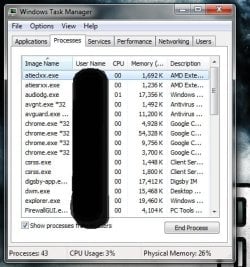
The processes tab in the task monitor shows no process that is using CPU.

What can this hard drive activity be?

Thanks!
Have you tried disabling System Protection?

EDIT: Btw, the first thing I make sure I do right after performing a clean install of Windows (any Windows, 7, XP, Vista, etc), is the disabling of unnecessary services (Run --> Services.msc).

You wouldn't believe all the crap that runs in the background, even on a 'clean/fresh' install of Windows.

As a result, I've been able to reduce the number of processes from ~60 to ~40 (less processes = less CPU & RAM usage).
 

Attachments

  • rawr.jpg
    rawr.jpg
    46.7 KB · Views: 71
Last edited:

My Computer

Computer type
PC/Desktop
Computer Manufacturer/Model Number
Self Built
OS
Windows 8.1 Pro
CPU
Intel Core i5-2500K
Motherboard
ASRock Z77 Extreme4
Memory
8GB Corsair Vengeance DDR3
Graphics Card(s)
Sapphire Radeon HD 7970 GHz Vapor-X Edition
Sound Card
Realtek ALC898
Monitor(s) Displays
BenQ XL2411T
Screen Resolution
1920 x 1080 @ 144Hz
Hard Drives
Plextor M3 Pro 128GB
WD Caviar Blue
PSU
Seasonic G Series 650W
Case
Corsair Obsidian 650D
Cooling
Corsair H60 2013 Edition
Keyboard
Cooler Master Quick Fire Rapid
Mouse
Corsair Raptor M45
Other Info
Headphones: Sennheiser HD-515
Back
Top