SATA Drivers?

Rando

New member
Local time
11:39 AM
Messages
5
Hi everyone,

I'm getting ready to remove Windows 7 RC and install my legit copy of Windows 7 on my PC. My version of Windows 7 is a XP Pro -> Windows 7 Pro upgrade. When I did this upgrade on my laptop, I ran into a bunch of SATA issues because Windows XP does not support SATA on the default installation disk. Needless to say, a few hours later of messing with nLite, my laptop is good to go.

I want to avoid this mess with my PC and already be prepared. I'm trying to figure out what SATA drivers I need to use with nLite for my main PC. Is there somewhere I can go to get this information? Are the drivers based off my motherboard? CPU? Hard drive? Not sure where to start. My laptop's SATA drivers seemed to be based off the CPU (AMD) going by the name of the driver file.

Mobo: GIGABYTE GA-EP45-UD3P LGA 775 Intel P45 ATX Intel Motherboard
CPU: Intel Core 2 Quad Q9550 Yorkfield 2.83GHz LGA 775 95W Quad-Core Processor Model BX80569Q9550
RAM: G.SKILL 4GB (2 x 2GB) 240-Pin DDR2 SDRAM DDR2 1066 (PC2 8500) Dual Channel Kit Desktop Memory Model F2-8500CL5D-4GBPK
VGA: EVGA 896-P3-1255-AR GeForce GTX 260 Core 216 896MB 448-bit GDDR3 PCI Express 2.0 x16 HDCP Ready SLI Supported Video Card
HDD: Western Digital Caviar Black WD6401AALS 640GB 7200 RPM SATA 3.0Gb/s 3.5" Internal Hard Drive
 

My Computer

OS
Windows 7
Hi everyone,

I'm getting ready to remove Windows 7 RC and install my legit copy of Windows 7 on my PC. My version of Windows 7 is a XP Pro -> Windows 7 Pro upgrade. When I did this upgrade on my laptop, I ran into a bunch of SATA issues because Windows XP does not support SATA on the default installation disk. Needless to say, a few hours later of messing with nLite, my laptop is good to go.

I want to avoid this mess with my PC and already be prepared. I'm trying to figure out what SATA drivers I need to use with nLite for my main PC. Is there somewhere I can go to get this information? Are the drivers based off my motherboard? CPU? Hard drive? Not sure where to start. My laptop's SATA drivers seemed to be based off the CPU (AMD) going by the name of the driver file.

Mobo: GIGABYTE GA-EP45-UD3P LGA 775 Intel P45 ATX Intel Motherboard
CPU: Intel Core 2 Quad Q9550 Yorkfield 2.83GHz LGA 775 95W Quad-Core Processor Model BX80569Q9550
RAM: G.SKILL 4GB (2 x 2GB) 240-Pin DDR2 SDRAM DDR2 1066 (PC2 8500) Dual Channel Kit Desktop Memory Model F2-8500CL5D-4GBPK
VGA: EVGA 896-P3-1255-AR GeForce GTX 260 Core 216 896MB 448-bit GDDR3 PCI Express 2.0 x16 HDCP Ready SLI Supported Video Card
HDD: Western Digital Caviar Black WD6401AALS 640GB 7200 RPM SATA 3.0Gb/s 3.5" Internal Hard Drive

Hi rando and welcome

There are drivers for all the major componenets. BIOS (basic input output system) controls the mobo and anything it "talks" to.
The video has its own driver, etc

If you go to Gigabyte and download the drivers for your type (32bit or 64) you shold be ok.

the one thing you want to make sure of is of course the network /wifi driver

Hope that helps

Ken J++
 

My Computer

Computer Manufacturer/Model Number
HP Pavillion dv-7 1005 Tx
OS
Win 8 Release candidate 8400
CPU
[email protected]
Memory
4 gigs
Graphics Card(s)
Nvidia 9600M
Sound Card
HD built-in
Monitor(s) Displays
17" Wxga
Screen Resolution
1440x900
Cooling
none
Internet Speed
45Mb down 5Mb up

My Computer

OS
Windows 7 Ultimate x64 Service Pack 1 (Build 6.1.7601)
CPU
Intel Core 2 Quad Q6600 (G0 Kentsfield) LGA775 (FC-LGA6)
Motherboard
GIGABYTE GA-EP35C-DS3R (Rev. 2.1)
Memory
Corsair TW3X4G1333C9A 4GB PC-10600 (2x XMS3 2GB)
Graphics Card(s)
ASUS nVIDIA GeForce 560
Sound Card
RealTek ALC885/889A/890
Monitor(s) Displays
ChiMei CMV CT-730D 17inch (LCD Monitor)
Screen Resolution
1280-1024 60Hertz (Ture Colour 32bit)
Hard Drives
2x Barracuda 7200.10 SATA 3.0Gb/s 160-GB Hard Drive ST3160815AS (AHCI)
PSU
ANTEC 750w Earthwatts
Case
Thermaltake Shark (VA7000SWA ATX) Full Tower
Cooling
Front 120mm fan (1400 RPM) /Rear 120mm (1400 RPM) blue LED
Keyboard
Labtec Media Desktop Y-SAD65
Mouse
Razer DeathAdder 3G Infrared Sensor (1800DPI)
Internet Speed
Telstra BigPond Elite Liberty ADSL2+ 24Mbps/256kbps
Other Info
ASUS PCE-N13 802.11n Wireless LAN card
Its even money that you won't need any of these things. As current as your equipment is, I'd bet Win7 dials home right away and uploads all the drivers you need to get up and running.

Setup on my rig was an absolute breeze in comparison to installing XP Pro just a short time ago. 7 x64 came right up with hardly a click from me, and I have only SATA drives installed.

If you have concerns just put a partition on your drive and install 7 there; it will default to a dual boot with XP. You'll be deleting your XP partition faster than you think!
 

My Computer

Computer type
PC/Desktop
Computer Manufacturer/Model Number
Custom
OS
7 x64 Ultimate
CPU
AMD Ryzen 5
Motherboard
Gigabyte GA-AB350-Gaming
Memory
16GB DDR4
Graphics Card(s)
Radeon R7 360
Monitor(s) Displays
2 x Dell U2518D
Screen Resolution
2560x1440 2560x1440
Hard Drives
WD 500GB x2
Samsung SSD 128MB (OS)
XPG SX8200 Pro M.2 2280 1TB
PSU
Antec 500
Cooling
Hyper 212 EVO
Keyboard
Logitech cordless K800
Mouse
Logitech M510
Antivirus
Avira
what crispy said, i think you need the floppy version though,
32-bit Floppy Configuration Utility
slipstream all those files into nlite, once into nlite you have to choose the right ones, theres like 8 of them.

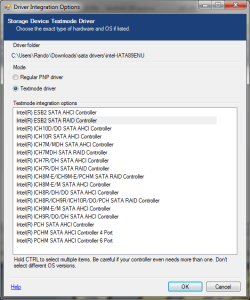
How do I know which driver to install? I tried selecting all in nLite and the Windows XP installation still could not find my hard drive with AHCI mode enabled. I'm pretty sure I have to be specific because I had the same issue with my laptop driver.
 

Attachments

  • sata drivers.png
    sata drivers.png
    57 KB · Views: 37

My Computer

OS
Windows 7
Just tried the following combination;

-All
-ICH10R & ICH9R on same disk
-ICH10R
-ICH9R

None of them worked. Gigabyte's website is having me download the same exact drivers from their site except Gigabyte's site says ICH9R/ICH10R. Now what...
 

My Computer

OS
Windows 7
Ok I'm pretty sure it's supposed to be a ICH10. At my bios screen near the revision date it says "ICH10".

I just tried ICH10D and it didn't recognize it either. argggggggg
 

My Computer

OS
Windows 7
Yay I figured the issue. I was using the proper driver (ICH10R) but my SATA drive was plugged into the purple ports instead of the orange ones.
 
Last edited:

My Computer

OS
Windows 7
Back
Top