Hello,
I seem to be having some difficulties with windows failing to recognize drivers for any new SATA hard drives which I add to my system, which is a win7 install on a z490 motherboard. Any hard drives I had previously still work fine, and I believe I had, at one point, been able to add a new hard drive without it being an issue. Neither diskpart nor disk management show the new drives.
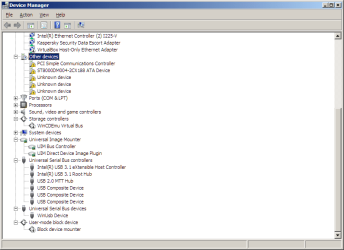
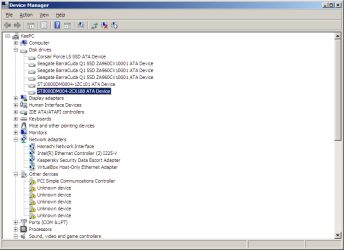
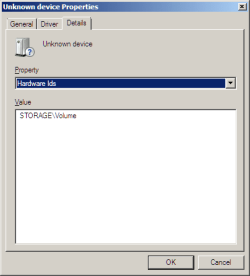
Device manager shows the new hard drivers with the "Driver not found" error, and attempting to "Search automatically" for drivers for them fails. (ST4000DM004... and Corsair Force GS ATA Device). This also happens to another hard drive I have, also a seagate hard drive (ST8000DM004).
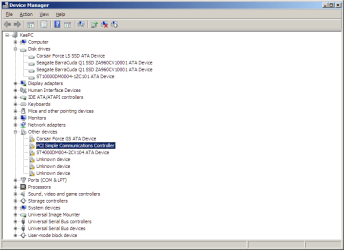
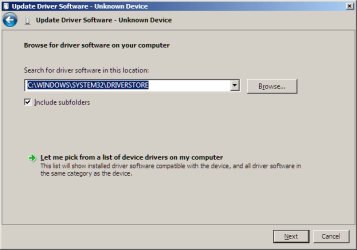
On a hunch, I tried to "Browse my computer for driver software"->"Let me pick from a list of device drivers on my computer"->Disk drivers->Standard disk drives->Disk drive, which then causes device manager to properly see it and allows Disk Management and third-party partition managers to see the drive itself, however attempting to mount it or assign a drive letter fails. Restarting after doing this change has not yet helped.
Overall, this seems to be a driver issue related to this specific install, as the hard drive(s) in question either worked with this PC prior to my last hardware upgrade, work fine in other OSes on this same machine, and/or work fine in another win7 PC.
Are there any suggestions on how to resolve this, especially if they avoid re-installing windows?
I seem to be having some difficulties with windows failing to recognize drivers for any new SATA hard drives which I add to my system, which is a win7 install on a z490 motherboard. Any hard drives I had previously still work fine, and I believe I had, at one point, been able to add a new hard drive without it being an issue. Neither diskpart nor disk management show the new drives.
Device manager shows the new hard drivers with the "Driver not found" error, and attempting to "Search automatically" for drivers for them fails. (ST4000DM004... and Corsair Force GS ATA Device). This also happens to another hard drive I have, also a seagate hard drive (ST8000DM004).
On a hunch, I tried to "Browse my computer for driver software"->"Let me pick from a list of device drivers on my computer"->Disk drivers->Standard disk drives->Disk drive, which then causes device manager to properly see it and allows Disk Management and third-party partition managers to see the drive itself, however attempting to mount it or assign a drive letter fails. Restarting after doing this change has not yet helped.
Overall, this seems to be a driver issue related to this specific install, as the hard drive(s) in question either worked with this PC prior to my last hardware upgrade, work fine in other OSes on this same machine, and/or work fine in another win7 PC.
Are there any suggestions on how to resolve this, especially if they avoid re-installing windows?
My Computer
At a glance
Windows 7 Ultimate x64Intel I7 10700k64 GB DDR4 CorsairNvidia RTX 3080 Ti
- Computer type
- PC/Desktop
- Computer Manufacturer/Model Number
- Custom Build
- OS
- Windows 7 Ultimate x64
- CPU
- Intel I7 10700k
- Motherboard
- ROG Strix Z490-F "Gaming"
- Memory
- 64 GB DDR4 Corsair
- Graphics Card(s)
- Nvidia RTX 3080 Ti
- Screen Resolution
- 3840x2160
- Hard Drives
- (Seagate BarraCuda Q1 SSD ZA960CV10001 960GB) x3
(Corsair Force LS SSD 240 GB)
(Seagate ST10000DM0004-1ZC101 10TB)
(Seagate ST8000DM004 8TB)