Best anti-virus?

Status
Not open for further replies.
I think the term best is very subjective. If it were me, I would start with MSE, Microsoft Security Essentials, its made with Windows in mind and its free. If you do not like it uninstall and start over.
 

My Computer My Computer

Computer type
PC/Desktop
Computer Manufacturer/Model Number
Dell XPS 420
OS
Windows 10, Home Clean Install
CPU
Intel Core2 processsor Q8200(2.33Ghz 1333FSB) Quad Core Tech
Motherboard
Dell
Memory
6 gb
Graphics Card(s)
ATI Radeon 256MB HD3650
Sound Card
Intergrated 7.1 Channel Audio
Monitor(s) Displays
Dell SP2009W 20"
Hard Drives
640 GB Serial ATA Hard drive
Cooling
Fan
Keyboard
Dell USB Keyboard
Mouse
Dell Premium Optical USB
Internet Speed
DSL 2.85
This question is one that is asked a lot.

I believe it needs to be asked from time to time. I think a person has to evaluate their anti-virus every 2-3 months. What was good 3 months ago may not be as good now. Things are always changing.

I have always used Avast and I have switched to MSE to try it out. I have seen MSE delete malware from an infected machine but I have also seen it leave a rootkit on a machine that was already infected.

I like to evaluate my anti-virus every 30 days personally. I have switched a few times.
 

My Computer My Computer

Computer Manufacturer/Model Number
Keeps changing - (Custom)
OS
Windows 7 Professional x64
CPU
Intel Core i7 860
Motherboard
Gigabyte GA-P55-UD4P
Memory
4GB DDR3 Mushkin 1600Mhz @ 7-8-7-20
Graphics Card(s)
MSI GTS250 1GB DDR3 Twin Frozr
Sound Card
Onboard realtek
Monitor(s) Displays
Samsung SyncMaster 24" P2450 + Samsung 20" 2033
Screen Resolution
1920 X 1080 and 1600 X 900 (#2 system 1440 X 900)
Hard Drives
Patriot Inferno 120GB SSD + 3 WD Blue 640GB drives
PSU
Corsair 750 HX Modular
Case
Lancool PC-K62
Cooling
Cooler Master TX3 CPU cooler and 4-140mm and 1-120mm case
Keyboard
Gigabyte USB keyboard
Mouse
Microsoft wireless laser mouse 5000
Internet Speed
7 Mb down 1.5 up
Other Info
System #2: AMD Phenom II X6 1055T (Freezer 7 Pro cooler) - Gigabyte 880GMA-UD2H - WD 500GB Black - 9500GT (1GB) 500W OCZ modular PSU - Antec 200 case. System #3 (LapTop) Core 2 Duo T6670 - 320GB 7200RPM HD - 4GB DDR3 RAM.
what rank is viper ... someone can post a screenie with it ;p
 

My Computer My Computer

OS
Windows 7 32bit RTM
If Kaspersky didn't slowed down Explorer, I'd still be using it.

Not just IE, but windows explorer and office as well. try this, it works for me. perform a complete uninstall of Kaspersky, turn off Windows Defender (by its Tools>Option>in Administrator uncheck "Use this program". turn off Windows Firewall on all networks (by Control Panel>Windows Firewall). Finally, open services.msc from Start button>Run and disable Windows Defender Service and Windows Firewall Service. Make sure they are not Started(Stopped). Reinstall Kaspersky.

P.S. I dont know if you need to disable the services, I think it suffice only to turn them off by options, but just to be safe, saving resources too after all.
 

My Computer My Computer

Computer Manufacturer/Model Number
custom built
OS
7600.16385 x86
CPU
Intel Pentium E8400
Motherboard
Gigabyte GA-X48T-DQ6
Graphics Card(s)
HIS 4890
Internet Speed
broadband 384kbps bandwidth
Here are the just released November results, which include Microsoft Security Essentials:

that makes G Data and Kaspersky the first ones, Avira got two stars becoz of False Positives, that's why Avira got 2 stars with a * on it.
 

My Computer My Computer

Computer Manufacturer/Model Number
custom built
OS
7600.16385 x86
CPU
Intel Pentium E8400
Motherboard
Gigabyte GA-X48T-DQ6
Graphics Card(s)
HIS 4890
Internet Speed
broadband 384kbps bandwidth
If Kaspersky didn't slowed down Explorer, I'd still be using it.

Not just IE, but windows explorer and office as well. try this, it works for me. perform a complete uninstall of Kaspersky, turn off Windows Defender (by its Tools>Option>in Administrator uncheck "Use this program". turn off Windows Firewall on all networks (by Control Panel>Windows Firewall). Finally, open services.msc from Start button>Run and disable Windows Defender Service and Windows Firewall Service. Make sure they are not Started(Stopped). Reinstall Kaspersky.

P.S. I dont know if you need to disable the services, I think it suffice only to turn them off by options, but just to be safe, saving resources too after all.
I was actually referring to Windows Explorer, sorry about that, I'm not much of a IE user myself, Google Chrome FTW.

Office as well huh?... Hmmmm.... Good to know.

Like I was saying on another thread, one of very first things I make sure I do right after performing a clean install of Windows (if not the first one), is the disabling of unnecessary services, and trust me, both Windows Defender & Windows Firewall fit that bill =)... (all this is done prior to the installation of AV + Firewall + Malware Agent, in this case: Kaspersky Internet Security 2010).

It sure didn't work for me.
 

My Computer My Computer

Computer type
PC/Desktop
Computer Manufacturer/Model Number
Self Built
OS
Windows 8.1 Pro
CPU
Intel Core i5-2500K
Motherboard
ASRock Z77 Extreme4
Memory
8GB Corsair Vengeance DDR3
Graphics Card(s)
Sapphire Radeon HD 7970 GHz Vapor-X Edition
Sound Card
Realtek ALC898
Monitor(s) Displays
BenQ XL2411T
Screen Resolution
1920 x 1080 @ 144Hz
Hard Drives
Plextor M3 Pro 128GB
WD Caviar Blue
PSU
Seasonic G Series 650W
Case
Corsair Obsidian 650D
Cooling
Corsair H60 2013 Edition
Keyboard
Cooler Master Quick Fire Rapid
Mouse
Corsair Raptor M45
Other Info
Headphones: Sennheiser HD-515

My Computer My Computer

Computer Manufacturer/Model Number
tw33k
OS
Windows 7 Ultimate (x64) SP1
CPU
Intel 3770k 4.6GHz
Motherboard
ASUS Maximus V Formula
Memory
8GB (2x 4GB) Crucial Ballistix
Graphics Card(s)
Sapphire 7950 (1060/1600)
Sound Card
On Board Realtek HD Audio
Monitor(s) Displays
27" Acer B273HU (via HDMI)
Screen Resolution
2048 x 1152
Hard Drives
Crucial M4 128GB
2TB WD Black
1TB Samsung F3 SATA
1TB WD Elite External
2TB WD USB 3.0
PSU
Corsair AX750 Gold
Case
Corsair Obsidian 800DW
Cooling
Corsair H100 (2x AP-121/2x UK-3000 push/pull)
Keyboard
Microsoft Wireless 5000
Mouse
Microsoft Wireless 5000
Internet Speed
5mb/s
Other Info
Logitech z-2300 2.1 speakers
Lamptron FC-5 v2
IMO, anyone will be very secure using Prevx + MSE + DEP + LUA. Simple, light and effective.
 

My Computer My Computer

OS
Windows 7 x64
If Kaspersky didn't slowed down Explorer, I'd still be using it.

Not just IE, but windows explorer and office as well. try this, it works for me. perform a complete uninstall of Kaspersky, turn off Windows Defender (by its Tools>Option>in Administrator uncheck "Use this program". turn off Windows Firewall on all networks (by Control Panel>Windows Firewall). Finally, open services.msc from Start button>Run and disable Windows Defender Service and Windows Firewall Service. Make sure they are not Started(Stopped). Reinstall Kaspersky.

P.S. I dont know if you need to disable the services, I think it suffice only to turn them off by options, but just to be safe, saving resources too after all.
I was actually referring to Windows Explorer, sorry about that, I'm not much of a IE user myself, Google Chrome FTW.

Office as well huh?... Hmmmm.... Good to know.

Like I was saying on another thread, one of very first things I make sure I do right after performing a clean install of Windows (if not the first one), is the disabling of unnecessary services, and trust me, both Windows Defender & Windows Firewall fit that bill =)... (all this is done prior to the installation of AV + Firewall + Malware Agent, in this case: Kaspersky Internet Security 2010).

It sure didn't work for me.

Then you need to reinstall Kaspersky every once in a while, or wait for another fix from Kaspersky Lab, or, find another AV :p
 

My Computer My Computer

Computer Manufacturer/Model Number
custom built
OS
7600.16385 x86
CPU
Intel Pentium E8400
Motherboard
Gigabyte GA-X48T-DQ6
Graphics Card(s)
HIS 4890
Internet Speed
broadband 384kbps bandwidth
Not just IE, but windows explorer and office as well. try this, it works for me. perform a complete uninstall of Kaspersky, turn off Windows Defender (by its Tools>Option>in Administrator uncheck "Use this program". turn off Windows Firewall on all networks (by Control Panel>Windows Firewall). Finally, open services.msc from Start button>Run and disable Windows Defender Service and Windows Firewall Service. Make sure they are not Started(Stopped). Reinstall Kaspersky.

P.S. I dont know if you need to disable the services, I think it suffice only to turn them off by options, but just to be safe, saving resources too after all.
I was actually referring to Windows Explorer, sorry about that, I'm not much of a IE user myself, Google Chrome FTW.

Office as well huh?... Hmmmm.... Good to know.

Like I was saying on another thread, one of very first things I make sure I do right after performing a clean install of Windows (if not the first one), is the disabling of unnecessary services, and trust me, both Windows Defender & Windows Firewall fit that bill =)... (all this is done prior to the installation of AV + Firewall + Malware Agent, in this case: Kaspersky Internet Security 2010).

It sure didn't work for me.

Then you need to reinstall Kaspersky every once in a while, or wait for another fix from Kaspersky Lab, or, find another AV :p
I've been using Avira AntiVir Personal + PC Tools Firewall Plus for about ~3 weeks now.

Very happy with it.
 

My Computer My Computer

Computer type
PC/Desktop
Computer Manufacturer/Model Number
Self Built
OS
Windows 8.1 Pro
CPU
Intel Core i5-2500K
Motherboard
ASRock Z77 Extreme4
Memory
8GB Corsair Vengeance DDR3
Graphics Card(s)
Sapphire Radeon HD 7970 GHz Vapor-X Edition
Sound Card
Realtek ALC898
Monitor(s) Displays
BenQ XL2411T
Screen Resolution
1920 x 1080 @ 144Hz
Hard Drives
Plextor M3 Pro 128GB
WD Caviar Blue
PSU
Seasonic G Series 650W
Case
Corsair Obsidian 650D
Cooling
Corsair H60 2013 Edition
Keyboard
Cooler Master Quick Fire Rapid
Mouse
Corsair Raptor M45
Other Info
Headphones: Sennheiser HD-515
I like the A/V program everyone loves to hate--Norton Anti Virus and I also like Norton Internet Security. I accidentally bought NAV instead of NIS at Fry's a few months ago. LOL! I've used Avast also. Since I don't get viruses in the first place, it's hard for me to ascertain which of the programs on the market are "best", so I choose to go with the product that seems the least intrusive and has a great interface. IMO, the Norton products have the best interface, hands down. Avast's interface sucks big time, but other than that, it seems decent, as best as I can determine from not having any viruses on my PC's.
 

My Computer My Computer

OS
Win7
I like the A/V program everyone loves to hate--Norton Anti Virus and I also like Norton Internet Security. I accidentally bought NAV instead of NIS at Fry's a few months ago. LOL! I've used Avast also. Since I don't get viruses in the first place, it's hard for me to ascertain which of the programs on the market are "best", so I choose to go with the product that seems the least intrusive and has a great interface. IMO, the Norton products have the best interface, hands down. Avast's interface sucks big time, but other than that, it seems decent, as best as I can determine from not having any viruses on my PC's.

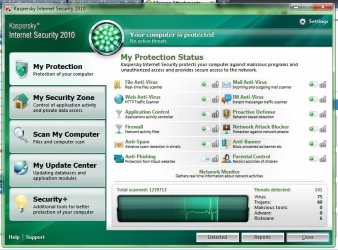
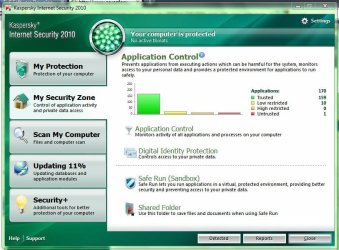
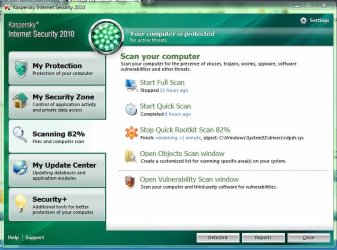
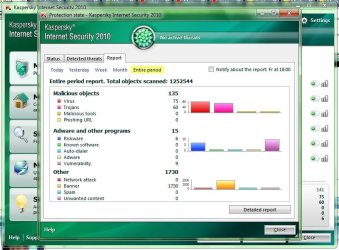
IMO Kaspersky has the best interface:
 

Attachments

  • Capture.JPG
    Capture.JPG
    99.3 KB · Views: 367
  • Capture2.JPG
    Capture2.JPG
    86.3 KB · Views: 16
  • Capture3.JPG
    Capture3.JPG
    79.2 KB · Views: 15
  • Capture4.JPG
    Capture4.JPG
    79.4 KB · Views: 13
Last edited:

My Computer My Computer

Computer Manufacturer/Model Number
custom built
OS
7600.16385 x86
CPU
Intel Pentium E8400
Motherboard
Gigabyte GA-X48T-DQ6
Graphics Card(s)
HIS 4890
Internet Speed
broadband 384kbps bandwidth
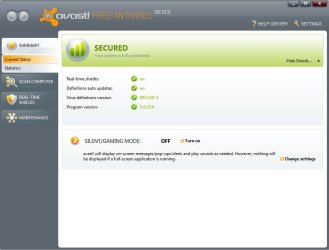
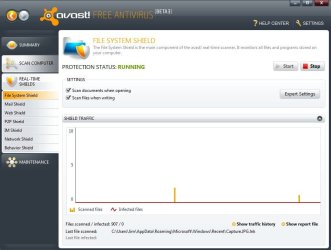
Actually, the Avast 5 interface is very nice:
 

Attachments

  • Capture.JPG
    Capture.JPG
    48.8 KB · Views: 18
  • Capture2.JPG
    Capture2.JPG
    66 KB · Views: 15

My Computer My Computer

Computer Manufacturer/Model Number
HP
OS
Windows 7 Home Premium 64-bit
CPU
Intel Core2 Quad Q6600 @ 2.40 Ghz
Memory
8GB RAM
Graphics Card(s)
ATI Radeon HD 4600
Monitor(s) Displays
HP w2007
Screen Resolution
1680 x 1050
Hard Drives
700 GB
Sexyness....

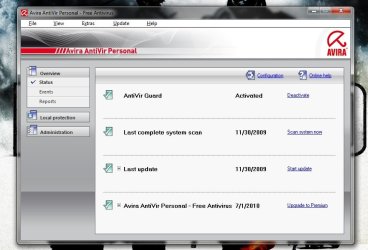
Here's Avira:
 

Attachments

  • rawr.jpg
    rawr.jpg
    55.6 KB · Views: 24

My Computer My Computer

Computer type
PC/Desktop
Computer Manufacturer/Model Number
Self Built
OS
Windows 8.1 Pro
CPU
Intel Core i5-2500K
Motherboard
ASRock Z77 Extreme4
Memory
8GB Corsair Vengeance DDR3
Graphics Card(s)
Sapphire Radeon HD 7970 GHz Vapor-X Edition
Sound Card
Realtek ALC898
Monitor(s) Displays
BenQ XL2411T
Screen Resolution
1920 x 1080 @ 144Hz
Hard Drives
Plextor M3 Pro 128GB
WD Caviar Blue
PSU
Seasonic G Series 650W
Case
Corsair Obsidian 650D
Cooling
Corsair H60 2013 Edition
Keyboard
Cooler Master Quick Fire Rapid
Mouse
Corsair Raptor M45
Other Info
Headphones: Sennheiser HD-515
Microsoft ES ^~
 

My Computer My Computer

Computer Manufacturer/Model Number
7600
OS
Windowns 7 x64
CPU
AMD Athlon X2 7750 Black Edition
Motherboard
ASUS M2N SLI - Deluxe
Memory
4gb Kingston
Graphics Card(s)
9600GT 512mb/256bits
Sound Card
onboard
Monitor(s) Displays
AOC 32"
Hard Drives
500gb Seagate 7200rpm
160gb WD 7200rpm
80gb Sansung 7200rpm
Cooling
Box
Internet Speed
600k
Actually, the Avast 5 interface is very nice:

Sexyness....

Here's Avira:
CHILDISH MODE: ACTIVE
Avast doesn't have blinking thing bling-bling nor animation nor nice icons, Kaspersky is slightly better.
Avira, what can I tell, Avira is out of league. The league consists of Avast 5, KIS2010, NIS2010. While Avira is more likely in the same class with BitDef2010 in GUI category.
 

My Computer My Computer

Computer Manufacturer/Model Number
custom built
OS
7600.16385 x86
CPU
Intel Pentium E8400
Motherboard
Gigabyte GA-X48T-DQ6
Graphics Card(s)
HIS 4890
Internet Speed
broadband 384kbps bandwidth
My vote is a combination of symantec, malwarebytes, admuncher, and the cleaner. all use low resources now. Very compatable.
 

My Computer My Computer

OS
Windows 7
Hey guys, I had Kaspersky Internet Security 2010 installed on my laptop until yesterday. It was working fine for 2-3 months until a few days ago when it started slowing my computer down a lot. My internet connection also slowed because of it, I uninstalled it and my laptop is back to running great again. Kaspersky was amazing, loved it so much, but I need something that I can install now that is reliable and will not slow me down at all. I basically don't want to notice it. What do you'll suggest? Doesn't matter if it's free or for pay, I just want something that will work and not slow me down at all.
 
Last edited:

My Computer My Computer

Computer Manufacturer/Model Number
HP Pavilion DV4
OS
Windows 7
CPU
Intel Core 2 Duo T6500 @ 2.1GHz per core
Memory
4GB RAM
Graphics Card(s)
Mobile Intel 4 Series Express Chipset Familiy
Hey guys, I had Kaspersky Internet Security 2010 installed on my laptop until yesterday. It was working fine for 2-3 months until a few days ago when it started slowing my computer down a lot. My internet connection also slowed because of it, I uninstalled it and my laptop is back to running great again. Kaspersky was amazing, loved it so much, but I need something that I can install now that is reliable and will not slow me down at all. I basically don't want to notice it. What do you'll suggest? Doesn't matter if it's free or for pay, I just want something that will work and not slow me down at all.
AV: Avira AntiVir Personal.

Just as light as Avast (if not lighter [~8MB most of the times]), but with slightly better protection rate (2nd only behind G DATA in av-comparatives.org's latest tests, with Avast coming in at #5).

Avira AntiVir Personal - FREE Antivirus

Firewall: PC Tools Firewall Plus

Tied for second behind the mighty Comodo in Mautosec.com's latest Proactive Security Challenge. Works GREAT right out of the box, no need to mess around with it's rules and policies, so... If you don't know how to properly set up a Firewall, this is the one for you.

PC Tools Firewall Plus - Free Firewall Download

Malware Client: Malwarebytes' Anti-Malware

Probably the best Malware agent out there right now.

Malwarebytes.org
 

My Computer My Computer

Computer type
PC/Desktop
Computer Manufacturer/Model Number
Self Built
OS
Windows 8.1 Pro
CPU
Intel Core i5-2500K
Motherboard
ASRock Z77 Extreme4
Memory
8GB Corsair Vengeance DDR3
Graphics Card(s)
Sapphire Radeon HD 7970 GHz Vapor-X Edition
Sound Card
Realtek ALC898
Monitor(s) Displays
BenQ XL2411T
Screen Resolution
1920 x 1080 @ 144Hz
Hard Drives
Plextor M3 Pro 128GB
WD Caviar Blue
PSU
Seasonic G Series 650W
Case
Corsair Obsidian 650D
Cooling
Corsair H60 2013 Edition
Keyboard
Cooler Master Quick Fire Rapid
Mouse
Corsair Raptor M45
Other Info
Headphones: Sennheiser HD-515
Status
Not open for further replies.
Back
Top