Will I have to format?

MissKat

New member
Local time
9:43 PM
Messages
13
Well my laptop fan stopped working so I took it to Future Shop (had three year warranty) to be fixed. I had a stupid Acer, which they were unable to find parts for so they gave me a new computer. I got a ten times better computer then what I had before. I had gotten Windows 7 Ultimate (full version) before I had the problem and got a new computer.

To my point. My new HP came with Windows 7 Home but I want Ultimate. If I put Ultimate on will I have to format the computer first before I can install it? Or will it just upgrade my computer, keeping all the programs and drivers on? The reason why I ask is because I don't want to have to re-install all the drivers and what not. When I formatted my last laptop and put the drivers all back on, it never worked the same again: like the web cam never worked anymore, those media buttons at the top of the keyboard never worked again, and the button to turn off the touch pad didn't work. I installed all the drivers for them from the Acer wed site but still nothing.

I like all the programs and how every things work now but I want Windows 7 Ultimate.
 

My Computer

Computer Manufacturer/Model Number
HP dv7-3024ca
OS
Windows 7 Home Premium 64-bit
CPU
AMD Athlon II Dual Core M300 2MHz
Memory
4 Gb DDR2
Graphics Card(s)
ATI Radeon HD 4200 with 128MB Display Cache Memory
Sound Card
Altec Lansing With SRS Premium Sound
Hard Drives
500 GB (5400 RPM) SATA
Well my laptop fan stopped working so I took it to Future Shop (had three year warranty) to be fixed. I had a stupid Acer, which they were unable to find parts for so they gave me a new computer. I got a ten times better computer then what I had before. I had gotten Windows 7 Ultimate (full version) before I had the problem and got a new computer.

To my point. My new HP came with Windows 7 Home but I want Ultimate. If I put Ultimate on will I have to format the computer first before I can install it? Or will it just upgrade my computer, keeping all the programs and drivers on? The reason why I ask is because I don't want to have to re-install all the drivers and what not. When I formatted my last laptop and put the drivers all back on, it never worked the same again: like the web cam never worked anymore, those media buttons at the top of the keyboard never worked again, and the button to turn off the touch pad didn't work. I installed all the drivers for them from the Acer wed site but still nothing.

I like all the programs and how every things work now but I want Windows 7 Ultimate.

You never have to format, but if you format it is called a clean install. My advice is install your windows DVD. When you arrive at advanced options, chose format. If you make a copy of your present OS, you can always go back to the point that you made the copy. So there is not downside, other than the work of reinstalling your programs. As you install, you are installing one of the best OS, on the market, today and you will enjoy it. Why not format take the time to reinstall your programs and really be satisfied with the OS. I know that 95% of my co members agree that formating is the best way to go. Once your OS is up and running, adctivated and all programs installed, make a system image. You will never have to reinstall again, as everything is on your system image.

If you have aq problem with any program, etc, come back here and we will help you. In addition if you make a copy of your OS, first, you can always return to that point if your installation runs into problems
 

My Computer

Computer type
PC/Desktop
Computer Manufacturer/Model Number
Dell XPS 420
OS
Windows 10, Home Clean Install
CPU
Intel Core2 processsor Q8200(2.33Ghz 1333FSB) Quad Core Tech
Motherboard
Dell
Memory
6 gb
Graphics Card(s)
ATI Radeon 256MB HD3650
Sound Card
Intergrated 7.1 Channel Audio
Monitor(s) Displays
Dell SP2009W 20"
Hard Drives
640 GB Serial ATA Hard drive
Cooling
Fan
Keyboard
Dell USB Keyboard
Mouse
Dell Premium Optical USB
Internet Speed
DSL 2.85
The Win7 DVD is driver-complete, meaning you won't have to find hardly any drivers. Bookmark your manufacturer's Support Downloads page for your model so you can find them there if needed along with any apps you like. WIndows Updates will also deliver newer ones quickly.

This is not like Vista, as MS funded the partnership with all manufacturers (WHQL) to build drivers for Win7 and has them first in the installer and via Windows Updates. Plug ethernet cable and select "Keep connected to internet during install" to be kept up to date with drivers during install.

I hope you retrieved your Ultimate from the boinked machine before turning it back in, either restoring Vista or just wiping the drive. A retail purchase of full version Ultimate belongs to you for life, you can migrate it to the machine of your choice. You did not hand it over to your supplier without expressly giving them your owned copy, and you can retrieve it under the EULA by reinstalling it (as with stolen/lost). Here's how:

When you do your clean formatted install as Rich suggests above, wait until connecting to the internet to Activate at Computer>Properties, then it may require a robocall during which you will trade a series of numbers that deactivate Win7 on the old machine and activate it on the new one. If this fails, talk with a person and explain the situation - that the old machine was returned. The license belongs to the person holding the key insert and receipt.
 
You never have to format, but if you format it is called a clean install. My advice is install your windows DVD. When you arrive at advanced options, chose format. If you make a copy of your present OS, you can always go back to the point that you made the copy. So there is not downside, other than the work of reinstalling your programs. As you install, you are installing one of the best OS, on the market, today and you will enjoy it. Why not format take the time to reinstall your programs and really be satisfied with the OS. I know that 95% of my co members agree that formating is the best way to go. Once your OS is up and running, adctivated and all programs installed, make a system image. You will never have to reinstall again, as everything is on your system image.

If you have aq problem with any program, etc, come back here and we will help you. In addition if you make a copy of your OS, first, you can always return to that point if your installation runs into problems


I think you may have missed my point. If I do a clean install that will mean I'd have to go online and reinstall all the drivers. I rather not do that because the last time I did that with a laptop, half the drives didn't work, therefore half the things on my laptop didn't work. I don't want that to happen again.

I know a clean install is better. But I just want to upgrade without having to format. I can do that right?

There are one or two programs that came with the computer which I'd like to keep but I can't seem to find them online so they can be reinstalled.

CAN I GO FROM HOME TO ULTIMATE WITHOUT FORMATTING?
 

My Computer

Computer Manufacturer/Model Number
HP dv7-3024ca
OS
Windows 7 Home Premium 64-bit
CPU
AMD Athlon II Dual Core M300 2MHz
Memory
4 Gb DDR2
Graphics Card(s)
ATI Radeon HD 4200 with 128MB Display Cache Memory
Sound Card
Altec Lansing With SRS Premium Sound
Hard Drives
500 GB (5400 RPM) SATA
I guess I'm just scared due to the problems I had with my Acer. The fact that I had an Acer didn't help, I'm sure.

But I sill much rather do the update without formatting.
 

My Computer

Computer Manufacturer/Model Number
HP dv7-3024ca
OS
Windows 7 Home Premium 64-bit
CPU
AMD Athlon II Dual Core M300 2MHz
Memory
4 Gb DDR2
Graphics Card(s)
ATI Radeon HD 4200 with 128MB Display Cache Memory
Sound Card
Altec Lansing With SRS Premium Sound
Hard Drives
500 GB (5400 RPM) SATA
I like all the programs and how every things work now but I want Windows 7 Ultimate.

Is there some particular functionality that Ultimate has that you think you need? Just asking as people seem to think that Ultimate is so much better, but find they don't actually need the features it provides.

If you do need the features, you can always do the anytime upgrade which unlocks the features. You don't have to format or reinstall to do that upgrade.
 

My Computer

Computer Manufacturer/Model Number
Self-Built in July 2009
OS
Windows 7 Ultimate x64
CPU
Intel Q9550 2.83Ghz OC'd to 3.40Ghz
Motherboard
Gigabyte GA-EP45-UD3R rev. 1.1, F12 BIOS
Memory
8GB G.Skill PI DDR2-800, 4-4-4-12 timings
Graphics Card(s)
EVGA 1280MB Nvidia GeForce GTX570
Sound Card
Realtek ALC899A 8 channel onboard audio
Monitor(s) Displays
23" Acer x233H
Screen Resolution
1920x1080
Hard Drives
Intel X25-M 80GB Gen 2 SSD
Western Digital 1TB Caviar Black, 32MB cache. WD1001FALS
PSU
Corsair 620HX modular
Case
Antec P182
Cooling
stock
Keyboard
ABS M1 Mechanical
Mouse
Logitech G9 Laser Mouse
Internet Speed
15/2 cable modem
Other Info
Windows and Linux enthusiast. Logitech G35 Headset.
I like all the programs and how every things work now but I want Windows 7 Ultimate.

Is there some particular functionality that Ultimate has that you think you need? Just asking as people seem to think that Ultimate is so much better, but find they don't actually need the features it provides.

If you do need the features, you can always do the anytime upgrade which unlocks the features. You don't have to format or reinstall to do that upgrade.

I agree. We used Ultimate on all of our computers for beta testing for a year. Then half of the computers got the pre-order Premium Upgrades (the others have Ultimate Sig. Edition and RTM) and we cannot tell the difference.

I'm told Premium would not be able to initiate Remote Desktop, only receive it. And no Bitlocker. But what else is the difference?

And you DO NOT have to find and install drivers with Windows 7, as I explained in the post above.

Sorry but this is not Vista.:party:
 
Here is what Ultimate has that is not available in Professional:

BitLocker, BitLocker To Go, AppLocker, Direct Access, Branche Cache, MUI language packs, boot from VHD.

Here is what Professional has that is not available in Home Premium:

Domain join, Remote Desktop host, location aware printing, EFS, Mobility Center, Presentation Mode, Offline Folders, Group Policy (GP) controls, advanced backup, XP Mode.
 

My Computer

Computer type
PC/Desktop
Computer Manufacturer/Model Number
Ignatz Special; 4 speed manual gearbox; factory air conditioning; one of one
OS
Windows 7 Home Premium SP1, 64-bit
CPU
Intel Skylake i5-6600K, not overclocked
Motherboard
AsRock Z170M Extreme 4, micro ATX
Memory
8 GB HyperX DDR4-2666 (2 x 4 GB)
Graphics Card(s)
none; graphics are integrated on CPU
Sound Card
onboard: Realtek ALC1150; external: USB Behringer UF0-202
Monitor(s) Displays
Dell S2340M 23 inch IPS
Screen Resolution
1600 x 900
Hard Drives
System: Crucial MX100 series SSD, 128 GB;
Data: Samsung Spinpoint 103SJ, 1 TB;
Backup: WD Caviar Green WD30EZRX-00D8PB0, 3 TB
PSU
Rosewill SilentNight 500 watt fanless, semi-modular
Case
Antec Solo II
Cooling
Noctua NH-U12S; Noctua F12 intake, Noctua S12A exhaust
Keyboard
Microsoft 200 6JH-00001 USB
Mouse
Dell or Microsoft optical wired; USB
Antivirus
Microsoft Security Essentials and Malwarebytes Premium
Browser
Pale Moon
Other Info
All fans PWM; speeds at idle: CPU circa 500 rpm; intake circa 600 rpm; exhaust circa 600 rpm; CPU temps 27 idle and 47 C load in a warm room (27 C/81 F) when running Intel Extreme Tuning Utility stress test.
Is there some particular functionality that Ultimate has that you think you need? Just asking as people seem to think that Ultimate is so much better, but find they don't actually need the features it provides.

If you do need the features, you can always do the anytime upgrade which unlocks the features. You don't have to format or reinstall to do that upgrade.

I have Ultimate and I know what the differences are between all of them. I don't care for Home but there are many things in Ultimate that I want. I have the full OS not the upgrade. You also can't anytime upgrade with to Ultimate "it's not available in all editions of Windows 7, such as Windows 7 Ultimate edition."
 

My Computer

Computer Manufacturer/Model Number
HP dv7-3024ca
OS
Windows 7 Home Premium 64-bit
CPU
AMD Athlon II Dual Core M300 2MHz
Memory
4 Gb DDR2
Graphics Card(s)
ATI Radeon HD 4200 with 128MB Display Cache Memory
Sound Card
Altec Lansing With SRS Premium Sound
Hard Drives
500 GB (5400 RPM) SATA
FYI:
"Location aware printing" doesn't affect network printing since we printt from/to all of our Ult/HP computers.

Offline Folders is one service in Win7 that can use turning off if you don't want any file you transfer between computers always being tracked and sync'd, using gobs of CPU all of the time.
 
Can I get straight answer to my question?

Can I put my Windows 7 Ultimate DVD in my computer and install it without having to format it?
 

My Computer

Computer Manufacturer/Model Number
HP dv7-3024ca
OS
Windows 7 Home Premium 64-bit
CPU
AMD Athlon II Dual Core M300 2MHz
Memory
4 Gb DDR2
Graphics Card(s)
ATI Radeon HD 4200 with 128MB Display Cache Memory
Sound Card
Altec Lansing With SRS Premium Sound
Hard Drives
500 GB (5400 RPM) SATA
Well my laptop fan stopped working so I took it to Future Shop (had three year warranty) to be fixed. I had a stupid Acer, which they were unable to find parts for so they gave me a new computer. I got a ten times better computer then what I had before. I had gotten Windows 7 Ultimate (full version) before I had the problem and got a new computer.

To my point. My new HP came with Windows 7 Home but I want Ultimate. If I put Ultimate on will I have to format the computer first before I can install it? Or will it just upgrade my computer, keeping all the programs and drivers on? The reason why I ask is because I don't want to have to re-install all the drivers and what not. When I formatted my last laptop and put the drivers all back on, it never worked the same again: like the web cam never worked anymore, those media buttons at the top of the keyboard never worked again, and the button to turn off the touch pad didn't work. I installed all the drivers for them from the Acer wed site but still nothing.

I like all the programs and how every things work now but I want Windows 7 Ultimate.

I'm a bit confused as to what you have in hand.

If you don't have a retail Win7 Ultimate upgrade (or full) license, you could consider an Anytime Upgrade. (That's different from a regular upgrade. Apparently most of the higher version fetaures are already installed. The Anytime Upgrade just makes them available. That's how the process takes less than 10 minutes.)

If you have an Ultimate upgrade license, I'm fairly sure that you could do an upgrade-in-place to Ultimate.
 

My Computer

Computer Manufacturer/Model Number
homegrown
OS
Windows 7 Pro X64 SP1
CPU
Intel Core I7-3930k
Motherboard
Asus P9X79 Pro
Memory
16 GB Gskill DDR3-2133
Graphics Card(s)
eVGA GTX680
Sound Card
Creative X-Fi Titanium
Monitor(s) Displays
As PA246Q
Screen Resolution
1920 X 1200
Hard Drives
Corsair Force GT, 120 GB
WDC 1.5TB Caviar Black
PSU
PCP&C Silencer 750 Crossfire
Case
Silverstone FT02
Cooling
Noctua NH-D14
Keyboard
cheap Logitech USB
Mouse
Microsoft Intellimouse Explorer (old optical) USB
Internet Speed
6Mb cable
Other Info
Pioneer BDR-205
Samsung SH-203B
Monsoon 5.1 speakers
Can I get straight answer to my question?

Can I put my Windows 7 Ultimate DVD in my computer and install it without having to format it?

Yes. You can do an in-place Upgrade with your full-retail version of Ultimate.

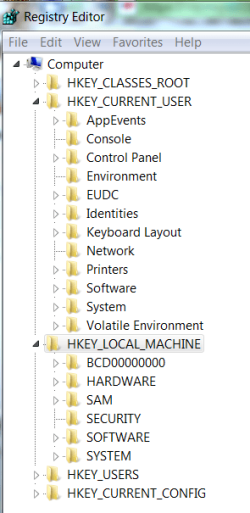
I would uninstall all of the junk programs from the Control Panel>Programs and Features, delete any folders for them left in C: Program Files, then clean them out of the Registry's (regedit) HKEY_CURRENT_USER and HKEY_LOCAL_MACHINE Software keys by right clicking and deleting. Ask here for help. Set a system restore point.

Capture.PNG

Then use the CCleaner disk and registry tabs to clean up the debris, and the free (state of the art) Auslogics disk/registry defraggers to put it in flawless order. Or the Windows Defragger if you must.

Run the DVD from the desktop and do an in-place Upgrade. Back up your files as this can fail and does regularly. Taking the steps above will reduce corruption but there will still be some level.

Cheers and best of luck!
 
Last edited:
Can I get straight answer to my question?

Can I put my Windows 7 Ultimate DVD in my computer and install it without having to format it?

Yes as long as there are both either 32bit, or 64bit. But, you need to have the ULTIMATE license for it, and Both microsoft and most of us here dont recommend it.

Ken J+
 

My Computer

Computer Manufacturer/Model Number
HP Pavillion dv-7 1005 Tx
OS
Win 8 Release candidate 8400
CPU
[email protected]
Memory
4 gigs
Graphics Card(s)
Nvidia 9600M
Sound Card
HD built-in
Monitor(s) Displays
17" Wxga
Screen Resolution
1440x900
Cooling
none
Internet Speed
45Mb down 5Mb up
Back
Top