Computer lags every couple seconds

Hi. I am running Windows 7 x64 and I have a problem where the computer lags every few seconds. For example, while I am typing this message, every couple words, the line cursor freezes, and then after a second, everything I type appears on screen.
Another example would be switching tabs in Firefox, clicking a tab, it would take a few seconds to switch. Going to a different program would have the same effect.

I ran MemTest for about 14 hours or so and passed. I have 8GB of RAM.

Does anyone know why this is happening?

:shock:I've seen this exact problem in FireFox, on both Win7 and XP. It's highly intermittent and seems to be dependent on other programs running in other FF windows. For example, I get it a lot when running Zenoss Enterprise in another FF Window.

I used to also get it a lot in XP even when not running Zenoss, but lately it has gone away. Lots of people have it, I don't think has anything to do with failing hardware. I've experienced it on a half-dozen or so different computers running XP, but not yet on Windows 7. The Zenoss support people also experience it, and also sometimes when not running Zenoss.

If you search the FF forums you can see a lot of gnashing and complaining, but no one seems to have an answer ... :cry:

Raargh
 
Last edited:

My Computer

Computer Manufacturer/Model Number
Dell T3400
OS
Windows 7 Pro x64 (dual-booting XPSP3 and Win7)
CPU
Intel Core-2 Quad
Memory
4GB 800 Mhz PC2 unbuffered ECC
Graphics Card(s)
NVIDIA Quadro FX 570
Sound Card
Creative SB X-Fi model SB0770
Monitor(s) Displays
Dell 19" FP
Screen Resolution
1680x1050
Hard Drives
SATA disk0 250GB disk1 500GB
Internet Speed
TW RR
Other Info
Just a baby compared to my work box!
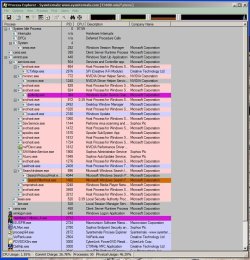
BTW Process Explorer is free, maintained by MS, and beats the pants off of Task Manager! I love it dearly.

procx.JPG

proctray.JPG

Process Explorer

Raargh
 

My Computer

Computer Manufacturer/Model Number
Dell T3400
OS
Windows 7 Pro x64 (dual-booting XPSP3 and Win7)
CPU
Intel Core-2 Quad
Memory
4GB 800 Mhz PC2 unbuffered ECC
Graphics Card(s)
NVIDIA Quadro FX 570
Sound Card
Creative SB X-Fi model SB0770
Monitor(s) Displays
Dell 19" FP
Screen Resolution
1680x1050
Hard Drives
SATA disk0 250GB disk1 500GB
Internet Speed
TW RR
Other Info
Just a baby compared to my work box!
Yes I did and I need those programs since I actually use them
 

My Computer

Computer Manufacturer/Model Number
Custom
OS
Windows 7 Ultimate
CPU
Intel e6750 2.66GhZ
Motherboard
Gigabyte P35 DS3R
Memory
8GB Patriot DDR2 800MhZ Memory
Graphics Card(s)
320MB eVGA 8800 GTS
Sound Card
Bult-in
Monitor(s) Displays
Samsung Syncmaster 931C 19"
Screen Resolution
1280*1024
Hard Drives
Samsung HD642JJ - 640GB
PSU
Corsair 500W
Case
Antec 900
Cooling
Stock
Could it possibly have something to do with your power management settings? Perhaps something to do with the processor throttling. Maybe you could check your power settings and set it to "High Performance" and see if that solves the problem.
 

My Computer

OS
Windows 7 RTM / Windows Vista SP2
CPU
AMD Athlon 64 4200 X2
Motherboard
Asus A8N5X (NForce 4)
Memory
2GB
Graphics Card(s)
ATI HD3850
Sound Card
SoundBlaster X-Fi
Hard Drives
Maxtor SATA 160 GB, Maxtor PATA 250 GB, WD MyBook External 500GB
Was waiting for your specs to provide your HD diagnostics.

Each maker has its own. WD Data Lifeguard bootable works on many. Seagate has Seatools.

These diagnose and repair many problems and can save a HD if used in time.

Having chkdsk run at every startup points directly at failing HD.
 
I use a Samsung HDJ 640GB. I've already provided my stats many times, are you guys looking for something else?
 

My Computer

Computer Manufacturer/Model Number
Custom
OS
Windows 7 Ultimate
CPU
Intel e6750 2.66GhZ
Motherboard
Gigabyte P35 DS3R
Memory
8GB Patriot DDR2 800MhZ Memory
Graphics Card(s)
320MB eVGA 8800 GTS
Sound Card
Bult-in
Monitor(s) Displays
Samsung Syncmaster 931C 19"
Screen Resolution
1280*1024
Hard Drives
Samsung HD642JJ - 640GB
PSU
Corsair 500W
Case
Antec 900
Cooling
Stock
Just updated my specs
 

My Computer

Computer Manufacturer/Model Number
Custom
OS
Windows 7 Ultimate
CPU
Intel e6750 2.66GhZ
Motherboard
Gigabyte P35 DS3R
Memory
8GB Patriot DDR2 800MhZ Memory
Graphics Card(s)
320MB eVGA 8800 GTS
Sound Card
Bult-in
Monitor(s) Displays
Samsung Syncmaster 931C 19"
Screen Resolution
1280*1024
Hard Drives
Samsung HD642JJ - 640GB
PSU
Corsair 500W
Case
Antec 900
Cooling
Stock
Samsung doesn't list diagnostic tools for that model, but the excellent Partition Wizard has a right click context menu Hard Drive Surface Scan and File System Scan. Free Download Partition Wizard

Since you tested the Memory, then I would also run sfc /scannow and see if there is any system file corruption.

I would then run a Repair Install from the desktop. A repair install in Win7 is an Upgrade over itself, which saves programs, files and settings in place but reinstalls the OS and reconfigures the boot. It only requires reactivation at Computer>Properties link.

Finally, was this an in-place Upgrade originally? These always have some level of corruption carried over so it would be hard to wring it all out with even a repair install. The ultimate solution is always the best one: A clean reinstall with format booting from the DVD.
 
This is a completely new install and the same problem happens even after each reformat. I will try your suggestion and post with updates. Thanks
 

My Computer

Computer Manufacturer/Model Number
Custom
OS
Windows 7 Ultimate
CPU
Intel e6750 2.66GhZ
Motherboard
Gigabyte P35 DS3R
Memory
8GB Patriot DDR2 800MhZ Memory
Graphics Card(s)
320MB eVGA 8800 GTS
Sound Card
Bult-in
Monitor(s) Displays
Samsung Syncmaster 931C 19"
Screen Resolution
1280*1024
Hard Drives
Samsung HD642JJ - 640GB
PSU
Corsair 500W
Case
Antec 900
Cooling
Stock
This is a completely new install and the same problem happens even after each reformat.

Then this is more likely hardware or program software rather than OS.

You pretty much eliminate OS and install by doing format install.
 
When I mentioned earlier about checking out the harddrive I was talking about using a hard drive diagnostic tool which Samsung has available. I wasn't talking about checking the integrity of your Operating system files because this seems to be a hardware problem.

I believe that the ES-Tools second one down on the list is the one to use.
Hard Drive Diagnostics Tools and Utilities (Storage) - TACKtech Corp.
 

My Computer

Computer type
PC/Desktop
Computer Manufacturer/Model Number
Home built
OS
Windows 7 Ult, Windows 8.1 Pro,
CPU
Q9650-4.275GHz, E8600 4.5GHz, E6750-3.8GHz
Motherboard
Evga 780i FTW
Memory
G.Skill PC2 9600 1200Mhz 5 5 5 15 2T
Graphics Card(s)
GTX480
Sound Card
Asus Xonar D2
Monitor(s) Displays
HannsG
Screen Resolution
1680X1050
Hard Drives
GSkill Phoenix Pro 120GB SSD
PSU
ThermalTake Toughpower 1000Watt modular
Case
ThermalTake XaserV
Cooling
Xigmatek S1283
Keyboard
Logitech G15
Mouse
Logitech G9
Internet Speed
T1
When I mentioned earlier about checking out the harddrive I was talking about using a hard drive diagnostic tool which Samsung has available. I wasn't talking about checking the integrity of your Operating system files because this seems to be a hardware problem.

I believe that the ES tools second one down is the one to use.
Hard Drive Diagnostics Tools and Utilities (Storage) - TACKtech Corp.

What I was looking for on Samsung site^^ chev65 found it listed above. Focus on a full diagnostic scan from boot.
 
When I mentioned earlier about checking out the harddrive I was talking about using a hard drive diagnostic tool which Samsung has available. I wasn't talking about checking the integrity of your Operating system files because this seems to be a hardware problem.

I believe that the ES tools second one down is the one to use.
Hard Drive Diagnostics Tools and Utilities (Storage) - TACKtech Corp.

What I was looking for on Samsung site^^ chev65 found it listed above. Focus on a full diagnostic scan from boot.

Should be interesting to find out if it's the HDD anyway. It's about all I can think of for intermittent freezing problems. Unless it's some strange software glitch which should be possible to fix just by uninstalling any suspicious programs.
 

My Computer

Computer type
PC/Desktop
Computer Manufacturer/Model Number
Home built
OS
Windows 7 Ult, Windows 8.1 Pro,
CPU
Q9650-4.275GHz, E8600 4.5GHz, E6750-3.8GHz
Motherboard
Evga 780i FTW
Memory
G.Skill PC2 9600 1200Mhz 5 5 5 15 2T
Graphics Card(s)
GTX480
Sound Card
Asus Xonar D2
Monitor(s) Displays
HannsG
Screen Resolution
1680X1050
Hard Drives
GSkill Phoenix Pro 120GB SSD
PSU
ThermalTake Toughpower 1000Watt modular
Case
ThermalTake XaserV
Cooling
Xigmatek S1283
Keyboard
Logitech G15
Mouse
Logitech G9
Internet Speed
T1
Ultimately after testing all the hardware and OS fully, maybe Repair Installing, I would format reinstall from boot, then only add the programs back incrementally with restore points to test which is causing it.
 
what about this tool? I found it on the official samsung website - SAMSUNG Hard Disk Drive - support - utilities

edit: nvm, realized that was just for external tools. I'll give ES a try. Thanks

Would you recommend me to backup data? I don't have a secondary HD to use but it'll come in 2 days. Samsung's website recommends but you know how they do this for precautionary reasons.
 

My Computer

Computer Manufacturer/Model Number
Custom
OS
Windows 7 Ultimate
CPU
Intel e6750 2.66GhZ
Motherboard
Gigabyte P35 DS3R
Memory
8GB Patriot DDR2 800MhZ Memory
Graphics Card(s)
320MB eVGA 8800 GTS
Sound Card
Bult-in
Monitor(s) Displays
Samsung Syncmaster 931C 19"
Screen Resolution
1280*1024
Hard Drives
Samsung HD642JJ - 640GB
PSU
Corsair 500W
Case
Antec 900
Cooling
Stock
Yes, good idea if you can't take the data loss., although I've never had HD fail in diagnostics when it wasn't already spastic.

I'd wait the 2 days and back up files and a Win7 System Image so you can start over if anything fails. I keep a backup image in primary parttion on HD and in root of external.
 
@ crazlunatic

From your Programs Screen shot You have 2 Anti virus applications installed (Avira Antivir Personal & Microsoft Security Essentials) - never ever install more than one Anti virus on a system

Remove both and Get the 64 bit windows 7 version of Microsoft Security Essentials, and remove that Spybot search & Destroy, Pando Media Booster too.
 

My Computer

Computer Manufacturer/Model Number
Apple - MBP 5,4
OS
Win 7 64, OSX Snow Leopard
CPU
Intel Core 2 Duo P8700
Memory
4 GB 1066 MHz DDR3
Graphics Card(s)
nVidia 9400 M
Screen Resolution
1440x900
Hard Drives
WD Caviar Black 500GB 7200RPM
@ crazlunatic

From your Programs Screen shot You have 2 Anti virus applications installed (Avira Antivir Personal & Microsoft Security Essentials) - never ever install more than one Anti virus on a system

Remove both and Get the 64 bit windows 7 version of Microsoft Security Essentials, and remove that Spybot search & Destroy, Pando Media Booster too.

Agree with all of this except Spybot which is the best troj killer in my toolbox. Just don't set up its Internet and Tea Timer crapola. The basic program is killer as always, esp in safemode.

Eager to test MSE against Avast - which I've put on over a hundred machines without a single issue or virus. So in spite of waiting long for MS's entry into AV I need more reason to here. How you like it?
 
@ gregrocker

I dont have anything against Spybot S&D, its a great tool, i do use it sometimes, but never use its active protection, only scans my system with it (or Malwarebytes) once in a weak.

My take on security, Use any Anti virus you like (MSE, Avast, Avira, AVG), update it regularly, Try to use a Firewall (if you are comfortable with it) And scan your system with a good Anti Spyware App like Malware bytes or Spybot S&D once in weak/month. And use a safe browser like Firefox or Chrome.


P.S: How can i unsubscribe from all the threads i posted here, always uses the quick post button and ends upp with tonnes of mail in my inbox, i don't want to subscribe to any htread here, please help me.
 
Last edited:

My Computer

Computer Manufacturer/Model Number
Apple - MBP 5,4
OS
Win 7 64, OSX Snow Leopard
CPU
Intel Core 2 Duo P8700
Memory
4 GB 1066 MHz DDR3
Graphics Card(s)
nVidia 9400 M
Screen Resolution
1440x900
Hard Drives
WD Caviar Black 500GB 7200RPM
Back
Top