
Clean Install with a Upgrade Windows 7 Version

How to Do a Clean Install with an Upgrade Windows 7 Version


   Information
This will show you how to do a Clean Install using a retail Upgrade Windows 7 installation disc.

   Warning
Remember that you need to legally own a valid qualifying previous version of Windows to use a Upgrade Windows 7, and to stop using (or uninstall) the qualifying OS while you have the upgrade installed. Microsoft only made doing a clean install from a upgrade Windows 7 possible to make it more convenient so you do not have to reinstall both the old Windows version (ex: Vista) and upgrade to Windows 7 everytime you needed or wanted to reinstall.

If you do not legally own a valid qualifying previous version of Windows, then you are violating the terms of Microsoft's Windows 7 End User License Agreement and could get your product key number invalidated by Microsoft. Plus, it is considered illegal.

For more about this, please see: Microsoft SMB Community Blog : Regardless of what any hack says, a Windows 7 Upgrade is an Upgrade. What you need to know.


OPTION ONE

A Normal Clean Install


1. Do a clean install at boot without checking the Automatically activate Windows when I'm online box during the installation process.

2. When the installation is finished, then manually activate Windows 7 with your product key number.

3. If your Windows should fail to activate, then pick up at step 2 in OPTION THREE below.


OPTION TWO

Through a Custom Install


   Note
This option will let you do a clean install of Windows 7 without formating the current Windows installation to have your current Windows installation backed up to the Windows.old folder during the installation of your retail upgrade Windows 7. This way you can copy any files back that you want from the C:\Windows.old folder (previous installation) back into your new installation afterwards.

1. Do a custom install at boot or from within your current Windows installation without checking the Automatically activate Windows when I'm online box during the installation process.

2. When the installation is finished, then manually activate Windows 7 with your product key number.

3. Copy any files that you want back from the C:\Windows.old folder into where you want it in you new installation.

4. You can now delete the Windows.old folder using Disk Cleanup to have a clean install now.


OPTION THREE

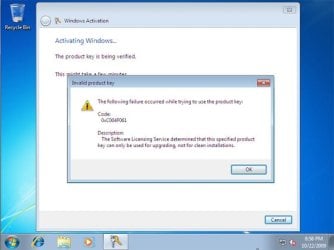
Clean Install with a Registry Workaround for Error Code 0xc004f061


   Note
If you get a activation error code 0xc004f061 while doing OPTION ONE or OPTION TWO above, then you will need to use this option instead
win7_upgrade_media_06.jpg


1. Do a clean install of your upgrade Windows 7 at boot without checking the Automatically activate Windows when I'm online box during the installation process.
NOTE: If you already did this from OPTION ONE above and got a activation error, then skip this step and just proceed to step 2 below instead. There's no need to reinstall again.

2. Click on the Download button below to download the .bat file below, and save it to your desktop.
Activate_Windows_Upgrade_after_Clean_Install.bat


Download


3. Right click on the downloaded .bat file, and click on Run as administrator.

4. If prompted, click/tap on Run and Yes (UAC).
NOTE: If you like, you can stop getting the Run prompt by unblocking the downloaded .bat file.

5. You will now notice a command prompt quickly open and close while applying the changes to your registry.

6. Click/tap on OK. (see screenshot below)
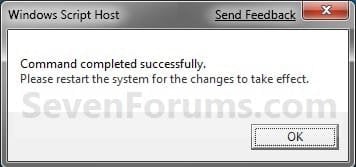
OK.jpg
7. Restart the computer.

8. When the computer is finished restarting, then manually activate Windows 7 with your product key number.


OPTION FOUR

Double Installing Windows 7


   Note
This option is the same that was used to do a clean install of an upgrade copy of Windows 7. It's more work, but if the options above did not work for you, then this should since this is the most reliable option.

1. Do a clean install of your upgrade Windows 7 at boot without checking the Automatically activate Windows when I'm online box during the installation process, and do not activate Windows 7. When finished with the clean install, do not or install any Windows Updates, drivers, or programs yet.

2. When finished with the clean install, start at step 4 at this link to do an in-place "upgrade" install with your upgrade Windows 7 installation disk from within the just now finished clean install of Windows 7.

3. When the in-place upgrade installation is completely finished, then manually activate Windows 7 with your product key number. You can now also install any Windows Updates drivers, and programs you like.
That's it,
Shawn


Attachments

Last edited:
Hello Camr, and welcome to Seven Forums.

Only if you wanted to do a clean install each time. :)
 

My Computer

Computer type
PC/Desktop
Computer Manufacturer/Model Number
Self built custom
OS
64-bit Windows 11 Pro for Workstations
CPU
Intel i7-8700K OC'd to 5 GHz
Motherboard
ASUS ROG Maximus XI Formula Z390
Memory
64 GB (4x16GB) G.SKILL TridentZ RGB DDR4 3600 MHz
Graphics Card(s)
ASUS ROG-STRIX-GTX1080TI-O11G-GAMING
Sound Card
Integrated
Monitor(s) Displays
2 x Samsung Odyssey G7 27"
Screen Resolution
2560x1440
Hard Drives
1TB Samsung 990 PRO M.2,
4TB Samsung 990 PRO PRO M.2,
TerraMaster F8 SSD Plus NAS
PSU
Seasonic Prime Titanium 850W
Case
Thermaltake Core P3
Cooling
Corsair Hydro H115i
Keyboard
Logitech wireless K800
Mouse
Logitech MX Master 4
Internet Speed
2 Gb/s Download and 100 Mb/s Upload
Antivirus
Malwarebyte Anti-Malware Premium
Browser
Google Chrome
Other Info
Logitech Z625 speaker system,
Logitech BRIO 4K Pro webcam,
HP Color LaserJet Pro MFP M477fdn,
APC SMART-UPS RT 1000 XL - SURT1000XLI,
Galaxy S23 Plus phone
Need some confirmation on the BOOTABLE dvd part...


I currently have vista 64 home premium and need to do a clean install to use Windows 7 Professional. I purchased the Windows 7 Pro and downloaded the ISO file to my desktop. Digital River now offers the standalone ISO
X15-65805/X15-65805.iso

.
1) I have the iso on my desktop
2) I used CDBurnerXP and selected the


  • [*]"Burn ISO Image" Option


  • [*]I then choose the ISO from the desktop and clicked burn
Primary Question


  • [*]Do I now have a BOOTABLE dvd? Or do i need to make the DVD BOOTABLE?
Secondary Question


  • [*]What do I need to do now, how do I boot from the DVD to start my clean install?


  • [*]Once it starts to install are there any special settings I should be made aware of now instead of half way through?

Thanks again for all the help!
 
Last edited:

My Computer

OS
vista 64
Remember that you need a valid qualifying previous version of Windows to use a Upgrade Windows 7, and to stop using (or uninstall) the qualifying OS while you have the upgrade installed.

I need to install W7 Home Premium. My PC is currently running build 7232, 64-bit, and my wife's PC is running build 7100, 32-bit.

During the install process, will it ask me to insert the install disk of the qualifying previous version? I have the XP disc for my PC, but don't have the Vista disc for my wife's PC because it came pre-installed from HP.
 
Last edited:

My Computer

Computer Manufacturer/Model Number
Personal Build
OS
Windows 7
CPU
Intel i7 920
Motherboard
Asus P6T
Memory
12GB Patriot 1333
Graphics Card(s)
Gigabyte GV-N250 1G
Sound Card
Realtek (on-board)
Monitor(s) Displays
2-Acer X193W
Screen Resolution
1680X1050
Hard Drives
Seagate 1TB
PSU
Antec 500W
Case
Raidmax Smilodon
Cooling
stock
Keyboard
Microsoft Natural Multimedia 1.0
Mouse
Logitech M-RM67A
Internet Speed
10Mb/1Mb
Other Info
Network: Belkin N+ Wireless, HTPC (wired), 2-laptops (wireless), i-Phone (wireless), Tivo (wired), Replay (wired-Powerline Adapter)
....
During the install process, will it ask me to insert the install disk of the qualifying previous version? I have the XP disc for my PC, but don't have the Vista disc for my wife's PC because it came pre-installed from HP.
No it did not ask me for any disks. Disks don't matter anyway because there is no "key" associated with a disk.

The install process searches out installed versions. If you don't have an installed version then you have to use the registry mod at the beginning of this thread to set things straight before it will activate. I had a laptop with Vista where the HD had crashed. I booted from the upgrade disk and when asked about automatic activation I said yes. -- DON'T DO THAT.

This whole thing is a somewhat confusing mess (IMHO). They say one thing but something quite different is the way it works.

Read all the threads about the process and I think you will see what to do.
 

My Computer

OS
win 7 pro
Reg MOD

....
During the install process, will it ask me to insert the install disk of the qualifying previous version? I have the XP disc for my PC, but don't have the Vista disc for my wife's PC because it came pre-installed from HP.
No it did not ask me for any disks. Disks don't matter anyway because there is no "key" associated with a disk.

The install process searches out installed versions. If you don't have an installed version then you have to use the registry mod at the beginning of this thread to set things straight before it will activate. I had a laptop with Vista where the HD had crashed. I booted from the upgrade disk and when asked about automatic activation I said yes. -- DON'T DO THAT.

I installed Win 7 (upgrade disc) on a Toshiba laptop pre-installed with vista. My Laptop crashed yesterday, and subsequently required a format of the HDD.

When I tried to reisntall Win7, i had an error message that the KEY WAS INVALID.

I contacted MS who were happy with my explanation and verified the key was in fact valid. They explained that although the disc was an UPGRADE, they would talk me through the setup , which would involve altering the registry.

The process was to install without entering the KEY
Then once installation complete open regedit and search MEDIABOOT
Dbl click MEDIABOOTINSTALL and alter 1 to 0 then exit regedit
Open CMD with admin rights
then enter the following; cscript.exe slmgr.vbs -rearm
exit CMD then reboot
You can then goto activate win and enter your VALID procuct key.

REMEMBER you still need to own a previous version of win to legally do this
 

My Computer

Computer Manufacturer/Model Number
Toshiba
OS
Win 7
CPU
Intel Pentium Dual CPU T3400 2.17 Ghz
Motherboard
Toshiba KTKAA
Memory
3gb
Graphics Card(s)
Mobile Intel 4 series on board
I performed a Custom Install. I used a Live CD of Ubuntu to delete & repartition my HDD. I do not remember if I had unchecked the "Automatically activate Windows when I'm online box during the installation process."

Over the days & weeks, I was getting the Activate Windows popup. I tried to use my Upgrade Key, and got the 0xC004F061 error. So I guess my only options is #3?
 

My Computer

Computer Manufacturer/Model Number
Asus V2-M3M8200 Barebones
OS
Windows 7 Professional x64
CPU
AMD Phenom II X4 925
Motherboard
V2-M3M8200 (basically a M3N78-VM)
Memory
4x1024mb Kingston HyperX DDR2-1066 KHX8500D2/1G
Graphics Card(s)
Asus GTS 450 OC
Sound Card
Creative Sound Blaster X-Fi Titanium PCIe
Monitor(s) Displays
Asus 24" LCD VH242H
Screen Resolution
1920x1080
Hard Drives
WDC WD5000AAKS
WDC WD5002ABYS
Seagate ST325062 USB-to-IDE
Fujitsu 160GB Pocket USB HDD
PSU
Antec Earthwatts EA-430D
Case
Asus V2-M3M8200
Cooling
120mm side fan & 80mm front & 92mm rear fan
Keyboard
Dell USB mini Multimedia
Mouse
Logitech MX518
Internet Speed
Comcast Xfinity
Other Info
Logitech Webcam Pro 9000
Accurian 40-1462 Speakers
little dot MKII Headphone Amp
Hello Josh,

That's what it looks like. :(
 

My Computer

Computer type
PC/Desktop
Computer Manufacturer/Model Number
Self built custom
OS
64-bit Windows 11 Pro for Workstations
CPU
Intel i7-8700K OC'd to 5 GHz
Motherboard
ASUS ROG Maximus XI Formula Z390
Memory
64 GB (4x16GB) G.SKILL TridentZ RGB DDR4 3600 MHz
Graphics Card(s)
ASUS ROG-STRIX-GTX1080TI-O11G-GAMING
Sound Card
Integrated
Monitor(s) Displays
2 x Samsung Odyssey G7 27"
Screen Resolution
2560x1440
Hard Drives
1TB Samsung 990 PRO M.2,
4TB Samsung 990 PRO PRO M.2,
TerraMaster F8 SSD Plus NAS
PSU
Seasonic Prime Titanium 850W
Case
Thermaltake Core P3
Cooling
Corsair Hydro H115i
Keyboard
Logitech wireless K800
Mouse
Logitech MX Master 4
Internet Speed
2 Gb/s Download and 100 Mb/s Upload
Antivirus
Malwarebyte Anti-Malware Premium
Browser
Google Chrome
Other Info
Logitech Z625 speaker system,
Logitech BRIO 4K Pro webcam,
HP Color LaserJet Pro MFP M477fdn,
APC SMART-UPS RT 1000 XL - SURT1000XLI,
Galaxy S23 Plus phone
I have done tried to do a clean install with an upgrade dicsc on a new formatted hdd and but when I type the product key in it says "the product key is not vaild" the key is correct and it worked when I used it on the same pc before I needed to re format, oh and its not conected to the internet as I need to get windows on so I can put my wep code in.

Any ideas
 

My Computer

OS
windows 7 home pre 64 bit
CPU
AMD quad 4
Motherboard
Asus
Memory
Kingston
Graphics Card(s)
On board
Sound Card
On board
Monitor(s) Displays
Samsung
Screen Resolution
1280 x 1024
Hard Drives
Samsung 1TB
WD 300GB
Hello Ballie,

What type (ex: OEM, student, retail) of Windows 7 do you have?

You may need to either do a phone activate or METHOD THREE in the tutorial instead.

Hope this helps,
Shawn
 

My Computer

Computer type
PC/Desktop
Computer Manufacturer/Model Number
Self built custom
OS
64-bit Windows 11 Pro for Workstations
CPU
Intel i7-8700K OC'd to 5 GHz
Motherboard
ASUS ROG Maximus XI Formula Z390
Memory
64 GB (4x16GB) G.SKILL TridentZ RGB DDR4 3600 MHz
Graphics Card(s)
ASUS ROG-STRIX-GTX1080TI-O11G-GAMING
Sound Card
Integrated
Monitor(s) Displays
2 x Samsung Odyssey G7 27"
Screen Resolution
2560x1440
Hard Drives
1TB Samsung 990 PRO M.2,
4TB Samsung 990 PRO PRO M.2,
TerraMaster F8 SSD Plus NAS
PSU
Seasonic Prime Titanium 850W
Case
Thermaltake Core P3
Cooling
Corsair Hydro H115i
Keyboard
Logitech wireless K800
Mouse
Logitech MX Master 4
Internet Speed
2 Gb/s Download and 100 Mb/s Upload
Antivirus
Malwarebyte Anti-Malware Premium
Browser
Google Chrome
Other Info
Logitech Z625 speaker system,
Logitech BRIO 4K Pro webcam,
HP Color LaserJet Pro MFP M477fdn,
APC SMART-UPS RT 1000 XL - SURT1000XLI,
Galaxy S23 Plus phone
Hello Ballie,

What type (ex: OEM, student, retail) of Windows 7 do you have?

You may need to either do a phone activate or METHOD THREE in the tutorial instead.

Hope this helps,
Shawn

Its a retail win7 upgrade home pre, I couldn't get past the enter key code bit but in the end I used another win 7 oem upgrade key code which did get it to boot into win7 then I tried to activate the correct key code but had to do the phone thing but its all activated now. Thanks
 

My Computer

OS
windows 7 home pre 64 bit
CPU
AMD quad 4
Motherboard
Asus
Memory
Kingston
Graphics Card(s)
On board
Sound Card
On board
Monitor(s) Displays
Samsung
Screen Resolution
1280 x 1024
Hard Drives
Samsung 1TB
WD 300GB
You're welcome Ballie. I'm happy to hear that you got it activated now. :)
 

My Computer

Computer type
PC/Desktop
Computer Manufacturer/Model Number
Self built custom
OS
64-bit Windows 11 Pro for Workstations
CPU
Intel i7-8700K OC'd to 5 GHz
Motherboard
ASUS ROG Maximus XI Formula Z390
Memory
64 GB (4x16GB) G.SKILL TridentZ RGB DDR4 3600 MHz
Graphics Card(s)
ASUS ROG-STRIX-GTX1080TI-O11G-GAMING
Sound Card
Integrated
Monitor(s) Displays
2 x Samsung Odyssey G7 27"
Screen Resolution
2560x1440
Hard Drives
1TB Samsung 990 PRO M.2,
4TB Samsung 990 PRO PRO M.2,
TerraMaster F8 SSD Plus NAS
PSU
Seasonic Prime Titanium 850W
Case
Thermaltake Core P3
Cooling
Corsair Hydro H115i
Keyboard
Logitech wireless K800
Mouse
Logitech MX Master 4
Internet Speed
2 Gb/s Download and 100 Mb/s Upload
Antivirus
Malwarebyte Anti-Malware Premium
Browser
Google Chrome
Other Info
Logitech Z625 speaker system,
Logitech BRIO 4K Pro webcam,
HP Color LaserJet Pro MFP M477fdn,
APC SMART-UPS RT 1000 XL - SURT1000XLI,
Galaxy S23 Plus phone
Thanks!

Followed your instructions and everything worked well. What a relief! I had installed a new hard drive and the Windows 7 installation was easy but this activation was a problem until I found your posts.

Thanks!

Doug Wickstrom
 

My Computer

Computer Manufacturer/Model Number
PC Depot
OS
Windows 7
CPU
AMd Athlon 64x2 4600
Motherboard
Asus AU-A8N-SLI
Memory
4GB
Graphics Card(s)
XFX Geforce7800 GTX 256
Sound Card
Turtle Beach Montego DDL
Monitor(s) Displays
NEC CTX
Hard Drives
Seagate 120GB
WD 500GB
You're welcome Doug, and welcome to Seven Forums. :)
 

My Computer

Computer type
PC/Desktop
Computer Manufacturer/Model Number
Self built custom
OS
64-bit Windows 11 Pro for Workstations
CPU
Intel i7-8700K OC'd to 5 GHz
Motherboard
ASUS ROG Maximus XI Formula Z390
Memory
64 GB (4x16GB) G.SKILL TridentZ RGB DDR4 3600 MHz
Graphics Card(s)
ASUS ROG-STRIX-GTX1080TI-O11G-GAMING
Sound Card
Integrated
Monitor(s) Displays
2 x Samsung Odyssey G7 27"
Screen Resolution
2560x1440
Hard Drives
1TB Samsung 990 PRO M.2,
4TB Samsung 990 PRO PRO M.2,
TerraMaster F8 SSD Plus NAS
PSU
Seasonic Prime Titanium 850W
Case
Thermaltake Core P3
Cooling
Corsair Hydro H115i
Keyboard
Logitech wireless K800
Mouse
Logitech MX Master 4
Internet Speed
2 Gb/s Download and 100 Mb/s Upload
Antivirus
Malwarebyte Anti-Malware Premium
Browser
Google Chrome
Other Info
Logitech Z625 speaker system,
Logitech BRIO 4K Pro webcam,
HP Color LaserJet Pro MFP M477fdn,
APC SMART-UPS RT 1000 XL - SURT1000XLI,
Galaxy S23 Plus phone
The title says this is how to do a clean install of a retail version of the upgrade. Does this also apply to upgrades received from a computer manufacturer as a free upgrade? If so, do you need to use the upgrade assistant cd first, or just the operating system cd?
 

My Computer

Computer Manufacturer/Model Number
HP Firebird 802
OS
Windows 7 Home Premium X64
CPU
Core 2 Q8400
Memory
4GB
Hello Shkramer, and welcome to Seven Forums.

It varies with some OEM copies of Windows 7 like that, but you can backup anything that you do not want to lose to be sage and give it a try to see from the Windows 7 installation disc. Be sure that you have all of your devices driver installation files downloaded and saved first to have them handy after the installation.
 

My Computer

Computer type
PC/Desktop
Computer Manufacturer/Model Number
Self built custom
OS
64-bit Windows 11 Pro for Workstations
CPU
Intel i7-8700K OC'd to 5 GHz
Motherboard
ASUS ROG Maximus XI Formula Z390
Memory
64 GB (4x16GB) G.SKILL TridentZ RGB DDR4 3600 MHz
Graphics Card(s)
ASUS ROG-STRIX-GTX1080TI-O11G-GAMING
Sound Card
Integrated
Monitor(s) Displays
2 x Samsung Odyssey G7 27"
Screen Resolution
2560x1440
Hard Drives
1TB Samsung 990 PRO M.2,
4TB Samsung 990 PRO PRO M.2,
TerraMaster F8 SSD Plus NAS
PSU
Seasonic Prime Titanium 850W
Case
Thermaltake Core P3
Cooling
Corsair Hydro H115i
Keyboard
Logitech wireless K800
Mouse
Logitech MX Master 4
Internet Speed
2 Gb/s Download and 100 Mb/s Upload
Antivirus
Malwarebyte Anti-Malware Premium
Browser
Google Chrome
Other Info
Logitech Z625 speaker system,
Logitech BRIO 4K Pro webcam,
HP Color LaserJet Pro MFP M477fdn,
APC SMART-UPS RT 1000 XL - SURT1000XLI,
Galaxy S23 Plus phone
Purchased and downloaded the upgrade 64 bit edition from Microsoft Store created an ISO and installed from boot using method 1, went without a hitch, wanted a clean install and thats what it gave me :) Thanks for the tutorial, read it prior to install incase something went wrong.
 

My Computer

OS
Windows 7
You're most welcome Helidoc. :)
 

My Computer

Computer type
PC/Desktop
Computer Manufacturer/Model Number
Self built custom
OS
64-bit Windows 11 Pro for Workstations
CPU
Intel i7-8700K OC'd to 5 GHz
Motherboard
ASUS ROG Maximus XI Formula Z390
Memory
64 GB (4x16GB) G.SKILL TridentZ RGB DDR4 3600 MHz
Graphics Card(s)
ASUS ROG-STRIX-GTX1080TI-O11G-GAMING
Sound Card
Integrated
Monitor(s) Displays
2 x Samsung Odyssey G7 27"
Screen Resolution
2560x1440
Hard Drives
1TB Samsung 990 PRO M.2,
4TB Samsung 990 PRO PRO M.2,
TerraMaster F8 SSD Plus NAS
PSU
Seasonic Prime Titanium 850W
Case
Thermaltake Core P3
Cooling
Corsair Hydro H115i
Keyboard
Logitech wireless K800
Mouse
Logitech MX Master 4
Internet Speed
2 Gb/s Download and 100 Mb/s Upload
Antivirus
Malwarebyte Anti-Malware Premium
Browser
Google Chrome
Other Info
Logitech Z625 speaker system,
Logitech BRIO 4K Pro webcam,
HP Color LaserJet Pro MFP M477fdn,
APC SMART-UPS RT 1000 XL - SURT1000XLI,
Galaxy S23 Plus phone
I couldn't upgrade windows 7 from within windows xp (don't know why) so I needed a clean install, and with this tutorial it was very easy! Nice pics and clear description of every step, thnx a lot :)
 

My Computer

OS
Windows 7
CPU
Intel Pentuim Dual Core E5200 S775
Motherboard
Asus P5QL PRO S775
Memory
Corsair XMS2 DDR2 1066 4G kite
Graphics Card(s)
Radeon HD 4770
Keyboard
Logitech
Mouse
Logitech MX518
You're welcome Venucci, and welcome to Seven Forums. :)

Doing a inplace upgrade to XP from Windows 7 is not an available option. Only a Custom or Clean install. :(
 

My Computer

Computer type
PC/Desktop
Computer Manufacturer/Model Number
Self built custom
OS
64-bit Windows 11 Pro for Workstations
CPU
Intel i7-8700K OC'd to 5 GHz
Motherboard
ASUS ROG Maximus XI Formula Z390
Memory
64 GB (4x16GB) G.SKILL TridentZ RGB DDR4 3600 MHz
Graphics Card(s)
ASUS ROG-STRIX-GTX1080TI-O11G-GAMING
Sound Card
Integrated
Monitor(s) Displays
2 x Samsung Odyssey G7 27"
Screen Resolution
2560x1440
Hard Drives
1TB Samsung 990 PRO M.2,
4TB Samsung 990 PRO PRO M.2,
TerraMaster F8 SSD Plus NAS
PSU
Seasonic Prime Titanium 850W
Case
Thermaltake Core P3
Cooling
Corsair Hydro H115i
Keyboard
Logitech wireless K800
Mouse
Logitech MX Master 4
Internet Speed
2 Gb/s Download and 100 Mb/s Upload
Antivirus
Malwarebyte Anti-Malware Premium
Browser
Google Chrome
Other Info
Logitech Z625 speaker system,
Logitech BRIO 4K Pro webcam,
HP Color LaserJet Pro MFP M477fdn,
APC SMART-UPS RT 1000 XL - SURT1000XLI,
Galaxy S23 Plus phone
I appreciate the good tutorial and helpful comments... My pc was built with Vista 64-bit Home Premium w/SP1. I have all of the discs used in the system install and also received a Windows 7 Upgrade Option Program DVD. I hope to do a clean install but have some questions...


Do I have to anything to my hard drive (for example uninstall any programs?) before proceeding with option 1? Since DVDs load automatically, when I reboot will the install automatically boot off the DVD? Please forgive me if these are silly questions! :) Also, what do I do if I need to reinstall Windows 7 in the future? Must I first install my Vista or just insert the 7 upgrade DVD? Thanks for your gracious help!
 

My Computer

OS
vista 64-bit
Back
Top