How do I open the cookies folder?

robertpri

New member
Local time
12:27 PM
Messages
46
Ran a scan and it shows 29 tracking cookies by name. But I can't open users\bob\cookies, or anything else related to cookies. In other versions, I could manually delete them, although they were in a different folder. "Search" does nothing.
 

My Computer

Computer Manufacturer/Model Number
Asus G50 and Toshiba L505
OS
Win 7 - 64 Pro
CPU
2.28
Motherboard
?- asus laptop
Memory
4 gb
Graphics Card(s)
? laptop
Sound Card
? laptop
Monitor(s) Displays
dual display, laptop and 24" Samsung
Hard Drives
two 250gb drives in laptop and one 250 Esata
PSU
laptop
Case
laptop
Cooling
laptop
The cookies folder is really here: C:\Users\[username]\AppData\Roaming\Microsoft\Windows\Cookies
 

My Computer

Computer type
PC/Desktop
Computer Manufacturer/Model Number
Alienware Aurora ALX R4
OS
Windows 10 Pro (x64)
CPU
Intel Core i7-3930K (3.2GHz - 4.5GHz)
Motherboard
Alienware Aurora-R4 x79
Memory
4x Samsung 4GB PC3-12800 DDR3 (16GB 1600MHz)
Graphics Card(s)
Nvidia Geforce GTX 690
Sound Card
SteelSeries Siberia Elite
Monitor(s) Displays
Dell UltraSharp U3011
Screen Resolution
2560x1600
Hard Drives
Samsung 850 Pro 256 GB, Seagate 1TB Desktop Hybrid HDD, 2x Western Digital 4TB Green HDD
PSU
875W Some Dell PSU <.<
Case
Alienware Aurora ALX
Cooling
Custom Liquid Cooling (EK CPU & GPU blocks) dual EK 480RAD
Keyboard
Logitech G710+ Mechanical
Mouse
Logitech G700s
Internet Speed
Verizon Fios (50 mbps average)
Other Info
Server: Intel NUC D54250WYK: i5-4250U, 16GB, 256 GB mSATA, Windows Server 2012 R2
Type shell:cookies into start/search and hit Enter. That will give you the "normal" cookies. Tracking cookies hide in various places. Best is to run SuperAntiSpyware to flush them out.
 

My Computer

Computer Manufacturer/Model Number
HP, Dell, Gateway, Toshiba - 4 laptops and 2 desktops
OS
Vista, Windows7, Mint Mate, Zorin, Windows 8
CPU
from 1.6GHz Duo to i7
Monitor(s) Displays
2x HP w2207
Hard Drives
5x HDD, 7x SSD, 12x Externals
Keyboard
with trackball - no mices
Mouse
Trackball mice
Internet Speed
DSL 6000
The cookies folder is really here: C:\Users\[username]\AppData\Roaming\Microsoft\Windows\Cookies

Thanks! Good lord, could they have buried them any deeper?

Why can't I put a block on these? The same ones come up on all my computers [visit the same sites, I guess] but those are XP and easy to find. Can't super duper Norton's Security Suite "see" these and "block" them? I have to run other s/w to spot them.
 

My Computer

Computer Manufacturer/Model Number
Asus G50 and Toshiba L505
OS
Win 7 - 64 Pro
CPU
2.28
Motherboard
?- asus laptop
Memory
4 gb
Graphics Card(s)
? laptop
Sound Card
? laptop
Monitor(s) Displays
dual display, laptop and 24" Samsung
Hard Drives
two 250gb drives in laptop and one 250 Esata
PSU
laptop
Case
laptop
Cooling
laptop
I tell Internet Explorer and other browsers to not allow third-party cookies. For IE, go to Internet Options > Privacy, there should be an Advance button there. I put third-party cookies as block, if you want you can make first-party prompt but don't block. Next you can block individual sites from setting cookies by use the Sites button.
 

My Computer

Computer type
PC/Desktop
Computer Manufacturer/Model Number
Alienware Aurora ALX R4
OS
Windows 10 Pro (x64)
CPU
Intel Core i7-3930K (3.2GHz - 4.5GHz)
Motherboard
Alienware Aurora-R4 x79
Memory
4x Samsung 4GB PC3-12800 DDR3 (16GB 1600MHz)
Graphics Card(s)
Nvidia Geforce GTX 690
Sound Card
SteelSeries Siberia Elite
Monitor(s) Displays
Dell UltraSharp U3011
Screen Resolution
2560x1600
Hard Drives
Samsung 850 Pro 256 GB, Seagate 1TB Desktop Hybrid HDD, 2x Western Digital 4TB Green HDD
PSU
875W Some Dell PSU <.<
Case
Alienware Aurora ALX
Cooling
Custom Liquid Cooling (EK CPU & GPU blocks) dual EK 480RAD
Keyboard
Logitech G710+ Mechanical
Mouse
Logitech G700s
Internet Speed
Verizon Fios (50 mbps average)
Other Info
Server: Intel NUC D54250WYK: i5-4250U, 16GB, 256 GB mSATA, Windows Server 2012 R2
Download SurF File Manager

It will get into all those "hidden" areas that MS doesn't want you to access.
 

My Computer

Computer Manufacturer/Model Number
Cheap $399.00 E-Machine
OS
Windows 7 Pro & Vista Home Premium
CPU
Athlon 64 3800+ (Orleans) 2.40GHz
Motherboard
Winfast
Memory
2GB DDR2 RAM DIMM
Graphics Card(s)
NVIDIA GeForce 8500 GT 512 MB memory HDMI out
Sound Card
creative X-Fi Exteme 7..1 channel
Monitor(s) Displays
Acer V223W 22" widescreen DVI
Screen Resolution
1680x1050
Hard Drives
WDC WD5 500GB
WDC WD25 250GB
PSU
OCZ 550 watt
Case
Gateway
Cooling
2 fans
Keyboard
Dell
Mouse
Sony Vaio
Internet Speed
18MB/s down - .72MB /s up
I tell Internet Explorer and other browsers to not allow third-party cookies. For IE, go to Internet Options > Privacy, there should be an Advance button there. I put third-party cookies as block, if you want you can make first-party prompt but don't block. Next you can block individual sites from setting cookies by use the Sites button.

I have them set to "not allow" third party cookies, but it does not seem to stop them.
Further, I have tried that first party prompt, but it never tells you the name of the cookie. It just says it wants to set one, and there are times I want it, like my bank, favorite online stores, forums, etc.
Very annoying
 

My Computer

Computer Manufacturer/Model Number
Asus G50 and Toshiba L505
OS
Win 7 - 64 Pro
CPU
2.28
Motherboard
?- asus laptop
Memory
4 gb
Graphics Card(s)
? laptop
Sound Card
? laptop
Monitor(s) Displays
dual display, laptop and 24" Samsung
Hard Drives
two 250gb drives in laptop and one 250 Esata
PSU
laptop
Case
laptop
Cooling
laptop
The tracking cookies sneek in regardless what you do - unless you stay off the web. Run SAS from time to time to flush them out. They are pretty harmless anyhow. The other cookies in the cookie folder you can edit from time to time - what's the big deal? Can't have your cake and eat it.
 

My Computer

Computer Manufacturer/Model Number
HP, Dell, Gateway, Toshiba - 4 laptops and 2 desktops
OS
Vista, Windows7, Mint Mate, Zorin, Windows 8
CPU
from 1.6GHz Duo to i7
Monitor(s) Displays
2x HP w2207
Hard Drives
5x HDD, 7x SSD, 12x Externals
Keyboard
with trackball - no mices
Mouse
Trackball mice
Internet Speed
DSL 6000
Download SurF File Manager

It will get into all those "hidden" areas that MS doesn't want you to access.

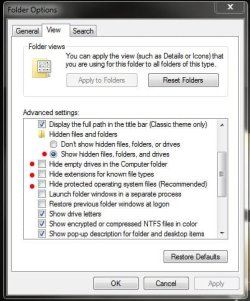
Or you could just go into "Control Panel", "Folder Options", click "View" tab and check/un-tick these boxes... ;)

Folder Options.JPG

That's the first thing I do when I set up windows :D
 

My Computer

Computer type
PC/Desktop
Computer Manufacturer/Model Number
Custom built by me.
OS
Windows 10 Pro
CPU
Intel Core i7-4770K (3.5Ghz)
Motherboard
Gigabyte G1 Sniper 5 (F10 Bios)
Memory
32 gig Corsair Dominator Platinum (4x8Gig)
Graphics Card(s)
Sapphire Tri-X R9 Fury
Sound Card
Soundblaster ZXR
Monitor(s) Displays
NEC PA242W 24" LCD Monitor
Screen Resolution
1920 x 1200
Hard Drives
Primary - Samsung 850 Pro (512gig), Samsung 840 Pro (256gig), 2TB WD Caviar Black.
PSU
EVGA Supernova 1000 G2
Case
Cooler Master HAF X
Cooling
Corsair H100i with Corsair Air Series SP120 Quiet Fans
Keyboard
Logitech Wireless Wave
Mouse
Logitech Performance MX
Internet Speed
High Speed Cable
Antivirus
Norton Security
Browser
IE11
Other Info
Memory Timings - 1866MHz @ 9-9-9-27-1T @ 1.5 volts
Why can't I put a block on these? ..........

Robert,

You could set Internet Explorer to block all cookies, then allow cookies per website instead. The tutorial below can show you more on this to help. It's the same in Windows 7 as Vista. :)

Cookies - Vista Forums

Hope this helps,
Shawn
 

My Computer

Computer type
PC/Desktop
Computer Manufacturer/Model Number
Self built custom
OS
64-bit Windows 11 Pro for Workstations
CPU
Intel i7-8700K OC'd to 5 GHz
Motherboard
ASUS ROG Maximus XI Formula Z390
Memory
64 GB (4x16GB) G.SKILL TridentZ RGB DDR4 3600 MHz
Graphics Card(s)
ASUS ROG-STRIX-GTX1080TI-O11G-GAMING
Sound Card
Integrated
Monitor(s) Displays
2 x Samsung Odyssey G7 27"
Screen Resolution
2560x1440
Hard Drives
1TB Samsung 990 PRO M.2,
4TB Samsung 990 PRO PRO M.2,
TerraMaster F8 SSD Plus NAS
PSU
Seasonic Prime Titanium 850W
Case
Thermaltake Core P3
Cooling
Corsair Hydro H115i
Keyboard
Logitech wireless K800
Mouse
Logitech MX Master 4
Internet Speed
2 Gb/s Download and 100 Mb/s Upload
Antivirus
Malwarebyte Anti-Malware Premium
Browser
Google Chrome
Other Info
Logitech Z625 speaker system,
Logitech BRIO 4K Pro webcam,
HP Color LaserJet Pro MFP M477fdn,
APC SMART-UPS RT 1000 XL - SURT1000XLI,
Galaxy S23 Plus phone
Type shell:cookies into start/search and hit Enter. That will give you the "normal" cookies. Tracking cookies hide in various places. Best is to run SuperAntiSpyware to flush them out.


whs - Is SuperAntiSpyware more effective for cookie removal than CCleaner ? Or would you recommend using both ? Thanks !
 

My Computer

OS
Win 7, 32bit, Premium
Is SuperAntiSpyware more effective for cookie removal than CCleaner ? Or would you recommend using both ? Thanks !
I've found out that if you run CCleaner first then SuperAntiSpyware doesn't find anything.

If you run SuperAntiSpyware first then it will find some tracking cookies.

So I just use CCleaner.:D
 

My Computer

Computer type
PC/Desktop
Computer Manufacturer/Model Number
Dell Inspiron 530
OS
Windows 7 Professional SP1 64-bit
CPU
Intel Core 2 Duo Processor E8300 @ 2.83GHz
Motherboard
Dell Inc. 0RY007 (Socket 775)
Memory
4.00 GB Dual-Channel DDR2 @ 332MHz (5-5-5-15)
Graphics Card(s)
Intel(R) G33/G31 Express Chipset Family
Sound Card
Integrated 7.1 Channel Audio
Monitor(s) Displays
Acer G245HQL 23.6" LED(1920x1080@60Hz)
Screen Resolution
1920 x 1080
Hard Drives
Disk 0 HITACHI 1TB OS Installed - Disk 1 HITACHI 1TB For Backups
Keyboard
Dell USB Keyboard
Mouse
Dell Optical USB Mouse
Internet Speed
DSL 10 meg
Antivirus
Symantec(SEP)
Browser
Pale Moon
I use both Cclaener and SAS. About once a week I run SAS in safe mode and some times it will find some left overs.
 

My Computer

Computer type
PC/Desktop
Computer Manufacturer/Model Number
Home made Desktop
OS
Windows 10 Pro. 64/ version 1709 Windows 7 Pro/64
CPU
Intel i7-6800K @ 4.3
Motherboard
ASUS X-99 Deluxe II
Memory
Corsair Platinum 16 gig @2400
Graphics Card(s)
EVGA GTX 1070 OC
Monitor(s) Displays
Asus 27" LED LCD/VE278Q
Screen Resolution
1920-1080 or 1280-720 HDMI
Hard Drives
INTEL SSD 730-240 Gb Sata 3.0/
PSU
EVGA Platium 1200W
Case
Phanteks Luxe Tempered Glass 8 fans/ one radiator
Cooling
XSPC/ Water Cooled CPU
Keyboard
Das 4 Professional
Mouse
Logitech M705/MX Anywhere 2-S
Internet Speed
100 mbits
Antivirus
Microsoft Security Essentials/ Malwarebytes Premium 3.0/ SAS
Browser
I.E. 11 default/Firefox/ ISP Time Warner Cable/Spectrum
Other Info
LG BluRay Burner/
Sound system-KLipsch-THX/
Icy Dock ssd Hot Swap bays.
Type shell:cookies into start/search and hit Enter. That will give you the "normal" cookies. Tracking cookies hide in various places. Best is to run SuperAntiSpyware to flush them out.


whs - Is SuperAntiSpyware more effective for cookie removal than CCleaner ? Or would you recommend using both ? Thanks !
CCleaner dows not remove tracking cookies. Use SAS for that.
 

My Computer

Computer Manufacturer/Model Number
HP, Dell, Gateway, Toshiba - 4 laptops and 2 desktops
OS
Vista, Windows7, Mint Mate, Zorin, Windows 8
CPU
from 1.6GHz Duo to i7
Monitor(s) Displays
2x HP w2207
Hard Drives
5x HDD, 7x SSD, 12x Externals
Keyboard
with trackball - no mices
Mouse
Trackball mice
Internet Speed
DSL 6000
Back
Top