How to Uninstall W7 When In A Multi-Boot

Ques: Can I do this startup repair now to make sure all is working whenever that day comes. Don't want to mess things up. I have an OEM disk (dell).

Gary
I actually just removed 7 and my Vista bootloader was still intact. I'm guessing that 7 still uses BCD for the bootloader and just replaced the Vista one, but Vista can still configure it because it's the same.

And to Bare Foot Kid, first problem, I don't have 7 any more (I will buy it when it comes out though). And what are my chances of Microsoft actually listening to my advice? (not rhetorical question)

About Linux, I've always loved computers so I just try to explore and learn about as many operating systems as I can. I've been using Windows for about 9 years now and I've actually learned more about how computers work by using Linux for a year and just trying to configure stuff and install programs than I have from using Windows. I've never had any problems with installing it, Google has been a great help. Not saying that I haven't learned anything from Windows though, it's still my primary operating system.

Edit: is there a way I can send MS feedback without reinstalling it? I'll reinstall it in a virtual machine if I know they will listen to my feedback. How hard is it to add an option of where to install the bootloader? (again, not a rhetorical question)
 

My Computer My Computer

OS
Vista, XP, 7, Debian
Thanks for the update.
 

My Computer My Computer

Computer type
PC/Desktop
Computer Manufacturer/Model Number
Alienware® ALX X58
OS
Win 7 Ult SP1/Win 10 Pro (all x64)
CPU
Intel® Core™ i7-975 Extreme O/C to 4.02 GHz, 8MB Cache
Motherboard
Asus® P6T Deluxe V2 X58 LGA1366
Memory
24GB Corsair Vengeance DDR3 SDRAM at 1600MHz - 6 x 4096MB
Graphics Card(s)
1792 MB NVIDIA® GeForce® GTX 295 Dual Core
Sound Card
Onboard Soundmax® High-Definition 7.1 Performance Audio
Monitor(s) Displays
Samsung XL2370 LED backlit 23" W/S 2ms response time
Screen Resolution
1920 X 1080
Hard Drives
2 x 500gb SATA II
1 x 1TB SATA II
1 external eSATA LaCie 3TB
(Non-RAID)
PSU
Alienware® 1200 Watt Multi-GPU
Case
Alienware® P2 ALX Chassis with AlienIce™ 3.0 Video Cooling
Cooling
Alienware® High-Perf. Liquid Cooling + Acoustic Dampening
Keyboard
Microsoft® Wireless Entertainment 8000 + Logitech® G15 Wired
Mouse
Microsoft® Wireless Laser 8000 + Logitech® G9 Wired
Internet Speed
1Gb/s
Antivirus
McAfee LiveSafe
Browser
Firefox - latest
Other Info
Using non-RAID on purpose as I find RAID to be too temperamental.
Now set to AHCI
Hello frankzappa77,

If you look at the changes to the UAC in Windows 7 with relation to how it operated in Windows Vista, you will see that Microsoft does listen to constructive feedback from it's users.

There is a direct link to the MS feedback address on the forum. Will see if I can find it and post back...

Update Can't find the link I thought I saw here :( must have been a senior moment :)
 
Last edited:

My Computers My Computers

System One System Two

  • Computer type
    PC/Desktop
    Computer Manufacturer/Model Number
    ChillBlast - Custom to my design
    OS
    Windows 11 Pro x64 [Latest Release and Release Preview]
    CPU
    Ryzen 9 5950X, 3.8 - 5.2 MHz
    Motherboard
    Asus Prime X570-Pro
    Memory
    64GB [2 x 32GB] DDR4 3200MHz
    Graphics Card(s)
    4GB NVIDIA GEFORCE GTX 1650 Ti
    Sound Card
    On-board SPDIF to 5.1 System + HDMI [5.1 system]
    Monitor(s) Displays
    32" UHD 32 Bit HDR Monitor + 43" UHD 4K 32Bit HDR TV
    Screen Resolution
    2 x 3840 x 2160 @60Hz
    Hard Drives
    1TB M2 SSD OS, 500GB Fast Access SSD, 2 x 8TB Data + Various Externals from 1TB to 4TB, 10TB NAS
    PSU
    NZXT C750 80 PLUS Gold 750W Modular PSU
    Case
    Workstation Case [Matt Black]
    Cooling
    NZXT Kraken X63 280mm CPU Cooler +2x Quiet Case fans
    Keyboard
    Logitech Wireless MX Keys & K400 + others
    Mouse
    Logitech Wireless MX Master 3S
    Internet Speed
    920 MB Down 50 MB Up
    Antivirus
    BitDefender Total Security Pro
    Browser
    Chrome (always run latest Non-Beta)
    Other Info
    Also run ...
    Laptop - Quad 8GB - Windows 10 Pro x64
    Nexus 7 Android tablet x2
    Samsung 10.2" tablet
    Blackview TAB 8 4G Android Tablet c/w Keyboard
    Wacom Intuos Pro Medium Pen Pad
    Wacom Intuos Pro Small Pen Pad
    Wacom Expresskeys Remote
    Loopdeck+ Graphics Controller
    Shuttle Pro v2 Control
  • Computer type
    Laptop
    System Manufacturer/Model Number
    Dell XPS 17 10750H
    OS
    Windows 11 Pro x64 Latest RP
    CPU
    Intel I7 10750H 5.0GHz
    Motherboard
    Dell XPS
    Memory
    32GB [2x16GB] DDR4 2933 MHz
    Graphics Card(s)
    nVidia GTX1650Ti 4 GB GDDR6
    Sound Card
    Stock [Realtek] 4 Speaker
    Monitor(s) Displays
    17" IPS UHD+ Infinity Edge Touchscreen
    Screen Resolution
    3840 x 2400
    Hard Drives
    2TB M2 NVMe, 4TB External + various 500GB & 1TB External NVMe (also have access to spinner HDD from
    PSU
    Stock
    Case
    Stock XPS Aluminium & Carbon Fibre
    Cooling
    Stock - Active Fan Control
    Keyboard
    Backlit + Various Logitech
    Mouse
    Stock Track Pad + Logitech MX Trackball
    Internet Speed
    72 MB Down 18MB Up
    Browser
    Chrome
    Other Info
    Also run ...
    Laptop - Quad 8GB - Windows 10 Pro x64
    Nexus 7 Android tablet x2
    10.2" tablet
    Sony Z3 Android Smartphone
    Wacom Intuos Pro Medium Pen Pad
    Wacom Intuos Pro Small Pen Pad
    Wacom Expresskeys Remote
    Loopdeck+ Graphics Controller
    Shuttle Pro v2 Control Pad
    10TB NAS

My Computer My Computer

Computer Manufacturer/Model Number
* BFK Customs *
OS
W 7 64-bit Ultimate
CPU
Intel Q9550 Yorkfield
Motherboard
ASUS P5Q Pro
Memory
8GB Dominator 8500C5D
Graphics Card(s)
ATI : XFX 5870
Sound Card
Realtek HD Audio 7-1
Monitor(s) Displays
1x 47" LCD HDMI & 3x 26" LCD HDMI
Screen Resolution
1920x1080P & 1920x1200
Hard Drives
1x 80GB Intel X25-M G2 SSD : 1x 500GB & 1x 640GB WD Caviar Black(s)
PSU
Corsair 620HX
Case
Cooler Master RC-690
Cooling
Tuniq Tower 120, 2x 140mm and 3x 120mm case fans
Keyboard
Microsoft 500
Mouse
Razer Diamondback 3G
Internet Speed
14 Mb/s
Other Info
1x Koutech 3Gb/s SATA HDD Hot Swap Rack

My Computers My Computers

System One System Two

  • Computer type
    PC/Desktop
    Computer Manufacturer/Model Number
    ChillBlast - Custom to my design
    OS
    Windows 11 Pro x64 [Latest Release and Release Preview]
    CPU
    Ryzen 9 5950X, 3.8 - 5.2 MHz
    Motherboard
    Asus Prime X570-Pro
    Memory
    64GB [2 x 32GB] DDR4 3200MHz
    Graphics Card(s)
    4GB NVIDIA GEFORCE GTX 1650 Ti
    Sound Card
    On-board SPDIF to 5.1 System + HDMI [5.1 system]
    Monitor(s) Displays
    32" UHD 32 Bit HDR Monitor + 43" UHD 4K 32Bit HDR TV
    Screen Resolution
    2 x 3840 x 2160 @60Hz
    Hard Drives
    1TB M2 SSD OS, 500GB Fast Access SSD, 2 x 8TB Data + Various Externals from 1TB to 4TB, 10TB NAS
    PSU
    NZXT C750 80 PLUS Gold 750W Modular PSU
    Case
    Workstation Case [Matt Black]
    Cooling
    NZXT Kraken X63 280mm CPU Cooler +2x Quiet Case fans
    Keyboard
    Logitech Wireless MX Keys & K400 + others
    Mouse
    Logitech Wireless MX Master 3S
    Internet Speed
    920 MB Down 50 MB Up
    Antivirus
    BitDefender Total Security Pro
    Browser
    Chrome (always run latest Non-Beta)
    Other Info
    Also run ...
    Laptop - Quad 8GB - Windows 10 Pro x64
    Nexus 7 Android tablet x2
    Samsung 10.2" tablet
    Blackview TAB 8 4G Android Tablet c/w Keyboard
    Wacom Intuos Pro Medium Pen Pad
    Wacom Intuos Pro Small Pen Pad
    Wacom Expresskeys Remote
    Loopdeck+ Graphics Controller
    Shuttle Pro v2 Control
  • Computer type
    Laptop
    System Manufacturer/Model Number
    Dell XPS 17 10750H
    OS
    Windows 11 Pro x64 Latest RP
    CPU
    Intel I7 10750H 5.0GHz
    Motherboard
    Dell XPS
    Memory
    32GB [2x16GB] DDR4 2933 MHz
    Graphics Card(s)
    nVidia GTX1650Ti 4 GB GDDR6
    Sound Card
    Stock [Realtek] 4 Speaker
    Monitor(s) Displays
    17" IPS UHD+ Infinity Edge Touchscreen
    Screen Resolution
    3840 x 2400
    Hard Drives
    2TB M2 NVMe, 4TB External + various 500GB & 1TB External NVMe (also have access to spinner HDD from
    PSU
    Stock
    Case
    Stock XPS Aluminium & Carbon Fibre
    Cooling
    Stock - Active Fan Control
    Keyboard
    Backlit + Various Logitech
    Mouse
    Stock Track Pad + Logitech MX Trackball
    Internet Speed
    72 MB Down 18MB Up
    Browser
    Chrome
    Other Info
    Also run ...
    Laptop - Quad 8GB - Windows 10 Pro x64
    Nexus 7 Android tablet x2
    10.2" tablet
    Sony Z3 Android Smartphone
    Wacom Intuos Pro Medium Pen Pad
    Wacom Intuos Pro Small Pen Pad
    Wacom Expresskeys Remote
    Loopdeck+ Graphics Controller
    Shuttle Pro v2 Control Pad
    10TB NAS
I thinks I can remove the Windows 7 partition but the boot file is on another partition an it can't be deleted. Maybe Windows 7 had locked it somehow. Anybody know how to delete it?
 

My Computer My Computer

Computer Manufacturer/Model Number
Thinkpad T60
OS
Windows 7 build 6956
CPU
Core Duo 2Ghz
Memory
2GB
Graphics Card(s)
ATI Mobility x1400
Monitor(s) Displays
15''
Internet Speed
20 - 100megabyte/s
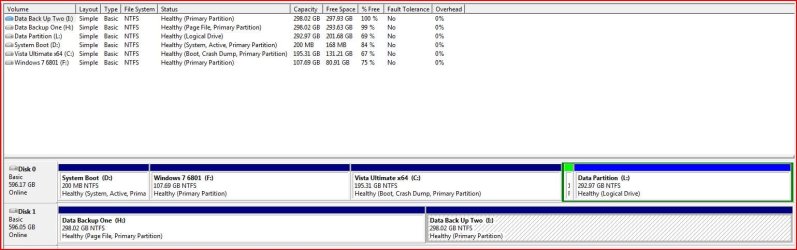
You can always try Gpart to delete the partition. Just make sure that it doesn't contain your other OS'es boot data.

I installed 7 first on a new HD and then Vista after 7. Your setup may be different:

7 created a small (200mb) partition at the beginning of the drive (containing all the boot data) and then installed itself on the next partition.

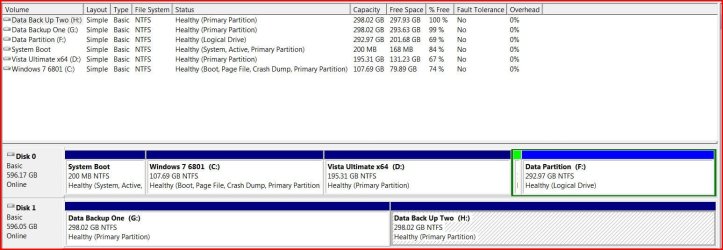
So my system looks like:

Hd0,0 (200mb boot data)
Hd0,1 (107GB Windows 7 6801)
Hd0,2 (195GB Vista x64)
Hd0,3 (290GB Data)

Both 7 and Vistas boot data reside on the 200MB partition. In my case, deleting that 200MB partition will wipe out Vista's boot as well.
 

My Computer My Computer

Computer type
PC/Desktop
Computer Manufacturer/Model Number
Systems by SmartEyeball
OS
8 Pro x64
CPU
i7 3770K 4.6GHz
Motherboard
ASUS P8Z77 WS
Memory
16GB G.Skill Trident X 2666mhz
Graphics Card(s)
x2 EVGA 780 Ti Superclocked SLI
Sound Card
SB X-FI Surround 5.1 PRO USB / ATH-AD900 Headphones
Monitor(s) Displays
x3 Dell U2410 / 58" Samsung
Screen Resolution
5760*1200/ 1920*1200
Hard Drives
2x Intel 520 240GB (RAID 0) * 2x WD Caviar Blacks 2TB (RAID 0) * 2TB WD Caviar Black * Sony Optirac DVD
PSU
Silverstone Strider Evolution 1200W
Case
Thermaltake Level 10 GT Snow Edition
Cooling
Noctua NH-D14
Keyboard
Topre Realforce // Ducky Shine MX Black // Filco Ninja TKL
Mouse
Thermaltake Theron (Highly Recommended) + Razer Imperator
Antivirus
MSE
Browser
IE, FF, WaterFox
Other Info
GT Extreme V2 Sim Racing Cockpit + 40" LCD and K/B Mouse stand ▼
Fanatec CSR Elite Wheel + Clubsport V1 Pedals + CSR shifter/7G-H ▼Saitek X52 Pro ▼ TrackIR 5 Pro
Buttkicker v2 Seat Rumbler with Dedicated 5.1 and Sub Woofer attached to frame ▼
=
Bloody Big Grin
You can always try Gpart to delete the partition. Just make sure that it doesn't contain your other OS'es boot data.

I installed 7 first on a new HD and then Vista after 7. Your setup may be different:

7 created a small (200mb) partition at the beginning of the drive (containing all the boot data) and then installed itself on the next partition.

So my system looks like:

Hd0,0 (200mb boot data)
Hd0,1 (107GB Windows 7 6801)
Hd0,2 (195GB Vista x64)
Hd0,3 (290GB Data)

Both 7 and Vistas boot data reside on the 200MB partition. In my case, deleting that 200MB partition will wipe out Vista's boot as well.
So you have a 200MB primary partition for just the boot data? Do you mean that the bootloader is installed on this partition? If so, how did you get Windows to install the bootloader onto a partition other than the installation partition? Or are you using GRUB for the bootloader?
 

My Computer My Computer

OS
Vista, XP, 7, Debian
Hi,

MS speak is confusing to say the least.

The System partition is the one containing the boot files - the boot files will install on whichever partition is marked as Active

The Boot partition is the one containing the operating system files - the o/s will install on whichever partition you select during installation.

In the picture below taken from Vista Disk Management, the 30gb partition is the System partition ( containing boot files ) it also happens to be the Boot partition (containing the Vista o/s files )

DMVISTA.jpg

If I boot into another o/s, on another partition, then this will now be the Boot partition.

However, 30gb partition will still be the System, Active partition.

Hope that helps

SIW2
 

Attachments

  • DM72008-11-25_235723.jpg
    DM72008-11-25_235723.jpg
    24.5 KB · Views: 17

My Computers My Computers

System One System Two

  • Computer type
    PC/Desktop
    OS
    7 X64
    CPU
    i5 8400
    Motherboard
    gigabyte b365m ds3h
    Memory
    2x8gb 3200mhz
    Hard Drives
    various
    PSU
    pure power 11 400w cm
    Case
    Coolermaster
    Cooling
    cryorig m9i
  • Computer type
    PC/Desktop
    OS
    7x64
    CPU
    g5400
    Motherboard
    ga b365m ds3h
    Memory
    8gb ddr4 2400
    PSU
    xfx pro 450w
Hello SIW2.

So this helps clear up what I've just done; as this is my disk management shot.
Just to confirm: Windows 7 is now ready to be removed with no problem; correct?
For those that don't know; this is the thread I started about this earlier.

DiscManagement_Boot.JPG

Thanks!


Later ;) Ted
 

My Computer My Computer

Computer Manufacturer/Model Number
* BFK Customs *
OS
W 7 64-bit Ultimate
CPU
Intel Q9550 Yorkfield
Motherboard
ASUS P5Q Pro
Memory
8GB Dominator 8500C5D
Graphics Card(s)
ATI : XFX 5870
Sound Card
Realtek HD Audio 7-1
Monitor(s) Displays
1x 47" LCD HDMI & 3x 26" LCD HDMI
Screen Resolution
1920x1080P & 1920x1200
Hard Drives
1x 80GB Intel X25-M G2 SSD : 1x 500GB & 1x 640GB WD Caviar Black(s)
PSU
Corsair 620HX
Case
Cooler Master RC-690
Cooling
Tuniq Tower 120, 2x 140mm and 3x 120mm case fans
Keyboard
Microsoft 500
Mouse
Razer Diamondback 3G
Internet Speed
14 Mb/s
Other Info
1x Koutech 3Gb/s SATA HDD Hot Swap Rack
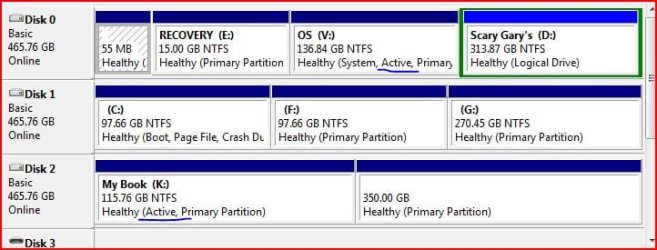
Sooo, seems that I should be fine with removing 7 from my second hdd as the Vista OS partition on disk 0 is the one marked active.

partitions.JPG

Why is my external drive also marked as active?

Gary
 

My Computer My Computer

Computer Manufacturer/Model Number
Dell XPS420
OS
Vista Ult 64 bit Seven Ult RTM x64
CPU
Intel Core2 Quad Q6600 2.40 gigahertz
Memory
Crucial Ballistix 4x2GB PC2 6400
Graphics Card(s)
NVIDIA GeForce 8600 GTS 256 MB
Sound Card
Creative SB X-Fi audio
Monitor(s) Displays
HP w2207 + HPvs15
Screen Resolution
1680x1050 + 1024x768
Hard Drives
2-WD5000AAKS-500 GB
WD5000AAV-500 GB external
Keyboard
Microsoft Comfort Curve
Mouse
MX Revolution
Other Info
Wacom Intuos 2 Graphics Tablet
Experience Index=5.5
Hi Gary,

There can be one Active partition per hard drive.

You may have seen this referred to as "Flagged On" if you have used Linux, or a Linux tool such as Gparted.

If you right click an inactive partition in Disk Management, you will get an option to "Mark partition as Active ". (Do not do this - the other partitions on that drive would then be inactive and you won't be able to boot.)

First you need to boot into Vista. Then remove the 7 boot files using Easy BCD.

Then, in Vista's Disk Management, right click on the 7 partition and format it. Or you could delete the 7 partition if you want to change the partition sizes on that drive.

Barefoot kid - looks the same procedure for you too.

Hope it helps

SIW2
 

My Computers My Computers

System One System Two

  • Computer type
    PC/Desktop
    OS
    7 X64
    CPU
    i5 8400
    Motherboard
    gigabyte b365m ds3h
    Memory
    2x8gb 3200mhz
    Hard Drives
    various
    PSU
    pure power 11 400w cm
    Case
    Coolermaster
    Cooling
    cryorig m9i
  • Computer type
    PC/Desktop
    OS
    7x64
    CPU
    g5400
    Motherboard
    ga b365m ds3h
    Memory
    8gb ddr4 2400
    PSU
    xfx pro 450w
Hello SIW2.

Thank you for the confirmation.


Later :) Ted
 

My Computer My Computer

Computer Manufacturer/Model Number
* BFK Customs *
OS
W 7 64-bit Ultimate
CPU
Intel Q9550 Yorkfield
Motherboard
ASUS P5Q Pro
Memory
8GB Dominator 8500C5D
Graphics Card(s)
ATI : XFX 5870
Sound Card
Realtek HD Audio 7-1
Monitor(s) Displays
1x 47" LCD HDMI & 3x 26" LCD HDMI
Screen Resolution
1920x1080P & 1920x1200
Hard Drives
1x 80GB Intel X25-M G2 SSD : 1x 500GB & 1x 640GB WD Caviar Black(s)
PSU
Corsair 620HX
Case
Cooler Master RC-690
Cooling
Tuniq Tower 120, 2x 140mm and 3x 120mm case fans
Keyboard
Microsoft 500
Mouse
Razer Diamondback 3G
Internet Speed
14 Mb/s
Other Info
1x Koutech 3Gb/s SATA HDD Hot Swap Rack
I think I've got it. Thanks SIW2.

Gary
 

My Computer My Computer

Computer Manufacturer/Model Number
Dell XPS420
OS
Vista Ult 64 bit Seven Ult RTM x64
CPU
Intel Core2 Quad Q6600 2.40 gigahertz
Memory
Crucial Ballistix 4x2GB PC2 6400
Graphics Card(s)
NVIDIA GeForce 8600 GTS 256 MB
Sound Card
Creative SB X-Fi audio
Monitor(s) Displays
HP w2207 + HPvs15
Screen Resolution
1680x1050 + 1024x768
Hard Drives
2-WD5000AAKS-500 GB
WD5000AAV-500 GB external
Keyboard
Microsoft Comfort Curve
Mouse
MX Revolution
Other Info
Wacom Intuos 2 Graphics Tablet
Experience Index=5.5
Or are you using GRUB for the bootloader?

Nope. W7 setup did it itself. I only created 3 partitions. I haven't re-installed Linux yet, so no GRUB. I must confess I wasn't really paying attention when I installed W7....:o


Hi,

MS speak is confusing to say the least.


You can say that again ;)

Vista CM:
attachment.php


Windows 7:

attachment.php


Bah. Attachments are still huge :(
 

Attachments

  • VistaCM.JPG
    VistaCM.JPG
    96.8 KB · Views: 114
  • W7CM.JPG
    W7CM.JPG
    116.7 KB · Views: 118

My Computer My Computer

Computer type
PC/Desktop
Computer Manufacturer/Model Number
Systems by SmartEyeball
OS
8 Pro x64
CPU
i7 3770K 4.6GHz
Motherboard
ASUS P8Z77 WS
Memory
16GB G.Skill Trident X 2666mhz
Graphics Card(s)
x2 EVGA 780 Ti Superclocked SLI
Sound Card
SB X-FI Surround 5.1 PRO USB / ATH-AD900 Headphones
Monitor(s) Displays
x3 Dell U2410 / 58" Samsung
Screen Resolution
5760*1200/ 1920*1200
Hard Drives
2x Intel 520 240GB (RAID 0) * 2x WD Caviar Blacks 2TB (RAID 0) * 2TB WD Caviar Black * Sony Optirac DVD
PSU
Silverstone Strider Evolution 1200W
Case
Thermaltake Level 10 GT Snow Edition
Cooling
Noctua NH-D14
Keyboard
Topre Realforce // Ducky Shine MX Black // Filco Ninja TKL
Mouse
Thermaltake Theron (Highly Recommended) + Razer Imperator
Antivirus
MSE
Browser
IE, FF, WaterFox
Other Info
GT Extreme V2 Sim Racing Cockpit + 40" LCD and K/B Mouse stand ▼
Fanatec CSR Elite Wheel + Clubsport V1 Pedals + CSR shifter/7G-H ▼Saitek X52 Pro ▼ TrackIR 5 Pro
Buttkicker v2 Seat Rumbler with Dedicated 5.1 and Sub Woofer attached to frame ▼
=
Bloody Big Grin
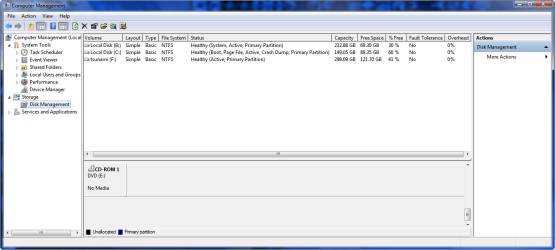
Can someone explain what's happening with mine.

B:\ Vista
c:\ Windows 7
f:\ external hard disk

This is the view from within Windows 7
2008-11-26_232630.png
 

My Computer My Computer

Computer Manufacturer/Model Number
Home Brew
OS
Windows 7 Ultimate Vista Ultimate x64
CPU
Core 2 Duo E8500 3.16Ghz @ 3.8Ghz
Motherboard
eVGA 750i FTW
Memory
2x2Gigs Patriot PC2-6400 LL
Graphics Card(s)
Inno3D GeForce GTX260 216 SP
Monitor(s) Displays
ASUS VW222U 22" 2ms Response time
Screen Resolution
1680x1050
Hard Drives
SATA 150GB
SATA II 250GB
USB IDE 750GB Ext.
PSU
HYTEC 600W & Thermaltake 650W Toughpower Power Exp
Case
Thermaltake Armor LCS (Liquid Cooling System)
Cooling
Liquid Cooling System
Keyboard
Logitech G15 Gaming Keyboard
Mouse
Logitech G9 Gaming Mouse
Hi Mr Grim,

B ( in this view ) contains Vista boot files and Win7 boot files , it also contains Vista o/s.

C ( in this view ) contains Win7 o/s files.

Your external hd is marked as active as there is only one partition.

If you carve it into several partitions with Disk management , i.e shrinking from the right - you will find the partition on the left ( with lower address numbers on the hd ) will remain the Active partition by default.

Hope that helps

SIW2
 
Last edited:

My Computers My Computers

System One System Two

  • Computer type
    PC/Desktop
    OS
    7 X64
    CPU
    i5 8400
    Motherboard
    gigabyte b365m ds3h
    Memory
    2x8gb 3200mhz
    Hard Drives
    various
    PSU
    pure power 11 400w cm
    Case
    Coolermaster
    Cooling
    cryorig m9i
  • Computer type
    PC/Desktop
    OS
    7x64
    CPU
    g5400
    Motherboard
    ga b365m ds3h
    Memory
    8gb ddr4 2400
    PSU
    xfx pro 450w
Hi Smarteyeball,

Thanks for posting the screenshot - it's interesting.:geek:

I installed 7 first on a new HD and then Vista after 7. Your setup may be different:

7 created a small (200mb) partition at the beginning of the drive (containing all the boot data) and then installed itself on the next partition.

So my system looks like:

Hd0,0 (200mb boot data)
Hd0,1 (107GB Windows 7 6801)
Hd0,2 (195GB Vista x64)
Hd0,3 (290GB Data)

Both 7 and Vistas boot data reside on the 200MB partition. In my case, deleting that 200MB partition will wipe out Vista's boot as well.


Was that a new hd that you partitioned with Win7 during the installation ?

Everyone else seems to have installed after Vista and got the expected result , i.e. 7 installs it's boot files on the existing Active partition ( which for most people is the partition that already contains Vista's boot and o/s files ).

As you installed 7 first , it seems to have made it's own additional first partition.

Anybody else done the same thing, and got the same result?

It's a good thing as you can make an image of that 200mb partition to restore in an emergency. I have the Paragon Drive Backup, which lets you make a small bootable cd - so you can boot in , find the backup image and restore it - I assume Acronis etc are pretty much the same?

You could try using EasyBCD to remove the 7 boot files from the 200mb partition.

You might find that Vista doesn't know they've been removed and will still show 7 as a boot option. In that case it can be deleted from the boot tab in msconfig.

It will be fun to see how this pans out for us all:D

SIW2
 

My Computers My Computers

System One System Two

  • Computer type
    PC/Desktop
    OS
    7 X64
    CPU
    i5 8400
    Motherboard
    gigabyte b365m ds3h
    Memory
    2x8gb 3200mhz
    Hard Drives
    various
    PSU
    pure power 11 400w cm
    Case
    Coolermaster
    Cooling
    cryorig m9i
  • Computer type
    PC/Desktop
    OS
    7x64
    CPU
    g5400
    Motherboard
    ga b365m ds3h
    Memory
    8gb ddr4 2400
    PSU
    xfx pro 450w
Wait, so SIW2, what you're saying is (assume fresh install on a clean hard drive), if I had a 100GB HD and I (hd0,0) was a 200MB partition and the rest 99.8GB was (hd0,1), I can guide the 7 installer to install boot files to the 200MB partition?

Does that mean that when I get to the disk management page in the setup, that I select (hd0,0) as my installation partition? or will it automatically install the boot files to the first partition?

As for a backup of my boot record (not windows boot files), I use HD Hacker to create a raw image of my MBR just incase.

Also, just to clear something up with the 'active' partition thing. I recall when I installed OS X, I had to mark my 4th primary partition dedicated towards it as 'active' through the command line. I then decided to boot up GParted and check how the flags were re-associated, and my Vista partition was no longer the boot partition, (hd0,3) was. This insured that my MBR was not touched, and Darwin was installed to the bootsector of (hd0,3) - my question, does the same go for Windows?

Say I had GRUB on the MBR, can I tell Windows not to touch the MBR by flagging my second partition (or whichever partition I want to install it onto) as 'active'/boot?

Thanks for all the info so far everyone.
 

My Computer My Computer

OS
Vista, XP, 7, Debian
Back
Top