Help. Dual boot won't boot.

Hello John.


Here you go, I have to go to work now my self.

Safe Mode - Vista Forums


You can figure out which HDD is which using the BIOS and the mobo manual to see which is SATA 1, 2 ect. (page 2.2)


Later ;) Ted
 

My Computer

Computer Manufacturer/Model Number
* BFK Customs *
OS
W 7 64-bit Ultimate
CPU
Intel Q9550 Yorkfield
Motherboard
ASUS P5Q Pro
Memory
8GB Dominator 8500C5D
Graphics Card(s)
ATI : XFX 5870
Sound Card
Realtek HD Audio 7-1
Monitor(s) Displays
1x 47" LCD HDMI & 3x 26" LCD HDMI
Screen Resolution
1920x1080P & 1920x1200
Hard Drives
1x 80GB Intel X25-M G2 SSD : 1x 500GB & 1x 640GB WD Caviar Black(s)
PSU
Corsair 620HX
Case
Cooler Master RC-690
Cooling
Tuniq Tower 120, 2x 140mm and 3x 120mm case fans
Keyboard
Microsoft 500
Mouse
Razer Diamondback 3G
Internet Speed
14 Mb/s
Other Info
1x Koutech 3Gb/s SATA HDD Hot Swap Rack
Hi Ted. Thanks for your suggestions.
I followed the tutorial but cannot seem to boot into safe mode. If I press F8 I just get a box with boot options in it (HDD, DVD Drive etc.)
If I choose the hard drive it just leaves me with the blinking cursor forever.
I checked out the Asus mobo manual (section 3.3.5) and had a closer look at my 2 Samsung Spinpoints. They both show up identically in this screen so I cannot differentiate between the storage drive and the drive with the 2 installs on it.

I'm beginning to think all is lost and that I'm going to have to take torrentg's advice and do a complete install of Vista on one of the drives.
That's a real pain as I'll lose a lot of programmes I'll struggle to replace and have to go through the whole setup again.
Also I'll have to create another partition for W7 once I've got Vista going.
As I said in a previous post if I boot from Easus Partition Manager I can see both drives and distiguish the partioned drive with the OSs on it.
If I simply disconnect one of the HDDs and then do this I should be able to see whether I've got the drive I want. It's a 50/50 chance I'll get the right one. If not I'll know it's the other.
If I then do a standard Vista install on that disk will it format the whole drive, remove any partitions (and W7), and enable me to boot?
I am reluctant to do this but there doesn't seem to be any other way. At least I'll then be able to reconnect the other drive with all my photos and music on and access it.

What do you think? Will this work?

Thanks for the help, John
 

My Computer

Computer Manufacturer/Model Number
The Monolith. 3.1
OS
Windows 7 Home Premium 64 bit
CPU
i7 [email protected]
Motherboard
Gigabyte Z77-D3H
Memory
2x4GB Corsair Vegeance DDR3
Graphics Card(s)
XFX GTX 260 Black Edition
Sound Card
none-through large stereo hi fi
Monitor(s) Displays
Croosover 27MDP LED IPS Dell 2408 WFP
Screen Resolution
2560x1440 1920x1200
Hard Drives
1x Samsung 840Pro 128GB SSD
1x Samsung Spinpoint F1 1TB
PSU
Corsair AX 850 Watt
Case
Cooler Master ACTS 840
Cooling
Be Quiet! Dark Rock Pro
Keyboard
Enermax Aurora
Mouse
Logitech Ballmouse
Internet Speed
20MBPS
Hello John.


Yes it'll work, but during install I'd choose "Custom Install" option and create only one (100GB?) partition, it's up to you how big of a partition to put Vista on and then after the install you can create the rest of the partitions you may want to add, that way Vista won't try to hog up the whole HDD. After you select custom look for drive option (or something simular) on the right side of the window.

I'm sorry we couldn't get you running. :confused:


Later :shock: Ted
 

My Computer

Computer Manufacturer/Model Number
* BFK Customs *
OS
W 7 64-bit Ultimate
CPU
Intel Q9550 Yorkfield
Motherboard
ASUS P5Q Pro
Memory
8GB Dominator 8500C5D
Graphics Card(s)
ATI : XFX 5870
Sound Card
Realtek HD Audio 7-1
Monitor(s) Displays
1x 47" LCD HDMI & 3x 26" LCD HDMI
Screen Resolution
1920x1080P & 1920x1200
Hard Drives
1x 80GB Intel X25-M G2 SSD : 1x 500GB & 1x 640GB WD Caviar Black(s)
PSU
Corsair 620HX
Case
Cooler Master RC-690
Cooling
Tuniq Tower 120, 2x 140mm and 3x 120mm case fans
Keyboard
Microsoft 500
Mouse
Razer Diamondback 3G
Internet Speed
14 Mb/s
Other Info
1x Koutech 3Gb/s SATA HDD Hot Swap Rack
Hi John,

Yes, it makes sense to find the drive with o/s 's installed.

You can choose which partition on that drive you wish to install Vista on - you don't need to format the other one.

Vista will create a compatible mbr and bootsector and install it's own bootmgr and Boot folder on the partition marked as Active - the rest of the Vista will be installed on whichever partition you clicked on when you got the partition screen during installation.

If you click directly on the partition you wish to install to - do not select Drive Options (advanced) - you will have the option to save the existing contents into a Windows. Old folder. You can fish anything you need out of there after.

If the first partition is Active, with your existing Vista installation on it (Easeus boot cd will tell you which is the Active partition) :

1. You could install Vista on the partition it is already on (I assume the first one).

OR

2. You could install Vista on the second partition , where (I assume 7 is now).

If you take the second option, you should find the hd is bootable - and you have your original Vista partition intact - you will have a second Vista installation as well , but that doesn't matter.

Set the first Vista partition as default in msconfig boot tab , then you can remove the second one, or install 7 over it.
 

My Computers

System One System Two

  • Computer type
    PC/Desktop
    OS
    7 X64
    CPU
    i5 8400
    Motherboard
    gigabyte b365m ds3h
    Memory
    2x8gb 3200mhz
    Hard Drives
    various
    PSU
    pure power 11 400w cm
    Case
    Coolermaster
    Cooling
    cryorig m9i
  • Computer type
    PC/Desktop
    OS
    7x64
    CPU
    g5400
    Motherboard
    ga b365m ds3h
    Memory
    8gb ddr4 2400
    PSU
    xfx pro 450w
Hi John,

This might sound obvious, but have you replaced the battery with a new one?
 

My Computer

Computer type
PC/Desktop
Computer Manufacturer/Model Number
Dwarf Dwf/11/2012 r09/2013
OS
Windows 8.1 Pro RTM x64
CPU
Intel Core-i5-3570K 4-core @ 3.4GHz (Ivy Bridge) (OC 4.4GHz)
Motherboard
ASRock Z77 Extreme4-M
Memory
4 x 4GB DDR3-1600 Corsair Vengeance CMZ8GX3M2A1600C9B (16GB)
Graphics Card(s)
MSI GeForce GTX770 Gaming OC 2GB
Sound Card
Realtek High Definition on board solution (ALC 898)
Monitor(s) Displays
ViewSonic VA1912w Widescreen (VGA)
Screen Resolution
1440x900
Hard Drives
OCZ Agility 3 SSD 120GB SATA III x2 (RAID 0)
Samsung HD501LJ 500GB SATA II x2
Hitachi HDS721010CLA332 1TB SATA II
Iomega 1.5TB Ext USB 2.0
WD 2.0TB Ext USB 3.0
PSU
XFX Pro Series 850W Semi-Modular
Case
Gigabyte IF233
Cooling
1 x 120mm Front Inlet 1 x 120mm Rear Exhaust
Keyboard
Microsoft Comfort Curve Keyboard 3000 (USB)
Mouse
Microsoft Comfort Mouse 3000 for Business (USB)
Internet Speed
NetGear DG834Gv3 ADSL Modem/Router (Ethernet) ~4.0 Mb/s (O2)
Antivirus
Avast! 8.0.1497
Browser
IE 11
Other Info
Optical Drive: HL-DT-ST BD-RE BH10LS30 SATA Bluray
Lexmark S305 Printer/Scanner/Copier (USB)
WEI Score: 8.1/8.1/8.5/8.5/8.25
Asus Eee PC 1011PX Netbook (Windows 7 x86 Starter)
Thanks for the help SIW2.


Later ;) Ted
 

My Computer

Computer Manufacturer/Model Number
* BFK Customs *
OS
W 7 64-bit Ultimate
CPU
Intel Q9550 Yorkfield
Motherboard
ASUS P5Q Pro
Memory
8GB Dominator 8500C5D
Graphics Card(s)
ATI : XFX 5870
Sound Card
Realtek HD Audio 7-1
Monitor(s) Displays
1x 47" LCD HDMI & 3x 26" LCD HDMI
Screen Resolution
1920x1080P & 1920x1200
Hard Drives
1x 80GB Intel X25-M G2 SSD : 1x 500GB & 1x 640GB WD Caviar Black(s)
PSU
Corsair 620HX
Case
Cooler Master RC-690
Cooling
Tuniq Tower 120, 2x 140mm and 3x 120mm case fans
Keyboard
Microsoft 500
Mouse
Razer Diamondback 3G
Internet Speed
14 Mb/s
Other Info
1x Koutech 3Gb/s SATA HDD Hot Swap Rack
Hi guys and thanks for your swift replies.
Dwarf. I only got the mobo a couple of months ago so I think the battery is ok . also I already removed it to reset my cmos and it took my clock back to 2002. when I put it back in it seemed ok.
Ted and SIW2. Isn't the custom install of Vista what I already did as mentioned in my original post.
I tried repair installs and they did not help so I did a custom Vista install to the partition Vista was already on. This all seemed to work ok but I still couldn't boot into Vista (orW7)
Why would it be any different if I do it again?
As you will know a custom install asks me where I want to put it so I just clicked the original Vista partition.
Doing that got rid of the disk read error message but left me with the eternal blinking cursor and still no boot.
Is this what you mean me to try?

Thanks a lot, John
 

My Computer

Computer Manufacturer/Model Number
The Monolith. 3.1
OS
Windows 7 Home Premium 64 bit
CPU
i7 [email protected]
Motherboard
Gigabyte Z77-D3H
Memory
2x4GB Corsair Vegeance DDR3
Graphics Card(s)
XFX GTX 260 Black Edition
Sound Card
none-through large stereo hi fi
Monitor(s) Displays
Croosover 27MDP LED IPS Dell 2408 WFP
Screen Resolution
2560x1440 1920x1200
Hard Drives
1x Samsung 840Pro 128GB SSD
1x Samsung Spinpoint F1 1TB
PSU
Corsair AX 850 Watt
Case
Cooler Master ACTS 840
Cooling
Be Quiet! Dark Rock Pro
Keyboard
Enermax Aurora
Mouse
Logitech Ballmouse
Internet Speed
20MBPS
Just had a thought, John.

When you have only the HD with o/s on it attached - try running startup repair - you never know.

You might also make sure the first partition is marked as Active - if not, you can use Easeus to mark it active - probably need to rt click the first partition and select mark Active, or similar, from the Easeus context menu.

EDIT: Just seen your last post - the blinking cursor would seem to indicate nothing bootable can be found.
 

My Computers

System One System Two

  • Computer type
    PC/Desktop
    OS
    7 X64
    CPU
    i5 8400
    Motherboard
    gigabyte b365m ds3h
    Memory
    2x8gb 3200mhz
    Hard Drives
    various
    PSU
    pure power 11 400w cm
    Case
    Coolermaster
    Cooling
    cryorig m9i
  • Computer type
    PC/Desktop
    OS
    7x64
    CPU
    g5400
    Motherboard
    ga b365m ds3h
    Memory
    8gb ddr4 2400
    PSU
    xfx pro 450w
Ah. I see what you mean SIW2. Let me confirm this with you.
I do a custom install of Vista on my second partition (which now has W7 on it) and that should enable me to boot into that new install of Vista?
I'm not clear on the msconfig boot tab part. Also, if I get through that bit I'll then be booting into my original Vista install yes?
If I then install W7 over the new Vista install will I still get a dual boot?

Many thanks, John
 

My Computer

Computer Manufacturer/Model Number
The Monolith. 3.1
OS
Windows 7 Home Premium 64 bit
CPU
i7 [email protected]
Motherboard
Gigabyte Z77-D3H
Memory
2x4GB Corsair Vegeance DDR3
Graphics Card(s)
XFX GTX 260 Black Edition
Sound Card
none-through large stereo hi fi
Monitor(s) Displays
Croosover 27MDP LED IPS Dell 2408 WFP
Screen Resolution
2560x1440 1920x1200
Hard Drives
1x Samsung 840Pro 128GB SSD
1x Samsung Spinpoint F1 1TB
PSU
Corsair AX 850 Watt
Case
Cooler Master ACTS 840
Cooling
Be Quiet! Dark Rock Pro
Keyboard
Enermax Aurora
Mouse
Logitech Ballmouse
Internet Speed
20MBPS
Just had a thought, John.

When you have only the HD with o/s on it attached - try running startup repair - you never know.

You might also make sure the first partition is marked as Active - if not, you can use Easeus to mark it active - probably need to rt click the first partition and select mark Active, or similar, from the Easeus context menu.

EDIT: Just seen your last post - the blinking cursor would seem to indicate nothing bootable can be found.


That seems to be the case. everything I try I get the blinking cursor. why would this be?
 

My Computer

Computer Manufacturer/Model Number
The Monolith. 3.1
OS
Windows 7 Home Premium 64 bit
CPU
i7 [email protected]
Motherboard
Gigabyte Z77-D3H
Memory
2x4GB Corsair Vegeance DDR3
Graphics Card(s)
XFX GTX 260 Black Edition
Sound Card
none-through large stereo hi fi
Monitor(s) Displays
Croosover 27MDP LED IPS Dell 2408 WFP
Screen Resolution
2560x1440 1920x1200
Hard Drives
1x Samsung 840Pro 128GB SSD
1x Samsung Spinpoint F1 1TB
PSU
Corsair AX 850 Watt
Case
Cooler Master ACTS 840
Cooling
Be Quiet! Dark Rock Pro
Keyboard
Enermax Aurora
Mouse
Logitech Ballmouse
Internet Speed
20MBPS
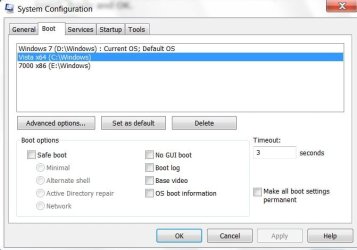
You should get a boot menu offering two Vista installations.

The default will be the new installation.

The boot files you have just installed will be on the Active partition ( presumably the first partition - your existing Vista partition).

The MBR and bootsector will have been rewritten and should work.

Then all you need to do is make the Vista you want to keep the Default boot choice.

To do that, easiest way is to type msconfig in start search box, open it, click Boot tab, highlight the Vista you want to have as default( i.e. the one you wish to keep), Apply and OK.

BOOTCHOICE2009-05-05_202210.jpg


No need to restart immediately , but do and check in Disk Management that you have booted into into the original Vista and the partition is shown as both System and Boot.


The new Vista installation will then just be a bunch of files - you don't need them - delete it, install 7 over it, whatever you like.

That seems to be the case. everything I try I get the blinking cursor. why would this be?

Last time I got that , the sata lead was detached. In your case, I think there is a problem early in the boot sequence.

Reinstall should fix it. You could do it from the command line, but as a reinstall omly takes 20 mins. - it may be easier for you to reinstall.
 

My Computers

System One System Two

  • Computer type
    PC/Desktop
    OS
    7 X64
    CPU
    i5 8400
    Motherboard
    gigabyte b365m ds3h
    Memory
    2x8gb 3200mhz
    Hard Drives
    various
    PSU
    pure power 11 400w cm
    Case
    Coolermaster
    Cooling
    cryorig m9i
  • Computer type
    PC/Desktop
    OS
    7x64
    CPU
    g5400
    Motherboard
    ga b365m ds3h
    Memory
    8gb ddr4 2400
    PSU
    xfx pro 450w
Many thanks I'm going to try that now. Hopefully my next post will have some kind of smiley attached.
Best wishes, John
 

My Computer

Computer Manufacturer/Model Number
The Monolith. 3.1
OS
Windows 7 Home Premium 64 bit
CPU
i7 [email protected]
Motherboard
Gigabyte Z77-D3H
Memory
2x4GB Corsair Vegeance DDR3
Graphics Card(s)
XFX GTX 260 Black Edition
Sound Card
none-through large stereo hi fi
Monitor(s) Displays
Croosover 27MDP LED IPS Dell 2408 WFP
Screen Resolution
2560x1440 1920x1200
Hard Drives
1x Samsung 840Pro 128GB SSD
1x Samsung Spinpoint F1 1TB
PSU
Corsair AX 850 Watt
Case
Cooler Master ACTS 840
Cooling
Be Quiet! Dark Rock Pro
Keyboard
Enermax Aurora
Mouse
Logitech Ballmouse
Internet Speed
20MBPS
I just in installed win7 and I have a boot menu. If nothing works and it sounds bad I would start all over again. Format both drives and install vista and get that up and working. Change the bios back to boot from HHD. Reboot into vista a couple of times. Change the bois back to boot to CD and install Win7 and see what happens. I know it sound like a lot of work, but that is what you are doing right now working hard and not getting any where.
 

My Computer

Computer type
PC/Desktop
OS
Windows 10, 7, x64
I was just going through this thread and a thought jumped out at me:

If your bios has a setting for RAID as a possible choice and something else like IDE, did you mistakenly change it from RAID to IDE? I did that once while "playing" even when I wasn't running any raid array at the time and that generated the same error as your o.p.
 

My Computer

Computer Manufacturer/Model Number
self built
OS
7600.20510 x86
CPU
P4 550 3.4 GHz HT running at 3.5 GHz
Motherboard
MSI PM8M3-V (MS-7211 v1.x) Micro-ATX mainboard
Memory
OCZ 2 GB(2x1GB) DDR400mHz running @ 414 mHz
Graphics Card(s)
HIS Radeon HD 3850 IceQ 3 Turbo HDMI Dual DL-DVI AGP
Sound Card
MOTU Traveler firewire studio interface 192 kHz 24 bit
Monitor(s) Displays
22" widescreen Acer X223W LCD, 17" Compaq P75 CRT
Screen Resolution
1680x1050 and 1280x1024
Hard Drives
SATA I x2 WD, 400 GB and 120 GB, SATA 2 WD Caviar Black 1 TB
PSU
350W generic
Case
Cybertronpc, it glows blue
Cooling
stock cpu fan, Ice-Q 3 gpu and system, many case fans
Keyboard
Logitch Classical Keyboard 200
Mouse
Logitech Mediaplay cordless
Internet Speed
1792/448 kbits/sec
Other Info
SATA II PCI fake RAID adapter, 1 GB Readyboost, original ATI Remote Wonder (even works with WMC perfectly), Logitech Rumblepad 2 game controller x2
Well I'm afraid I couldn't get any of those suggestions to work. I tried the Vista install on my W7 partition but still no boot. Tried all sorts of things. Eventually i got so frustrated I deleted the partition and reformmatted the drive.
I then tried to do a fresh install of Vista but that wouldn't boot either.
In a fit of disconnection anxiety I took it to a local system builder and trader.
Embarrassingly he says he installed and booted and said no problem that he could find. He ran all sorts of diagnostics apparently so he charged me 45 pounds.

I think my problem is that my technical knowledge is very superficial. I know how to the things that I've learnt to do but I don't really understand why they work like that.
I probably missed something really obvious.
My screw ups are getting less frequent so I must be learning something.

Thanks for all your help and support, john:o
 

My Computer

Computer Manufacturer/Model Number
The Monolith. 3.1
OS
Windows 7 Home Premium 64 bit
CPU
i7 [email protected]
Motherboard
Gigabyte Z77-D3H
Memory
2x4GB Corsair Vegeance DDR3
Graphics Card(s)
XFX GTX 260 Black Edition
Sound Card
none-through large stereo hi fi
Monitor(s) Displays
Croosover 27MDP LED IPS Dell 2408 WFP
Screen Resolution
2560x1440 1920x1200
Hard Drives
1x Samsung 840Pro 128GB SSD
1x Samsung Spinpoint F1 1TB
PSU
Corsair AX 850 Watt
Case
Cooler Master ACTS 840
Cooling
Be Quiet! Dark Rock Pro
Keyboard
Enermax Aurora
Mouse
Logitech Ballmouse
Internet Speed
20MBPS
Hello John.


Well at least you've got your system back up and running and there was nothing wrong with the hardware. Now take your time and methodically get everything back like it was and above all; have fun and learn as you go as I do; remember there's no rush.


Later ;) Ted
 

My Computer

Computer Manufacturer/Model Number
* BFK Customs *
OS
W 7 64-bit Ultimate
CPU
Intel Q9550 Yorkfield
Motherboard
ASUS P5Q Pro
Memory
8GB Dominator 8500C5D
Graphics Card(s)
ATI : XFX 5870
Sound Card
Realtek HD Audio 7-1
Monitor(s) Displays
1x 47" LCD HDMI & 3x 26" LCD HDMI
Screen Resolution
1920x1080P & 1920x1200
Hard Drives
1x 80GB Intel X25-M G2 SSD : 1x 500GB & 1x 640GB WD Caviar Black(s)
PSU
Corsair 620HX
Case
Cooler Master RC-690
Cooling
Tuniq Tower 120, 2x 140mm and 3x 120mm case fans
Keyboard
Microsoft 500
Mouse
Razer Diamondback 3G
Internet Speed
14 Mb/s
Other Info
1x Koutech 3Gb/s SATA HDD Hot Swap Rack
have you verified via msconfig that your boot sequence is in the proper order.
you also might simply delete the reference to Win 7. leaving your original OS bootable via drive C:
 
Back
Top